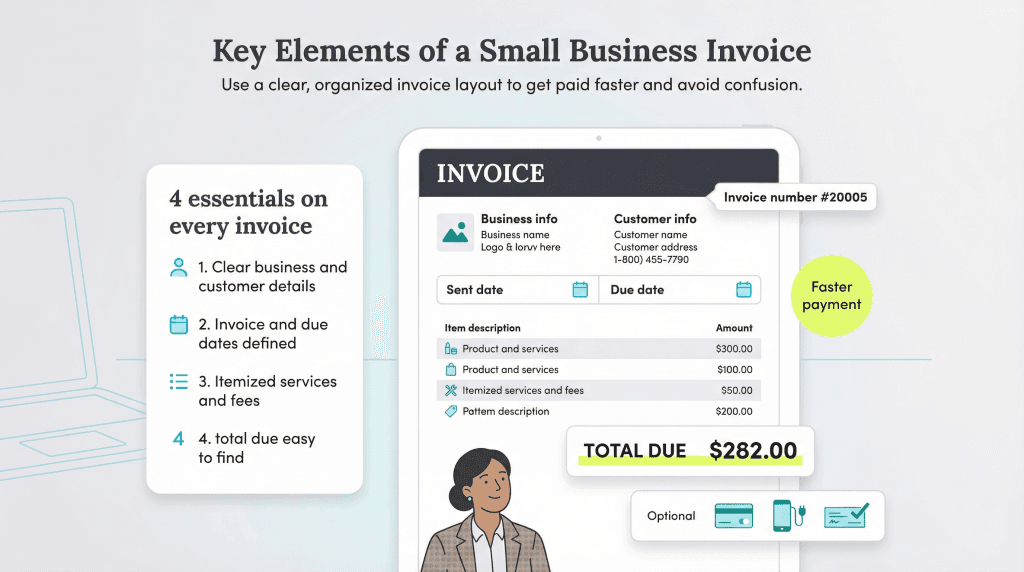
An invoice is not a binding legal document. However, invoices are a crucial part of your accounts receivable process, which helps you collect money for the products and services you sell and provide.
The invoice template you choose must be professional and easy to understand. Its clarity directly affects when — and on what terms — you receive payment. We’ll highlight 10 best practices for creating professional invoices and share critical elements of invoices your customers will notice and respond to promptly.
The critical elements when creating a small business invoice
According to The State of B2B Payments report, three out of four small and medium-sized businesses find that their customer invoices become overdue. Late payments create cash flow problems and disrupt the accounts payable process, so minimizing them is crucial.
“A well-designed invoice establishes credibility, prevents confusion and makes sure you receive timely payments,” said Rachel Barnett, owner of Gentle Frog. Here are 10 critical elements to include in your invoices for the best results.
1. Include a standout header in your invoice.
While clearly labeling your invoice seems obvious, it’s a critical invoicing element. Ensure you label the document as an invoice in its header so your customer knows precisely what it is. Use a bold, large font to grab your customer’s attention.
Labeling the document makes it clear that it’s an invoice and that the dollar amount listed is what the customer owes. Businesses typically send out multiple documents along with the invoice; when the invoice doesn’t clearly state what it is, it might get tossed aside or thrown away and go unpaid.
2. Include your company’s information on your invoices.
Small business invoices must include your business’s legal name, branding/logo, street address, email address, phone number and (if applicable) fax number. Ensure all information is listed at the top and bottom of the invoice and make your contact information especially clear and accessible.
Double-check that all your information is accurate in case the customer must contact you to pay with a credit card by phone, email you with questions or mail a check to your business address. Incorrect information will make you look unprofessional and make receiving payment more challenging.
Editor’s note: Looking for the right accounting and invoice-generating software for your business? Fill out the below questionnaire to have our vendor partners contact you about your needs.
3. Include your customer’s name and contact information on the invoice.
Ensure the customer’s name and title are clear and spelled correctly on your invoice. Include the customer’s contact information on the invoice with their email and physical addresses. If you don’t include their information, they may discard the document.
4. Include the invoice’s sent date and due date.
In addition to your company’s information, you must include the date the invoice was issued. “This should be the date the invoice is generated rather than when it should have been generated, if the business owner had fallen behind in their bookkeeping,” advised Barnett.
Of course, you’ll also need to clearly state the payment due date. Make this information crystal clear and let them know the new total they will owe if they pay after the due date, if you must add on interest or late fees. “It’s important to know that some clients will consider a due date a suggestion rather than a firm date,” said Barnett.
Clear and accurate dates will help if there’s any confusion about when an item was sold or services were rendered. Businesses must sometimes look back and confirm service dates and product shipment dates.
5. Include an invoice number on your invoice.
Numbering invoices is another way to help you get paid on time. An invoice number serves as a transaction’s unique identifier. The invoice number is the second most important element after the amount due. “[The invoice number] allows the purchaser to track and note which invoice is being paid within their own records,” said Barnett. “It also allows the business providing the invoice to easily track their outstanding invoices.”
You can assign each invoice a number in various ways, including chronologically. Numbered invoices make searching for and retrieving documents much more straightforward. You’ll be able to check customer queries quickly and identify which transactions weren’t paid.
6. Include a breakdown of products and services provided on the invoice.
Your invoice must include a section that breaks down the bill for the customer. This breakdown can be as specific or generic as you prefer as long as it’s easy for the customer to understand.
Include the following in your breakdown:
- Name of the goods or service provided
- Date the goods or service was provided
- Rate charged for the goods or service provided
- Quantity of the goods or service provided
Consider adding a section to elaborate on item descriptions or provide additional information to explain what’s listed on the invoice. For example, you can include additional materials purchased to complete a job or additional hours an employee worked.
7. Include transaction terms on the invoice.
Including payment terms on the invoice is critical. Payment terms depend on your industry, preference and customer relationship. For example, you may require payment upon the receipt of an invoice or extend 30-day or 60-day payment terms. It’s also vital to clearly state what the penalties and fees will be if the terms are not met.
List available payment methods so your customer understands their payment options. For example, in addition to accepting credit card payments or checks, you may also accept credit card payments with PayPal, allow Venmo payments or accept Apple Pay. Simplifying the payment process and including various convenient payment methods can increase customer retention and satisfaction.
8. Include itemized fees on your invoices.
If there are handling fees, taxes for purchased goods or any other money the customer must pay, list each fee as a separate line item. This way, customers will understand the charges fully. Itemizing fees also helps when your business must apply various payments to different budgets to ensure your books balance.
9. Include the total amount of money due on your invoice.
While it may seem obvious, the most crucial part of an invoice is the money the customer owes your business. Ensure you clearly state the total amount owed, including taxes. Display it prominently on the invoice in bold next to the label “Total” or “Total due” to ensure your customer knows what they must pay. Don’t make them hunt for the amount they owe.
10. Include customer notes on your invoices.
While the above items are essential, including a message field is also a good idea. A message field is a great place to write a brief note to the customer and thank them for their business. Showing customers you value them can enhance customer loyalty, so taking every opportunity to thank them is essential. You can also use this field to reference the project, explain any unique elements and include incentives for early or prompt payment.
Designing professional invoices
While your invoices should include critical elements, it’s also essential to pay attention to their design. To help you visualize a clear, professional, straightforward invoice, here’s an example generated from Wave Financial — an excellent free accounting software solution with stellar invoicing features.
When designing your business’s invoice, consider the following invoice design best practices.
Your invoice should reflect your brand.
Like everything you send, your invoice reflects your brand and helps tell your brand’s story. This means creating and issuing consistent invoices with the proper elements, as well as sticking to the same template and structure. “A professional invoice is more than just a payment request,” said Barnett. “It should reflect the business issuing it.”
Keep the following elements in mind:
- All invoices should include your logo at the top.
- If they’re printed in color, use your corporate identity’s color scheme in the invoice header.
- Write customer notes in your brand’s voice.
- Keep your brand identity consistent with other customer-facing communications.
Make your invoice easy to read.
Keep readability in mind when designing your invoices. If you make your invoice complicated, disorganized or hard to understand, you’ll likely experience more late or incomplete payments.
“I always emphasize that a good invoice should be well-structured, leaving no room for confusion,” said Arham Ullah, principal at Tangent Consulting.
Consider the following tips:
- Use signature fonts only if they’re easy to read.
- Avoid script fonts or those with too much embellishment in favor of clear fonts.
- Ensure the font size isn’t too small.
- Stick to one font for the invoice body (your logo and headers can be in a different font).
- Include plenty of white space for readability (you can always add another page if necessary).
- Print the main invoice portion — where you detail charges — in black.
- Minimize the use of bold, all capital letters and italics.
- Avoid abbreviations and jargon in your line item descriptions so the client understands all charges.
Make it easy to pay the invoice.
If you offer an online payment option, include a link or quick response code (or both) on your invoice. The extra convenience may prompt some customers to pay when they get the invoice instead of putting it off until someone can cut and mail a check.
If your invoicing efforts are top-notch but customers aren't paying, it may be time to consider the
debt collection process.
Use a template.
Using a template to design and structure your invoice can help it look clean and professional. There are plenty of free options out there, as well as ones you can purchase if you have the budget. “I recommend starting with a template from accounting software like QuickBooks or Xero for any small business,” said Ullah. “These tools do calculations automatically and integrate with your records.”
Such resources take the guesswork out of invoicing, ensuring you cover all your bases and don’t leave any important information out.
Sammi Caramela and Jennifer Dublino contributed to this article.