When you’re looking for employees, reviewing applications can feel like searching for a needle in a haystack. The average corporate job posting receives 250 applicants, according to Glassdoor, meaning the task of identifying qualified candidates demands both efficiency and precision.
This article is sponsored by ZipRecruiter.
Resume screening – the process of evaluating applications to identify the most promising candidates – can be one of the most time-consuming aspects of hiring, yet it’s also one of the most critical. This means your screening process must be designed to surface the right information quickly while ensuring you don’t overlook qualified talent.
Improve your odds of receiving high quality applicants by posting your job where it will get noticed by top talent. For example,
posting jobs on ZipRecruiter provides employers access to more than 22 million job seekers according to ZipRecruiter's 2024 data. The platform also leverages a matching algorithm
delivers quality candidates to 80% of employers within the first day.Why effective resume screening matters
Resume screening directly impacts the quality of your hires and the efficiency of your entire hiring process. Poor screening processes lead to several problems:
- Wasting time interviewing unqualified candidates
- Overlooking strong applicants buried in the pile
- Extending your time-to-hire so long that top talent accepts other offers
The challenge is especially acute in today’s competitive labor market. Top candidates are often only on the market for a short time, so delays in your screening process can cost you exceptional talent; many applicants won’t accept a job offer if the company takes too long to respond.
The most successful organizations treat resume screening as a strategic function, not just an administrative task. Fortunately, the resume screening process can be partially automated thanks to applicant tracking systems. According to a 2025 review by Jobscan, 97.8% of Fortune 500 companies use applicant tracking systems to manage the volume of applications. As a result, the expectation for organized, systematic screening has become the industry standard.
Step 1: Set smart filters before you start
Before you open a single resume, establish clear criteria for what qualifies a candidate to move forward. This preparation prevents subjective decision-making and ensures consistency across all applications.
- Start with must-have qualifications. These are the non-negotiable requirements, like specific certifications, years of experience in a particular role or technical skills that are essential to job performance. Document these clearly so you can quickly identify applications that don’t meet the minimum threshold.
- Identify your nice-to-have qualifications. These are attributes that would enhance a candidate’s fit but aren’t strictly necessary. This might include experience with specific software tools, industry knowledge or leadership experience. These criteria help you rank candidates who pass your initial filter.
- Create a simple scoring system. Assign point values to different qualifications so you can objectively compare candidates. For example, you might award five points for direct industry experience, three points for relevant education and two points for each desired technical skill. This systematic approach reduces bias and makes it easier to explain your decisions.
If you’re using an applicant tracking system, configure your filters to automatically flag applications that meet your must-have criteria. Many modern platforms use matching algorithms that score candidates based on how well their qualifications align with your job requirements, helping you prioritize which resumes to review first.
Step 2: Use screening questions strategically
Screening questions are your first line of defense against unqualified applications. When designed well, they can eliminate obvious mismatches before you invest time reviewing full resumes.
- Ask questions that reveal deal-breakers early. If your position requires U.S. work authorization or willingness to relocate, ask these questions upfront. If a specific certification is mandatory, include a screening question about it. This prevents you from spending time on applications that can’t proceed regardless of other qualifications.
- Design questions that surface real experience. Instead of asking “Do you have experience with project management?” ask “Describe a project you’ve managed from start to finish, including the budget you worked with and the size of your team.” Open-ended questions require candidates to demonstrate knowledge rather than simply checking a box.
- Watch for vague or generic responses. When answers lack specific details, metrics or context, it often indicates embellished claims. A candidate who says “I increased sales” without mentioning timeframes, starting points or percentages probably doesn’t have substantial experience in that area.
- Limit the number of questions. While screening questions are valuable, too many can discourage qualified candidates from completing your application. Focus on three to five questions at most, and make sure they address your most important criteria.
Modern recruiting platforms often integrate screening questions directly into the application process. ZipRecruiter’s ZipIntro feature, for example, allows employers to add screening questions that help identify candidates who meet specific requirements before the resume review stage, streamlining the entire process.
Step 3: Check for red flags
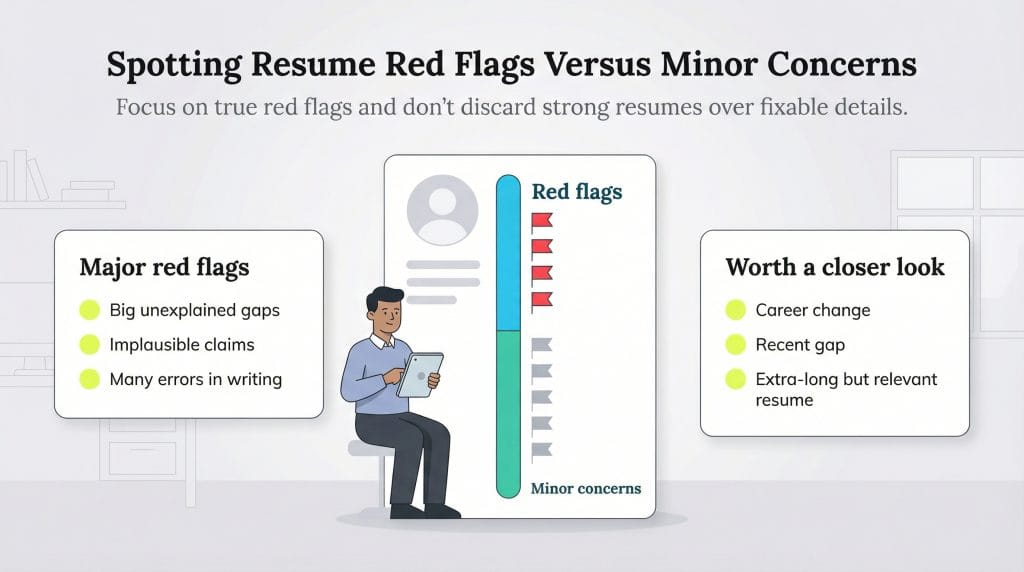
Not every unusual element in a resume is a problem. Learning to distinguish between legitimate red flags and minor concerns that can be addressed later is crucial for effective screening.
True red flags include:
- Significant unexplained gaps in employment history (though always consider that there may be valid personal reasons.)
- Patterns of very short job tenures without career progression.
- Inconsistencies in dates or titles between the resume and LinkedIn profile.
- Claims that seem implausible given the candidate’s experience level.
- Obvious typos and grammatical errors throughout the document, suggesting lack of attention to detail.
Concerns that deserve follow-up but aren’t automatic disqualifiers include:
- A career change from a different industry.
- Recent gaps in employment (many qualified candidates face layoffs.)
- Job titles that don’t perfectly match your terminology.
- Skills listed without context about how they were used.
- Education from non-traditional programs or online institutions.
When evaluating resumes, remember that 73% of hiring professionals say they’re willing to spend more time reviewing a resume that’s longer than usual, according to 2024 research from ResumeGo. Don’t automatically eliminate candidates whose resumes exceed one page if the content is relevant and well-organized.
Step 4: Avoid common biases in resume evaluation
Even with the best intentions, unconscious bias can infiltrate your screening process and cause you to overlook qualified candidates. Research has consistently shown that bias affects hiring outcomes based on perceived characteristics such as race or gender identity. These biases often appear in ways that hiring managers don’t recognize.
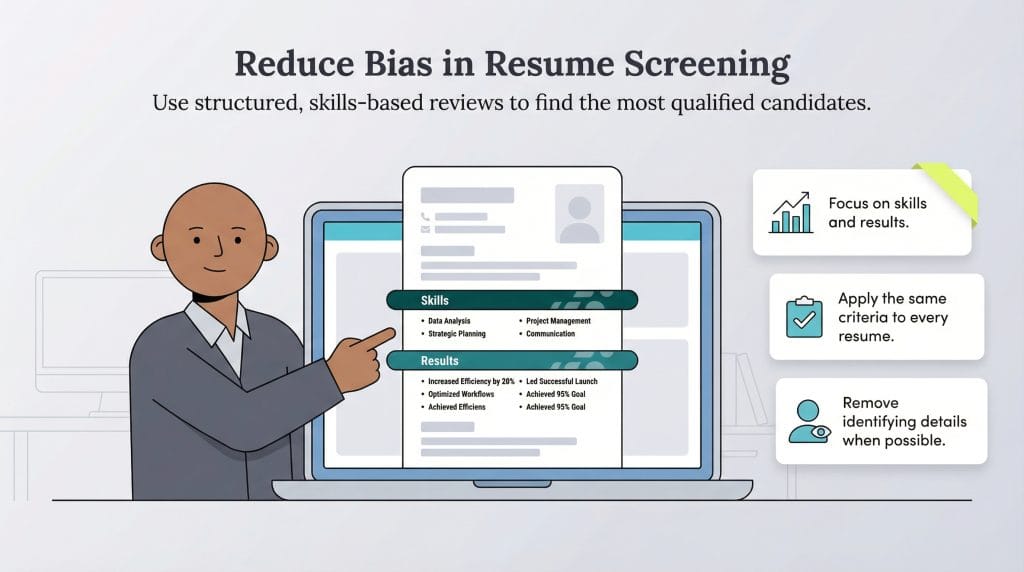
Here’s how to reduce bias in your screening:
- Remove identifying information when possible. Consider using blind resume screening where names, addresses and graduation dates are hidden during initial review. When blind hiring is used, 60% of applicants who don’t fit the traditional mold (white, male, or attended an elite school) make it through screening, compared to just 20% with traditional methods.
- Focus on demonstrated skills and results. Instead of being influenced by prestige markers like brand-name companies or elite universities, look at what candidates actually accomplished. Did they increase revenue? Lead successful projects? Solve complex problems? These outcomes matter more than where someone worked or studied.
- Challenge your assumptions about “culture fit.” Often, what hiring managers call culture fit is actually comfort with similarity. Instead, focus on whether candidates share your organization’s values and work ethic, not whether they remind you of your current team members.
- Use structured criteria for all candidates. Apply the same standards to every resume. If you require five years of experience, don’t make exceptions for candidates with impressive backgrounds in other areas unless you’re willing to do so consistently.
- Be aware of recency bias. The first resume you review and the most recent one you’ve seen tend to make stronger impressions than those in the middle of your stack. Review applications in batches and rank them against your criteria, not against each other.
In 2023,
Business.com conducted a study that found job-seekers with nonbinary gender pronouns on their resumes were less likely to be contacted by employers and were 8 percent less likely to be considered a “good fit” for an open position. Read the full report on our research into
hiring biases against nonbinary job seekers for more information.
Step 5: Balance thoroughness with speed
The tension between careful evaluation and efficient processing is real. You need to be thorough enough to identify quality candidates, yet fast enough to reach them before competitors do.
The research from ResumeGo shows that 47% of hiring professionals spend between 30 seconds and one minute reviewing each resume during initial screening, while 71% of respondents said they either “almost always” or “often” skim resumes instead of thoroughly reading them.
When you’re reviewing dozens of resumes, efficiency is critical. However, the key is making sure you gather the right information quickly to avoid overlooking qualified candidates.
- Batch your resume reviews. Rather than reviewing applications as they come in throughout the day, schedule specific blocks of time for resume screening. This allows you to get into a rhythm and make more consistent evaluations.
- Use the two-pass method for high volumes. On your first pass, spend 30 to 60 seconds per resume conducting a quick scan for must-have qualifications. Flag promising candidates for a more thorough second review.
- Set daily goals. If you have 200 applications to review, commit to screening 40 to 50 per day. This prevents burnout and maintains the quality of your decision-making.
- Know when to move quickly. For roles where you receive many qualified applicants, you can afford to be selective. For hard-to-fill positions, you may need to be more flexible in your criteria and advance candidates to the interview stage based on potential rather than perfect qualification matches.
- Leverage technology without over-relying on it. Applicant tracking systems can save significant time by automatically filtering and ranking candidates. Effective ATS use reduces time-to-hire, helping you identify and secure top talent quickly.
Technology should augment your judgment, not replace it. Many employers may lose out on highly qualified candidates who are screened out of hiring processes by ATS systems because they aren't submitting ATS-friendly resumes. This means you should periodically review applications that don't score highly to ensure your filters aren't too restrictive.
Moving from screening to interviews
Once you’ve completed your screening process, you should have a manageable pool of candidates who warrant further evaluation. Most hiring managers aim to advance five to 10 candidates to the phone screening or initial interview stage for each open position.
Document your decision-making criteria so you can explain them to stakeholders and ensure fair treatment of all candidates. Review your selected candidates’ resumes thoroughly so you can ask specific questions about their experience. Prepare a consistent set of phone screen questions to further evaluate fit.
Remember that resume screening is just the first filter. A strong resume gets a candidate into the conversation, but the interview process reveals whether they’re truly the right fit. Don’t feel pressured to hire someone whose resume looked perfect on paper if the interview reveals gaps or concerns. Conversely, give candidates whose resumes weren’t flawless a fair opportunity to demonstrate their capabilities in person.
Effective resume screening requires both system and judgment. The system – your filters, scoring rubrics and processes – ensures consistency and efficiency. Your judgment evaluates the intangibles that separate adequate candidates from exceptional ones.