



Your free business.com+ membership unlocks exclusive tech deals and advisor support
Join Free
BDC Hamburger Icon

Menu

Close
BDC Logo with Name
Search Icon
Search Icon
Advertising Disclosure
Close
Advertising Disclosure

Business.com aims to help business owners make informed decisions to support and grow their companies. We research and recommend products and services suitable for various business types, investing thousands of hours each year in this process.

As a business, we need to generate revenue to sustain our content. We have financial relationships with some companies we cover, earning commissions when readers purchase from our partners or share information about their needs. These relationships do not dictate our advice and recommendations. Our editorial team independently evaluates and recommends products and services based on their research and expertise. Learn more about our process and partners here.

The Best Job Posting Sites for Employers in 2026

After a review of leading hiring sites, we’ve selected ZipRecruiter, LinkedIn Jobs, Indeed, Handshake and Workable as our top picks.

author image
Written by:
Adam Uzialko, Senior Editor
author image
Editor verified:
Chad Brooks,Managing Editor
Last Updated Sep 03, 2026
Business.com earns commissions from some listed providers. Editorial Guidelines.
ZipRecruiter logo
ZipRecruiter
9.0 /10
Editor's rating
Best for Reaching Candidates Fast
  • Starting price: Quote required
  • Reach: 100+ job sites
  • Free trial: Yes, new employers
Indeed logo
Indeed
8.8 /10
Editor's rating
Best for Free Job Postings
  • Starting price: $0 for 3 posts/mo
  • Reach: Indeed and Glassdoor
  • Free trial: Free plan
LinkedIn logo
LinkedIn Jobs
8.5 /10
Editor's rating
Best for Passive Candidates
  • Starting price: $0 for one post
  • Reach: LinkedIn member network
  • Free trial: One job post
Workable logo
Workable
8.7 /10
Editor's rating
Best for Complete Hiring Process
  • Starting price: $299 per month
  • Reach: 200+ job boards
  • Free trial: 15 days, no card
Handshake logo
Handshake
8.2 /10
Editor's rating
Best for Entry-Level Hiring
  • Starting price: $0 to post
  • Reach: 25M+ verified candidates
  • Free trial: Free plan available
Table Of Contents Icon

Table of Contents

Open row

At business.com, we strive to provide business owners with unparalleled recommendations for the best HR software and services, along with actionable advice for navigating human resources processes, fostering a healthy company culture and improving employee engagement. We infuse our playbooks and explainers with expertise from real HR advisers, payroll consultants, retirement planners and other human resources professionals.

Across our HR reviews and product guides, every solution we recommend — whether it be a payroll platform, PEO/HRO service or employee monitoring software — is thoroughly tested, investigated and vetted independently to ensure vendor claims about products are legitimate and backed by real user experiences. As part of our commitment to fairness and accuracy, each assessment is reviewed by a top business.com editor who was not involved in the analysis process. Learn more about our editorial process.

How we decided

Tip Bulb

How we decided

We started with 18 job posting sites, hiring platforms and applicant tracking systems that small and midsize employers commonly consider when they begin recruiting, interviewing and hiring, researched the current plan...

MoreMore

We started with 18 job posting sites, hiring platforms and applicant tracking systems that small and midsize employers commonly consider when they begin recruiting, interviewing and hiring, researched the current plan structure and documentation for each, and selected five as our top picks.

Two well-known names came off the list on structural grounds rather than product quality. We evaluated each remaining platform on the size and relevance of its candidate pool, how billing works and how predictable it is, whether a genuinely usable free option exists, what happens to your posting after day one, whether the platform helps you screen the applications it generates, and how much of the buying process happens before you can see a price. We weighted candidate reach and pricing transparency most heavily, because those are the two factors that most often determine whether a small employer gets value from a job board or just gets a bill.

18

evaluated

10

researched

5

chosen

We started with 18 job posting sites, hiring platforms and applicant tracking systems that small and midsize employers commonly consider when they begin recruiting, interviewing and hiring, researched the current plan structure and documentation for each, and selected five as our top picks.

Two well-known names came off the list on structural grounds rather than product quality. We evaluated each remaining platform on the size and relevance of its candidate pool, how billing works and how predictable it is, whether a genuinely usable free option exists, what happens to your posting after day one, whether the platform helps you screen the applications it generates, and how much of the buying process happens before you can see a price. We weighted candidate reach and pricing transparency most heavily, because those are the two factors that most often determine whether a small employer gets value from a job board or just gets a bill.

18

evaluated

10

researched

5

chosen

Hiring has not gotten easier, and top talent is staying put in their current roles more often. The number of job openings was little changed at 7.3 million in July 2026, according to the U.S. Bureau of Labor Statistics, while hires and total separations both held at 5.1 million and quits stayed at 3.1 million. Fewer people are moving voluntarily, which means the candidates you want are less likely to be actively looking.

If you want to reach candidates, you need to conduct proactive outreach. That includes selecting the right job boards to reach your ideal future employee. To help you determine which job posting site is best for your business, we reviewed the current plan documentation, pricing pages and help centers for leading hiring platforms to sort out which ones still put your opening in front of qualified people, what each one actually charges you for and where the free options stop being useful.

Compare our best picks

BDC Ribbon
Our Top Picks for 2026
ZipRecruiter
Indeed
LinkedIn Jobs
Workable
Handshake
Rating (Out of 10)9.08.88.58.78.2
Use case

Reaching candidates fast

Free posting

Passive candidate

Complete hiring process

Early career

Pricing model

Job slots or per day; requires a quote

Free to post; pay per interaction

Free single post; pay per click

Flat monthly by headcount; starts at $299 per month

Free posting; paid tiers on request

Free posting

Trial only

Yes

Yes, one job

Trial only

Yes

Resume database

56M+ profiles

Separate purchase

Recruiter add-on

400M+ profiles

Included

Distribution

100+ job sites

Indeed and Glassdoor

LinkedIn only

200+ job boards

Partner schools

Review Link
Scroll Table

Our Reviews

ZipRecruiter logo
Editor's Rating: 9/10

Most job boards put your listing in a search index and wait. Instead, ZipRecruiter distributes the post to more than 100 job sites with a single click, including Google Jobs and niche boards, then uses its matching technology to scan resumes and actively invite qualified candidates to apply. That’s a big selling point for small businesses that don’t have a recruiter on staff.

ZipRecruiter posting

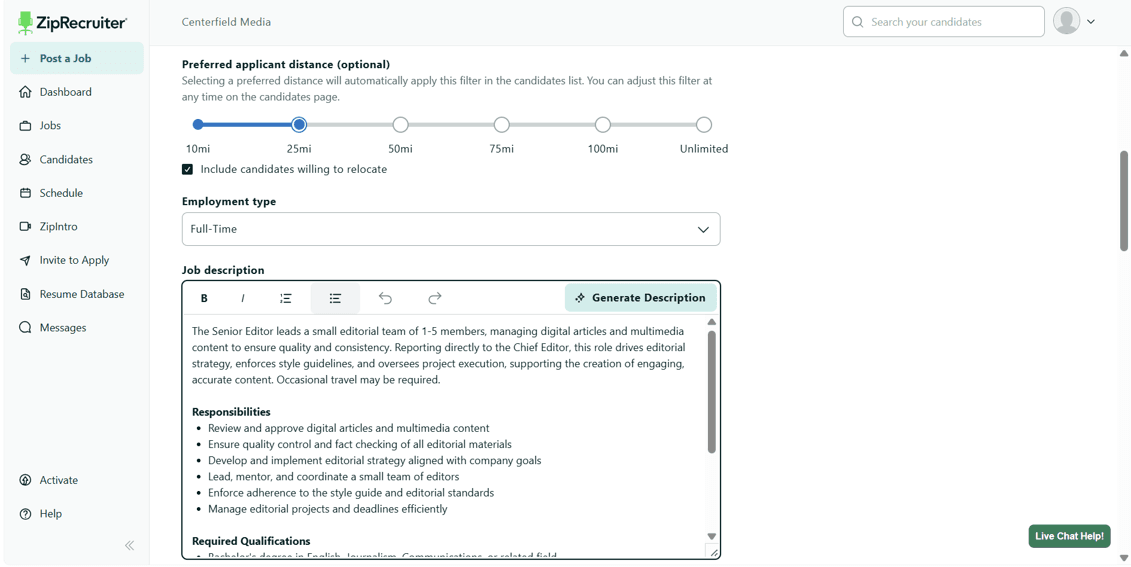
ZipRecruiter’s generated job description is based on our desired qualifications and requirements for the role. It felt specifically tailored to our requirements and succinct, though, as editors ourselves, we could think of a few improvements to the copy. 

When testing ZipRecruiter’s job posting form, we were especially impressed by its ability to automatically generate a job description for us. We simply filled out desired qualifications and requirements for the role we were hiring for—a senior editor to help support our mission to deliver great quality review content—and ZipRecruiter served us up with a virtually ready-to-go job description.

ZipRecruiter’s reach is significant, as well. Nearly 20 million job seekers use the platform monthly, and more than 4 million businesses have used it for hiring. Listings also go out through text and email alerts rather than waiting to be searched for, and the platform provides more than 500 customizable job description templates plus screening questions to filter the resulting applications.

Job slots on ZipRecruiter are also flexible, which means if you fill a position quickly, you are not locked into a 30-day posting for a job that’s no longer vacant. Simply close the job and drop a new role into the same slot immediately.

Clicks and applications are unlimited and included in the standard rate, with no per-click or per-application charges, so a posting that unexpectedly takes off does not produce an unexpected invoice. That is the opposite of how Indeed and LinkedIn work, and for budget-sensitive employers it is a strong argument in ZipRecruiter’s favor.

ZipRecruiter does not publish its prices. The company describes flexible pricing tailored to your hiring needs, including monthly subscriptions with customizable job slots and pay-per-day options, but no rate card appears on its plans page. Pricing depends on factors like the number of active job ads, resume views and user seats.

In our review of ZipRecruiter, we found three named tiers with clearly differentiated features but no dollar figures attached to any of them:

PlanWhat it addsHow to get pricing
StandardDashboard, distribution to 100+ job boards, AI outreach to candidatesFree trial, self-serve
PremiumEverything in Standard plus access to the Resume DatabaseFree trial, self-serve
ProEverything in Premium plus TrafficBoost for hard-to-fill roles and ATS integrationsLive chat, email or phone

Standard and Premium can be started as a free trial without talking to anyone. Pro requires contacting sales, as do enterprise plans, which ZipRecruiter defines as intended for companies with more than 5,000 employees; its small and midsize tier covers one to 5,000. If you need a number before you commit, request a consultation and get the quote in writing. Do not budget from figures you find on third-party sites, which in our research disagreed with each other by hundreds of dollars a month on the same plan name.

  • Unlimited clicks and applications are included in the standard rate, so costs do not scale with a posting's popularity.
  • Distribution to more than 100 job sites happens automatically, which is broader one-click reach than any other pick here.
  • Flexible job slots let you close a filled role and post a new one immediately, with no 30-day lock.
  • No published pricing means you cannot compare costs without starting a trial or talking to a sales representative.
  • The resume database is gated behind the Premium tier, although it can be purchased as an add-on to the standard plan for an additional monthly cost.
  • Employers consistently report that high applicant volume comes with relevance problems, which shifts work onto whoever screens the applications.

ZipRecruiter holds a score of 8.4 out of 10 on TrustRadius across 237 reviews, and a 4.4 out of 5 on Trustpilot from more than 12,800 reviews.

TrustRadius’s synthesis of recent reviews is genuinely mixed in a way we think buyers should read before signing. Reviewers praise the volume of applicants, the breadth of reach across job platforms and the ease of posting, with many reporting increased applicant flow. The recurring complaints are about inconsistent relevance in matched candidates, limited precision in filtering and a volume of unqualified applications that requires manual sifting. Cost came up repeatedly among the smallest employers.

Indeed logo
Editor's Rating: 8.8/10

Indeed remains the default first stop for most employers because you can post a job and receive applications without paying anything. You create an employer account, fill in the title, location, pay and description, and confirm to post for free. For a business making its first hire, that removes the only real barrier to getting started.

Indeed job postin

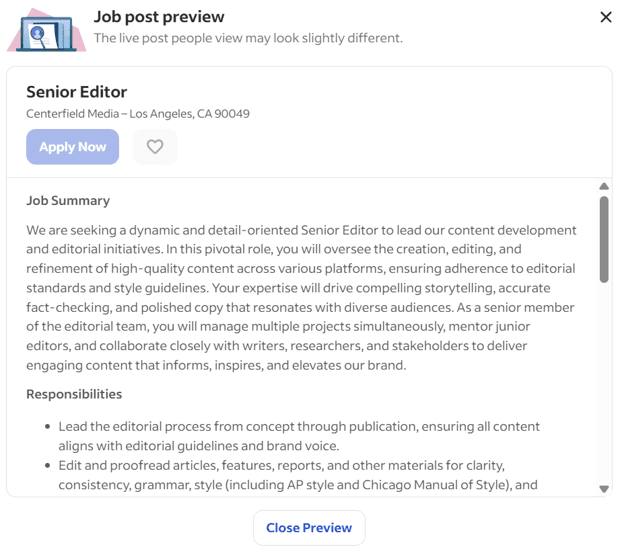
Our job posting preview gave us a sense of what applicants would see once we pushed our job live. Indeed’s generated job description was useful if a bit verbose, and we didn’t get as much input on the front end as we did with ZipRecruiter. 

When testing Indeed, we liked that we were able to preview our job posting to see what it looked like through a candidate’s eyes. However, while Indeed also offered a generated job description, it was based on basic information about the role rather than prompts we selected about specific qualifications and requirements. It wasn’t bad, necessarily, but we preferred having more input on the front end to reduce the amount of editing we’d need to do later.

Glassdoor also legally merged with Indeed in July 2026, closing more than a year of operational integration between the two Recruit Holdings-owned sites. Glassdoor’s brand, product and anonymous reviews continue, but the site now runs under Indeed’s terms of use and privacy policy, and the standalone Glassdoor employer posting flow has been retired. In practice, a single Indeed posting now covers both audiences. We deliberately did not list Glassdoor separately on this page for that reason.

Where Indeed asks for money is visibility. A free posting competes for placement against sponsored ones. When you sponsor, Indeed recommends a budget based on your job title, location and description (of course, you don’t need to follow that recommendation). You keep the ability to pause or close a job at any time from the employer dashboard, as well.

Posting on Indeed is free. Sponsoring is what costs money.

According to Indeed’s own pricing explainer, you incur charges when someone interacts with your job post. With a daily budget, you are typically charged when job seekers click to view your job. With a monthly budget, you may be charged when they start an application instead. How much you spend depends on the budget you choose and how the posting performs. Payment information is required before Indeed begins promoting the post, and Indeed validates billing details as a fraud-prevention step.

On invoicing, many U.S. accounts are billed on the first of the month or when cumulative Sponsored Jobs spend reaches a standard threshold (usually $500), whichever comes first. Fast-spending campaigns therefore bill sooner than employers expect. Indeed accepts credit cards, and for employers who cannot pay by card it offers insertion orders, ACH or wire, and check.

  • Free posting is a real product, not a teaser, which makes Indeed the lowest-risk place for a first-time employer to start.
  • One posting now reaches both Indeed and Glassdoor audiences following the July 2026 merger.
  • You set the budget and can pause or close a sponsored job from the dashboard at any time.
  • Free postings lose placement to sponsored ones, so unpaid visibility decays quickly on competitive roles.
  • Charges are triggered by candidate interactions rather than results, so a popular posting can spend its budget without producing a hire.
  • Employers report high volumes of irrelevant applications and limited tools for sorting them, including no way to run a boolean search across applicants.

Indeed.com scores 8 out of 10 on TrustRadius across 166 reviews. Recruiters and staffing professionals rate the sourcing and posting workflow highly and repeatedly single out cost-effectiveness, with several noting it is the only platform in their stack they do not pay for. The criticism is consistent and specific, covering many irrelevant resumes, an applicant dashboard that does not surface basic details like current title or years of experience, no boolean search across applicants, and difficulty getting fake or duplicated profiles removed. One IT recruitment manager reported that roughly one in 20 applicants met the basic requirements for the roles they posted.

LinkedIn logo
Editor's Rating: 8.5/10

Job boards reach people who are looking, but LinkedIn reaches people who are not. For salaried, credentialed and management-level roles, the strongest candidate for a specialized position is usually employed and not browsing job boards on a Tuesday afternoon.

LinkedIn offers free posting of individual jobs aimed at hiring managers at small and midsize companies who hire sporadically, targeting relevant job seekers based on the post’s criteria. For teams hiring multiple roles a year, LinkedIn Recruiter and job slots add sourcing tools, advanced search filters and promotion to targeted member audiences.

linkedin job posting

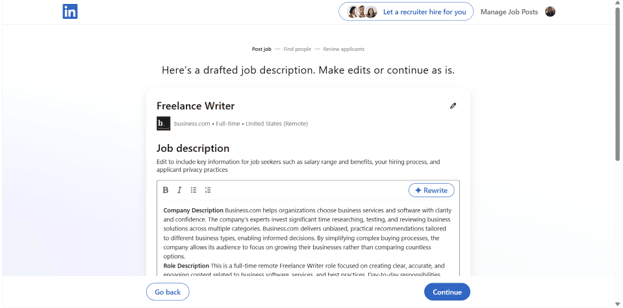
LinkedIn drafted this job description for us in less than a minute and all it took was a couple of clicks. If you already have a LinkedIn profile, it’s incredibly easy to post a job.

What we really liked about LinkedIn is that it was incredibly easy to spin up a job from our existing profile. LinkedIn already knows a lot about our company and the type of work we do, so it took less than two minutes to spin up a job description for a freelance writer. Of course, we had some notes, which we could easily apply in the job description editor. And we were more or less ready to post without much work required on our end.

The trade-off is fit, and reviewers are blunt about it. LinkedIn works for professional and technical roles and does not work well for hourly, industrial or production positions, largely because those candidates are less likely to maintain profiles. If you are hiring a warehouse team, this is the wrong tool to use. If you are hiring a controller, an engineer or a marketing manager, it is probably the right one.

One downside to be aware of is that job postings expire automatically after about two weeks and have to be reset, which can fragment your applicant tracking data on a long-running search. Confirm the current duration in your account before you rely on it.

A free LinkedIn job post costs nothing. Promoted jobs have no universal published rate, because LinkedIn uses marketplace pricing against a budget you choose.

LinkedIn offers a suggested budget for promoted jobs based on posts with similar titles and locations. Bidding then happens automatically for each job view on a cost-per-click basis, and you pay the automated bid amount only when a qualified member clicks to view your promoted job. Qualified clicks are determined by the advanced targeting criteria you enter, such as locations, preferred skills and must-have skills. Your actual spend varies with the clicks you receive, but you will never pay more than the total budget you set for that job.

Recommended budgets are calculated differently by product. For Recruiter, the recommendation weighs factors like the number of qualified members on LinkedIn, the number of similar jobs live at the time and the budgets of those similar jobs. For Recruiter Lite, it weighs the job title, industry and location. Note that these rules apply to jobs created with a Recruiter, Recruiter Lite or Talent Hub account, not to jobs posted from a personal LinkedIn member account.

LinkedIn Recruiter is sold separately and priced by seat; get a written quote rather than relying on figures published elsewhere.

  • It is the only pick here that reliably reaches candidates who are not actively job hunting.
  • Advanced targeting on promoted jobs lets you spend against specific skills and locations rather than broad impressions.
  • You’ll never pay more than the total budget you set for a job.
  • Reviewers consistently describe the paid tiers as expensive, particularly for small teams.
  • It performs poorly for hourly, industrial and production roles where candidates are less likely to have profiles.
  • Reporting and analytics are widely criticized as weak, and postings that expire and need resetting complicate tracking on long searches.

LinkedIn Jobs holds a score of 7.9 out of 10 on TrustRadius across more than 300 reviews. LinkedIn Recruiter earned a similar score of 8.1 out of 10 across more than 300 reviews.

Reviewers credit an intuitive interface, an unusually wide range of search filters and an accessible help center, and several describe it as the best available source of professional candidates by both quantity and quality. Cost is the dominant complaint, followed by weak data and reporting and poor suitability for lower-skill roles. One HR specialist at a small agency summed up the consensus: even the least expensive option may still be too pricey for smaller companies.

Workable logo
Editor's Rating: 8.7/10

Workable posts to more than 200 job boards from a single entry point, builds and hosts your careers page, and then tracks every applicant through scheduling, interview scorecards, offer letters and e-signature. For an employer whose actual bottleneck is the spreadsheet-and-inbox chaos that follows a successful posting, Workable makes a strong case for itself.

Workable job posting

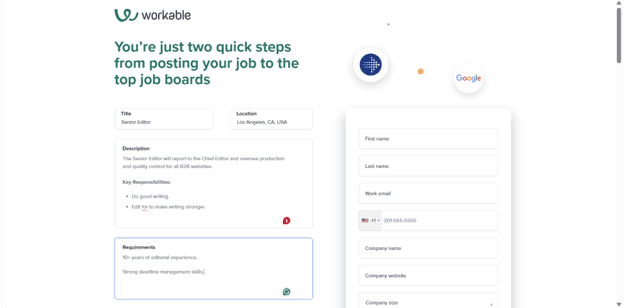
Workable didn’t surface a generated description at the same point in the posting flow where ZipRecruiter, Indeed and LinkedIn offered one. Maybe the ease with which ZipRecruiter, Indeed and LinkedIn spun up job descriptions just made us lazy, but it felt to us like it slowed the process down.

Workable includes passive candidate sourcing against a database of more than 400 million profiles, past candidate resurfacing so previous applicants resurface for new roles, social media campaigns and integrations with Indeed Easy Apply, Apply with LinkedIn and LinkedIn Recruiter System Connect. The compliance features, including EEO, OFCCP and CCPA support plus GDPR automation tools, come standard rather than as an enterprise upsell.

Workable also publishes its prices, which is rare in this category. That transparency is a real advantage when you are shortlisting.

You’ll have to put a bit more work into the job description than you would with ZipRecruiter, Indeed or LinkedIn, though. That’s not such a bad thing, but it is worth noting. If you’re really unsure of how you want to craft your job description, though, it could present a minor challenge you’ll need to overcome before posting your job.

Workable charges by your total employee headcount, not by how many roles you are hiring for or how many recruiters use the system. That is the detail that catches growing companies out, because your bill rises as you add staff even if your hiring volume stays flat.

The published rates below are for the one-to-20 employee band on annual billing; these are the cheapest prices for each plan.

PlanMonthlyAnnual
Standard$360 per month (month-to-month billing available)$3,588 (20% savings)
PremierAnnual billing required$7,188
EnterpriseAnnual billing required$8,628

Workable lists nine headcount bands: 1-20, 21-50, 51-100, 101-200, 201-400, 401-600, 601-800, 801-1,000 and 1,000-plus. The price of each plan increases as your headcount grows. Annual billing saves up to 20 percent against paying monthly.

Add-ons

On Standard, texting costs an additional $89 per month, video interviews $109 and assessments $59, with performance and engagement adding $39 on the HR side. All of those are included on Premier and Enterprise, so the tier comparison is closer than the headline numbers suggest.

Workable Agent, the AI sourcing and screening layer, runs on credits. Every paid account starts with 3,000 free credits, and the agent spends one credit to evaluate a candidate, two to source a passive one and 10 for a candidate chat. Additional credits cost $0.12 each in a 5,000-credit pack ($600), $0.10 in a 10,000-credit pack ($1,000) and $0.095 in a 50,000-credit pack ($4,750). Credits expire one year from purchase and are not refundable.

The 15-day trial includes the complete Standard feature set with no credit card required. If you end a subscription, the account drops to a Free plan, on which you cannot post jobs or interact with candidates and can only view data for candidates already in the account.

  • Published pricing is unusual in this category and makes genuine comparison possible before you talk to sales.
  • Distribution to more than 200 job boards plus full applicant tracking means one purchase covers reach and process.
  • The 15-day trial gives you the full Standard feature set without a credit card.
  • Pricing scales with employee headcount rather than hiring volume, so growth raises your bill even if hiring does not.
  • Features many buyers expect as standard, including texting, video interviews and assessments, are paid add-ons on the Standard plan.
  • Workable sometimes returns multiple applications from the same applicant, most likely a function of its wide distribution network—if a candidate applies in multiple places, their application may get picked up multiple times.

Workable scores 7.3 out of 10 on TrustRadius across 86 reviews, a small sample size compared to the other job boards we reviewed. Reviewers consistently praise the interview feedback tools, candidate search, one-click publishing to job boards and an interface new hiring managers pick up quickly with minimal training. The complaints center on pricing, particularly for the smallest companies; reporting and data visualization that reviewers describe as less intuitive than it should be; and weak duplicate-candidate detection, with several reviewers noting the same applicant appears twice when they apply to more than one role. Search across archived jobs and resumes also drew repeated criticism.

Handshake logo
Editor's Rating: 8.2/10

If you are hiring interns, recent graduates or anyone at the start of a career, Handshake reaches a population the general boards handle badly. It connects employers to 25 million verified candidates through college and university career centers, and standard job posting is free. Handshake’s own framing is to start with your free job and scale as your team grows, which is an honest description of how a small employer should use it.

Handshake job posting

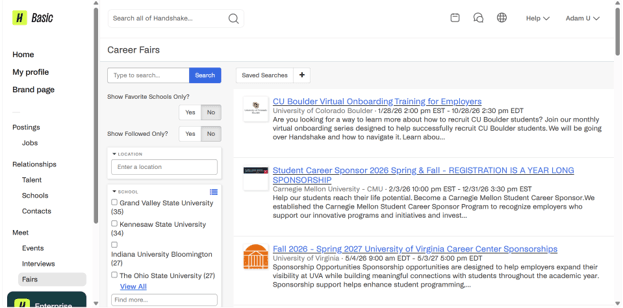
One thing that sets Handshake apart is its career fair directory, which connects you with colleges’ and universities’ career fair events. If you’re looking to recruit college students and recent grads, this tool allows you to meet them where they’re at. 

The platform has moved well past being a campus job board. It offers AI-powered matching that surfaces relevant candidates while leaving hiring decisions with you, tools to manage roles, candidates and schools from one place, brand presence that keeps you visible to candidates across the stages of their careers, and real-time analytics on what is working.

Pricing

Standard job postings are free. Handshake’s paid tiers, which add targeted campaigns and enhanced employer branding, are not publicly priced and require contacting the company.

Handshake removed its old employer Trust Score after concluding it was not a reliable enough tool for vetting trustworthy employers, and its Trust and Safety team now manually validates all new employers, using the identity verification provider Persona. Your postings are routed to the schools you select and go live only after review and approval. Employers need at least one job posted and approved by an institution before messaging its students, and at schools in the Handshake Open program, employers need a job approved by at least 10 Handshake partner schools first.

Budget time rather than money for onboarding here. In our review of Handshake’s employer documentation, the recurring theme was verification and approval rather than cost, which is the opposite of every other platform we reviewed.

Standard job postings are free. Handshake’s paid tiers, which add targeted campaigns and enhanced employer branding, are not publicly priced and require contacting the company.

Handshake removed its old employer Trust Score after concluding it was not a reliable enough tool for vetting trustworthy employers, and its Trust and Safety team now manually validates all new employers, using the identity verification provider Persona. Your postings are routed to the schools you select and go live only after review and approval. Employers need at least one job posted and approved by an institution before messaging its students, and at schools in the Handshake Open program, employers need a job approved by at least 10 Handshake partner schools first.

Budget time rather than money for onboarding here. In our review of Handshake’s employer documentation, the recurring theme was verification and approval rather than cost, which is the opposite of every other platform we reviewed.

  • Free standard job postings reach 25 million verified early-career candidates.
  • Manual employer validation and school-level approval keep the candidate pool credible on both sides.
  • School-network targeting reaches candidates by program and graduation year in a way general boards cannot match.
  • Employer validation and per-school job approval mean your first posting is not instant.
  • Messaging students requires approved postings, and at Handshake Open schools that means approval from at least 10 partner schools.
  • Paid tier pricing is not published, and the platform is a poor fit for experienced or senior hires.

The Handshake Talent Engagement Suite holds a score of 8.0 out of 10 on TrustRadius across 71 reviews, the smallest sample size in our review. Employers who use it for early-career recruiting describe reliable access to a diverse candidate pool across many universities, streamlined career fair registration and job posting, and campaign tools that let them reach students directly and build brand presence ahead of fair season. Account team support draws unusually warm comments. The most common criticism is filter accuracy, with reviewers reporting that graduation year, major and location filters do not always match, so campaigns reach students outside the intended group.

What Job Posting Sites Do for Employers

A job posting site provides a place to list your open position, and sometimes promote it across a wider distribution channel. You describe the role, the platform publishes it and candidates find it through search, alerts or a recommendation engine.

What separates job boards are how wide their reach is and how much they’ll do for you. Some sites only index your posting and wait for candidates to search. Others push it out through email and text alerts, syndicate it to partner boards or actively identify matching candidates and invite them to apply. A few add a searchable resume database so you can go looking rather than waiting. And a smaller group, including Workable, extends past the application into scheduling, evaluation and offers.

Partnering with an effective job board is a major way that companies recruit new employees, but the way you do it may vary depending on your circumstances. If you have one opening and a person who can screen resumes, a free posting on a large board may be sufficient. If you have four openings and nobody with time to sort applications, paying a bit more for matching and tracking is probably worthwhile.

Job Posting Sites vs. Job Search Sites: What is the Difference?

Job search sites are built for candidates; they organize listings, send alerts, host resumes and help someone find work. Job posting sites are the employer-facing side of the same platforms, where you publish an opening and pay for visibility.

Most of the large platforms offer both services. Indeed, ZipRecruiter and LinkedIn each run a candidate-facing search product and an employer-facing posting product against the same pool of people. That is why the best job search sites and the best job posting sites are often one and the same. It’s also why candidate-side reach is a legitimate thing for an employer to evaluate. A platform with a weak candidate experience will have a weak candidate pool no matter how good its employer dashboard looks.

When you compare platforms, look at candidate-side numbers as well as employer features. ZipRecruiter reports nearly 20 million monthly job seekers, for example. Handshake reports 25 million verified candidates, though concentrated in early career. Those figures tell you who you are actually buying access to.

Types of Job Boards and When to Use Each

Not every opening belongs on every platform. The best job boards for your role depend less on overall size than on where your ideal candidate actually looks.

General Job Boards

Indeed and ZipRecruiter cast the widest nets and work well for roles with broad appeal. These include administrative, customer service, retail, warehouse and most entry-level positions. Expect high volume and plan to screen applications manually.

Professional Networks

LinkedIn is the practical choice for salaried, credentialed and management roles, and the only realistic route to candidates who are currently employed and not looking for a new job. It is a poor fit for hourly and industrial work.

TipBottom line
If you are bidding against larger employers for the same professionals, see our guide on how to compete with big businesses for talent.

Niche and Industry Boards

Sector-specific sites reach candidates who have already self-selected into your field. Volume drops sharply here, but applicant relevance improves. It’s worth pairing postings on niche boards with postings on a general board, rather than using niche boards alone.

Campus and Early-career Networks

Handshake and similar platforms reach students and recent graduates through their career centers, with filtering by school, program and graduation year that general boards cannot replicate. These are good choices for companies looking for interns or willing to train and develop early-stage talent.

Aggregators and Search Engines

Google Jobs indexes structured listings from career sites and boards rather than accepting direct postings. You reach it by publishing elsewhere with correct structured data, or by using a platform that distributes there for you.

Applicant Tracking Systems with Distribution

Workable and comparable platforms post to hundreds of boards at once and then manage the pipeline. Platforms like these are useful when your constraint is an internal vetting process rather than reach.

TipBottom line
Niche boards generate fewer applications than general boards, but they’re usually better ones. Job seekers using an industry-specific site have already self-selected into your field, so a posting that draws 12 applicants from a trade board can easily outperform one that draws 200 from a general search. See our guide on how to find employees for more on balancing the two.

How Much Does It Cost to Post a Job?

It costs anywhere from nothing to several hundred dollars per month per role to post a job online, and oftentimes you can control your own budget caps. But the pricing model matters more than the price. There are four billing structures in this category, and each one fails in a different way.

Free posting is genuinely free on Indeed, LinkedIn (one job at a time) and Handshake. However, free listings lose placement to sponsored ones and decay over time. For a role with modest competition and a patient timeline, free posting works. For an urgent or competitive hire, it usually does not, and it is worth reviewing Indeed alternatives for hiring before you raise your budget cap there.

  • Interaction-based billingis how Indeed and LinkedIn charge for visibility. You set a budget and get charged when candidates click or start an application. The appeal is that you control the ceiling. The risk is that you pay for attention rather than outcomes, so a posting can spend its full budget and produce no hire.
  • Job slot subscriptions, ZipRecruiter’s model, charge a flat rate for an active posting regardless of how many people click or apply. Costs are predictable, so a popular posting does not create a larger bill. The trade-off is that you pay whether the posting performs or not.
  • Headcount-based subscriptions, Workable’s model, charge by company size rather than hiring activity. That makes budgeting simple and is efficient if you hire constantly, but it means an occasional hirer pays the same as a busy one, and your bill rises as you grow.

Whatever you choose, price the screening alongside the posting. That is the line item most small employers leave out. In many cases, that will be the cost of the hours an internal member on your team spends reviewing applicants.

How to Post a Job and Attract Qualified Applicants

The platform determines how many people see your opening, while the job posting determines how many of the right ones apply. These steps address the part you control: the job posting.

1. Define the Role Before You Write the Ad

Decide what the person will actually do in their first 90 days, which skills are genuinely required and which are preferable, and what the job pays. The more precise you can be, the better suited your applicants will be for the job, and the less likely they’ll lose interest further down the line.

2. Use a Specific Job Title

Candidates search by title. Internal titles like “customer advocate” do not match what anyone types. Use the title a person looking for this job would search for, and save the internal designation for the offer letter.

3. Publish the Pay Range

Pay transparency is legally required in a growing number of states and it filters your applicant pool for free. Omitting salary invites applications from people you cannot afford and deters those you can.

4. Write for the Candidate, Not the Org Chart

Lead with what the person will do and why the work matters, then list requirements. Keep the requirements list to what you would genuinely reject someone for missing; long lists deter qualified applicants, particularly those who assess themselves conservatively.

5. Add Screening Questions

Most platforms let you attach knock-out questions covering credentials, availability, location and work authorization. Including good questions can save hours of resume review. Save your business some money and your hiring manager’s sanity by taking some time with this step on the front end.

6. Choose the Right Platforms, Then Sponsor Selectively

Pick one general board and one targeted channel rather than posting everywhere. Sponsor only the roles that are urgent or genuinely competitive, and set a total budget rather than an open-ended daily one.

7. Respond Within 48 Hours

Strong candidates are usually in more than one process. A fast, human first response converts more of them than a bigger ad budget will. Decide who owns this before you post, not after applications arrive, and use a recruiting CRM system to keep track of who you have contacted.

Bottom LineBottom line
The largest cost in a job board hire is usually not the ad. A sponsored role in a dense metro can return 200 applicants, and at five minutes per resume that is roughly 17 hours of someone’s week, which almost always exceeds the campaign spend. Budget for screening capacity before you raise your posting budget.

Additional Options to Consider

Monster and CareerBuilder

Monster and CareerBuilder still appear on many roundups, but the merged company filed for Chapter 11 bankruptcy protection in June 2025. The U.S. Bankruptcy Court for the District of Delaware approved the sale of its job board business to BOLD, which retained the rights to both brands and extended employment offers to at least 350 employees.

The sites continue to operate under new ownership. We did not name either as a best pick for 2026 because a platform working through an ownership transition is a harder thing to recommend to a small employer making a single important hire, not because the products stopped functioning.

SimplyHired

SimplyHired, also part of Recruit Holdings, aggregates listings and can be a low-cost supplement, though it draws from overlapping inventory to Indeed.

Dice

Dice is the established choice for technology roles and worth a look when a general board is not producing engineers. It is a niche board that can nicely complement some of the more general job boards we’ve selected above.

Snagajob

Snagajob, now owned by JobGet, specializes in hourly and shift work. This specific niche board could drive more relevant applications for some employers compared with the broader reach of some of our top picks above.

TipBottom line
Employee referrals remain among the most reliable sources of quality hires and cost a fraction of paid advertising. How staffing agencies work is also worth understanding, because an agency can be the right answer for a hard-to-fill or short-term role, where the fee buys screening capacity you do not have in house.

How to Choose a Job Posting Site

1. Consider the Role You’re Hiring For

Start with the role, not the platform. A warehouse opening and a controller opening belong on different sites. Ask where a person currently doing this job would look, then work backward. Our small business hiring tips cover how to frame that question.

2. Consider Reach Versus Screening

Decide whether your bottleneck is reach or throughput. If you post and hear nothing, focus on distribution, matching and passive sourcing. If you post and then drown in applications, invest in screening questions, filtering and applicant tracking. Employers frequently spend on the first problem when they have the second. Our guide to staffing your business walks through diagnosing which one you have.

3. Check the Pricing Model

Match the billing model to how you hire. Occasional, unpredictable hiring suits per-slot or per-day pricing, where you pay only while a posting is live. Steady, year-round hiring suits a subscription. Interaction-based billing suits employers who can monitor a campaign and pull the plug, and punishes those who set a budget and forget it.

4. Cap Your Budget

Insist on a price before you commit. Two of our five picks do not publish rates. That doesn’t disqualify them, but it does mean you should get the quote in writing, confirm what happens when a trial converts and check the cancellation terms. Several platforms in this category convert trials to paid subscriptions automatically.

5. Run a Test Posting and Refine Your Approach

Test with one role before you standardize. Run a single opening on your leading candidate platform, track applications per dollar and qualified applications per dollar separately, and let the second number decide. Total application volume means nothing if those applicants aren’t suitable for your open position.

Methodology

We evaluated 18 job posting sites, hiring platforms and applicant tracking systems used by small and midsize U.S. employers and selected five as our best picks for 2026.

Our research was conducted primarily against vendor-controlled sources: current pricing pages, plan comparison pages, employer help centers and product documentation. We took this approach deliberately after finding that third-party pricing summaries in this category are frequently stale or inaccurate. In one case, published figures on aggregator sites disagreed with a vendor’s live pricing page by more than $60 per month on the same named plan, and several sites still described a plan that the vendor’s own help center identifies as a legacy product no longer sold to new customers. Where a vendor does not disclose pricing, we report that rather than substituting an unsourced estimate. Where a vendor makes a claim about its own performance, we attribute it.

We also created employer accounts and built draft job postings on each platform to evaluate the posting flow, job description tooling and screening setup first-hand.

Scoring weighted six criteria.

  • Candidate Reach and Relevance (25%): We looked at the size of each platform’s candidate pool and, more importantly, who is in it. A site with 20 million monthly job seekers is only useful if those job seekers do the work you are hiring for, so we assessed each platform against specific role types rather than raw traffic. We also weighed whether a platform reaches passive candidates who are not actively searching, since that is where the hardest roles get filled.
  • Pricing Transparency (25%): We rewarded platforms that publish their rates and penalized those that require a sales conversation before you can budget. We also assessed how predictable each pricing model is in practice, because a published rate that scales with employee headcount and a quoted rate that stays flat all year can produce very different bills.
  • Free Options (15%): We distinguished between platforms with a genuinely usable free tier and those offering a short trial that converts to a paid subscription automatically. We also considered how long free visibility lasts, since a listing that gets buried behind sponsored posts within 48 hours is not really free.
  • Screening and Application Management Features (15%): Applicant volume without filtering tools does not solve a hiring problem, it relocates it to whoever reads the resumes. We evaluated screening questions, knock-out criteria, search and filtering precision, candidate rating and pipeline tracking.
  • Distribution and Integrations (10%): We assessed how far a single posting travels beyond the platform you published it on, including syndication to partner boards, aggregators and Google Jobs. We also looked at integrations with applicant tracking systems, calendars, background check providers and HR software, since a platform that forces manual data entry costs you time that does not show up on the invoice.
  • Support and Onboarding (10%): We reviewed what support channels each vendor offers, whether they are available outside business hours, and what it actually takes to get your first job live. Onboarding friction varies widely in this category: some platforms have a posting live in minutes, while others require identity verification and per-institution approval before anyone sees your opening.

User scores are drawn from third-party review platforms and were current at the time of publication. We report the review count alongside each score, because a high average across a few dozen reviews is a weaker signal than a slightly lower average across several hundred.

Frequently Asked Questions

Indeed is the strongest free option for most employers because posting is genuinely free rather than trial-based, and a single posting now also reaches Glassdoor following the July 2026 merger of the two platforms.

LinkedIn allows one free job post at a time, which suits professional roles, and Handshake offers free standard postings to a pool of 25 million verified early-career candidates.

In all three cases, free postings compete for visibility against paid ones and lose placement over time, so a free listing works better for a role with a patient timeline than an urgent one.

ZipRecruiter distributes a single posting to more than 100 job sites with one click, including Google Jobs and niche boards, and actively invites matching candidates to apply rather than waiting for them to search.

Indeed offers the largest single-site audience and now covers Glassdoor as well. Visibility on either platform improves substantially when you pay for it, so if the hire is urgent, budget for sponsorship rather than relying on organic placement.

Both sites still operate, but under new ownership. The merged CareerBuilder + Monster filed for Chapter 11 bankruptcy protection in June 2025, and the bankruptcy court approved the sale of the job board business to BOLD, which retained the rights to both brands. We did not include either in our 2026 best picks because we are cautious about recommending a platform in the middle of an ownership transition to an employer making a single important hire.

Resume databases and passive sourcing tools, which are a separate purchase from job posting on most platforms. ZipRecruiter’s Resume Database covers more than 56 million profiles searchable by skills, experience and location, with nearly 230,000 new candidate profiles added monthly, and sits on its Premium tier and above (or it can be purchased as an add-on for the Standard tier at an additional monthly cost). Workable includes passive candidate sourcing against a database of more than 400 million profiles. LinkedIn Recruiter is the standard tool for reaching employed professionals who are not looking, and is sold separately from job posting.

By narrowing the funnel before it opens rather than sorting it afterward. Use a job title candidates actually search for, publish the pay range, keep the requirements list to genuine deal-breakers, and attach screening questions covering credentials, availability and location. Post to one general board and one targeted channel instead of everywhere. Then decide who will respond to applicants within 48 hours before you publish, because response speed converts strong candidates more reliably than a larger ad budget does.

Did you find this content helpful?
Verified CheckThank you for your feedback!
author image
Written by: Adam Uzialko, Senior Editor
Adam Uzialko, the accomplished senior editor at Business News Daily, brings a wealth of experience that extends beyond traditional writing and editing roles. With a robust background as co-founder and managing editor of a digital marketing venture, his insights are steeped in the practicalities of small business management. At business.com, Adam contributes to our digital marketing coverage, providing guidance on everything from measuring campaign ROI to conducting a marketing analysis to using retargeting to boost conversions. Since 2015, Adam has also meticulously evaluated a myriad of small business solutions, including document management services and email and text message marketing software. His approach is hands-on; he not only tests the products firsthand but also engages in user interviews and direct dialogues with the companies behind them. Adam's expertise spans content strategy, editorial direction and adept team management, ensuring that his work resonates with entrepreneurs navigating the dynamic landscape of online commerce.