Your free business.com+ membership unlocks exclusive tech deals and advisor support
Join Free
BDC Hamburger Icon

Menu

Close
BDC Logo with Name
Search Icon
Search Icon
Advertise with us
Advertising Disclosure
Close
Advertising Disclosure

Business.com aims to help business owners make informed decisions to support and grow their companies. We research and recommend products and services suitable for various business types, investing thousands of hours each year in this process.

As a business, we need to generate revenue to sustain our content. We have financial relationships with some companies we cover, earning commissions when readers purchase from our partners or share information about their needs. These relationships do not dictate our advice and recommendations. Our editorial team independently evaluates and recommends products and services based on their research and expertise. Learn more about our process and partners here.

Best No-Code Website Builders of 2026

author image
Written by:
Adam Uzialko, Senior Editor
author image
Editor verified:
Chad Brooks,Managing Editor
Last Updated Jul 15, 2026
Business.com earns commissions from some listed providers. Editorial Guidelines.
9.2 /10
Editor's rating
Best Overall
  • Starts at $19 per month
  • No-code editor + templates
  • 14-day free trial (no credit card)
Visit Site
Links to Squarespace
9.1 /10
Editor's rating
Best All-in-One
  • Free to build (pay to publish)
  • No-code editor + AI designer
  • 7-day free trial for paid plans
Visit Site
Links to GoDaddy Airo AI Builder
wix logo
Wix
9.0 /10
Editor's rating
Best for Design Freedom
  • Free plan (Wix branded)
  • No-code canvas and 900+ templates
  • 14-day money-back guarantee
Shopify logo
Shopify
9.0 /10
Editor's rating
Best for E-commerce
  • Starts at $29 per month
  • No-code editor + e-commerce tools
  • 3-day trial + $1/mo for 3 months
Square logo
Square Online
8.5 /10
Editor's rating
Best for Simplicity
  • Free plan (Square branded)
  • Beginner-friendly no-code editor
  • 30-day free trial on paid plans
Table Of Contents Icon

Table of Contents

Open row

At business.com, we’ve spent years advising entrepreneurs, creating actionable guides for obtaining funding and managing business finances, and comparing and contrasting leading software and services to identify the best financial tools for small and growing businesses. Our playbooks and explainers are packed with advice from real business lenders, accountants, credit card processing experts, tax advisers and other finance professionals.

To inform our financial software and service recommendations, we put ourselves in the shoes of business owners and test each product’s effectiveness while taking into account its cost. Every review, whether it be for a credit card processing solution or invoicing software, is infused with our guiding principles: accuracy and objectivity. Learn more about our editorial process.

How We Decided

Tip Bulb

How We Decided

When examining the no-code website builders available today, we focused on how much a non-technical business owner can accomplish entirely through a visual interface: building pages, customizing designs, adding functionality and managing content without writing...

MoreMore

When examining the no-code website builders available today, we focused on how much a non-technical business owner can accomplish entirely through a visual interface: building pages, customizing designs, adding functionality and managing content without writing code. We considered the quality and quantity of templates, the depth of no-code customization, whether pages render responsively on mobile, the availability of integrations and native business tools, and — for owners who might outgrow a purely no-code approach — whether the platform offers any low-code escape hatch. Pricing and support also influenced our selections.

53

evaluated

10

researched

5

chosen

When examining the no-code website builders available today, we focused on how much a non-technical business owner can accomplish entirely through a visual interface: building pages, customizing designs, adding functionality and managing content without writing code. We considered the quality and quantity of templates, the depth of no-code customization, whether pages render responsively on mobile, the availability of integrations and native business tools, and — for owners who might outgrow a purely no-code approach — whether the platform offers any low-code escape hatch. Pricing and support also influenced our selections.

53

evaluated

10

researched

5

chosen

No-code website builders have made a professional web presence accessible to anyone, eliminating the need to work with developers or learn to code. The best platforms pair an intuitive visual editor with polished templates, so you can design, populate and launch a complete site on your own. These platforms are our top picks thanks to their ease of use, strong template libraries and the range of business functionality they deliver without requiring you to write a single line of code.

Comparison Chart

BDC Ribbon
Our Top Picks for 2026
Squarespace
GoDaddy Airo AI Builder
Wix
Shopify
Square Online
Rating (Out of 10)9.29.19.09.08.5
Best for

Best Overall

Best All-in-One

Best for Design Freedom

Best for E-commerce

Best for Simplicity

Free trial

14 days

Free plan; 7 days on paid plans

14-day money-back guarantee; free plan includes Wix branding

3 days, then $1 per month for 3 months

Free plan; 30 days on paid plans

Starting monthly cost

$19

$9.99 (required to publish site)

$17

$29

Free ($49 per location to upgrade)

Editor

Drag-and-drop (fluid, section-based)

Drag-and-drop; AI starting point (Airo)

Drag-and-drop (free-form canvas)

Drag-and-drop (section-based store editor)

Drag-and-drop (section-based editor)

App/plugin integrations

43 native extensions

Integrations incl. WordPress, Stripe, Acuity

800+ App Market

Thousands (Shopify App Store)

Square App Marketplace; Wix store sync

Payment processing

Squarespace Payments or third parties

PayPal, Stripe, Square

Wix Payments + 80 gateways

Shopify Payments or third parties

Square (native)

AI integration

Blueprint AI setup, copy, product descriptions

Airo builder, logo, content, SEO

Layout and content via language prompts

Sidekick assistant; Shopify Magic content

Square AI

Customer support

24/7 email and ticket; help center

24/7 phone, text and chat

24/7 support

24/7 chat (enhanced on higher tiers)

Chat and email; phone 6AM-6PM US Pacific Time, Monday – Friday (24/7 on Premium)

Transaction fee (standard)

2% on Basic; 0% on Core and up

Via chosen processor

Via chosen processor

2% on Basic (0% with Shopify Payments)

3.3% + $0.30 online (2.9% + $0.30 on paid plans)

Scroll Table

Our Reviews

squarespace logo
Editor's Rating: 9.2/10
Visit Site
Links to Squarespace

Squarespace is our best overall no-code website builder because it offers a strong template library and simplistic, user-friendly interface that makes it easy for even the least tech-savvy user to stand up a beautiful and functional website. With Squarespace, you build entirely without code: choose a designed template, then arrange sections, swap imagery, adjust type and style pages directly on screen. Even a first-time builder can produce a site that looks professionally made, which is exactly what a no-code tool should deliver.

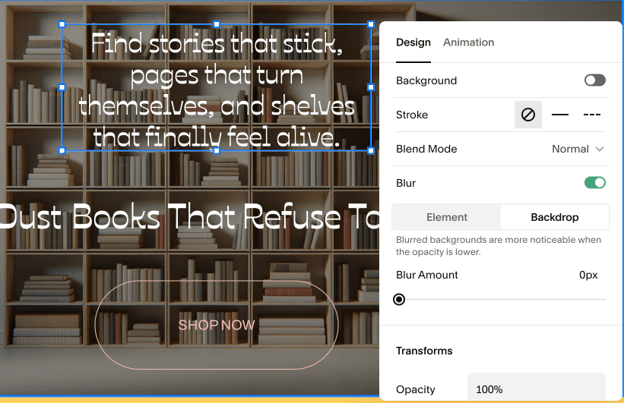
A design editing menu for a specific element within Squarespace, allowing for changing the background or backdrop of the element or adding animation effects.

We built a test site with Squarespace in less than 15 minutes. It wasn’t the most striking website we’d ever seen, but it was remarkable how quickly we were able to go from nothing to a functional website. And we could tell bringing the site to the next level was well within reach with just a bit more work. 

Squarespace also offers AI tools like Blueprint AI, which generates a structured starting point, and Squarespace AI, which can draft well-written web copy. These AI tools make it even faster to go from concept to launch-ready. And while Squarespace is a no-code tool at heart, it includes a low-code option for those who want it: custom CSS and code injection are available on the Core plan and above, so you can fine-tune the design later. Add capable native tools for e-commerce, scheduling and selling memberships or digital products, and Squarespace is the most well-rounded choice for most businesses.

Squarespace offers four pricing plans. The prices below include the annual billing discount.

PlanCost (billed annually)Best For
Basic$19/moCore no-code site building, templates, hosting, SSL, SEO and Squarespace AI. 2% transaction fee on store sales.
Core$29/moAdds a 0% store transaction fee, custom code injection (low-code), advanced analytics and unlimited contributors.
Plus$49/moAdds advanced merchandising, abandoned cart recovery, subscription selling and product reviews.
Advanced$99/moAdds the lowest processing rates, API integrations and Commerce APIs for high-volume stores.

Email marketing campaigns and Squarespace Scheduling (Acuity) are priced separately as add-ons. A custom domain is free for the first year on annual plans, then renews at standard rates.

  • The best template library in the category gives every user a strong, professional starting point.
  • The no-code editor balances ease of use with genuine design control.
  • Custom CSS and code injection on Core and above provide a low-code path when you need it.
  • Reaching a live support representative can be difficult, though the help center is extensive.
  • The entry-level Basic plan charges a 2% transaction fee on online store sales, making Core essential for serious sellers.
  • The fluid editor is less flexible than other website builders we reviewed; you’ll work within the template, rather than placing elements freely.

Squarespace received a rating of 8.4 out of 10 on TrustRadius across more than 300 reviews. Customers praised Squarespace for its overall usability, simple domain management and effective content creation tools, though some reported limited flexibility as a challenge.

“Squarespace is great for small business owners who require an online presence but don’t need a super robust website with more flexibility/options. The Squarespace features have grown a lot since I first started using it in 2018, and I only expect that to continue. Despite having ecommerce and membership features, I don’t feel I can recommend Squarespace for those types of websites over other options,” one user wrote.

Editor's Rating: 9.1/10
Visit Site
Links to GoDaddy

GoDaddy is our pick for best all-in-one website builder, which allows you to manage domains, email, marketing, payments and more from one dashboard. Its no-code website builder is intuitive and accessible. You work with templates and pre-built modules, which you can customize with your own content. No code is required at any point, making it easy for anyone to build an aesthetic and functional website for their business.

If you’re looking to accelerate the process even further, GoDaddy’s Airo AI Builder generates a complete, usable website as a starting point. These websites tend to be a bit bland, but they’re functional, and they give you a great jumping off point from which to customize with GoDaddy’s no-code tools.

GoDaddy also offers built-in SEO, email marketing, social campaigns and a marketing calendar, plus 24/7 phone and chat support that’s a genuine differentiator. Note that while you can build your site for free (and take as long as you want to do it) publishing a live site requires a paid plan starting at $9.99 per month.

GoDaddy offers a free website builder plan; however, this does not allow connecting a custom domain, nor does it allow you to publish any sites you create. Still, the free plan lets you explore the tool as much as you’d like before upgrading. GoDaddy also offers several paid tiers that scale up from a basic informational site to a full e-commerce store.

PlanCost (billed annually)Best For
FreeFreeBuilding and exploring sites (cannot publish); includes a set of monthly AI credits.
Basic$9.99/moPublishing a live site, connecting a custom domain and basic marketing tools.
Premium$14.99/moMore publishing capacity, additional marketing tools and user access sharing.
Commerce$20.99/moSelling online with an integrated store, abandoned cart recovery and payment tools.
  • GoDaddy is an all-in-one platform offering bundled tools, including domains, email, marketing and payments.
  • Airo AI Builder provides a fully-functional, usable site as a starting point.
  • 24/7 phone and chat support (in English and Spanish) is a market-leading support offering.
  • GoDaddy designs and Airo AI Builder sites are solid, but not as polished as other website builders we reviewed.
  • You can build for free, but publishing requires a paid plan.
  • Some useful features, like email marketing integration, are locked behind paid plans.

GoDaddy received a 7.4 out of 10 on TrustRadius across more than 200 reviews. Customers praised the user-friendly platform and responsive customer support, though some described support as inconsistent and noted slower page load speeds.

“Godaddy is a good choice for Small and Medium Scale enterprises. Godaddy can be found easily on the internet as it is a popular choice. It has affordable pricing plans and bundles. Godaddy is not a complicated tool. Anyone with basic knowledge can set up websites in Godaddy. Godaddy is one of the fastest web hosting services in the market. Godaddy has an intuitive dashboard. It has a template collection, a domain search tool, and a domain name generator tool, etc, for the untrained eye to kick start an online business. Godaddy’s website design tool or its template collection etc are not suited for a professional website developer,” one user wrote.

wix logo
Editor's Rating: 9/10

Most no-code builders make a quiet trade: they keep you from breaking anything by keeping you inside a grid. Wix doesn’t. Its editor hands a non-technical user a genuinely open canvas: you can drop an element wherever you want it, nudge it a few pixels left, layer it over an image and never once open a code panel. For business owners who arrive with a clear picture of what their site should look like, that’s the difference between adapting to a template and building the thing they actually pictured.

That freedom is backed by substance rather than novelty. More than 900 templates give you a designed starting point if you’d rather not begin from nothing, and the App Market’s 800-plus integrations mean bookings, payments, forms and marketing tools slot in without a developer. Wix also draws the clearest line from no-code to low-code of anything on this list: Velo, its built-in development platform, lets a developer add custom JavaScript, databases and APIs to the same site later, so a business can start fully no-code and grow into custom functionality without a rebuild. The honest catch is that an open canvas asks more of you than a locked grid does; free positioning means mobile views occasionally need a second pass to look right.

Wix offers a free plan that includes Wix branding, plus four premium tiers, discounted when billed annually:

PlanCost (billed annually)Best For
Light$17/moPortfolios and simple informational sites; custom domain and ad-free. No e-commerce.
Core$29/moThe entry point for selling online: payments, e-commerce, bookings and analytics.
Business$39/moAdvanced e-commerce, more storage, automated sales tax and advanced shipping.
Business Elite$159/moUnlimited storage, the full e-commerce feature set and priority support for high-volume operations.

All premium plans include a free custom domain for the first year (first purchase only). Payment processing fees and some third-party apps carry additional costs. An Enterprise tier with custom pricing is also available.

  • Free-form no-code positioning offers the most layout control in the category.
  • A library of 900+ templates and an 800+ App Market cover most needs within one platform.
  • Velo provides a built-in low-code path for advanced custom functionality.
  • The added flexibility means mobile layouts can require more manual cleanup than section-based editors.
  • Wix’s free plan includes its company branding, so you’ll need to upgrade to at least the Light plan to remove it.
  • If you need e-commerce support, you’ll need to upgrade to the Core plan at minimum.

Wix earned an 8.2 out of 10 on TrustRadius across more than 300 reviews. Customers praised the platform’s customization and analytics tools, especially for small business sites, though some noted limited integrations and mediocre support.

“We primarily use Wix to launch quick and easy marketing websites where the [sole] purpose is to gain SEO credibility with high quality responsive design. Since Wix’s user interface is very plug and play, it’s easy for our design team to create websites without having to code much at all. Wix also provides security and stability we’d expect from a hosting server with very little overhead cost,” one user wrote.

Shopify logo
Editor's Rating: 9/10

Shopify’s editor is designed to help you assemble an online storefront quickly and easily by stacking content sections in a theme that’s designed to convert. You can easily swap in featured collections, product grids and other elements that showcase your products. The goal is to make it quick and easy to stand up an online storefront that can drive real sales without a lot of headache, delay or upfront investment.

Shopify online stores support unlimited products, inventory that holds up across locations and an app ecosystem deep enough that most gaps close with a search. Sidekick fields questions inside the admin, and Shopify Magic drafts the product descriptions and marketing copy that usually stall a launch. When merchants eventually want more than the visual editor exposes, Liquid, Shopify’s theme language, gives a developer room to work without leaving the platform.

However, it’s important to understand Shopify is a commerce engine with a website attached. For a store, that focus is the whole point. For a brochure site or portfolio, you’d be paying for machinery you’ll never use.

Shopify offers three core plans for a full online store, shown below at the discounted annual rate, plus a Starter plan for social selling and a Plus tier for enterprise. Standard monthly pricing is higher (for example, Basic is $39/mo billed monthly).

PlanCost (billed annually)Best For
Basic$29/moA full standalone store: unlimited products, the no-code store editor, themes, checkout and marketing tools.
Grow$79/moGrowing stores: up to 5 staff accounts, lower card rates and a reduced third-party transaction fee.
Advanced$299/moScaling stores: up to 15 staff accounts, the lowest standard card rates and calculated shipping.
Plusfrom $2,300/moEnterprise: fully customizable checkout, unlimited staff and priority 24/7 support.
  • A no-code section-based store editor and deep theme library make building a storefront fast and intuitive.
  • Best-in-class checkout, unlimited products and a vast app ecosystem make it the most complete e-commerce platform.
  • Liquid offers a low-code path for developers to customize themes beyond the visual editor.
  • The editor is commerce-oriented; it's less suited to general-purpose or non-store websites.
  • Costs can climb once card processing fees, paid themes and third-party apps are added on.

Shopify earned a rating of 8.7 out of 10 on TrustRadius across more than 700 reviews. Customers reported an intuitive interface for managing content and product catalogs and strong customization for building storefronts, though some felt it relied too heavily on third-party apps.

“Shopify is perfect for companies who are looking to run a simple-to-medium base e-commerce system and aren’t looking to get too fancy with integrations. Those companies, though, that have more complex integrations (especially with checkout) might be better off using another e-com system out there where you have access to the full core code,” one user wrote.

Square logo
Editor's Rating: 8.5/10

Square Online’s free plan gives away more than most competitors sell. A real shopping cart with unlimited items, inventory that syncs automatically with Square’s point-of-sale system, pickup and local delivery, coupons, gift cards, lead capture forms and built-in SEO tools are all available at no monthly cost, forever. For an owner who wants to test whether an idea has legs before spending anything — or a brick-and-mortar business that already runs on Square and wants its catalog online by the weekend — nothing else here gets you selling faster. The editor is uncluttered and genuinely no-code, and the POS integration is the real draw: discounts created at the register apply automatically at online checkout, and orders and inventory stay in one system.

The simplicity has a ceiling, and it arrives sooner than the free plan suggests. Square rebuilt its pricing in late 2025 around three unified tiers — Square Free, Square Plus at $49 per month per location and Square Premium at $149 per month per location, replacing 18 separate à la carte subscriptions. That consolidation is good news for a business using Square’s full stack and expensive for one that only wants a website: the jump from free to the first paid tier is $49, and it’s billed per location rather than per site. The free plan also carries the highest online processing rate Square charges, at 3.3% plus 30 cents per transaction, which drops to 2.9% plus 30 cents on Plus and Premium — so the “free” store isn’t free once you’re actually selling.

Design is where the platform asks the most of you. Expanded site customization — custom fonts, animations, customizable themes and stock photography — is a Plus-tier feature, and custom code and video embeds aren’t available on the free plan at all. There’s no low-code path comparable to Wix’s Velo or Shopify’s Liquid. Most telling: Square now points sellers who want a more polished storefront toward a Wix integration, using Wix’s AI-powered onboarding to build the store and syncing it back to the Square catalog — a candid signal about where Square sees its own builder’s design ceiling. Treat Square Online as the fastest route from idea to first sale, especially if you’re already on Square, rather than the platform you’ll grow a design-led brand on.

PlanCostBest For
Square Free$0Testing the platform or running a basic store indefinitely. Includes the website builder with SEO tools, a cart with unlimited items, custom domain connect, pickup and local delivery, coupons and lead capture forms — but carries the highest online processing rate at 3.3% + 30¢.
Square Plus$49/mo per locationGrowing stores. Adds expanded site customization (custom fonts, animations, themes and stock photography), custom code and video embeds, abandoned cart emails, product reviews, item badges and scheduled updates, subscriptions and bundles, and a lower 2.9% + 30¢ online rate.
Square Premium$149/mo per locationHigh-volume operations. Adds real-time shipping rates, advanced reporting, 24/7 phone support, a 0% gift card load fee and the lowest in-person rate at 2.4% + 15¢.

Square Plus and Square Premium each include a 30-day free trial. Custom domains are purchased separately, starting around $19.95 per year. Payment processing fees apply on every plan, including Square Free — the free plan carries Square’s highest online rate. Businesses processing more than $250,000 per year can contact Square about custom pricing. Square Payroll and hardware are sold separately.

  • One of the fastest, most beginner-friendly no-code editors for getting a simple store online.
  • A permanent free plan lets you sell unlimited physical products with a real cart, with no monthly cost.
  • Native Square POS sync keeps inventory, orders and discounts consistent across online and in-person sales — a genuine advantage for businesses that already run a register on Square.
  • Paid plans start at $49 per month per location, the highest entry point among the builders we reviewed, and the per-location structure adds cost for multi-site businesses.
  • Design tools are thin: expanded customization and custom code sit behind Square Plus, and there's no low-code path comparable to Wix's Velo or Shopify's Liquid.
  • The free plan carries Square's highest online processing rate (3.3% + 30¢), so a store that sells with any regularity pays for "free" at checkout.

Square Online received a 7.5 out of 10 rating on TrustRadius. Customers praised the user-friendly navigation and drag-and-drop website builder, but noted the platform lacks advanced tools and doesn’t provide much in the way of SEO support.

“If your goal is to get a quick and simple e-commerce website up, Square Online can easily help you accomplish that task. Load products, prices, and simple shipping and you’re off to the races. We use it to connect up to targeted marketing landing pages that educates users on our products before they buy,” one user wrote.

What Is a No-Code Website Builder?

A no-code website builder is a platform that lets you create a fully functional website entirely through a visual interface, without writing or editing any code. Instead of working with HTML, CSS or JavaScript, you choose a template and then design your site by arranging elements like images, buttons and sections on screen, while the platform generates the underlying code and hosts the result. The goal is to put professional web design within reach of business owners who have no technical background.

No-code builders power the mainstream website builder market: platforms like Squarespace, Wix, GoDaddy, Shopify and Square Online are all no-code at their core. They differ in how much design freedom they offer and what business functionality they include, but they share the defining promise that you never have to write a line of code to get a complete site online.

No-Code vs. Low-Code: What's the Difference?

The terms “no-code” and “low-code” are related but not interchangeable, and understanding the distinction helps you choose the right tool.

  • No-code means you build entirely through visual tools, and writing code is never required. This is the model behind every pick on this page, and it’s the right fit for the large majority of business websites, such as informational sites, portfolios, service businesses and standard online stores.
  • Low-code means you still do most of the work visually, but the platform lets you drop into custom code when you want more than the visual tools allow. Several no-code builders include a low-code escape hatch for this reason. For example, Squarespace offers custom CSS and code injection, Wix has its Velo development platform and Shopify offers its Liquid theme language. These let a business start entirely no-code and bring in a developer later for specific custom features, without migrating to a new platform.

The practical takeaway: choose a no-code builder for the site itself, but if you anticipate needing custom functionality down the line, favor one whose low-code options give you room to grow.

When to Consider a Low-Code Platform

For most businesses, a no-code website builder is all that’s necessary. But there are cases where a dedicated low-code platform is worth considering, typically when you’re building something closer to a web application than a website:

  • Custom web applications: If you need user logins, custom databases, complex workflows or interactive tools rather than a standard website, dedicated low-code app platforms like Bubble are built for that.
  • Design-led sites with developer polish: Platforms like Webflow sit between no-code and low-code, giving designers fine-grained visual control that outputs clean, production-grade code. This type of platform is popular with agencies and design-focused teams.
  • Internal tools and portals: Tools like Softr or Airtable-based builders can turn structured data into client portals, directories or internal apps faster than a traditional website builder.

These platforms carry a steeper learning curve and often a higher cost than the no-code builders on this page, so they make sense only when your needs genuinely exceed what a website builder can do. For a standard business website, one of our no-code picks will serve you better and get you live faster.

What Are the Benefits of a No-Code Website Builder?

No-code website builders offer several practical advantages for business owners:

  • No technical skills required: You design entirely through a visual interface, so no coding, web development or design background is needed to build or maintain your site.
  • Faster launch times: Starting from a template (or an AI-generated draft) and customizing it visually is far quicker than building a site from scratch, often reducing the timeline from weeks to hours.
  • Lower cost: Combining design, hosting and templates into a single subscription is typically far cheaper than commissioning a custom-built site from a developer or agency.
  • Independence: You can update your own site whenever you need to, without waiting on or paying a developer for every change.
  • Built-in business tools: Most no-code builders bundle hosting, SSL, SEO tools and often e-commerce, so you get a complete business website from one platform.
  • Room to grow: Many no-code builders include low-code options or extensive app markets, so you can add functionality as your business expands.

How to Choose a No-Code Website Builder

Beyond price, a few factors separate a builder you’ll be happy with from one you’ll outgrow.

Ease of Use

The whole point of no-code is accessibility, so the editor should feel intuitive from the first session. Section-based editors (like Squarespace, Shopify and GoDaddy) keep things structured and beginner-friendly; free-form editors (like Wix) offer more control at the cost of a slightly steeper learning curve.

Template Quality

Your template is your starting point. Look for a library that’s genuinely well designed and suited to your industry, and test it with your real content during a free trial before committing.

Business Functionality

Consider what your site needs to do beyond looking good, such as e-commerce, bookings, email marketing or memberships. Check whether those capabilities are built in or available through an app market, so you can add them without code.

Low-Code Growth Options

If there’s any chance you’ll need custom functionality later, favor a platform with a low-code escape hatch such as Squarespace’s code injection, Wix’s Velo or Shopify’s Liquid, so you can extend the same site rather than rebuilding elsewhere.

Support

No-code editors are approachable, but you’ll still hit questions. Platforms that pair their tools with responsive human support (ideally phone or live chat) offer a stronger safety net.

Methodology

To determine the best no-code website builders, our team of technology experts and software analysts evaluated an initial list of 53 platforms offering visual, no-code site creation. This comparison helped narrow our list to 10 platforms for in-depth testing.

To choose our top recommendations, we built real sites in each platform’s no-code editor to evaluate how much a non-technical user can accomplish without code, and assessed each platform’s low-code options for businesses that might need to go further. We also analyzed template quality, pricing, business functionality, mobile responsiveness and support.

In the end, our experts and analysts judged each platform on more than a dozen factors, broken into the following weighted categories:

  • Ease of Use (30%): We tested each no-code editor and onboarding flow, gauging how quickly a non-technical user could build and launch a site.
  • Templates & Design (25%): We evaluated the quality, variety and industry coverage of each platform’s templates.
  • Pricing (20%): We compared plans, transaction fees and extra costs for apps or e-commerce functionality.
  • Functionality & Growth (15%): We assessed built-in business tools and low-code options for extending a site as needs grow.
  • Customer Service (10%): We investigated support channels and self-service resources for non-technical users.

Based on these criteria, we determined which no-code website builders offer the strongest combination of usable no-code editing, quality templates and room to grow. To learn more about our methodology, see our full editorial process.

FAQs

A no-code website builder lets you create a complete, functional website through a visual interface without writing any code. You choose a template and arrange elements — text, images, sections — on screen, and the platform generates the underlying code and hosts your site. Squarespace, Wix, GoDaddy, Shopify and Square Online are all no-code builders.

No-code means you build entirely through visual tools and never write code. Low-code means you work mostly visually but can drop into custom code when you need more than the visual tools allow. Several no-code builders include low-code options, such as Squarespace’s code injection, Wix’s Velo and Shopify’s Liquid, so you can start no-code and extend later.

No. No-code website builders are designed specifically for people without coding or web development experience. You work entirely through a visual editor, usually starting from a professionally designed template you customize with your own content.

Yes. Most no-code builders include e-commerce on their paid tiers, and Shopify is purpose-built for it. Square Online’s free plan even lets you sell physical products. If selling is your priority, choose a platform whose tools are oriented around commerce and checkout.

Consider a dedicated low-code platform when you’re building something closer to a web application than a website — think user logins, custom databases and complex workflows. You might also choose a low-code platform when you need designer-level control over production code. Platforms like Webflow, Bubble and Softr serve those needs, at the cost of a steeper learning curve than the no-code builders here.

Most no-code builders suited to small businesses cost between $0 and $160 per month depending on the plan tier. Several offer free plans (Wix, Square Online) or free trials (Squarespace), while premium e-commerce tiers run higher. Factor in transaction fees, domain renewals and any paid apps when budgeting.

Did you find this content helpful?
Verified CheckThank you for your feedback!
author image
Written by: Adam Uzialko, Senior Editor
Adam Uzialko, the accomplished senior editor at Business News Daily, brings a wealth of experience that extends beyond traditional writing and editing roles. With a robust background as co-founder and managing editor of a digital marketing venture, his insights are steeped in the practicalities of small business management. At business.com, Adam contributes to our digital marketing coverage, providing guidance on everything from measuring campaign ROI to conducting a marketing analysis to using retargeting to boost conversions. Since 2015, Adam has also meticulously evaluated a myriad of small business solutions, including document management services and email and text message marketing software. His approach is hands-on; he not only tests the products firsthand but also engages in user interviews and direct dialogues with the companies behind them. Adam's expertise spans content strategy, editorial direction and adept team management, ensuring that his work resonates with entrepreneurs navigating the dynamic landscape of online commerce.