Business.com aims to help business owners make informed decisions to support and grow their companies. We research and recommend products and services suitable for various business types, investing thousands of hours each year in this process.
As a business, we need to generate revenue to sustain our content. We have financial relationships with some companies we cover, earning commissions when readers purchase from our partners or share information about their needs. These relationships do not dictate our advice and recommendations. Our editorial team independently evaluates and recommends products and services based on their research and expertise. Learn more about our process and partners here.
Automating your accounts payable can save time and reduce errors — and it’s easier than ever to set up.


This article is sponsored by Xero.
If you run a small business, you know the accounts payable (AP) routine: invoices arrive by email, by mail, and as PDFs buried in someone’s inbox. Someone keys them into a spreadsheet or accounting system, chases down an approval, schedules a payment and tries to remember which bills are still outstanding. It works, until it doesn’t. A missed due date triggers a late fee, a duplicate invoice gets paid twice and an afternoon disappears into manual data entry that could have gone toward actual growth.
Automating your AP process fixes the leaks in that workflow, replacing the most error-prone manual steps (data entry, approval routing, payment execution and reconciliation) with rules and software that handle the repetitive work for you. This guide walks through how to do that in four practical stages: organizing and capturing vendor invoices; setting up approval workflows; scheduling and batch-paying bills; and tracking what’s outstanding.
Accounts payable automation is the use of software to reduce or eliminate the manual steps involved in receiving, approving and paying vendor bills. It’s less a single feature than a progression. At the most basic level, you might digitize invoices and store them in one place. Further along, software extracts invoice data automatically, routes bills to the right approver, executes payments and reconciles them against your bank feed without anyone rekeying a number.
It helps to think of AP as a four-stage workflow:
You don’t have to automate all four stages at once. Many small businesses start with capture and approvals, then layer in automated payments and reconciliation as they grow.
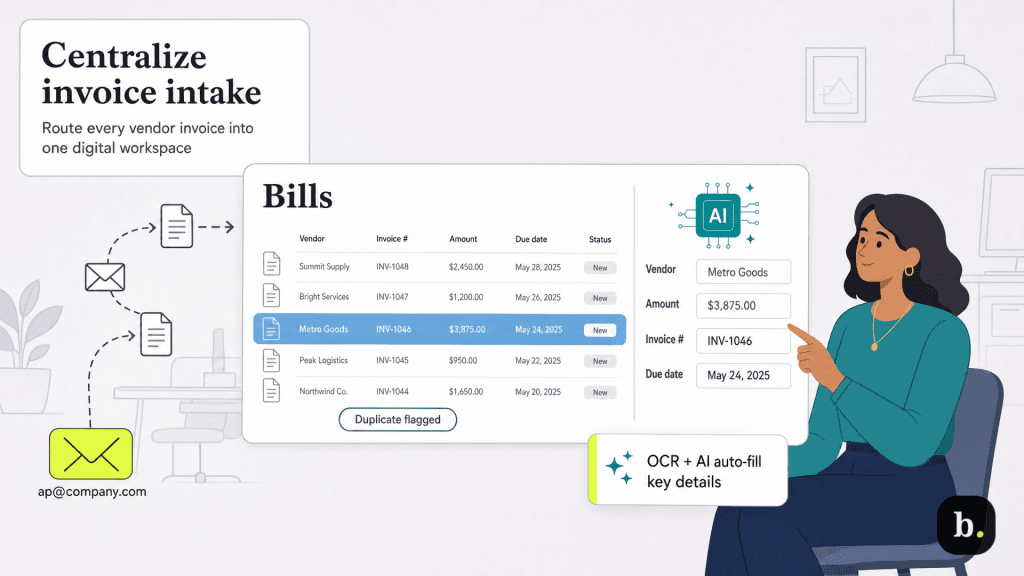
You can’t automate a messy intake. The foundation of an efficient AP process is getting every invoice into one place, in a consistent format, as soon as it arrives.
Start by centralizing how invoices come in. Instead of letting bills scatter across personal inboxes and desk drawers, route them to a single destination; this is often a dedicated email address that forwards directly into your accounting software. Most modern accounting platforms let you email or upload invoices straight into a bills workspace, where they’re stored digitally and matched to the right vendor.
From there, automated data capture does the tedious part. Using optical character recognition (OCR) and increasingly AI-assisted extraction, the software reads each invoice and pulls out the vendor name, amount, invoice number and due date, so you’re reviewing pre-filled fields rather than typing them from scratch. This is also where duplicate detection earns its keep, flagging a bill that looks like one you’ve already entered before it slips through to payment.
Xero’s bill management tools illustrate how this stage works in practice: you can forward bills from your email or upload files directly into Xero, have key details captured automatically, set up repeating bills for recurring vendors so you don’t recreate them each month and flag potential duplicates, all of which keeps the intake clean before anything moves downstream.
Once invoices are captured, the next question is who approves them before payment. For very small teams this often happens informally, but informal approvals are exactly where errors and fraud creep in. A structured approval workflow adds control without adding much friction.
Good approval automation does a few things. It routes bills to the right person based on rules you set (by amount, vendor or category), it records who approved what and when, and it separates the person who enters a bill from the person who authorizes payment. That separation, known as segregation of duties, is one of the simplest and most effective internal controls a small business can adopt. When one employee can both create and pay a bill with no oversight, the risk of error or fraud climbs sharply.
This is a strength of doing AP inside a single accounting system rather than across disconnected tools. In Xero, for example, the person who prepares a payment and the person who approves it can be governed by different user permissions, so authorization to actually release funds is reserved for designated users. A bookkeeper can queue bills for payment while the owner retains final sign-off, preserving control over cash going out while still delegating the busywork.
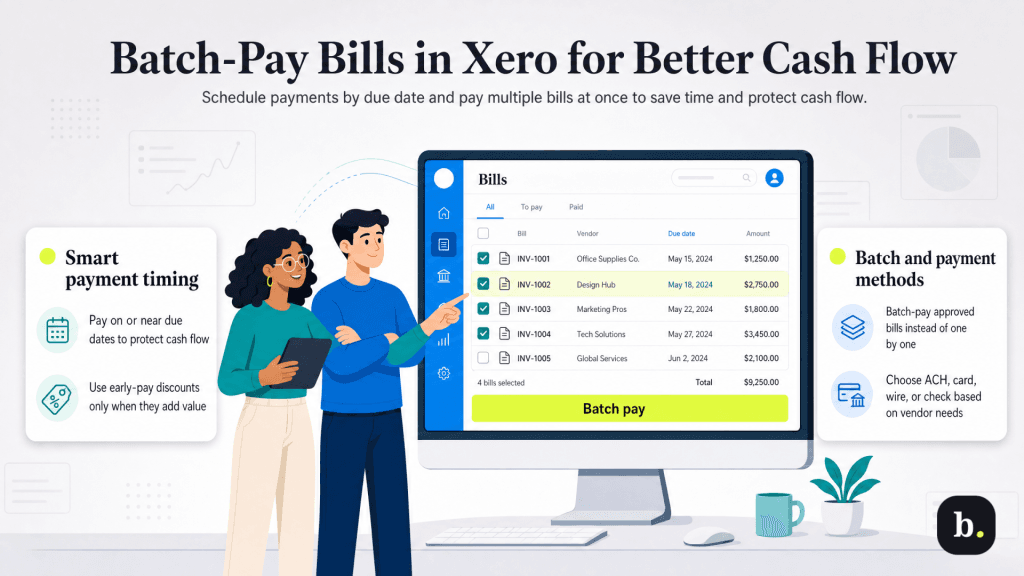
This is the stage where automation saves the most visible time. Instead of paying bills one at a time as they cross your desk, you schedule and pay them in organized batches.
Two ideas matter here. The first is payment timing. Paying too early ties up cash you could be holding; paying late risks fees and strained vendor relationships. The goal is to pay on or near the due date, unless a vendor offers an early-payment discount worth capturing. Tracking due dates and planned payment dates lets you time payments deliberately rather than reactively. The second is batching, or grouping multiple approved bills and paying them together, rather than initiating each transaction separately.
Xero supports both common approaches to paying multiple bills. With the traditional batch method, you select the bills you want to pay, then create and export a payment file that you upload to your online banking; each supplier receives a single payment and the bills are marked as paid in Xero.
Alternatively, Xero’s online bill payments – processed through its payments partner, Melio – let you pay U.S. suppliers in USD directly from within Xero by ACH, wire, debit or credit card, or a mailed check, without exporting a file to your bank. Online bill payment is available across Xero’s pricing plans, with standard ACH payments included, and faster or alternative delivery methods carrying a per-bill fee.
Choosing a payment method comes down to how your vendors prefer to be paid and how much speed and control you need. ACH is typically the low-cost default; cards can help you manage cash-flow timing; checks remain necessary for some suppliers. The advantage of running all of this through your accounting software is that every payment is recorded against the right bill automatically, which sets up the final stage.
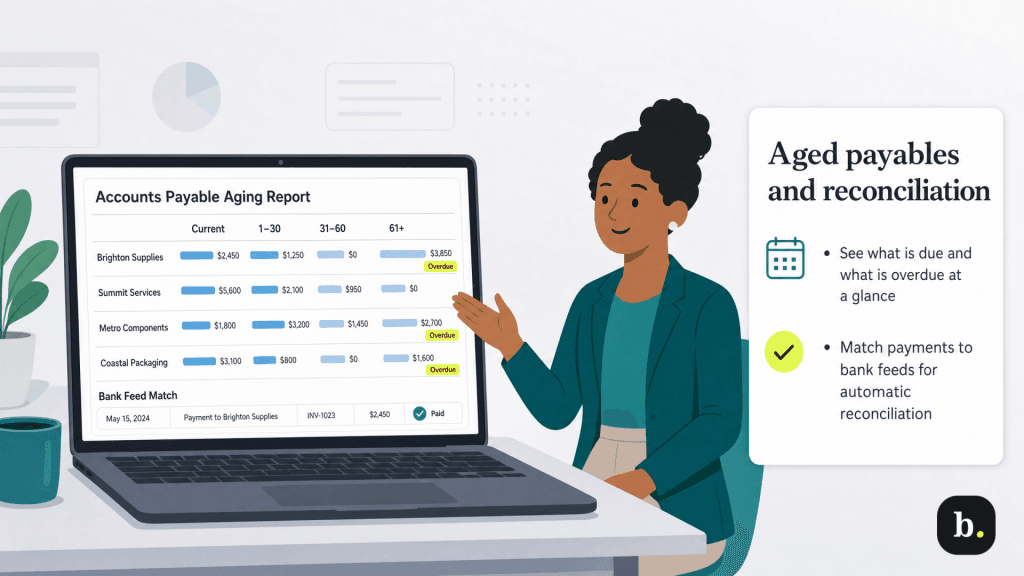
Automation isn’t finished when a payment goes out. The last stage is keeping a clear, current picture of what you owe and making sure your books match reality.
The core tool here is the accounts payable aging report (often called aged payables), which groups your outstanding bills by how soon – or how overdue – they are. A glance tells you what’s due this week, what’s coming and whether anything has slipped past its date. That visibility is what actually prevents late fees, rather than relying on memory or a stack of paper.
Reconciliation is the other half. When payments are matched against your bank feed, your records stay accurate without manual cross-checking. In Xero, paying a bill through the system marks it as paid and creates a reconciliation item against your bank transactions, so the loop closes automatically. You can run an Aged Payables report at any time for an up-to-date view of bills, credit notes and overpayments outstanding, turning AP from a source of surprises into a reliable input for cash-flow planning.
The four-stage workflow above is platform-agnostic—the principles hold whatever tool you use. When you’re evaluating specific software, weigh these factors:
Xero is one option in this category, with bill capture, approval permissions, batch and online payments, and automated reconciliation built into its accounting platform. It’s worth comparing against dedicated AP tools and other accounting suites to find the fit for how your business works.
Automating accounts payable is a workflow you build in stages. Capture invoices in one place, route them through clear approvals, schedule and batch your payments, and keep a live view of what’s outstanding. Each stage removes a little manual effort and a little risk, and together they free up time and cash that’s better spent elsewhere. Handling the full cycle from bill capture through approvals, payments and reconciliation can help businesses keep their workflow connected, so records stay current as the work gets done.
