Business.com aims to help business owners make informed decisions to support and grow their companies. We research and recommend products and services suitable for various business types, investing thousands of hours each year in this process.
As a business, we need to generate revenue to sustain our content. We have financial relationships with some companies we cover, earning commissions when readers purchase from our partners or share information about their needs. These relationships do not dictate our advice and recommendations. Our editorial team independently evaluates and recommends products and services based on their research and expertise. Learn more about our process and partners here.
Learn what happens between authorization and funding, what can slow down your deposits and how to get paid faster.


When a customer swipes, dips or taps a credit card at your register (or enters their card details online), the transaction appears to happen instantly. The payment is approved, the receipt prints or the confirmation screen appears, and the sale feels complete. At least to the customer.
But the money from that transaction doesn’t land in your bank account right away. There’s a gap between when a card payment is authorized and when the funds actually settle into your account — and for many businesses, that timing matters more than people realize.
This guide walks through the full credit card payment processing lifecycle, explains what affects settlement timing and shares what you can do to get paid faster.
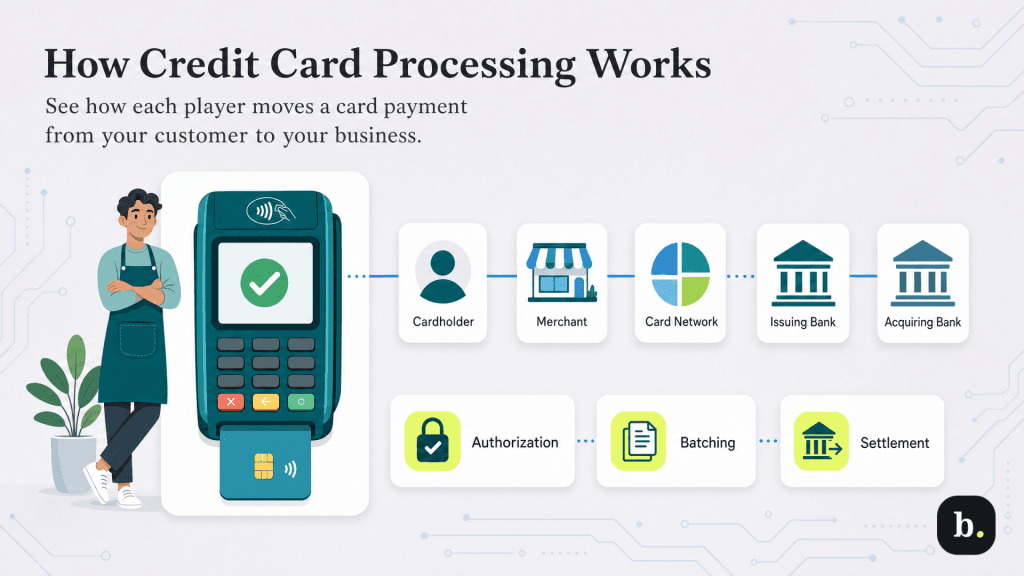
Every time your business accepts credit cards, multiple parties are involved behind the scenes, each playing a specific role: the cardholder, the merchant, the payment processor, the card network, such as Visa, Mastercard, American Express or Discover, the issuing bank (the customer’s bank) and the acquiring bank (your business’s bank).
Before the funds reach your business bank account, the transaction moves through three distinct stages: authorization, batching and settlement. Here’s what each step entails.
Authorization is the step that happens in real time when a customer presents their card at the point of sale or enters their payment details online. When a customer presents their card or submits their payment information, the payment terminal or online checkout system sends the transaction details to your payment processor, which routes the request through the appropriate card network to the cardholder’s issuing bank.
That bank checks whether the card is valid, whether the account has sufficient funds or available credit and whether the transaction passes credit card fraud screening. If everything is approved, the bank sends an authorization code back through the same chain, and the transaction is authorized.
This entire process typically takes only a few seconds. But an authorization doesn’t mean money has actually moved yet. The issuing bank has placed a hold on the cardholder’s funds for the transaction amount, while the purchase works its way through the rest of the settlement process. The funds or available credit are there — they’re just being set aside until settlement is complete.
Throughout the business day, each authorized transaction is stored by your payment terminal, POS system or online checkout platform. At the end of the day, or at another time you configure, those authorized transactions are grouped together and sent to your payment processor as a single batch. This process is called batching, or “batch closing.”
Many businesses batch once a day, typically at the close of business. Many of the best POS systems handle batching automatically at a preset time, while others require manual batch closing. The timing of your batch matters because the settlement process doesn’t begin until the batch is submitted. If you forget to close a batch or your system’s auto-batch time is set too late, getting paid may take longer.
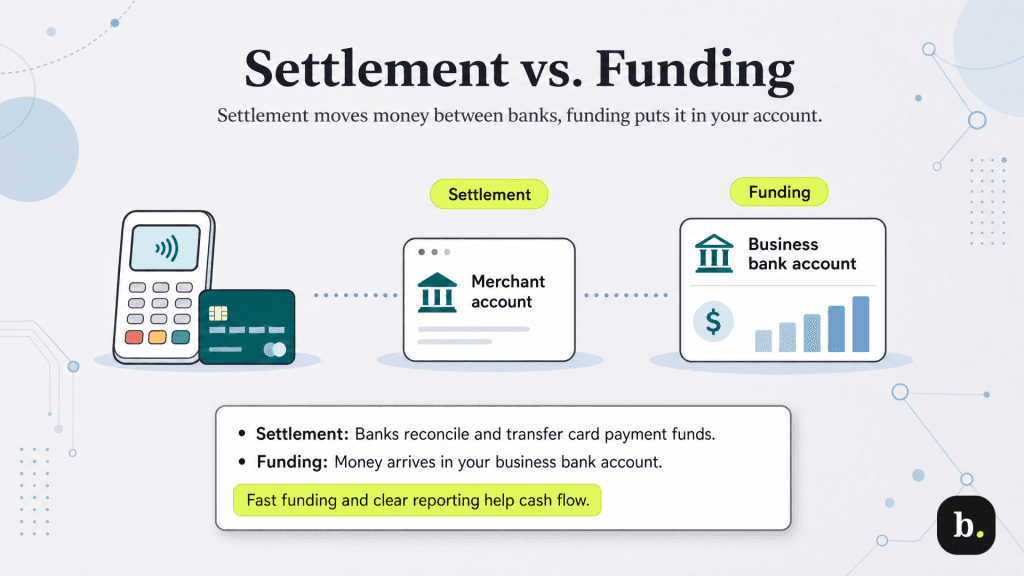
Once your processor receives the batch, the settlement process begins. Each transaction moves through the card network to the appropriate issuing banks, where the transactions are finalized. From there, the funds work their way back through the payments system to your acquiring bank, then into your merchant account before landing in your business bank account. That’s when the money is actually yours to use.
The terms “settlement” and “funding” are often used interchangeably, but they’re not quite the same thing.
For most small businesses using standard processing, those steps happen close together, so the difference usually matters more on paper than it does in day-to-day operations.
For most small businesses, funds from card transactions settle within one to three business days after the batch is submitted. Many businesses receive next-business-day funding, meaning a batch submitted on Monday evening may show up in your account on Tuesday or Wednesday.
Several factors influence where you fall within that range, including the following:
While the general range of one to three business days applies broadly, settlement speed can vary depending on whether a customer pays with a traditional card or one of today’s digital payment methods. The following table provides a general reference.
Payment type | Typical settlement | Notes |
|---|---|---|
Credit cards | 1-2 business days | Standard for most processors |
Debit cards | 1-2 business days | Often slightly faster; some processors offer same-day for debit |
Online/e-commerce | 1-3 business days | May add a day depending on gateway and fraud review |
Mobile wallets (Apple Pay, Google Pay) | 1-2 business days | Settles on the same timeline as the underlying card |
Debit card transactions sometimes settle slightly faster than credit cards because the funds are drawn directly from the cardholder’s bank account rather than extended as credit, but in practice, the difference is often negligible. Transactions made through a mobile wallet, such as Apple Pay or Google Pay, are processed as standard card transactions using the card stored in the wallet, so their settlement timeline usually mirrors that of the underlying card type.
Businesses that need even faster access to funds may be able to shorten that timeline. Many of the best credit card processors offer accelerated funding options that can move money into your account sooner than the standard one-to-three-day timeline.
In many cases, the processor makes funds available before the full bank-to-bank settlement cycle is complete, then reconciles the underlying transactions on the back end. This added convenience usually comes at a cost, whether that’s an extra per-transaction fee, a percentage-based fee for instant deposits or a flat monthly charge for faster funding.
Whether accelerated funding makes sense depends on your cash flow needs. Businesses that operate on thin margins with daily expenses, such as restaurants purchasing fresh ingredients or retailers restocking fast-moving inventory, may find the added cost worthwhile for the improved cash flow predictability. Seasonal businesses that experience revenue spikes may also benefit during peak periods. But for businesses with healthy cash reserves and predictable expenses, the standard settlement timeline is often sufficient.
While one to three business days is typical, several circumstances can push settlement times beyond that window.
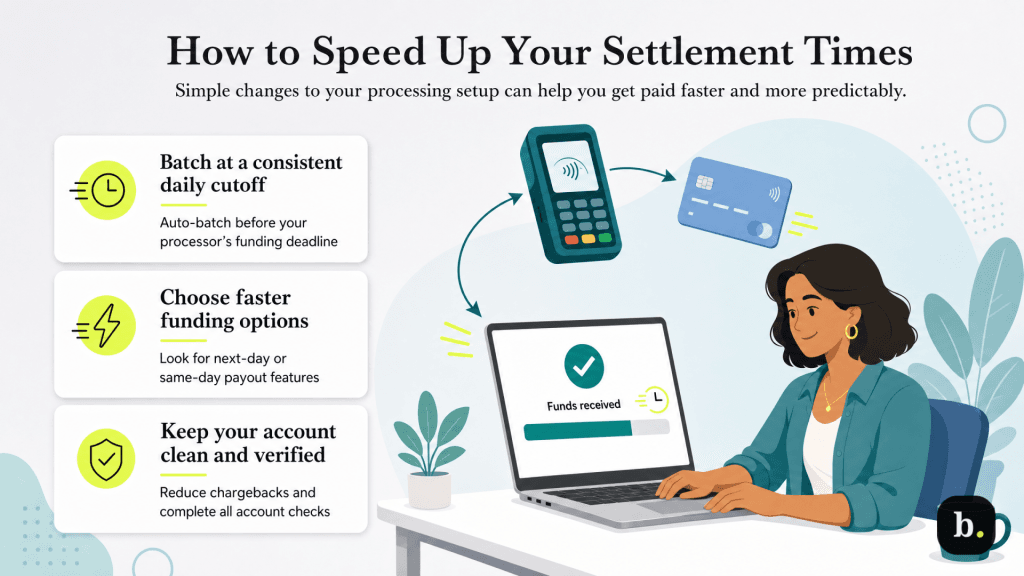
While you can’t control how banks move money behind the scenes, there are several practical steps you can take to make sure you’re receiving funds as quickly as your processing setup allows.
Settlement isn’t just something merchants need to understand; customers often have questions about pending charges and authorization holds, too.
When a customer checks their bank or credit card statement shortly after a purchase, they’ll often see the charge listed as “pending.” This reflects the authorization hold — the issuing bank has reserved the funds, but the transaction hasn’t fully settled yet. The charge typically moves from “pending” to “posted” once settlement is complete, which often takes one to three business days.
Pre-authorization holds work differently and are common in industries like hospitality, car rentals and fuel purchases. When a hotel places a hold on a guest’s card at check-in, for example, the hold amount may exceed the final charge. The difference between the hold and the actual charge doesn’t always disappear immediately; it can take several business days for the issuing bank to release the unused portion, which sometimes causes confusion for the customer.
If your business uses pre-authorization holds, be prepared to explain the process to customers who see a larger-than-expected pending charge on their statement. A brief note on the receipt or at checkout explaining how holds work can prevent a lot of unnecessary questions.
For most small businesses, credit card transactions settle within one to three business days — a timeline that’s well established across the payments industry. Every transaction moves through authorization, batching and settlement, and each stage can slightly speed up or slow down how quickly funds reach your account.
The biggest factors you can control are choosing a processor with competitive funding timelines, batching consistently and before your processor’s cutoff time and maintaining a clean processing history. If your business needs faster access to funds, same-day and instant funding options are increasingly available, though they usually come at an added cost.
Settlement tends to feel much more predictable once you understand where the delays usually happen. Weekend and holiday gaps are part of the payments cycle, not a sign that something’s wrong, and new merchant accounts often come with a little extra scrutiny during those first 30 to 90 days. Businesses that plan for that early on — whether that means keeping a modest cash buffer, batching at the same time each day or simply watching cutoff times more closely — usually have a much easier time managing cash flow. After that, settlement becomes more routine than something you actively think about.
