Business.com aims to help business owners make informed decisions to support and grow their companies. We research and recommend products and services suitable for various business types, investing thousands of hours each year in this process.
As a business, we need to generate revenue to sustain our content. We have financial relationships with some companies we cover, earning commissions when readers purchase from our partners or share information about their needs. These relationships do not dictate our advice and recommendations. Our editorial team independently evaluates and recommends products and services based on their research and expertise. Learn more about our process and partners here.
As your business grows past 100 employees and multiple departments, controlling who sees what financial data becomes both critical and complex.


This article is sponsored by Intuit.
When a company has a dozen employees, managing access to financial systems is straightforward. The owner, an accountant and maybe a bookkeeper can share a single accounting platform without much concern about who sees what. But as organizations scale past 100 employees and begin operating across multiple departments, locations or subsidiary entities, the question of data access becomes far more consequential.
Consider the risks: your sales team probably shouldn’t have visibility into payroll data. A subsidiary’s financial statements may need to remain isolated from other business units. External accountants and auditors need enough access to do their work, but not a byte more. Without the right controls in place, sensitive information leaks across organizational boundaries, creating compliance liabilities, competitive risks and a fertile environment for fraud.
This guide walks through how growing organizations can implement role-based access control (RBAC) and data segregation strategies within their ERP systems to protect sensitive financial information while still enabling the collaboration their teams need to operate effectively.
Data segregation is the practice of restricting access to information based on organizational role, department or entity. It’s an IT best practice and a business requirement that touches security, compliance and operational efficiency.
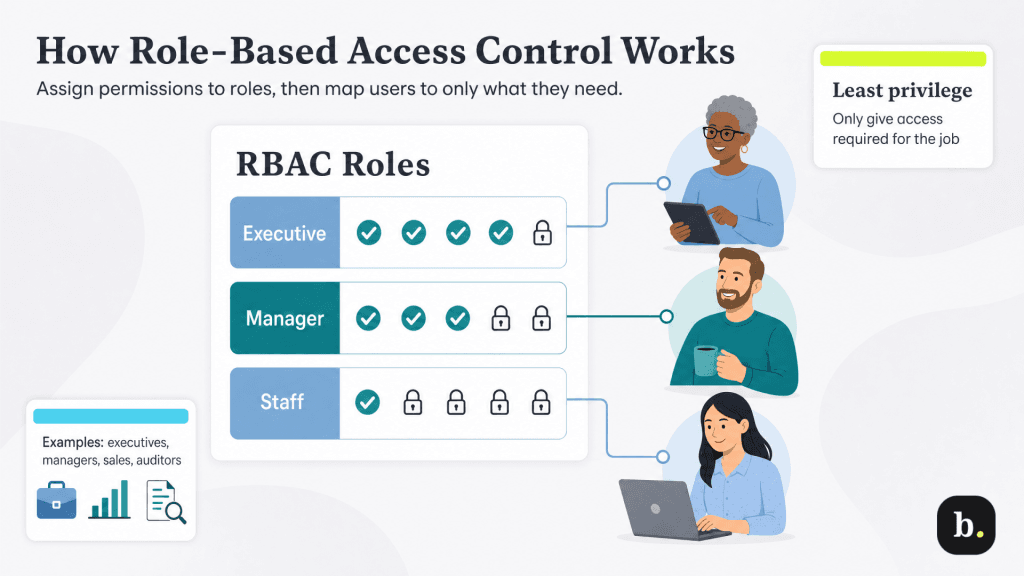
Role-based access control is a permissions model that assigns system access based on a user’s job function rather than granting permissions to individuals on a case-by-case basis. Instead of deciding that Jane in accounting can view invoices and Bob in sales can see customer records, you define roles like “Accounting Manager” or “Sales Representative”. You would then attach a certain set of permissions to those roles; when users are assigned to the appropriate role, they would inherit its permissions automatically.
The underlying principle is called “least privilege”: every user gets the minimum level of access required to perform their job, and nothing more. This differs sharply from the all-or-nothing approach that many small businesses fall into, where employees either have full system access or are locked out entirely.
While every organization’s role hierarchy will look a little different, most mid-sized businesses share a common pattern:
Leading ERP platforms like Intuit Enterprise Suite come with predefined roles, including company administrator, bookkeeper, project manager and payroll manager. They also allow administrators to create custom roles with specific permissions tied to features and transaction types. Roles and permissions can be managed across multiple entities from a single login, which is particularly valuable for organizations with complex structures.
Within each role, permissions typically operate across several dimensions. At the most basic level, users may be granted the ability to view, create, edit, delete or approve records. But effective RBAC goes deeper: you’ll want to distinguish between report access and transaction access (a user might need to view financial summaries without being able to modify individual journal entries,) and you’ll need data export controls to prevent unauthorized bulk downloads of sensitive records.
For example, a department manager might have full create-and-edit access to expense reports within their department, view-only access to company-wide budget summaries and no access to payroll records or bank account details. Mapping out a permission matrix like this before configuring your system prevents the common pitfall of granting overly broad access during initial setup and trying to rein it in later.
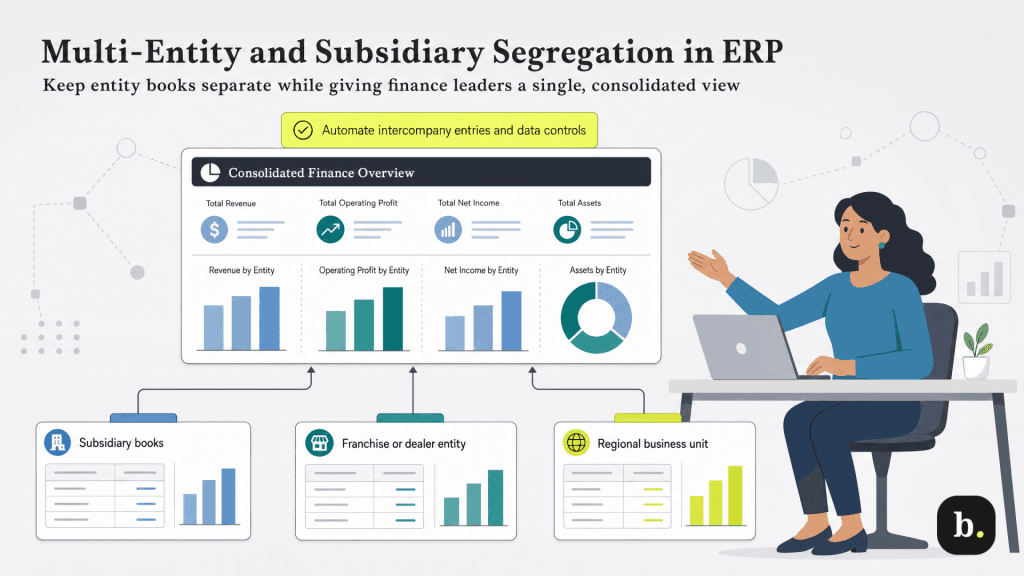
When a business operates through multiple legal entities such as subsidiaries, holding companies, franchises or geographically distinct operations, each entity often has legal, competitive or operational reasons to maintain financial independence. A subsidiary may be required by law to maintain its own books. Franchise or dealer networks may include competitors who should never see each other’s financial performance. And business units operating in different regulatory environments may need to comply with different data-handling requirements.
At the same time, leadership needs consolidated visibility. The CFO needs to see how the whole portfolio is performing; the board needs consolidated financial statements; and the parent company needs to manage intercompany transactions and elimination entries for accurate reporting. The challenge is delivering both operational isolation at the entity level and consolidated intelligence at the top.
Modern ERP platforms address multi-entity management through a shared-infrastructure model. Each entity maintains its own general ledger and transactional data, but all entities live within a unified platform that enables cross-entity reporting and management from a single interface.
Intuit Enterprise Suite takes this approach natively. Administrators can manage all entities from one account with a dropdown entity switcher, support up to 500 users with customized access permissions and run consolidated financial statements across the entire portfolio. The platform handles intercompany transactions automatically as well; when one entity invoices another, matching receivable and payable entries are created without manual journal entries, and elimination entries for consolidated reporting are generated automatically. This is a meaningful departure from legacy approaches, such as maintaining separate QuickBooks subscriptions for each entity and manually reconciling intercompany transactions at month-end.
Intercompany billing is one of the most sensitive areas in multi-entity accounting, and it’s also where poor access controls cause the most confusion. When Entity A charges Entity B for shared services, the system needs to create matching entries on both sides of the ledger, maintain a clear audit trail, and ensure that users at Entity B can see the invoice without gaining access to Entity A’s broader financial data.
A properly configured ERP will automate these transactions through predefined intercompany account mappings, generate the elimination entries needed for consolidated reports and restrict cross-entity visibility so that operational users only see their own entity’s data. Finance leaders can then view the full picture through consolidated dashboards without compromising entity-level isolation.
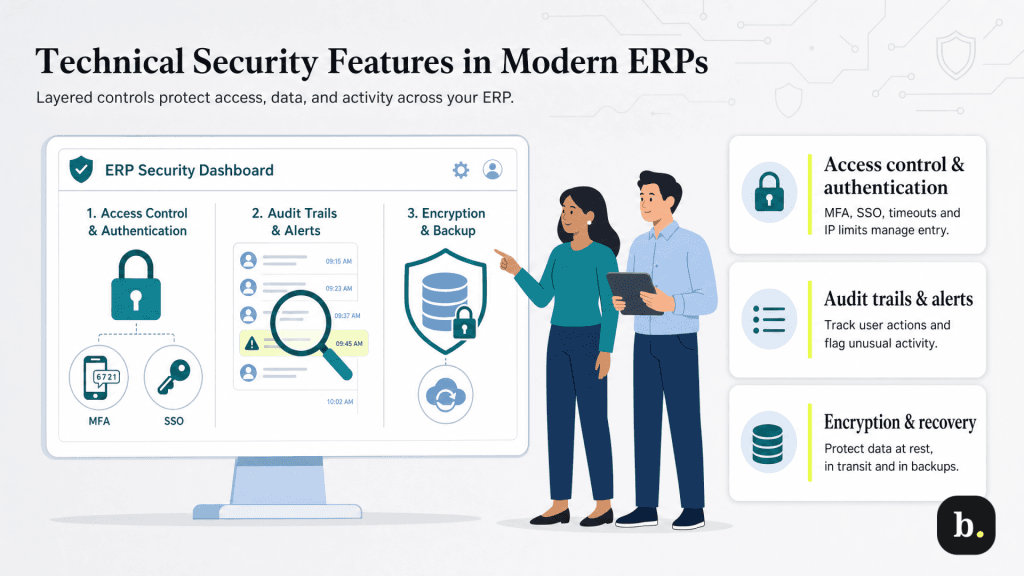
RBAC defines what users can do once they’re inside the system. Authentication controls determine who gets in at all. For growing organizations, several layers of authentication security should be non-negotiable:
Comprehensive audit trails are essential both for compliance and for detecting unusual behavior before it becomes a breach. An effective audit system tracks who accessed what data and when, maintains change logs for sensitive transactions (particularly journal entries, payment approvals and account modifications), and generates alerts for unusual access patterns, such as a user suddenly downloading large volumes of data or accessing records outside their normal scope.
These logs also serve a practical purpose during external audits. When an auditor asks to verify who approved a specific transaction or when a particular account was modified, a detailed audit trail provides the answer instantly.
Data encryption protects information both at rest (stored on servers) and in transit (moving between user devices and the platform). Cloud-based ERP systems like Intuit Enterprise Suite use bank-grade 256-bit encryption, the same standard used by major financial institutions.
For especially sensitive fields like Social Security numbers, bank account details and routing numbers, field-level encryption adds an additional layer of protection. Field-level encryption ensures that even users with broad system access cannot view these specific data points unless explicitly authorized. Backup security and disaster recovery protocols should also be evaluated during ERP selection to ensure that your data remains protected and recoverable even in the event of a system failure or security incident.
Implementing data segregation effectively requires as much organizational planning as it does technical configuration. These best practices can help ensure a smooth rollout:
Even organizations that invest in RBAC and data segregation can undermine their own efforts through a few common mistakes.
In general, beware of overly complex permission structures that frustrate users to the point of workaround behavior. If accessing a needed report requires three levels of approval, people will find shortcuts like emailing spreadsheets, screenshotting dashboards or simply asking a colleague with broader access to pull the data. The most secure system is one that makes the right behavior the easy behavior.
