Business.com aims to help business owners make informed decisions to support and grow their companies. We research and recommend products and services suitable for various business types, investing thousands of hours each year in this process.
As a business, we need to generate revenue to sustain our content. We have financial relationships with some companies we cover, earning commissions when readers purchase from our partners or share information about their needs. These relationships do not dictate our advice and recommendations. Our editorial team independently evaluates and recommends products and services based on their research and expertise. Learn more about our process and partners here.


When a business is small enough, the books mostly take care of themselves. One person knows every transaction and anything that looks strange can be sorted out from memory. As your business grows, though, there are more transactions, more people spending money and more invoices outstanding at any given moment. Suddenly, nobody can say with confidence what last month actually looked like.
The month-end close is the set of steps that turns a month of raw activity into financial statements you can trust and act on. Done well, it takes a few days and produces numbers current enough to steer by. Done poorly, it drags into the middle of the following month, at which point the picture it produces is a historical document rather than a management tool.
This checklist walks through what a complete close involves, where growing businesses typically get stuck, how to build a cadence your team can sustain and the accounting software tools that can help make the whole process smoother.
The month-end close is the process of finalizing your accounting records for a completed month. You verify that every transaction has been recorded, categorized and reconciled against outside evidence; make any adjusting entries needed to place income and expenses in the correct period; and then produce financial statements from the result.
It differs from the year-end close mainly in scope and stakes. The year-end close closes the books for tax filing and, if applicable, for lenders, investors or auditors. The month-end close is internal. Nobody outside the business requires it. That is why it tends to slip when the team is busy, but that slip can be expensive.
The relationship between the monthly and year-end close is important. Twelve disciplined monthly closes make the year-end close a formality, while 12 skipped ones make it an excavation. Businesses that skimp on the monthly work are just pushing it until the year-end close, passively choosing to do the same volume of work under worse conditions, further from the events in question, with a filing deadline attached.
A close needs to be both accurate and timely. Accuracy without timeliness produces a set of statements describing a month you can no longer influence.
Federal Reserve research on small business finances found that more than half of small employer firms applied for financing in the year leading up to the 2025 Small Business Credit Survey, most often to meet operating expenses or to fund an expansion. Both of those conversations go better with recent statements in hand. The same survey found that only about four in 10 applicants received the full amount they sought, an outcome influenced by the ability (or lack thereof) to produce clean, current financials.
Beyond financing, a late close degrades every decision that depends on knowing where the money went, including pricing, hiring, whether a product line is actually profitable and whether a cash squeeze in six weeks is coming. A number you receive on the 25th about the previous month doesn’t give you much actionable data.
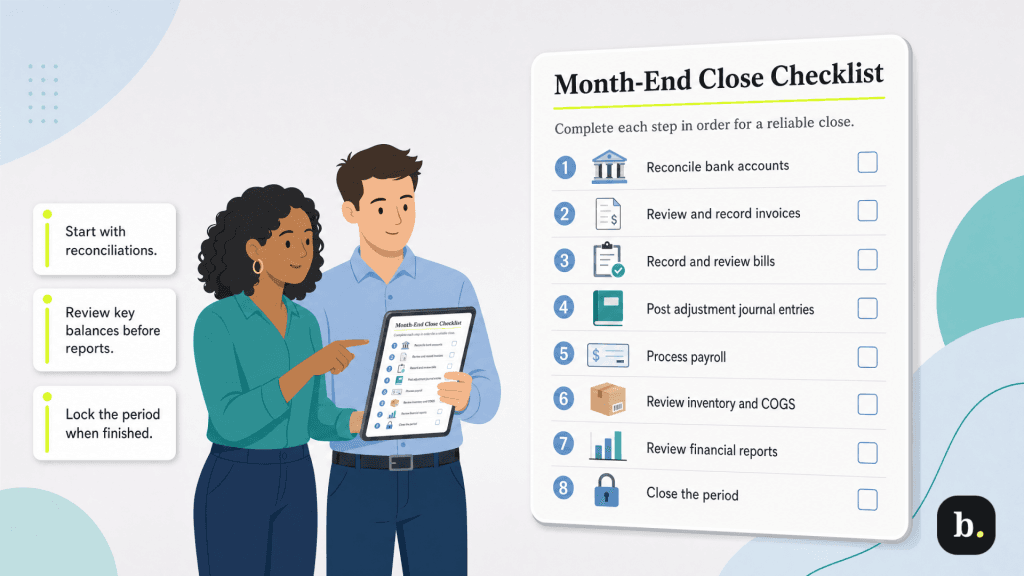
This monthly checklist should be performed in order. Each step in this month-end checklist depends on the accuracy of the steps before it, and running them out of sequence is the most common reason a close has to be redone. Not every step applies to every business, but the sequence still matters.
Start here, because everything downstream assumes it. Match every transaction in your accounting records against the corresponding bank and credit card statements. Every line should appear in both places, with the same date and the same amount, and the ending balances should agree.
Investigate discrepancies rather than plugging them. A transaction in your books but not on the statement may be an outstanding check, a duplicate entry or a payment that never actually went through. A transaction on the statement but not in your books is usually something nobody told accounting about, which is worth knowing regardless of the dollar amount.
This step is also where the best accounting software earns its keep. In QuickBooks Online, connected bank and credit card accounts feed transactions automatically, and bank rules can categorize recurring items based on conditions you define (such as vendor, amount, account, transaction type.) A rule can support up to five conditions, so you can be as specific as “money out, from the operating account, under $250, from this vendor.”
Note that rules can be set to confirm matching transactions automatically, which moves them straight into your books without review. That is a real time-saver for predictable, low-risk items like a monthly software subscription, but it’s a liability for anything variable. Reserve auto-confirmation for transactions you would not scrutinize anyway, and leave the rest in the review queue where a human sees them.
Run an aging report and read it properly. Confirm that every invoice you issued during the month was actually recorded, that payments received were applied to the right invoices and the aging buckets reflect reality.
The close is a natural forcing function for collections. An unpaid invoice that has exceeded 60 days is a problem that gets harder to resolve every month it ages, and the monthly review is where you catch it while catching it still helps. If a receivable is genuinely uncollectible, the close is also when you write it off rather than carrying a fictional asset forward.
The mirror image of receivables, with an added wrinkle: accrual accounting requires you to record expenses in the period you incurred them, not the period you paid them. A contractor who worked in March and invoices you in April is a March expense.
This is where a close most often produces a misleading picture. Unrecorded expenses do not just understate costs, they overstate profit, which is the specific error most likely to cause a business to make a decision it regrets. Chase down the invoices that have not arrived yet and accrue for what you know you owe.
Adjusting entries reconcile cash reality with accounting reality. The recurring ones for most growing businesses:
Most of these repeat identically month to month, which makes them ideal candidates for recurring transaction templates in your accounting software. Set them once and stop rebuilding them from scratch every cycle.
Confirm that payroll expense in your books matches what your payroll provider actually processed, and that the associated liabilities (taxes withheld, employer contributions, benefit deductions) are recorded and either paid or accrued.
Payroll tax liabilities deserve particular attention because the penalties for getting them wrong accrue to the business rather than to the provider. If payroll runs through a separate system, this reconciliation is the seam where errors hide, making it worth checking every month.
For product businesses, confirm that recorded inventory matches physical inventory and that cost of goods sold (COGS) reflects what actually moved. A full physical count every month is unrealistic for most operations. Instead, cycle counting a subset of SKUs each month is the practical compromise.
Persistent variances between recorded and actual inventory are rarely a counting problem. They usually indicate shrinkage, receiving errors or a process gap somewhere upstream, which is useful information the close surfaces almost as a byproduct.
With the underlying records verified, produce the income statement, balance sheet and cash flow statement. Then read them, which is the step a lot of people skip.
Compare each against the prior month and the same month last year. Investigate anything that moved sharply without an explanation you already know. This variance review is the closest thing the close has to a self-test; an error that survived the earlier steps will usually announce itself here as a number that makes no sense. If revenue is up 30 percent and your COGS is flat, one of those two figures is wrong.
Once the statements are final, prevent the closed period from changing. Without a lock, a backdated entry in August rewrites the July statements you already distributed, and nobody finds out until the numbers in two documents disagree.
QuickBooks Online handles this through a closing date rather than a discrete “close the month” command. In your account settings, you turn on the “close the books” setting and enter a closing date. Transactions on or before that date can then be changed only after a warning, or only with a password, depending on which security option you choose.
Legitimate corrections to closed periods happen. The point is that they happen deliberately, by someone with authority, rather than by accident.
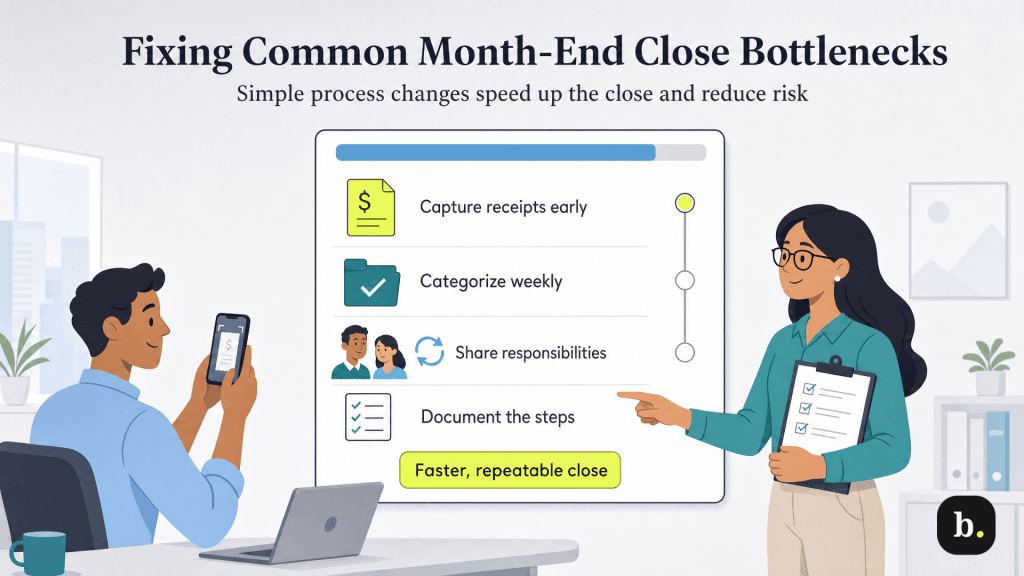
Most slow closes are slow for the same handful of reasons, and none of them are really accounting problems.
The close stalls while someone emails three people about a charge from five weeks ago. Capture documentation at the moment of the transaction. Most accounting platforms, QuickBooks Online included, accept a photo of a receipt from a phone and attach it to the transaction. The discipline is worth more than the feature; the tool only works if people use it in the parking lot rather than at month-end.
Uncategorized transactions were mentioned above, and it’s an issue worth repeating because it is the most common single cause of a slow close. A weekly categorization habit is the highest-return process change available to most growing businesses.
In many growing businesses the close lives entirely in the head of a bookkeeper or the owner. This is a genuine business risk, not just an inefficiency; when that person is sick, on vacation or gone, the close does not happen. Documenting the process is the mitigation, and it costs one afternoon.
A close that exists only as habit gets performed differently each month, which makes it impossible to improve or hand off. Write the steps down. A shared document listing each task, its owner and its due date is not sophisticated, and it is most of the benefit.
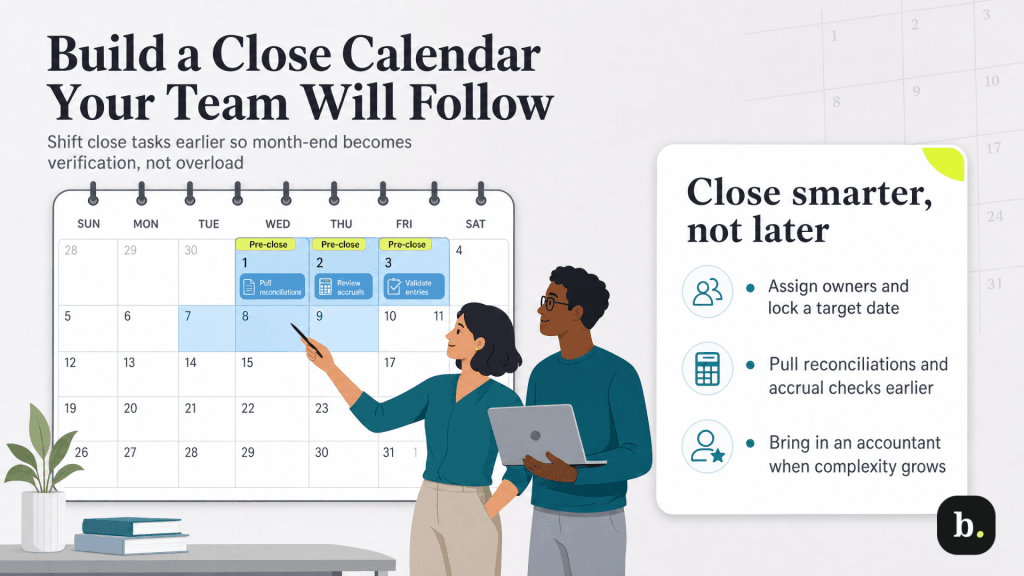
A checklist describes what to do; a calendar determines whether it happens. Assign an owner to every task. Then move work earlier. A meaningful share of the close does not require the month to be over: reconciling through the 25th, categorizing transactions weekly and confirming recurring accruals can all happen before month-end, which converts the close from a wall of work into a short verification pass. Teams that close quickly are generally not working faster on the first business day; they are arriving with less left to do. Set a target date and publish it, because without a stated deadline the close expands to fill whatever space it is given.
Finally, know when to bring in help. If your close consistently overruns despite a documented process, or if you have crossed into territory involving inventory, multiple entities, revenue recognition or accrual complexity you are not confident about, an accountant is a better investment than another month of guessing. Many work directly in your existing books, which means bringing one in is a matter of granting access rather than migrating anything.
