Your free business.com+ membership unlocks exclusive tech deals and advisor support
Join Free
BDC Hamburger Icon

Menu

Close
BDC Logo with Name
Search Icon
Search Icon
Advertise with us
Advertising Disclosure
Close
Advertising Disclosure

Business.com aims to help business owners make informed decisions to support and grow their companies. We research and recommend products and services suitable for various business types, investing thousands of hours each year in this process.

As a business, we need to generate revenue to sustain our content. We have financial relationships with some companies we cover, earning commissions when readers purchase from our partners or share information about their needs. These relationships do not dictate our advice and recommendations. Our editorial team independently evaluates and recommends products and services based on their research and expertise. Learn more about our process and partners here.

Best Drag-and-Drop Website Builders of 2026

author image
Written by:
Adam Uzialko, Senior Editor
author image
Editor verified:
Chad Brooks,Managing Editor
Last Updated Jul 07, 2026
Business.com earns commissions from some listed providers. Editorial Guidelines.
9.1 /10
Editor's rating
Best All-in-One
  • Starts at $9.99 per month
  • Drag-and-drop editor inside a full business ecosystem
  • Free plan available
Visit Site
Links to GoDaddy
squarespace logo
Squarespace
9.2 /10
Editor's rating
Best Overall
  • Starts at $19 per month
  • Fluid, design-forward visual editor
  • 14-day free trial (no credit card)
wix logo
Wix
9.0 /10
Editor's rating
Best for Design Freedom
  • Starts at $17 per month
  • Pixel-level drag-and-drop canvas + 900+ templates
  • 14-day money-back guarantee; free plan available
Shopify logo
Shopify
9.0 /10
Editor's rating
Best for E-commerce
  • Starts at $29 per month
  • Section-based store editor + extensive theme library
  • 3-day free trial, then $1/month for the first 3 months
Image related to the service.
WordPress.com
9.0 /10
Editor's rating
Best for Customization
  • Starts at $4 per month
  • Block-and-pattern editor + 60,000+ plugins
  • Free plan available
Table Of Contents Icon

Table of Contents

Open row

Drag-and-drop website builders let you design a professional, branded site by moving elements around a visual canvas — no code, no developer, no design degree required. The best of them pair an intuitive editor with polished templates so you can see exactly what your visitors will see as you build. These are our top picks for business owners who want hands-on control over how their website looks and works.

At business.com, we’ve spent years advising entrepreneurs, creating actionable guides for obtaining funding and managing business finances, and comparing and contrasting leading software and services to identify the best financial tools for small and growing businesses. Our playbooks and explainers are packed with advice from real business lenders, accountants, credit card processing experts, tax advisers and other finance professionals.

To inform our financial software and service recommendations, we put ourselves in the shoes of business owners and test each product’s effectiveness while taking into account its cost. Every review, whether it be for a credit card processing solution or invoicing software, is infused with our guiding principles: accuracy and objectivity. Learn more about our editorial process.

How We Decided

Tip Bulb

How We Decided

When examining the range of drag-and-drop website builders available today, we focused first on the editing experience: how intuitive the visual canvas is, how much freedom you have to position and style elements, and how closely the editor reflects the final...

MoreMore

When examining the range of drag-and-drop website builders available today, we focused first on the editing experience: how intuitive the visual canvas is, how much freedom you have to position and style elements, and how closely the editor reflects the final published result. We considered the quality and quantity of templates available as starting points, the depth of manual customization on offer, whether pages render responsively on mobile without extra work, and the availability of integrations and native business tools. Pricing and customer support also influenced our selections.

52

evaluated

9

researched

5

chosen

When examining the range of drag-and-drop website builders available today, we focused first on the editing experience: how intuitive the visual canvas is, how much freedom you have to position and style elements, and how closely the editor reflects the final published result. We considered the quality and quantity of templates available as starting points, the depth of manual customization on offer, whether pages render responsively on mobile without extra work, and the availability of integrations and native business tools. Pricing and customer support also influenced our selections.

52

evaluated

9

researched

5

chosen

Website builders make the web design process accessible, eliminating the need to work with developers in order to create a functional, branded website. The best drag-and-drop builders go a step further, letting you shape every section of a page visually, moving, resizing and restyling elements until the design matches what you had in mind. These platforms are our top picks thanks to their intuitive editors, strong template libraries and the balance they strike between ease of use and creative control.

Comparison Chart

BDC Ribbon
Our Top Picks for 2026
GoDaddy
Squarespace
Wix
Shopify
WordPress.com
Rating (Out of 10)9.19.29.09.09.0
Best for

Best All-in-One

Best Overall

Best for Design Freedom

Best for E-commerce

Best for Customization

Free trial

Free plan; 7 days on paid plans

14 days

14-day money-back guarantee; free plan includes Wix branding

3 days, then $1 per month for 3 months

Free plan

Starting monthly cost

$9.99 (required to publish site)

$19

$17

$29

$4

Editor

Drag-and-drop; AI starting point (Airo)

Drag-and-drop (fluid, section-based)

Drag-and-drop (free-form canvas)

Drag-and-drop (section-based store editor)

Block-and-pattern editor; page-builder plugins (Elementor, Divi)

App/plugin integrations

Integrations incl. WordPress, Stripe, Acuity

43 native extensions

800+ App Market

Thousands (Shopify App Store)

60,000+ plugins (all paid plans)

Payment processing

PayPal, Stripe, Square

Squarespace Payments or third parties

Wix Payments + 80 gateways

Shopify Payments or third parties

Stripe, PayPal (WooCommerce gateways on Commerce)

AI integration

Airo builder, logo, content, SEO

Blueprint AI setup, copy, product descriptions

Layout and content via language prompts

Sidekick assistant; Shopify Magic content

Built-in AI site assistant for content and design

Customer support

24/7 phone, text and chat

24/7 email and ticket; help center

24/7 support

24/7 chat (enhanced on higher tiers)

24/7 priority support (paid plans)

Transaction fee (standard)

Via chosen processor

2% on Basic; 0% on Core and up

Via chosen processor

2% on Basic (0% with Shopify Payments)

10% Personal / 8% Premium / 4% Business / 0% Commerce

Review Link
Scroll Table

Our Reviews

GoDaddy logo
Editor's Rating: 9.1/10
Visit Site
Links to GoDaddy

GoDaddy earns its “best all-in-one” designation by wrapping a drag-and-drop website builder inside a broader small-business ecosystem — domains, email, marketing, payments and more, all managed from one dashboard. The editor itself is approachable and section-based: you work with pre-built, customizable modules that you can rearrange, restyle and fill with your own content, which keeps the learning curve gentle for owners who have never built a site before.

Not every entrepreneur has the time or desire to build a site from the ground up, even with drag-and-drop tools in hand. That’s where GoDaddy’s Airo comes in: it generates a customized starting point — layout, sections and starter copy — after you answer a few questions about your business, so you begin from a working draft rather than a blank page and then refine it by hand in the editor. The surrounding toolset is where GoDaddy adds the most value: built-in SEO, email marketing, social campaigns and a marketing calendar, plus 24/7 phone and chat support that’s a genuine differentiator for owners who need help outside business hours. GoDaddy’s designs aren’t always as refined as the best-in-class competitors, but the breadth of bundled tools and the low barrier to entry make it a strong beginner-friendly, all-in-one option.

GoDaddy offers a free website builder plan; however, this does not allow connecting a custom domain, nor does it allow you to publish any sites you create. Still, the free plan lets you explore the tool as much as you’d like before upgrading. GoDaddy also offers several paid tiers that scale up from a basic informational site to a full e-commerce store.

PlanCostBest For
FreeFreeBuilding and exploring sites (cannot publish); includes a set of monthly AI credits.
Basic$9.99/moPublishing a live site, connecting a custom domain and basic marketing tools.
Premium$14.99/moMore publishing capacity, additional marketing tools and user access sharing.
Commerce$20.99/moSelling online with an integrated store, abandoned cart recovery and payment tools.
  • A genuinely broad set of bundled tools (domains, email, marketing, payments) makes GoDaddy a true all-in-one platform.
  • Airo provides a strong starting point so you don't have to build from scratch, then hands off to a drag-and-drop editor.
  • 24/7 phone and chat support (in English and Spanish) is a market-leading support offering.
  • Designs are solid but not as polished as the strongest competitors.
  • The drag-and-drop editor offers less design flexibility than competitors, keeping you closer to template defaults.
  • Many essentials — professional email, premium features, SSL — can carry additional costs, and renewal pricing isn't always clearly published.

GoDaddy received a 7.4 out of 10 on TrustRadius across more than 200 reviews. Customers praised the user-friendly platform and responsive customer support, though some described support as inconsistent and noted slower page load speeds.

“Blogs, online stores, and business pages are great. If logging in for access, a more robust system may need to be purchased. I have created a website for a tattoo shop, metal storage container provider, and custom concrete contractor. I plan to create a non-profit website and a property management website as well,” one user wrote.

squarespace logo
Editor's Rating: 9.2/10

Squarespace is our best overall pick because it pairs the most polished template library in the category with a visual editor that gives you real design control without overwhelming you. Its fluid editor lets you drag sections into place, adjust spacing, swap imagery and restyle type directly on the page, so what you build is what your visitors see. The templates are genuinely designed rather than merely functional, which means even a first-time builder can produce a site that looks professionally made.
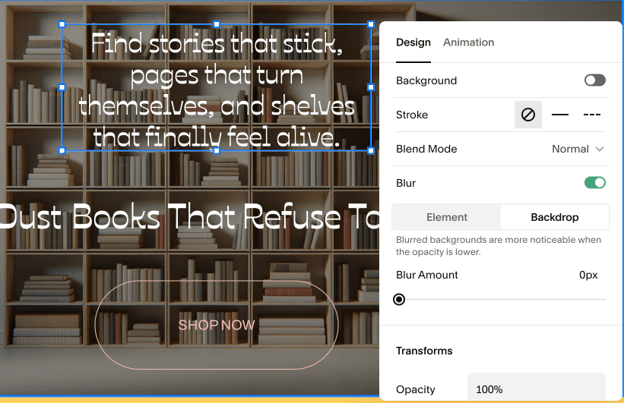
A design editing menu for a specific element within Squarespace, allowing for changing the background or backdrop of the element or adding animation effects.
Squarespace’s intuitive drag-and-drop editor makes it easy to design your website or improve upon a template or Blueprint AI design as a jumping off point.

If you’d rather not start from a blank canvas, Squarespace’s Blueprint AI can generate a structured starting point from a few questions about your business, and Squarespace AI can draft on-page copy. The core experience is a hands-on visual editor, and that’s where Squarespace shines. Behind the design tools sit capable business features: native e-commerce, appointment scheduling through Squarespace Scheduling (Acuity), email campaigns (priced separately), and the ability to sell memberships, subscriptions and digital products. For most small businesses that want an attractive, easy-to-manage site, Squarespace is the most well-rounded choice.

Squarespace offers four pricing plans. The prices below include the annual billing discount.

PlanCost (billed annually)Best For
Basic$19/moCore site building, templates, hosting, SSL, SEO tools and Squarespace AI. Carries a 2% transaction fee on online store sales.
Core$29/moAdds a 0% online store transaction fee, custom code injection, advanced analytics and unlimited contributors.
Plus$49/moAdds advanced merchandising, abandoned cart recovery, subscription selling and product reviews.
Advanced$99/moAdds the lowest payment processing rates, API integrations and Commerce APIs for high-volume stores.

Email marketing campaigns and Squarespace Scheduling (Acuity) are priced separately as add-ons. A custom domain is free for the first year on annual plans, then renews at standard rates.

  • The best template library in the category gives every user a strong visual starting point.
  • The fluid editor balances ease of use with genuine design control.
  • Deep native tools for selling products, services, memberships and digital goods.
  • Reaching a live support representative can be difficult, though the help center is extensive.
  • The entry-level Basic plan charges a 2% transaction fee on online store sales, making Core essential for serious sellers.
  • The fluid editor's flexibility is limited compared to free-form builders; you're working within each template's structure rather than positioning elements freely.

Squarespace received a rating of 8.4 out of 10 on TrustRadius across more than 300 reviews. Customers praised Squarespace for its overall usability, simple domain management and effective content creation tools. Some customers reported limited flexibility and inconsistent drag-and-drop behavior in the newer editor as challenges.

“Squarespace is a great platform if you are an inexperienced web designer and would like to build an aesthetically pleasing website. It is perfect for hosting a blog. I also use it to integrate with acuity scheduling, which has worked very well for me. I find it easy to upload and sell my digital products as well,” one user wrote.

wix logo
Editor's Rating: 9/10

Wix earns its “best for design freedom” designation because its drag-and-drop editor offers the most granular control in the category. Where some builders snap elements into fixed sections, Wix lets you position virtually any element anywhere on the canvas, giving designers and hands-on owners near-pixel-level control over layout. Paired with one of the deepest template libraries available (more than 900 designer-made options), it’s the platform of choice for anyone who wants to shape a site exactly to their vision rather than working within tighter guardrails.

That freedom is backed by real depth. Wix’s App Market adds more than 800 integrations, so most functionality gaps can be filled without leaving the ecosystem, and the platform’s AI creation tools can generate a starting layout or draft copy if you’d rather not begin from scratch. The trade-off for all that flexibility is that free-form positioning can require more attention to keep mobile layouts tidy, but for users who prioritize design control, Wix is hard to beat.

Wix offers a free plan that includes Wix branding, plus four premium tiers, which are discounted when billed annually.

PlanCost (billed annually)Best For
FreeFreeTrying out the platform and making a decision as to which features you’ll need. It includes Wix branding, so we recommend upgrading before launching.
Light$17/moPortfolios and simple informational sites; custom domain and ad-free site. No e-commerce.
Core$29/moThe entry point for selling online: payments, e-commerce, bookings and analytics.
Business$39/moAdvanced e-commerce, more storage, automated sales tax and advanced shipping.
Business Elite$159/moUnlimited storage, the full e-commerce feature set and priority support for high-volume operations.

All premium plans include a free custom domain for the first year (first purchase only, not on renewals). Payment processing fees and some third-party apps carry additional costs. An Enterprise tier with custom pricing is also available.

  • Free-form drag-and-drop positioning offers the most layout control in the category.
  • A library of 900+ templates gives users a strong, varied starting point.
  • An extensive App Market (800+ integrations) covers most functionality needs within one platform.
  • The added flexibility means mobile layouts can require more manual cleanup than section-based editors.
  • The Free plan includes Wix branding, which is a non-starter for any serious businesses.
  • The entry-level Light plan doesn't include e-commerce, so sellers need at least the Core plan.

Wix earned an 8.2 out of 10 on TrustRadius across more than 300 reviews. Customers praised the platform’s customization and analytics tools, especially for small business sites, though some noted limited integrations and mediocre support.

“We built and managed a website via Wix, extensively using their blog features and email marketing. The website builder is fairly manageable for people looking for a drag-and-drop experience, offering more detailed customization if desired. The blog offers some reporting — though not all the analytics we’d like — and there’s some automation available with the email marketing systems,” one user wrote.

Shopify logo
Editor's Rating: 9/10

Shopify earns its “best for e-commerce” designation because its store editor is purpose-built for selling. You build and rearrange your storefront using sections and blocks – putting a featured-collection block, a promotional banner or a product grid into place – starting from one of Shopify’s many polished themes. The editor is intuitive for non-designers, but every design decision is oriented around commerce: product merchandising, cart, and the platform’s best-in-class checkout.

The commerce depth is what sets Shopify apart. You get unlimited products, robust inventory tools, and a vast app ecosystem, plus AI helpers like Sidekick for operational and design questions or Shopify Magic for generating product descriptions and marketing copy.  These tools speed up the repetitive work of populating a store. It’s worth being clear about Shopify’s orientation: its editor is commerce-first, tuned toward building and running a storefront rather than a free-form design tool for general-purpose websites. For anyone building an online store, that focus is a strength; for a simple brochure or portfolio site, a general website builder may be a better fit.

Shopify offers three core plans for a full online store, shown below at the discounted annual rate, plus a Starter plan for social selling and a Plus tier for enterprise. Standard monthly pricing is higher (for example, Basic is $39/mo billed monthly).

PlanCost (billed annually)Best For
Basic$29/moA full standalone online store: unlimited products, the easy-to-use store editor, themes, world-class checkout and marketing tools.
Grow$79/moGrowing stores: up to five staff accounts, lower card rates and a reduced third-party transaction fee.
Advanced$299/moScaling stores: up to 15 staff accounts, the lowest standard card rates and third-party calculated shipping.
Plusfrom $2,300/moEnterprise: fully customizable checkout, unlimited staff and priority 24/7 support.

Note: The Plus tier is billed monthly; the three core plans above show the discounted annual rate. All plans include unlimited web hosting, a free SSL certificate and a custom domain connection. Using Shopify Payments avoids the third-party transaction fee. There are no setup fees.

  • A section-based store editor and deep theme library make building a storefront fast and intuitive.
  • Best-in-class checkout, unlimited products and a vast app ecosystem make it the most complete platform for serious e-commerce.
  • Sidekick and Shopify Magic speed up store setup and content creation.
  • The editor is commerce-oriented; it's less suited to general-purpose or non-store website design.
  • Drag-and-drop is limited to blocks and sections. Individual elements in each block are edited via a sidebar (though this is also straightforward and intuitive.)
  • Costs can climb once card processing fees, paid themes and third-party apps are added on top of the base subscription.

Shopify earned a rating of 8.7 out of 10 on TrustRadius across more than 700 reviews. Customers reported an intuitive interface for managing content and product catalogs and strong customization for building storefronts, though some felt it relied too heavily on third-party apps.

“If you are either a super small seller that needs something basic, or a company doing quite well in sales. I say this because if you are super small, you can get away with the free options and cheap/main perks. But if you are more nuanced or require customization, promotion, etc., you might hit a bottleneck: not making enough to justify the expenses, but not expanding enough to get over that hump,” one user wrote.

Editor's Rating: 9/10

WordPress.com earns its “best for customization” designation because no other platform on this list can match its ceiling for extensibility. Its block-and-pattern editor lets you build pages visually by dragging pre-designed patterns and blocks into place, and because plugin and theme installation is now available on every paid plan — starting at the entry-level Personal tier — you can extend that foundation far beyond what closed platforms allow. Where a builder like Shopify keeps you inside its own ecosystem, WordPress.com opens the door to a library of more than 60,000 plugins and, for users who want true page-builder-grade drag-and-drop, tools like Elementor and Divi.

The native block editor is a legitimate visual, drag-and-drop experience, but WordPress.com rewards growth. We recommend starting on the Personal plan to get online affordably, then upgrading to the Business plan as your business scales beyond a sole proprietorship. Business unlocks developer-level control — SFTP/SSH access, staging sites, Git deployments, real-time backups, advanced SEO controls and priority support — that growing teams and more complex sites come to need. For businesses that expect to sell at volume, the Commerce plan adds a full WooCommerce store with 0% transaction fees. This is the platform for owners who want room to grow into a genuinely custom site rather than out of a builder’s limits.

WordPress.com offers a free plan plus four paid tiers, discounted when billed annually. Plugin and theme installation is available on every paid plan.

PlanCost (billed annually)Best For
Personal$4/moGetting online affordably: custom domain (free year one), ad-free site and plugin/theme access. 10% payment transaction fee.
Premium$8/moCreators and small sites: premium themes, more storage and payment tools. 8% transaction fee.
Business$25/moGrowing businesses: SFTP/SSH, staging, Git deployments, real-time backups and advanced SEO. 4% transaction fee.
Commerce$45/moOnline stores: full WooCommerce, premium store extensions and 0% transaction fees.

A custom domain is free for the first year on annual plans, then renews at standard rates. An Enterprise tier is available for large organizations. Standard payment transaction fees scale down by tier as shown above and are separate from payment-processor fees.

  • The highest customization ceiling on this list, thanks to 60,000+ plugins and full theme access on every paid plan.
  • Managed hosting, security, backups and updates are handled for you — the flexibility of WordPress without the maintenance burden of self-hosting.
  • Clear upgrade path from an affordable entry plan to developer-grade control and full e-commerce.
  • The native block editor has a steeper learning curve than the most beginner-friendly drag-and-drop builders; the deepest drag-and-drop comes via page-builder plugins.
  • Lower tiers carry payment transaction fees (10% on Personal, down to 0% on Commerce) worth factoring into cost.
  • Migrating your site to a different platform is difficult, so if you may want to make a change later WordPress may not be the best choice.

WordPress.com scored an 8.6 out of 10 on TrustRadius across more than 3,000 reviews. Reviewers praised the platform for its competitive costs, but noted that the trade-off for its power is a steeper learning curve than the simplest drag-and-drop builders.

“I would certainly recommend WordPress in the context of smaller startups or freelancers with limited funds. The ongoing costs are a lot lower than that of other competitors such as Squarespace, Wix, or Weebly even. Whilst it is not great for D2C and ecommerce it is often a good platform for brochure sites,” one user wrote.

What Is a Drag-and-Drop Website Builder?

A drag-and-drop website builder is a website creation platform that lets you design and arrange the elements of a web page visually (by clicking, dragging and dropping) rather than by writing code. Instead of hand-coding HTML and CSS or editing template files, you move text boxes, images, buttons, galleries and entire sections around a live canvas, and the builder generates the underlying code for you. What you arrange on screen is, in most cases, what your visitors will see when the site is published.

Drag-and-drop builders sit at the heart of the broader website builder category. Some use a strictly section-based model, where you stack and rearrange pre-built content blocks; others offer free-form canvases that let you position virtually any element anywhere. Many now layer AI-assisted tools on top, generating a starting layout or draft copy, but the defining feature remains the same: hands-on, visual editing that puts design control in the hands of non-developers.

How Does a Drag-and-Drop Website Builder Work?

Most drag-and-drop builders follow a similar sequence. After signing up, you either choose a template as a starting point or, on platforms that offer it, let an AI tool generate an initial layout from a short description of your business. From there, you work in a visual editor; you’ll select an element (a heading, image, button, form or section) and drag it into position, then adjust its size, spacing, color, font and content directly on the page.

Behind the scenes, the builder translates those visual choices into clean, responsive code and hosts the result for you. Most platforms handle mobile layouts automatically, generating a phone-friendly version of each page, though free-form editors may give you separate controls to fine-tune the mobile view. Because everything is visual, iterating is fast: you can swap a section, restyle a page or test a new layout in minutes rather than rebuilding from code.

What Are the Benefits of Using a Drag-and-Drop Website Builder?

The core benefit of any website builder is a professional, mobile-responsive site without hiring a developer. Drag-and-drop editing extends that value further:

  • No coding required: You design entirely through a visual interface, so no HTML, CSS or developer skills are needed to build or update your site (though usually you can employ these, if you choose.)
  • Visual, what-you-see-is-what-you-get (WYSIWYG) control: Because you edit on a live canvas, the design you build closely matches what your visitors will see, reducing guesswork.
  • Faster launch times: Starting from a template or an AI-generated draft and rearranging it visually is far quicker than building a site from scratch.
  • Easy iteration: Swapping sections, restyling pages or testing new layouts takes minutes, so your site can evolve alongside your business.
  • Lower upfront cost: Combining design, hosting and templates into a single subscription is typically far cheaper than commissioning a custom-built site.
  • Ownership and independence: You can make updates yourself, on your own schedule, without waiting on or paying a developer for every change.

How Much Does a Drag-and-Drop Website Builder Cost?

Drag-and-drop builder pricing generally follows a tiered structure, with plans that scale by storage, features, e-commerce functionality and support level. Entry-level plans, sufficient for a basic informational site, typically run in the $4 to $20 per month range. Mid-tier plans with e-commerce and analytics generally cost $20 to $40 monthly, while premium plans with advanced e-commerce, more storage and priority support can run $40 to $160 per month or more. Annual billing usually offers a meaningful discount over month-to-month pricing.

As with any website platform, it’s worth budgeting separately for domain registration (typically $12 to $25 annually if not bundled after the first free year), any premium templates, apps or plugins, and payment processing fees on e-commerce plans (often around 2.9% + $0.30 per transaction). Some platforms also charge their own transaction fee on top of processing fees at lower tiers, so sellers should check where that fee drops to zero before committing.

How to Choose a Drag-and-Drop Website Builder

Beyond price, a handful of factors separate a builder you’ll enjoy using from one you’ll outgrow or fight against.

Editor Flexibility vs. Guardrails

Builders fall on a spectrum. Section-based editors (like Squarespace and Shopify) keep elements aligned and mobile-friendly by default, which is faster and more forgiving. Free-form editors (like Wix) let you position anything anywhere, offering more control at the cost of more manual attention. Consider how much design freedom you actually want versus how much you’d prefer the builder to keep things tidy for you.

Template Quality and Quantity

Your template is your starting point, and a strong one saves hours. Look for a library that’s not just large but genuinely well designed, with options suited to your industry. Testing a platform’s free trial or free tier with your real content is the most reliable way to judge template quality before committing.

Customization Ceiling

Think about where you’ll be in two years, not just today. A builder that’s easy to start with but can’t accommodate custom code, plugins or advanced functionality may limit you as you grow. Platforms like WordPress.com offer a much higher customization ceiling for businesses that expect to need it, while more closed platforms trade some flexibility for simplicity.

Mobile and Responsive Editing

Most builders generate a mobile version of your site automatically, but the quality varies. If a large share of your visitors will be on phones, confirm how much control you have over the mobile layout and how much cleanup the automatic version requires.

Integrations and Native Tools

Consider what your site needs to do beyond looking good, like online payments, bookings, email marketing and CRM connections. Check whether those capabilities are built in or available through an app market or plugin library, so you’re not forced to leave the platform to fill a gap.

Human Support When You Get Stuck

Visual editors are approachable, but you’ll still hit questions. Platforms that pair their tools with responsive human support, ideally including phone or live chat, offer a stronger safety net than self-service-only options.

What Are Some Features of Drag-and-Drop Website Builder Platforms?

As you compare drag-and-drop builders, look for the following capabilities, which distinguish a capable visual editor from a rigid template tool.

  • Visual on-canvas editing: The ability to select, move, resize and restyle elements directly on a live preview of the page, so what you build matches what you publish.
  • A strong template library: A varied, well-designed set of starting templates, ideally industry-specific, that you can customize rather than build from scratch.
  • Sections and reusable blocks: Pre-built content sections and blocks you can drag in, rearrange and reuse across pages to build quickly and consistently.
  • Responsive and mobile controls: Automatic mobile layouts, plus the ability to fine-tune how pages render on smaller screens.
  • Undo and version history: The ability to reverse changes and roll back to earlier versions, so you can experiment without risk.
  • Integrations and extensions: An app market or plugin library that lets you add e-commerce, bookings, marketing and other functionality without code.
  • Optional AI assistance: Tools that can generate a starting layout or draft copy, giving you a working draft to refine rather than a blank canvas.

Methodology

To determine the best drag-and-drop website builders, our team of technology experts and software analysts evaluated an initial list of 52 platforms with meaningful visual, no-code editing capabilities. This comparison helped narrow our list to nine platforms for in-depth testing.

To choose our five top recommendations, we evaluated each editor to determine how much control, speed and polish the drag-and-drop tools delivered. We also analyzed template quality and quantity, pricing, the depth of manual customization available, mobile responsiveness, integrations and support options.

In the end, our experts and analysts judged each platform on more than a dozen factors, broken into the following weighted categories:

  • Editor & Ease of Use (30%): We tested each builder’s visual editor and onboarding flow, gauging the learning curve and how much hands-on control it offered without becoming overwhelming.
  • Templates & Design (25%): We evaluated the quality, variety and industry coverage of each platform’s templates as starting points.
  • Pricing (20%): We compared plans, including base subscription costs, transaction fees and extra costs for apps, plugins or e-commerce functionality.
  • Customization & Flexibility (15%): We assessed how far each platform lets you go beyond its defaults, from custom code to plugins and integrations.
  • Customer Service (10%): We investigated available support channels and self-service resources, since even intuitive editors sometimes require human help.

Based on these criteria, we determined which drag-and-drop website builders offer the strongest combination of usable visual editing, quality templates and reliable core website-building tools. To learn more about our methodology, see our full editorial process.

FAQs

A website builder is considered drag-and-drop when it lets you design pages by visually moving elements — text, images, buttons, sections — around a canvas, rather than editing code or template files. The builder generates the underlying code for you as you arrange the page.

No. Drag-and-drop builders are designed specifically for people without coding or design backgrounds. You work entirely through a visual interface, and most platforms start you from a professionally designed template you can customize.

Section-based editors (such as Squarespace and Shopify) have you stack and rearrange pre-built content sections, which keeps layouts aligned and mobile-friendly automatically. Free-form editors (such as Wix) let you place virtually any element anywhere, offering more control at the cost of more manual attention to layout and mobile views.

Yes. Many drag-and-drop builders now include AI features that can generate a starting layout or draft on-page copy, giving you a working draft to refine visually rather than a blank canvas. The hands-on editor remains the core of the experience.

Absolutely. Most builders on this list include e-commerce on their higher tiers, and Shopify is purpose-built for it. If selling is your primary goal, prioritize a platform whose editor and tools are oriented around commerce, checkout and product management.

Most drag-and-drop builders suited to small businesses cost between $4 and $160 per month depending on the plan tier, with entry plans often in the $4 to $20 range and premium e-commerce plans running higher. Many platforms also charge their own transaction fee on lower tiers, and domain renewal and apps or plugins can add to the total.

Did you find this content helpful?
Verified CheckThank you for your feedback!
author image
Written by: Adam Uzialko, Senior Editor
Adam Uzialko, the accomplished senior editor at Business News Daily, brings a wealth of experience that extends beyond traditional writing and editing roles. With a robust background as co-founder and managing editor of a digital marketing venture, his insights are steeped in the practicalities of small business management. At business.com, Adam contributes to our digital marketing coverage, providing guidance on everything from measuring campaign ROI to conducting a marketing analysis to using retargeting to boost conversions. Since 2015, Adam has also meticulously evaluated a myriad of small business solutions, including document management services and email and text message marketing software. His approach is hands-on; he not only tests the products firsthand but also engages in user interviews and direct dialogues with the companies behind them. Adam's expertise spans content strategy, editorial direction and adept team management, ensuring that his work resonates with entrepreneurs navigating the dynamic landscape of online commerce.