
Business.com aims to help business owners make informed decisions to support and grow their companies. We research and recommend products and services suitable for various business types, investing thousands of hours each year in this process.
As a business, we need to generate revenue to sustain our content. We have financial relationships with some companies we cover, earning commissions when readers purchase from our partners or share information about their needs. These relationships do not dictate our advice and recommendations. Our editorial team independently evaluates and recommends products and services based on their research and expertise. Learn more about our process and partners here.


Squarespace is a powerful and intuitive website builder that makes getting started with a website easy. With over 200 templates to get started with, its Blueprint AI assistant, and its drag-and-drop editor, Squarespace allows users to create functional websites within minutes. In the backend, Squarespace includes strong e-commerce functionality, including built-in POS systems, integrations for cross-selling and upselling, effective SEO tools and more. These features make Squarespace one of the best website builders and design services currently on the market.
A functional website is a necessity for businesses. Even brick and mortar stores should still maintain an online store to maximize sales opportunities. Fortunately, Squarespace makes building and designing a functional, responsive website easy. Its drag-and-drop editor is one of the easiest and most intuitive we’ve tested.
While Squarespace offers over 200 templates to use as a starting point for building a site, it also has its own native AI assistant, Blueprint AI. Unlike other AI assistants that use natural language processing and chat features to design a website, Blueprint AI instead walks users through a tutorial using forms and checkboxes. In under five minutes in our test, Blueprint AI generated a functional – if somewhat bland – website template that was a strong starting point for our own customization.
Squarespace also features numerous integrations that make its websites suitable for e-commerce. With native, built-in integrations for services like cross-selling on Google Shopping, marketing on Facebook or Instagram, and more, Squarespace makes its case as a compelling all-in platform. All Squarespace tiers also come with a native POS system to enable sales, as well as functionality for features like Gift Card offerings or loyalty programs.

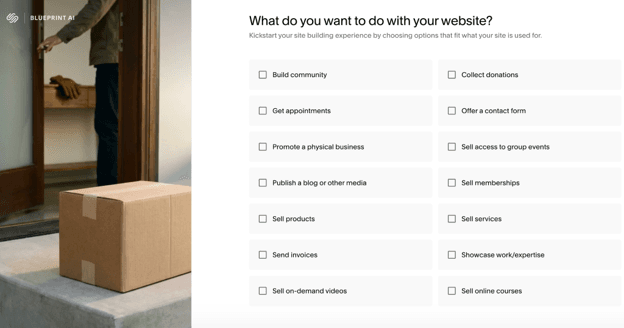
For our testing of Squarespace’s website builder, we took it for a spin to create a mock online bookstore. On the whole, we found the process to be smooth and easy-to-understand, if a little cookie cutter. When starting the website building, Squarespace immediately prompts for information about what kind of website we were trying to build in order to tailor content.
After selecting e-commerce and selecting what our goals for the website were, we were presented with a choice of building the website from a selection of professional and AI-generated templates or using Squarespace’s AI assistant, Blueprint AI, to help provide us a custom starting point. For the purposes of this review, we opted to use Blueprint AI.
Selecting Blueprint AI led us to another dropdown screen, where we had to reselect our previous choices. Blueprint AI then guided us through the selection of a site title and brand personality, offering seven options: Professional, Playful, Friendly, Sophisticated, Bold, Quirky, or Innovative. These different options affected the main background image and the text in the preview of the webpage.
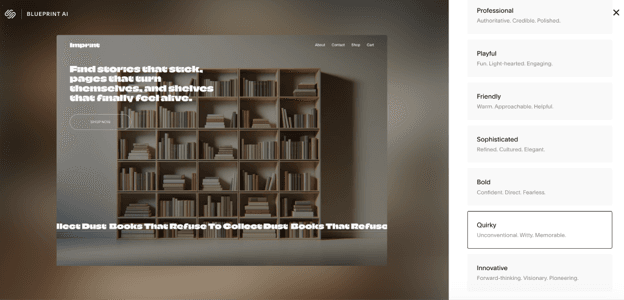
We were then guided through the selection of pages to add to the site, with Blueprint AI having already selected the pages it thought we needed for our book store (Homepage, About, Contact, Shop). Next, we chose a color palette and fonts, and Squarespace offered recommendations based on our previous choices.
Altogether, we were able to build a prototype of our bookstore website in five minutes, including the time it took Blueprint to generate the site. We were impressed with how quickly Squarespace’s tools were able to generate a usable product. This also included some fun, more advanced design work like animated, scrolling text that we have not seen other website builders generate.
However, we did feel like the overall product ended up lacking some amount of polish compared to other AI website builders we have tested. Blueprint AI generated a usable website quickly, but the overall uniqueness of the website felt limited by Blueprint AI’s focus on using a questionnaire for the build portion instead of using a chatbot. Having said that, we then found it incredibly easy to edit the Squarespace page, including through the use of a drag-and-drop interface and easy-to-see positioning of objects.
[Read next: How to Create an Accessible E-Commerce Website]
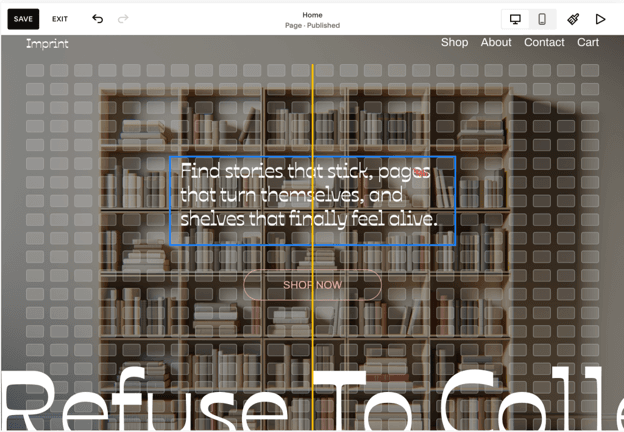
Overall, we found Squarespace to be easy to use and set up. While we found its Blueprint AI to be a little less impactful than those of some of its competitors, its intuitive drag-and-drop interface and pre-existing templates make it easy to use quickly. However, this level of willingness to readjust and modify webpages may mean that Squarespace is better suited to users with some experience or idea of what they are looking for in a webpage, as opposed to complete novices.
Squarespace’s spectrum of web building features are impressive. Squarespace’s AI website builder can deliver an initial draft of a website within five minutes, it has a large template library, built-in SEO functionality, an integrated POS system and a full fledged e-commerce suite.
Blueprint AI is Squarespace’s answer to services like Wix’s Aria, which can build a website from scratch based on human language prompting. While we were initially hopeful for similar functionality from Blueprint AI, we found the integration here a little lacking. Blueprint AI does not work off of human language prompting and a chatbot feature; instead, it works off a series of a limited selection of dropdown menus and checkboxes, which makes the process and end result feel somewhat cookie cutter.
Having said that, Blueprint AI does deliver on its goals extremely quickly. While the end result of the bookstore we had chosen to build was somewhat basic and lacking in creative flair, it was still fully functional and in an operational place. For the five minutes it took to work through Blueprint AI’s menus, we considered this a success as it automated away the most difficult parts of using a website builder, like building and linking different pages, applying a theme evenly and creating the overall navigation and flow.
After building a website with Blueprint AI, Squarespace offers a secondary AI assistant called Beacon AI chat. This tool, still in beta during our review, exists to help manage and optimize existing Squarespace websites. Among the tools and capabilities it offers are:
Beacon AI chat does work off of natural language processing, so it functions like the AI chatbots everyone is used to. We tested its functionality across creating a new page, making edits to the store’s layout and drafting email campaigns.
Overall, we found that Beacon AI chat performs reasonably well. In many cases, such as creating new product listings or creating a new page, it lacked the functionality to do it directly but pointed us to exactly where we needed to go, making the process smoother and faster. We also found this helpful for users who are new to creating websites and want additional support.
Throughout our testing of Squarespace, one of the features that most impressed us was the ease with which we could rearrange, edit and drag content in the website builder. Every item within the page is editable, making it easy to take a template or starting point generated by Blueprint AI and put an individualized spin on it.
In particular, we found the grids that Squarespace provides while dragging and dropping content to be particularly helpful. The guidelines for centering content or aligning blocks with each other made it easy to line up elements in a way that is both visually appealing and supports navigation, keys to a positive user experience.
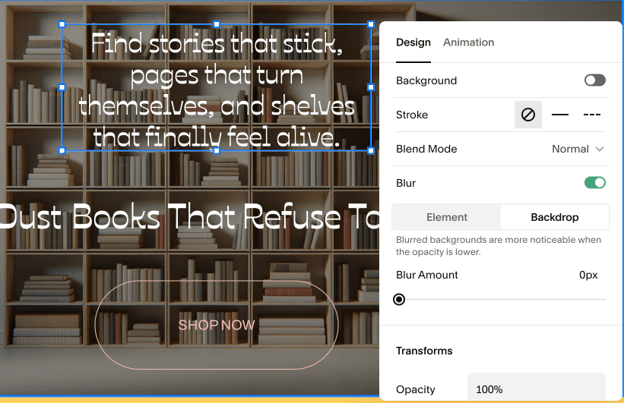
One particularly powerful feature of Squarespace that we loved was the individual element editing. As each element was self-contained, it allowed for some very powerful customization easily. Single clicking on an element, such as a text block, allowed for simple editing commands like revising the text, duplicating the item or pinning it.
Single clicking also offers the option to edit the block’s background, which opens up an additional context menu for much richer customization. Here, users can find commands for changing opacity, adding transforms, as well as various animated effects. These animations include options for various triggers, including on-click or hover.
We were impressed by how powerful this editing is and how approachable Squarespace made it. We found this process intuitive and easy to approach, as opposed to hiding editing behind additional pages.
Squarespace offers SEO functionalities baked in throughout its product. We could customize SEO settings by page through each page’s own SEO setting options, offering granular control that gives businesses a better chance to rank on search engine results pages (SERPs).
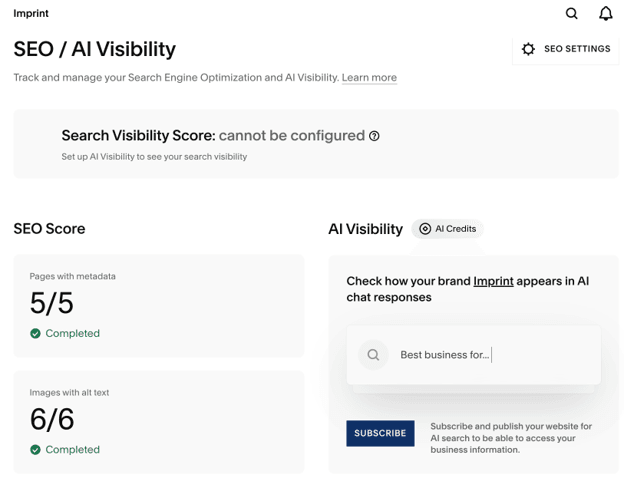
In addition to the per-page SEO settings, Squarespace also offers a broader SEO/AI Visibility dashboard. This dashboard includes an SEO Score checklist; if your site is not fully set up, Beacon AI can fill in the missing metadata and alt text to meet the checklist. [Looking to improve your SEO rankings even more? Check out six technical SEO tips to improve website traffic].
Squarespace also has an AI Visibility chatbot to test how your brand appears in AI chat responses. We were unable to test this feature because we did not publish our site, but the functionality is impressive for helping brands trial how well their websites appear. However, this functionality does cost AI credits to use.
We also liked how Squarespace allowed us to customize the SEO for each individual product in our test store. This functionality could be extremely impactful, especially for stores with thousands of products.
On the front end, Squarespace makes it easy to build a Product Page and a cart page through Blueprint AI. What differentiates Squarespace for us is the multitude of features and integrations that Squarespace offers for backend e-commerce support.
Squarespace comes with its own payment processor built-into the website, making the process easy to enable. And with credit card rates as low as 2.5% + $0.30, the service is affordable and works with most major payment cards and services.
Squarespace Payments also allows for full commerce management, including services like Gift Cards, invoice management, abandoned cart management, integrations with services like ChowNow and OpenTable, physical sales through a Squarespace POS device and the sale of physical goods through a Google Shopping integration. This type of full service offering comes fully enabled by default on Squarespace’s Core plan.
In particular, we were also very happy to see that Squarespace offers unlimited product and service sales. And you can easily add a list of products through the upload of a CSV file, making populating your product catalogue a breeze. This stands in contrast to Wix, which has a set limit of 50,000 products able to be listed.
We found Squarespace’s pricing to be in line with other website builders. However, unlike some services we tested, Squarespace does not offer a free plan. Instead, Squarespace offers a 14-day free trial, with an offer for a one time seven day extension.
Here’s a breakdown of Squarespace’s plans per month.
Plan | Pricing | Highlights |
|---|---|---|
Basic | $19 |
|
Core | $29 | Everything in Basic, plus:
|
Plus | $49 | Everything in Core, plus:
|
Advanced | $99 | Everything in Plus, plus:
|
Squarespace makes it easy to get started using the platform. Users can create a free account, which automatically starts the 14-day free trial. Combined with Blueprint AI, this gives users plenty of time to build at least a prototype of a webpage and get a feel for if Squarespace is a good fit.
We found between the templates Squarespace provides, Blueprint AI, Beacon AI and Squarespace’s own intuitive functionality, the 14-day trial is more than enough to build and deploy a fully functioning webpage. Squarespace offers the choice to pay monthly or pay annually for a substantial discount.
We were impressed by how well Squarespace lays out its online customer support functions. On the support page, Squarespace lays out guides by product or topic, and features a powerful mix of well-written articles and video content answering many common questions.
Beyond static content, Squarespace also offers support through:
Squarespace is a strong option for businesses and individuals, especially for those focused on usability. However, Squarespace does have some limitations.
To determine the best website builders and design services for small businesses, we’ve researched and tested dozens of services. This testing involves hands-on website building of test sites to evaluate features, ease of use, customer support, customization options and the overall value of the offering. We also reviewed product documentation and videos and referred to third-party review sites.
When deciding on the best service for building e-commerce websites, we prioritized factors like inventory management, inventory limits, pricing, external shopping integrations, how easy it was to build the website and POS integration.
We recommend Squarespace for …
We don’t recommend Squarespace for …
