Business.com aims to help business owners make informed decisions to support and grow their companies. We research and recommend products and services suitable for various business types, investing thousands of hours each year in this process.
As a business, we need to generate revenue to sustain our content. We have financial relationships with some companies we cover, earning commissions when readers purchase from our partners or share information about their needs. These relationships do not dictate our advice and recommendations. Our editorial team independently evaluates and recommends products and services based on their research and expertise. Learn more about our process and partners here.

GoDaddy’s Airo AI Builder makes it easy to create a sleek website that brings in new customers and promotes your unique brand image. Whether you’re an artist that needs a public portfolio or a gourmet restaurant that needs a reliable reservation system, Airo AI Builder’s generative AI tools and vast template library can quickly stand up a functional site suitable for businesses in nearly any industry. We awarded Airo AI Builder a score of 9.1 out of 10 after testing it, and named it the best website builder for businesses looking to launch a website in one day.
Airo AI Builder is designed to get your website built and ready for launch quickly, with intuitive tools and conversational AI that makes the development process as simple as prompting a chatbot. In our test, we were able to build a fully functional website in just 30 minutes. It wasn’t perfect, but it was ready to go live with a homepage, about page and checkout page.
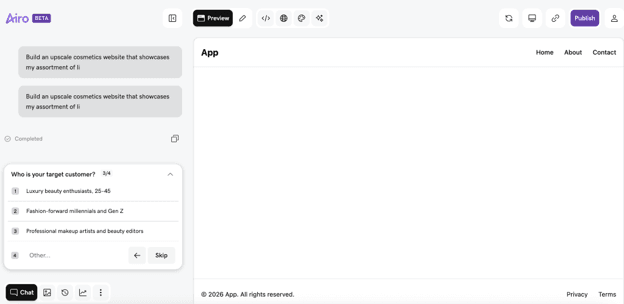
As one of the best AI website builders, Airo AI Builder does more than just help you get started. You’ll have a full suite of tools at your disposal to help your website grow and thrive. Want to analyze your site’s technical SEO? Just ask the AI conversation tool. You can even connect a custom API in one simple prompt. And there’s no need to worry about keeping your data secure, because all Airo websites have automatic SSL and DDoS protection.
We found it especially useful that you could take advantage of all these features simply by asking Airo AI Builder’s chatbot about them. It’s a standout aspect of the software for entrepreneurs who don’t know what they don’t know about building a website. If you’re not sure, just ask, and your built-in AI companion will probably be able to help you.
GoDaddy hosts over 84 million domain names, making it the largest domain name registrar in the world.
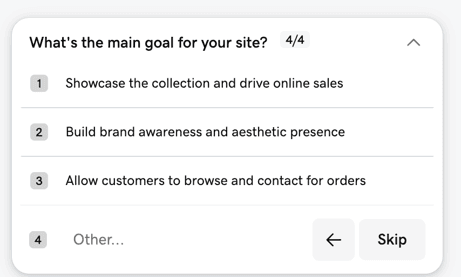
After signing up, GoDaddy Airo’s AI prompted us to answer simple questions about our business, including our brand name, what products we wanted to showcase, and our target customer base. We were also asked about our main goal for the website, and to select an aesthetic and tone preference.
Within minutes, we had a functioning Home page. The only error was that the logo Airo had generated didn’t properly load. We did appreciate, though, that we could set up an On Click action connected to the logo, so that it pointed to other pages within our website. During our test, we linked the logo to the Home page, so that users browsing the website would instantly be redirected back to the Home page when they clicked the logo. If Airo AI Builder generated any element we didn’t want to include on the page, we could simply delete it with a click.
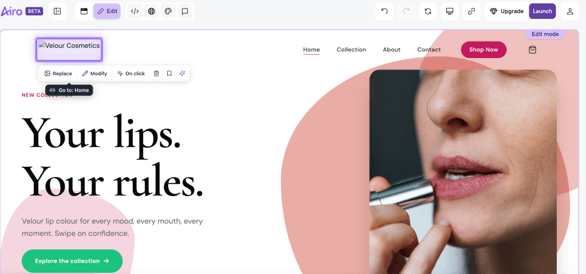
It was also easy to swap any of the initial images generated by Airo. We had the option to select from Airo’s media library or directly upload any of our own images. While we found the AI-generated copy a bit generic, we were able to easily edit the text, font and text color. If Airo’s copy doesn’t fit your brand, you can simply click on it and replace it with something written by your team.
This is the strength of Airo AI Builder, in general. The AI chatbot builds a functional website that looks good enough to launch your business, but you’re able to build on that jumping off point if you have the time. The clickable editor is straightforward, so you won’t need any technical skills to make improvements. And, if all you’re looking for is something simple to get started, the website it generates is completely usable, if not quite unique and dazzling.
Once our Home page was ready, Airo AI Builder asked us for feedback, and we requested a change in color scheme. After generating our About page, Airo AI Builder had additional questions regarding checkout. We confirmed we would only be selling in the United States and did not need to accept recurring payments. The checkout section took the longest to build, but the entire website was almost 100% functional in under a half hour. If we upgraded to a paid plan, we would have been able to publish then and there.
From your initial site-building prompt to your latest marketing campaign, Airo AI Builder gives you the tools to do it all.
Airo AI Builder requires no prior coding knowledge to craft a user-friendly website. All you have to do is answer straightforward prompts and Airo instantly builds a drag-and-drop template for you. This doesn’t mean you won’t have the ability to access or edit your site’s code, though. All paid plans allow you to download your site’s code in a zip file.
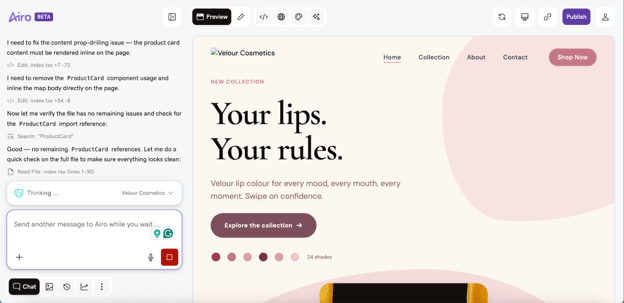
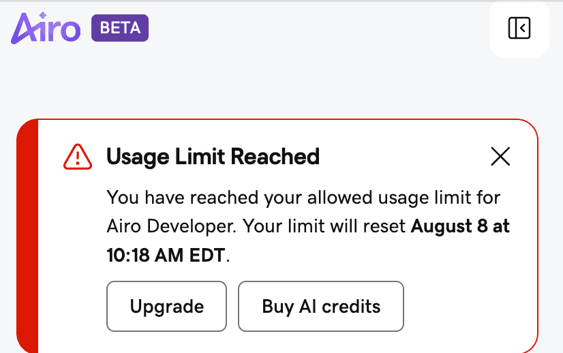
While building each element, Airo AI Builder provided explanations about the process every step of the way. We could see in real time what was in progress and when the platform was cleaning up any errors. However, you can’t create an unlimited amount of projects all at once. We hit our usage limit during our first test project and received a notice that it wouldn’t reset for a month.
GoDaddy users also have the option to build fast-loading WordPress websites with WordPress-optimized hosting plans via Airo for WordPress. This extends the level of flexibility, which was a nice option to have because we found it a bit lacking when using Airo AI Builder on its own.
Tailoring your website to your brand is about more than choosing the right logo font. That’s why GoDaddy Airo AI Builder offers dozens of templates across various industries. Restaurants can build menus, non-profits can accept donations, real estate agents can showcase their latest listings and the list goes on. No matter the type of business you operate, GoDaddy Airo AI Builder gives you the tools you need to do business online and get your brand noticed by potential customers.
GoDaddy Airo AI Builder allows you to upload up to 5,000 products to your e-commerce store. The platform also connects directly to Stripe, so accepting online payments is straightforward and simple. Subscription based businesses can easily set up their online store to accept recurring payments, as well.
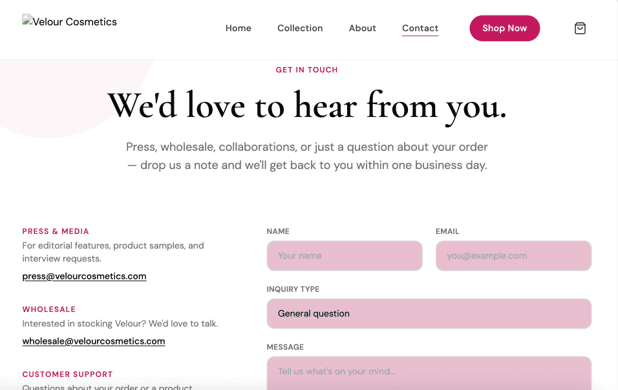
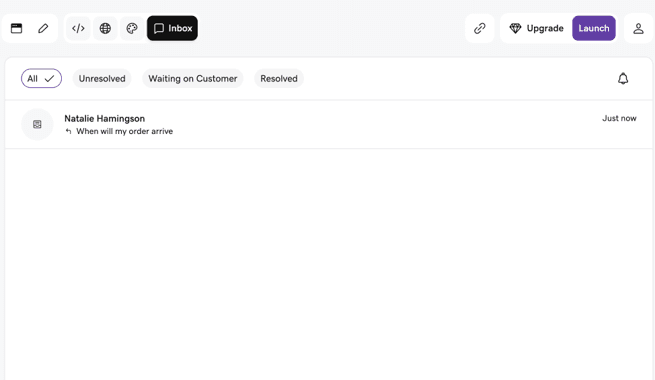
When setting up our online store, Airo AI Builder automatically generated a customer contact form that connected directly to an in-app inbox. We liked how this allowed us to easily manage messages from one organized location. We sent a test message through the form that instantly showed up in our inbox, with the option to tag conversations based on status: “Resolved,” “Unresolved” or “Waiting on Customer.”
Users on paid plans can also set up an AI chat widget, so customers don’t have to wait for a response. All chatbot conversations will also show up in your inbox, so you can see if they require additional outreach or intervention.
All Airo plans include built-in SEO tools, so your website is automatically created according to best optimization practices. If you want an analysis of your site’s SEO efficacy, simply send an “Analyze SEO for my website” prompt to Airo’s AI builder. Airo will automatically implement any necessary SEO updates, including title tags, metadata and meta descriptions.
Upgraded plans offer additional marketing tools, including a Customer Insights Dashboard. You’ll get detailed analytics on user paths, so you know exactly where your target customers are navigating after initial discovery. With Premium feature plans, you’ll also get access to email marketing tools, a marketing calendar and the ability to generate social media ads. You can also integrate Google Analytics into your Product page for even greater performance insight.
GoDaddy Airo’s affordable pricing makes cost a low barrier to entry for small businesses on a budget. You’ll be able to create unlimited sites with the free plan, but publishing does require an upgrade. Fortunately, even GoDaddy’s paid plans are competitively priced compared to other website builders we reviewed.
For businesses that only need to maintain one published website, the Starter plan is an attractive option. Here’s how Airo’s paid plans breaks down:
Plan | Pricing (annual billing) | Highlights |
|---|---|---|
Starter | $9.99 per month |
|
Professional | $24.99 per month |
|
Ultimate | $99.99 per month |
|
If you’re interested in using Airo to host your WordPress website, the Basic plan starts at $14.99 per month for the first year. For additional features, including enhanced SEO optimization and added GB NVMe storage, the Deluxe Airo for WordPress plan is $19.99 per month, while the Ultimate plan costs $26.99 per month for the first year.
Getting fully setup with GoDaddy Airo can be a same-day process, depending on your goals and which plan you choose. We signed up for the 7-day free trial to test the platform out and were able to create a nearly complete website in under an hour. Because GoDaddy’s Airo AI Builder is so intuitive, we didn’t need to seek out any external support. According to GoDaddy, more complex websites can be built with Airo AI Builder in two to three focused hours.
Although our Airo AI Builder website was easy enough to set up on our own, GoDaddy offers 24/7 support via text, chat and phone if you need additional support. All support channels are available to anyone, whether or not you’re a current GoDaddy customer. The platform’s TrustPilot score is 4.4 out of 5, with generally positive reviews for customer support. We did find a small handful of user reviews, however, that expressed frustration with getting a direct answer from customer service.
Using an AI website builder may be incredibly quick, but it’s quite obvious that AI was involved in creating the content. We were especially disappointed with the initial copy, which was fairly generic. A few of the images generated by Airo were also fairly unpolished. It’s easy enough to overcome these drawbacks, though, since you can simply edit each element with your own text and images. Just make sure your communications or marketing team takes a close look at each page before you publish. As long as you apply a human touch from those who know your brand, it’s worth it to use GoDaddy Airo in place of a slow and costly development process.

While the Free plan claims that users can create unlimited projects and apps, it’s easy to run out of AI credits quickly. Projects are capped at 50 AI credits per month, which we maxed out as soon as our website was finished. We were still able to make edits to each page, but we couldn’t send any more prompts to the AI builder, even for simple questions, such as “Can I upload my own images?” If users are signing up for a Free plan in hopes of testing out multiple projects, they’ll have to wait an entire month for credits to refresh.
To determine the best website builders and design services for small businesses, we’ve researched and tested dozens of services. This testing involves hands-on website building of test sites to evaluate features, ease of use, customer support, customization options and the overall value of the offering. We also reviewed product documentation and videos and referred to third-party review sites.
When deciding on the best website builders for same-day launch, we prioritized factors like ease of use, the chatbot, how well the design responded to our input, our ability to tweak the design after it was generated, add-on tools and available integrations. After testing Airo AI Builder, we awarded it a 9.1 out of 10 overall score, thanks in large part to its intuitive feature-set and ability to stand up a working website in less than an hour.
GoDaddy Airo AI Builder (from $9.99/month) is the pick for speed and simplicity, turning conversational prompts into a functional site, logo and written content in minutes — though our reviewers found its designs “a bit bland and generic” and its AI credits limited on lower-tier plans
Squarespace (from $19/month) is the strongest choice for e-commerce, thanks to unlimited products, robust merchandising and upselling tools, and native inventory/payment/booking features. Its main drawbacks are harder-to-reach customer support and some missing third-party integrations.
Wix (from $17/month) offers the broadest toolkit overall, with 2,000+ templates, 800+ integrations, built-in CRM, and up to 50,000 e-commerce products, plus its own Aria AI assistant for building and refining sites by hand afterward. It earned praise for ease of use offset by complaints about billing and support.
In short: choose GoDaddy Airo for the fastest, most affordable launch; Squarespace for serious online selling; and Wix for the most flexible, feature-rich all-around builder.
We recommend GoDaddy Airo for…
We don’t recommend GoDaddy Airo for…
