Business.com aims to help business owners make informed decisions to support and grow their companies. We research and recommend products and services suitable for various business types, investing thousands of hours each year in this process.
As a business, we need to generate revenue to sustain our content. We have financial relationships with some companies we cover, earning commissions when readers purchase from our partners or share information about their needs. These relationships do not dictate our advice and recommendations. Our editorial team independently evaluates and recommends products and services based on their research and expertise. Learn more about our process and partners here.
Learn how headless commerce works, who benefits from it and how AI tools can help build a custom storefront.


This article is sponsored by Wix.
You have a clear vision for your online store, and with an AI tool you can describe that experience and start building it through a conversation—no coding required. Turning the design into a working business takes more than attractive pages, though. Your storefront needs accurate prices, available inventory and a checkout system that creates real orders. That’s where headless commerce comes in, connecting a customer’s shopping experience to the tools that actually run the operation.
Using headless commerce, you can build your frontend site with help from an AI tool, such as ChatGPT or Claude, and use a platform like Wix Headless to manage the backend inventory, sales and payments. Here’s how headless commerce works and how to decide whether it suits your store.
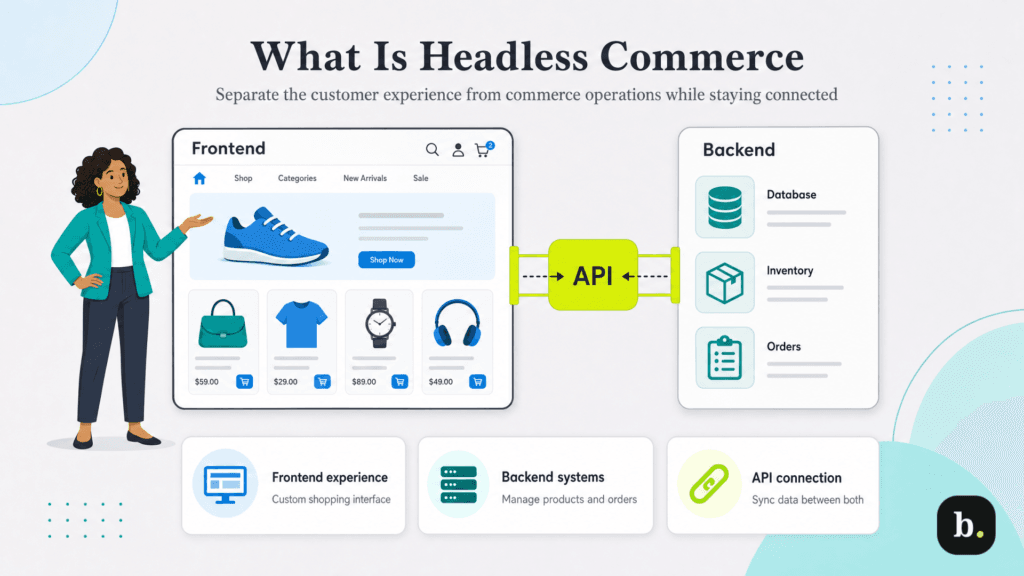
Headless commerce is an approach to building an online store that separates the customer-facing shopping experience from the backend that manages commerce operations. You may also see this architecture referred to as “headless e-commerce.”
In a conventional integrated store, the storefront and commerce tools come together in one platform. With headless commerce, you choose how to build the storefront and connect it to commerce services.
There are three components that make up a headless e-commerce site:
Imagine a retailer selling supplies for small apartments. Its site allows customers to shop by room size and storage problem, rather than browse standard product categories. A custom frontend organizes that user experience while drawing prices and product availability from the retailer’s commerce backend without requiring a reorganization of how the backend is set up.
Headless commerce gives you control over the storefront design and user experience while keeping it connected to the systems that run your business.
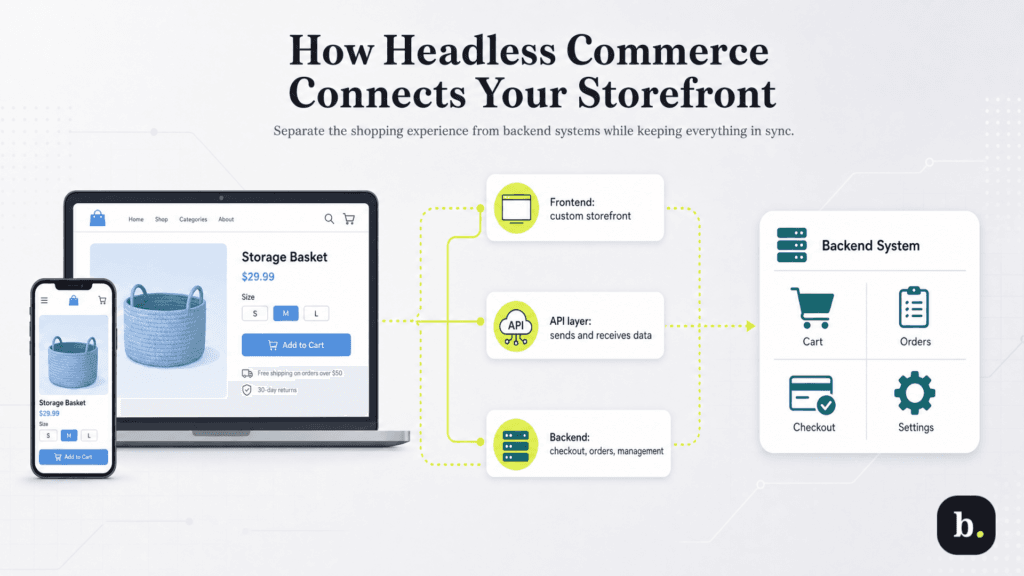
Consider what happens when a shopper buys a storage basket:
1. The frontend requests the product’s information and displays its price, photos and available options.
2. The shopper selects a size and adds it to a cart. The storefront sends that selection to the connected commerce service.
3. Checkout applies the configured purchase rules, such as delivery options and applicable charges.
4. A completed purchase produces an order that the business can manage in its backend.
The connection makes the storefront useful. A page showing sample products may look convincing, but it cannot run your store until the relevant business functions are connected.
With Wix Headless, for example, you can connect a custom frontend to commerce tools and a management dashboard, and use hosted checkout pages. This lets you build the shopping experience without rebuilding every purchase function yourself.
Depending on the platform, you can also connect bookings, events, a content management system (CMS) and a blog. Check which services are available and how they work with your chosen frontend.
The choice between integrated and headless commerce usually comes down to how much control you need and who will maintain the result.
Consideration | Integrated storefront | Headless storefront |
|---|---|---|
Storefront design | Uses the platform’s editor, themes and available customization options | Uses a separately built frontend connected to commerce services |
Initial setup | Often a straightforward option for standard store requirements | Requires building and connecting a custom shopping experience |
Ongoing maintenance | Much of the storefront’s operation stays within the platform | Custom frontend changes and integrations need an owner |
Best fit | A business whose needs fit the platform’s existing tools | A business with specific customer experiences or additional frontends to support |
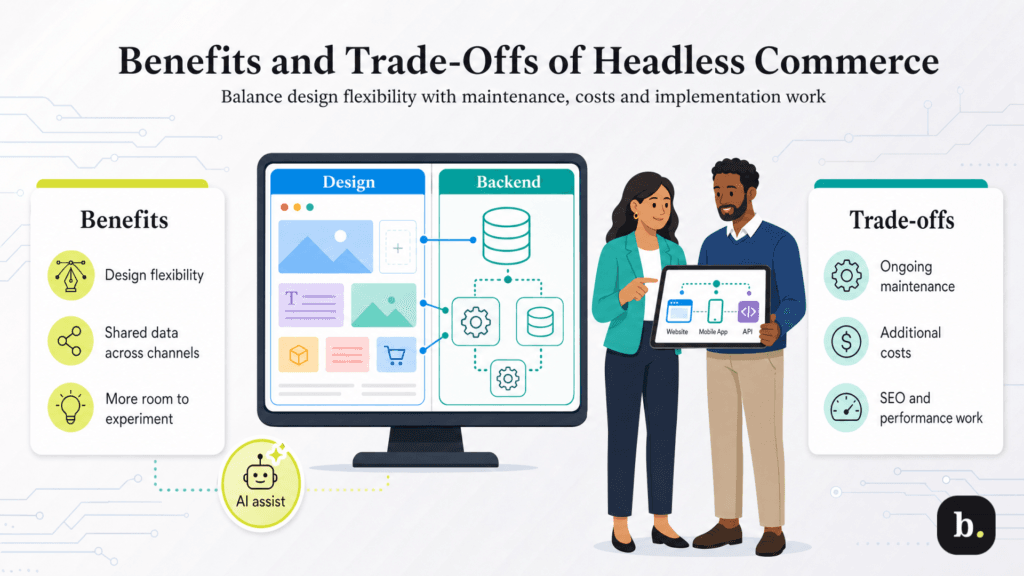
Headless commerce offers more control over your storefront, along with additional responsibilities for maintaining it.
Headless commerce deserves a closer look when you can name a customer or business requirement that your current storefront struggles to support.
Some customers need guidance before they can choose a product. A retailer might want shopping organized around measurements, compatibility or a particular project. A custom frontend is worth considering when that journey is central to the sale.
First, check whether your current platform can already deliver the experience. A design adjustment or existing feature may solve the problem with less work.
Perhaps your team repeatedly runs into the same limitation when presenting collections or explaining products. Write down what customers cannot do today and how the proposed frontend would help. That gives you a concrete basis for comparing the cost of a custom build with its expected value.
A business planning a website and a separate customer app may benefit from connecting both to shared commerce services. Start by identifying which information must stay consistent, such as product availability and order records. Each interface still needs its own design, implementation and testing.
If you have built a promising design in an AI tool, headless commerce offers a path to connect it to business operations. A headless commerce platform supplies those services while letting you retain a custom frontend.
An integrated store remains a sensible choice when its tools meet your requirements. The deciding factor is whether extra frontend control solves a meaningful problem and whether you can support it over time.
Start with a small scope: a usable catalog, clear product pages and one complete purchase journey. The steps below use Wix Headless as an example; the exact setup and publishing process depend on the platform and AI tool you choose.
Write a short brief covering your products, required pages and customer tasks. Explain how shoppers should find products and what information they need before purchasing. Our guide to making a business website can help organize the plan.
Describe customer needs clearly in your prompt. For the apartment-supply retailer, that might mean: “Create a mobile-friendly storefront where customers can filter storage products by room and dimensions. Show measurements prominently on product pages and keep the cart easy to reach.”
Include any design requirements, such as easy-to-use mobile navigation or prominent product comparisons. Our website design tips can help you evaluate the result.
For this example, install the Wix plugin in a supported AI client and sign in to your account. The plugin combines development instructions with access to the platform’s tools, so the agent can help build and manage a connected store. The Headless AI toolkit provides setup instructions for supported clients, including Claude Code, Cursor, Codex and VS Code.
You can also start a new project by including wix.com/headless/skill.md in your prompt. Specify whether you are creating a new business or working with an existing store. The new-project workflow creates a new site and should not be treated as an automatic migration tool.
Choose the business services your store requires. Prepare product names, prices, variants and inventory information, and confirm which records the frontend will use.
Ask the agent to build the store described in your brief using the Headless instructions. It can create the business backend and frontend and publish an initial site, then return links to the live site and management dashboard.
If you prefer to start from the dashboard, the Wix setup guide explains how to create a Headless site and open a frontend-building prompt in your AI tool. For an existing store, use the applicable connection or migration process.
Review the generated storefront against your brief. Check that its layout, navigation and product displays support the shopping experience you intended. Ask the agent which business services it connected and what still needs configuration.
Keep requests specific. “Show dimensions above the add-to-cart button” is easier to assess than “Make this page better.” Once connected, you can also ask the agent to add products or update content, while retaining the option to manage operations in the dashboard.
Ask for a preview link so your team can review changes before you publish them. A shared preview captures the site at that moment.
Replace sample content with your actual products and verify prices, descriptions, variants and inventory. Check that changes in the backend appear correctly in the storefront.
Configure your payment, delivery and tax settings, then test the complete purchase journey. Verify product filters, links, discounts and order confirmations. Check what happens when an item is unavailable or a customer leaves checkout and returns.
Ask someone unfamiliar with the project to find a product and complete a test purchase on their phone. Their experience can expose unclear navigation or missing information. Our guide to reducing friction on an e-commerce website can help structure the review.
Confirm that the resulting order appears correctly in your management dashboard and that purchase tracking works before directing customers to the site.
Confirm your domain, hosting arrangement and required paid services. Publish the version you have reviewed, coordinating changes with collaborators so you do not overwrite work you intend to keep.
Assign responsibility for product data and frontend maintenance, and retain access to the source project. After launch, monitor customer questions, checkout problems and conversion data. Use that evidence to prioritize improvements.
Test one complete shopping journey before adding more features. A reliable first version gives you a useful foundation for expansion.
Yes, when a small business needs a custom shopping experience and has a practical maintenance plan. Business size alone does not determine the fit. Start with the customer problem, available budget and ongoing responsibilities.
You may not need to write code yourself. An AI tool or developer can build the frontend and connect it to the business backend. The level of setup depends on the platform and the features you need. Identify who will review the result and resolve technical issues.
Yes, when the commerce platform supports the appropriate AI workflow. Use its documented prompts and connection instructions, then verify that the result works with live business data and checkout rather than sample products.
Often, yes, if the platform supports connecting or migrating to a custom frontend. Check which business data and features carry over, what needs rebuilding and how you will test the new experience before replacing the live store.
Costs depend on the platform, implementation and ongoing support. Budget for commerce services, any AI subscriptions, hosting and development work. Check which paid features you need to accept payments or connect a custom domain, along with any usage or API fees.
