Your free business.com+ membership unlocks exclusive tech deals and advisor support
Join Free
BDC Hamburger Icon

Menu

Close
BDC Logo with Name
Search Icon
Search Icon
Advertising Disclosure
Close
Advertising Disclosure

Business.com aims to help business owners make informed decisions to support and grow their companies. We research and recommend products and services suitable for various business types, investing thousands of hours each year in this process.

As a business, we need to generate revenue to sustain our content. We have financial relationships with some companies we cover, earning commissions when readers purchase from our partners or share information about their needs. These relationships do not dictate our advice and recommendations. Our editorial team independently evaluates and recommends products and services based on their research and expertise. Learn more about our process and partners here.

Stripe vs. PayPal

Both Stripe and PayPal can help you send invoices, process payments and receive money. How do they differ, and which one is right for your business?

author image
Written by:
Dock Treece, Senior Analyst
Editor verified:
Sandra Mardenfeld,Senior Editor
Last Updated Aug 21, 2026
Business.com earns commissions from some listed providers. Editorial Guidelines.
Table Of Contents Icon

Table of Contents

Open row

Accepting payments is an essential part of running a business, whether that’s in-person, online or both. The right solution should allow your customers to pay using the methods they prefer, without costing you a fortune in fees. Stripe and PayPal are both top credit card processors that facilitate payments and each includes additional features that may be useful to small businesses. We’ve compared both solutions to help you see which one is the best choice for your small business. 

Stripe vs. PayPal Highlights

Criteria

Stripe

PayPal

Costs

  • Pricing is transparent with no monthly fees or contracts.
  • Online transactions: 2.9% plus 30 cents 
  • In-person transactions: 2.7% plus 5 cents
  • Pricing is complex and you might have to pay a monthly fee for some services.
  • Online transactions: 2.29% to 3.49% plus 49 cents
  • In-person transactions: 2.29% to 2.99% plus 9 cents

Payments

  • Stripe supports more than 100 payment methods, including cards, digital wallets, bank payments and buy now, pay later options.
  • Businesses can use prebuilt checkout tools or create highly customized payment experiences.
  • Stripe also supports recurring and subscription payments through Stripe Billing.
  • You can accept major credit and debit cards, PayPal, Venmo, cryptocurrency, Apple Pay and Google Pay.
  • You can only create customized checkout screens with a paid subscription to Payments Pro.
  • PayPal lets your customers pay in four installments or with monthly payments. 

International payments

  • Stripe supports payments in more than 135 currencies from customers in more than 195 countries.
  • Businesses can offer local payment methods such as Alipay and WeChat Pay.
  • Currency conversion generally adds 1 percent when Stripe performs the conversion; Adaptive Pricing can instead present prices in the customer’s local currency and pass the conversion cost to the shopper.
  • PayPal accepts payments from over 200 countries in 120 currencies.
  • Currency conversion fees are 3% to 4%.

Hardware

  • Stripe offers several certified mobile, countertop and smart payment devices.
  • Stripe-branded readers start at $59.
  • Tap to Pay lets businesses accept contactless payments on compatible smartphones for an additional 10 cents per authorization.
  • PayPal offers multiple devices, including handheld and countertop point-of-sale (POS) devices.
  • Your first card reader costs $29.
  • There aren’t any fees for using Tap to Pay on your mobile device. 

Additional services

  • Businesses can send invoices or manage subscriptions and recurring payments.
  • Stripe includes fraud prevention and payment optimization tools such as Radar and Authorization Boost.
  • PayPal’s invoicing features are excellent and easy to use. 
  • PayPal offers business loans, lines of credit and business debit cards.

Ease of use

Stripe’s prebuilt checkout tools are easy to use, but advanced customization may require developer assistance.

PayPal is easy to use, and you can start accepting payments right away. 

Who is Stripe For?

Stripe is our choice for e-commerce businesses that want flexible online payment processing and the ability to accept credit cards and a wide range of other payment methods. Stripe stands out for its customizable checkout tools, support for more than 100 payment methods and extensive integration options.

Stripe functions primarily as a payment processor for online businesses and offers tools for accepting payments through websites, mobile apps, invoices, subscriptions and in-person transactions. As a payment aggregator, Stripe creates a merchant account for your business under its master account and deposits funds directly into your linked bank account.

After signing up, businesses can start accepting payments with Payment Links, Stripe Checkout or one of Stripe’s many integrations. Companies that need more control can use Stripe’s APIs and developer tools to build customized payment experiences. Stripe also offers additional products for billing, tax collection, fraud prevention, reporting and more.

Here’s what we love most about Stripe:
  • Transparent flat-rate pricing with no monthly fees or long-term contracts
  • Flexible checkout options ranging from no-code payment links to fully customized payment experiences
  • Support for more than 100 payment methods, including cards, ACH transfers, digital wallets and buy now, pay later services
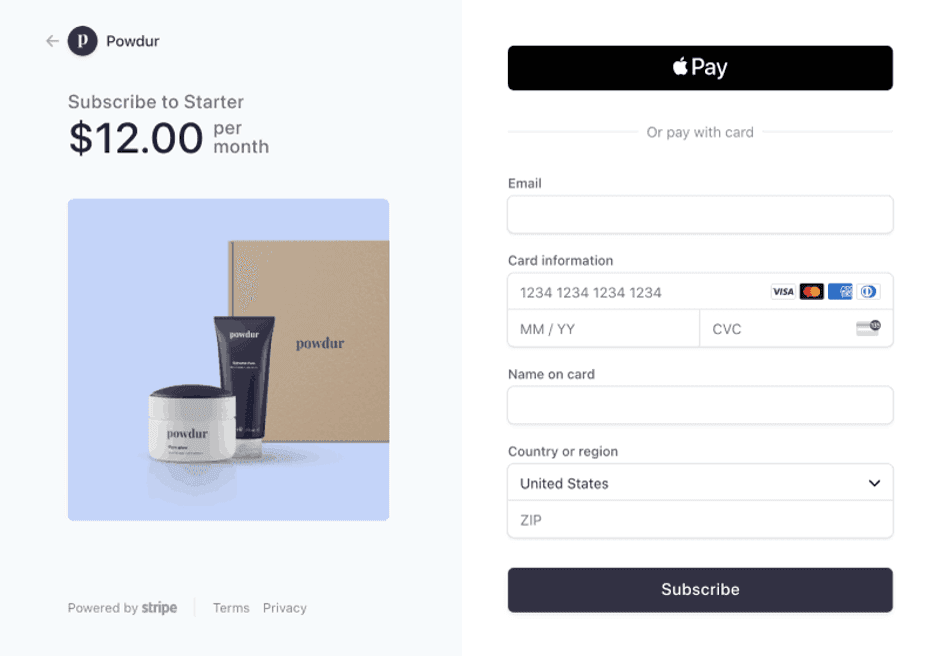
Stripe payments
Stripe lets you accept over 100 payment methods, including digital wallets like Apple Pay. Source: Stripe

Who is PayPal For?

PayPal’s uncomplicated platform makes it a great choice for startups and other small businesses that want an easy way to accept payments and create invoices. While it isn’t the cheapest payment processing solution, we found it to be valuable for businesses with a low sales volume that need simplicity above all else. PayPal is familiar to many customers and has a strong reputation, so using a PayPal checkout screen provides customers with confidence when purchasing from your business, especially if they aren’t familiar with your company. 
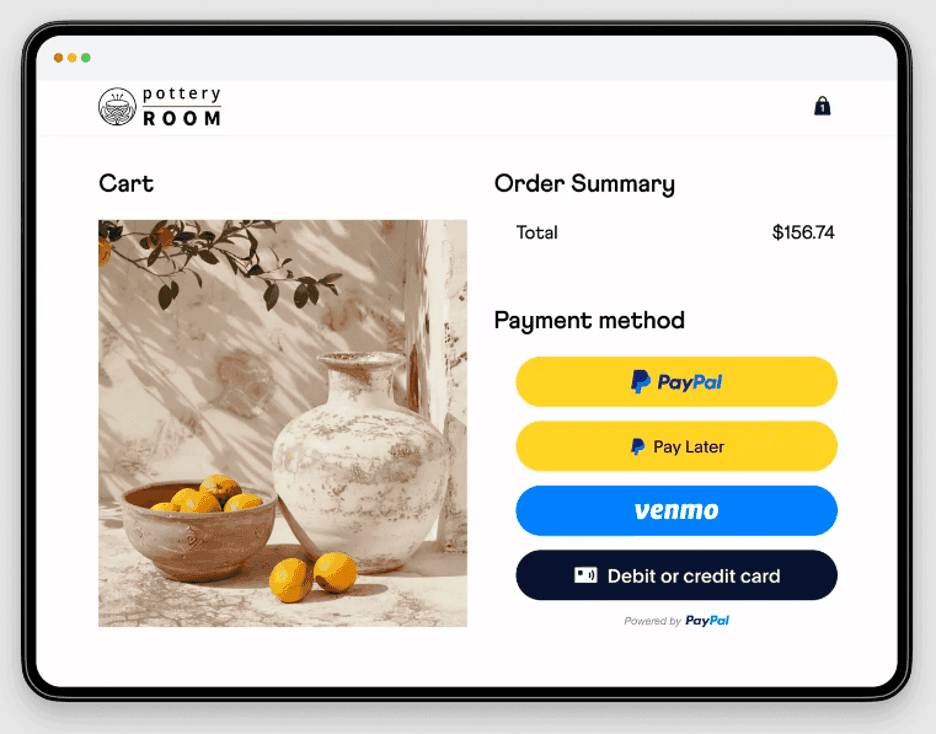
Paypal payments
Your customers can pay with PayPal, Venmo, any major card or choose to pay in installments. Source: PayPal

Like Stripe, PayPal is a financial services company. However, PayPal functions primarily as a digital wallet for individuals or your small business. It excels at invoicing clients and receiving payments for work performed. It also offers merchant services like POS systems and credit card processing.

Signing up for PayPal is quick and easy. Once you’re registered, you can decide how best to use the platform to support your needs, order equipment or add tools and features. You can also order a POS system, acquire a business loan or use the platform to send individual invoices and receive payments. 

We think PayPal stands out because of these reasons:

  • Uncomplicated checkout pages with multiple payment options, including pay later features
  • Multiple hardware devices and accessories at affordable prices
  • Business financing options with loans and PayPal business debit cards
Bottom LineBottom line
Stripe is a strong choice for e-commerce businesses that want flexible online payment processing and customizable checkout experiences. PayPal may be a better fit for companies that prioritize simplicity and want to start accepting payments with minimal setup.

Stripe vs. PayPal Comparison

Pricing and Plans

Stripe

If you choose Stripe for your payment processing needs, online payments start at 2.9% plus 30 cents per transaction, while in-person payments through Stripe Terminal cost 2.7% plus 5 cents. Pricing is the same for all cards and digital wallets, including Visa, Mastercard, American Express, Discover, JCB, Apple Pay and Google Pay. Stripe also supports more than 100 payment methods, including bank payments and buy now, pay later options.

There are no contracts and no monthly fees. You’ll have to consider a few other fees, but in general, we like how simple and transparent Stripe is when it comes to pricing. Here’s a breakdown of Stripe’s costs:

  • Online transactions (Payments): 2.9% plus 30 cents
  • In-person transactions (Terminal): 2.7% plus 5 cents
  • ACH Direct Debit: 0.8%, capped at $5
  • Hardware: $59-$299
  • International cards: +1.5%
  • Manually entered cards: +0.5%
  • Currency conversion: +1%
  • Tap to Pay: +10 cents per authorization
  • Custom checkout domain: $10 per month
  • Disputes: $15
  • Invoicing: +0.4%
Did You Know?Did you know
If your company has a unique business model ─ including large payment volume, country-specific rates, multi-product discounts or other specific features ─ Stripe will work with you to create a custom payment processing plan that can lower processing fees.

PayPal

  • PayPal’s fees are complicated and depend on what functions you need.
  • You will pay around 2.29%-3.49% plus 49 cents for online transactions. 
  • International fees vary by country. 

PayPal transaction fees are based on the type of payment being processed and whether transactions are domestic or international. Rates vary from 2.29% ─ plus a fixed fee for quick response (QR) code transactions valued over $10 ─ to 3.49% with an additional fixed fee for standard PayPal checkout, invoicing, Venmo and other commercial transactions. 

In general, we found PayPal’s pricing structure to be complicated. Fees depend a lot on how you plan to accept payments and, for some functions, you’ll need to sign up for a monthly plan. We recommend speaking to PayPal to get a clear idea of what you’ll be paying. Here are some of the most relevant fees.

  • Online transactions:                       2.29%-3.49% plus 49 cents
  • In-person transactions:                  2.29%-2.99% plus 9 cents
  • Hardware:                                      $29-$499
  • PayPal digital payments:                3.49% plus 49 cents
  • International transactions:              +1.5%
  • Currency conversion:         3%-4%
  • Payments Advanceds:                   $5 per month
  • Payments Pro:                               $30 per month
  • Virtual terminal:                              $30 per month
  • Chargebacks:                                 $20
Best for Pricing and Plans
Stripe
Stripe is our winner when it comes to pricing. We appreciate that Stripe keeps it simple, so it is easy to determine what fees you’ll be paying right from the start. PayPal's pricing structure is complicated, and you might not be able to figure out fees and monthly costs without speaking to a sales representative. In general, we found that Stripe is considerably less expensive than PayPal for every transaction type.

Payments

Stripe

Stripe makes it easy to accept payments online, in person and through invoices or subscriptions. The platform supports more than 100 payment methods, including major credit and debit cards, mobile wallets, bank payments and buy now, pay later options. Businesses can also offer local payment methods in markets around the world through a single payment platform.

One of Stripe’s biggest strengths is the flexibility of its checkout experience. Businesses can get started quickly with Stripe Checkout or Payment Links and later customize the payment flow with Stripe’s developer tools and APIs. We also like that companies can use a custom checkout domain for a more branded customer experience.

Stripe supports buy now, pay later payment methods, including Klarna and Afterpay, alongside cards, bank payments and digital wallets. The platform also includes reporting and analytics tools that help businesses track sales, payment trends and customer activity.
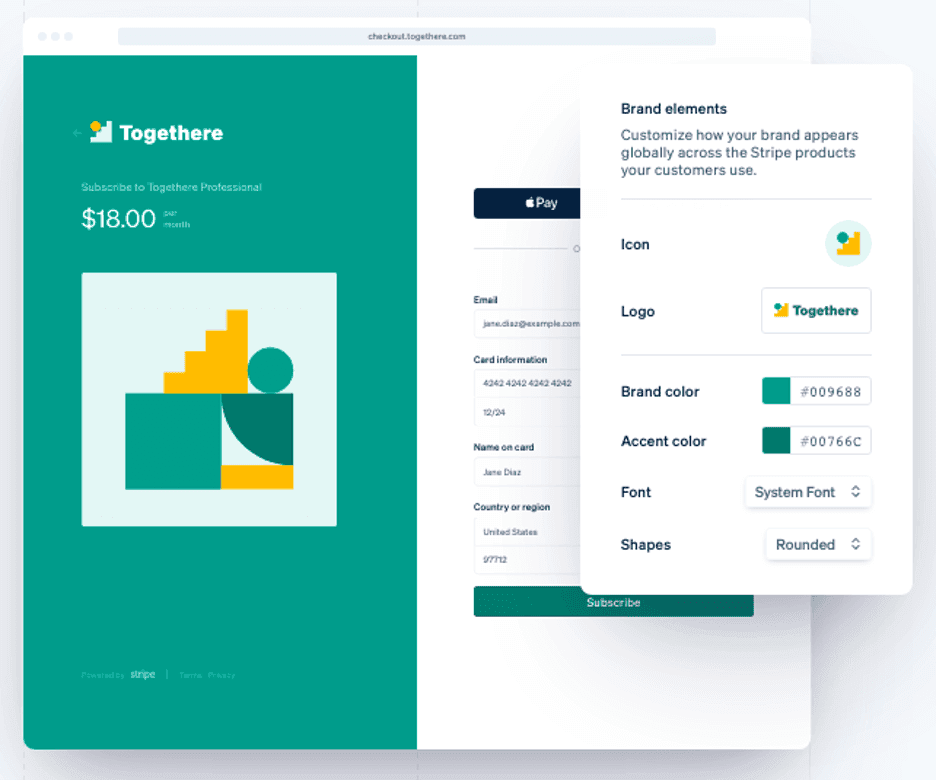
Stripe checkout
Stripe lets you customize checkout pages to match your business’s branding. Source: Stripe

PayPal

Similar to Stripe, PayPal lets you securely accept payments online and in person. Customers can pay with PayPal, Venmo, Apple Pay, Google Pay, cryptocurrency or with major credit and debit cards. We love that PayPal has its own Pay Later function, letting customers choose between four installments or monthly payments, but you still get your money upfront. 

When checking out online, customers will be sent to a PayPal checkout screen, which can boost consumer confidence, especially if you are a new business. You also have the option of creating a customized checkout page, but it requires an additional paid monthly subscription. If you don’t have a website, you can still send customers payment links or QR codes. PayPal also provides analytics to help you learn how to sell more efficiently. 

Best for Payments
Stripe
Both platforms offer competent payment processing, but Stripe lets you accept payments in more ways, notably from more digital wallets and through ACH bank transfers. We also appreciate that you can create customized checkout pages at no extra cost.

International Payments

Stripe

Stripe is a strong option for businesses that sell to customers around the world. The platform supports payments in more than 135 currencies and offers a wide range of local payment methods, including digital wallets and bank-based options that are popular in different markets. Businesses can manage domestic and international payments through the same Stripe account.

We especially like that Stripe can tailor the checkout experience based on where a customer is located. Businesses can present prices in local currencies and offer relevant payment methods, which makes the checkout process feel more familiar to international customers. Stripe also offers tools for businesses operating across multiple countries, including local acquiring and multicurrency settlement in supported markets.

PayPal

PayPal is a solid choice for small businesses that need to accept payments from around the world. PayPal can process payments from over 200 countries and supports over 120 currencies. Plus, PayPal’s global recognition can help boost consumer confidence in your company, leading to more sales.

While Stripe charges a set fee for all international transactions, PayPal charges different fee rates for different countries. The currency conversion fee is around 3%, which is higher than Stripe’s fee of 1%. 

Best for International Payments
Tie
When it comes to international payments, both Stripe and PayPal offer a solid product. PayPal supports payments from slightly more countries while Stripe can process a few more types of currency. The right choice depends on what countries you plan to do business in and what currencies you need to accept. As PayPal charges different fees for each country, you’ll also have to check which option will save you more money.
TipBottom line
Doing global business successfully means finding the best way to accept payments, but it also requires considering issues like cultural norms and foreign regulations. Read our tips on expanding your business internationally to help your company flourish overseas.

Hardware

Stripe

Stripe Terminal lets businesses accept in-person payments while keeping those transactions connected to the rest of their Stripe payment data. Stripe offers several certified payment devices and provides APIs that allow businesses to integrate Terminal into custom POS systems.

There’s a basic card reader for $59, while the Stripe Reader S700 and Stripe Reader S710 smart readers cost $299. Businesses can also enable Tap to Pay on compatible iOS and Android devices for an additional 10 cents per authorization.

PayPal

PayPal offers a number of hardware devices to accept in-person payments through PayPal Zettle or you can enable Tap to Pay on iOS or Android for no additional fee. The basic card reader is a bit more functional than Stripe’s with a numerical keypad and a simple digital display. Your first reader only costs $29 but additional readers go for $79. 

Zettle Terminal, which has a touchscreen display and connects with PayPal’s POS app, costs $199. For $239 you get Terminal with a built-in barcode scanner and for $269 it comes with a dock and printer. PayPal also offers store kits with displays ranging from $249 to $499 and you can also purchase individual accessories easily, such as cash drawers and printers, right from their website.

Best Hardware
PayPal
PayPal offers more ways to accept in-person payments and for cheaper. We especially love that PayPal gives you a discount on your first card reader and doesn’t charge additional fees for using Tap to Pay.

Additional Services

Stripe

In addition to payment processing, Stripe offers a broad range of business tools:

  • Billing: Manage subscriptions, recurring payments and usage-based billing.
  • Invoicing: Create and send invoices, accept online payments and automate payment reminders.
  • Tax: Calculate, collect and report sales tax, VAT and GST in supported jurisdictions.
  • Radar: Screen transactions for potential fraud using Stripe’s built-in fraud prevention tools.
  • Sigma: Create custom reports and analyze payment data using SQL-based queries.
  • Connect: Manage payments and payouts for marketplaces and multi-vendor platforms.
  • Issuing: Create and manage virtual or physical payment cards.
  • Identity: Verify customer identities and help meet compliance requirements.

PayPal

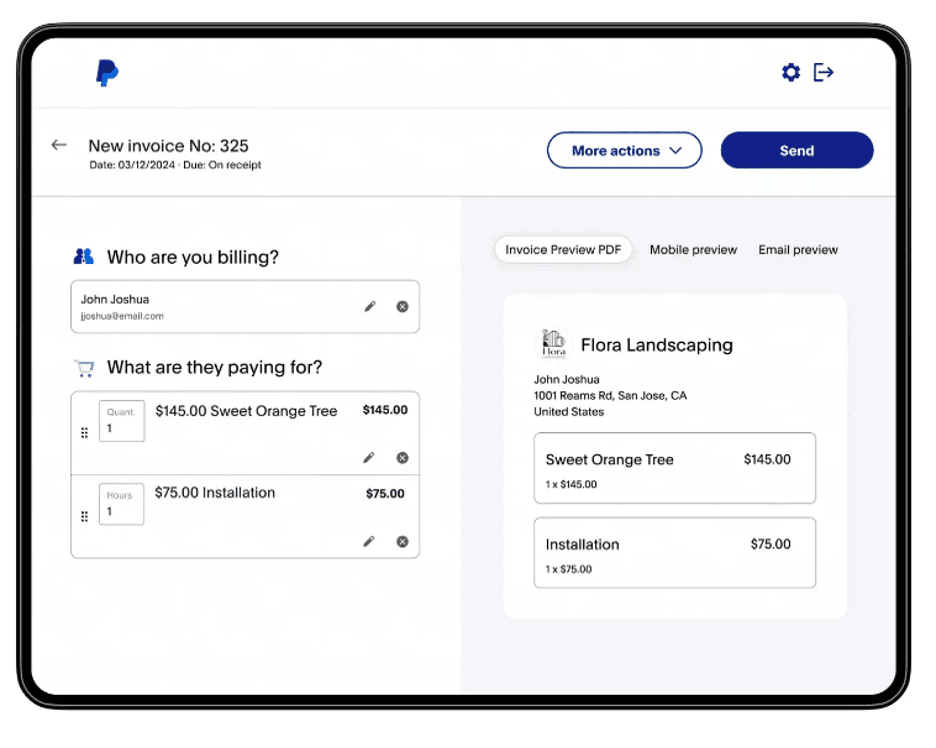
Paypal invoices
Creating invoices is a breeze in PayPal. Source: PayPal

In addition to payment processing, PayPal offers these services:

  • Invoicing: Sending PayPal invoices is a breeze. There’s no fee for sending an invoice, but the company collects a fee from merchants for all invoices paid through the platform.
  • Business loans: Business account customers can apply for a PayPal Business Loan to help cover expenses. Prospective borrowers use PayPal’s online tool to check their eligibility ─ without impacting their credit score. Eligibility is based on several factors, including your credit history and your company’s overall financial health. 
  • Working capital: PayPal also offers flexible lines of credit if your business regularly needs access to small amounts of capital to cover expenses.
  • Seller protection: Seller protection guards you against fraud and reduces the risk of chargebacks. 
  • Tax calculation tools: These tools help you calculate sales taxes owed on transactions based on location and transaction type.
  • Business debit card: You can use your PayPal balance to make purchases and withdraw cash. Plus, there’s 1% cash back on eligible purchases.
Best Additional Services
Tie
We found that both Stripe and PayPal offer excellent additional services to complement their payment processing features. The right platform for your business depends a bit on what else you need beyond accepting payments. PayPal has options for funding your business and we found its inventory features easier to use. Stripe has potent security features and lets you set up recurring billing and subscriptions.

Ease of Use

Stripe

Stripe is easy to get started with. Businesses can begin accepting payments quickly using Payment Links, Stripe Checkout and other prebuilt tools, while the Dashboard makes it easy to manage payments, customers, invoices and subscriptions from one place.

The platform becomes more complex as you move beyond Stripe’s out-of-the-box tools. Businesses that want highly customized checkout experiences, advanced automations or API-based integrations may need technical expertise or developer support. That said, Stripe’s documentation is among the best we’ve seen, making it easier to implement and manage advanced features than many competing payment platforms.

PayPal

PayPal can be used straight out of the box. You don’t need any development experience or outside resources to set it up. The downside is, with PayPal’s basic offering, you’ll have to use PayPal’s checkout screens. However, as many consumers are already familiar with PayPal, that means checking out should be easy. If you subscribe to Payments Pro, you will need developer help to get the most out of the platform.

Best for Ease of Use
PayPal
We found PayPal is easier to set up and use in our testing. While we appreciate that Stripe can be customized to fit your specific needs and branding, if you don’t know an IT specialist and don’t have the means to pay someone to help you configure Stripe, you may want to use PayPal or find a simpler system, because Stripe’s bells and whistles can be overwhelming.

Stripe vs. PayPal Summary

Choose Stripe if:

  • You want a customizable checkout experience that accepts a wide range of payment methods.
  • You need transparent, affordable rates to process domestic and international payments.
  • You want flexible payment tools that can scale as your business grows.

Choose PayPal if:

  • You want a checkout process that inspires consumer confidence and drives sales.
  • You need a simple way to start accepting payments and issuing invoices. 
  • You’re looking for affordable hardware options for accepting in-person payments.

FAQs

Stripe and PayPal are two of our top choices for payment processing. The better option depends on your business. If ease of use and affordable hardware are a priority, go with PayPal. If you prioritize customization and transparent fees, Stripe is a better choice.
Businesses use Stripe and PayPal to accept payments both online and in person. Stripe accepts over 100 payment methods in over 135 currencies.
Both Stripe and PayPal are reputable, secure platforms that help keep financial information from your business and customers safe. Both also have tools to help detect and prevent fraud.
Stripe is free to set up and there are no monthly service fees or contracts. You only pay fees on the payments you process.
If you process too many fraudulent transactions or fail to pay the required fees, both PayPal and Stripe may prevent you from processing any more transactions until the issue is resolved.
Did you find this content helpful?
Verified CheckThank you for your feedback!
author image
Written by: Dock Treece, Senior Analyst
Dock David Treece is a respected finance expert known for his thorough exploration of business financial matters, with a focus on Small Business Administration (SBA) loans and alternative lending. He currently serves as the senior vice president of marketing at BNY Mellon, having previously held the role of editorial manager at Dotdash. At business.com, Treece covers accounting concepts, business credit cards and bank accounts, and retirement contributions. Drawing from over 17 years of experience, Treece has worn various hats, including financial advisor, registered investment advisor and a key position on the FINRA Small Firm Advisory Board. In addition to his corporate roles, Treece's entrepreneurial background adds depth to his understanding of the challenges and opportunities small business owners face. As a co-founder and manager of a small business, he offers firsthand insights into the tools and tactics necessary for success in the ever-changing entrepreneurial landscape.