Your free business.com+ membership unlocks exclusive tech deals and advisor support
Join Free
BDC Hamburger Icon

Menu

Close
BDC Logo with Name
Search Icon
Search Icon
Advertising Disclosure
Close
Advertising Disclosure

Business.com aims to help business owners make informed decisions to support and grow their companies. We research and recommend products and services suitable for various business types, investing thousands of hours each year in this process.

As a business, we need to generate revenue to sustain our content. We have financial relationships with some companies we cover, earning commissions when readers purchase from our partners or share information about their needs. These relationships do not dictate our advice and recommendations. Our editorial team independently evaluates and recommends products and services based on their research and expertise. Learn more about our process and partners here.

Best CRM for Real Estate Businesses

A successful real estate business needs to stay organized and the right CRM system can help you do just that.

Nadia Reckmann
Written by:
Nadia Reckmann, Senior Analyst
Last Updated Aug 21, 2026
Business.com earns commissions from some listed providers. Editorial Guidelines.
9.6 /10
Editor's rating
Best for Small Real Estate Agencies
  • Free plan available
  • 14-day free trial (paid plans)
  • Paid plans start at $20/user/month
Visit Site
Links to HubSpot CRM
9.4 /10
Editor's rating
Best for Growing Real Estate Businesses
  • Free plan available
  • 15-day free trial (paid plans)
  • Paid plans start at $14/user/month
Visit Site
Links to Zoho CRM
9.4 /10
Editor's rating
Best for Sales Automation
  • No free plan available
  • 14-day free trial
  • Starts at $14 per user, per month
Visit Site
Links to Pipedrive CRM
Image related to the service.
Salesforce CRM
9.2 /10
Editor's rating
Best for Real Estate Managing Brokers
  • Free plan available
  • 30-day free trial
  • Paid plans start at $25/user/month
Freshsales logo
FreshsalesCRM
9.3 /10
Editor's rating
Best for Client Communication
  • Free plan available
  • 21-day free trial
  • Paid plans start at $9/user/month
Table Of Contents Icon

Table of Contents

Open row

At business.com, our team of technology experts has analyzed hundreds of tools and services designed to improve essential business operations, from POS systems to GPS fleet management services to remote PC access software, and we use these experiences to provide business owners with actionable guides and industry insights. Every playbook and explainer is infused with advice from real IT consultants, implementation experts, security specialists, software developers and more.

Our rigorous product review process involves in-depth industry research, vendor interviews, hands-on testing and service comparisons. Each analysis — whether for a business phone system, CRM platform, call center software or website builder — is independently verified by a business.com editor to ensure our recommendations are free of bias and errors. Learn more about our editorial process.

How We Decided

Tip Bulb

When evaluating the best CRM software, we looked closely at each system’s features, such as lead generation tools, marketing capabilities and analytics. We considered whether the CRM’s dashboards and various functions were user-friendly and if the platform could be...

MoreMore

When evaluating the best CRM software, we looked closely at each system’s features, such as lead generation tools, marketing capabilities and analytics. We considered whether the CRM’s dashboards and various functions were user-friendly and if the platform could be customized. We compared plans and subscription costs to see which CRM vendor would provide the best value at the most affordable price. We also took into account each product’s limitations and the quality of customer service provided.

65

evaluated

13

researched

10

chosen

When evaluating the best CRM software, we looked closely at each system’s features, such as lead generation tools, marketing capabilities and analytics. We considered whether the CRM’s dashboards and various functions were user-friendly and if the platform could be customized. We compared plans and subscription costs to see which CRM vendor would provide the best value at the most affordable price. We also took into account each product’s limitations and the quality of customer service provided.

65

evaluated

13

researched

10

chosen

As a real estate agent, you need to be able to stay on top of your prospects, organize property showings, manage listings, handle negotiations, match buyers with their ideal houses and keep them updated throughout the process. This is where a customer relationship management (CRM) platform comes to the rescue. The right CRM can help your real estate business stay organized, streamline the buying and selling processes, manage contacts and close more deals. We’ve closely reviewed dozens of CRM solutions and their features to help you navigate their complexities and find an ideal solution that matches the needs of your real estate company.

Compare Our Best Picks

BDC Ribbon
Our Top Picks for 2026
HubSpot CRM
Zoho CRM
Pipedrive CRM
Salesforce CRM
FreshsalesCRM
Rating (Out of 10)9.69.49.49.29.3
Best for

Small real estate agencies

Growing real estate businesses

Sales automation

Real estate managing brokers

Client communication

Free plan

Yes, up to 2 users

Yes, up to 3 users

No

Yes, up to 2 users (Free Suite)

Yes, up to 3 users

Free trial

14 days

15 days

14 days

30 days

21 days

Starting price (paid tiers)

Free (paid plans start at $20 per user, per month)

Free (paid plans start at $14 per user, per month)

$14 per user, per month (billed annually)

Free (paid plans start at $25 per user, per month)

Free (paid plans start at $9 per user, per month)

Support

Live chat and email; phone on top-tier plans only

Phone, email, live chat and remote assistance

Live chat and email; phone on top-tier plans only

Live chat; phone for business-stopping issues only

Phone, email and live chat

Email features

Campaigns, drag-and-drop email builder, contact segmentation, mass emails, AI personalization

AI insights, email status updates, mass emails, sales inbox

Sales inbox, basic email tracking

AI insights (top plans), campaigns, mass emails, advanced journey mapping

Real-time open/click alerts, email sequences, email triggers

Multiple listing service (MLS) integration or real estate extensions

Third-party integrations and real estate-specific CRM objects

Yes

Manual/API only

Yes

No

Built-in phone dialer

No

Yes

Yes

No

Yes

Landing pages and web forms

Yes

Yes

Web forms included on

Requires paid add-ons

Basic

Review Link
Scroll Table

Our Reviews

Hubspot logo
Editor's Rating: 9.6/10
Visit Site
Links to HubSpot CRM

Small businesses and solo brokers don’t have time — or money — to figure out a complex CRM or get multiple solutions to cover their essential sales and marketing needs. They need a tool that can help them stay on top of their leads and deals, communicate with buyers and sellers effectively, manage their property listings and stay organized. That is exactly why we chose HubSpot as the best CRM for small real estate agencies.

hubspot CRM

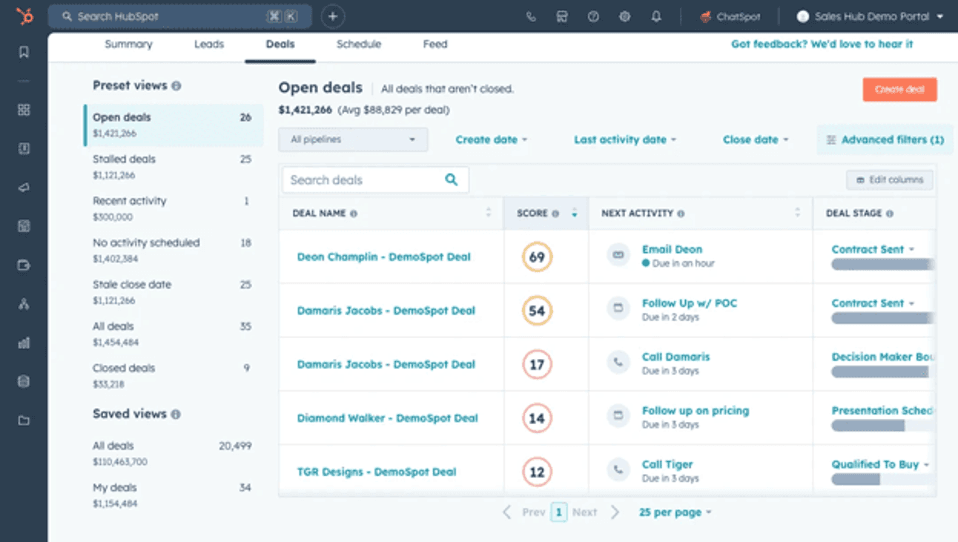
HubSpot’s AI-powered deal intelligence helps sales teams prioritize opportunities and focus on the next actions most likely to move deals forward. Source: HubSpot

We were impressed by the sheer number of features that HubSpot offers on its forever-free plan. It includes contact management, deal tracking, email tools and basic automation, as well as AI-powered prospecting tools, an integrated content management system and e-commerce capabilities. We like that real estate agents can send targeted and segmented email campaigns straight from the CRM, eliminating the need for third-party providers and reducing setup costs.

You can access numerous customizable, goal-based templates and design emails using a simple drag-and-drop builder or ask Breeze AI to draft them for you. We love HubSpot’s user-friendly, intuitive interface and straightforward setup, with plenty of support available along the way — something that is particularly important for small businesses without an information technology person and for less tech-savvy solo real estate agents.

HubSpot offers a free CRM along with paid plans that add automation, reporting, AI-powered tools and advanced customization options. The plans below highlight the HubSpot features most relevant to real estate professionals.

Smart CRM Pricing

PlanPrice (Annual Billing)Key Features
FreeFreeManage contacts, companies and deals in one place; organize your sales pipeline; sync your data.
Starter$20/user/monthRemoves HubSpot branding; enables user permissions configuration; automatically enriches data.
Professional$50/user/monthCustom CRM layout configuration; merge duplicate records; organize users into teams (e.g., marketing, sales, customer service)
Enterprise$75/user/monthGet AI insights on CRM index pages; set custom objects; enable single sign-on.

Additional tools that take the Smart CRM to the next level live in HubSpot’s Sales Hub. Here’s a closer look at those plans.

Sales Hub Pricing

PlanPrice (Annual Billing)Key Features
FreeFreeContact management; deal tracking; meeting scheduling; basic reporting; access to HubSpot’s free tools
Starter$20/user/monthEverything in the Free plan (with fewer limits), plus: calling; basic sales automation; Data Agent; intent signals; task queues; Breeze Prospecting Agent; 500 HubSpot Credits
Professional$90/user/monthEverything in Starter, plus: conversation intelligence; forecasting; call recording and transcription; advanced automation and sequences; AI meeting assistant; predictive lead scoring; sales analytics; Smart Deal Progression; 3,000 HubSpot Credits
Enterprise$150/user/monthEverything in Professional, plus: advanced deal and pipeline analytics; lead form routing; pipeline approvals; custom channels API; AI transcript enrichment; 5,000 HubSpot Credits
  • HubSpot’s flexible shared dashboards foster openness and teamwork between your sales and marketing departments.
  • The platform supports both personalized and mass outreach, logging each interaction automatically to build rich, current profiles for every customer and lead.
  • We’re big fans of how Breeze AI simplifies workflow automation, content creation for sales and marketing and performance tracking for your team.
  • While HubSpot matches Salesforce in terms of robust features, many of its best tools are gated behind higher-tier pricing.
  • Phone support remains a priority for many users, but it’s not included with HubSpot’s Free or Starter plans.
  • Power users may find that costs related to application programming interface (API) usage and transactional emails can increase rapidly.

HubSpot earned an 8.3 out of 10 across more than 5,000 reviews on TrustRadius. Customers frequently praised its comprehensive data management and seamless integrations with other business software. Also frequently mentioned was HubSpot’s effective automation and user-friendly sales pipeline tracking. However, customers noted HubSpot has limited customization options and a relatively high cost for the best features. Some also suggested the software isn’t especially intuitive or navigable.

“Integrates with our entire stack, makes it very easy to track outbound, existing customers, and deal progression. For smaller companies, I feel like HubSpot CRM is a no-brainer for the CRM choice to use. You can easily make sure tasks are accounted for and even prospect right out of HubSpot CRM. This also makes forecasting very simple as well,” one user wrote.

Zoho CRM logo
Editor's Rating: 9.4/10
Visit Site
Links to Zoho CRM

Zoho CRM’s scalability, customization options, extensive marketplace and built-in AI tools make it an excellent CRM for growing real estate businesses. We found Zoho CRM’s minimalist interface intuitive and easy to use, which helps reduce the learning curve for a busy, growing real estate team.

zoho forecast

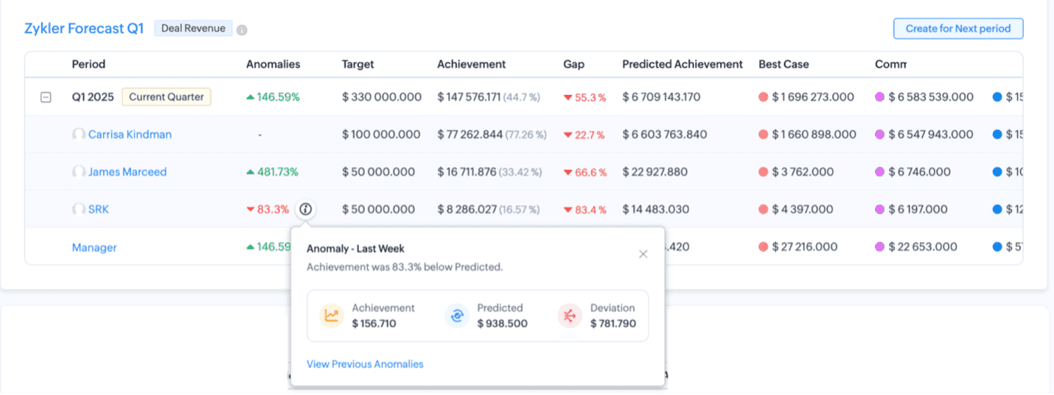
Zoho can identify deal and forecast anomalies and notify sales reps so they can take immediate action. Source: Zoho

We loved how Zoho CRM handles omnichannel communication. It brings all client conversations — be it through email, phone, live chat or social platforms — into one unified dashboard, which helps real estate agents deliver fast, consistent responses to client inquiries about listings, property details and contract terms without jumping between tabs.

What particularly stood out in our review is Zoho Marketplace, which carries more than 2,500 extensions across upward of 40 categories, including more than 800 built specifically for Zoho CRM. Agencies are bound to find relevant tools as they grow. Real estate businesses will particularly appreciate a Zillow widget that can help source United States property information, such as estimated values and similar sold properties.

We also liked that the platform integrates seamlessly with other products from the Zoho ecosystem, providing a centralized, cost-effective solution to send email campaigns, request contract signatures, manage invoices and launch post-sale surveys.

PlanPriceFeatures
FreeFreeUp to 3 users. Contact management; follow-up reminders; workflow automation; custom email templates; data import and export; standard reports; APIs.
Standard$14 per user, per monthEmail integration and mass emails; built-in calling; multiple sales pipelines; calendar integration; data capture forms; sales forecasting; data enrichment; custom modules; Gmail and Outlook integration; Slack, Zoom and Teams integration.
Professional$23 per user, per monthAI agents; process management; inventory management; predictive intelligence; unlimited reports; CPQ; custom portals; customer journeys; web-to-case forms; customer portals; Google Ads integration.
Enterprise$40 per user, per monthMulti-team management; reporting hierarchy; custom buttons and functions; extended field types; sequential data collection; approval process; account based marketing; developer sandbox; field-level encryption; extended AI capabilities; QuickBooks integration.
  • Zoho CRM delivers a powerful all-in-one platform for sales, marketing and customer service, making it a solid choice for businesses looking for a comprehensive CRM solution.
  • Its AI tools are a standout, helping to automate tasks, interpret data and surface actionable insights with ease.
  • With Zoho Marketplace, you can extend your CRM’s functionality through a wide variety of integrations tailored to your needs.
  • Although the Standard plan is budget-friendly, it may fall short on some key features — especially when it comes to marketing automation.
  • More advanced customization capabilities, such as custom buttons, page layouts and modules, generally are reserved for higher-tier subscriptions.
  • File storage is tight at the entry level (the Standard plan includes just 1GB) and colleagues who only need to view data still cost you, with Team User licenses running an extra $9 per user, per month.

Zoho CRM earned an 8.4 out of 10 across more than 1,000 reviews on TrustRadius. Customers often praise the platform’s contact organization tools, flexible customization options and seamless integration with third-party business software. However, some users complained about the navigability of the software and suggested reporting is more limited than some competitors, such as HubSpot.

“Zoho CRM has really helped streamline our day-to-day sales activities within the entire sales department. Initially, we didn’t have such a tool, where we structured all the sales details in such a structured and transparent way. Introducing Zoho CRM has helped us in transparency within our sales team. It has really automated [a lot] of manual tasks,” one user wrote.

Pipedrive logo
Editor's Rating: 9.4/10
Visit Site
Links to Pipedrive CRM

The everyday life of a real estate agent is busy enough without needing to spend valuable time on repetitive sales tasks in their CRM. Pipedrive’s advanced automation and customization functionality as well as its strong focus on lead management and effective follow-ups, are the reasons we chose it as the best CRM for sales automation. We love Pipedrive’s straightforward interface and how easy it is to view all your deals on a highly visual, kanban-style pipeline. We appreciate that many of the seemingly complex actions in Pipedrive — be it customizing a dashboard, building an email template or setting up a workflow — can be done with a simple drag-and-drop.

Pipedrive CRM

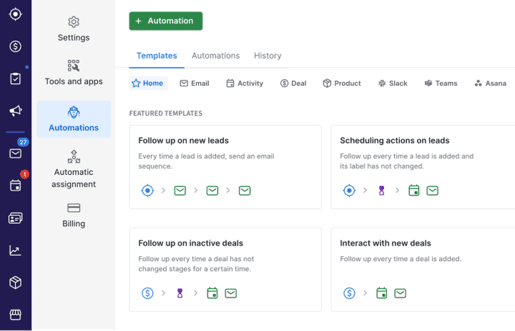
Building workflow automations in Pipedrive is straightforward with numerous available templates. Source: Pipedrive

We were pleasantly surprised by Pipedrive’s email marketing functionality. Real estate agents can choose from many available templates and set up custom automations to send email reminders about property showings, follow up with prospective buyers and request document signatures. We also liked that Pipedrive offers a product catalog that can be integrated with a configure, price, quote (CPQ) feature. This makes it easy for real estate agents to create an updated repository of property listings automatically that can be shared with a prospective buyer along with a corresponding quote.

Since Pipedrive reorganized its plans, we also appreciate that the LeadBooster lead generation suite — chatbot, live chat, web forms and the Prospector database — now comes bundled into the Premium and Ultimate plans alongside Projects and Smart Docs, rather than being sold separately at every tier as it once was. For an agency that actually needs those tools, that bundling matters more to the real bill than the headline seat price does.

Pipedrive replaced its previous five-tier structure in 2025. Essential is now Lite, Advanced is now Growth, Professional and Power have been merged into Premium, and Enterprise has become Ultimate. Prices below are per seat, per month, billed annually.

PlanPrice (billed annually)Features
Lite$14 per seat, per monthLead, calendar and pipeline management; AI-powered report creation; real-time sales feed; 500+ integrations; deal card customization; enforced two-factor authentication; web-to-mobile calls; mobile apps; 2,500 leads and deals per user; 30 custom fields
Growth$39 per seat, per monthEverything in Lite plus: full email sync with open and click tracking; automations and nurturing sequences; subscriptions, installments and forecast reports; meeting scheduler; contacts timeline; 5,000 leads and deals per user; 50 reports
Premium (most popular)$59 per seat, per monthEverything in Growth plus: LeadBooster lead generation and routing (chatbot, live chat, Prospector and web forms); Projects and Smart Docs included; custom scoring and company data enrichment; AI-powered multi-email tools; team inbox; contracts and e-signatures; 15 teams; 150 active automations; 15,000 leads and deals per company
Ultimate$79 per seat, per monthEverything in Premium plus: security alerts and rules; phone and email data enrichment; sandbox testing account; extended phone support; partner discounts on PandaDoc, CloudTalk and Surfe; 500 custom fields; 500 reports per user; 25 teams
  • Pipedrive’s suite of sales tools, reporting capabilities and customizable automations make it a great fit for businesses that depend on sales teams to drive revenue.
  • We like that Pipedrive includes lead generation tools, such as email campaign features, live chat, chatbots and web forms to help bring in new prospects.
  • The platform’s user-friendly design makes it easy to share dashboards and reports with your team, promoting better collaboration and efficiency.
  • Pipedrive stays laser-focused on sales and marketing optimization, but that focus means it doesn’t offer the broader range of features found in some other platforms.
  • Lower-tier plans place tight limits on valuable features, such as the number of open deals, custom fields and active automations, which could be restrictive for growing teams.
  • Extended phone support is reserved for the top-tier Ultimate plan, which may be a drawback for smaller teams needing hands-on help — HubSpot and Freshsales both make live human support easier to reach further down their lineups.

Pipedrive earned an 8.6 out of 10 across more than 500 reviews on TrustRadius. Customers often like the flexibility the platform offers, allowing users to customize the tool to suit their workflow. Also frequently mentioned are Pipedrive’s sales pipeline management features and strong integrations. Customer-reported downsides tend to be limitations surrounding reporting and automation, as well as issues with the drag-and-drop interface of the deal management module.

“We use Pipedrive in our organization to manage our customer relationships and track sales. Pipedrive makes it easy to keep scheduling follow up activities with prospects that you can continue the sales cycle until a deal is either won or lost. It is also very customizable, easy to set up and integrates with our email marketing platform. We have been using Pipedrive for over 10 years now. It is also very cost effective, and less complicated compared to some of the other CRM platforms,” one user wrote.

Editor's Rating: 9.2/10

We chose Salesforce as the best CRM for real estate managing brokers because of its advanced analytics, automation and team management features. We were impressed by how deeply Salesforce can be tailored to fit complex real estate operations. Managing brokers can design custom deal flows, dashboards and property objects that match their unique sales cycles, team structures and property types. We like that brokers can keep a close eye on the performance of their real estate business with Salesforce’s advanced analytics and highly customizable reports, providing visibility into agent activity, pipeline health, lead sources and forecasted revenue.

Salesforce CRM

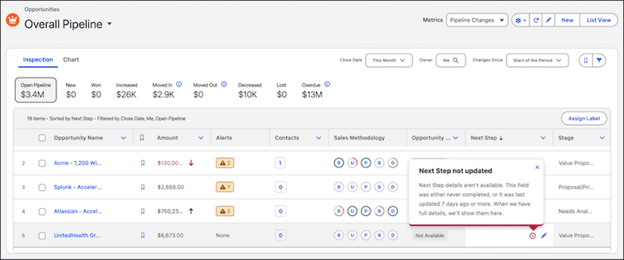
Salesforce CRM’s pipeline management feature provides a comprehensive view of your sales opportunities. Source: Salesforce

We were particularly impressed by Salesforce’s AI-powered features, such as advanced lead scoring, next-step recommendations and conversation analysis. Salesforce now groups most of its AI under the Agentforce brand, though the Einstein name survives on individual features such as Einstein Conversation Insights and Einstein Activity Capture. Whatever the label, it goes further than most CRM solutions we’ve reviewed: rather than simply recording calls, it analyzes auto-generated transcripts and updates contact records with the customer concerns and pain points it identifies, helping managing brokers ensure relevant follow-ups. We also liked that real estate brokers can build a property listings catalog and let Salesforce’s AI analyze contact activity to present buyers and sellers with the right property at the right time.

However, it’s important to note that Agentforce is a paid add-on on the Enterprise and Unlimited plans and is only bundled in at the top Agentforce 1 Sales tier.

PlanPriceFeatures
Free Suite$0; up to 2 usersBasic lead and opportunity management; simple email and Slack conversations; no contract or credit card required
Starter Suite$25 per user, per monthAccount, Contact, Lead, Task and Opportunity management; AI activity capture; web-to-lead capture; mass emailing and email templates; Salesforce mobile app access; customizable reports and dashboards; products and price books
Pro Suite$100 per user, per monthEverything in the Starter Suite plan plus: offline mobile functionality; forecasting; contracts, orders and quotes; 3 campaigns per opportunity; topics and recommendations; data and file storage per user
Enterprise$175 per user, per monthEverything in Pro Suite plan plus: opportunity scoring; 5 campaigns per opportunity; Einstein Conversation Insights; sales teams; advanced reporting; opportunity splits; sales territories; pipeline inspection; deal insights; waterfall charts; web API; Agentforce available as an add-on
Unlimited$350 per user, per monthEverything in the Enterprise plan plus: predictive AI; lead scoring; email insights; Einstein Relationship Insights; Buyer Assistant; sales engagement; Premier Success Plan; full sandbox
Agentforce 1 Sales$550 per user, per monthEverything in the Unlimited plan plus: the full suite of AI; unmetered Agentforce usage for employees; Salesforce Spiff, Sales Planning, Sales Programs, Salesforce Maps and Tableau Next; Slack Enterprise+; 1 million Flex Credits and 2.5 million Data Cloud Credits per org, per year
  • Salesforce delivers outstanding customization capabilities, and it can function independently without relying on other systems.
  • For organizations with complex operations, uniting sales, marketing and customer service teams on a single platform and database can boost collaboration, streamline workflows and drive continuous improvement significantly.
  • Salesforce’s AI tools are industry-leading, providing valuable support across the board, from frontline customer service to executive decision-making.
  • With so many options available, it’s easy to get stuck in planning mode. Without a clear minimal viable product in mind, your Salesforce rollout could drag on indefinitely.
  • Customer support leaves room for improvement and the additional 30% fee for top-tier service can feel like a steep ask.
  • Even though Salesforce is moving toward more no-code and drag-and-drop customization, deeper personalization still requires technical skills, such as HTML, cascading style sheets and other coding know-how.

Salesforce earned an 8.8 out of 10 across more than 3,000 reviews on TrustRadius. Customers frequently praise Salesforce for its extensive customization options and powerful contact management features, including its sales pipeline visibility. It earned especially high markets for strong lead tracking and qualification, as well as its reporting. However, customers often mentioned high prices, especially for the most advanced features. Many also mention a high learning curve for the software.

“It’s great at bringing in members from different sources and streamlining their journey — making it easier for our staff to manage follow-ups and tailor actions based on where each member is in their path. As for where it’s less suited, I’d say it depends on company size — it might be a bit too much for a very small organization,” one user wrote.

Freshsales logo
Editor's Rating: 9.3/10

Real estate agents need to be able to stay on top of dozens of client conversations at a time, respond to new queries as quickly as possible and stay laser-focused on the most promising opportunities. Freshsales’ comprehensive communication tools, combined with AI-powered insights and seamless integration with other Freshworks products, make it our choice for the best real estate CRM for client communication.

Freshsales dashboard

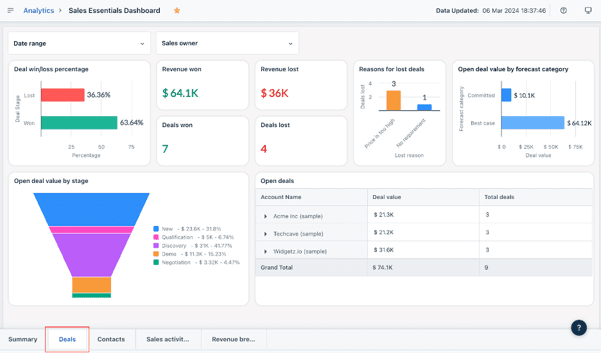
The Sales Essentials dashboard allows sales managers to see a broad overview of the key sales metrics, including deals won and lost. Source: Freshworks

We were impressed by Freshsales’ ability to handle omnichannel communication. Even on the entry-level Growth plan, real estate agents can stay connected with buyers and sellers through email, short message service (SMS) and social messaging channels. Each conversation is recorded and a corresponding contact record is updated automatically.

We appreciated Freshsales’ communication tools, which help agents stay connected with prospective buyers and sellers throughout the sales process. However, what truly sets Freshsales apart from other CRM solutions we reviewed is its built-in phone dialer. Available on all plans, it allows real estate agents to call straight from the CRM, leave prerecorded voicemails, save conversations for reference and analyze them to improve future communication.

Freshsales offers three paid CRM plans ranging from $9 to $59 per user per month when billed annually. Here’s a look at what each plan includes.

PlanPricing (Annual Billing)Key Features
Growth$9/user/month
  • Contact management
  • Kanban views
  • Contact lifecycle stages
  • Built-in email, chat and phone
  • Email templates
  • Custom fields
  • Basic workflows
Pro$39/user/monthEverything in Growth plus:
  • Contact scoring
  • Deal insights
  • Territory management
  • Sales sequences
  • Custom sales activities
Enterprise$59/user/monthEverything in Pro, plus:
  • Forecasting insights
  • Field-level permissions
  • Custom modules
  • Sandbox testing
  • Audit logs

Note that every Freshsales account includes one configure, price, quote (CPQ) license for generating branded quotes, proposals and contracts; additional licenses run $19 per user, per month. The customer-facing Freddy AI Agent is sold separately; these accounts get 500 sessions once to trial it, after which sessions cost $49 per 100.

  • Every customer interaction, whether inbound or outbound, is tracked and logged automatically, giving sales reps the context they need to personalize their approach and close deals more effectively.
  • Sales managers can launch campaigns across email, phone and SMS to help boost lead generation efforts for their teams.
  • Lead assignment can be customized based on criteria you define, such as recent performance or specific areas of expertise within your team.
  • Key features, such as multiple pipelines, sales forecasting and some AI capabilities, are locked behind higher-tier plans, while certain add-ons can increase costs as usage grows.
  • Although the platform is generally user-friendly, the wide range of features may mean longer onboarding times for teams new to CRM systems.
  • Support is limited to weekdays, even for users on premium plans, which can be frustrating when issues arise outside standard business hours.

Freshsales earned an 8.9 out of 10 across more than 100 reviews on TrustRadius. Users often praise Freshsales for its user-friendly interface and intuitive navigation, which requires minimal training to understand. It is also often commended for strong integrations with other business software. However, some users cite limitations surrounding reporting and the mobile app experience as downsides.

“Freshworks CRM is well suited for businesses where new leads are generated often and there is a longer sales process that needs to be organized. Deals are organized clearly and task reminders are helpful to keep track of follow ups and different stages for each client/lead. Freshworks CRM may not be well suited for scenarios where the sales process is happening instantly,” one user wrote.

Pricing for Real Estate CRMs

The pricing and costs of your real estate CRM will depend on your agency’s size, business needs and priorities. Small agencies, solo real estate agents and companies new to CRM systems might want to start with a free plan from providers, such as HubSpot or Zoho CRM. While limited in their features, free CRMs can help you get started, set up essential processes and determine the tools you might need moving forward. More established real estate agencies will benefit from live demos of top-tier plans offered by many providers.

Free trials also provide ample opportunities to evaluate a CRM solution. The length usually varies between 14 and 30 days but can often be extended if you reach out directly to the provider.

When evaluating the pricing of a real estate CRM, consider additional factors, such as add-ons and higher feature limits. For example, Pipedrive’s LeadBooster live chat and prospecting add-on will add an extra $32.50 per month, though it comes bundled at no extra charge on the Premium and Ultimate plans.

Some companies also charge for CRM implementation, training, data migration or onboarding. For example, Sales Hub Professional customers typically pay a one-time onboarding fee of $1,500, while Sales Hub Enterprise customers typically pay $3,500. Zoho also offers a dedicated implementation program, Jumpstart, starting at $200 per hour with a 10-hour minimum engagement.

If your agency requires 24/7 customer support or other premium service options, many providers offer them at an additional charge. For example, Zoho’s Premium support package costs 20 percent of your subscription fee, but covers 24 hours a day, five days a week; round-the-clock coverage requires Zoho’s Enterprise Support plan, which runs 25 percent of your annual subscription and carries a 50-license minimum.

Features of Real Estate CRMs

The best CRM software providers offer a wide variety of features to help you and your business stay organized, manage leads and close more deals. Real estate agencies, in particular, should look for the following features when choosing a CRM solution.

Contact management

Contacts are at the heart of real estate CRMs. After all, real estate is a people business. Contact management features can help agents bring all their client information — contact details, budget, time frame, property preferences — into one centralized space, so they can build a comprehensive customer profile and match them to ideal properties or buyers.

The best real estate CRMs update contact records automatically based on recent activity, such as email conversations or associated deal advancements. To reduce manual data entry time and help organize their vast contact lists, real estate agents should particularly keep an eye out for features, such as contact segmentation and tagging, custom fields, contact enrichment and business card scanning.

TipBottom line
When implementing your CRM, make sure to set up custom tags or labels, such as Owner, Tenant or Potential Buyer, to help segment and filter your contacts easily.

Lead management

Lead management tools let real estate agents capture, organize and generate incoming leads from various sources, such as listing websites, landing pages, inquiry emails, open house forms and social media. Make sure that your CRM tags your newly entered leads so that you can pull up their information easily later on.

Ideally, the system should also create a follow-up action so that each lead can move one step closer to conversion rather than sitting idly in your database. It’s also helpful if your real estate CRM allows you to score leads so that you can focus on the most promising opportunities.

Property listing management

The best real estate CRMs provide agents with an opportunity to keep track of their numerous properties. Product catalogs can be used to store property details and images and share them easily with prospective buyers. Additionally, an integration with a CPQ module will allow real estate agents to send quotes and invoices along with the associated property details straight from the CRM.

FYIDid you know
HubSpot offers a real-estate-specific Listings object that allows agents to create detailed property profiles and manage the associated client communication and campaigns from within the CRM.

Sales pipeline management

There is no point in simply storing contacts if they can’t be turned into deals. The best real estate CRMs support sales pipeline management and offer visual pipelines that can be updated easily with a drag-and-drop. It can be helpful to have multiple pipelines for different property types, sales cycles or territories. Kanban-style pipelines are quite common among real estate CRMs, with some providers offering a funnel and list views as well — it’s important that your system displays the deals in a way that works for you. Some CRMs can also update contacts automatically based on their deal progress and vice versa, saving agents valuable time and ensuring consistency across the system.

Omnichannel client communication

Consistent and prompt communication with buyers and sellers is at the heart of a successful real estate business. A good CRM brings client conversations from across all channels — email, phone, website and social media — in one place, providing valuable context for your next outreach and ensuring timely follow-ups.

Some CRMs offer a unified communication hub, allowing you to not only track but also interact with clients from within the system. Real estate agents should keep an eye on features, such as email sync, live chat widgets and chatbots, web form builders and integration with SMS, WhatsApp, Facebook Messenger and other relevant communication platforms.

Built-in marketing tools

Promoting your business, services and listings is often just as important as the first property showing and your real estate CRM should offer a range of marketing features to help you stand out from the competition. Ideally, your system will include built-in email marketing services — or, at the very least, relevant integrations — and social media support.

Assess the available email templates and their usability, the system’s ability to send targeted email campaigns and build landing pages and web forms and how easy it is to create personalized marketing experiences.

Automated workflows

Busy real estate agents don’t have time to update CRM details manually or go through the motions of repeating the same CRM tasks. That’s why a good system will take care of data entry and workflow automation, allowing real estate agents to focus on closing deals. Consider whether your CRM can send automated follow-up emails, update deals based on specific triggers, send property alerts or remind agents about upcoming house showings.

Some real estate CRMs offer helpful AI assistants that can suggest the best next actions, flag deals that require immediate attention, pull up all relevant property or client details on a prompt and build entire sales sequences.

Reporting and analytics

Real estate agents need to be able to analyze their past deals and activities to improve future performance and see how far off they are from hitting their targets. Quality real estate CRMs offer detailed reports and visual dashboards that provide an overview of key sales metrics, including sales volume, average commission, days on market (DOM), showings per sale and listing-to-meeting ratio.

It’s important that your CRM allows you to filter reports to pull up and share relevant information easily. AI-powered CRM forecasting tools can also help you better plan your workload, prioritize the most profitable opportunities and adjust your sales and digital marketing strategy.

How to Choose a Real Estate CRM

According to IBISWorld, there were 1,669 CRM providers in the U.S. alone in 2025. While not all systems are created equal, it can be challenging to find the one that suits your real estate business. Follow the steps below to narrow down your search and home in on your ideal CRM fit.

1. Assess your business needs

To find the most suitable solution for your real estate business, you first need to understand your business goals and reasons for getting a CRM in the first place. Consider using a problem-first approach. Do you lack visibility into your agents’ performance and key performance indicators? Prioritize reporting capabilities in your CRM. Do you feel that some leads are slipping through the cracks due to your long response time?

Make sure your system brings together all your communication channels. Do you spend most of your time on the go and need to keep track of client updates? Mobile CRM apps can be something to look for in your solution. Make a list of your top problems and priorities that you can come back to when evaluating different providers.

2. Do your market research

With the sheer number of CRM apps available, it can be difficult to find the one that ticks all the boxes for your real estate agency. You can start with topical review guides (such as this one) and check user comments on third-party review sites. Pay close attention to specialized solutions and reviews from other real estate agents and industry experts. Some providers will have dedicated case studies, which can help you evaluate relevant use cases and compare business-specific CRM benefits.

3. Ask vendors for a demo or join a webinar

Most CRMs offer free trials that usually vary from 14 to 30 days, during which you can evaluate the product. However, if asked, many providers will also offer a one-on-one demo, especially if you’re considering an Enterprise-level solution or there is no trial available.

Demos provide an ideal opportunity to ask business-specific questions to see if and how the CRM can be customized to fit your needs and to see it in action. You can also join a live webinar or review some on-demand resources. However, while webinars can give you a good idea of the product’s functionality, they rarely focus on real estate-specific use cases.

4. Evaluate key features

During a trial period — or while on a demo call with a vendor — make sure to evaluate whether a system has the key CRM features that address the pain points you’ve identified previously and how well they are executed.

Additionally, ensure that the solution integrates seamlessly with your current setup and programs. For that, review and test their available integrations and note whether connecting them requires an API or technical knowledge. Pay close attention to the provided customer support, security features and general usability.

5. Consider pricing

In most cases, CRM pricing depends on your selected tier. However, consider additional cost factors, such as paid add-ons, feature limits, user allowances and annual vs monthly billing. Some CRMs also charge fees for onboarding, data migration, training and implementation, so make sure to confirm that prior to purchase.

Often, free CRMs can be sufficient for solo real estate agents and smaller real estate agencies while larger businesses might want to evaluate higher-tier solutions. However, pay close attention to features and services that are priced based on a percentage of your license fee — the costs can climb up quickly.

TipBottom line
Consider whether you need several individual accounts or one team CRM account. While a team account can be more expensive, it might be a better fit for larger real estate agencies that will benefit from a streamlined setup.

Benefits of a real estate CRM

While many real estate agents and real estate agencies are still using spreadsheets to keep track of their clients and deals, having a dedicated CRM system can greatly increase your productivity, streamline operations and free up valuable time that can be spent on closing sales. The following are just some of the top benefits of implementing a real estate CRM solution in your agency.

360-degree customer view

A real estate CRM can help bring all client details — from contact information to property preferences to the latest conversations — into one central space. It allows agents to get the full picture at a glance and use it to personalize their outreach, quickly pull up relevant details on a call, and, eventually, match a suitable buyer with an ideal property. Agents can use custom fields and tags to ensure the information is stored and filtered the way they need it. Additionally, having a central source of client data means that all real estate agents remain on the same page and avoid duplicate efforts.

Generate more leads

A good real estate CRM can take your lead generation and management to a new level. It can help you create inquiry web forms directly linked to the CRM records, set up chatbots to qualify and route initial requests, design landing pages for your listings and even manage your social media outreach. Most importantly, a CRM system will ensure that no potential buyer or seller slips through the cracks.

Elevate client communication

According to the National Association of Realtors (NAR), there were roughly 1.44 million Realtors in the U.S. as of June 2026. This means that if you don’t reply to a prospect’s message right away, chances are they will turn to your competition. Having a real estate CRM ensures you can be notified the moment a potential client reaches out to you, regardless of the channel. Each conversation will be recorded in the system automatically, with some CRMs being able to transcribe and analyze each call to determine client concerns and intent.

Did You Know?Did you know
In NAR’s 2025 Profile of Home Buyers and Sellers, 88 percent of buyers and 91 percent of sellers used a real estate agent or broker — the highest seller share on record — reinforcing the importance of prompt and effective client communication.

Get full visibility into your agency’s performance

With a real estate CRM, you don’t need to wait until the end of the quarter to review sales figures — key metrics will be displayed in real-time on visual dashboards and you can run and share in-depth reports in a click. Many CRMs also leverage the power of AI to highlight any risks or pipeline bottlenecks and alert you to emerging opportunities. Most systems will allow you to set up custom reports based on your agency’s needs and even schedule and regularly email top-level insights to relevant stakeholders.

Boost productivity

Manual data entry is a waste of agents’ time and is prone to human error. The same can be said about repetitive tasks. Rather than updating each individual client record, real estate agents can use a CRM to scan the web and enhance each contact automatically with details from their social media profiles. They can set up automated workflows to send post-sale emails, schedule showings, follow up with a quote and run personalized email marketing campaigns. AI-powered real estate CRMs can also help real estate agents save time by creating email templates and generating messages, pulling up property and deal data on a prompt, running sales forecasts, auto-updating client records after a call and more.

Methodology

Our sales software analysts began this evaluation with a field of 65 CRM platforms, then worked that pool down to 13 finalists for hands-on investigation before settling on the recommendations above. Because real estate teams buy CRMs for reasons that differ from a typical B2B sales org (including listing pipelines, showing schedules and buyer-seller matching), we weighted our review toward the capabilities agents and managing brokers actually lean on day to day.


Narrowing the field took several passes. We sat through vendor demos, put questions to sales representatives about how their systems handle property data and lead routing, and spent time inside each platform ourselves rather than relying on spec sheets. We compared plan structures and feature sets tier by tier, paying particular attention to what a vendor bundles versus what it sells separately — email marketing and lead capture tools, for instance, are core functionality on some platforms and paid add-ons on others, which changes the real cost for an agency considerably. Alongside our own testing, we combed independent review sites for firsthand accounts from working agents and brokerages, using those experiences as a check against our findings.


In total, we assessed each platform against more than 30 individual factors, grouped into four weighted categories. The weighting reflects the priorities business owners tell us drive their software purchasing decisions.

  • Pricing (30%): We compared what each vendor’s plans actually deliver at each price point. Our analysis covered monthly subscription rates, per-user and per-seat charges, implementation and onboarding fees, and the add-on costs that surface once an agency scales past the entry tier.
  • Features (25%): We looked for the fundamentals (contact and lead management, campaign tools, automated workflows, pipeline tracking, forecasting and reporting) then evaluated integration libraries. Platforms earned additional credit for capabilities that matter in a listings-driven business: omnichannel client communication, property and product catalogs, no-code customization, AI-assisted prospecting and client-facing self-service portals.
  • Ease of use (25%): We used each system firsthand to gauge how steep the learning curve runs and how much configuration a non-technical user can handle alone. We also weighed the strength of each mobile app, since agents spend their days at showings and open houses rather than at a desk.
  • Customer service (20%): We reviewed the support channels each vendor offers and, critically, which tiers they’re gated behind; for example, phone support in particular is frequently reserved for upper plans. We also assessed each provider’s knowledge base, tutorials and other self-service resources.

Scoring against these criteria surfaced clear patterns in what each system does best and which kind of real estate operation it fits, which is how we chose our “best for” designations attached to each pick above.


To learn more about our methodology, see our full editorial process.

Real Estate CRM FAQs

Real estate CRMs are designed to make it easier for real estate agents to stay on top of their contacts, automate repetitive tasks and close more deals. With their help, real estate agents can generate more leads, manage their buyer and seller relationships, market properties and drive new business.

Real estate CRMs help real estate agencies and real estate agents stay organized, manage seller and buyer relationships and market their business. Some common features include lead management, sales pipelines, workflow automations, reporting and analytics, property listing management, omnichannel client communication tools, email marketing and integrations with social media platforms.

Most CRMs can be customized to fit the needs of your real estate agency. Features that include custom fields and modules, property type-specific pipelines, visual dashboards and branded email and web form templates can help ensure the system accurately reflects your brand and sales processes. Look for ways to set up custom workflows to trigger follow-up emails after a showing, launch post-sale surveys, send property recommendations, alert agents about stagnated deals and more.

Real estate CRM costs vary depending on the chosen provider, pricing plan and selected paid add-ons. Entry-level paid plans among our best picks start between $9 and $25 per user, per month, while top-tier plans range from $40 to $550 per user, per month. Some CRMs also provide a free plan with limited features. Most CRMs offer a free trial period, usually between 14 and 30 days, during which agents can evaluate the product’s functionality and fit.

Yes, some CRM providers, such as HubSpot, Zoho CRM, Freshsales and Salesforce, offer free plans that are suitable for real estate agents and small brokerages. These plans are often restricted in features and cap the number of users (typically at two or three) but they can be a good solution for solo agents, smaller real estate agencies and brokers new to CRMs.

Did you find this content helpful?
Verified CheckThank you for your feedback!
Nadia Reckmann
Written by: Nadia Reckmann, Senior Analyst
Nadia Reckmann has spent years exploring her passions for advertising, customer relationship management and SaaS software more generally. With a master's degree in advertising, she started her career working on B2C and B2B marketing campaigns, executing everything from white papers to social media posts with the help of A/B testing and data-driven strategies. For business.com, Reckmann covers CRM solutions and remote access PC software. At OnePageCRM, Reckmann worked with software developers, UX designers and product managers to properly convey the CRM's value proposition and overhauled the company's website. She also worked with the CEO on thought leadership and launched a video learning hub for salespeople. With her intimate understanding of customer relationship management, Reckmann has gone on to analyze leading CRM solutions and other business software and provides detailed recommendations to business owners.