
Business.com aims to help business owners make informed decisions to support and grow their companies. We research and recommend products and services suitable for various business types, investing thousands of hours each year in this process.
As a business, we need to generate revenue to sustain our content. We have financial relationships with some companies we cover, earning commissions when readers purchase from our partners or share information about their needs. These relationships do not dictate our advice and recommendations. Our editorial team independently evaluates and recommends products and services based on their research and expertise. Learn more about our process and partners here.
A comprehensive evaluation of Mailchimp's email marketing platform for small businesses and beginners


Email marketing can be intimidating when you’re just getting started. Between building campaigns, managing contact lists and figuring out which metrics matter, there’s a great deal for first-time marketers to learn. Mailchimp makes the process more approachable with an intuitive email builder, ready-made templates and straightforward tools for managing and tracking campaigns. We found it to be a great choice for beginners who want to start with the basics while still having room to grow. Here’s what you should know before deciding if Mailchimp is right for your business.
We chose Mailchimp as the best email marketing software for beginners because it takes much of the technical work out of creating your first campaign. During testing, we used the platform’s visual drag-and-drop builder and predesigned templates to create a professional-looking email without touching a single line of code.
We particularly liked the guidance Mailchimp provides along the way. Helpful tooltips and a guided setup process walked us through creating our first campaign, and Mailchimp offered suggestions as we worked. For example, it recommended adding clickable links to encourage recipients to take action. Beginners can also turn to Mailchimp’s Help Center for video tutorials, step-by-step guides and email marketing best practices.
Mailchimp also gives new users several ways to try the software before paying. Essentials and Standard come with a 14-day free trial that allows up to 100 email sends, while the Free plan supports up to 250 contacts and 500 monthly sends, with a limit of 250 sends per day. We like that businesses with small contact lists can use the Free plan to learn the basics and build their first campaigns without making an upfront investment.
Another advantage is that you don’t necessarily have to leave Mailchimp once you’ve mastered the basics. Paid plans add more sophisticated tools for automation, audience segmentation, testing and analytics as your marketing needs grow. This gives beginners an opportunity to start with a relatively simple setup and add more advanced capabilities when they’re ready.
During our testing, we found Mailchimp’s interface intuitive, even for team members with no prior email marketing experience. The dashboard has a clean, organized layout, with key functions clearly labeled and easy to find. We were able to go from creating an audience list to building an email campaign in under 30 minutes.
The drag-and-drop email builder was especially easy to use. If the template we selected was missing something we wanted to include, we simply chose content blocks for text, images, buttons or social media links and dragged them into our email. We could also preview the campaign as we worked to see how it would appear on desktop and mobile devices.
We appreciated how Mailchimp groups its features into clear categories like Campaigns, Automations, Audience and Analytics. We rarely had to hunt around for what we needed. And when we did get stuck looking for a particular feature or setting, we could type it into the search bar and Mailchimp pointed us in the right direction.
We found that it only took a few hours of using the platform to get comfortable with fundamental tasks like creating campaigns, managing subscriber lists and viewing reports. That relatively short learning curve is a big reason we think Mailchimp works so well for beginners.
Some of Mailchimp’s more advanced features take longer to learn. We found the automation builder and customer journey tools less straightforward than creating a basic campaign. However, Mailchimp provides documentation and video tutorials that can help users get acquainted with these more complex features.
Mailchimp offers a broad set of email marketing tools, but you don’t need to master them all at once. We found the following features especially useful for businesses getting started with email marketing.
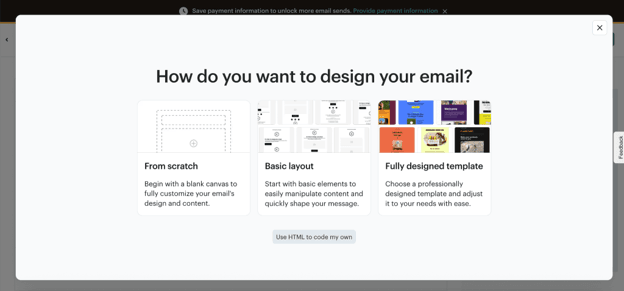
Mailchimp’s email marketing campaign builder gives beginners plenty of ways to get started. We could choose a basic drag-and-drop layout, work from a predesigned template, start from scratch or import our own HTML code. We liked having these options because you can keep things simple when you’re new to email marketing without giving up more advanced design controls if you need them later.
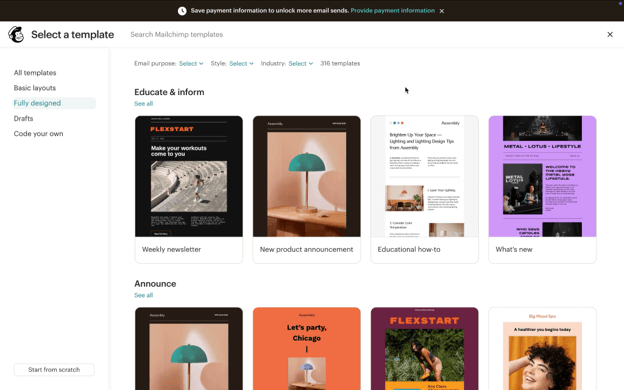
We tested dozens of templates for email newsletters, product announcements, event invitations and seasonal promotions. Each was mobile-friendly, and we could customize the design with our own brand colors, fonts and images. Mailchimp’s Content Studio also gave us one place to store logos, images and other brand assets so we could easily reuse them in future campaigns.
As we built our email, Mailchimp did some of the design work for us. Adding a new content block automatically adjusted the spacing and alignment, and Mailchimp suggested image sizes along the way. We also got a warning if something might not look right on a mobile device. It’s the kind of guidance that comes in handy when you’re designing an email for the first time.
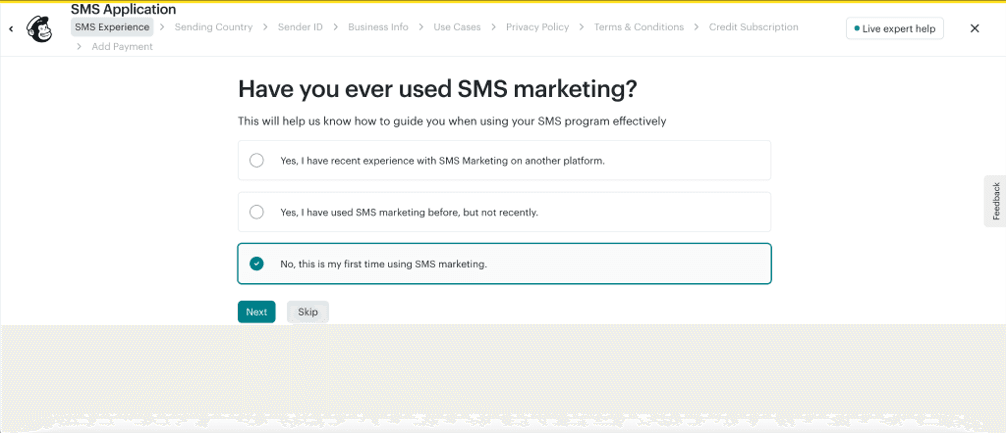
Mailchimp offers text message marketing as a paid add-on for Essentials, Standard and Premium subscribers. You’ll need to apply for SMS Marketing and purchase a monthly subscription for SMS credits, which are used to send messages. Once we started the setup process, we found it fairly straightforward, although you’ll need to verify your business information and comply with various text message laws and regulations before sending your first campaign. Before registering, we were asked a few simple questions about our experience with SMS marketing and where we planned to send messages. We also had to verify our business contact and tax ID information.
The SMS interface felt familiar after using Mailchimp’s email tools, so there wasn’t much new to learn. We could segment our audience, personalize messages and schedule sends much like we did with email campaigns. A character counter kept track of our message length as we worked, while the preview showed us what the finished text would look like on a phone. We also liked that Mailchimp works with the same contacts and workflow automation tools you’re already using for email marketing.
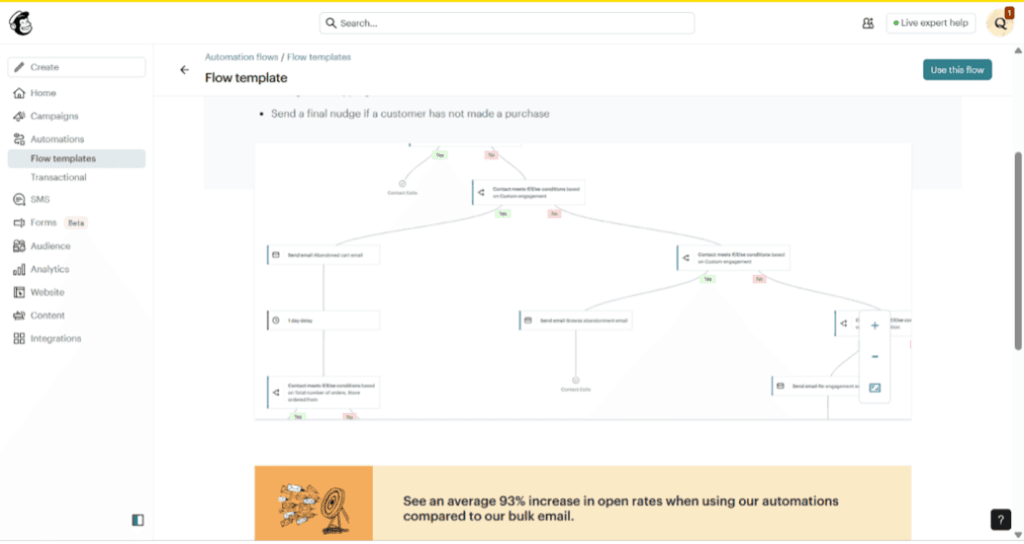
We built several automated email sequences in Mailchimp, including a welcome series for new subscribers, abandoned shopping cart email reminders and post-purchase follow-ups. The visual builder laid out each workflow like a flowchart, so we could easily see the steps a subscriber would take from beginning to end.
Mailchimp gave us plenty of options for deciding when an automation should kick in. We could use actions like email opens, link clicks, website visits or purchases as triggers, then send different messages based on what a subscriber did. Despite all of those options, we found the visual setup fairly easy to follow.
Mailchimp’s automation tools do get more complex as you move beyond the basics, but we think the visual builder gives beginners a manageable place to start. Businesses can begin with a relatively simple workflow, such as welcoming a new subscriber, then build more involved customer journeys as they get comfortable with the platform.
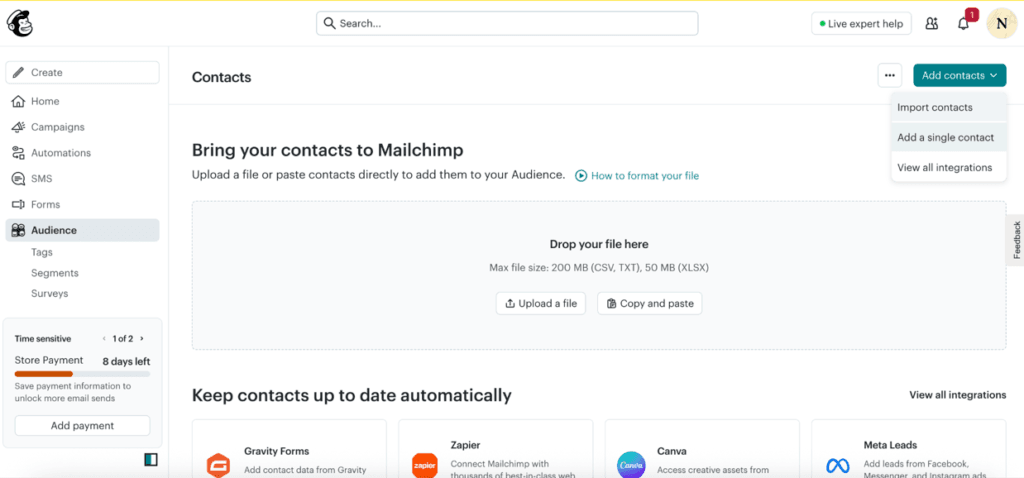
Mailchimp gave us several ways to bring contacts from our email list into the platform. We could upload a CSV file, import contacts from another platform or connect an e-commerce store or CRM. There were also options to copy and paste multiple contacts or add someone individually, which is handy when you only have a few names to add.
Once our contacts were in Mailchimp, we could divide them into much more specific audiences. We created segments based on demographic information, purchase history, email engagement and custom fields. In one test, we isolated subscribers who had opened our last three emails but hadn’t made a purchase in 60 days. We could then use that segment for a targeted re-engagement campaign.
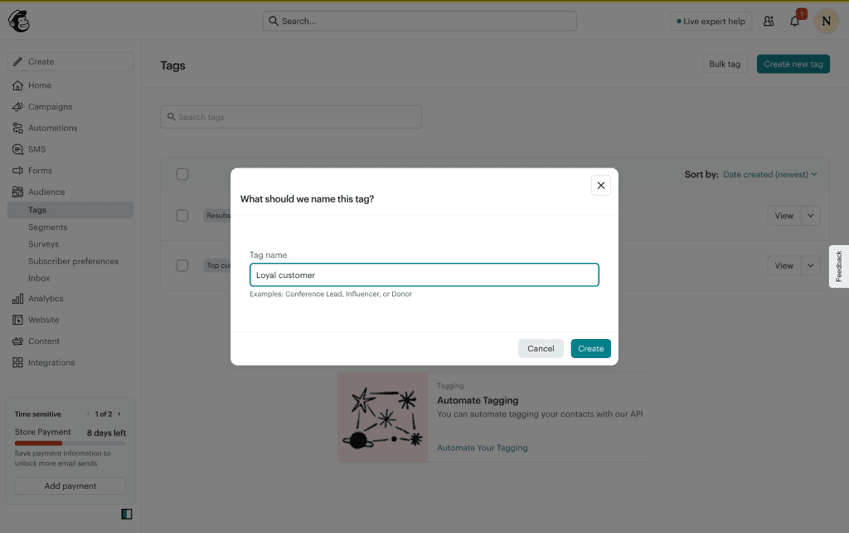
We also tried out Mailchimp’s tags and groups. Tags gave us a way to label contacts ourselves, while groups let subscribers indicate what they’re interested in. Both were quick to set up. After clicking “create group” or “create tag,” we entered our labels and were done in less than a minute.
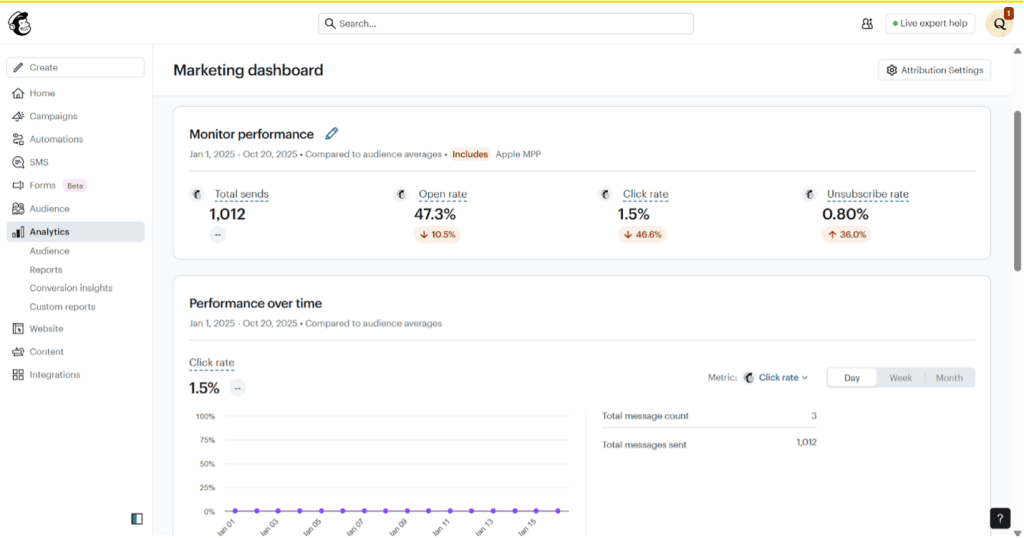
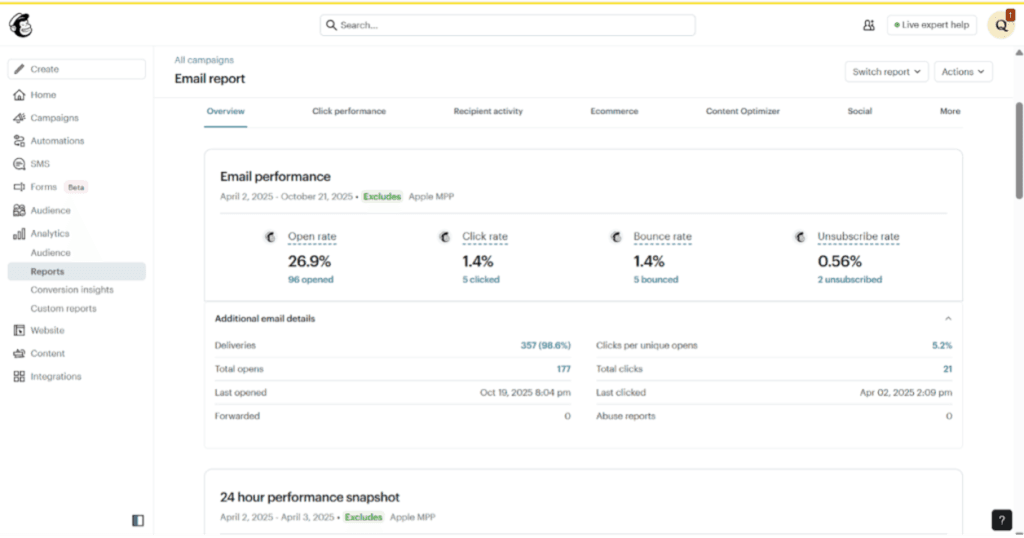
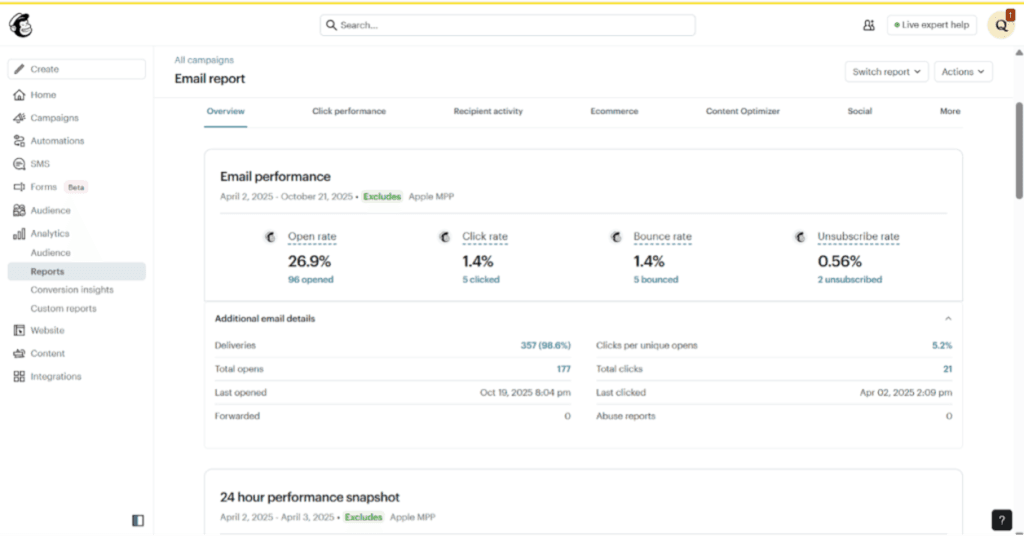
Mailchimp’s reporting dashboard gave us a quick look at how our campaigns were performing. We could see open rates, click-through rates, unsubscribes and revenue generated from email campaigns without having to dig through multiple reports.
The platform also tracks industry benchmarks, allowing us to compare our performance with businesses in the same sector. Seeing how our campaigns measured up helped us spot areas where we could improve.
We particularly liked the click maps feature, which showed us exactly where subscribers clicked within our emails. This gave us a better sense of which content and calls to action were getting the most attention. We could also view reporting by location and device to learn more about our audience.
Mailchimp covers the reporting basics well, but businesses that need more sophisticated attribution across multiple marketing channels may eventually need additional analytics tools.
Mailchimp also gives businesses several ways to collect new subscribers. We created multiple landing pages for different lead magnets and found the process similar to building an email campaign. The same drag-and-drop approach made it easy to add content and make changes without having to learn another tool.
For signup forms, we could choose from embedded forms, email pop-ups and standalone landing pages. Mailchimp also let us choose between single and double opt-in and offered plenty of fields to add to a form. One option that caught our attention was birthday information, which could come in handy for businesses that want to send birthday offers or build a loyalty program.
New subscribers are automatically added to the appropriate Mailchimp audience when they submit a form. You can also use a form submission to kick off an automation, such as a welcome email or series.
Mailchimp connects with more than 300 third-party apps. We tested integrations with Shopify, WordPress, QuickBooks and Salesforce and found each one straightforward to connect.
The e-commerce integrations open up quite a few possibilities. Connecting Mailchimp with Shopify or WooCommerce lets customer, purchase and product data flow into Mailchimp. Businesses can use that information for abandoned cart emails, product recommendations and follow-up emails after a purchase.
Mailchimp also connects with many of the best accounting software platforms, including QuickBooks. During testing, we could use customer data from QuickBooks to create more specific audience segments, including customers based on lifetime value or outstanding invoices.
Mailchimp offers four main marketing plans, with pricing based largely on the number of contacts in your audience. Each paid plan also comes with a monthly email send limit tied to your contact allowance. As your list grows, your monthly price can increase even if you stay on the same plan.
Plan | Starting Price | Contact/Send Limits | Key Features |
|---|---|---|---|
Free | $0 | Up to 250 contacts; 500 monthly sends; 250-send daily limit | Limited email templates, basic reporting, forms and landing pages, email support for the first 30 days |
Essentials | Starts at $13 per month | Starts with 500 contacts; monthly sends up to 10x contact limit | All email templates, A/B testing, scheduled emails, automation flows with up to four steps, 24/7 email and chat support |
Standard | Starts at $20 per month | Starts with 500 contacts; monthly sends up to 12x contact limit | Enhanced automation flows, advanced segmentation, custom-coded templates, multivariate testing, custom reports, personalized onboarding |
Premium | Starts at $350 per month | Starts with 10,000 contacts; monthly sends up to 15x contact limit | Enhanced automation flows, advanced segmentation, multivariate testing, dedicated onboarding, phone and priority support |
Mailchimp’s starting prices only tell part of the story. What you ultimately pay depends on your plan, contact count and how much email you send. Here are a few other details to keep in mind:
Getting started with Mailchimp requires minimal technical expertise, and we found the onboarding process well-designed for beginners. Account creation takes less than five minutes, requiring only basic business information and email verification. The platform immediately launches a setup wizard that guides you through essential initial steps.
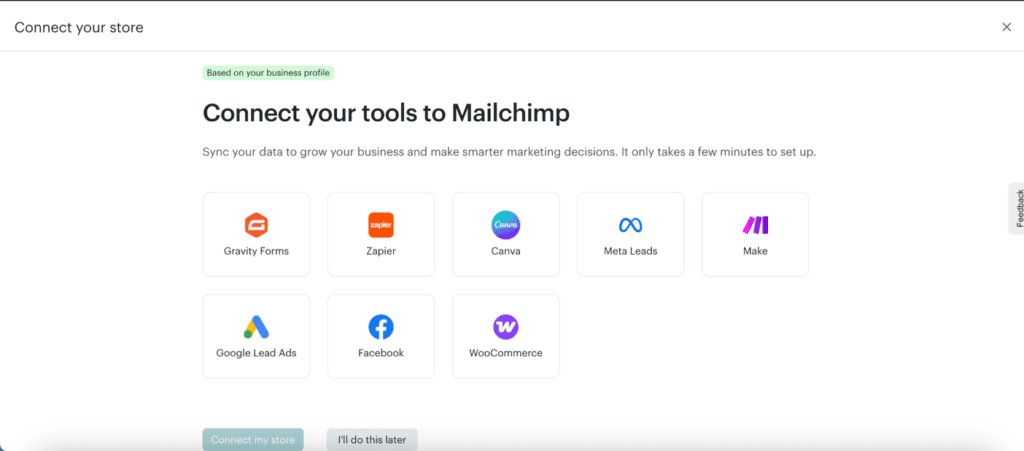
During setup, we answered questions about our business, industry, marketing goals and the channels we planned to use, such as email, SMS and social media. Mailchimp used our answers to tailor the setup process and point us toward relevant features. We also had the option to connect other marketing tools, including Google Lead Ads and Meta Lead Ads, before we finished setting up our account.
There’s plenty of help available as you learn the platform. Mailchimp’s Help Center and free resource library include guides and tutorials covering its tools as well as broader marketing topics. Freelancers and agencies can also join Mailchimp & Co. for free to access Mailchimp Academy, which offers self-paced courses and certifications.
Businesses that want more hands-on help can get it with the higher-tier plans. Standard customers receive one 60-minute personalized onboarding session during their first 90 days, while Premium customers can schedule up to four sessions. We think that extra guidance could be particularly useful for beginners who want help getting everything set up correctly before they start sending campaigns.
Authenticating your sending domain takes a few more technical steps because you’ll need to work with DNS records. Mailchimp provides instructions for the process, and support is available if you get stuck. It’s worth taking care of authentication early, since it can help with email deliverability and how your business appears to recipients.
Mailchimp offers several ways to get help, but your options depend on which plan you choose. We tested the available support channels and also spent time with Mailchimp’s self-service resources. Here’s what you can expect:
Mailchimp is easy to get started with, but we found a few drawbacks worth considering before you sign up:
To identify the best email marketing services, we started with a list of popular platforms and narrowed it down through research and hands-on testing. We spent several weeks evaluating the finalists, reviewing their features and pricing, watching tutorials and testing the software through free trials or free plans when available. We also looked at customer support options and read user reviews to see how each service performs for real customers.
When choosing the best email marketing service for beginners, we paid particularly close attention to how easy each platform was to set up and use. We tested tasks a new user is likely to tackle first, such as adding contacts, creating an email campaign, working with templates and reviewing campaign results. We also considered what businesses can accomplish on free and lower-cost plans, along with the tutorials, guides and support resources available when users need help.
We recommend Mailchimp for …
We don’t recommend Mailchimp for …
