As your business grows from a startup into a more established operation, the amount of paper you deal with tends to grow right along with it. Filing cabinets fill up, paperwork takes over valuable space and finding the document you need can become frustrating and time-consuming.
Searching for document management software and not sure where to start? Tell us a little more about your business and get customized quotes from qualified providers.
One solution is to move toward a paperless office. By using digital conversion tools, businesses can turn paper documents into electronic files that are stored in the cloud or on a local server. We’ll walk through what document digitization involves and explain how it can help businesses stay organized, reduce costs and run more efficiently.
What is document digitization?
Document digitization is the process of capturing images of paper documents and converting them into digital files using scanning and capture software. OCR, or optical character recognition, turns those scanned images into searchable, editable text. You may also hear this process referred to as document scanning or document imaging.
Once documents are digitized, businesses can add more information, known as key index fields or metadata, to help better organize and manage files. This helps meet data retention requirements and supports storing documents in a computerized filing system.
After documents have been scanned, checked for accuracy and made editable, many paper originals can be destroyed. Some records, however, must remain in physical form to comply with state record retention laws (such as paycheck recordkeeping requirements) or other legal stipulations.
What are the business benefits of digitizing documents?
Document digitization can bring businesses the following advantages:
- Share documents easily: It’s faster to share digital documents than paper ones. Files can be emailed or shared online, so more than one person or team can access the same document at the same time, which makes workplace collaboration easier, especially for remote or hybrid teams.
- Store information safely: Digitized documents make it easier to store and protect records securely. Digital files can be backed up on remote servers and protected with access controls and security measures. Unlike paper documents, digital files are far less likely to be lost, misplaced or damaged, and they’re easier to archive and manage in an organized way.
- Incorporate digital elements: Scanning allows information to be captured from paper files, films, tapes and other physical media. Data can also be read from barcodes, RFID tags, QR codes or other scannable sources. The scanned information can then be used with document management systems, ERP software, management information system software, the best CRM software and other business applications.
- Save time and money: Digitizing documents eliminates the need to search through file rooms or store paper records in warehouses. Instead, documents can be accessed with just a few clicks. Cutting back on paper use, storage space and manual handling can lead to meaningful cost savings over time. In fact, some estimates suggest that storing and managing a paper document can cost more than 200 times as much as keeping a digital one, underscoring how much businesses can save by going paperless.
- Improve customer service: Digitized documents can be indexed with key index fields or metadata, making it easier and faster to find the information needed to help customers. Jennifer Graham, co-founder of Total Document Solutions, agrees that quick searches are a major time-saver for customer service teams. “With the benefit of OCR or ICR, the ability to search for key text or information strings comes within seconds,” Graham noted.
- Minimize storage space: Moving away from paper records reduces the need for filing cabinets and storage rooms. “This opens possibilities for repurposing the area for more productive, revenue-generating activities,” Graham pointed out.
- Meet compliance regulations: Some industries require certain records to be maintained in digital form. Document scanning can help businesses meet these compliance requirements quickly and cost-effectively.
- Reduce paper waste: Digitizing documents can cut down on paper use dramatically, helping businesses reduce waste and support a more sustainable business model.
- Increase file accessibility: Digital files can be stored in the cloud or shared securely, so authorized users can access them whether they’re in the office or working remotely. Because the files are searchable and editable, it’s much easier to find what you need.
- Create automation opportunities: Digitizing documents can streamline day-to-day operations by reducing manual tasks. Graham noted that many businesses are surprised by how easily they can automate processes like sorting documents, managing approvals and sending reminders.
File management best practices include choosing a clear, consistent naming system to make documents easier to find through search. For example, files can be organized by project name or date.
What documents can you digitize?
There’s no real limit to the types of documents you can digitize. That said, if you’re planning a larger effort to convert paper records into electronic files, it helps to start with documents that are used most often or take up the most space, such as:
- Official correspondence
- Financial papers
- Contractual agreements
- Medical records
- HR files
- Bills and invoices
- Survey maps
- Other large documents
Once documents are scanned, the next step is adding descriptive information so they’re easy to identify and retrieve later. Using OCR or ICR (Intelligent Character Recognition) technology, scanned images can be converted into readable text that can be searched, shared and used across different applications.
How are documents digitized?
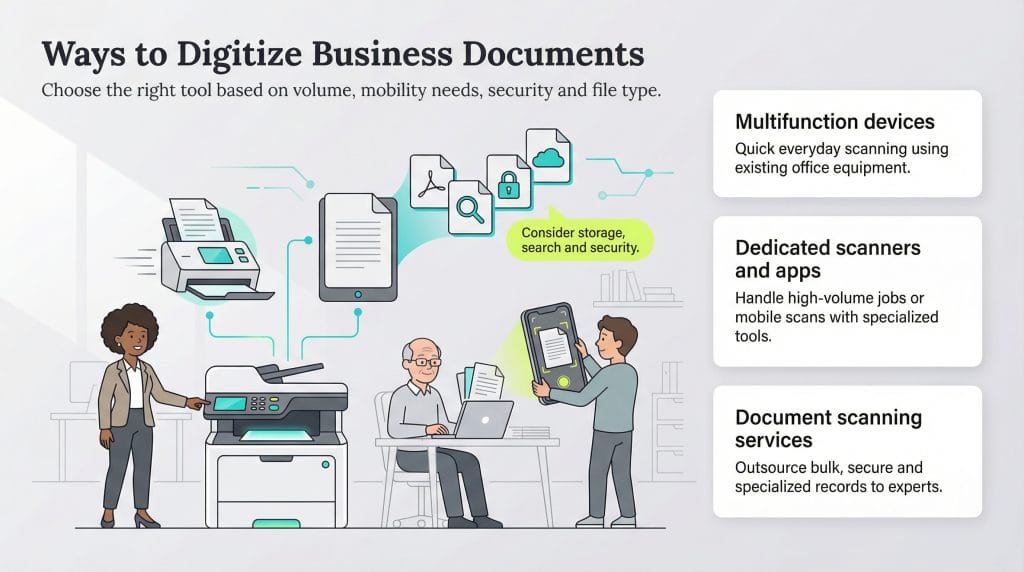
The following tools can help you digitize your documents.
Multifunction devices
If your documents don’t require high-resolution scanning, a multifunction device you already have in the office may be enough. For example, an office printer with scanning capabilities lets employees digitize paper documents quickly without added cost.
Dedicated scanners
For businesses that scan documents frequently or in large volumes, a dedicated scanner can be a better fit. These devices typically offer higher resolution, faster scanning speeds and more flexibility for handling different paper sizes and document types.
Scanning apps
If you don’t have a scanner or need to scan documents on the go, a smartphone app can be a practical option. It uses your phone’s camera to capture clear images and keep paperwork organized.
If you use a scanning app for business documents, take time to review its storage options, search features and security measures to make sure it meets your needs before downloading.
Document scanning services
Outsourcing document scanning can make sense for businesses with a large backlog of paper files. Professional scanning services handle the time-consuming work of preparing, scanning and indexing documents, which can help companies digitize records efficiently without pulling internal staff away from other responsibilities.
Here are the different types of document scanning services and some of the use cases they specialize in:
- Bulk scanning: Bulk-scanning services use high-quality devices to scan large volumes of documents quickly. There is no need to convert each page individually, which significantly reduces the scanning time.
- Large-format scanning: This type of scanning service specializes in capturing superior-quality images of large physical documents, such as those measuring 54 x 72 inches. You can customize the scanned documents’ color, size, resolution and file type. Examples of such files include posters, maps and architectural plans.
- OCR processing: OCR processing services provide fully editable scanned image files. OCR technology converts scanned images into text-searchable documents, allowing you to edit text easily without affecting the original font style.
- Microfiche and microfilm scanning: These services convert data stored on tapes and microfilms to indexable digital files, making it easier to share, store, access and retrieve digital files.
- Off-site and on-site scanning: Off-site scanning services digitize documents at their facilities. If you entrust classified or sensitive documents to such a service, verify that it passed numerous clearances, such as FBI background checks and fingerprinting. Alternatively, you can choose an on-site service to perform such scans. However, on-site scanning can be slower and more expensive than off-site scanning, as high-volume equipment is usually too large and sensitive to transport to a client location.
- Medical record scanning: When it comes to paper vs. electronic medical records, there’s no question that electronic records are more convenient and secure. Still, any provider you select to scan medical records must comply with HIPAA laws.
- HR, accounting and legal: Specialized departments can benefit from document scanning services that securely organize highly confidential employee documents, detailed bookkeeping records, and legal files in one place. Scanned documents can be accessed exclusively by the appropriate department or shared for collaboration when permissions are enabled within the document repository.
What are the biggest barriers to digitizing documents?
Small companies often want to go digital but hesitate because of what’s involved — and what’s at stake. Graham noted that small businesses face several common challenges when considering document digitization. “The biggest barrier to convincing a small company to digitize its documents often comes down to a mix of perceived costs, lack of familiarity with the process and resistance to change,” Graham explained.
- Cost concerns: Digitizing documents can feel overwhelming for a small business, especially when budgets are tight. Expenses like hiring a scanning provider, paying for a cloud storage service and not seeing an immediate return can cause hesitation. “Many small companies perceive digitization as expensive due to the cost of scanning hardware, software solutions and cloud storage,” Graham noted. “Some worry about recurring costs like subscription fees for document management systems or data migration services.”
- Awareness of the process: Many small businesses don’t have a clear picture of how digitization works, which can make the process seem more complicated than it really is. Without that understanding, it’s easy to focus on perceived costs instead of the benefits. Graham said educating businesses about the process can help highlight advantages like improved efficiency, stronger security and long-term cost savings.
- Resistance to change: Small businesses may be comfortable with their existing paper-based systems and hesitant to adopt something new. While that’s understandable, Graham said concerns about learning new technology or disrupting daily routines shouldn’t stop companies from taking advantage of the benefits that digitization offers.
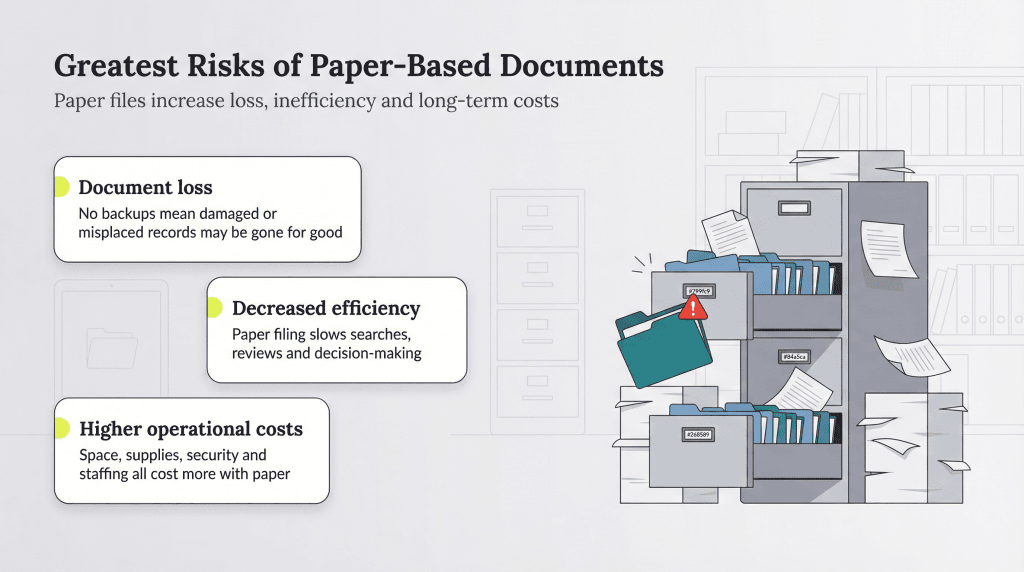
What are the greatest risks of not digitizing documents?
Putting off digitization can leave your business exposed to several avoidable risks, including the following:
- Document loss: Physical documents are easy to misplace and vulnerable to damage or human error. “Unlike digital files, physical documents often have no backup, making recovery sometimes impossible,” Graham cautioned.
- Decreased efficiency: Searching for, filing and managing paper documents takes time and can require additional staff just to stay organized. Relying on paper can slow communication, delay decision-making and disrupt workflows. “Many physical filing systems cannot manage version control,” Graham warned. “This becomes especially challenging when a small company needs to produce an ‘official’ record during an audit or legal review.”
- Higher operational costs: Maintaining a paper-based system often leads to ongoing expenses that add up over time, such as:
- Physical space for filing systems, including office space or off-site storage
- Office supplies like paper, ink and folders for printing and copying
- Additional staff time or overtime spent managing paper documents
- Security measures to protect sensitive physical records
- Environmental costs tied to paper use and disposal