Your free business.com+ membership unlocks exclusive tech deals and advisor support
Join Free
BDC Hamburger Icon

Menu

Close
BDC Logo with Name
Search Icon
Search Icon
Advertise with us
Advertising Disclosure
Close
Advertising Disclosure

Business.com aims to help business owners make informed decisions to support and grow their companies. We research and recommend products and services suitable for various business types, investing thousands of hours each year in this process.

As a business, we need to generate revenue to sustain our content. We have financial relationships with some companies we cover, earning commissions when readers purchase from our partners or share information about their needs. These relationships do not dictate our advice and recommendations. Our editorial team independently evaluates and recommends products and services based on their research and expertise. Learn more about our process and partners here.


User Permissions and Financial Controls: How Growing Teams Can Share the Books Without Losing Control

author image
Written by:
Adam Uzialko, Senior Editor
author image
Editor verified:
Chad Brooks,Managing Editor
Last Updated Jun 25, 2026
Business.com earns commissions from some listed providers. Editorial Guidelines.
Table Of Contents Icon

Table of Contents

Open row

This article is sponsored by Intuit.

When a business is just two or three people, it isn’t a problem for everyone to have access to the full financial picture. The founder knows every transaction, the bookkeeper handles payroll without a second thought and access questions never come up because there’s nothing to wall off. The openness boosts efficiency at a time when the company needs agility most.

Unfortunately, once a team grows enough, the same wide-open access that once felt frictionless quietly turns into a source of accidental errors and an accountability blind spot. The books still need to be shared, but sharing them without structure starts to cost more than it saves. That’s where accounting software with user permissions and financial controls comes in.
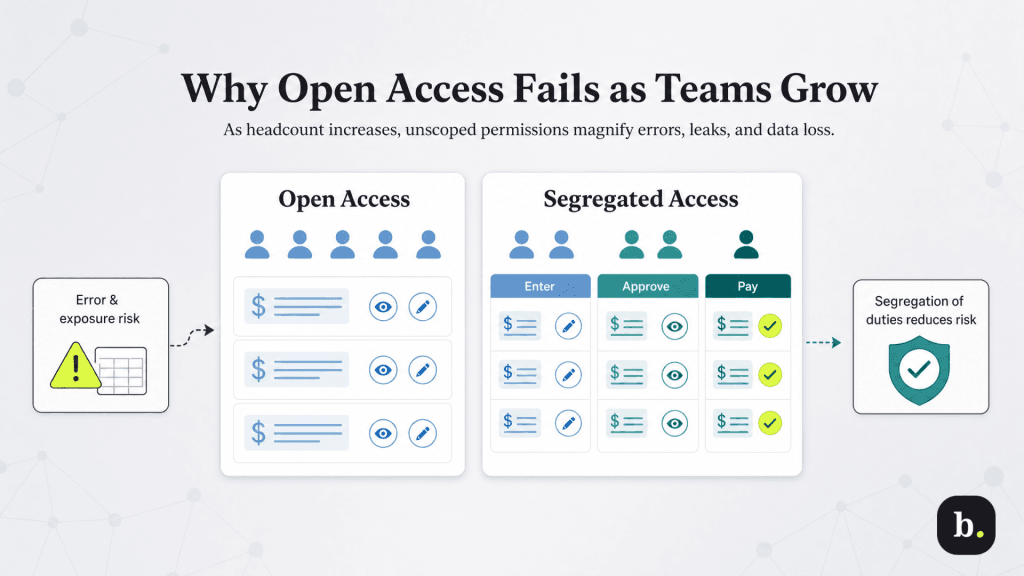
Why open access stops working as you scale

why open access stops working

As your team grows and more people have editable access to financial data, the surface area for mistakes and exposure rapidly expands. Five trusted people with full access is a manageable risk, while 25 is a different proposition entirely, even if every one of them is conscientious and well-intentioned.

The risks tend to fall into three distinct categories:

  • Error risk. An office manager with full access opens a prior month to fix what looks like a typo and unknowingly edits a closed accounting period, quietly throwing off reconciled books and a filed tax basis. The manager had no bad intent, just access that exceeded their needs.
  • Confidentiality risk. A sales rep who needs to create invoices can also see payroll runs and compensation data, because the system grants visibility in broad strokes rather than by function. Sensitive information ends up in front of people who never needed it to do their jobs.
  • Data-portability risk. A contractor brought in for a short project has access to the full vendor list and pricing history. When the engagement ends, that data walks out the door with them because access was never scoped or time-bound in the first place.

This is where a recognized accounting principle called “segregation of duties” comes in. The American Institute of Certified Public Accountants describes it as dispersing the critical functions of a key process across more than one person, so that no single individual can both initiate and conceal an error or a fraudulent transaction. In practice, that means the person who enters a bill shouldn’t also be the one who approves and pays it. Permissions are simply how that principle gets enforced in your accounting software.

Bottom LineBottom line
Restricting access isn't a statement about whom you trust. It protects employees from costly accidental mistakes and protects the business from single points of failure — the situations where one person's error, departure, or oversight can disrupt the entire financial picture.

Role-based access control, explained for the books

The fix for open-access sprawl has a name: role-based access control (RBAC). The idea is straightforward: Instead of deciding what each individual person can touch, you define what each role needs to do, then assign people to roles. A bookkeeper gets the bookkeeper’s access whether you have one bookkeeper or four.

Underneath RBAC sits the principle of “least privilege”. Give each role the minimum access required to do its job, and nothing beyond that. The default isn’t full access unless there’s a reason to restrict, it’s no access unless there’s a reason to grant it. That single inversion is what separates a controlled environment from an open one.

It also makes onboarding and offboarding clean: a new hire inherits a role’s access on day one, and a departing employee’s access disappears the moment their role is revoked. 

Most capable accounting systems express access in tiers that map to this thinking:

  • View-only: Users can see specified areas but change nothing.
  • Data entry: Users can create and edit transactions within an area, but not approve them.
  • Approval: Users can authorize transactions others have entered.
  • Admin: Users can manage users, settings, and access itself (a tier that should stay rare).

Mapping roles to your actual team

Translating the principle into your own org chart is where it becomes useful. Below is a starting map of common roles at a growing small or midsize business and what each one typically needs and, just as importantly, what each should be walled off from.

Role

Typically needs access to

Should be walled off from

Bookkeeper / AP clerk

Entering bills and expenses, reconciling accounts

Payment approval, banking, payroll

Sales / AR staff

Creating invoices, viewing customer records

Vendor lists, payroll, expense data

Office manager / admin

Broad day-to-day operational entry

Closed accounting periods, payroll

Outside accountant / contractor

Scoped, time-bound access to relevant areas

Anything outside the engagement scope

Owner / controller

Approvals, reporting, user administration

Sole unchecked control of any full cycle

The outside accountant or contractor is the clearest case for scoped, time-bound access: they need exactly the areas relevant to their engagement and nothing more, and that access should be trivial to revoke the day the work ends. 

Even the owner or controller benefits from structure, not because anyone doubts the owner, but because a business where only one person can approve, record and review every transaction has built a single point of failure into its financial controls. Segregation of duties applies at the top of the org chart too.

This is the kind of granular, role-by-role mapping that QuickBooks Advanced is built to support. Its custom roles let an administrator define exactly what each user can see and do across distinct areas of the books — banking, sales, payroll, expenses, reports, budgets, and inventory — rather than handing out access in broad all-or-nothing strokes. The plan supports up to 25 users (plus separate access for your accountant) at no per-seat charge, which means access can scale alongside headcount instead of forcing a trade-off between team size and cost. 
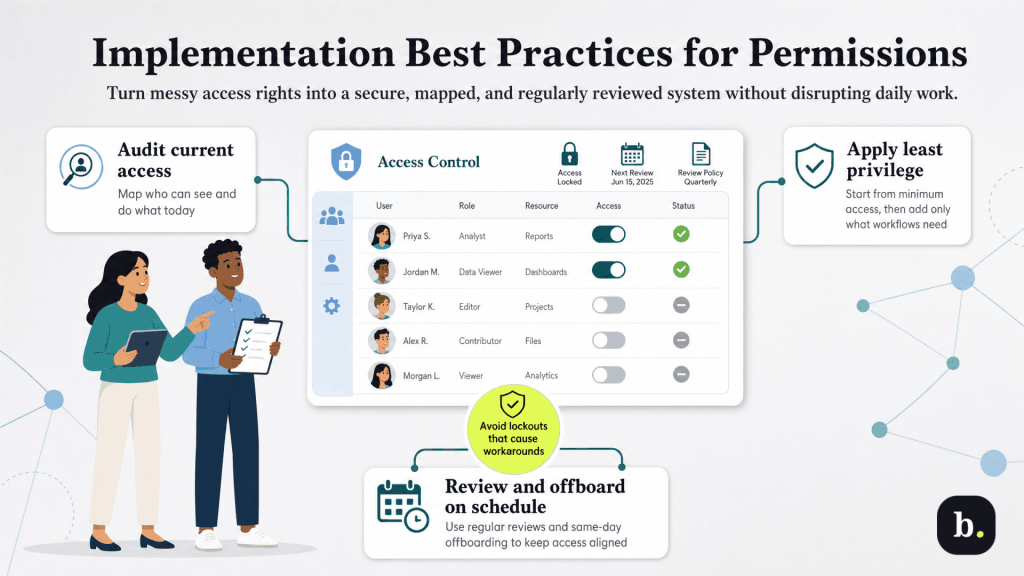
Implementation best practices

Implementation best practices

Rolling out structured permissions doesn’t require a disruptive overhaul. It works best as a deliberate sequence:

  1. Audit current access first. Before changing anything, document who can see and do what today. This baseline almost always surfaces surprises like accounts no one remembers granting, departed contractors still active and overlapping permissions. This tells you where the real exposure sits.
  2. Apply least privilege as the default. Reset to the minimum each role needs, then deliberately add access back where a genuine workflow requires it. Building up from “none” is far safer than trimming down from “everything.”
  3. Lock closed accounting periods. Once a month or quarter is reconciled and closed, restrict the ability to edit it. This single control directly prevents the office-manager scenario of well-meaning edits that silently corrupt finalized books.
  4. Build a same-day offboarding checklist. When someone leaves or a contract ends, revoking access should be a defined step that happens immediately, not an afterthought discovered during the next audit.
  5. Review permissions on a schedule. Roles drift as responsibilities change. A quarterly review (plus a check-in at every role change or departure) keeps access aligned with what people actually do.
  6. Document who has access to what. A simple, current access map is invaluable when an auditor, insurer or security questionnaire asks how you control financial data. It also makes every other step on this list easier.

One caution worth flagging: over-restriction has its own failure mode. Permissions tightened to the point that people can’t do their jobs push staff toward workarounds like shared logins, which obliterate the accountability the system was supposed to provide. The goal is the minimum access that lets each person work smoothly, not the minimum access possible. Watch for friction and loosen deliberately where the work genuinely requires it.

Sharing the books without losing control

The three risks of unmanaged access — accidental errors, confidentiality gaps and accountability blind spots — all trace back to access that outgrew the team without anyone deciding it should. The fix is to define roles around what each job needs to do, grant the least privilege required and review it as the organization changes.

Done well, this turns permissions from a constraint into an enabler. When the guardrails exist, delegation gets easier; you can hand off real responsibility because the structure catches mistakes before they spread. The businesses that scale smoothly tend to be the ones whose financial controls grew in step with their headcount, rather than the ones that waited for an incident to force the issue.

If your team has outgrown everyone-sees-everything, it may be worth exploring how QuickBooks Advanced’s custom roles and user management can help you structure access deliberately, sharing the books across a growing team while keeping control firmly in place.

Did you find this content helpful?
Verified CheckThank you for your feedback!
author image
Written by: Adam Uzialko, Senior Editor
Adam Uzialko, the accomplished senior editor at Business News Daily, brings a wealth of experience that extends beyond traditional writing and editing roles. With a robust background as co-founder and managing editor of a digital marketing venture, his insights are steeped in the practicalities of small business management. At business.com, Adam contributes to our digital marketing coverage, providing guidance on everything from measuring campaign ROI to conducting a marketing analysis to using retargeting to boost conversions. Since 2015, Adam has also meticulously evaluated a myriad of small business solutions, including document management services and email and text message marketing software. His approach is hands-on; he not only tests the products firsthand but also engages in user interviews and direct dialogues with the companies behind them. Adam's expertise spans content strategy, editorial direction and adept team management, ensuring that his work resonates with entrepreneurs navigating the dynamic landscape of online commerce.