Business.com aims to help business owners make informed decisions to support and grow their companies. We research and recommend products and services suitable for various business types, investing thousands of hours each year in this process.
As a business, we need to generate revenue to sustain our content. We have financial relationships with some companies we cover, earning commissions when readers purchase from our partners or share information about their needs. These relationships do not dictate our advice and recommendations. Our editorial team independently evaluates and recommends products and services based on their research and expertise. Learn more about our process and partners here.
Benchmark Email Marketing Review
Written by:
Tom Anziano, Senior Writer
Editor verified:
Shari Weiss,Senior Editor
Last Updated Nov 19, 2025
Business.com earns commissions from some listed providers. Editorial Guidelines.
Table of Contents
Editors Score:8.7/10
Benchmark’s email marketing platform is exceptionally easy to set up and use. Its drag-and-drop editor, AI design tools and other standout features are user-friendly and provide everything small businesses need for effective email marketing campaigns.
Pros
Benchmark is exceptionally easy to set up and use.
Its fully-featured Free plan is a great way to get started with email marketing, and its Pro plans are affordably priced.
AI-powered text and image tools help you create professional looking, branded emails with just a few clicks.
Cons
The Free plan’s contact and email send limits might be restrictive for some businesses.
Benchmark only offers basic email features and even paid plans don’t provide additional marketing tools.
Benchmark’s platform doesn’t include automations, customer engagement features or A/B testing.
Busy small business owners need a straightforward, user-friendly email marketing platform that can help them generate leads, boost sales and build customer relationships at an affordable price. Benchmark fits the bill with its intuitive software, AI tools and standout drag-and-drop email editor. Benchmark strikes a great balance between essential email functionality and user-friendly features. Small business owners will also appreciate the free plan, which includes everything needed to start sending email marketing campaigns — with affordable upgrade options as their lists grow.
Benchmark Email Marketing Editor's Rating:
8.7 / 10
Pricing/value
9.4/10
Features
8/10
Customizations, add-ons and integrations
7/10
Ease of use
9.8 /10
Customer support
9.2/10
Why we chose Benchmark as best for user-friendliness
Benchmark recently launched a redesign of its email marketing platform, streamlining many of its features into an even easier-to-navigate interface that any small business owner will be able to master in minutes. We were impressed by how painless it is to start building professional, responsive emails using Benchmark’s drag-and-drop editor, AI-powered tools, unlimited segmentation features and handy reports. Benchmark also provides clear, step-by-step guidance for new users.
We appreciate that the new, simplified platform centers ease-of-use with essential tools for quickly composing and sending sleek emails to subscribers. However, that simplicity comes at a cost, as many advanced email marketing features like automations, integrations, sign-up forms and customer engagement tools aren’t currently included. Still, business owners looking for the basics will be more than satisfied with Benchmark, especially its forever free plan.
Whether you’re new to marketing or ramping up your efforts, Benchmark makes email marketing approachable and easy to manage. For all those reasons and more, Benchmark is our pick for the best email marketing service for user-friendliness.
Did You Know?
Benchmark’s email audit checklist makes sure your emails aren’t missing anything important and helps you adhere to opt-in email marketing requirements.
Benchmark’s easy-to-use drag-and-drop editor helps you create and edit professional email campaigns, even with limited design experience. Source: Benchmark
Ease of Use
Ease of use is where Benchmark shines. All built-in features come with easy-to-follow, step-by-step instructions. Right from the Help Hub icon on the lower right, users can search for any topic. Most articles include animated instructional graphics, making it easier to get up to speed quickly. Many competitors we reviewed don’t offer that level of insight into how to use each tool.
During testing, we created polished, responsive emails in minutes using the drag-and-drop editor and AI tools. We also liked that there were some predesigned templates to start from, but we were disappointed that the offering is much smaller than the previous version of Benchmark Email. Before sending, you can view how your message will look on the web, on a tablet or on a phone. You can also send yourself a test email before launching a campaign.
We especially like that the platform alerts you to any potential problems with your email before you send, like missing links, blank sections or layout problems. This added layer of review ensures that your company’s emails are always complete and professional.
Benchmark’s Audit feature helps you send professional looking emails by pointing out design or content issues. Source: Benchmark
FYI
If you’re a current subscriber to Benchmark and want to hang on to the features you love, like the ability to create automated email sequences, you’ll still have access to the old version of the platform, now called Benchmark Classic. The company will notify users when the old system is phased out.
Benchmark Features
Benchmark includes helpful email marketing tools for communicating with your subscribers and improving your marketing ROI. Every feature is included in all plans, so no matter your budget, you’ll always have access to the full platform, something not many competitors offer.
Drag-and-drop email builder
We found Benchmark’s drag-and-drop designer to be a standout feature, making it easy for just about anyone to create eye-catching emails. You can choose from one of a handful of pre-made templates or start from scratch with a variety of different layouts to send professional, attractive email newsletters and messages, regardless of your design experience.
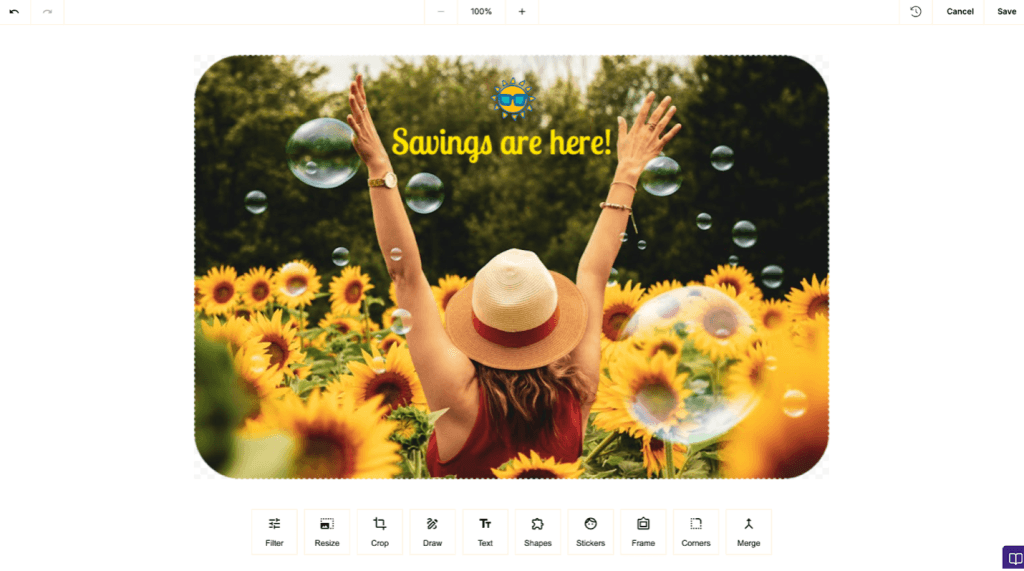
Adding text, images, videos, social media links and clickable buttons is simple. We appreciate that Benchmark allows you to import images directly or choose from their library of stock photos. An editing tool lets you crop the image or overlay text and stickers. You can preview the email in multiple formats before sending.
Benchmark’s platform includes a stock photo library and easy-to-use tools to add text, stickers and drawings to any image. Source: Benchmark
AI-powered content
For users who want a faster, more automated email design experience, Benchmark offers a number of AI-powered tools. Magic Image quickly creates customized visuals based on your prompts. We appreciate that the tool generates multiple versions, so you can choose the one that best fits your message. Smart Text provides headline or button copy options in your preferred tone. It can also help you enhance your body copy by making it longer or shorter, changing the tone and fixing errors.
We were impressed that Benchmark doesn’t gatekeep such powerful AI features. Even free plan users have access to unlimited image and text generation. Despite these useful features, we would have liked the ability to generate body copy from a prompt. AI-assistance would also be useful in creating compelling subject lines that keep emails out of the promotions tab or spam folder.
Even free plans have access to AI-powered image and text generation. Source: Benchmark
List-building tools
Building a quality email list is the first step to launching successful campaigns. Benchmark makes it easy to add contacts individually or in bulk by importing a CSV file. If you’re not sure how to format a contact list for uploading, Benchmark provides a link to easy-to-follow instructions right on the upload page.
You can create an unlimited number of custom fields, tags and lists, allowing you to segment subscribers in the way that makes most sense for your marketing efforts. However, we found Benchmark’s list creation function to be more complicated than other aspects of the platform, especially if you want to add contacts manually.
Tip
In order to make the most of your marketing efforts, it’s important to keep in mind current market segmentation trends when creating lists.
Straightforward dashboard
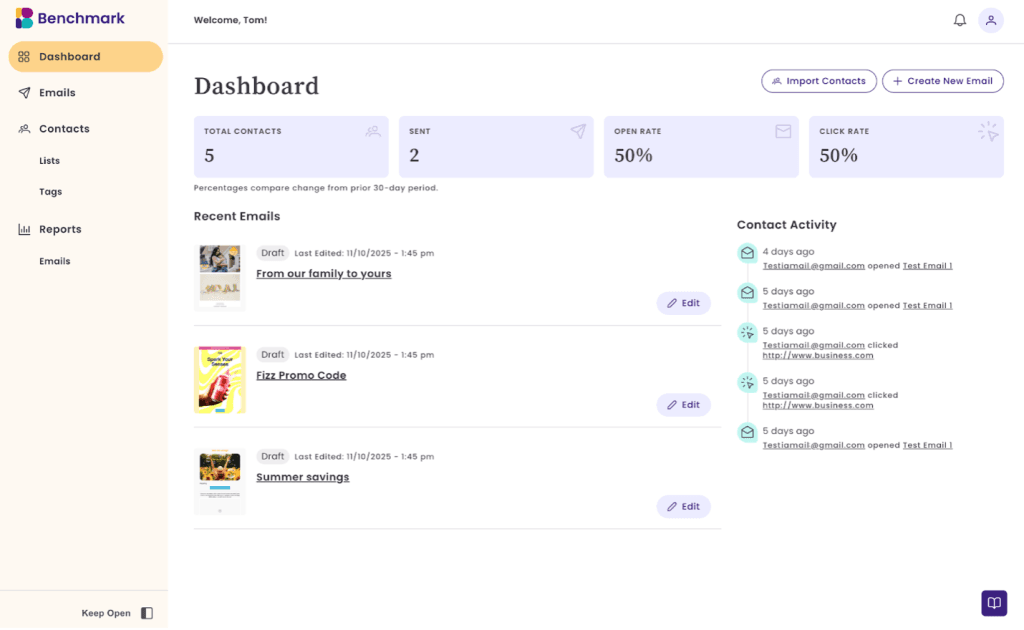
Benchmark’s simplicity is what sets it apart, and navigating the dashboard is just as uncomplicated as the rest of the platform. When you open Benchmark, everything you need is right there or just a click away. You can import contacts, create emails, get an overview of your most important metrics and access support chat or how-to articles. The Contact Activity section is especially useful, showing your subscribers’ most recent interactions with your email marketing campaigns.
Benchmark’s dashboard gives you an overview of recent emails, campaign metrics and subscriber activity. Source: Benchmark
Campaign analytics
We appreciate that Benchmark helps you glean essential insights into campaign performance. The platform provides key email analytics as soon as your campaigns are sent, including:
We also like that Benchmark organizes your campaign data in a clean, easy-to-understand dashboard. From there, you can drill into specific metrics, such as which URLs were clicked, how campaigns compare, and when your subscribers are most active.
FYI
Data analytics and reporting tools are critical for determining whether your messages are having the intended impact. Benchmark’s insights can help you refine your campaigns and keep optimizing for better results.
Benchmark Pricing
Benchmark’s Free plan — which few competitors offer — impressed us. We especially love that it is fully-featured, so small business owners just getting started with email marketing can get the most out of the platform without running up costs.
Every Benchmark plan includes the following core features:
Drag-and-drop email editor
Templates
AI text and image generation
Stock photo gallery
Email audit checklist
Device previews
Unlimited custom fields, tags and lists
Link tracking
Email reports
Access to Benchmark’s online help center and live chat support
Here’s a deeper breakdown of how Benchmark’s plans differ, including subscriber limits and maximum sends:
Plan
Monthly price
Features
Free
$0
500 maximum contacts
2,500 emails per month
1 user maximum
1 domain maximum
Pro
Monthly pricing is based on contacts:
$37/month (2,500 contacts)
$63/month (5,000 contacts)
$93/month (10,000 contacts)
$129/month (15,000 contacts)
$149/month (20,000 contacts)
$179/month (25,000 contacts)
$209/month (30,000 contacts)
$269/month (40,000 contacts)
$299/month (50,000 contacts)
$399/month (75,000 contacts)
$499/month (100,000 contacts)
100,000 maximum contacts
From 25,000 to 1 million emails per month
Add up to 10 users
Add up to 10 domains
Customize
Quote required
100,000+ contacts
Custom emails per month
Custom users
Custom domains
You can easily upgrade or downgrade your plan at any time right from the dashboard. We like that if you go over your send limit, Benchmark will contact you to see if you want to upgrade instead of automatically charging you for a higher send limit. Paid plans allow you to add additional users for $15 per user per month.
Implementation and Onboarding
Signing up for Benchmark begins by creating a free account. Once you’ve entered your name, company name, phone number and email address, you can begin building email campaigns with the easy-to-use drag-and-drop email editor.
The platform’s interactive interface walks you through creating your first campaign. The simple onboarding process is intuitive enough for beginners to pick up quickly. There are helpful how-to articles that you can access directly on the dashboard if you need extra assistance.
Customer Support
Access helpful step-by-step visual guides right from the dashboard. Source: Benchmark
We found that Benchmark’s customer support was excellent each time we tested it. You can contact a rep via live chat or email directly from the Help Hub. Live agents are available during normal business hours and outside of those times, you can send an email or search Benchmark’s help docs.
When we reached out, the customer-service representatives were prompt and courteous, and answered all our questions about the product. We also appreciate that the online articles and step-by-step guides with videos and animated graphics make troubleshooting the platform a breeze.
Limitations
Benchmark is a great option for small businesses that want a user-friendly email marketing platform. We did, however, identify some limitations.
Limited features: Benchmark prioritizes ease-of-use at the cost of many more-advanced, but common features needed to run powerful campaigns and grow your email list. Business owners looking for landing pages or signup forms, A/B testing, automations, tools to engage email subscribers or simply a solution with more robust functionality won’t find much value in Benchmark’s limited service. This is especially true for Benchmark’s paid plans, which increase contact and send limits, but surprisingly don’t include any extra features that might justify the cost.
Limited templates: We were disappointed with the relatively limited offering of pre-made email templates in the platform. Benchmark includes less than 30, while other competitors offer a few hundred. Having access to editable templates can help business owners save a great deal of time when crafting campaigns, and we would have liked to see more included.
No CRM features: Some businesses prefer a platform that includes robust CRM functionality alongside email marketing. While Benchmark offers a CRM solution called Benchmark ONE, Benchmark Email marketing services are not included. Read our review of Salesforce Marketing Cloud to learn about a CRM with integrated email marketing tools.
FYI
Read our Campaigner review if you have a large business that needs hundreds of pre-designed templates and extensive customization and marketing automation features.
Methodology
To identify the best email marketing services, we compiled a list of popular platforms based on online research. We carefully examined each service’s online reputation and narrowed the list to a group of finalists. We spent several weeks researching each email marketing service by exploring its offerings, watching tutorials and how-to videos, testing the software (when possible), and reading user reviews. We also evaluated each platform’s pricing structure and customer support. When selecting our pick for the most user-friendly email marketing service, we focused on how intuitive the platform was for time-strapped small business owners, comparing free and paid features and evaluating how easy it was to get up and running.
FAQs
Benchmark offers a free plan, but it has some limitations that may be deal-breakers. There are contact and send caps that may hinder your email list growth.
Yes, Benchmark is an especially strong option if you want a platform that is easy to learn and use and comes with useful features for quickly and painlessly emailing your subscribers. Smaller businesses on a budget will appreciate the fully-featured free plan and the affordable prices of Benchmark’s paid plans.
No. Benchmark Email doesn’t currently integrate with any other external business software solutions.
Bottom Line
We recommend Benchmark for …
Small and midsize businesses looking for basic email marketing services at no or low cost.
Business owners who prioritize speed and ease-of-use over complex, advanced features.
Businesses that want robust, easy-to-use AI-powered email marketing tools without paying extra.
We don’t recommend Benchmark for …
Businesses with more complex email marketing needs, like automated workflows or customer engagement features.
Small business owners looking for a scalable solution that adds on premium features as their business grows.
Businesses that want a CRM and email marketing on the same platform.
Sean Peek contributed to this article.
Did you find this content helpful?
Thank you for your feedback!
Share Article:
Written by: Tom Anziano, Senior Writer
Tom Anziano is an international business expert with a bachelor of business administration from the University of Miami, where he concentrated on marketing. Over the last two decades, he has shared his expertise domestically and abroad, including as a business skills and writing teacher in Madrid.
At business.com, Anziano primarily covers marketing topics, including social media trends, marketing analysis, and email and text message marketing.
Anziano also has experience testing business software and services, allowing him to make informed recommendations on the best products and tools for business owners. He specializes in CRM software, email and text message marketing platforms, and financial solutions.