Business.com aims to help business owners make informed decisions to support and grow their companies. We research and recommend products and services suitable for various business types, investing thousands of hours each year in this process.
As a business, we need to generate revenue to sustain our content. We have financial relationships with some companies we cover, earning commissions when readers purchase from our partners or share information about their needs. These relationships do not dictate our advice and recommendations. Our editorial team independently evaluates and recommends products and services based on their research and expertise. Learn more about our process and partners here.

You want new business software to make things easier for your organization, not harder. Document management systems, in particular, aim to streamline file storage for easy access and allow employees to work on the documents they need without jumping through hurdles. In our testing, we found that M-Files users can quickly and seamlessly organize and manage electronic documents. We also love that the sleek and intuitive interface sets users up for success, making M-Files a standout solution in the document management space.
Out of all the document management software we reviewed, M-Files has one of the most neatly organized and intuitive interfaces. The dashboard is reminiscent of Windows File Explorer, which most computer users are familiar with. Whereas other products have a steep learning curve, M-Files is user-friendly and easy to navigate. Documents can be uploaded with a simple drag-and-drop, and most of the software’s functions can be achieved with a few clicks on the dashboard. Users can search files by metatags or document text, making identification and categorization a breeze. For these reasons, M-Files stands out as the best document management software for companies prioritizing ease of use.
In addition to M-Files’ high usability, businesses can expect essential document management tools, including optical character recognition (OCR), e-signing and offline access. When we tried the platform, we enjoyed using the workflow automation features and the M-Files Aino AI assistant, which is now included with every M-Files edition, to increase efficiency and reduce the potential for human error. With this functionality, businesses will find it easier than ever to store, track, access and even synthesize company information.
The document management systems market is projected to grow to $29.78 billion by 2034, exhibiting a compound annual growth rate of 15 percent, according to Fortune Business Insights. This growth is driven by increasing digital transformation initiatives and the demand for efficient document storage solutions. Businesses are increasingly placing critical importance on streamlining their document workflows and improving employee productivity. Based on our testing and research, we found that companies can confidently rely on M-Files and its modern technology to meet their document management needs.
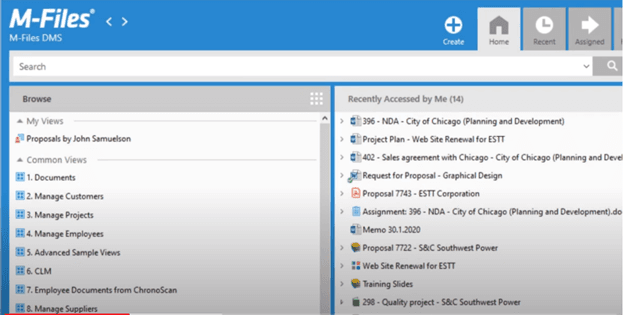
One of our favorite aspects of M-Files is that it’s extremely intuitive. The user interface is neatly organized, and you can carry out most tasks directly from the central dashboard. The top navigation menu provides direct access to views and main functions, including:
The interface also includes functionality for creating new assignments, customer records, documents and projects. Users can scan documents and use M-Files’ OCR tool to make them fully searchable, which is on par with what competing software solutions can do.
M-Files’ file explorer tool displays all publicly accessible folders and those you have access to privately. Users can easily view metadata cards, preview documents and apply filters using the right-side navigation. Another great aspect of M-Files is that most major functions can be carried out directly from the dashboard in a few clicks, making it easy to learn and reducing the time it takes to train employees on the software. This straightforward setup also allows users to complete tasks more quickly.
M-Files comes in both cloud-based and on-premises versions. The cloud document management system works on any major web browser, including Microsoft Edge, Google Chrome, Mozilla Firefox and Safari. The on-premises M-Files Desktop client is available only on Windows operating systems with Microsoft .NET Framework 4.7.2, 4.8.x or later. Mac and Linux users can access M-Files through the web version with M-Files Web Companion for editing content with desktop applications.
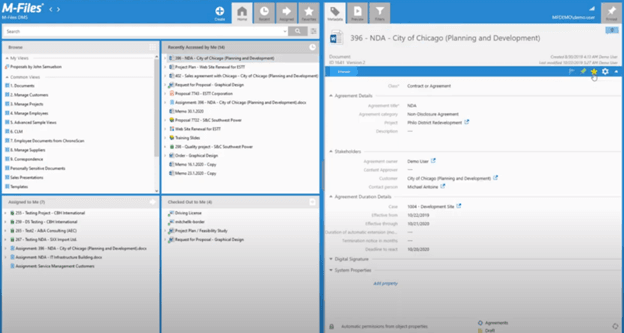
While M-Files lacks some of the valuable features of more comprehensive document management software, it does have all the core functions we looked for in these programs, including the ones highlighted below.
M-Files’ search function, like those of many other document management solutions, is based on the metadata associated with documents. When uploading a document, users can add metadata to the file. For example, uploading an invoice with the metatags “Q3,” “2026” and “invoice,” along with information such as the date and time it was uploaded, can make it easier to find what you’re looking for later on.
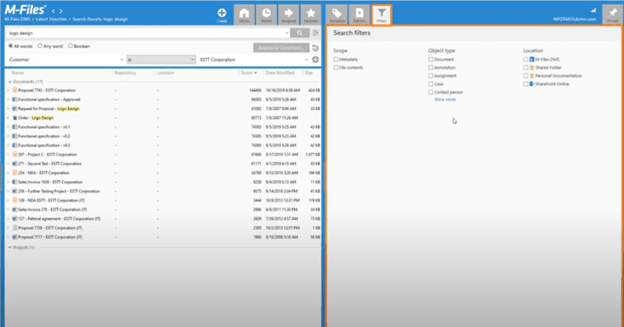
M-Files’ optical character recognition (OCR) improves document searchability by scanning documents and making the text searchable beyond the metadata. For example, if you upload a document that includes the salutation “To whom it may concern,” you can search your files for that specific document using that exact phrase. OCR can also automate the process of applying metadata tags to new uploads.
>> Learn More: File Management Best Practices Every Small Business Should Follow
M-Files’ workflow automation abilities serve a project management function within the document management software. Built-in tools automatically categorize certain documents and assign certain tasks to users. For example, if a staff member has completed work on a document, they can send the document to a manager with the “review and approval” task assigned. All interested parties are notified once the manager approves the document, allowing the next step to begin immediately. If improving productivity is a top goal, we recommend also checking out our review of DocuPhase, one of M-Files’ competitors.
Research M-Files commissioned through Forrester Consulting found that knowledge work automation can increase workflow efficiency by 70 percent and document search by 50 percent, demonstrating significant time savings that translate to a 294 percent return on investment. This aligns with M-Files’ focus on automating manual tasks to allow employees to concentrate on higher-value activities.
Businesses that want no-code document automation should note that M-Files reserves this capability for its top-tier Enterprise edition, along with advanced rendering tools that handle repetitive formatting work automatically.
We love that M-Files has integrated artificial intelligence features through M-Files Aino, an AI assistant designed to enhance document management workflows. This technology aims to help users work more efficiently with their organization’s information by automating certain tasks and providing intelligent search capabilities.
The AI assistant offers several core functions:
Document interaction: Users can ask M-Files Aino questions about documents in everyday language rather than relying solely on keyword searches. The system attempts to understand the context of queries and provide relevant responses.
Content analysis: The AI can examine documents and extract key information, helping users identify important details without reading entire files manually.
Metadata support: Aino can assist with document categorization by suggesting appropriate tags and classifications based on content analysis.
Multi-language support: The system works with documents in various languages and can provide responses in the user’s preferred language.
Access controls: The AI respects existing user permissions within M-Files, ensuring that it only provides information from documents that users are authorized to access.
We were pleased to see that M-Files offers Aino on all of its plans. Both the Essentials and Enterprise editions offer the assistant, so even smaller teams get AI-assisted search, summarization and classification without paying for enterprise-grade options they don’t need. Enterprise buyers get more: a larger AI capacity allowance, stronger administrative controls and Aino agents, which automatically extract metadata and classify documents to reduce manual filing. This is an improvement over rivals that still treat AI as a premium upsell.
A budgeting tip: Aino usage draws from a monthly quota that is shared across everyone on your subscription rather than allocated per user, and how quickly you burn through it depends on document language, text volume and formatting complexity. M-Files warns you at 90 percent consumption and temporarily disables the assistant if you exhaust the allowance, so heavy AI users on a small seat count may find the pooled model limiting.
M-Files’ versioning feature, a key component to look for when picking a document management system, tracks a document’s history by monitoring changes and archiving old versions so you can refer to them as needed. It tracks who last opened the document, what changes were made and when, so you know exactly which team members made which edits. Versioning includes a check-in and checkout feature, too; when a user checks out a document, it’s unavailable to edit until it’s checked back in. This prevents multiple current versions of the same document. Rival program FileHold has virtually the same tool; learn more in our detailed FileHold review. Enterprise subscribers can go further with custom versioning schemes and parallel workflows that control how document versions, changes and releases are managed — useful in regulated environments where version lineage has to be provable.
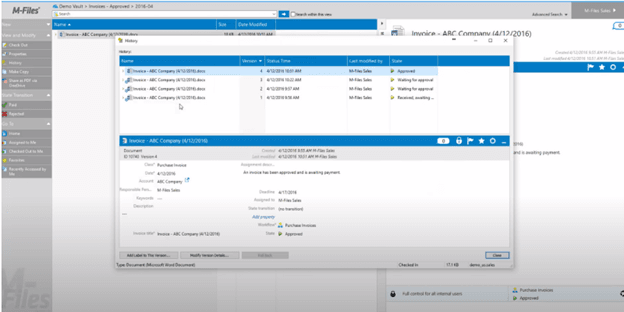
M-Files offers extensive integrations with electronic signature services, including Adobe Acrobat Sign, DocuSign and Visma Sign, to enable e-signatures on documents that require approvals. Users can affix their signature to any file within the M-Files application and send signed files to recipients directly from the software.
We found the Adobe Acrobat Sign integration particularly robust. It allows users to send documents for secure and legally binding e-signatures using the Adobe Acrobat Sign cloud service directly from within M-Files workflows. M-Files also integrates with Adobe Certified without requiring a separate e-signature service contract from Adobe. The integration uses webhook technology for real-time signature process updates between M-Files and the e-signature services.
M-Files also integrates with Salesforce, Google Workspace and SAP, along with Microsoft’s Outlook, Teams, SharePoint and Microsoft 365 Copilot. Still, for an alternative document management system with hundreds of third-party integration options, check out our review of DocuWare.
We appreciated that company administrators can set permissions for individual M-Files users and create groups of users, ensuring document security and confidentiality. Permissions can be set to read or write to allow users to view or edit documents, respectively. Users can also be granted priority. For example, if both a manager and a staff member want to access a document to make edits simultaneously, the manager would be granted priority and the staffer would have to wait.
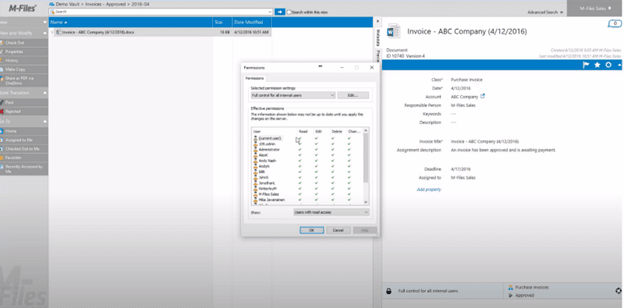
M-Files implements comprehensive security measures designed to protect organizational data throughout its entire lifecycle. In addition to enabling the role-based access controls discussed above, the program maintains detailed audit trails that track every user interaction with documents, creating a record of who accessed what information and when. Such document tracking is invaluable for compliance reporting and security investigations. The platform holds ISO/IEC 27001 certification and SOC 2 attestation and supports GDPR compliance.
The platform’s security architecture includes advanced encryption both in transit and at rest, protecting sensitive information transmitted between users or stored in the system. M-Files supports integration with existing enterprise authentication systems, including Active Directory and single sign-on solutions, allowing organizations to maintain centralized user management while ensuring secure access. When we used M-Files, we saw that the system also includes features like:
These security features work together to create a robust framework that helps organizations meet various compliance standards while maintaining the flexibility needed for efficient collaboration and document management. Organizations in heavily regulated sectors should budget for the Enterprise edition since federated authentication, enterprise key management through Azure Key Vault and extended audit logging with exportable compliance evidence are only available on that tier.
If a user anticipates not having internet access, they can designate files for offline use on a laptop or mobile device. Any changes a user makes while offline are recorded and automatically synced with the system once internet access is restored. This is especially valuable in today’s world of remote work, where employees are sometimes working on the go or in unusual locations.
M-Files changed its approach to pricing in 2024, and it’s a change we welcome. The company used to require a sales conversation to reveal rates — the same frustrating practice we still see from competitors DocuWare and FileHold. Now M-Files publishes a starting price: its entry-level Essentials edition costs $65 per seat monthly. That transparency makes it easier to budget, and it’s a genuine competitive advantage in a category where opaque quotes are the norm.
The vendor also simplified its lineup, retiring the three-tier Base, Team and Business structure in favor of two editions: Essentials and Enterprise. Enterprise pricing is still quote-based, which M-Files attributes to the fact that its cost reflects governance requirements, external collaboration needs, AI usage volume and total content volume rather than seat count alone. Subscriptions are typically billed annually. All editions can be cloud-hosted or hosted on your own servers, with a hybrid option available.
Here is how the two editions compare:
Plan | Price | Features |
|---|---|---|
M-Files Essentials | $65 per seat monthly |
|
M-Files Enterprise | Custom quote | Everything in Essentials, plus:
|
M-Files offers several add-on options, such as Additional Storage, Premium Cloud (a dedicated single-tenant Azure environment for organizations with stricter performance and compliance demands), data residency options, Outlook Pro for automatic email archiving, Reporting Databases, Process Maps, Job Aids and Premium Support. Implementation services and managed services are also priced separately. M-Files doesn’t publish figures for any of these.
As with DocuWare, M-Files offers a 30-day free trial. The trial runs in the cloud, requires no credit card and lets you invite unlimited colleagues into a preloaded vault, so you can test collaboration rather than just clicking around alone. We highly encourage you to take advantage of this opportunity to test M-Files before deciding whether to pay for it.
M-Files offers comprehensive implementation and onboarding options to accelerate time-to-value and maximize user adoption. The company provides multiple service packages, from self-service DIY options to full professional implementation support.
M-Files doesn’t publish pricing for implementation or managed services, and costs vary widely with the size of your organization and the complexity of your requirements. Before signing a contract, ensure all expenses are transparent.
We also found M-Files’ customization options both plentiful and straightforward compared with other document management systems, which adds to its high ease of use. Solution templates, configurations, add-ins and APIs make it easy to build out the program for your company’s unique needs. Users can also install add-on products and extensions from M-Files and third-party partners, allowing seamless integration and more rapid deployment.
Unlike other vendors, M-Files requires only one license subscription to get started. With a single license, teams can deploy the software on-premises or in the cloud (or both), offering flexibility and limitless scalability.
M-Files users can contact customer support through phone, email or the web-based support portal. Product support is offered 8:30 a.m. to 5 p.m., Monday through Friday. Both the Essentials and Enterprise editions include standard M-Files product support along with documentation and learning resources. Businesses can also purchase Premium Support as an add-on, which delivers 24/7 coverage and faster response times.
We found it handy that M-Files lists its country-specific sales and technical support phone numbers on its website. M-Files offices and representatives are available globally, offering worldwide reach. The company also provides robust online resources through the M-Files Community platform, including webinars, video guides, user forums, product documentation and an AI assistant for quick answers to common questions — a deeper self-service library than most competitors in this category maintain.
M-Files’ standing in the market has strengthened, too. The company earned the 2025 Gartner Peer Insights Customers’ Choice distinction for document management, which reflects customer-submitted reviews.
When using M-Files, only basic document access, viewing, editing and sharing can be accomplished through web browsers or the vendor’s mobile apps. For full functionality and seamless integration with your device’s file system, you’ll need to install the M-Files Desktop client on Windows computers. We think some users will find this inconvenient and limiting, particularly Mac and Linux shops, which have no native desktop client at all and must work through the browser.
Also, while we love M-Files largely due to its user-friendliness, some users might have trouble adjusting to the search engine, which categorizes documents by generating lists of metatags. To make files easier to find, users can add their own specialized tags — a tool that’s especially useful for businesses dealing with a high volume of documents. However, this computerized filing system can have a slight learning curve for those accustomed to traditional document organization methods. In M-Files’ defense, though, users would deal with this regardless of which document management product or vendor they choose, as practically all of them use metatags.
Finally, the two-edition structure means several capabilities that competitors bundle as standard — no-code document automation, secure external collaboration and extended audit logging among them — require the quote-based Enterprise plan. Businesses that need just one of those features may find themselves paying for a higher tier to get it.
We evaluated dozens of products to determine the best document management software on the market. Specifically, we looked at each solution’s:
We also researched each vendor’s pricing, setup process, security measures and customer support. In addition, we tried the software ourselves, watched company how-to videos and read customer reviews.
When searching for the best document management software for businesses seeking high usability, we considered the system’s ease of use, the user-friendliness of the interface, and the program’s ability to improve workflow and make operations more efficient. We also took into account the software’s ease of implementation and its learning curve.
We recommend M-Files for…
We don’t recommend M-Files for…
