Business.com aims to help business owners make informed decisions to support and grow their companies. We research and recommend products and services suitable for various business types, investing thousands of hours each year in this process.
As a business, we need to generate revenue to sustain our content. We have financial relationships with some companies we cover, earning commissions when readers purchase from our partners or share information about their needs. These relationships do not dictate our advice and recommendations. Our editorial team independently evaluates and recommends products and services based on their research and expertise. Learn more about our process and partners here.
Best goal-setting apps and goal-tracking software
The right software can help you set clear business goals and track progress over time.
Written by: Tom Anziano, Senior WriterUpdated Mar 10, 2026
Editor Verified:
Editor Verified
A business.com editor verified this analysis to ensure it meets our standards for accuracy, expertise and integrity.
Gretchen Grunburg,Senior Editor
Business.com earns commissions from some listed providers. Editorial Guidelines.
Table of Contents
Whether you’ve been in business for two months or 22 years, your company is likely working toward specific goals, such as sales targets, marketing initiatives or efforts to cut business costs. Many businesses also encourage employees to set individual goals tied to the organization’s broader objectives.
Whatever the case, the right goal-tracking tool can hold you and your staff accountable while helping you measure progress along the way. In this guide, we’ll cover the key features and benefits of goal-setting software and goal-tracking apps and share our top choices to help your business succeed.
What are goal-setting and goal-tracking tools and apps?
Goal-setting and tracking tools and apps are software platforms businesses can use to establish objectives, record progress and measure key performance indicators (KPIs). These platforms offer a range of features and may support popular frameworks like SMART goals or objectives and key results (OKRs). Once goals are set and an endpoint is established, the software can track progress and highlight milestones, so everyone can see how the objective is moving forward.
“Goal-setting software is a place to create clarity, accountability and momentum by connecting daily tasks to long-term outcomes,” explained Jensen Savage, founder of Savage Growth Partners. Most of these platforms allow team members to set individual, team and project goals, then link them to broader organizational targets. Dashboards and alerts keep everyone on track, while additional features encourage employee engagement and better workplace collaboration. These tools are especially important for building a successful remote company, since teams don’t always have the opportunity to coordinate in person.
“Goal-setting and tracking software and apps are perfect for virtual businesses as they create the feeling of a central office where work documents and status reports can be accessed at any time,” said Teresa Saputo-Crerend, co-founder of LaunchBreak.
FYI
Goal-tracking tools only work if everyone is measuring progress against the same business goals and objectives. Make sure your team agrees on priorities before you start tracking results.
What are the best goal-setting and goal-tracking tools and apps?
As project management software has evolved over the past decade, so have tools for goal-setting and tracking. The best apps encourage productivity, foster collaboration and offer a range of pricing options.
Before choosing a platform, it’s important to understand what you hope to get out of it. “Define your needs first because many of these apps are designed for specific purposes, such as task management, multiple projects, large teams, small teams and more,” advised Saputo-Crerend.
Here are 13 tools that can help businesses set and track goals.
1. Bitrix24
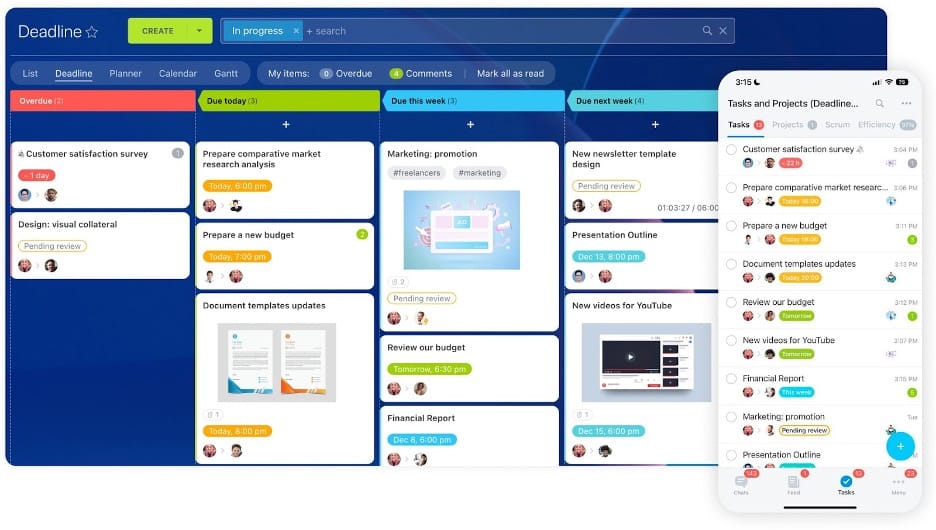
With Bitrix24’s clean, color-coded interface, keeping track of tasks is easy. Source: Bitrix24
Bitrix24 is an all-in-one platform that combines project management, collaboration and CRM tools. Businesses can use it to set team and individual goals, assign tasks and track progress in one place. Teams can create tasks and subtasks tied to employee objectives, helping managers connect day-to-day work with more overarching company goals.
The platform is flexible enough to support both short-term planning and long-term goal tracking. Shared dashboards, alerts and reporting tools help teams stay aligned and see how work is progressing.
Bitrix24 offers a free plan with unlimited users and 5 GB of storage. The free version also includes core collaboration tools, task management, CRM features, shared calendars and built-in chat and video calls.
Paid plans are billed per organization rather than per user:
Basic: $49 per organization per month (billed annually); supports up to five users
Standard: $99 per organization per month (billed annually); up to 50 users
Professional: $199 per organization per month (billed annually); up to 100 users
Enterprise: Starts at $399 per organization per month (billed annually); up to 250 users (can scale to thousands of users as teams grow)
2. 15Five
With 15Five, you can track progress on individual and company-wide goals. Source: 15Five
15Five combines software with education and a supportive community to help companies manage performance, employee development and training in one place. The platform is used primarily by HR leaders who want to build stronger teams through continuous performance management and feedback. Its insights help teams stay aligned with company goals, communicate OKRs clearly and track employee progress based on individual skills and development plans.
One drawback is that 15Five does not offer a free plan. Paid plans are billed per user:
Engage: $4 per user per month (billed annually); includes engagement surveys, AI-powered insights and basic analytics
Perform: $11 per user per month (billed annually); includes performance reviews, OKRs, goal management and access to core platform features and integrations
Total Platform: $16 per user per month (billed annually); combines Engage and Perform while adding advanced analytics, AI tools and learning features
15Five also offers additional products for managers and compensation planning.
Tip
Pair your goal-setting system with tools that measure employee performance. Many platforms let you set objectives, monitor progress and evaluate results over time.
3. Asana
Asana’s Goals feature lets teams track progress toward company objectives by linking related projects and milestones. Source: Asana
Asana offers tracking tools teams can use across nearly every part of an organization. The platform combines collaboration and goal tracking so teams can coordinate work while monitoring progress. Among its many features, the Goals tool allows teams to set objectives, track progress, add subgoals and monitor how individual contributors support larger goals.
Asana offers a free plan for individuals and small teams called the Personal plan. However, the platform’s dedicated Goals feature is available only in Advanced or higher plans.
Paid plans are billed per user as follows:
Starter: $10.99 per user per month (billed annually); includes workflow builder, timeline and Gantt views, dashboards and advanced search
Advanced: $24.99 per user per month (billed annually); adds Goals, portfolio management, workload tracking and advanced reporting tools
Enterprise: Custom pricing; includes advanced security, admin controls and enterprise integrations
Enterprise+: Custom pricing; adds compliance features and advanced governance tools
4. ClickUp
ClickUp organizes projects into tasks and subtasks so teams can track progress and priorities in one workspace. Source: ClickUp
ClickUp is a hierarchical project management platform designed to help teams organize work, documents and tasks in one place. The system uses a layered structure that lets teams break large goals into smaller tasks and subtasks, making it easier to track progress across projects.
ClickUp also includes modular tools called ClickApps, which allow teams to customize task management and workflows. Additional customization options help teams tailor their workspace, while built-in collaboration tools make it easier to keep projects, communication and documents in one central hub.
ClickUp offers a free plan for individuals and small teams with basic task management and collaboration tools. Paid plans are billed per user:
Unlimited: $7 per user per month (billed annually); includes goals, unlimited custom fields and additional integrations
Business: $12 per user per month (billed annually); adds advanced automation, dashboards and workload management tools
Enterprise: Custom pricing; includes advanced security, enterprise controls and dedicated support
5. Databox
Monitoring your team’s progress is easy from the Databox dashboard. Source: Databox
Databox is a business intelligence platform that helps teams track performance through customizable dashboards. If your team relies on several software platforms to monitor goals, Databox stands out by pulling data from multiple sources and displaying key metrics in one place. This makes it easier to compare performance across sales, marketing and operations and see whether your team is on track to meet its targets.
Databox offers a Free plan that includes three data source connections along with standard dashboard features and access to more than 100 integrations. Paid plans are priced based on the number of connected data sources:
Pro: $159 per month (billed annually); includes unlimited users, custom metrics, dashboards and goal tracking
Growth: $399 per month (billed annually); adds advanced analytics, datasets and AI-generated insights
Premium: $799 per month (billed annually); includes up to 100 data source connections along with enterprise-level reporting and support features
6. Engagedly
Engagedly’s goals dashboard lets managers track OKR progress, monitor team alignment and review goal completion across departments. Source: Engagedly
Engagedly is an AI-powered talent management platform that helps companies align employee goals with broader business objectives. The software includes tools for performance management, feedback, professional development and employee engagement, allowing teams to track progress and support career growth in one system.
The platform supports goal setting through OKRs, progress tracking and performance check-ins. Managers can monitor milestones, provide real-time feedback and review historical performance data to see how employees are progressing toward individual and team objectives.
Engagedly uses a modular pricing structure that allows businesses to build a customized platform based on the tools they need. Paid modules are billed per user per month (billed annually):
Manage Performance: $5-$8 per user per month; includes performance reviews, goals and OKRs, feedback and check-ins
Learn & Grow: $3-$5 per user per month; includes learning management, skill tracking and career development tools
Recognize & Reward: $2 per user per month; includes employee recognition, rewards and gamification features
Engage & Listen: $2 per user per month; includes engagement surveys, pulse checks and employee feedback tools
Additional suites are available:
Mentoring Suite: $8 per user per month; includes mentoring programs, progress tracking and goal support
Manage Compensation: $10 per user per month; includes compensation management and performance-based pay tools
Deskless Employee Communication: $5 per user per month; includes messaging, surveys and internal communication tools
Businesses can combine modules based on their needs, and pricing may vary depending on company size and feature bundling. There’s a minimum spend of $7,500 per year.
7. Goalscape
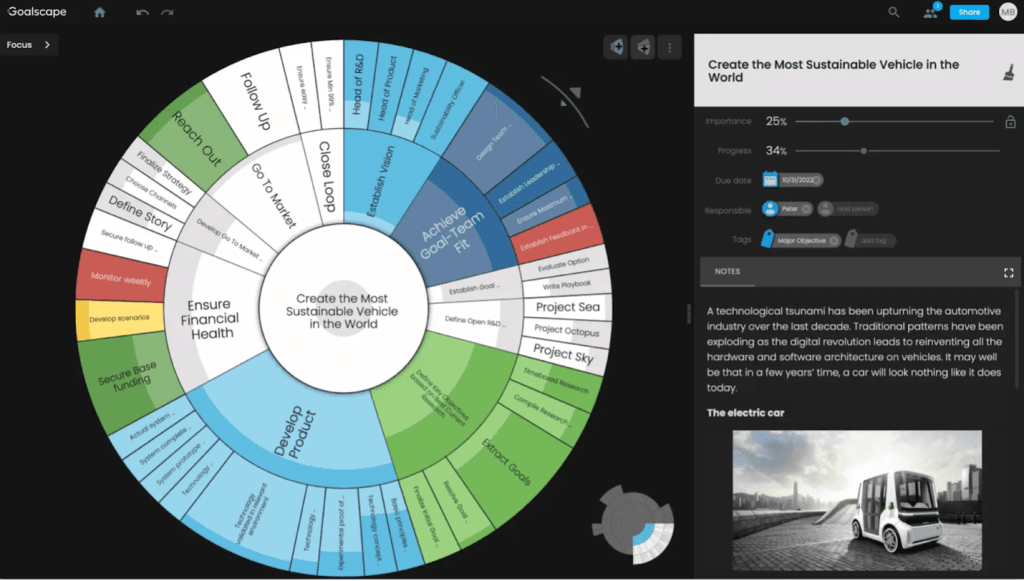
Goalscape’s simple interface allows you to easily visualize goals. Source: Goalscape
Goalscape takes a visual approach to goal planning. Instead of lists or dashboards, the platform uses a circular “goal map” that shows how projects, milestones and tasks connect to a larger objective. As work progresses, sections of the map fill in, making it easier to see which activities are moving the goal forward.
The platform allows users to build visual goal hierarchies, adjust priorities and monitor progress as tasks are completed. Goalscape can be used for both personal planning and team collaboration, and it supports sharing goal maps with colleagues and integrating with tools like Microsoft Teams.
Goalscape offers a 14-day free trial; paid plans are billed per user:
Pro: $8.25 per user per month (billed annually); includes unlimited goal maps, sharing tools and reporting features
Enterprise: $17.33 per user per month (billed annually); includes corporate branding, dedicated servers and enterprise security features
8. Jira
Jira’s kanban boards help teams visualize workflows, track task progress and keep projects moving from planning to completion. Source: Atlassian
Designed for agile teams, Jira is a widely used platform for project management and issue tracking. The software helps teams organize work, prioritize tasks and monitor progress across projects using agile frameworks such as Kanban and Scrum.
Teams can break larger objectives into issues, tasks and subtasks while tracking progress through dashboards, backlogs and reporting tools. These features help teams see how day-to-day work connects to broader project goals while keeping development projects organized and on schedule.
Jira offers a Free plan for up to 10 users that includes project boards, backlog management, reports and dashboards. Paid plans are billed per user:
Standard: $7.91 per user per month (billed annually); adds automation rules, user roles and permissions and expanded project controls
Premium: $14.54 per user per month (billed annually); includes advanced planning tools, cross-project dependencies and expanded analytics
Enterprise: Custom pricing; includes enterprise-grade security, centralized administration and advanced analytics
9. Lattice
Lattice’s Goals & OKRs dashboard helps teams track objectives, monitor key results and align individual work with company priorities. Source: Lattice
Lattice is a performance management platform that helps businesses set goals, track employee progress and support professional development. Its Goals & OKRs tools connect individual work with broader company objectives, helping managers monitor progress and keep teams on the same page.
The platform also includes tools for performance reviews, employee feedback and engagement surveys. Lattice integrates with workplace tools such as Slack, Salesforce and Microsoft Teams so teams can manage goals and performance data within the systems they already use.
Lattice pricing is modular, with a base Talent Management platform and optional add-on modules.
Talent Management: Starts at $11 per seat per month; includes performance reviews, goals and OKRs and habit tracking tools
Engagement: Costs an additional $4 per seat per month; adds employee surveys, pulse surveys and onboarding insights
Grow: Costs an additional $4 per seat per month; adds career development tools, competencies and individual development plans
Compensation: Costs an additional $6 per seat per month; adds compensation benchmarking, pay bands and review workflows
Note that Lattice requires a minimum annual spend of $4,000.
10. monday.com
monday.com’s project boards help teams plan work, assign tasks and track progress using visual timelines and status updates. Source: monday.com
monday.com is a work management platform that helps teams plan projects, assign tasks and track progress toward shared goals. The software uses customizable boards, workflows and dashboards to organize work and keep teams aligned on priorities.
Teams can use prebuilt templates, automation tools and visual views — including Kanban, timeline and Gantt charts — to monitor progress and manage projects. monday.com also integrates with widely used business tools such as QuickBooks Online, Slack and Todoist so teams can connect their workflows across platforms.
monday.com’s work management platform offers a Free plan for up to two users; paid plans are billed per seat:
Basic: $9 per seat per month (billed annually); includes unlimited items, unlimited viewers, custom fields and 5 GB of storage
Standard: $12 per seat per month (billed annually); adds timeline, calendar and Gantt views, plus automations and integrations
Pro: $19 per seat per month (billed annually); includes advanced automations, time tracking and expanded reporting tools
Enterprise: Custom pricing; includes advanced security, enterprise-grade controls and dedicated support
Did You Know?
monday.com also offers monday CRM, a sales management platform built on the same customizable system as its work management software. Teams can track leads, manage sales pipelines and automate follow-ups using familiar boards and dashboards. Learn more in our monday CRM review.
11. Trello
Trello uses Kanban-style boards with cards and lists to help teams organize tasks, track progress and move projects through each stage of completion. Source: Atlassian
Trello, another product from Atlassian, is a project management platform built around the Kanban method, which organizes tasks into visual boards, lists and cards. Teams can use these boards to track work as it moves through different stages, making it easier to monitor progress and keep projects moving forward.
With Trello, teams can break larger objectives into smaller tasks, assign responsibilities and track progress from start to finish. The platform also offers customizable templates, automation tools and integrations with hundreds of business apps, making it useful for teams across many industries, including remote and distributed teams.
Trello offers a free tier that supports up to 10 collaborators per workspace and includes unlimited cards and up to 10 boards. Its three paid options are as follows:
Standard: $5 per user per month (billed annually); adds unlimited boards, advanced checklists and automation features
Premium: $10 per user per month (billed annually); includes timeline, calendar and dashboard views plus advanced admin controls
Enterprise: Starts at $17.50 per user per month (billed annually); includes enterprise-grade security, advanced permissions and organization-wide administration
12. Weekdone
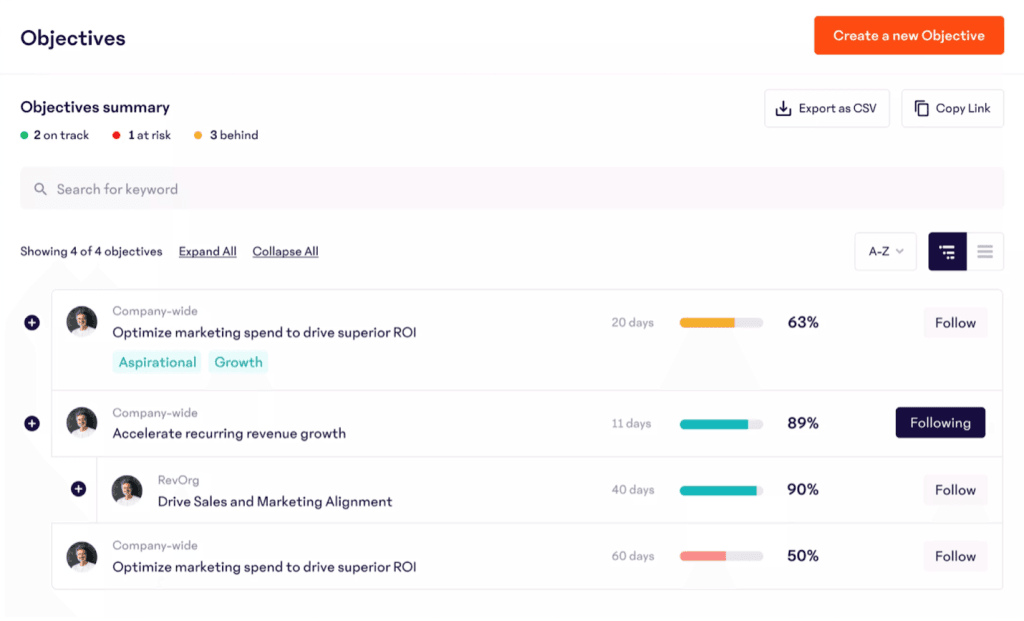
Weekdone helps teams align company objectives with weekly plans and progress updates using the OKR framework. Source: Weekdone
Weekdone is OKR software designed to help small and midsize businesses set company objectives, align team priorities and track progress toward measurable results. Using the Objectives and Key Results framework, leaders define company goals while teams establish key results that measure progress over time.
The platform also includes weekly planning and progress reports that help managers monitor team performance and keep everyone aligned on priorities. Built-in coaching resources and employee onboarding tools guide teams through the process of setting effective OKRs and maintaining accountability.
Weekdone is free for up to three users; paid plans are billed per user. Paid plans start at $9 per user per month (billed annually) for a 10-user package; pricing scales based on team size.
13. Todoist
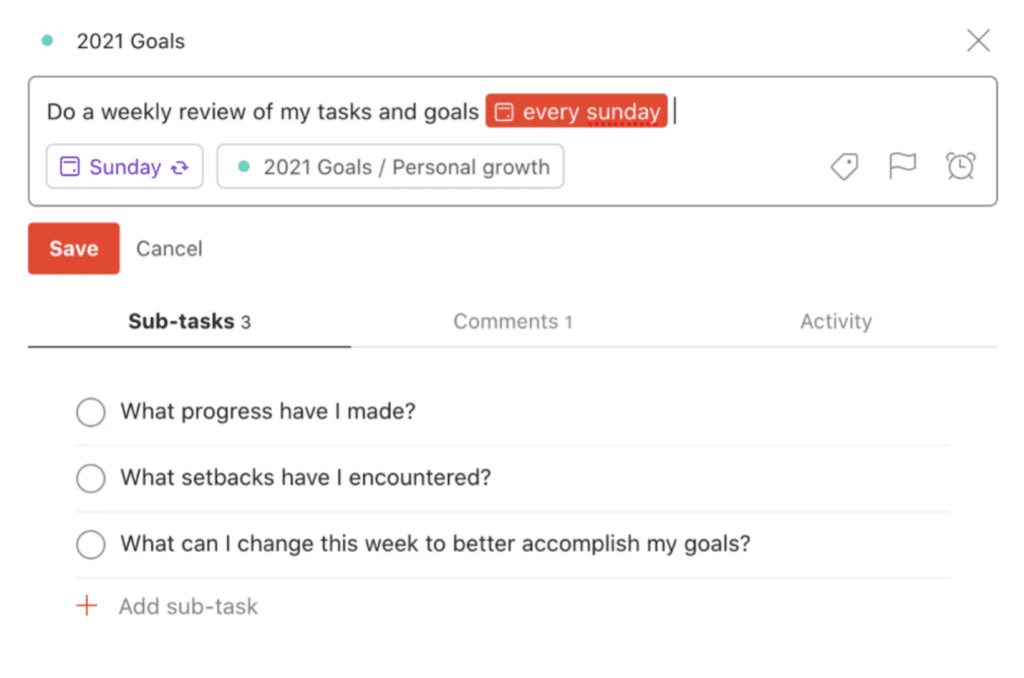
Todoist helps you manage tasks, review goals and more. Source: Todoist
Todoist is a streamlined task management platform designed to help individuals and teams organize work, track projects and stay focused on priorities. Known for its clean interface and simple workflow tools, Todoist makes it easy to capture tasks quickly, assign responsibilities and keep projects moving forward.
Users can create projects, break work into subtasks and track progress using list or board views. Todoist also supports natural-language task entry, allowing users to quickly add due dates, priorities and reminders while creating tasks. Built-in integrations and collaboration tools help teams coordinate work across multiple platforms.
Todoist offers a free Beginner tier that includes up to five personal projects, three filters, list and board views and one-week activity history. Its two paid options are as follows:
Pro: $5 per user per month (billed annually); includes up to 300 projects, 150 filters, calendar layout, reminders and AI-powered Task Assist
Business: $8 per user per month (billed annually); includes shared team workspaces, up to 500 team projects and team roles and permissions
Tip
Whether you're coordinating a team initiative or organizing your own workload, the right software can strengthen your project management skills by helping you prioritize tasks, track progress and keep goals moving forward.
What are the benefits of using goal-setting apps and goal-tracking software?
Goal-setting and tracking tools can significantly improve how teams plan, prioritize and execute their work. When employees understand what they’re working toward — and how their efforts contribute to company objectives — it becomes much easier to stay focused and move projects forward. Here are a few benefits of working with goal-setting tools:
Enhanced productivity
Clear goals give teams a direction to work toward. Instead of bouncing between tasks, employees know which projects matter most and where to spend their time. Teams can also step back from processes that don’t support a specific objective, which frees up time for work that actually moves projects ahead. Many goal-setting platforms also include reminders, dashboards and progress tracking to help employees stay focused and accountable.
“What’s really exciting is how this technology is making high-performance habits easier, not harder,” explained Louis Carter, founder and CEO of Best Practice Institute. “It’s less about the discipline to update goals manually, and more about building systems that adapt to you.”
Carter noted that modern goal-setting tools increasingly address the human side of improved productivity as well. Automation and AI-driven insights can help employees identify priorities, adjust workloads and stay aligned with company goals. “When the software starts coaching, not just tracking, it becomes part of the team,” Carter said.
Increased team unity and engagement
Shared goals help teams pull in the same direction. When employees understand what the company is trying to accomplish — and how their work contributes — collaboration and workplace teamwork tend to improve, and engagement follows. Teams that work toward clear objectives are also more likely to stay connected to the company’s progress, which can strengthen morale and reduce employee turnover over time.
Brittany L. Truszkowski, chief operating officer at Grand Canyon Law Group, explained that one of the biggest benefits of goal-tracking apps is that they make employee progress clearly visible, which allows managers to see improvement and reward effort. “What really matters is what that kind of visibility creates,” she said. “Accountability, yes, but also recognition.”
Truszkowski added that this visibility helps employees become more invested in their progress instead of feeling like they’re simply being judged and measured against metrics.
FYI
When teams can see how their work contributes to larger goals, goal-tracking tools can strengthen company culture and support long-term retention.
Reduced confusion
When goals, deadlines and progress updates live in one place, employees spend less time guessing about priorities or chasing down status updates.
“The biggest benefit is being able to grow and act on plans without chaos and constant back and forth,” explained Savage. “With task comments, file attachments and status updates all in one place, we rarely have to ask, ‘Where are we on this?’ It dramatically reduced confusion and sped up delivery across the board.”
Informed decision-making
Clear goals give leaders a reference point in day-to-day business decision-making. When teams regularly check their progress against company objectives, it becomes easier to prioritize work, allocate resources and decide what deserves attention next. Without that anchor, businesses can end up reacting to short-term demands instead of focusing on long-term priorities.
Saputo-Crerend noted that goal-setting software was crucial to helping her and her co-founder prioritize decisions and stay on top of tasks while launching their business.
“[It] helped to streamline our workload when we were gearing up to launch our business,” she explained. “Everything, including documents, notes from calls, progress updates and to-do lists, was all organized by project and by department. It saved us time and allowed us to think more clearly during the frenetic early days.”
Performance visibility and accountability
Goal-setting platforms can also improve how businesses track and evaluate employee performance. When goals and progress updates are visible in one system, managers can see how individual contributions support company objectives and address issues before they become larger problems.
“We’re able to tie goals directly to each team member’s role, track progress in real time and integrate that right into their performance reviews,” said Truszkowski. “It’s not a guessing game anymore. If someone committed to improving client communication or increasing efficiency, we’re not scrambling to remember — it’s all there, visible and measurable.”
Did You Know?
Goal-setting software helps managers connect individual employee performance goals to company priorities, making it easier to track progress, give feedback and keep teams moving in the same direction.
What are the key features of goal-setting software and goal-tracking apps?
The right goal-tracking software depends on your industry and the size of your team. However, most effective platforms share a core set of features that make it easier to set objectives, monitor progress and keep teams aligned.
AI assistance: Many modern goal-setting platforms include AI tools that help users draft goals, identify trends and flag potential issues before they become larger problems. Some systems can analyze progress data and suggest adjustments to keep teams on track.
Custom fields: Custom fields allow teams to tailor goals to their specific workflows. Businesses can track information such as priority level, revenue impact, project stage or department ownership, helping leaders see how individual tasks connect to broader business strategies.
Templates: Prebuilt templates make it easier to set up goals quickly without starting from scratch. Many platforms offer templates for common business objectives, recurring projects or industry-specific initiatives, allowing teams to focus on execution instead of setup.
Goal views: Visual dashboards help teams track progress across projects, departments and employees. Many platforms support Kanban boards, timeline views, calendars or Gantt charts so managers can quickly see what’s moving forward and where work may be stalled.
Analytics and reporting: Strong reporting tools help businesses measure progress and evaluate performance. Analytics dashboards can highlight trends, identify bottlenecks and provide insights that help managers refine future goals and allocate resources more effectively.
Integrations: Goal-setting software works best when it connects with other business systems. Many platforms integrate with some of the best CRM software tools, communication apps and project management software so teams can keep planning, reporting and collaborating in one place.
Sean Peek contributed to this article. Source interviews were conducted for a previous version of this article.
Did you find this content helpful?
Thank you for your feedback!
Share Article:
Written by: Tom Anziano, Senior Writer
Tom Anziano is an international business expert with a bachelor of business administration from the University of Miami, where he concentrated on marketing. Over the last two decades, he has shared his expertise domestically and abroad, including as a business skills and writing teacher in Madrid.
At business.com, Anziano primarily covers marketing topics, including social media trends, marketing analysis, and email and text message marketing.
Anziano also has experience testing business software and services, allowing him to make informed recommendations on the best products and tools for business owners. He specializes in CRM software, email and text message marketing platforms, and financial solutions.