Business.com aims to help business owners make informed decisions to support and grow their companies. We research and recommend products and services suitable for various business types, investing thousands of hours each year in this process.
As a business, we need to generate revenue to sustain our content. We have financial relationships with some companies we cover, earning commissions when readers purchase from our partners or share information about their needs. These relationships do not dictate our advice and recommendations. Our editorial team independently evaluates and recommends products and services based on their research and expertise. Learn more about our process and partners here.
The right internet connection can transform your business, but which option is most suitable for you?

Whether it’s a design agency sending large files to a client or a coffee shop taking a credit card payment from a customer, every business needs to be connected to the internet. But with hundreds of internet service providers (ISPs) offering thousands of deals, how do you choose the right one for your business?
In this article, we’ll cover the following aspects of selecting the best business internet option for you:
Business internet is a high-performance broadband service designed to meet the greater needs of companies and organizations.
The best business internet service providers offer a range of beneficial services, such as high-speed connections with low latency, high uptime rates, excellent customer service and other features, like website creation tools, email management and cybersecurity support. [Related article: Best Website Builder and Design Services]
Although it costs more, business broadband is a better choice for most companies. One reason is that customer support is often superior. So, if you run into a problem with your website, your email or the connection itself, the company can help you faster.
Let’s look at some of the features and considerations to help you select the right plan.
How fast you can perform a given task online sometimes makes a huge difference, so it’s important to ensure your business has the right internet speed.
Across all U.S. fixed broadband connections, the median download speed is roughly 307 Mbps and the median upload speed is roughly 63 Mbps, according to Ookla’s Speedtest Global Index. That lopsided ratio is characteristic of the cable and DSL lines most homes rely on, so a residential plan means making some sacrifices in service along the line.
Business connections widen that gap — and on fiber, they close it. Entry-level business fiber plans commonly deliver symmetrical speeds, meaning uploads match downloads instead of trailing them by a factor of five or more. AT&T’s business fiber, for example, scales to 5 Gbps in both directions, and dedicated business connections reach considerably higher. [Related article: AT&T Business Internet Review]
However, it’s important to choose the right speeds for your business’s needs.
“Be realistic: While ‘gig speeds’ are all the latest hype, that kind of plan can often be a bit overkill for a typical small office or retail setting,” said Jake Turner, co-founder and chief financial officer of managed IT provider Cosmistack. “At the same time, don’t opt for the slowest speeds just to save a buck — the frustration of watching loading spinners all day isn’t worth it.”
Turner recommended the following speeds:
If your team relies heavily on VoIP phone services or video conferencing, aim for the higher end of these ranges to maintain quality.
Joe Warnimont, a senior analyst at HostingAdvice.com, shared his approach to determining speed and bandwidth needs. “My favorite, and perhaps most accurate, way to determine the best bandwidth and internet speed for a business is to conduct what I call a ‘day in the life’ log,” he said.
“Monitor your employees for their internet activities for a few weeks (with the consent of your employees) to see exactly how much bandwidth and speed you’ll need,” Warnimont explained. “This helps identify peak usage times and which activities — like video calls and file transfers — your workers use most.” [Related: Best Employee Monitoring Software]
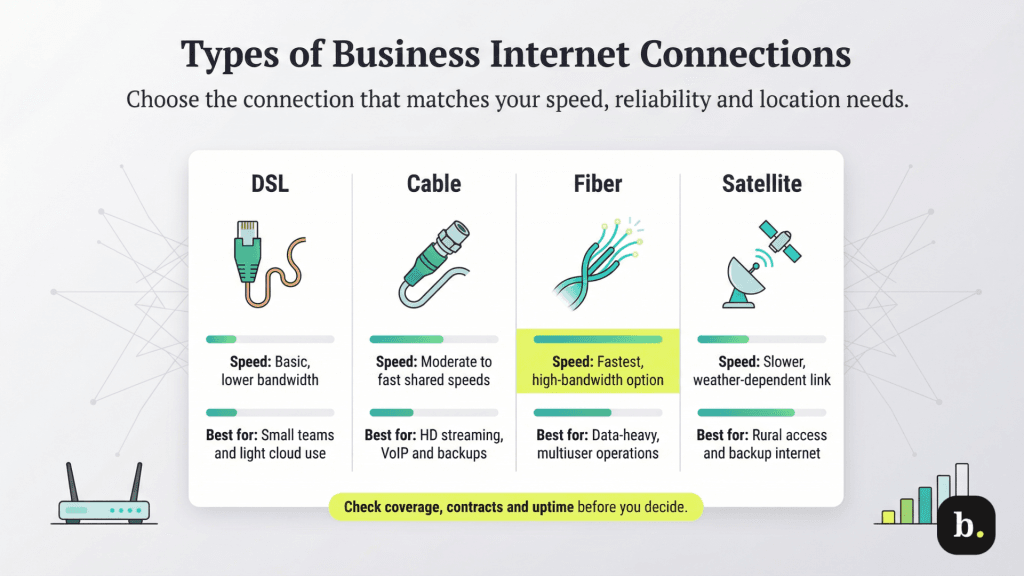
When you’re choosing the right internet plan for your business, it is important to understand the types of internet connections available.
A DSL internet connection can provide internet service over an average copper telephone line, which gives you an easy entry point for your business internet service. Perfect for light usage like cloud storage, DSL allows you to create a local area network (LAN) that can be tailored to your business’s needs. Because of DSL’s limited bandwidth and modest speeds, it’s best for smaller businesses with only a few simultaneous connections.
Turner cautioned that “DSL typically has much lower maximum speeds available and can be hard-pressed to support the needs of a modern business.”
DSL is also on its way out. Major carriers are retiring the copper telephone networks it runs on. For example, AT&T has federal approval to discontinue legacy service across more than 30 percent of its roughly 4,600 copper wire centers and plans to retire the majority of its copper footprint outside California by the end of 2029. Verizon and Fidium have also filed to end legacy service in additional states. Under the FCC’s tech transition rules, providers must have an adequate replacement service available and notify affected homes and small businesses before permanently discontinuing copper service. Before you sign a DSL contract, ask the provider whether copper is scheduled for retirement at your address and what the replacement will be. [Related article: DSL vs. Cable Internet]
Cable broadband internet service uses a coaxial cable to connect you to the internet at speeds appropriate for moderate to heavy activities. Online backups are faster, and file management is seamless, even with multiple simultaneous users. If your organization has upgraded to high-definition streaming audio or uses VoIP services for teleconferencing, cable internet is a great option.
With a fiber-optic internet line, you get the best bandwidth and the fastest solution for a business internet connection. However, because fiber-optic lines still require a lot of infrastructure to be built, coverage is still uneven — fiber now passes more than 60 percent of U.S. households, according to the Fiber Broadband Association. If a fiber-optic business internet line is available in your area, most providers offer reliable, always-on service with blazing-fast speeds of up to 100 Gbps, although the average connection actually clocks in at around 1 Gbps. At 10 Gbps, you could transfer 1TB of data in 15 minutes or less.
“Customers should also be aware that the vast majority of ‘fiber service’ from ISPs is fiber to the node (FTTN) or fiber to the curb (FTTC), and not fiber to the home (FTTH),” Turner said. “This means that fiber-optic cabling ends at a nearby distribution point (typically ISP equipment on your street), and the ‘final mile’ of connection from this equipment to your home or business will still run on coaxial cable.”
Sometimes, it’s hard to spot this in the small print, so Turner recommended contacting individual providers for clarity.
If you’re in a remote area that doesn’t have access to a landline for an internet connection, you may need to use satellite internet service. Just like with satellite TV, your ISP will install a receiver dish at your worksite to establish an internet connection. Because the connection quality of a satellite line depends on many factors — such as trees, the weather or even sunspots — it offers unstable service and slower transfer speeds than land-based options do.
Turner said satellite is “an excellent option for rural customers whose local ISP can’t offer higher speeds or who don’t offer a physical connection at all. It’s also handy for businesses as a backup connection.” He noted that satellite can be expensive and often incurs data-usage charges, which is an important consideration if you do a lot of video streaming. [Related article: Viasat Business Internet Review]
Business ISPs usually provide a service level agreement (SLA) that states exactly which services will be provided. These contracts can cover everything from low latency and always-on connections to transfer speeds and technical support, all to help ensure your business gets exactly what it needs.
An SLA can also include how you’ll be compensated if the baseline service level isn’t met, so it’s important to choose a bundle that meets all of your needs. Although you can get a business internet plan that doesn’t require a contract, you can often get cheaper monthly rates with a multiyear package offered by most major ISPs. The trade-off varies by provider: as we found in our Spectrum Business review, Spectrum sells its business plans month to month with no early termination fees, while our Comcast Business review found the provider offers a five-year price lock in exchange for a one-year service agreement.
A reliable connection is arguably the most important part of any business internet plan. After all, what good is fast internet if you can’t actually connect to it? Most major ISPs offer “near-perfect” uptime.
On the other hand, an unreliable internet connection can affect your transfer speeds, the number of lines it can support and more. More importantly, an unreliable line could bring your business to a complete stop, which would halt productivity, prevent sales and potentially damage customer loyalty.
Besides looking at factors such as cost, security and customer support, you should choose an ISP with proactive network monitoring, Warnimont advised. “Every business wants rapid responses to outages, so it’s essential to have a monitoring system that catches issues long before they take down your entire network,” he said.
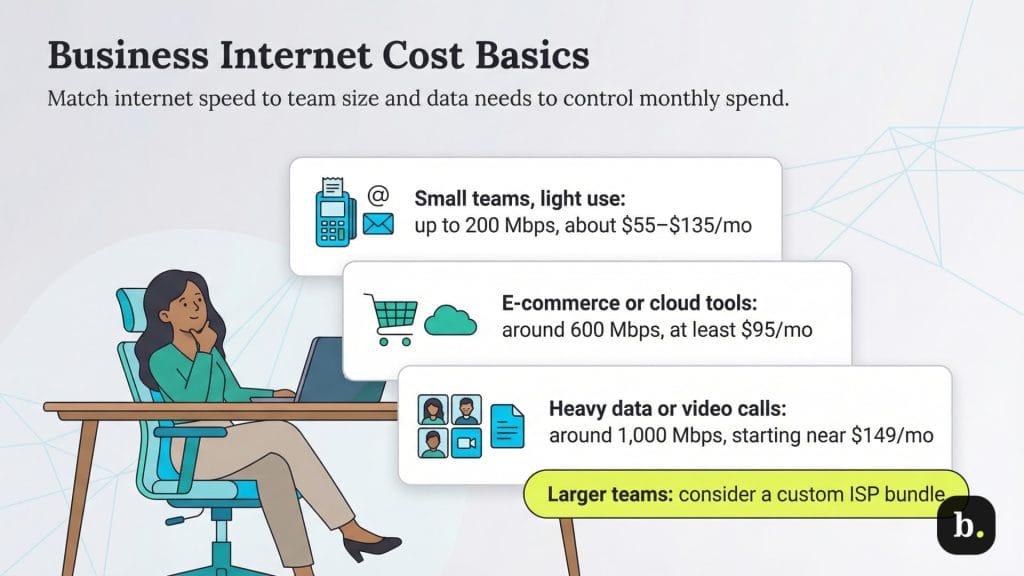
The cost of a business internet plan can range from about $35 to several hundred dollars a month, depending on your needs. If your business has fewer than 20 employees who need to run low-bandwidth applications, like checking email and running a point-of-sale (POS) system, an entry-level plan will likely cover you. Among the providers we’ve reviewed, entry tiers run roughly $35 to $70 per month. Note that 300 Mbps is now the minimum at most major providers — the 100 to 200 Mbps business tiers common a few years ago have evaporated. [See our picks for the best POS systems.]
Businesses that engage in e-commerce or that use cloud-based software as a service should expect to pay around $95 to $100 per month for mid-range speeds of 500 to 750 Mbps. If your business handles large amounts of data via activities such as video file transfer, VoIP meetings or teleconferencing, you’ll want plans in the 1,000 Mbps range or above, which run roughly $115 to $180 per month at the major cable and fiber providers. Costs climb from there: enterprise-grade dedicated fiber with a strong SLA typically costs $200 to more than $500 per month.
Consider the contract term, too, since introductory pricing at several major ISPs rise substantially after the first 12 months. Complex organizations with specific needs or companies with 20 or more people should contact a sales representative at any major ISP to create a customized bundle tailored to their needs.
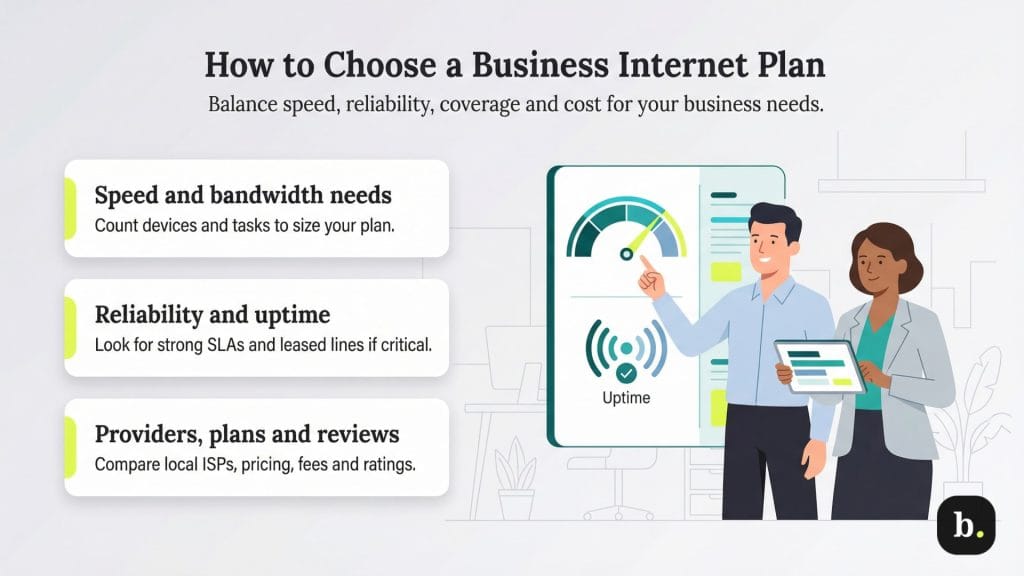
Although it’s unfortunate to overpay for a service with too much speed and bandwidth, it’s arguably much worse to pick one that’s too slow and lacks the bandwidth you need.
Make sure to consider two factors when you’re determining how fast your internet connection needs to be. First, count the maximum number of devices likely to access it at any given time.
Second, determine what the people using those devices will be doing. If you and your team use cloud storage a lot, transfer large files to clients or engage in lots of video calls, you’ll need higher speeds and more bandwidth.
Determine how important it is for your business to have reliable internet. If you and your staff use the internet to take customer payments, run email marketing campaigns, sell to prospects, help customers, order stock and more, a few hours of downtime will be very disruptive.
If you need the most dependable internet connection, choose an ISP with the highest guaranteed uptime and the most watertight SLAs. This will likely cost you more, but it will be much less than the business losses that would result from prolonged downtime.
If speed, reliability and control of your internet connection are paramount, consider a leased line. You might see it called a “dedicated line” or “private internet access.” A leased line costs a lot more but minimizes the risk of outages, major faults and the associated costs.
You will likely have a wide choice of ISPs in urban areas, but the selection in rural areas will be much more restricted. Many ISPs include ZIP-code-based search tools on their websites so you can see whether they serve your area.
When you find the ISPs that serve your area, compare their plans. Short-list the best providers, and evaluate their internet speeds, data caps, prices and contract terms. Some charge fees for equipment and setup, so try to factor those costs into your budget.
Before you register with an ISP, read reviews and testimonials from customers to find out how they rate their experience with the company, and see our picks for the best business internet service providers. You can also check several speed-test sites to see if a potential provider matches the promises on its website.
If possible, speak with neighboring businesses or your local chamber of commerce. Real-world experiences from other nearby firms can tell you how reliable the connection really is in your area.
You could choose a residential broadband connection instead of a business one. Here’s a side-by-side look at how business and residential internet compare:
Residential broadband | Business broadband | |
|---|---|---|
Stable connection | Reliable | More reliable |
Speed | Median 307 Mbps download and 63 Mbps upload | It depends on the connection type, but simultaneous high-speed transfer of up to 5 Gbps is possible. |
Price per month | Median $75 to $81 | $35 (5G fixed wireless) to $200+ (multi-gigabit fiber) |
Extras | Vouchers, discounts, limited-time free streaming subscriptions | Range of business-related extras, some of which are chargeable |
Best for | Streaming, browsing and gaming | Multiple users with bandwidth-hungry tasks |
You’ll pay less with a residential broadband connection. If a handful of you are in the office streaming music, editing documents and running a few other low-bandwidth apps, you’ll probably get by just fine.
However, there might be times when your connection seems a bit slow. That’s because residential broadband providers often choke connections to normalize speed across their user base. Although business broadband providers also do this, they do it much less. Therefore, your download speed will be much more reliable and your upload speed may be much faster with business broadband than with residential broadband.
These are not the only benefits of business broadband. Business ISPs offer extra features and add-ons, such as domain name registration, website creation tools, multiple email addresses with the domain name for your growing staff, security services and more.
Eduardo Vasconcellos contributed to the reporting and writing in this article. Source interviews were conducted for a previous version of this article.