
Business.com aims to help business owners make informed decisions to support and grow their companies. We research and recommend products and services suitable for various business types, investing thousands of hours each year in this process.
As a business, we need to generate revenue to sustain our content. We have financial relationships with some companies we cover, earning commissions when readers purchase from our partners or share information about their needs. These relationships do not dictate our advice and recommendations. Our editorial team independently evaluates and recommends products and services based on their research and expertise. Learn more about our process and partners here.

As one of the leading document management software providers on the market, Revver offers a wide range of capabilities and features that are ideal for small and large businesses looking to ditch their manual processes and switch to a paperless office. With unlimited storage on every user license and an abundance of customizable tools, companies can migrate their data into the Revver system to streamline employee workflows and improve information sharing throughout the organization. Plus, if you need help integrating Revver’s services into your business, you have the full support of your own customer success manager and team.
We chose Revver as the best document management software for businesses seeking extensive digital storage because it removes the storage ceiling altogether. Revver includes unlimited storage with every new user license, so companies can store, track and manage their most confidential files in one place without worrying about losing or sharing them on less-than-secure platforms — or running out of room. We were impressed that Revver doesn’t reserve capacity for its priciest tier the way many rivals do; a business on the entry-level Basic license gets the same unlimited storage as one on the Full license. That distinction matters more than it might sound. Competitors commonly meter storage by plan, which means your filing and retention decisions end up shaped by your subscription rather than by how your business actually works.
We love the flexibility Revver offers on its range of user license types, implementation packages and success programs. We also appreciate that Revver has dropped account-wide license minimums, so you can mix and match tiers across your team and buy only the seats you need at the level you need them. The software itself is easy to use and action- and use-case-oriented. The introduction of to-do lists and quick-access drawers on the home screen make finding what you need easier than before.
Revver splits the homepage into three handy columns:
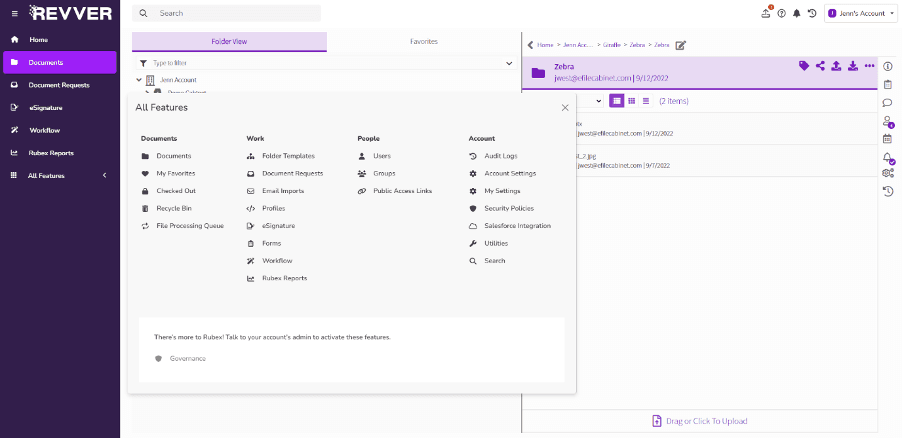
In addition to the “Home” tab, the menu on the left side has buttons for navigating to other parts of the software:
We also like how the search feature (available at the top of the dashboard and in the “All Features” tab) makes document identification and retrieval faster and more accurate than before. One feature we really appreciated was how users can set off a “missing item search” to scan through folders that are missing a document you expect – for example, a client folder missing a contract. As well as searching across an entire document base, you can search individual cabinets and drawers.
While it’s the extensive storage capacity that makes Revver stand out the most, users can also enjoy helpful features that make the system more than just a virtual file cabinet.
Revver lets users securely store, encrypt and share files with co-workers or clients as needed. Unlike most document management systems currently available, Revver doesn’t cap how much you can keep on the platform — unlimited storage comes with every license tier rather than being sold as an upgrade. That can come in handy for companies regularly dealing with large files and in-depth recordkeeping, because there’s no need to periodically purge archives or renegotiate a plan just to make room for the next year of records.
We were impressed at how effectively the Document Request system works. For example, you can structure a request to a colleague on which document to upload, where the document should be stored in Revver and when the request is due. Along with each message, you can include a subject line, message and supporting docs.
You can even send it as a secure public link — no login required — or allow the recipient to sign in with temporary access. This would be handy for, say, an HR manager collecting IDs and tax forms from a new employee. You can templatize the process, too, which means you won’t have to start from scratch each time you gather the same files.
A related feature on the platform is “Form Fill.” This turns PDFs into interactive forms with input areas like tick-boxes, text, date and number strings inside Revver. When the recipient completes it, Revver then flattens the PDF again, archiving it for later reference once someone has confirmed that it’s been completed correctly. Sales teams could make great use of this feature for closing deals and getting commitment from clients.
We love that Revver integrates with the following business tools:
Revver also offers integrations with IMAP/SMTP email servers, SSO and a broad range of printers and scanners.
There are lots of developer opportunities with Revver, too. The company provides its own software development kit to help developers integrate via a .Net Referenced Assembly interface and Component Object Model. Alongside its prebuilt connectors, Revver exposes an open API, so teams with development resources can wire the platform into systems it doesn’t support out of the box.
Revver AI is the biggest addition to the platform since the eFileCabinet rebrand, and we were pleased to find that it isn’t sold as a premium add-on — every license tier includes it, right down to Basic. That’s a meaningful contrast with rivals that reserve their document intelligence tools for top-end plans or bill them separately.
The centerpiece is Smart Extract, which reads uploaded documents and pulls out the metadata you care about without anyone building a template first. Extracted values become searchable, drive Revver Reports and can trigger workflows, so a stack of scanned invoices can file, name and route itself. We found this a better approach than the template-driven data capture some competitors use, since it doesn’t break the moment a vendor changes its invoice layout.
Smart Extract Hints builds on that by letting you give the AI written guidance about where to look on trickier documents — useful when a field could be confused with something similar, like an ID number sitting next to a phone number. You can test hints against real files and see the results before committing them, which we appreciated.
Smart Summary generates a plain-language synopsis of a file and stores it as a metadata field. You can switch it on for a single file or an entire location, and because the summaries are searchable, you can hunt for a document based on what it says rather than what it’s called. Smart Categorization and Smart Filing round out the set, classifying documents against your own folder descriptions and filing them accordingly.
On the privacy question that inevitably comes with AI features, Revver states that customers choose whether to enable these tools at all and that customer data is never used to train AI models. For businesses in regulated industries weighing a document platform, that’s a reassuring position to see stated plainly.
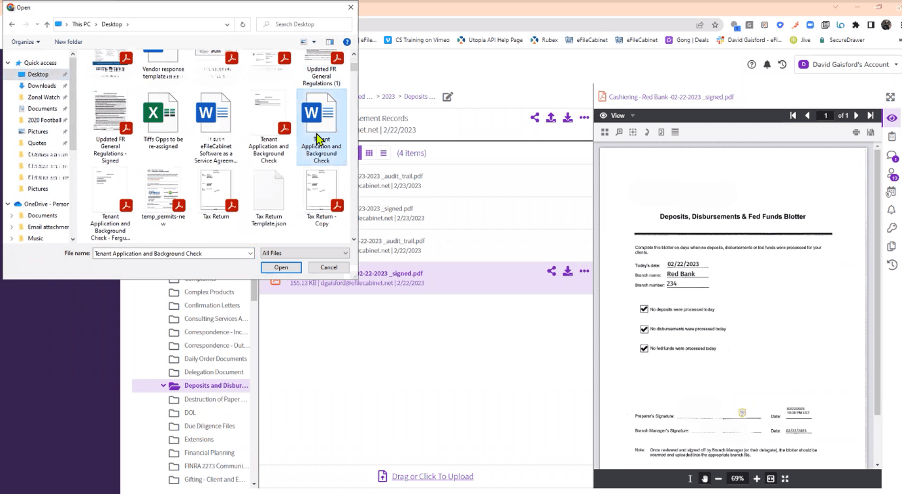
Revver’s cloud-based document storage has robust security measures in place to ensure files are always protected, even when trusting a third-party custodian to monitor and manage your documents. Files are encrypted in transmission, and file integrity and history are maintained via the “Audit Logs” function. Revver holds SOC 2, SOC 3, ISO 27001 and CSA STAR certifications, and the platform can be configured to meet HIPAA, WORM and GDPR requirements — assuming, as with any DMS, that your own workflows are compliant in the first place.
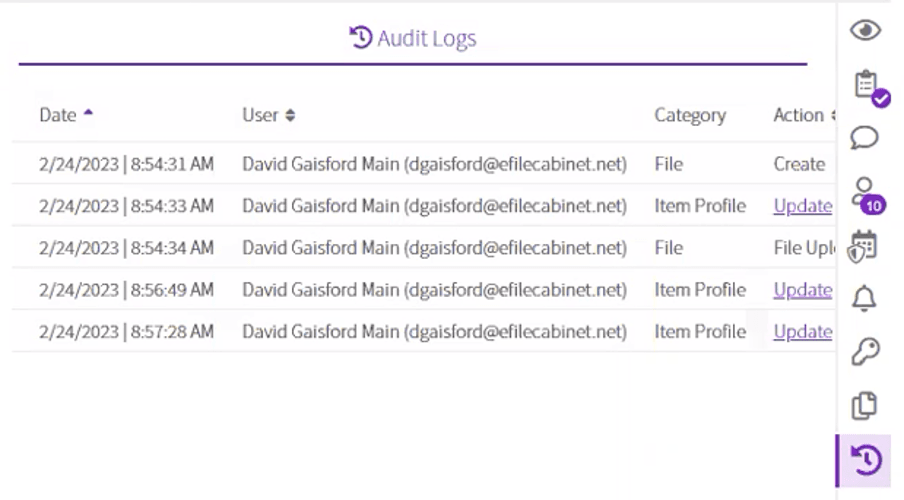
There are two ways staff can work on the same document when using Revver. First, if the document was originally loaded through a Microsoft 365 app, it can be amended by multiple people in real time. When the amended version is completed, a copy of the new iteration and the previous are saved and stored.
Alternatively, if your document is not a Microsoft 365 file, the platform has a check-in and checkout feature that ensures multiple users don’t make parallel edits on the same version. Instead, edits are made on a single, updated version of the document and older versions are saved and archived within the software for later review. M-Files and fellow document management vendor FileHold both have a similar check-in/checkout tool.
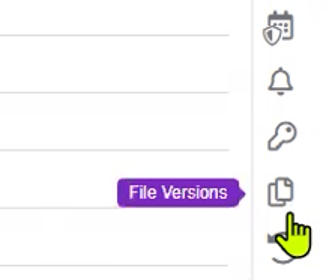
As you can see from the image above, checking previous versions in Revver is as easy as selecting the relevant icon on the screen.
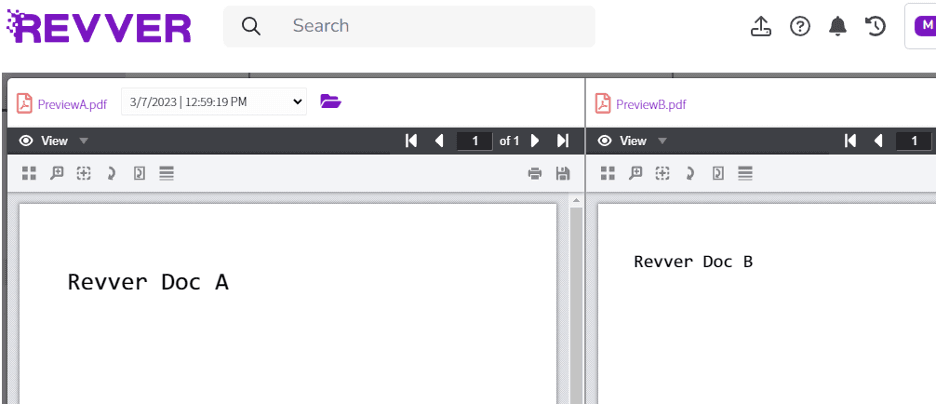
The Dual Screen Previewer is particularly useful, especially for legal teams comparing versions of contracts and creative teams comparing leaflet and sales letter drafts. You can see both files side by side so you can more easily spot differences of tracked changes. You can also use it to preview a document while viewing or updating its metadata or other details on the second screen. We like how easy it is to activate this feature, too – just click on the button in the top right.
With Revver, you can use:
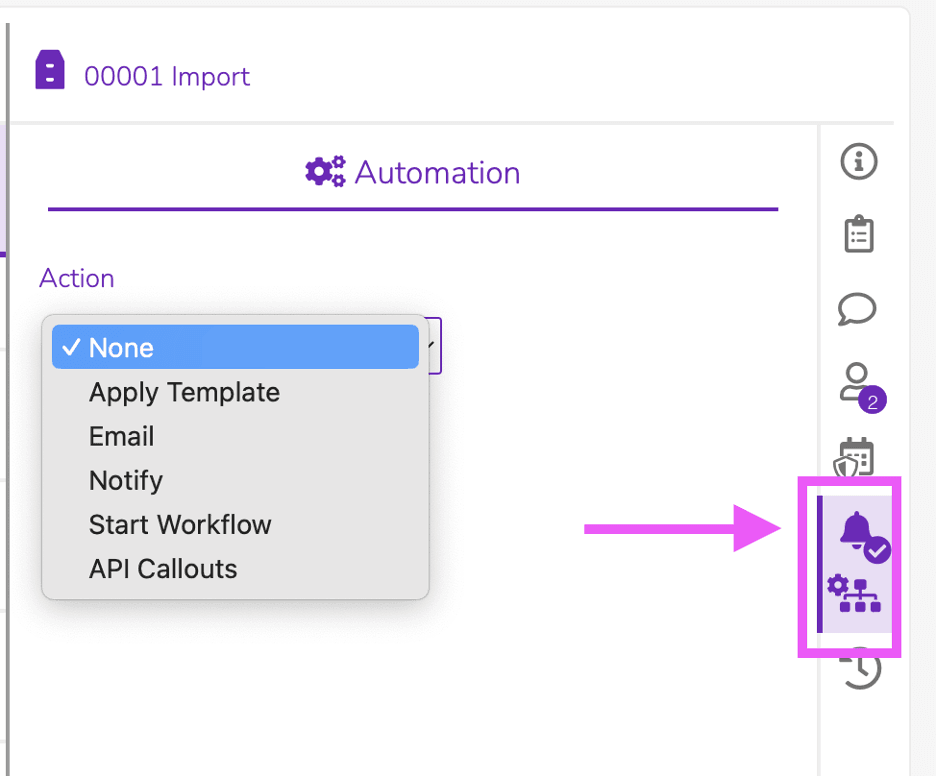
We like how Revver allows you to sort and store documentation in a logical structure that makes sense for your business without requiring a great deal of experience with the platform. We further appreciate that the system offers no-code, enterprise-grade automation that anybody can manage without coding skills. The platform is capable of automating manual, repetitive document processes, such as routing documents, requesting approvals, creating new folders and extracting data.
You can also place container-level triggers on cabinets, drawers or folders to apply folder templates automatically, which means each newly created location takes on a ready-made layout straight away. Users can set email or in-app alerts whenever files are uploaded or moved, start a workflow when profile values like the category or due date change, or send file information to an external system via an API webhook to send data to other platforms without any manual intervention.
We like how the platform gives users the choice of describing stages to the system via the panel shown in the image above or drag-and-drop steps and stages as well as users and document types, into a custom workflow. You can reflect complexity in the process by setting different rules for the workflow depending on what a user fills in on a given document.
Businesses can rely on Revver to automatically file documents, saving time and increasing productivity. Regardless of whether the document is initially located in a text message, an email or on a hard drive, users can store files in the program and search for them as needed through the filing processes. The workflow tools help make completing everyday document-related operations more efficient. Competitor OnPhase (formerly DocuPhase) also has automation features that boost productivity; learn all about them in our detailed OnPhase review.
Revver has a zonal optical character recognition (OCR) tool that turns scanned files into searchable texts and can even pinpoint key fields on standard forms. On top of that, Revver automatically applies its latest OCR process — including handwriting recognition — to every uploaded file.
This lets you rename and route documents automatically and send those that don’t match any template to a fallback folder. The benefit of this is that no file will go missing as unmatched documents have a default location.
You can merge multiple fields (like name plus date) into a single file name, which means key data appears in the file name, so there’s no need to manually relabel it later. This helps your team cut back on manual sorting and document renaming, keeping files much more organized from the outset.
Revver has three user license types – Basic, Essentials and Full – targeted towards particular use cases, plus a Guest User license for people outside your business. Here’s how the plans break down:
User license type | Price | Intended use case | Features |
|---|---|---|---|
Guest User | Included with a package | External guests and clients | View and upload shared files and folders and complete eSignature requests, without a paid seat. |
Basic license | $25/user/month | General non-specialist roles | File storage, sharing and searching within the organization with no workflow automation (Microsoft 365 and Salesforce integration included). |
Essentials license | $67/user/month | Client management teams and HR staff | Daily document management functionality like approving documents, sharing files with people outside the business, creating fillable forms, PDF editing and sending documents for eSignature. Basic workflow automations possible. |
Full license | $87/user/month | Sales managers, customer services/success managers, HR managers | Complete access to Revver’s intelligent document management and workflow automation tools with user groups, security settings, account preferences and governance. |
Revver AI — including Smart Extract, Smart Summary and zonal OCR — is included with every license tier.
We like how companies can subscribe employees to user license types based on their access needs. For example, your HR manager could be on the Full license while their team is on the Essentials license. This cuts costs and gives you tighter control over your permissions.
Revver now publishes its rates, which is a welcome change from the quote-only approach it took previously — and a point of difference from most competitors in this category, who still make you sit through a sales call before you learn what you’ll pay. There are no account-wide minimums either, so you buy the seats you need at the tiers you need. Revver also offers a 14-day free trial that doesn’t ask for a credit card, so you can test the platform against your own documents before signing anything. Do note that published prices exclude professional services and implementation fees, which Revver quotes separately — so the sticker price isn’t the whole picture if you need help migrating.
Transitioning to a new DMS or setting up one within your business for the first time can be challenging. We like how each business that signs up with Revver has access to its own customer success manager backed up by a support team.
During the sales discovery process, Revver begins to build a picture of what you need the platform to do — which is followed by a solution mapping phase to shape the platform around these demands. Revver then finalizes a design for implementation with you before starting the rollout. After implementation, Revver looks for ways to extend the platform across your organization to improve efficiency. We appreciate this level of attention, which includes help with data migration, document storage, process automation and compliance.
Once implemented, you can reach Revver through a web browser or install its Windows desktop app, which adds conveniences like watched folders and the ability to print or scan straight into the platform.
Revver offers reliable customer service should any issues arise. The vendor provides 24/7 support through its AI support agent and the Revver Help Center.
We’re impressed by the knowledge base and resources on the Revver site. There’s a library of help articles to get new users started, aid troubleshooting and to encourage the best use of the platform’s features. A well-stocked resources section features training videos, access to online webinars, and a growing collection of tips and tricks. The company also provides downloadable JSON templates you can import into Revver to standardize daily processes in various fields, including accounting, banking, HR, medical patients and more.
The firm offers initial implementation and ongoing customer support by phone from 9:30 a.m. to 3:30 p.m. MT and help via website chat and email from 7 a.m. to 6 p.m. MT. Chats open with Fin, Revver’s AI support agent, which can pass you to a live technician whenever you ask. When we contacted the support team through live chat, we were met with a speedy and helpful response. A premium implementation and support package is available for an additional charge, which provides 24-hour phone support.
Revver also has a Revver Annual Success Package, available for an extra charge. This gains you access to a team of people, including an onboarding manager, integration consultant, technical success manager and customer success manager. This is in addition to your account executive and technical support rep.
Additionally, we love that Revver hosts weekly “Open Office Hours” through Zoom, where you can ask questions of the vendor’s customer success managers and support staff. This isn’t something we saw other providers doing.
Revver still doesn’t have its own branded smartphone app. Access when you’re on the move is possible only through a browser, and the company’s own guidance for mobile users is to save the web app as a home-screen shortcut rather than install anything. For teams whose staff work primarily from phones — field service crews, inspectors, visiting caseworkers — that’s a real constraint, and it’s the clearest gap between Revver and cloud-first rivals that ship full-featured mobile apps.
Revver’s per-user pricing is transparent, but it isn’t cheap for small teams. A five-person office that needs full administrative and automation access would be looking at $87 per user per month, and implementation and professional services are quoted on top. The mix-and-match licensing softens this considerably — you can put most of a team on Basic and reserve Full licenses for the one or two people who actually build workflows — but businesses counting every dollar should model the blend carefully before committing. If flexible, scalable pricing is your priority, take a look at our review of FileHold, which offers both subscription and outright-purchase options.
Everyday use is straightforward, but the administrative side takes work. Setting up granular permissions, building out workflows and migrating an existing archive all require someone to invest real time, and users consistently report that admins and IT staff need more hand-holding than general users do. Revver’s in-house implementation team helps here, and the company is faster to deploy than several heavyweight competitors, but don’t assume you can configure the platform properly in an afternoon.
To identify the best document management software products, we closely examined a number of vendors and systems. As part of our assessment, we considered each solution’s features, pricing, ease of use, setup process, integrations, security and mobility. The specific functions we looked at included file routing and sharing, search tools, scanning, automation abilities and collaboration tools. We participated in trials and demos whenever possible, watched tutorials and reached out to the companies as if we were new business owners to judge their customer service. When selecting the best platform for businesses seeking extensive storage space, we prioritized storage capacity and plan options.
We recommend Revver for …
We do not recommend Revver for …
