Business.com aims to help business owners make informed decisions to support and grow their companies. We research and recommend products and services suitable for various business types, investing thousands of hours each year in this process.
As a business, we need to generate revenue to sustain our content. We have financial relationships with some companies we cover, earning commissions when readers purchase from our partners or share information about their needs. These relationships do not dictate our advice and recommendations. Our editorial team independently evaluates and recommends products and services based on their research and expertise. Learn more about our process and partners here.

AdvancedMD Medical Billing Services Review and Pricing
Business.com earns commissions from some listed providers. Editorial Guidelines.
Table of Contents
Editors Score:8.5/10
AdvancedMD offers comprehensive medical billing services as well as an extensive EHR platform. With tools like Claim Inspector helping practices achieve at least a 95 percent first-pass clean claim acceptance rate, it's our pick for ease of use.
Pros
AdvancedMD's RCM team handles much of the day-to-day billing work, including claims submission, payment posting and denial management.
Claim Inspector and the built-in clearinghouse help billing staff catch potential errors before claims go out.
The software is highly customizable and connects billing with AdvancedMD's EHR and practice management tools.
Cons
AdvancedMD's RCM service doesn't include medical coding, so practices have to handle coding in-house or through a separate service.
Implementation and data migration can add to the upfront cost, particularly for practices with more complex migration needs.
AdvancedMD's standard data migration packages don't include financial transaction history, so practices may need to work down outstanding A/R in their previous system before switching.
Editor's Rating8.5/10
Healthcare organizations need a medical billing partner that can handle their claims with ease and provide full visibility into the process in real time. They also need access to software that’s scalable enough to meet their needs with straightforward functionality.
AdvancedMD fits the bill perfectly while giving practices several ways to handle billing. They can outsource the day-to-day work to its RCM team, use billing tools alongside AdvancedMD’s EHR or manage billing in-house with its practice management software. We like that flexibility, especially since the different pieces work within the same broader platform. Practices can keep tabs on claims and financial performance without bouncing between different systems, and despite the amount of functionality packed into the software, we found it surprisingly easy to navigate.
AdvancedMD - MBS Editor's Rating:
8.5 / 10
Pricing/value
8/10
EMR/PMS
8/10
RCM process
8/10
First-pass claims rate
9.6/10
Customer support
9/10
Why We Chose AdvancedMD for Ease of Use
We chose AdvancedMD as the best medical billing service for ease of use because it makes a complicated part of running a medical practice relatively straightforward. Billing staff can quickly see which claims need attention, look up codes and work through prioritized task lists without digging around the platform. We also like AdvancedMD’s color-coded navigation, which makes it easier to tell different areas of the software apart as you move through the billing process.
Claim Inspector is one of the features that stood out most during our review. This tool checks claims for coding errors, missing information and payer-specific requirements before they’re submitted, using Optum’s claims-editing knowledge base to catch potential problems. AdvancedMD guarantees at least a 95 percent first-pass clean claim acceptance rate. That’s particularly useful for busy billing teams that would rather fix an issue before submission than deal with a rejected claim later.
There’s plenty that AdvancedMD handles on the service side, too. Its RCM team takes care of claims submission, payer follow-up, denials, appeals, payment posting and patient collections. But practices aren’t left wondering what’s going on with their billing. Staff can log in to check reports, follow financial performance and see what’s happening with the revenue cycle.
We also like having AdvancedMD’s EHR and practice management tools in the same system. Scheduling, clinical and billing information can move from one part of the platform to another, cutting down on duplicate data entry. It’s one of the reasons AdvancedMD stood out to us: there’s a lot going on, but getting around the software isn’t difficult.
FYI
AdvancedMD is also one of our picks for the best medical software. If you want a closer look at its clinical features, practice management tools and overall usability, check out our AdvancedMD EHR review.
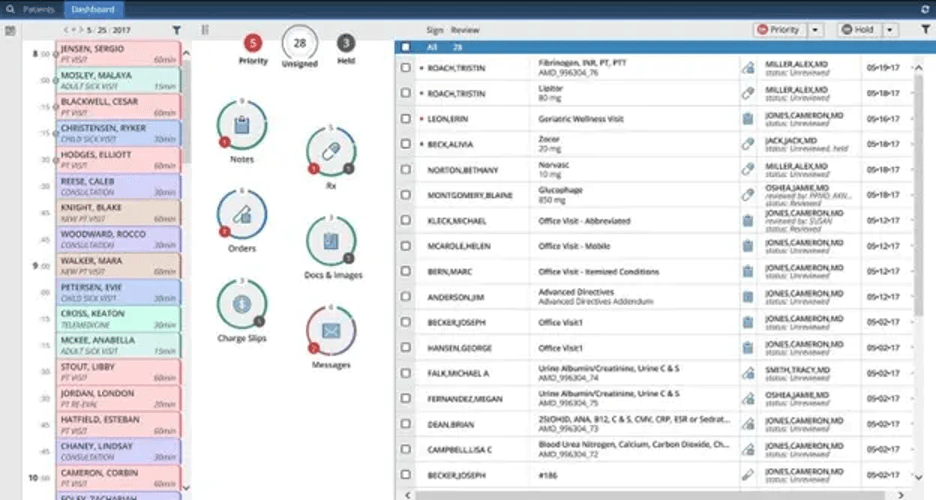
AdvancedMD’s dashboard uses “donut” filters to show outstanding notes, orders, charge slips and messages, making it easy to see what needs attention. Source: AdvancedMD
Ease of Use
Usability is exactly why AdvancedMD stands out for both medical billing and medical software. We love that the color-coded navigation gives users visual cues for each section of the platform. The workflow is uncomplicated and, once you’re trained on the software, quite logical. Practices can also customize dashboards, templates and workflows to fit the way their staff works.
Like most systems, the more you customize AdvancedMD, the steeper the learning curve. However, hands-on training, webinars and self-guided educational tools can help you get up to speed. We also like the software’s shortcuts and “donut” filters, which quickly show what needs attention and make it easier to move through everyday tasks.
AdvancedMD Medical Billing Features
AdvancedMD offers a robust set of features that cover nearly every need healthcare organizations have in a medical billing service — with the notable exception of medical coding services.
Claims Management and Claim Scrubbing
AdvancedMD gives practices a central place to manage medical claims from the initial charge through submission and reimbursement. We like that billing staff can see which claims are ready to go and which ones still need work, rather than piecing together the process across different systems.
Here are some of the claims management features that stood out to us:
Charge review: Charges generated through the EHR flow into the billing system, where staff can review them before creating and submitting claims. AdvancedMD’s computer-assisted coding can also suggest ICD-10 and CPT codes based on clinical documentation, though providers or coders still need to review and approve them.
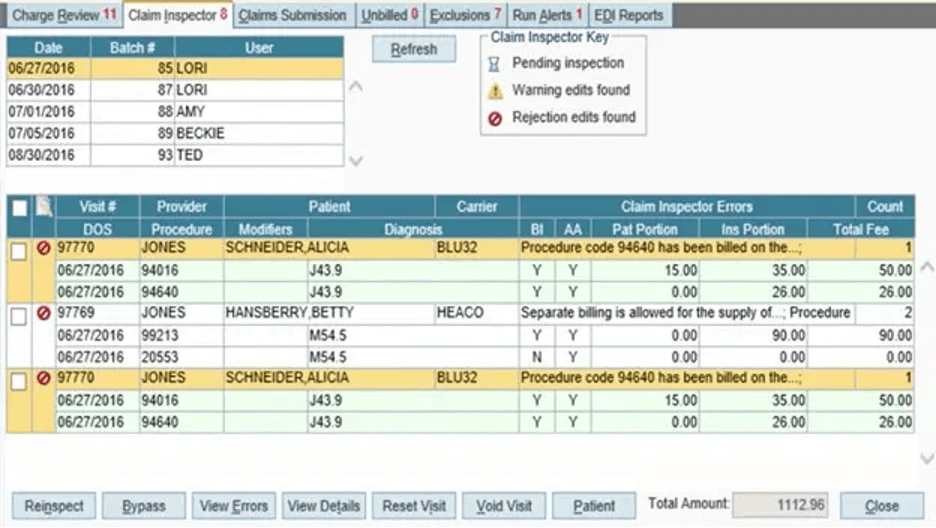
Claim scrubbing: AdvancedMD uses Claim Inspector to scrub claims before they’re submitted, checking for coding and patient-data errors, industry requirements and payer-specific rules. Potential problems are flagged for billing staff to review and correct before the claim goes to the payer. We especially like that the claim scrubbing process happens right within the claims workflow.
Prioritized worklists: AdvancedMD organizes claims that need attention into worklists, giving billing staff a running view of what still needs to be addressed. We like that this takes some of the hunting around out of claims management, particularly when a practice is dealing with a large volume of claims.
Integrated clearinghouse: Once claims are ready, they can be submitted electronically through AdvancedMD’s built-in clearinghouse, which connects with more than 1,800 carriers. Keeping claim scrubbing and submission in the same workflow is a nice touch.
First-pass claim acceptance: AdvancedMD guarantees at least a 95 percent first-pass clean claim acceptance rate. A clean claim isn’t the same thing as a paid claim, of course, but catching problems before submission can cut down on claims that have to be corrected and sent again.
One thing to keep in mind is that these coding tools aren’t the same as a medical coding service. AdvancedMD’s RCM team doesn’t assign diagnosis and procedure codes, so practices still need to handle coding in-house or through a separate service.
AdvancedMD’s Claim Inspector flags claims for potential errors before submission, helping billing staff identify issues that could lead to rejected claims. Source: AdvancedMD
Denial Management and A/R Follow-Up
Getting a claim submitted is only part of the job. AdvancedMD’s RCM team also follows claims after submission, working denials, handling appeals and following up with payers on outstanding balances. We like that practices can turn over much of this work without losing visibility into what’s happening with their accounts receivable.
Here are some of the tools and services that help with follow-up:
Denial management: AdvancedMD’s billing team works denied claims and handles the follow-up needed to get them resolved. Billing staff using the software can also work from automatically generated lists of denials and unexpected payment amounts, making it easier to see what still needs attention.
Appeals and payer follow-up: The RCM team follows up with payers on outstanding claims and handles appeals when necessary. This is one of the more time-consuming parts of medical billing, so we like that it’s included rather than falling back on the practice.
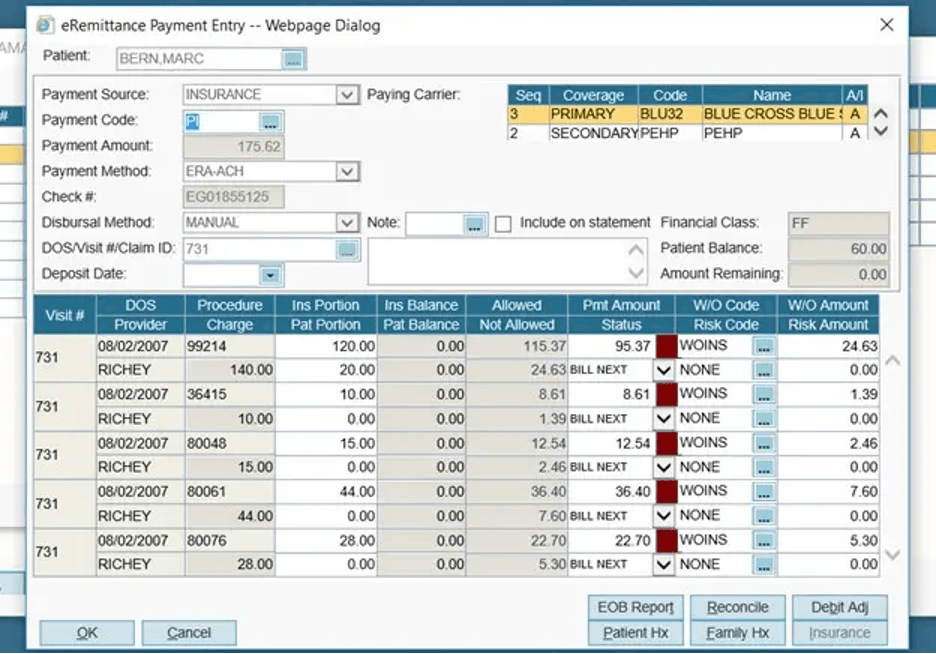
ERA processing: Electronic remittance advice is received and posted within AdvancedMD, giving practices a record of how the payer handled each claim. The software can also flag unexpected payment amounts, which is useful when a claim was paid but the reimbursement doesn’t look right.
A/R management: AdvancedMD tracks outstanding claims and accounts receivable balances so the billing team can continue working accounts that haven’t been paid. Practices still have access to their financial information and reports, so outsourcing billing doesn’t mean giving up visibility into aging receivables.
Additional denial tools: AdvancedMD expanded its Waystar integration in 2026 with Denial and Appeal Management tools that can help identify denials worth pursuing and prioritize them based on factors such as expected payment. These tools give practices another option for digging into denials and potential lost revenue.
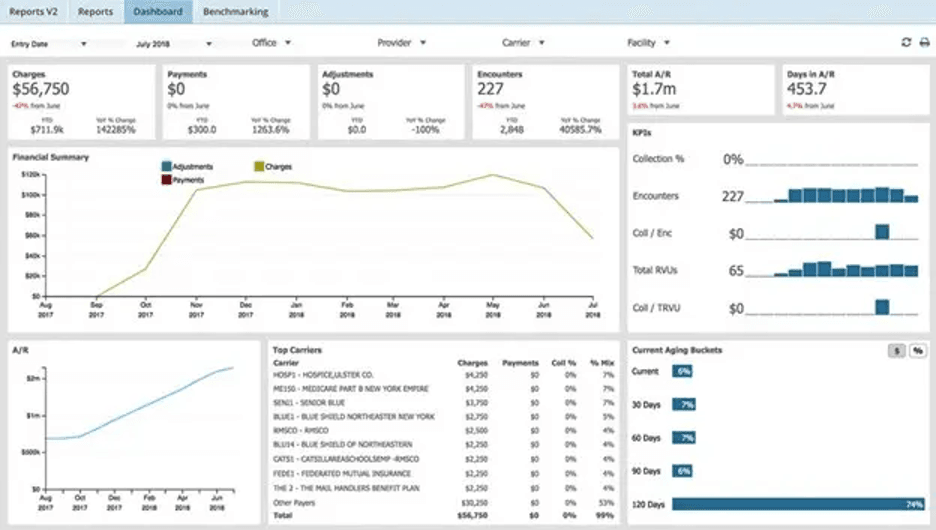
AdvancedMD’s dashboard gives practices a quick look at accounts receivable, payments and claims activity, even when the RCM team is handling billing follow-up. Source: AdvancedMD
Payment Posting and Patient Collections
AdvancedMD keeps working the revenue cycle after a health insurance payment comes in. Its RCM team handles payment posting and patient collections, including the remaining balances patients are responsible for. We like that this work stays connected to the same billing system, so practices can still see payments and outstanding balances without having to reconcile information from a separate service.
Here are some of the payment and collection services included with RCM:
Payment posting: AdvancedMD processes and matches incoming payments, posts ERAs and applies payments to patient accounts. This takes another repetitive billing task off the practice’s plate while keeping account balances up to date.
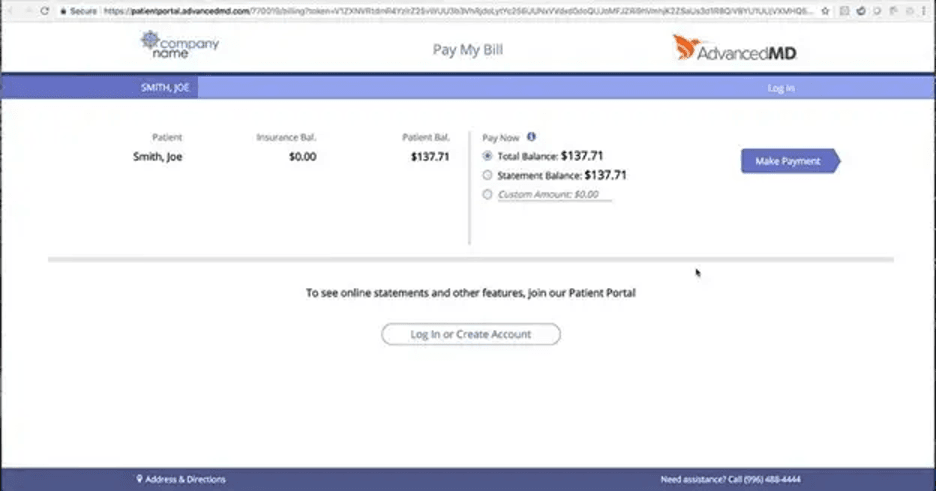
Patient statements: The RCM team sends both electronic and paper statements to patients at no additional cost. AdvancedMD’s billing software also supports several ways for patients to pay, including online payments, payment plans, cards on file and payments made over the phone.
Patient collections: AdvancedMD follows up on patient balances as part of its RCM service rather than handing that portion of the revenue cycle back to the practice. Its billing tools can also support statement cycles and debt collection activity for past-due accounts.
Patient call center: AdvancedMD provides a U.S.-based patient call center in states where the service is permitted. The team can field patient billing questions and manage requests for explanations of benefits, which could save front-office staff quite a bit of time.
Integrated payments: Practices have several options for collecting copays and other patient balances through AdvancedMD’s broader platform. Payment information stays tied to the patient account, making it easier for staff to see what’s been paid and what remains outstanding.
AdvancedMD organizes outstanding balances into collections worklists so billing staff can see which accounts need follow-up. Source: AdvancedMD
Reporting and Analytics
Outsourcing medical billing shouldn’t leave a practice in the dark about its finances. AdvancedMD gives RCM customers access to reporting and data analytics tools that show how the revenue cycle is performing, from accounts receivable to payer reimbursements. We especially like that practices can dig into the numbers themselves instead of waiting for an update from their billing team.
Here are some of the reporting tools that stood out to us:
Financial dashboard: AdvancedMD’s dashboard gives practices an at-a-glance look at financial health, including charges, payments, A/R and reimbursement trends. Data can be filtered by factors such as provider, carrier, location and date range.
Customizable reports: Practices can build reports around the information they want to track rather than relying solely on a handful of preset reports. AdvancedMD’s Report Center includes more than 150 standard reports and nearly 500 configurable ones, with reports covering collections, accounts receivable, productivity and other areas of the practice.
Payer and revenue trends: Reporting tools let practices compare reimbursement trends, top carriers and A/R performance over time. That’s particularly useful for spotting a payer that’s taking longer to pay or an area where outstanding balances are starting to creep up.
RCM performance reports: RCM customers receive periodic financial reviews along with weekly and monthly reports. AdvancedMD says these cover areas such as carrier, claims and financial results, giving practices another way to keep tabs on the work being handled on their behalf.
Exportable data: Reports can be exported to Excel or PDF, which makes it easier to share financial information or work with the numbers outside AdvancedMD.
AdvancedMD’s reporting tools let practices track collection trends, payments and outstanding balances over time. Source: AdvancedMD
Tip
Business intelligence can help practices turn billing data into useful insights instead of simply tracking numbers. AdvancedMD's reporting tools can highlight A/R trends, reimbursement patterns and other financial metrics that may point to areas needing attention.
AI and Automation
AdvancedMD is adding more AI and automation to its billing tools, with much of it aimed at reducing repetitive work before and after a claim is submitted. We like that these tools generally assist staff rather than taking the process out of their hands. Here’s an overview:
Computer-assisted coding: AdvancedMD’s CAC reviews clinical documentation and suggests ICD-10 and CPT codes before charges move into billing. Providers or coders can accept, change or reject the recommendations, so there’s still a human check before the codes are finalized.
Denial and appeal management: AdvancedMD also offers expanded Waystar tools that use AI to prioritize higher-impact denials, while automated workflows and templates can help staff work appeals more efficiently.
Insurance card automation: Patients can upload images of their insurance cards through the patient portal, and AdvancedMD uses AI to extract details such as the carrier and subscriber information. Staff can review the information before saving it, cutting down on manual data entry while still keeping a human check in the process.
AdvancedMD uses AI to pull insurance information from cards patients upload, giving staff a chance to review the details before saving them. Source: AdvancedMD
EHR and Practice Management Integration
AdvancedMD’s RCM service doesn’t operate separately from the rest of the practice. It connects with AdvancedMD’s EHR, practice management and scheduling tools, allowing information to move from the patient visit into the billing workflow without staff repeatedly entering the same data. That’s a big part of why we find AdvancedMD so easy to work with.
Here are some of the integration benefits we like:
Connected billing workflow: Information moves between scheduling, the EHR and billing in real time. Charges and clinical documentation can flow into the billing process, cutting down on duplicate data entry and giving the billing team access to the information it needs to work claims.
Included software: Practices that use AdvancedMD’s RCM service get access to its core software platform at no additional charge. That gives staff their own tools for monitoring claims, payments and financial performance while AdvancedMD handles the day-to-day billing work.
Front-office connection: Scheduling, insurance eligibility, patient information and billing all live within the broader AdvancedMD platform. We like that this connects front-office work with what eventually happens on the billing side rather than treating revenue cycle management as a separate process.
EHR flexibility: Practices don’t necessarily have to give up an EHR they already like to use AdvancedMD’s RCM service. AdvancedMD says customers can stay with another EHR, while its integration options can help move charges and other information into the billing workflow.
AdvancedMD connects scheduling and other front-office tasks with the broader practice management and billing platform. Source: AdvancedMD
AdvancedMD Medical Billing Service Pricing
AdvancedMD gives practices a few ways to manage medical billing, depending on whether they want to outsource the work or handle it themselves. Pricing is as follows:
Outsourced RCM service: AdvancedMD charges 4 to 8 percent of monthly collections for its revenue cycle management service. The exact rate depends on factors such as the size of the practice, its specialty and the complexity of its billing needs. AdvancedMD’s billing team handles the day-to-day work, and the company’s core software platform is included at no additional charge.
Medical software with billing tools: Practices that want AdvancedMD’s broader EHR and practice management platform can choose medical specialty plans ranging from $429 to $1,070 per provider per month. These plans include billing functionality that practices can use to manage their own revenue cycle.
Billing software: Practices that want to keep billing in-house without purchasing the full EHR can use AdvancedMD’s practice management and billing software separately. Encounter-based pricing for practice management ranges from $0.87 to $1.74 per claim, which may suit lower-volume practices. AdvancedMD also sells software specifically to medical billing companies, with plans ranging from $229 to $1,070 per provider per month.
You’ll need to contact AdvancedMD for a custom quote based on your needs and practice. There are also a few additional costs to keep in mind:
Implementation and data migration: Setup, training and data migration may add to the initial cost. AdvancedMD says implementation can range from free to around $1,000 for smaller practices and up to $6,000 for complex organizations with substantial migration needs. We’d recommend getting these costs in writing before signing up.
Add-ons: AdvancedMD offers optional tools and services that can increase the total cost. For example, its AI Clinical Assistant costs $100 per provider per month for unlimited encounters or $0.99 per encounter.
Payment processing: AdvancedMD Pay doesn’t charge a monthly fee or require a minimum processing volume. Transaction rates generally range from 2 to 6 percent depending on payment type.
Bottom Line
You don't have to outsource your billing to use AdvancedMD. Practices can hire AdvancedMD's RCM team to handle billing, use its software to manage billing in-house or purchase its broader EHR and practice management platform with billing tools included.
Implementation and Onboarding
AdvancedMD’s RCM onboarding typically takes six to eight weeks and includes billing setup, payer enrollment and account management orientation. Practices should plan for some back-and-forth during this period as AdvancedMD gets the billing operation ready and prepares the team to work with its account manager and software.
Setup fees vary depending on the size and complexity of the practice. AdvancedMD says fees can range from free to $1,000 for smaller practices and up to $6,000 for more complex enterprise clients with extensive data migration needs.
Practices moving from another practice management system can also pay AdvancedMD to migrate their existing data. A dedicated Data Services Specialist guides the process, with three migration options:
Tier 1 ($800): Includes patient demographics, responsible parties, notes and memos.
Tier 2 ($1,200): Includes Tier 1 data plus appointment and recall history.
Tier 3 ($2,000): Includes the previous tiers plus insurance coverage, carriers, referring providers and fee schedules.
Financial transaction history isn’t included in these migration packages, so AdvancedMD recommends working down outstanding accounts receivable in your previous system before making the switch. Clinical EHR data migration is priced separately and requires a custom quote.
Practices implementing AdvancedMD’s broader medical software should expect a longer process of about 90 days. That implementation includes system configuration, training and workflow setup, so practices adopting the EHR and other software alongside RCM should leave additional time to get everything configured before going live.
Customer Support
AdvancedMD’s standard phone and email support hours are 8 a.m. to 8 p.m. ET on normal business days. Customers can also reach support through live chat or submit a support ticket. For issues that are easier to troubleshoot directly, AdvancedMD offers secure remote access assistance.
After-hours emergency support is available, though AdvancedMD may charge $150 per incident. The fee doesn’t apply to system access issues or server errors that prevent users from completing their primary workflow. We like that emergency help is available outside standard hours, but practices that expect to need frequent after-hours assistance should keep the potential fee in mind.
AdvancedMD also maintains a self-service customer portal called Hub, where users can access support resources, submit feedback, propose new features and connect with other AdvancedMD customers. Its free Learning Center offers videos, product demos, webinars, e-books and other educational resources.
Limitations
AdvancedMD has a lot to offer, but there are a few drawbacks to consider before choosing its medical billing service.
Medical coding isn’t included: AdvancedMD’s RCM team doesn’t assign diagnosis and procedure codes, so practices still need to handle medical coding in-house or through a separate service. AdvancedMD does provide coding tools, including computer-assisted coding, but that’s different from having a billing service code your claims for you. If you’d rather outsource all your medical billing and coding needs, see our review of DrChrono, which offers RCM options with access to certified medical coders.
Setup and data migration can get expensive: AdvancedMD says setup fees can reach $1,000 for smaller practices and $6,000 for more complex organizations with extensive migration needs. Data migration may cost extra as well, and financial transaction history isn’t included in AdvancedMD’s practice management migration packages.
After-hours support may cost extra: AdvancedMD offers emergency support outside its standard business hours, but most after-hours incidents carry a $150 fee. System access issues and server errors that disrupt the primary workflow are exceptions.
Did You Know?
AdvancedMD is HIPAA-compliant and has several measures in place to protect patient information. These include multifactor authentication, encrypted data transmission, access controls and audit monitoring. AdvancedMD also performs annual cybersecurity risk assessments and vulnerability testing.
Methodology
Our team spent considerable time researching and analyzing medical billing services, including AdvancedMD’s offerings. That process involved software demonstrations, phone interviews and hands-on customer service evaluations. We also reviewed user feedback and examined ratings on the Better Business Bureau website.
In assessing ease of use, we looked at how simple it is to work with the software and manage the billing relationship, focusing on factors such as platform navigation, claims management, reporting, implementation and customer support. We also considered how much of the day-to-day billing work AdvancedMD handles for practices. Based on these factors, we identified AdvancedMD as the top choice for healthcare organizations that prioritize ease of use.
AdvancedMD FAQs
Yes. AdvancedMD is an established medical software and billing service provider that serves more than 13,000 medical practices and 850 medical billing companies. Its platform processes more than 9.5 million claims each month, and the company guarantees a 95 percent first-pass clean claim acceptance rate.
No. AdvancedMD's RCM service doesn't include medical coding, so practices need to handle coding in-house or use a separate service. AdvancedMD does provide coding tools, including computer-assisted coding, but its RCM team doesn't assign diagnosis and procedure codes.
Yes for medical billers, but no for medical coders. AdvancedMD provides billing specialists as part of its managed RCM service, so practices don't need to maintain their own billing staff. However, its RCM team doesn't assign diagnosis or procedure codes. Practices must handle medical coding themselves or use a separate coding service. AdvancedMD does provide coding software, automatic code updates and claim-scrubbing tools to help staff catch potential errors before claims are submitted.
Bottom Line
We recommend AdvancedMD’s medical billing service for …
Practices that want to outsource day-to-day billing while keeping access to their claims and financial data.
Practices that want medical billing services and software in one integrated platform.
Practices that already handle medical coding in-house or through a separate coding service.
We don’t recommend AdvancedMD’s medical billing service for …

Practices that want their RCM provider to handle medical coding.
Practices looking for the lowest possible upfront implementation and data migration costs.
Practices that need extensive after-hours customer support without the possibility of additional fees.
Leah Zitter's long-held passion for psychology and science led her to not only a doctorate but a career covering emerging technology in healthcare and related sectors. Her expertise has been trusted by The Centers for Disease Control and Prevention, and her analysis of medical software has proven invaluable for medical practices.
At business.com, Zitter provides guidance on medical software, billing and tools.
Zitter has also studied SaaS and analytics more generally on behalf of clients like Google, Microsoft, Amazon Web Services and more. She also contributed to the book "Strategize Up: The Simplified Blueprint To Scaling Your Business."