Business.com aims to help business owners make informed decisions to support and grow their companies. We research and recommend products and services suitable for various business types, investing thousands of hours each year in this process.
As a business, we need to generate revenue to sustain our content. We have financial relationships with some companies we cover, earning commissions when readers purchase from our partners or share information about their needs. These relationships do not dictate our advice and recommendations. Our editorial team independently evaluates and recommends products and services based on their research and expertise. Learn more about our process and partners here.
Business.com earns commissions from some listed providers. Editorial Guidelines.
Table of Contents
Editors Score:8.7/10
AdvancedMD's cloud-based EHR offers customizable charting, practice management, patient engagement and AI-powered tools in a single platform. The system is easy to navigate, with plenty of options for practices to customize it to the way they work.
Pros
AdvancedMD's intuitive workflows connect scheduling, charting, billing and patient engagement, reducing the need for duplicate data entry.
The highly customizable platform allows practices to choose the features they need and tailor workflows, dashboards and templates to their preferences.
AdvancedMD's AI Clinical Assistant can reduce time spent on documentation with ambient listening, pre-visit summaries and suggested chart actions.
Cons
AdvancedMD is one of the more expensive medical software platforms we reviewed, and costs can increase further with implementation, data migration and optional add-ons.
AdvancedMD has a relatively lengthy implementation process, with standard software onboarding typically taking about 90 days.
The platform's extensive features and customization options can create a learning curve for new users.
Editor's Rating8.7/10
Medical software can pack a lot of functionality into a single platform, but all those features aren’t much help if providers and staff struggle to use them. AdvancedMD stands out for making everyday tasks like scheduling appointments, charting patient visits and managing billing relatively straightforward. The cloud-based platform offers customizable dashboards, templates and workflows, along with AI-powered tools that can reduce some of the manual work involved in clinical documentation. Despite its extensive functionality, we found AdvancedMD surprisingly approachable and easy to navigate, making it our pick for the best medical software for ease of use.
AdvancedMD Editor's Rating:
8.7 / 10
Ease of use
9.5
Pricing
8/10
Consultation
8/10
Customization
9/10
Patient portal
9/10
Why We Chose AdvancedMD for Ease of Use
We chose AdvancedMD as the best medical software for ease of use because it manages to make a broad set of clinical and administrative tools feel relatively approachable. Providers and staff can access scheduling, patient charts, billing, reporting and patient engagement tools from the same cloud-based platform, while customizable dashboards, templates and workflows allow practices to tailor the system to the way they work. We especially like that users can prioritize the information and tasks they need most rather than navigating through the entire system every time they log in.
AdvancedMD has also continued to simplify some of the everyday tasks that can eat up providers’ time. Its redesigned scheduler makes it easier to search for openings, manage recurring appointments and access patient information, while the AI Clinical Assistant can prepare pre-visit summaries, capture provider-patient conversations and suggest information to add to the patient chart. These aren’t flashy features for the sake of having them; they can reduce clicks, repetitive data entry and time spent documenting visits.
Customization is another reason AdvancedMD stood out to us. Practices can configure dashboards, templates and workflows around their specialties and preferences, and they can build software packages with the features they actually need. That flexibility is particularly useful with a platform as extensive as AdvancedMD because practices don’t have to approach the software exactly the same way.
For these reasons, we think AdvancedMD does an excellent job of making an extensive medical software platform manageable for everyday users. Practices willing to spend some time configuring the system to their workflows should find a flexible, intuitive platform that can handle much of their day-to-day clinical and administrative work.
Bottom Line
AdvancedMD is a customizable, easy-to-use medical software platform that helps practices simplify everyday clinical and administrative workflows.
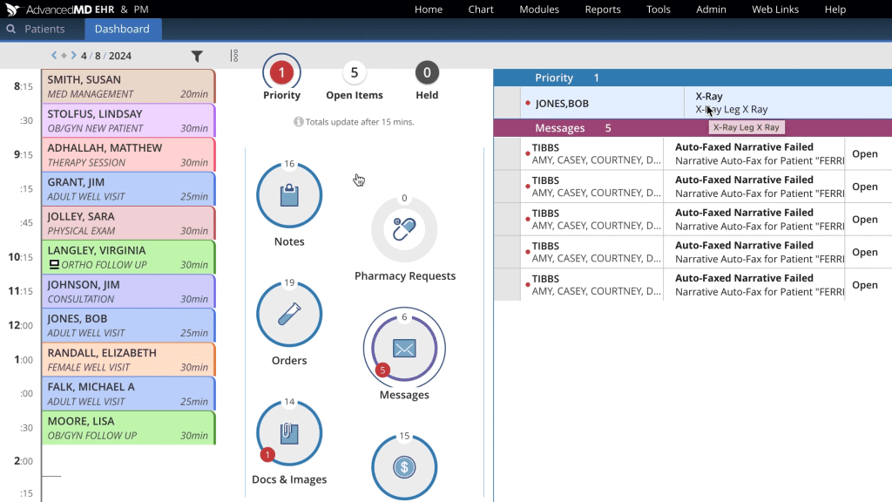
AdvancedMD’s dashboard keeps the daily schedule, outstanding tasks and priority items in one view, making it easy for providers to see what needs their attention. Source: AdvancedMD
Ease of Use
AdvancedMD packs a ton of functionality into its medical software, but we found the platform relatively easy to navigate. The dashboard gives users an at-a-glance view of their schedule and outstanding work, with visual indicators for priority items, notes, prescriptions, orders, documents and messages. Color coding throughout the platform also makes it easier to distinguish appointments and other information without digging into each item individually.
We especially like how much of the interface can be customized. Practices can configure dashboards, templates and workflows around the way their providers and staff work, rather than forcing everyone into the same setup. AdvancedMD has also redesigned its scheduler with faster search, improved recurring appointment tools and easier access to patient information, making one of the most frequently used parts of the system more straightforward.
Because AdvancedMD is cloud-based, providers and staff can access the system from supported devices without maintaining on-site servers. The platform also receives software updates without practices having to manage installations themselves. For providers who work away from the office, AdvancedMD offers mobile access to many everyday clinical tasks.
There is still a learning curve, particularly because AdvancedMD offers so many features and customization options. However, the company provides guided implementation and an extensive collection of videos, webinars and other educational resources. Once practices configure the platform around their workflows, we think AdvancedMD does a good job of making a large medical software system feel manageable.
AdvancedMD Features
AdvancedMD brings EHR, practice management, medical billing, patient engagement, telehealth, analytics and other tools together in a single cloud-based platform. Its features cover much of the patient journey, from scheduling and intake to charting, prescriptions, billing and follow-up communication.
We especially like how much flexibility practices have when choosing and configuring these tools. AdvancedMD allows customers to build packages around the features they need, while customizable dashboards, templates and workflows give providers and staff additional control over how they use the system. Below, we’ll take a closer look at the AdvancedMD features that stood out most during our review.
Appointment Scheduling
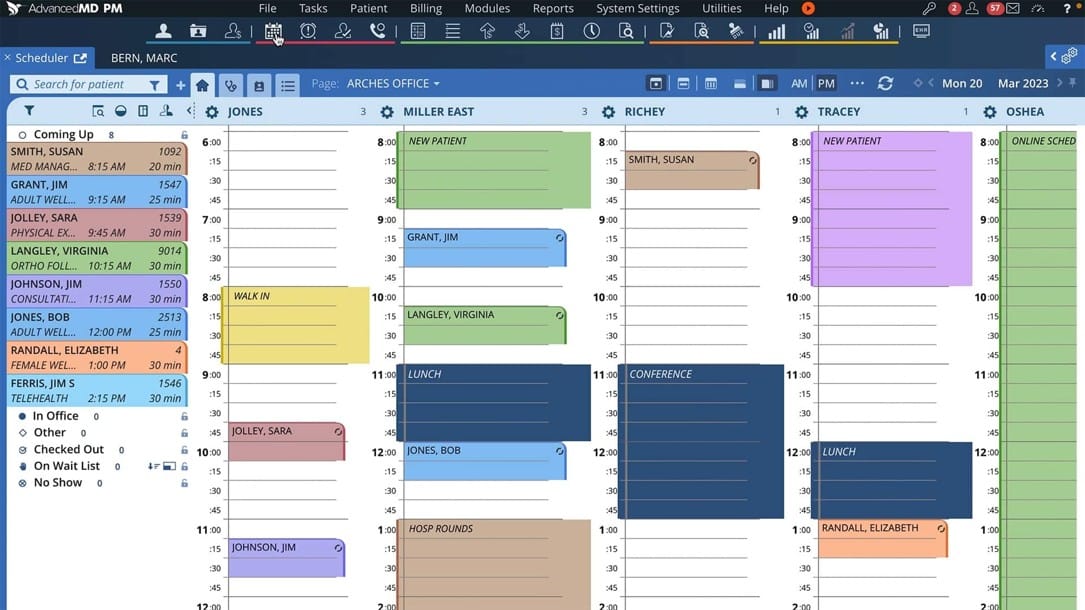
AdvancedMD’s scheduling tools are some of the strongest evidence we found for the platform’s ease of use. The company redesigned its scheduler in 2026 with a new interface, faster loading times and additional customization options. Staff can manage appointments across providers and locations from the same calendar, while color coding and flexible views make busy schedules easier to follow.
Here’s an overview of the scheduling features we found most useful:
Flexible scheduling: Staff can search for open time slots, schedule recurring appointments and customize the calendar by provider, location, appointment type and other criteria. Changes to appointments, blocks and holds appear immediately, which is especially helpful when several staff members are managing the schedule.
Patient information: Staff can access patient information directly from the scheduler, while quick-look summaries display details such as contact information, appointment type and recent clinical notes without requiring users to open the full patient chart.
Insurance eligibility: AdvancedMD can verify health insurance eligibility individually or in batches before patients arrive for their appointments. We like that eligibility information feeds into the scheduling workflow.
Waitlist management: Practices can add patients to a waitlist and use newly available time slots to fill openings caused by cancellations or rescheduled appointments. This is particularly useful for keeping busy provider schedules full.
Patient flow: Staff can check patients in and out through the scheduling system, assign exam rooms and track patients as they move through the office. Appointment reminders and online scheduling can further reduce the amount of routine scheduling work handled by front-office employees.
AdvancedMD’s color-coded scheduler gives staff a clear view of appointments across multiple providers while keeping patient status and waitlist information within easy reach. Source: AdvancedMD
Charting and Patient Encounters
AdvancedMD gives providers a highly customizable charting experience that can be tailored to different specialties, visit types and individual preferences. We especially like that the platform keeps relevant patient information close at hand throughout an encounter instead of requiring providers to repeatedly search through the full medical record.
Here are some of the charting features that stood out to us, particularly from a usability standpoint:
Customizable templates: AdvancedMD includes more than 1,300 prebuilt clinical templates organized by specialty and workflow. Providers can customize notes and subnotes around their own charting preferences, and practices can associate specific templates with different appointment types so the appropriate documentation is ready when a visit begins.
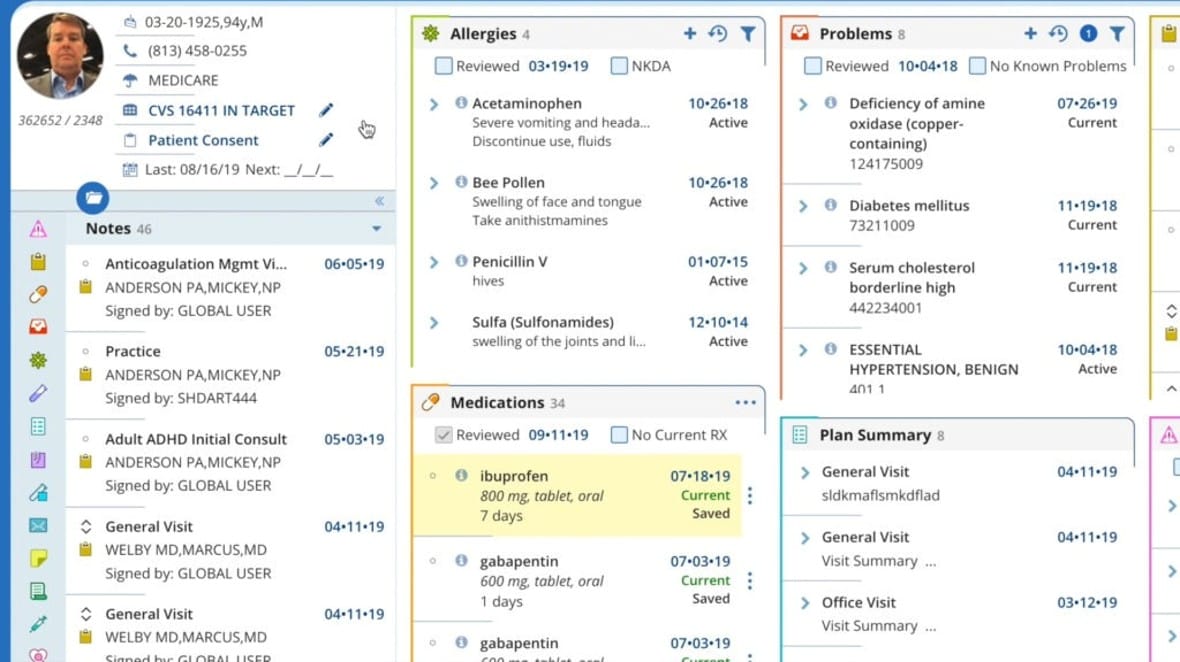
Patient Cards: Customizable Patient Cards give providers quick access to information such as medications, allergies, diagnoses, problems, appointments and other clinical history. Cards can be selected and arranged based on the information each provider wants to see, which is another example of AdvancedMD adapting to the user rather than forcing everyone into the same workspace.
Patient timeline: A chronological timeline lets providers review previous appointments, notes, lab orders, prescriptions and other patient activity. We like that this gives clinicians additional context without requiring them to piece together a patient’s history from separate areas of the EHR.
Patient encounters: Information patients submit before an appointment is available within the EHR, and staff can add vitals and other information as the patient moves through the visit. Providers can document the encounter using templates, typing, dictation and shortcuts, depending on how they prefer to chart.
Coding and billing workflow: AdvancedMD’s computer-assisted coding analyzes clinical documentation and suggests ICD-10 and CPT codes, which providers or coders can review, accept, modify or reject. Accepted codes flow into the billing workflow, helping connect clinical documentation with medical billing and coding without requiring users to enter everything manually.
AdvancedMD’s customizable Patient Cards keep important clinical information, including allergies, medications, problems and notes, within easy reach while providers review a patient’s chart. Source: AdvancedMD
Tip
Ask providers what they want to see first when they open a patient chart. AdvancedMD lets you customize chart views and templates so they don't have to hunt for the information they use most.
AI and Automation
AdvancedMD uses AI to reduce some of the manual work involved in preparing for visits, documenting encounters and entering patient information. We especially like that its AI Clinical Assistant is built into the EHR rather than requiring providers to move between AdvancedMD and a separate documentation tool. Providers remain in control of what’s recorded and what information is ultimately added to the patient chart.
Here are a few highlights:
Pre-visit summaries: The AI Clinical Assistant can pull together recent notes, lab results, medications, allergies and risk factors before an appointment, giving providers a concise overview of the patient’s recent history without requiring them to search through the chart themselves.
Ambient documentation: Providers can use ambient listening to capture and transcribe conversations during patient visits. After an encounter, AdvancedMD can turn the transcript into one of five documentation formats, including SOAP notes, psychiatric evaluations, medication management notes, treatment plans and shareable visit summaries. Providers can review and edit the documentation before signing it.
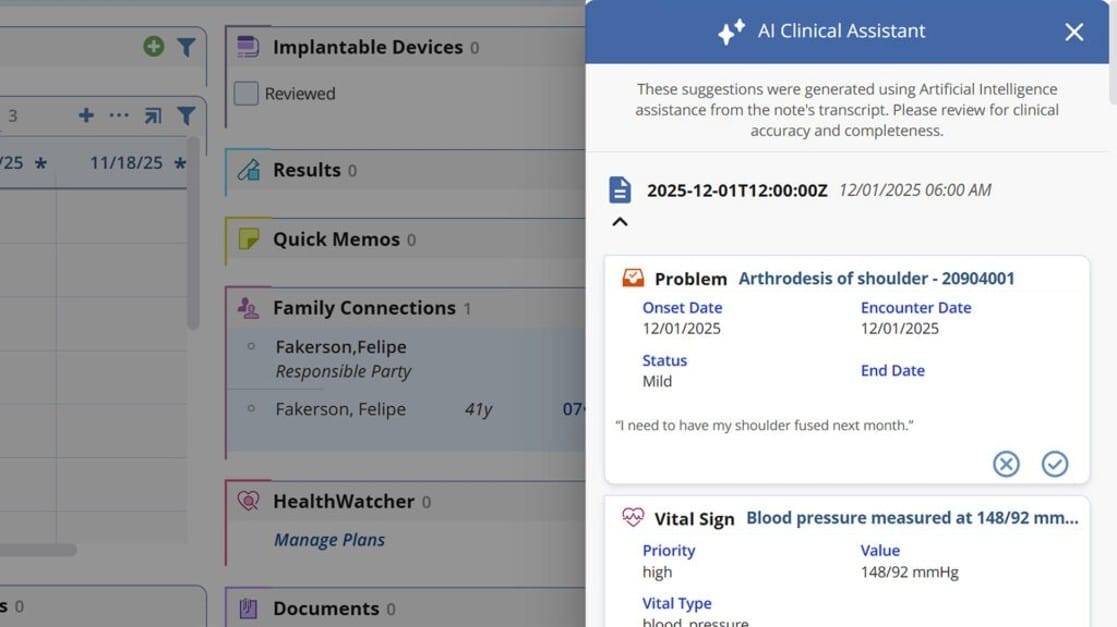
Chart suggestions and action items: AdvancedMD analyzes visit transcripts and suggests information that can be added to the patient chart, including diagnoses, medications, allergies, referrals, risk factors and patient education. It can also suggest content for note fields such as the chief complaint, history of present illness and SOAP notes. We like that providers choose which suggestions to accept rather than having AI automatically alter the medical record.
Insurance card capture: AdvancedMD uses optical character recognition to pull information from scanned or patient-uploaded insurance cards and populate fields such as the carrier, subscriber ID and group number. Staff can review the information before saving it, which can cut down on manual data entry during patient intake.
AdvancedMD’s AI Clinical Assistant can turn information from a visit transcript into suggested chart updates, which providers can review before accepting or rejecting them. Source: AdvancedMD
Patient Portal and Engagement
AdvancedMD gives patients several ways to handle routine tasks themselves, which can also reduce the amount of work falling on front-office staff. Patients can schedule appointments, complete forms, communicate with the practice and manage other aspects of their care online, while much of that activity feeds back into AdvancedMD’s clinical and administrative workflows.
Here are some of the patient engagement tools we found most useful:
Patient portal: Patients can use the portal to access their health records, view lab results, request prescription renewals, securely message the practice and manage appointments. The portal also allows patients to update demographic, contact and payment information themselves, reducing the need for staff to make routine changes.
Digital intake and consent forms: Practices can send intake and consent forms for patients to complete before an appointment. Completed forms can feed information into AdvancedMD rather than requiring staff to reenter it manually, and practices can also offer an iPad kiosk for patients who need to complete forms in the office.
Appointment reminders: Automated reminders can be sent by text, email or voice, with practices controlling the timing and frequency. Patients can confirm or cancel appointments from the reminder, and AdvancedMD supports reminders in English and Spanish.
Payments: Patients can view and pay bills online, save a credit card on file and manage payment plans. AdvancedMD can also send automated email and text payment reminders, giving practices another way to collect patient balances without relying entirely on phone calls or mailed statements.
Reputation management:Online reputation management is as important for medical offices as it is for retailers. With AdvancedMD, practices can automatically send post-visit surveys and invite patients to leave reviews on sites such as Google and Facebook. Staff can monitor feedback and reputation scores within AdvancedMD, keeping another patient-facing task connected to the practice management system.
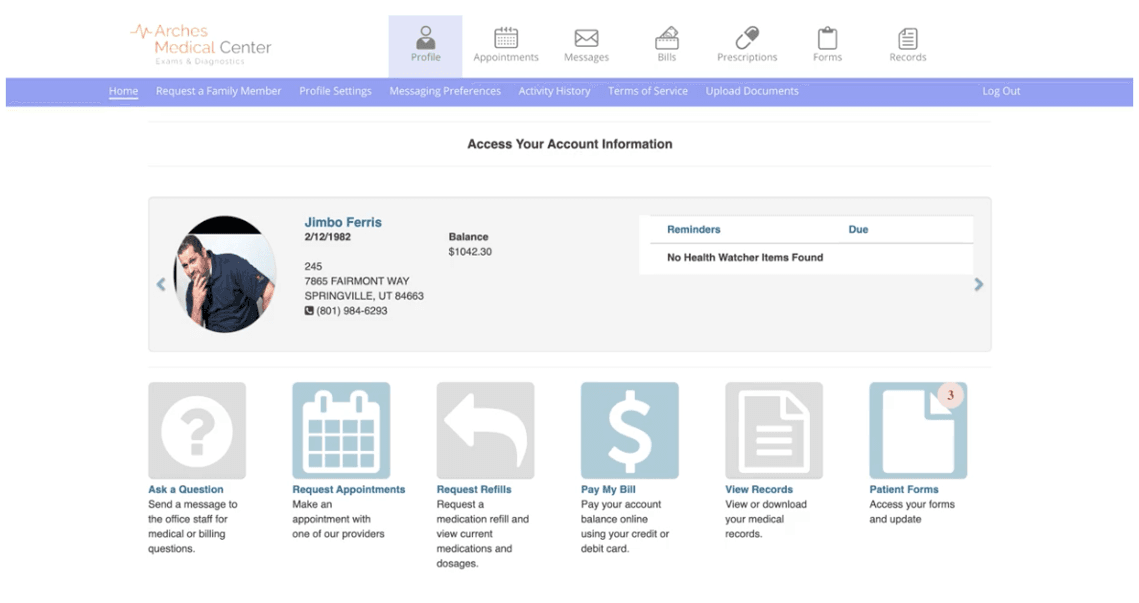
AdvancedMD’s patient portal gives patients one place to request appointments and prescription refills, pay bills, view medical records, complete forms and communicate with the practice. Source: AdvancedMD
Billing and Revenue Cycle Management
AdvancedMD connects its clinical and billing workflows, allowing information captured during a patient encounter to carry through to claims and payment. Practices can manage billing in-house with AdvancedMD’s software or outsource much of the process through its revenue cycle management service. Billing tools and services can add significantly to the overall cost, however, so practices should pay close attention to what’s included in their package.
Here are some of the billing capabilities we noted:
Claims management: AdvancedMD gives billing staff a central place to manage claims from charge capture through reimbursement. Staff can review charges, submit medical claims electronically, track their status and create worklists for claims that require additional attention.
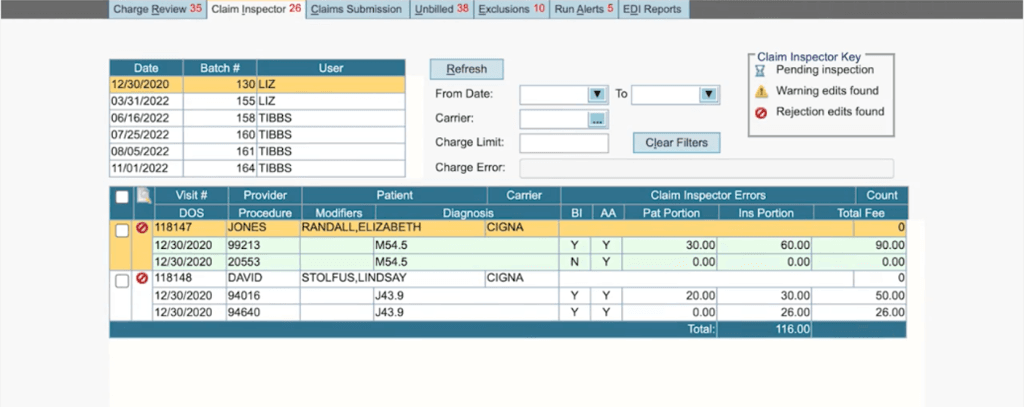
Claim scrubbing and clearinghouse: AdvancedMD’s Claim Inspector handles claim scrubbing by checking claims for coding, compliance and payer-specific issues before submission, while the integrated clearinghouse connects practices with more than 1,800 carriers. We like that claims can be scrubbed and submitted within the same workflow rather than requiring staff to move information between separate systems.
A/R and denial management: Dashboards and worklists help billing staff identify outstanding claims, denials and other accounts that need follow-up. Electronic remittance information can also be matched with charges and used to streamline payment posting.
Patient payments: Practices can collect copays and balances at the point of care, process credit card payments and allow patients to pay bills online. Because payment information is connected with the broader practice management system, staff can manage insurance and patient balances without maintaining a separate payment workflow.
Revenue cycle management: Practices that don’t want to handle the entire billing process in-house can use AdvancedMD’s RCM service, which includes claims submission, payment posting, denial management and dedicated account management. The service costs 4 to 8 percent of practice collections, depending on factors such as practice size, specialty and complexity, and core AdvancedMD software is included.
AdvancedMD’s Claim Inspector flags claims for potential errors before submission, helping billing staff identify issues that could lead to rejected claims. Source: AdvancedMD
AdvancedMD offers extensive reporting tools for practices that want to keep a close eye on their financial and operational performance. Its standard Report Center is included with the practice management software, while an advanced data analytics package adds more customizable dashboards and business intelligence tools. We like that practices can start with a large library of ready-made reports without having to build everything from scratch. Here’s an overview of what you can create and work with:
Standard reports: The Report Center includes more than 150 standard and nearly 500 configurable financial reports. Practices can track metrics such as collections, accounts receivable, provider productivity, patient demographics, scheduling, cancellations and no-shows.
Custom reporting: Users can customize reports with parameters such as date range, provider, carrier and location, while frequently used reports can be saved as favorites for easier access. Reports can also be exported to Excel.
Financial dashboards: AdvancedMD’s dashboards provide at-a-glance views of financial health, including A/R and reimbursement trends, charges, payments and provider productivity. Practices can filter the information they see to focus on specific providers, locations, carriers and time periods.
Advanced analytics: Practices that need more sophisticated analysis can add Advanced Reporting & Analytics, which supports customizable dashboards, drag-and-drop reporting and more detailed business intelligence. The platform can also identify patterns and trends, generate AI-powered narrative explanations of dashboard data and create forecasts based on historical information.
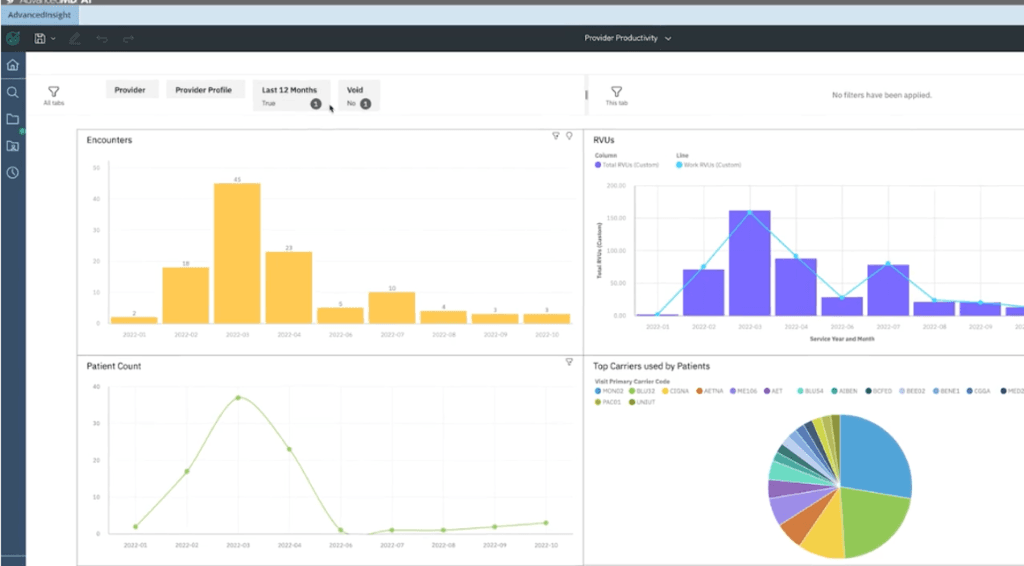
AdvancedMD’s analytics dashboards turn practice data into visual reports on metrics such as provider productivity, encounters, RVUs and patient volume. Source: AdvancedMD
Telehealth
AdvancedMD’s telehealth tools fit naturally into the rest of the platform, allowing practices to manage virtual appointments through many of the same scheduling, intake and payment workflows they use for in-person visits. Patients can join appointments from a phone, tablet or computer without installing separate software, which helps keep the process relatively simple on both sides of the visit.
Here are some of the telehealth tools AdvancedMD delivers:
Integrated scheduling: Patients can self-schedule telehealth appointments online, while staff can book virtual visits through the regular scheduler. Appointment confirmations include a link to join the session, and the same link remains valid if an appointment is rescheduled.
Virtual waiting room: Patients verify their identity and can adjust their audio and video before entering a virtual waiting room. Practices can also collect copays as part of the pre-visit workflow.
Flexible visits: Providers can conduct one-on-one or group sessions, while guest invites allow practices to bring additional participants into an appointment. Staff members can start a session before the provider joins, which could be particularly useful for practices that want virtual visits to follow a similar workflow to in-office appointments.
Connected payments: Practices can collect and authorize copays through the telehealth workflow and process payments after the visit. AdvancedMD also allows practices to automatically or manually check out telehealth appointments.
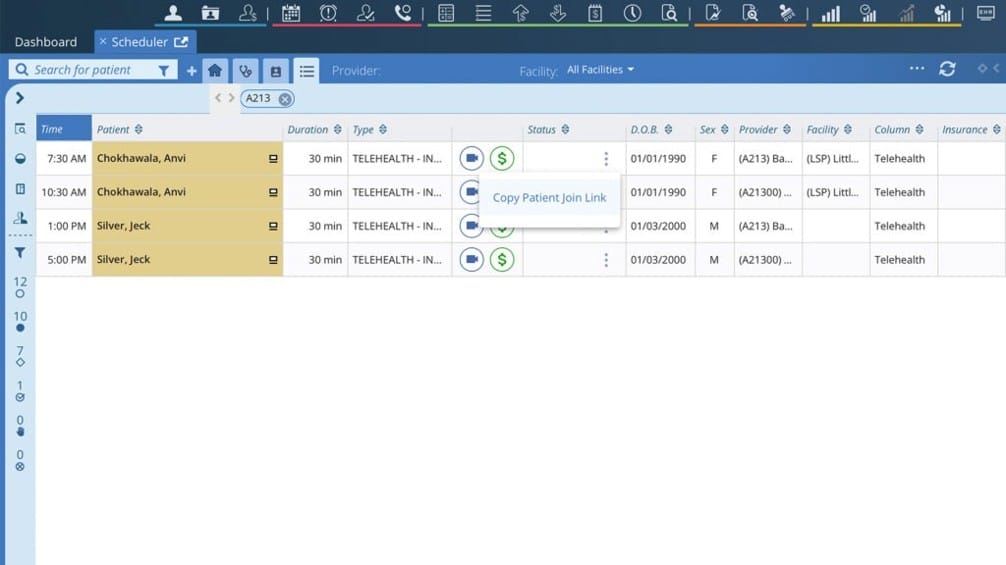
AdvancedMD integrates telehealth with its scheduling workflow, giving staff quick access to virtual appointments, patient join links and payment tools. Source: AdvancedMD
AdvancedMD’s pricing varies considerably based on the type of practice, number of providers and features selected. Pricing is generally based on each provider per month, with AdvancedMD defining a provider as a “mid-level clinician or higher.” We like that the company publishes starting prices and ranges for several types of practices rather than requiring every prospective customer to contact sales for basic pricing information.
Here’s a look at the pricing ranges:
Specialty or Service
Starting Prices/Ranges
Medical specialties
$429-$1,070 per provider per month
Mental health
$130-$399 per provider per month
Physical medicine
$399 per provider per month
Addiction medicine
$399 per provider per month
MedSpa
$278 per provider per month
Medical billing companies
$229-$1,070 per month
Revenue cycle management
4-8 percent of collections
There are several other costs and pricing options to consider when estimating what you’ll pay for AdvancedMD:
Encounter-based pricing: Practices with lower patient volumes can pay per encounter instead of a flat monthly subscription. Practice management pricing ranges from $0.87 to $1.74 per claim, while bundled practice management and EHR pricing ranges from $1.08 to $2.17 per claim. AdvancedMD says this model may be more cost-effective for practices averaging about 250 to 500 claims per month.
Custom bundles: Practices can combine EHR, practice management and patient engagement software and save up to 40 percent compared with purchasing the products individually. AdvancedMD’s online bundle builder provides recommendations based on your practice and generates a customized quote.
Add-ons: AdvancedMD offers optional add-ons that can increase your overall cost. For example, the AI Clinical Assistant costs $100 per provider per month for unlimited encounters or $0.99 per encounter. Make sure you know which features are included in your package and which carry an additional charge.
Revenue cycle management: AdvancedMD’s managed RCM service costs 4 to 8 percent of collections, depending on factors such as practice size, specialty and billing complexity. The service includes claims submission, payment posting, denial management and dedicated account management, and customers receive the core AdvancedMD software platform at no additional charge.
Payment processing: AdvancedMD Pay doesn’t charge a monthly fee or require a minimum processing volume. Transaction rates typically range from 2 to 6 percent depending on the payment type. Practices that want AdvancedMD’s PAX A920 Max countertop terminal can purchase it for $500.
Implementation and data migration: Setup, training and data migration may add to your initial costs. Because these expenses can vary considerably depending on your practice and the amount of data being transferred, we recommend getting implementation and migration costs included in your written quote before signing up.
Implementation and Onboarding
AdvancedMD’s implementation process includes system configuration, training and workflow setup, with software onboarding typically taking about 90 days. Because the platform offers extensive customization, practices should leave enough time to configure workflows and templates, train staff and make sure the system is ready before going live.
Setup fees vary considerably depending on the size and complexity of the practice. AdvancedMD says fees can range from free to $1,000 for smaller practices and up to $6,000 for more complex enterprise clients with extensive data migration needs.
Practices moving from another practice management system can also pay AdvancedMD to migrate their existing data. A dedicated Data Services Specialist guides the process, with three migration options:
Tier 1 ($800): Includes patient demographics, responsible parties, notes and memos.
Tier 2 ($1,200): Includes Tier 1 data plus appointment and recall history.
Tier 3 ($2,000): Includes the previous tiers plus insurance coverage, carriers, referring providers and fee schedules.
Financial transaction history isn’t included in these migration packages, so AdvancedMD recommends working down outstanding accounts receivable in your previous system before making the switch. Clinical EHR data migration is also priced separately and requires a custom quote.
Practices using AdvancedMD’s RCM service should expect a separate onboarding process of about six to eight weeks. This includes billing setup, payer enrollment and account management orientation.
Tip
AdvancedMD offers a free library of training videos and product demos. Have your team explore these resources before formal employee training so they can arrive with a basic understanding of the platform and more specific questions.
Customer Service
AdvancedMD offers several ways to get help when practices run into problems. Customers can contact support by phone, live chat and support ticket, and the company offers secure remote access assistance for issues that are easier to troubleshoot directly. We like that AdvancedMD routes calls based on the type of help needed, with dedicated options for practice management, clinical support, implementation, payments and other issues.
Practices that need more hands-on assistance can also use AdvancedMD’s professional services for implementation, training and consulting. The company offers one-on-one guidance from training experts and consultants who can work with customers in their own AdvancedMD environment. AdvancedMD also maintains a status center where customers can check the health of its applications and subscribe to alerts about maintenance or critical service information.
For self-service help, AdvancedMD provides a free Learning Center with videos, product demos, webinars, e-books and other educational resources.
Limitations
AdvancedMD offers extensive functionality and customization, but there are a few drawbacks practices should consider before committing to the platform.
Costs can add up quickly: AdvancedMD is one of the more expensive medical software platforms we reviewed, particularly once you add optional features and implementation expenses. Software for general medical specialties ranges from $429 to $1,070 per provider per month, while setup can cost as much as $6,000 for complex implementations. Practice management data migration costs another $800 to $2,000, and clinical EHR migration requires a custom quote.
Extensive customization comes with a learning curve: We like how much practices can tailor AdvancedMD’s dashboards, templates and workflows, but configuring such an extensive platform takes time. AdvancedMD says software onboarding typically takes about 90 days, so practices looking for a system they can implement almost immediately may prefer a simpler option, such as Tebra. Read our detailed Tebra review to learn more.
Some integrations may require additional development: AdvancedMD provides FHIR APIs for accessing patient information, but these regulatory APIs are read-only. Applications that need to write information back to AdvancedMD must use the company’s proprietary Connect APIs instead, which require a developer agreement and associated licensing and support fees. Practices that depend heavily on custom integrations should investigate these requirements before committing to the platform.
Methodology
To determine the best medical software, we researched and evaluated dozens of platforms based on factors such as ease of use, features, pricing, implementation, customer support and integrations. Our research included product demonstrations, vendor materials and hands-on evaluation of key workflows and tools.
When evaluating AdvancedMD for ease of use, we paid particular attention to how easily providers and staff can navigate the platform, complete everyday tasks and customize the software around their workflows. We also considered the learning curve, implementation process and how well AdvancedMD connects clinical and administrative tasks such as scheduling, charting, billing and patient engagement.
AdvancedMD FAQs
Yes. Depending on the package you choose, AdvancedMD may charge additional fees for implementation, data migration and optional features. Setup fees range from free to $1,000 for smaller practices and can reach $6,000 for more complex implementations, while practice management data migration costs $800 to $2,000. Clinical EHR migration requires a custom quote. AdvancedMD's AI tools cost $100 per provider per month for unlimited encounters or $0.99 per encounter, and electronic prescribing of controlled substances typically costs an additional $35 per month.
AdvancedMD says software onboarding typically takes about 90 days and includes system configuration, training and workflow setup. Practices adding revenue cycle management should expect a separate six- to eight-week onboarding process that includes billing setup, payer enrollment and account management orientation. Small mental health practices using AdvancedMD's self-service option platform can get instant access without a lengthy implementation process.
Yes. AdvancedMD offers outsourced medical billing through its revenue cycle management service, which costs 4 to 8 percent of monthly collections. The service includes claims submission, payment posting, denial management and dedicated account management, along with access to AdvancedMD's core software platform.
Bottom Line
We recommend AdvancedMD for…
Medical practices that prioritize ease of use and customizable workflows.
Practices that want EHR, practice management, billing and patient engagement tools in a single platform.
Growing and multilocation practices that want software they can customize as their needs change.
We don’t recommend AdvancedMD for…
Practices with limited budgets that need low-cost medical software.
Practices looking for a simple, out-of-the-box system with minimal setup or configuration.
Organizations that need to implement and launch a new medical software platform quickly.
Leah Zitter's long-held passion for psychology and science led her to not only a doctorate but a career covering emerging technology in healthcare and related sectors. Her expertise has been trusted by The Centers for Disease Control and Prevention, and her analysis of medical software has proven invaluable for medical practices.
At business.com, Zitter provides guidance on medical software, billing and tools.
Zitter has also studied SaaS and analytics more generally on behalf of clients like Google, Microsoft, Amazon Web Services and more. She also contributed to the book "Strategize Up: The Simplified Blueprint To Scaling Your Business."