Business.com aims to help business owners make informed decisions to support and grow their companies. We research and recommend products and services suitable for various business types, investing thousands of hours each year in this process.
As a business, we need to generate revenue to sustain our content. We have financial relationships with some companies we cover, earning commissions when readers purchase from our partners or share information about their needs. These relationships do not dictate our advice and recommendations. Our editorial team independently evaluates and recommends products and services based on their research and expertise. Learn more about our process and partners here.

Reliable communication is vital for enterprises managing multiple offices and high volumes of calls and data. Comcast Business delivers scalable cloud-based phone systems and on-premises solutions built on the nation’s largest gig-speed network. Its VoiceEdge, Voice Mobility, UCaaS Sessions and PRI/SIP trunking services give companies flexible options for unified communications, whether they operate a few regional branches or hundreds of nationwide locations. With this strong infrastructure and range of enterprise-grade tools, Comcast Business is our choice for the best business phone system for large organizations with complex network needs.
Enterprises with multiple locations or heavy data demands need a business phone system and unified communications provider that can deliver both speed and stability. Comcast Business meets those needs through its vast gig-speed network and a portfolio of scalable UC solutions designed for different infrastructures.
We like that Comcast Business supports nearly every type of phone system setup — from fully cloud-hosted systems to on-premises PBX integrations — allowing large organizations to modernize without disrupting existing hardware. Its VoiceEdge unified communications (UC) platform includes advanced call management and collaboration tools, helping sales teams and support staff stay connected across offices, while Voice Mobility extends business numbers to mobile devices for hybrid and remote teams. For companies that rely on traditional PBX systems, Comcast’s SIP and PRI trunking services provide dependable failover and disaster recovery options.
We were also impressed that Comcast has widened its reach. Its UCaaS Sessions and over-the-top VoiceEdge options work anywhere in the United States with any internet provider, which matters for enterprises with branch offices scattered across markets a single carrier rarely covers end to end. Comcast reports network reliability above 99.99 percent.
This mix of flexibility, nationwide coverage and proven reliability makes Comcast Business a go-to option for enterprises that can’t risk dropped calls or network interruptions between locations.

Comcast Business phone systems are relatively easy to set up and manage once deployed. The secure online portal lets administrators add users, change extensions and adjust settings in real time without calling support. We like that managers can make updates from anywhere, whether they’re at a headquarters location or working remotely.
VoiceEdge offers clear setup guidance and in-app tips that make getting started easy. The mobile app handles calling and voicemail without fuss. We also appreciate the desktop app’s Google Chrome extension, which lets employees place calls straight from the browser rather than switching applications — a small touch, but one that adds up across a large support or sales floor. Bigger companies may need a little extra time to choose and configure the right features, but once set, the system is easy to manage.
Comcast Business offers cloud-based and on-premises phone solutions designed to support organizations of all sizes. We analyzed the tools and capabilities that make it a strong choice for large enterprises with complex communication and network requirements. Here are some standout features:
Comcast Business Voice Mobility lets employees take and make calls from any device. It supports simultaneous ringing to desk and mobile phones, unlimited nationwide calling, call forwarding, transfers and hunt group routing — key features of a modern multiline phone system designed to handle high call volumes across departments. We like that users can manage everything from a single app, which makes it easy to stay connected and access their business phone number while moving between the office and remote work locations. Businesses can order up to eight mobility lines online and add as many as 24 by request, which gives smaller offices room to grow before stepping up to VoiceEdge. One thing to watch: voicemail isn’t bundled into the base service the way it is with several competing plans — Comcast sells it as an add-on at $5 per line per month.

VoiceEdge is Comcast Business’s full-featured unified communications platform. It includes desktop and mobile calling apps, readable voicemail, audio conferencing on a 100-person bridge, Webex team messaging, screen sharing, auto-attendant, virtual receptionist and interactive voice response (IVR) features and four hunt group routing patterns — tools that can also support small call center systems or customer-facing teams.
We were impressed by how much Comcast includes at no extra charge, particularly its Enhanced Call Hold feature, which adds a dedicated extension for parking and picking up callers and a one-touch experience on the handset. Key system emulation, Parking Spots, Call Park Groups, Busy Lamp Field and Shared Call Appearance are also bundled in. However, the receptionist console and call queueing are both sold as monthly add-ons rather than standard features.
Administrators can manage multiple sites from a single cloud portal, while employees benefit from integrated collaboration tools that simplify day-to-day communication.
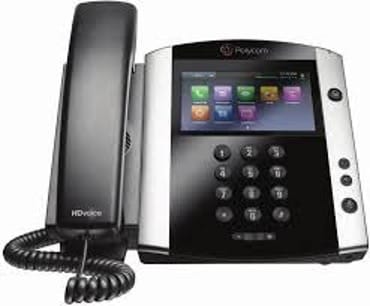
UCaaS Sessions is the offering we think most enterprises evaluating Comcast should look at first, and it’s the one that separates the company from providers that sell seats and little else. Instead of licensing a phone system per user, you connect the equipment you already run — a qualifying PBX, a contact center platform or Microsoft Teams — to Comcast’s voice network using over-the-top SIP trunking, with no hardware to install. Pricing follows concurrent call sessions rather than headcount, which is a better fit for organizations where a few 100 employees share a much smaller pool of simultaneous calls.
The biggest advantage for multi-location businesses is that UCaaS Sessions works over any internet connection. This lets Comcast support branch offices outside its physical network, a limitation that previously steered companies to look at cloud providers like RingCentral or 8×8. Call failover, load balancing and session pooling are included at no additional charge, which compares well against SIP trunks that charge a monthly fee for such features.
Comcast sells its collaboration layer as a seat type rather than forcing a single platform on you, which we appreciate. Businesses standardized on Webex can buy Webex Standard or Webex Premium seats, while organizations running Microsoft 365 can buy Comcast Seats for Microsoft Teams and keep calling inside the app employees already have open. For companies that would rather keep their existing Teams licensing, a Teams Connector add-on attaches to SIP Trunks and a comparable add-on attaches to UCaaS Sessions, both at $5 per month.
This flexibility is an advantage over VoIP providers that lock you into a proprietary collaboration client. That said, these are integrations rather than native capability — the calling features Comcast builds itself still stop short of the recording and video tools baked into competitors, as we cover in Limitations below.
For companies that use on-premises PBX systems, Comcast Business offers PRI and SIP trunking. These services integrate easily with existing hardware and include features like Caller ID name delivery, Direct Trunk Overflow and automatic failover for business continuity. This setup provides the reliability of a traditional phone system with the scalability of modern IP-based communications. SIP Trunks scale by concurrent call session, so per-session costs decrease as volume grows — useful for enterprises consolidating call paths across sites.

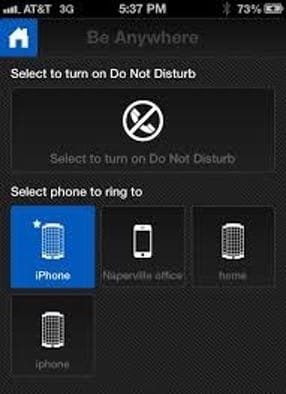
All Comcast Business cloud-hosted systems include features that keep teams connected across devices. The Be Anywhere tool, sequential and simultaneous ring options, mobile caller ID, voicemail notifications and the Comcast Business App give users the flexibility to manage calls from virtually anywhere.
Comcast Business offers a wide range of communication solutions for companies of all sizes, from bundled internet and phone packages for small businesses to comprehensive UC systems for large enterprises. Because its services span everything from simple business lines to cloud-based Unified Communications as a Service (UCaaS) platforms, pricing varies by product, location and bundle type.
Comcast has a reputation for opaque pricing, but that’s only half true for voice service. The company publishes market-level business voice pricing lists with per-seat and per-line rates, and the VoiceEdge seat rates were identical in both markets we checked. Rates below are drawn from Comcast’s Illinois pricing list effective May 1, 2026, and verified against its Indianapolis list effective Aug. 1, 2026. Line-level fees do vary by market, and large multi-site deployments are still quoted individually, so treat these as a baseline.
Comcast Business offers a wide range of communication solutions for companies of all sizes, from bundled internet and phone packages for small businesses to comprehensive UC systems for large enterprises. Because its services span everything from simple business lines to cloud-based Unified Communications as a Service (UCaaS) platforms, pricing varies by product, location and bundle type.
Comcast has a reputation for opaque pricing, but that’s only half true for voice service. The company publishes market-level business voice pricing lists with per-seat and per-line rates, and the VoiceEdge seat rates were identical in both markets we checked. Rates below are drawn from Comcast’s Illinois pricing list effective May 1, 2026, and verified against its Indianapolis list effective Aug. 1, 2026. Line-level fees do vary by market, and large multi-site deployments are still quoted individually, so treat these as a baseline.
Seat type | Monthly rate |
|---|---|
Basic Seat | $24.95 |
Webex Standard Seat | $34.95 |
Comcast Seats for Microsoft Teams | $34.95 |
Webex Premium Seat | $44.95 |
Unified Communication Seats, 1-9 | $44.95 |
Unified Communication Seats, 10-19 | $39.95 |
Unified Communication Seats, 20+ | $34.95 |
Equipment fee | $14.95 |
Voice lines themselves carry no charge on VoiceEdge, and unlimited nationwide calling is included. Optional services are billed separately: a receptionist console runs $29.95 per month, call queue agent $9.95 and additional voicemail boxes $7. We like that auto attendant, additional hunt groups and shared call appearance are all included at no charge — several competitors treat auto attendant as a paid tier.
Line type | Monthly rate |
|---|---|
Mobility line, bundled with another Comcast service | $44.95 |
Mobility line, standalone | $64.95 |
Voicemail, per line | $5 |
Equipment fee | $27.95 |
The bundling discount here is substantial — $20 per line per month — which explains why most Comcast voice customers pair phone service with business internet.
Service | Rate |
|---|---|
PRI trunk port, 6 channels | $349/month |
PRI additional channel | $14/month |
PRI full capacity | $489/month |
SIP Trunks, 6-9 concurrent call sessions | $35 per session/month |
SIP Trunks, 25-49 concurrent call sessions | $14 per session/month |
SIP Trunks, 250 concurrent call sessions | $10 per session/month |
UCaaS Sessions | $35 per session/month |
Installation runs $500 for an initial PRI port or per SIP site, while UCaaS Sessions activation is $199. On SIP Trunks, trunk group failover and load balancing each add $5 per month; on UCaaS Sessions, both are included.
The voice/communication solutions break down as follows:
Additional pricing notes to consider include the following:
Comcast Business offers several ways to get started, depending on your system and service plan. Smaller teams using Voice Mobility can self-install, activating service and equipment through a guided online setup. The process includes testing network speeds, configuring call settings and linking mobile devices through the Comcast Business App, which functions as a VoIP softphone for desktop or mobile use. Note that VoiceEdge Select, an entry-level tier that still appears in some older comparisons, has been closed to new customers since July 2022; existing subscribers keep their rates, but new buyers choose between Voice Mobility and full VoiceEdge.
Larger organizations implementing VoiceEdge or trunking services typically work with a Comcast Business representative for onboarding. These consultation-based deployments may include professional installation, number porting and customized network configuration to ensure consistent performance across multiple locations.
Once live, administrators can add or remove users, adjust call routing and access training resources from the online portal. Comcast also provides an extensive help center with tutorials and visual walkthroughs to simplify onboarding for new users.
Comcast Business offers customer support by phone, live chat and online resources. Response times are generally quick, but support agents often ask for detailed business information before providing specific help, which can slow down simple requests.
We like that the company’s online help center includes self-service guides, troubleshooting tips and configuration tutorials, making it easy for users to find answers without calling in. Administrators can also access account tools directly through the online portal to manage services or submit support tickets.
Enterprise customers on UC and trunking services get round-the-clock support, though we’d still like to see faster resolution on routine administrative requests, which is where Comcast draws the most consistent criticism from business users.
Comcast Business has much to offer large organizations, but consider the following potential drawbacks before committing:
In evaluating Comcast Business and other leading business phone systems, we examined each provider’s latest features, service options and user experience. Our process included reviewing product documentation, analyzing Comcast’s published market-level voice pricing lists, analyzing setup and management tools, and gathering customer feedback from multiple channels.
We compared Comcast Business’s VoiceEdge, Voice Mobility, UCaaS Sessions and trunking solutions against competing Voice over Internet Protocol (VoIP) and UCaaS platforms to understand how each helps companies choose a business phone system that fits their size, structure and communication needs. We also considered factors like scalability, pricing transparency and customer support responsiveness.
Comcast Business stood out for its flexible deployment options and enterprise-grade infrastructure, though its market-dependent bundled availability and quote-based enterprise pricing may affect accessibility for smaller organizations.
We recommend Comcast Business for …
We don’t recommend Comcast Business for …