Business.com aims to help business owners make informed decisions to support and grow their companies. We research and recommend products and services suitable for various business types, investing thousands of hours each year in this process.
As a business, we need to generate revenue to sustain our content. We have financial relationships with some companies we cover, earning commissions when readers purchase from our partners or share information about their needs. These relationships do not dictate our advice and recommendations. Our editorial team independently evaluates and recommends products and services based on their research and expertise. Learn more about our process and partners here.


While many customers enjoy the personalized care and attention solopreneurs and small companies can provide, these business entities may still be expected to provide a level of professional communication associated with larger operations. For many small business owners and solopreneurs, implementing a virtual phone line to separate personal and business calls is the first major step toward communicating like a bigger company.
Grasshopper offers all the essential communication tools like extension dialing, toll-free numbers and business texting you need to present a professional image at all times. Implementing a cloud-based business phone system in a startup, freelance or small team environment is often more expensive and complex than it needs to be.
A Grasshopper virtual phone system is the exception. During testing, we found its flexibility, ease of use and low cost ideal for solopreneurs and small business owners. In fact, with Grasshopper’s affordable pricing and plans, it’s our top pick as the best virtual phone system for freelancers and home offices.
Grasshopper is a virtual phone system that works on your existing phone. It piggybacks off your phone’s cellular network for voice-over-internet-protocol (VoIP) calls, texts and messages. It also works over Wi-Fi so you can keep communicating if your cell service becomes spotty. Grasshopper’s commitment to simplicity and affordability, along with a small set of great features, makes it the best virtual phone system for small businesses.
We like that Grasshopper provides the same core features across every phone plan, including unlimited minutes and business texting, call forwarding, inbound-only virtual faxing, mobile and desktop apps, voicemail and extensions. In our experience, the initial setup of virtual phone lines and call flows was straightforward. The platform is no more difficult to operate than an iPhone or Android phone and offers a similar look and feel for calls and texting.
With unlimited users included with most service plans, Grasshopper’s value proposition grows with every additional user account you essentially get for free. You can select a dedicated business phone number as your second virtual line, choosing a toll-free, vanity or local number that best suits your needs. It separates professional and personal contacts on cell phones while allowing several team members to answer calls from shared lines.
Other features that make Grasshopper a standout virtual phone system include a redesigned admin portal and AI transcription for voicemail and call recordings. Moreover, purchasing and setting up Grasshopper is a quick and easy process, especially if you’re selecting a new business phone number rather than porting one from your previous carrier (the former is more common for new and small businesses).
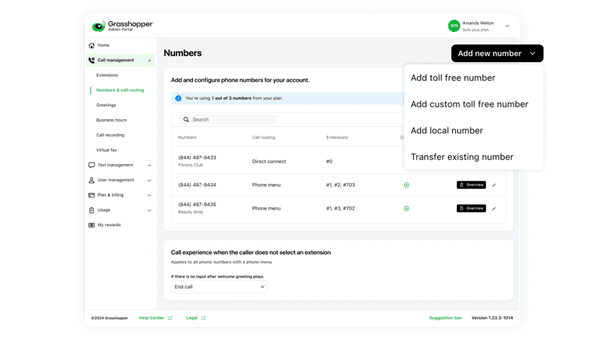
If you’re comfortable operating your existing smartphone, you shouldn’t have any issues adopting Grasshopper. You can access your business phone account and platform settings through the desktop app, mobile app and web browser. However, the business phone apps are where you’ll access the dialer and messages to make calls and send texts.
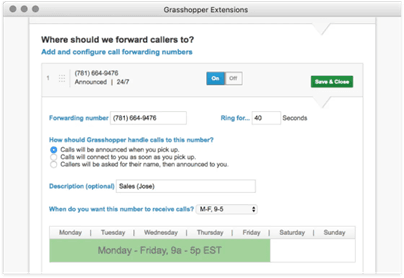
By default, when calls come in, Grasshopper rings your desktop and forwarding number simultaneously for 30 seconds before following your call forwarding rules. The setup assistant offers extension forwarding and phone menu options, but you can also customize settings later via the Grasshopper admin portal on desktop or mobile phone apps. Grasshopper only forwards calls to devices with valid phone numbers, which rules out desk phones unless you use a separate VoIP or landline service.
To test different features for our Grasshopper review, we set up three extensions. Most configuration options are easy to navigate using drop-down menus. Here’s what we learned during our evaluation:
Overall, we were satisfied with how easy it was to set up and manage Grasshopper’s virtual PBX (private branch exchange) service. It provides basic functionality in a simple platform suitable for small teams or solo entrepreneurs.
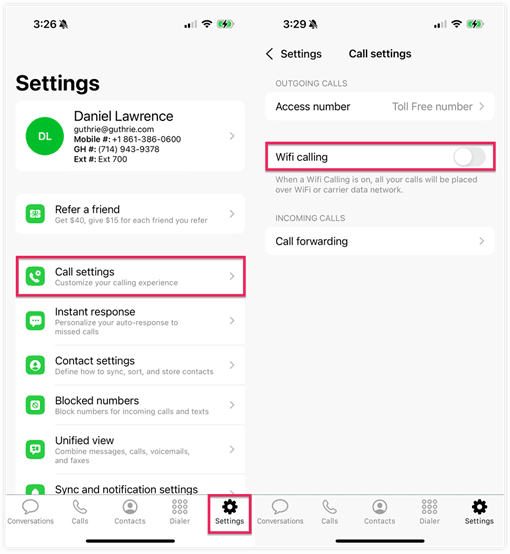
Mobile App | Distinguish between personal and business calls from nearly any mobile device. |
|---|---|
Call Forwarding and Schedules | Personalize your call management settings by configuring account-level, extension or call forwarding hours. |
Call Recording and AI Transcripts | Choose which extensions to automatically record inbound or outbound calls and receive searchable voice transcriptions. |
Unified Conversations | View texts, calls and voicemails for each contact in an organized thread. |
Business Texting and Instant Response | Respond to new customers automatically via text when you miss a call. |
Call Logs and Reporting | Track call metrics to identify areas for improvement. |
Call Blasting | Ring each call forwarding number simultaneously to reduce missed calls. |
Grasshopper’s virtual phone system includes core features with every plan. You get everything from a unified conversation inbox and call forwarding to business texting and voicemail transcription. Below, we explore the tools that we found most valuable for small business owners and freelancers.
Nearly all cloud-based phone systems offer mobile apps, including Grasshopper. Available on both iOS and Android phones, the Grasshopper mobile app received high user ratings but doesn’t work on tablets or iPads. During setup, you can choose whether to display your business number or the caller’s number, helping you distinguish between personal and professional calls.
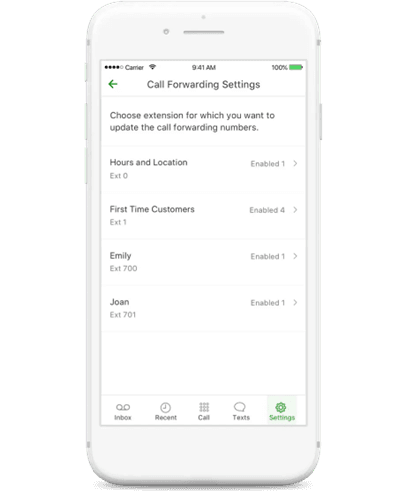
Most VoIP phone systems let companies customize their business hours and call forwarding rules. With a Grasshopper True Solo account, you can route calls to one forwarding number. Solo Plus and Small Business subscriptions support up to 50 numbers per extension. These plans also include a simple phone tree menu that lets callers choose a department or an employee extension.
For a small remote team, the easy-to-configure auto attendant and scheduling options offer the right amount of flexibility. But if employees or contractors have international or offshore numbers, you must enable international calling and deposit $500 as a prepayment. Other competitors, like Ooma Office and 8×8, connect to Puerto Rico, Alaska, or Hawaii on standard plans. See our Ooma Office review for more details.
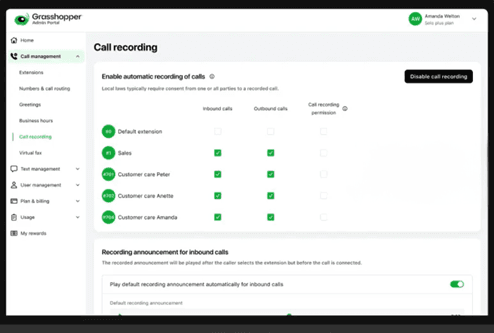
This feature is new to Grasshopper and is available on the Solo Plus and Small Business plans. We liked the flexibility to enable automatic recording on any or all extensions and choose inbound, outbound or all calls.
Sales and service teams can record calls for monitoring purposes or, in our case, for client meetings. In both use cases, you can search AI transcriptions shortly after recording calls. We searched and reviewed conversations in the admin portal, where we could see all transcriptions related to complaints or pull up meeting details for post-conference follow-ups.
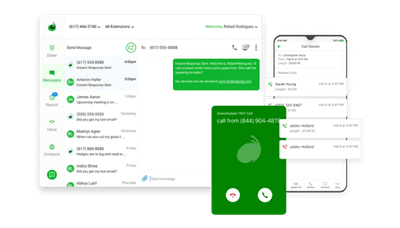
Sharing virtual phone lines among remote team members can be confusing, but Grasshopper’s unified inbox keeps conversations organized. It shows everyone the most recent customer interactions, with one activity feed per business phone number and one thread per contact or incoming phone number.
We tailored inboxes to our individual work styles using:
Many Grasshopper alternatives set limits on how many texts you can send monthly. We love that all Grasshopper phone subscriptions include unlimited texting, while all but the base plan allow instant response.
Like all VoIP phone systems, business owners must register with The Campaign Registry (TCR) before using business text or instant response services. This process can take up to two weeks, and you must have a registered business tax ID (TIN) or employer identification number (EIN). All outbound messaging capabilities are blocked until this process is complete.
With instant response, small teams can increase sales via business text messages to new customers immediately after missing a call. This feature ensures quick communication with anyone who reaches out to you. Responses are easy to customize from within the Grasshopper mobile app, desktop softphone or admin portal. You can add up to 160 characters with your key branding elements, including images, custom text and hyperlinks.
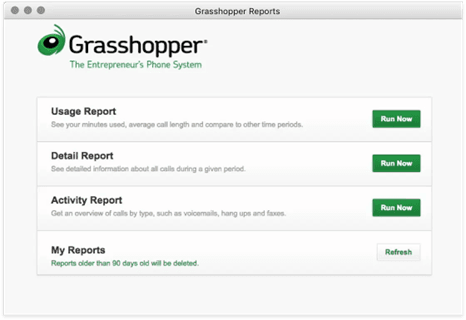
Grasshopper provides simple but effective reporting tools with all of its virtual phone plans. Although reporting is more commonly a focus among larger businesses or those with big customer service or sales teams, we still appreciate that Grasshopper includes these tools at no extra cost alongside its basic features.
Administrators and users can use Grasshopper to uncover insights into historical data through custom reporting tools, providing an overview of calls by type, including voicemails, hang-ups and faxes. You can also dive into minutes used and average call length with sorting options for specific phone numbers, extensions, time zones and dates. Reports are stored for up to 90 days and are available for download as comma-separated value (CSV) files from the admin portal.
This paid add-on is designed to reduce wait times and increase customer satisfaction. It lets you assign up to 15 phone numbers for simultaneous ringing. It’s an ideal tool for small businesses when demand and incoming calls spike for short periods.
Grasshopper phone plan pricing ranges from $18 to $70 per month. For greater savings, enable annual billing, which reduces costs to $14 to $55 per month. Grasshopper also offers a seven-day free trial — no credit card required.
Unlike most virtual phone systems we tested that charge per user, Grasshopper offers unlimited users for a single flat rate. This approach can save small businesses a lot of money when managing shared lines. However, adding VoIP numbers or extensions to subscriptions increases your costs.
Additionally, each phone number must be registered to send text messages, which is a requirement for all VoIP business phone users. According to Grasshopper, it doesn’t mark up TCR fees. You pay a one-time fee ($4.50) to register your business entity, $15 per use case or campaign and $1.50 monthly per active campaign (less than 6,000 texts per day), or $10 per month for over 6,000 daily texts.
To decide which Grasshopper plan fits your needs, consider the following:
Explore Grasshopper plans and pricing below:
Plan | Price | Features |
|---|---|---|
True Solo | $18 per month | One user account, one business phone number, one extension, 24/7 support, business texting, desktop and mobile apps, call forwarding, virtual fax, auto attendant, visual voicemail, custom greetings and basic reporting. |
Solo Plus | $32 per month | Everything in True Solo with unlimited users, three extensions, call recording, IVR and simultaneous call handling. |
Small Business | $70 per month | Everything in Solo Plus with four phone numbers and unlimited extensions. |
In addition to monthly or annual VoIP plans, Grasshopper offers several add-ons. You can find most options in your admin portal by selecting Plan & Billing, then Subscriptions. From here, you can choose from several add-on features, including:
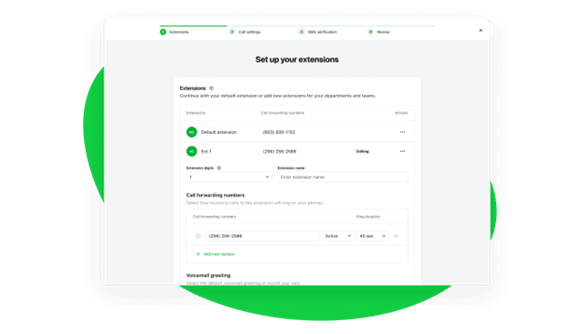
Most business owners can set up Grasshopper within two to five minutes. After signing up with a plan or choosing the free trial, the admin portal opens and the setup assistant walks you through the next steps.
Alternatively, you can skip most of the initial setup and download the Grasshopper apps to make calls immediately. This is helpful when you need to answer lines fast and want to finish the configuration later. In our tests, the longest part of the setup process involved recording a satisfactory greeting.
We found account settings in the admin portal and also configured extensions in the mobile apps. For our evaluation, we got a new VoIP number, which allowed us to use the system instantly. Porting an existing business number is free but can take anywhere from a few business days to a couple of weeks. In most cases, you won’t be able to send outbound texts until TCR approves your registration.
We love that all Grasshopper plans have the same level of customer support. That includes 24/7 availability through phone, email, chat, Facebook and X (formerly Twitter).
We contacted the company numerous times, posing as a new business owner. Each time we reached out, our calls were answered immediately by representatives who provided clear, detailed answers to all our questions. The reps never tried to pressure us into signing up for the service.
Grasshopper also offers on-demand training covering everything from creating new extensions and configuring user permissions to registering your brand to comply with U.S. and Canadian business texting regulations.
Like most business phone systems, Grasshopper has advantages and drawbacks. Its flexibility for solopreneurs, small teams and freelancers is a major pro. But the platform falls behind competitors in the following instances:
While researching the top business phone systems, we investigated more than a dozen platforms, including Grasshopper. We considered each VoIP provider’s user experience, latest features, mobile and desktop functionality and pricing. Through demos and product testing, we analyzed how systems worked for small businesses during setup and management tasks. We also collected user reviews and ratings, interacted with customer service and examined product documentation.
To compare virtual phone lines to more advanced cloud PBX and UCaaS systems, we assessed basic voice, texting, voicemail and administrative capabilities. We tried different tools to see how well they worked in small business settings.
Grasshopper limitations, specifically no video conferencing and limited AI features, make it less helpful for fast-growing startups or businesses with more than a handful of employees. Still, it nails the basics and is affordable for small companies looking to build their professional image. Based on our tests and experience, we chose Grasshopper as the best virtual phone system for small teams and solo entrepreneurs.
We recommend Grasshopper for …
We don’t recommend Grasshopper for …
Jessica Elliott contributed to the reporting and writing in this article.
