Business.com aims to help business owners make informed decisions to support and grow their companies. We research and recommend products and services suitable for various business types, investing thousands of hours each year in this process.
As a business, we need to generate revenue to sustain our content. We have financial relationships with some companies we cover, earning commissions when readers purchase from our partners or share information about their needs. These relationships do not dictate our advice and recommendations. Our editorial team independently evaluates and recommends products and services based on their research and expertise. Learn more about our process and partners here.


For businesses that spend a big part of the day in video meetings, it helps to have phone, messaging and collaboration tools that work together smoothly. We chose Zoom Phone as the best business phone system for video conferencing because it combines reliable VoIP calling with Zoom’s well-known meeting platform, flexible plans and growing lineup of AI-powered productivity features. During testing, we found the platform especially useful for hybrid teams that want to manage meetings, calls and internal communication from a single workspace. In this review, we’ll examine Zoom Phone’s features, pricing, usability and limitations to see how it compares with competing business phone systems.
During testing, Zoom Phone stood out most for businesses that spend a big part of the day in virtual meetings. The platform combines VoIP calling with Zoom’s familiar video conferencing tools, so employees can move between phone calls, meetings, messaging and team collaboration features without constantly bouncing between separate apps.
We also liked how naturally Zoom integrates AI-powered productivity features into the meeting experience. Tools like meeting summaries, voicemail prioritization, task generation and follow-up assistance help reduce manual work without making the platform feel overly complicated. At the same time, Zoom remains approachable for less technical users while still offering enough advanced functionality for larger teams and frequent presenters.
We also liked Zoom’s flexible pricing structure, which lets you mix and match plans based on employee roles, your business’s needs and how people use the platform in their day-to-day work. Some AI and collaboration tools do require separate Zoom Workplace licenses or higher-tier subscriptions. Even so, Zoom Phone felt fairly reasonably priced next to similar systems.
Overall, Zoom Phone stood out because it delivers much more than basic business calling. Its combination of video conferencing, collaboration tools and AI-assisted workflows makes it an excellent fit for organizations that spend much of the workday meeting virtually.
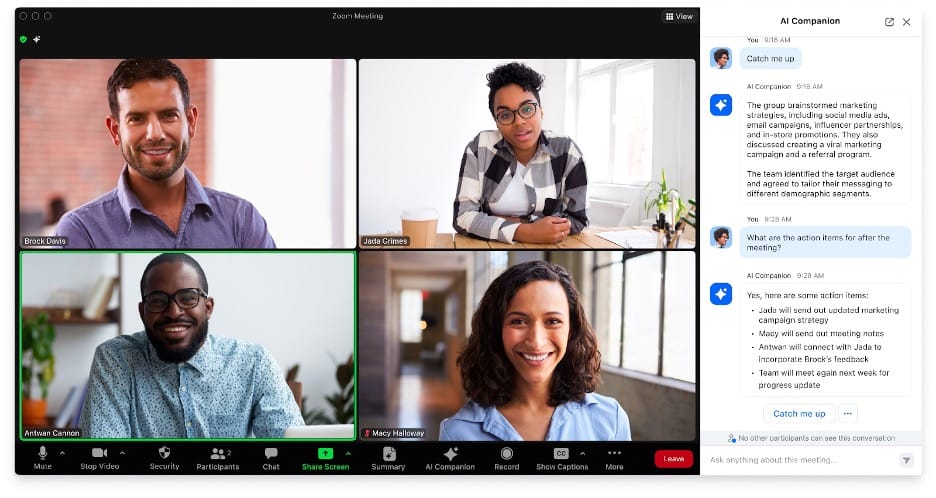
Zoom’s all-in-one communications platform is relatively easy to navigate, especially for businesses already familiar with Zoom Meetings. During testing, we found the platform’s VoIP calling, messaging and video tools straightforward enough for most employees to start using quickly without much guidance. Employees can place and receive calls through the mobile app, desktop client, web app, plug-and-play VoIP phones or compatible analog devices.
Basic tasks felt fairly intuitive. Even less technical team members should have little trouble making calls, joining meetings or using features like call transfers, recordings and hold controls. We also liked that Zoom offers functionality through both its desktop applications and browser-based tools, giving employees more flexibility depending on how and where they work.
The administrative side took more time to get comfortable with. Businesses moving from traditional landlines to a VoIP system may find the number of configuration options a bit overwhelming at first, particularly when setting up call routing, reports and AI-related settings. Some competitors, including Ooma and Nextiva, offer fewer collaboration and meeting features but may be easier for smaller teams with limited IT support to deploy and manage.
Zoom’s phone system is loaded with productivity and communications tools built to support teams of all sizes. Here are a few standout Zoom features worth knowing about for small businesses.
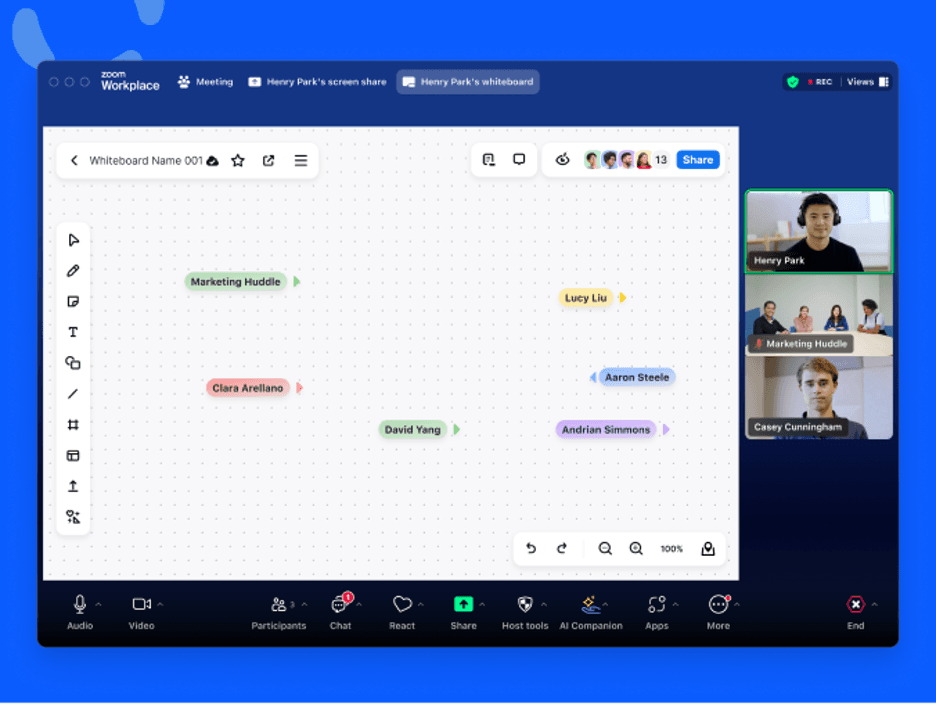
Video conferencing remains Zoom’s biggest strength. As a video-first platform, Zoom makes it easy for employees to move between phone calls, team chat, whiteboards and productive online meetings without constantly switching applications. During testing, we especially liked how naturally meetings connected with other collaboration tools across the Zoom Workplace platform, including chat, whiteboards and AI Companion features.
Even Zoom’s entry-level plans include access to Zoom Meetings, with support for up to 100 participants and meetings lasting up to 40 minutes on the free tier. Businesses that upgrade to Zoom Workplace Business plans can host meetings for up to 30 hours with as many as 300 participants. (Businesses that regularly host larger presentations or companywide meetings can purchase Zoom’s Large Meeting add-on to expand participant capacity well beyond the standard plan limits.) That flexibility makes Zoom a practical option for businesses that regularly host training sessions, employee onboarding meetings, webinars or large virtual presentations.
We also appreciated some of Zoom’s collaboration-focused features, including one-click meeting launches from whiteboards and AI-generated meeting summaries. While competitors like Dialpad, RingEX and Nextiva offer video conferencing tools, Zoom still feels more polished and meeting-centric overall, especially for businesses that spend much of the workday collaborating virtually.
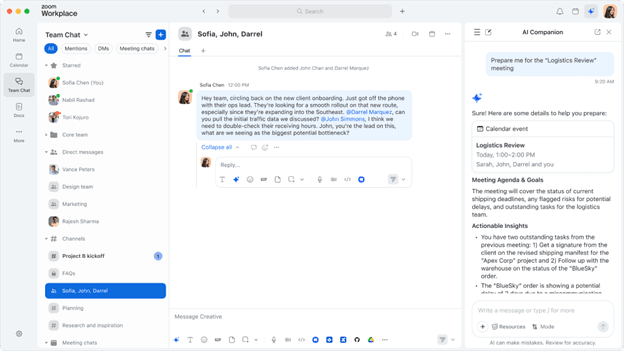
Many cloud-based business phone systems now include AI-powered meeting tools, but Zoom’s AI Companion felt more deeply integrated into day-to-day collaboration than most competitors we tested. Instead of limiting AI features to meeting summaries, Zoom extends them across Meetings, Team Chat, Docs, Email, Calendar and other parts of the Zoom Workplace platform.
During testing, we especially liked how AI Companion handled follow-up tasks and meeting organization. It can summarize meetings, pull out action items, prioritize voicemails and help teams keep track of conversations without relying on separate note-taking apps or endless manual recaps. Zoom has also expanded AI Companion beyond Zoom Meetings, so users can capture notes across platforms like Microsoft Teams and Google Meet.
The platform’s newer AI tools go beyond basic summaries. Features like My Notes, AI-generated task recommendations and cross-meeting insights make Zoom feel more like a connected productivity workspace than a standalone video conferencing app. We also appreciated that Zoom continues adding more customizable AI capabilities for businesses that want workflows tailored to specific teams or industries.
Overall, Zoom’s AI tools felt genuinely useful instead of gimmicky. However, keep in mind that some AI Companion features require separate Zoom Workplace plans or add-ons.
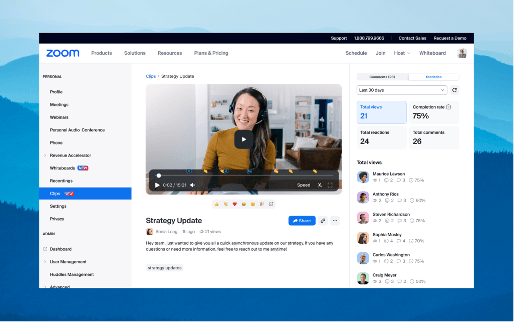
While productivity-killing meetings are a common workplace frustration, Zoom Clips gives teams a quicker way to share updates, walkthroughs and training videos asynchronously. We found it especially useful for simple onboarding tasks, internal demos and quick project updates that didn’t really need a live meeting.
During testing, we were able to personalize clips with company logos and brand colors, organize videos into playlists and share recordings across teams without much setup. Users can access Zoom Clips through the web portal or Zoom’s desktop and mobile apps to record and edit short-form videos.
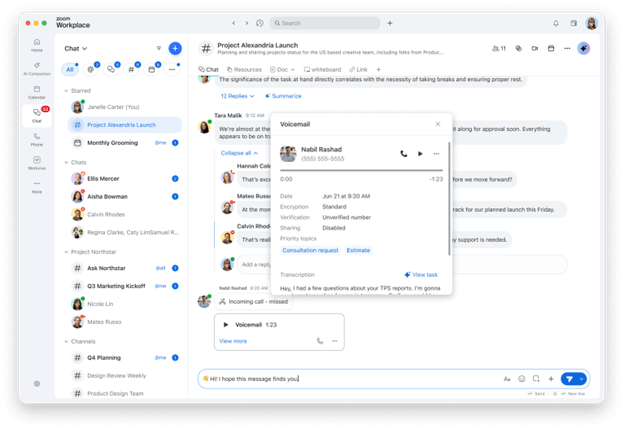
Zoom and its competitors offer standard unified communications features like messaging and file sharing. During testing, we liked how Zoom connects chat, meetings and AI tools in one workspace instead of treating them like separate apps. Team Chat made it easier to continue conversations after meetings ended, catch up on busy threads with AI-generated summaries and quickly surface action items and shared files.
Zoom’s AI-powered My Notes feature was another tool we found useful. Users can save notes and meeting transcripts in one place, keep track of follow-up details and decide whether notes stay private or shared with the team. Zoom has also expanded My Notes beyond Zoom Meetings, so users can capture and organize notes from platforms like Microsoft Teams and Google Meet.
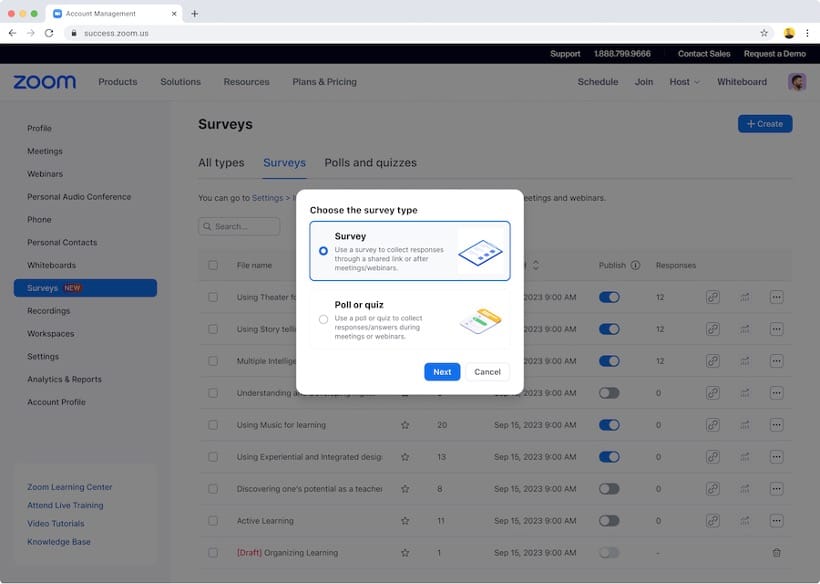
Survey and polling tools aren’t especially common in business phone systems, but Zoom includes several built-in options for gathering feedback before, during and after meetings. Hosts can create polls or quizzes ahead of time or launch them during live meetings to collect participant responses in real time.
One feature we liked was the ability to use poll responses to help assign participants to breakout rooms, which can simplify workshop sessions and training events. Zoom also makes it easy to share polling results and survey data during meetings or download reports afterward for additional analysis.
Zoom also supports post-meeting surveys and integrations with tools like Google Forms and SurveyMonkey. In testing, we found the polling features easy to launch during meetings, and it didn’t take long to build different question types, including multiple-choice, short-answer and rating-based responses.
Zoom’s App Marketplace includes thousands of integrations for CRM, collaboration, productivity and customer support platforms. We liked that many of those integrations are available across Zoom’s business plans instead of being locked behind only the highest-tier subscriptions.
During testing, we liked how easy it was to connect workplace tools directly inside Zoom. Users can schedule meetings, access cloud files and work with apps like Google Workspace, Microsoft 365 and Salesforce without constantly switching between platforms.
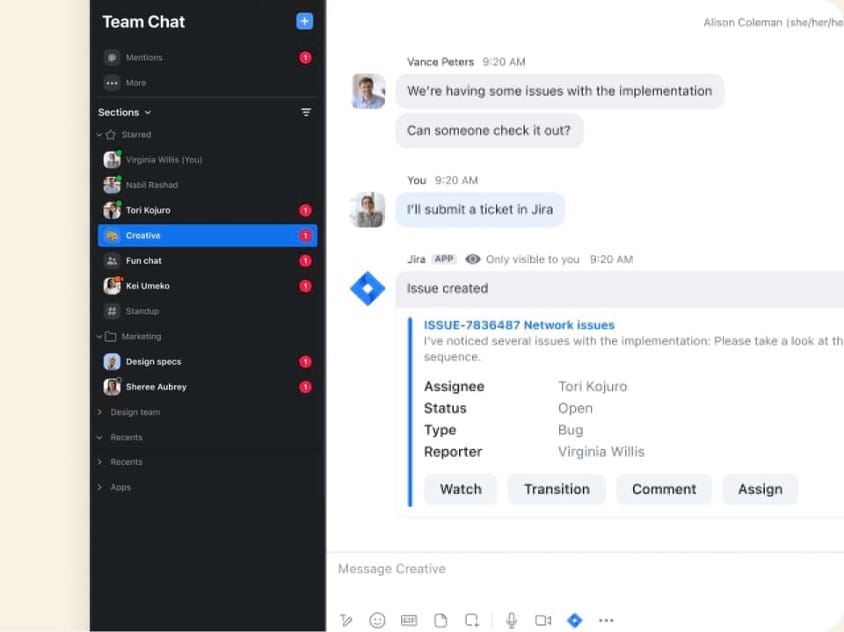
Zoom also offers integrations for many of the best CRM software platforms, including Salesforce and Zendesk. For example, the Zoom Phone integration for Zendesk lets support teams manage help desk tickets while handling calls inside the Zendesk interface. We also liked the Team Chat integrations, which allow users to pull tools like Jira, Asana, Salesforce and Microsoft Dynamics 365 directly into chat workflows.
Zoom Phone includes a strong set of call management and routing features for businesses handling higher call volumes or more complex workflows. The platform is especially flexible for teams that need shared phone lines, delegated calling and customizable routing rules across departments or locations.
We also liked how easy it was to configure business-hours routing, department call handling and shared calling features without needing separate software. The platform felt well-suited for growing small businesses but still offered enough flexibility for larger organizations managing more complicated communication workflows.
Features include:
Zoom’s pricing can take a little time to sort through because the company now splits its services across Workplace collaboration plans, Zoom Phone plans and a growing list of AI and productivity add-ons. For most businesses considering Zoom Phone, the main options to focus on are the core calling plans and the bundled Workplace + Phone tiers below.
Zoom’s Workplace plans center on meetings, messaging and collaboration tools. Businesses can subscribe to these plans on their own or combine them with Zoom Phone through bundled options like Pro Plus and Business Plus.
Workplace Plan | Annual Monthly Price (Per User) | Key Features |
|---|---|---|
Basic | Free |
|
Pro | $14.16 | Everything in Basic, plus:
|
Business | $18.33 | Everything in Pro, plus:
|
Enterprise | Custom pricing | Everything in Business, plus:
|
Zoom Phone plans focus on business calling features like cloud PBX, SMS, call routing and AI-powered call management. Some plans also bundle Zoom Workplace collaboration tools, including meetings, chat and productivity features.
Phone Plan | Annual Monthly Price (Per User) | Best For | Key Features |
|---|---|---|---|
Metered | $10.50 | Businesses with lighter call volumes |
|
US & CA Unlimited | $16 | Businesses that make frequent domestic calls |
|
Pro Plus | $20.50 | Small businesses that want phone and collaboration tools in one platform | Everything in US & CA Unlimited, plus:
|
Business Plus | $24.50 | Larger organizations with advanced admin and collaboration needs | Everything in Pro Plus, plus:
|
Additional pricing considerations include the following:
Zoom’s biggest onboarding advantage is familiarity. Since many employees already use Zoom for meetings, the interface tends to feel intuitive right away, which can shorten the learning curve during setup. New users receive an email invitation to activate Zoom Phone, then select their country, time zone and PIN before configuring voicemail, emergency address settings and business hours. Once setup is complete, users can start making and receiving calls through Zoom’s desktop or mobile apps.
Zoom has also streamlined the setup process for administrators in recent updates. Account owners and admins log in through the web portal and launch onboarding using an automated configuration tool. The system asks a series of questions about the company’s phone setup and communication needs, then provides tailored recommendations and step-by-step guidance to help configure the service.
Overall, we found standard Zoom Phone deployments relatively straightforward to configure, especially for administrators with prior VoIP experience. Most users should also have little trouble learning the platform’s core calling, messaging and video features. However, businesses with more advanced call routing, multiple office locations or complex permission structures should expect implementation to take longer than it would for a smaller team.
Zoom’s support setup is a bit more layered than what we saw from some competing VoIP providers, particularly for smaller businesses. The company offers several support channels, but the level of access you get depends on your account type, subscription tier and support plan.
Here’s what stood out during our evaluation:
While Zoom Phone offers strong calling, video and collaboration features, we identified a few limitations that may matter for smaller businesses.
We researched and analyzed dozens of the best business phone systems to identify the top VoIP and video conferencing solutions for different business needs. We evaluated pricing, calling features, video meeting capabilities, collaboration tools, integrations, usability, scalability, AI features, onboarding, administrative controls and customer support.
When identifying the best business phone system for video conferencing, we prioritized meeting quality, collaboration features, ease of use and the ability to unify video, messaging and business calling in one platform. Zoom stood out for its familiar interface, strong meeting tools and seamless connection between video conferencing and business communications.
We recommend Zoom Phone for …
We don’t recommend Zoom Phone for …