Business.com aims to help business owners make informed decisions to support and grow their companies. We research and recommend products and services suitable for various business types, investing thousands of hours each year in this process.
As a business, we need to generate revenue to sustain our content. We have financial relationships with some companies we cover, earning commissions when readers purchase from our partners or share information about their needs. These relationships do not dictate our advice and recommendations. Our editorial team independently evaluates and recommends products and services based on their research and expertise. Learn more about our process and partners here.
Rippling vs. ADP: A Comprehensive Comparison
The right HR solution can simplify your small business's human resources processes. Here's how Rippling and ADP compare.
Business.com earns commissions from some listed providers. Editorial Guidelines.
Table of Contents
Companies of all sizes can simplify their human resources processes by partnering with an HR provider. While the best HR software solutions suit many companies, some businesses want a more hands-on approach and choose to use one of the best PEO services.
Rippling and ADP TotalSource are top-rated HR solutions that can help businesses take a customized approach to handling essential HR needs, like benefits administration, payroll processing, compliance assistance and workforce reporting. We selected details from our complete Rippling review and our review of ADP TotalSource to help business owners compare these solutions side by side.
Rippling vs. ADP Highlights
Criteria
Rippling
ADP
Starting price
$8 per user per month (plus add-on features)
Custom pricing with add-on features
HR services
HR administration
Recruitment and onboarding
Organizational directory
Document management
Time tracking
Benefits administration
Payroll processing
Reporting and analytics
Custom workflows
HR process automation
Learning management
App and device management
Expense management
PEO option
HR administration
Employee handbooks
Recruitment and onboarding
Document management
Time tracking
Benefits administration
Payroll processing
Reporting and analytics
Risk and compliance
Unemployment claims administration
Workers comp and claims management
PEO option
Payroll and benefits
Domestic and global payroll services
Domestic and global payroll services
Usability
Intuitive, customizable and user-friendly
Intuitive and user-friendly
Customer support
Email and web chat (option for phone support with the HR help desk add-on)
Phone, email, web chat and a team of HR experts
Who is Rippling For?
Rippling is best for small and midsize businesses that need a highly customizable and scalable HR and IT solution. It is especially well suited for businesses that are growing rapidly or expanding into new markets. Rippling can help businesses automate their HR processes, streamline workforce management and manage their IT assets more efficiently.
Rippling is also a good choice for businesses that need a global payroll solution. Rippling can support payroll for employees, including complex tax and HR compliance requirements, in several countries.
Here are a few of the attributes that make Rippling an excellent HR solution:
Rippling can be used as a PEO, global payroll provider or stand-alone HR software platform.
You can customize Rippling’s automation features to streamline many HR functions.
Rippling offers a combination of HR and IT functions in one centralized platform.
Key Takeaway
Rippling provides a centralized workforce management platform that allows businesses to access functions related to payroll, HR, employee benefits and IT.
Who is ADP For?
ADP TotalSource is an excellent solution for businesses of all sizes. However, it’s especially well suited to midsize and large businesses. It’s also a good choice for businesses that need a comprehensive HR and payroll solution that can scale as they grow. We like that ADP offers a high level of customer support and can help businesses comply with complex HR and payroll regulations.
ADP also offers various industry-specific solutions for hospitality, healthcare and retail businesses.
Here are some attributes that make ADP a great choice for businesses that want to outsource their HR functions:
Businesses have the option to partner with ADP as a PEO, human resources outsourcing provider or stand-alone HR platform.
ADP’s competitive benefits and payroll platform are great for midsize and growing businesses.
ADP provides a team of HR experts to assist businesses with their specific HR needs.
Rippling doesn’t provide much pricing information online, primarily because it’s such a highly customizable platform. To get a quote, you must contact a representative to build an HR, finance and IT package based on the features you need. The base workforce management platform, Rippling Unity, starts at $8 per month. However, you’ll likely want to add more features to handle your HR and other operational needs.
Here are some key points about Rippling Unity pricing:
Rippling Unity service plans: Users can choose from four base plans: Core, Pro, Unlimited and Enterprise. Each tier provides various workforce management features, including global workforce analytics and policy management.
Add-ons: Rippling also offers various add-on modules, including IT asset management, mobile device management and app management. Add-on prices depend on the specific module and the number of users. More traditional HR add-ons include payroll processing (U.S. and global), benefits administration, time-tracking tools, HR compliance assistance, recruiting and onboarding services, and more.
Product demo: While we would have liked to see a free trial, we appreciate that potential customers can access a free product demo to get a feel for the platform.
ADP
ADP outlines its payroll and PEO plans online. However, like Rippling, it doesn’t list its prices online. Instead, the company has customizable plans based on a business’s size and needs.
ADP offers two bundles with payroll and HR functions that may appeal to small businesses:
Complete: The Complete plan includes payroll with direct deposit and other essential features, along with new-hire onboarding, background checks, HR training and tool kits, and more.
HR Pro: The HR Pro plan includes everything in the Complete plan, plus employee handbook assistance, an applicant tracking system, a learning management system and more.
PEO services, compliance functions, benefits, time and attendance features, and other services are also available. Again, to get pricing information, you’ll need to contact the company for a custom quote.
Consider these additional points about ADP’s pricing:
Employers must have at least five employees to use ADP’s PEO services.
ADP offers base plans and optional add-ons.
ADP has PEO and non-PEO plans.
Best Pricing and Plans
Tie
We called a tie in this category. ADP and Rippling have similar pricing models. Both offer base plans and a wide range of optional add-ons. Although Rippling lists its starting price per employee online, you'll likely need several additional features, which means you'll have to contact a representative to get a custom quote, just as you'll need to do for ADP. Both PEO services also require employers to have a minimum of five employees.
HR Services
Rippling
Essential HR features: Rippling’s base plan gives you the foundational HR features you need to onboard new hires, create and enforce company policies (like time-off policies), manage employee data, automate workflows, and track vacation and leave time.
Optional HR services: Rippling’s optional HR add-ons give you the power to recruit top talent, manage employee benefits, track time and attendance, process payroll, train employees and get HR support, all in one place.
Finance and IT services: Rippling’s finance and IT products (e.g., inventory, expense and app management) seamlessly integrate with its HR features to create one centralized management platform.
PEO services: PEO and employer of record services are available. Rippling users can scale between PEO and non-PEO services.
ADP
Employee acquisition features: ADP offers a suite of employee acquisition features for recruiting, onboarding, training and managing workers.
Essential HR services: ADP provides essential HR administrative services, such as employee handbook creation, document management and HR reports.
Compliance solutions: ADP’s compliance and risk management solutions help businesses protect their employees, manage workers’ compensation claims, verify employment statuses, and navigate unemployment claims.
FYI
ADP consistently monitors changes to payroll regulations and labor laws, including minimum-wage laws, and alerts businesses to necessary updates.
Best HR Services
Rippling
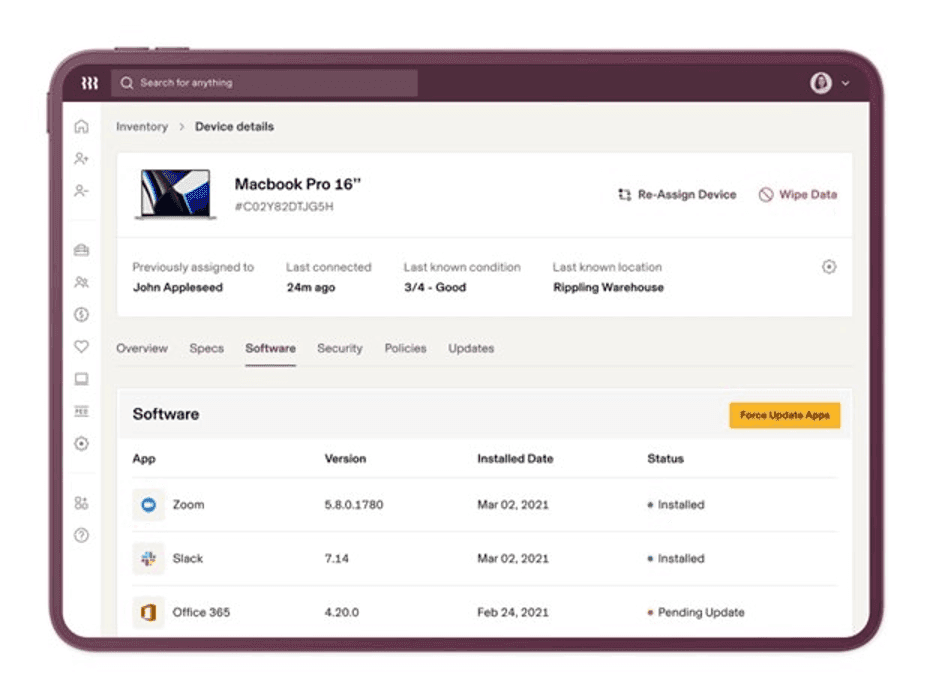
Both Rippling and ADP offer comprehensive HR services to help businesses manage their HR functions efficiently. However, Rippling's ability to automate many of these services stood out to us because HR automation streamlines a company's HR processes. Rippling also offers app and device management services, allowing employers to manage these functions on the same platform as their other, more traditional HR services.
Rippling’s device management feature directly integrates with the rest of its HR functions. Source: Rippling
Payroll
Rippling
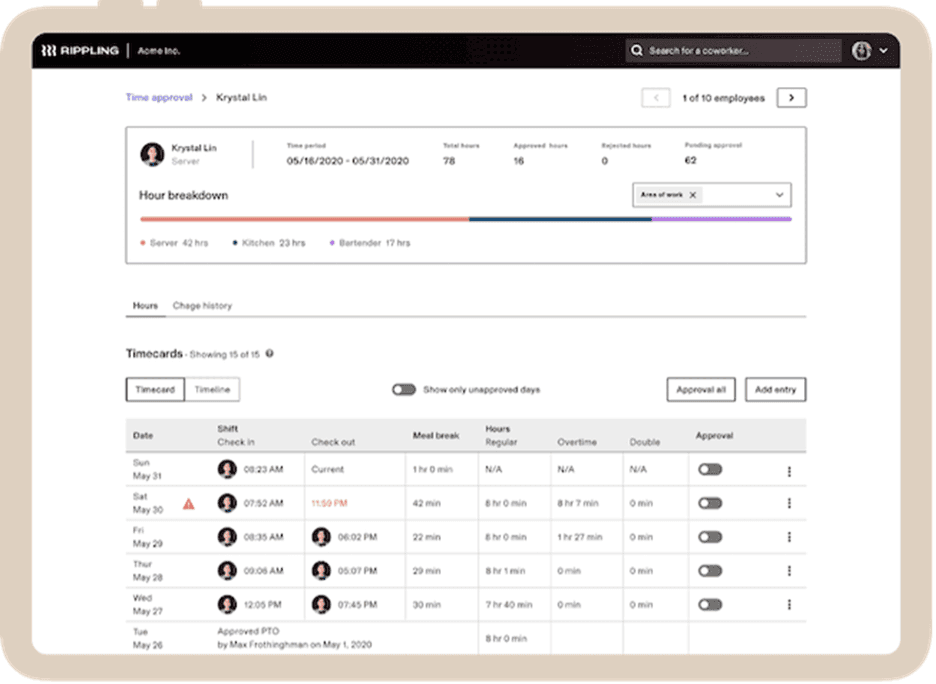
Time and attendance functions: Rippling’s time and attendance functionality can sync seamlessly with its payroll and PTO features.
Payroll processing: If you choose Rippling’s PEO option, you must use the company’s payroll processing services. However, you can also add U.S. or global payroll to your subscription.
Automatic payroll calculations: Rippling takes the hassle out of payroll by automatically calculating and filing all of your payroll deductions and payroll taxes, including federal, state and local taxes, as well as W-2, W-4 and 1099 forms.
Rippling’s time-tracking data can automatically populate into your payroll. Source: Rippling
ADP
Payroll processing: Businesses that want to partner with ADP as a PEO must use ADP’s payroll solution. However, companies can also use ADP’s payroll platform as a stand-alone product for U.S. and global payroll without a co-employment model.
Tax services: ADP offers payroll tax filing as well as business expense tax registration services.
Benefits administration: ADP’s comprehensive employee benefits can sync with its payroll platform.
Optional payroll features: Additional payroll options include audit and reconciliation services, multi-jurisdiction payroll, and state unemployment insurance management.
Did You Know?
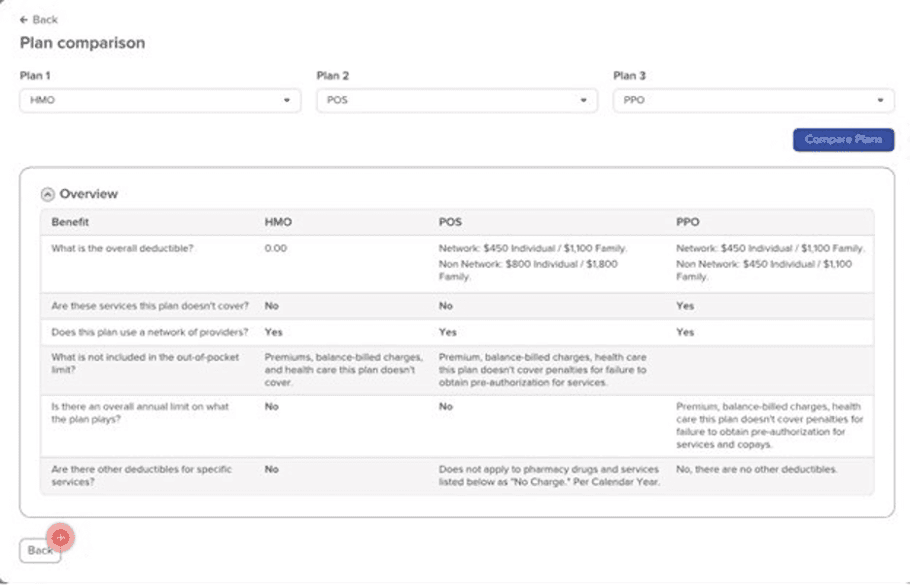
ADP has a helpful feature that can walk employees through the benefits administration process and assist them with choices and applications.
Best for Payroll
ADP
Although both Rippling and ADP offer comprehensive domestic and global payroll processing and tax filing, we found ADP's payroll and benefits slightly more comprehensive. We were impressed with ADP's optional features, like audit and reconciliation services, multi-jurisdiction payroll, and state unemployment insurance management. We also like that ADP offers robust and affordable employee benefits and a range of tiered payroll plans.
ADP’s plan comparison tool can help employees choose the best benefits options. Source: ADP
Usability
Rippling
We found Rippling’s interface and customizable workflows intuitive and straightforward; the platform is easy to use and navigate, and helps to streamline HR processes. We like that the unified system centralizes HR, IT and finance data in one place for efficient management. We were also impressed that Rippling can automate many HR functions.
ADP
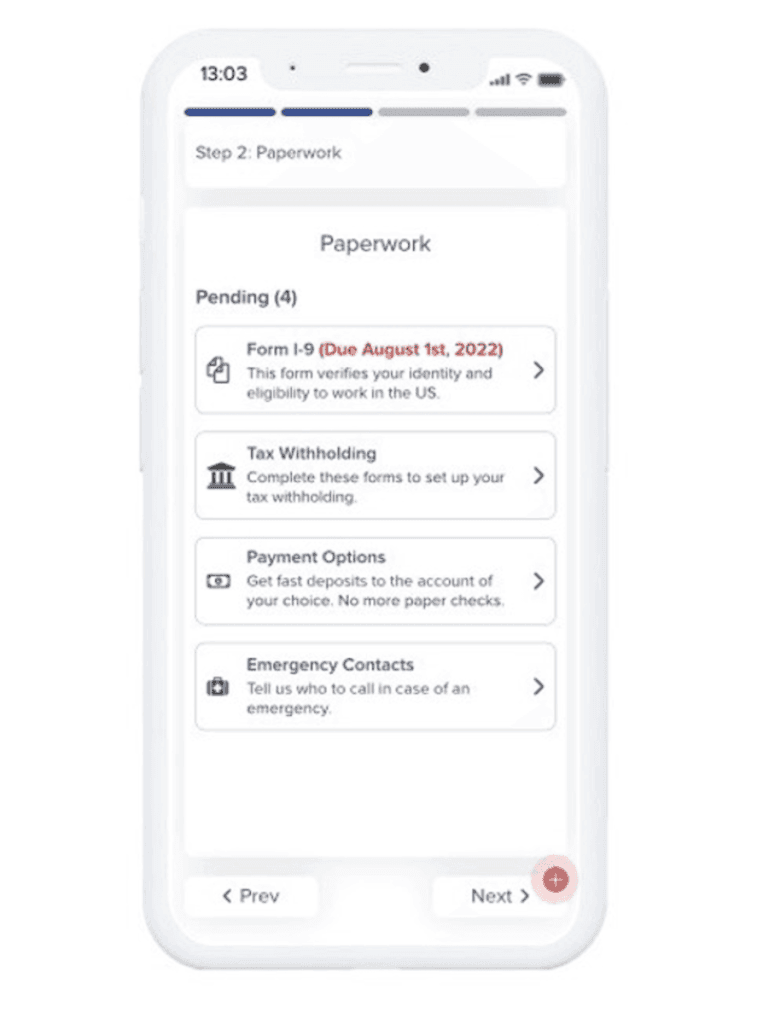
ADP’s customizable HR platform helps businesses tailor a solution to their specific needs. We like that the ADP Marketplace facilitates seamless integrations with hundreds of third-party solutions. Additionally, ADP’s iOS and Android mobile apps offer convenient access on the go.
ADP’s mobile features allow new hires to onboard from any location. Source: ADP
Best for Usability
Rippling
During testing, we were pleased to find that both Rippling and ADP offer intuitive products with clean interfaces. However, we were especially impressed with Rippling's ability to automate so many HR functions. While this does add some time and effort on the front end to customize the solution, it can ultimately save your HR professionals countless hours by eliminating repetitive HR tasks.
Customer Support
Rippling
Rippling offers standard email and web chat support. Users must pay to add Rippling’s HR Help Desk: HR Support if they want direct access to phone support. Rippling also offers basic online resources, like templates, blogs and a help center.
ADP
We like that ADP’s plans automatically include phone, email and web chat support and that users can access a dedicated HR representative. For further support, ADP users can also connect with HR experts and access online resources.
Best for Customer Support
ADP
This was another close call, but ADP's customer support came out on top. We like that ADP is IRS- and ESAC-certified; Rippling is not. ADP also offers phone support, whereas Rippling users must pay extra for that feature.
Rippling vs. ADP Summary
Choose Rippling if you are …
A startup that is growing rapidly and needs a scalable HR and IT solution.
A company that is expanding into new countries and needs a global payroll solution.
A company that needs to automate its HR processes and streamline its workforce management.
A company that’s seeking a single platform to manage all of its HR and IT functions.
Choose ADP if you are …
A midsize business that is growing rapidly and needs a scalable HR and payroll solution.
A large enterprise with multiple locations and a complex workforce.
A business that operates in a highly regulated industry, such as healthcare or finance.
A business that needs a lot of support from its HR and payroll provider.
FAQs
The implementation time will depend on what features you need, how many employees you have, and how many processes you want to customize and automate. However, some users can be up and running with Rippling in just a couple of weeks.
As with any HR software, your implementation time will depend on your company's size and the features you need. However, ADP's implementation takes an average of two to four weeks. This is standard in the industry.
Rippling has impressive integration capabilities. The software can integrate with over 500 third-party applications.
ADP has one of the most extensive lists of integrations of the HR solutions we reviewed. It can integrate with more than 550 third-party applications.
Skye Schooley is a dedicated business professional who is especially passionate about human resources and digital marketing. For more than a decade, she has helped clients navigate the employee recruitment and customer acquisition processes, ensuring small business owners have the knowledge they need to succeed and grow their companies.
At business.com, Schooley covers the ins and outs of hiring and onboarding, employee monitoring, PEOs and HROs, employee benefits and more.
In recent years, Schooley has enjoyed evaluating and comparing HR software and other human resources solutions to help businesses find the tools and services that best suit their needs. With a degree in business communications, she excels at simplifying complicated subjects and interviewing business vendors and entrepreneurs to gain new insights. Her guidance spans various formats, including newsletters, long-form videos and YouTube Shorts, reflecting her commitment to providing valuable expertise in accessible ways.