Business.com aims to help business owners make informed decisions to support and grow their companies. We research and recommend products and services suitable for various business types, investing thousands of hours each year in this process.
As a business, we need to generate revenue to sustain our content. We have financial relationships with some companies we cover, earning commissions when readers purchase from our partners or share information about their needs. These relationships do not dictate our advice and recommendations. Our editorial team independently evaluates and recommends products and services based on their research and expertise. Learn more about our process and partners here.
Squarespace vs. Wix: Which Website Builder Is Better?
Written by:
Jeremy Bender, Senior Writer
Editor verified:
Sandra Mardenfeld,Senior Editor
Last Updated Jul 15, 2026
Business.com earns commissions from some listed providers. Editorial Guidelines.
Table of Contents
Website builders make the process of building, maintaining and updating websites fast and easy. The best website builders mix intuitive ease of use with AI assistant builder capabilities, editable templates and e-commerce capacities for scaling up a store.
There are numerous website builders available. Two of our favorites are Squarespace and Wix — both are powerful, but each excels in certain niches. We’ve put together the following comparison guide to help you decide which builder might be right for you.
Squarespace vs. Wix Highlights
Criteria
Squarespace
Wix
Price
$19 per month for Basic tier, which includes free custom domain
Free for basic tier (includes Wix branding)
Free trial
14-day free trial
No, but has free tier
Third-party integrations
Yes
Yes
AI assistant builder
Yes, using a templated form
Yes, using a chatbot and natural language processing
Template library
Yes, with over 200 editable templates
Yes, with over 2,000 editable templates
Customer support
24/7 email support
Live chat during set hours
24/7 chatbot assistance
Active community forums
Hire an expert marketplace
Free online webinars
24/7 English-language callback
Live chat during set hours
24/7 chatbot assistance
Hire an expert marketplace
Drag-and-drop functionality
Yes, with grid
Yes, without grid
E-commerce capabilities
Built-in payment processor is on all plans
Unlimited product inventory
Card fees starting at 2.9 percent + $0.30
Basic e-commerce features, including payment processor, start on Core plan ($29/month)
Product inventory limited to 50,000 items
Card fees starting at 2.9 percent + $0.30
Who is Squarespace for?
In our testing, we found Squarespace to be the best website builder for ease of use [Learn more in our Squarespace review]. Squarespace comes packaged with several useful third-party integrations, impressive e-commerce support, SEO and AI visibility tools, a robust template library and more. While many of these functions are also available in other website building services, what sets Squarespace apart is the ease with which users can employ them.
Squarespace takes an approach that prioritizes ease of use over advanced functionality. For example, Squarespace has an AI website builder — Blueprint AI — that can build a first draft of a functioning website within five minutes, based on our testing. However, Blueprint AI works based off of a series of checklists and preset forms, as opposed to acting as a chatbot like how Wix’s AI website builder runs. This makes the process of using Blueprint AI, and the output of the tool, feel a bit more cookie cutter even if it is easier to manage.
Squarespace guides users through a quick onboarding process for building a website, funneling users into either choosing a professional website template or using its inhouse AI website builder, Blueprint AI. Source: Squarespace
This is not to say that Squarespace is lacking in the advanced functionality that other website builders have. Rather, that functionality is hidden behind basic, easy-to-use processes. This makes Squarespace ideal for beginners or for users who want a simple website that can be set up quickly, easily and effectively. Users who want more advanced functionality or a larger spread of choices right out of the box may be disappointed, however.
Some of the main benefits of using Squarespace include:
Simple, intuitive design tools that have advanced functionality for those willing to dig deeper
Who is Wix for?
In our review of Wix, we found the website builder is a strong offering for users interested in a larger template library as a starting point for web design, as well as a more nuanced experience. Like Squarespace, Wix also comes with other related functionalities as part of its overall product suite. Unlike Squarespace, though, some of these products are not built-in to the website builder and are purchased separately. Similarly, its third-party integrations are part of a larger library that can be installed a la carte.
Wix’s larger learning curve is offset, however, by its vast template library. While Squarespace has over 200 editable templates, Wix offers more than 2,000. These templates are a mix of professionally designed and AI-generated offerings, filterable by use case and industry. With such a large foundation, Wix makes it easy — and faster — for users to create more unique websites than through Squarespace.
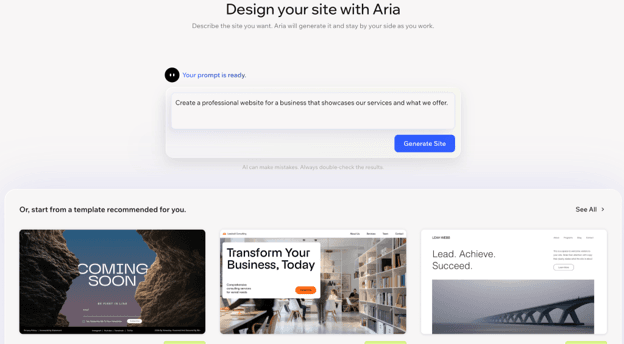
This difference also carries over to Wix’s AI builder, Aria. Aria is a functional AI chatbot that builds a website through a conversation with the user. This leads to the creation of more unique websites than Squarespace’s Blueprint AI; however, it also works better if a user has a general idea of how they want their page to appear and function. We found Wix to be better suited for users who either want a large template library or who have a more well-developed vision of how they want their website to look and function.
Like Squarespace, Wix offers new users the option to initially design a website through using a template or the AI assistant, Aria. Unlike Squarespace, Aria functions as a chatbot. Source: Wix
Some of the main benefits of using Wix are:
A robust template library across diverse use cases and industries
An AI website building tool that can generate more unique webpages
A free tier, at the price of including Wix branding
Squarespace vs. Wix comparison
Both Squarespace and Wix are strong offerings. If you want to know more about what makes each distinct, we break it down further below.
Price
Squarespace
Squarespace offers four plans. Beyond the Core plan, most of the tier differences come in the form of lower transaction or credit processing fees rather than upgrades in website builder functionality.
Basic: $19 per month when billed annually
This plan is ideal for small businesses who care more about an online presence than e-commerce or advanced functionality.
It includes all the core website building and AI functions as the other plans.
Core: $29 per month when billed annually
In addition to the Basic functionality, Core adds advanced website analytics, complete CSS and JavaScript customization, sales funnel analytics, API integrations and lower transaction fees.
Plus: $49 per month when billed annually
All the same functionality as Core, with lower digital content and membership transaction fees and reduced credit card processing rates.
Advanced: $99 per month when billed annually
This plan offers the lowest payment processing and transaction fees.
Wix
Wix offers a free tier with limited functionality, along with four paid tiers. Beyond the Light tier, most of the additional functionalities are for e-commerce rather than for the website builder.
Free: The free tier does not require a credit card, while still offering users no-code design features, the AI website builder, templates, web hosting and a drag-and-drop editor.
Websites on the free tier contain prominent Wix branding.
Light: $17 per month when billed annually
Includes a free domain for a year, 2GB of storage space, multi-cloud hosting and two site collaborators.
Includes a light marketing suite.
Core: $29 per month when billed annually
Includes a basic marketing suite, basic e-commerce functionality, can accept payments and can have five site collaborators.
Business: $39 per month when billed annually
Includes the standard marketing suite, standard e-commerce functionality and can have 10 site collaborators.
Business Elite: $159 per month when billed annually
Offers unlimited storage space, advanced marketing suite, e-commerce suite, developer platform and can have 100 site collaborators.
Best price
Wix
For businesses looking solely for a website builder, Wix comes out ahead. Its free tier offers an introductory point for businesses to become familiar with the platform and build a website. The Light tier then allows for the removal of Wix branding, while offering more storage space. These tiers both include Wix’s huge template selection and AI tools, making the platform development a steal.
However, businesses looking to focus on building an accessible e-commerce site would likely find more value in Squarespace’s offering.
Tip
When looking at the cost of higher-tier Wix and Squarespace plans, remember to compare their prices against other services. It may end up being cheaper to go with a higher priced web builder plan to save on POS system costs and the price of other tools and services you would need to integrate.
Free trial
Squarespace
Provides a 14-day free trial with the option for a one time seven-day extension.
Wix
Wix does not offer a free trial, but it does have a free tier.
Wix also offers a 14-day money-back guarantee.
Best free trial
Wix
Wix comes out ahead, as its free tier essentially functions as an unlimited free trial of Wix’s basic functionality. Then, users can take advantage of the 14-day money-back guarantee for upgrades to paid plans.
Third-party integrations
Squarespace
Squarespace comes packaged with several built-in integrations based on the pricing tier.
The Basic tier includes Google Analytics 4.
The Core tier and above also includes built-in integrations for Google Shopping, Facebook and Instagram advertising and insights, ChowNow, Mailchimp and Zapier.
Squarespace also has an additional extension library of 48 extensions in Shipping and Fulfillment, Inventory and Products, Sales and Marketing, and Finance.
Wix
Wix offers some built-in integrations based on the pricing tier.
On the Light tier and above, Wix offers Google Ads with Wix.
Starting on the Core plan, Wix offers tiered amounts of dropshipping support through Modalyst, as well as SMS and WhatsApp notifications.
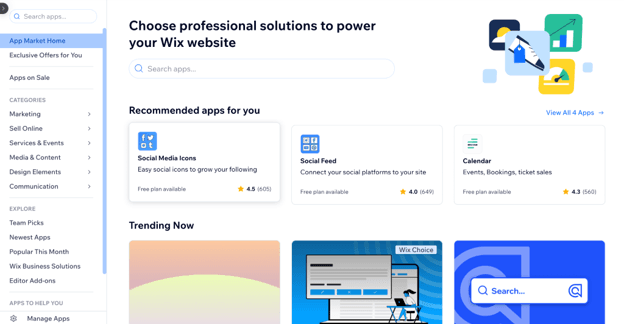
The Wix App market also has, as of this writing, hundreds of optional app integrations for everything from embedding Spotify to TikTok Ads to a fraud filter and IP blocker.
Wix offers hundreds of bespoke, third-party integrations in its app marketplace that can be added to a website. Source: Wix
Best Third-party integrations
Wix
Squarespace offers better integration functionality out of the box. However, Wix wins based on the breadth of the offerings available. While many app integrations can ultimately be recreated without the need of an integration on either platform, Wix’s app market makes the process smooth and powerful.
AI assistant builder
Squarespace
Squarespace offers two different AI assistants for the process of building a website: Blueprint AI, for initially generating a website, and Beacon AI, for iterating upon and editing a website once it’s created.
Blueprint AI
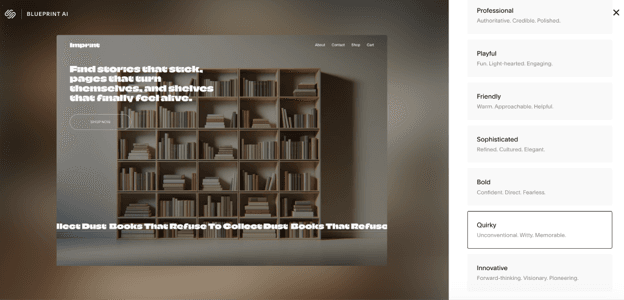
A simple and effective website builder that guides users through building a website by selecting options from drop-down menus and checkboxes.
Quick and effective, it allowed us to build and generate the first draft of a website within five minutes.
Its implementation and reliance on menus made the initial website designs feel cookie cutter.
Beacon AI
While still in beta as of this writing, Beacon AI is an automation tool that can assist with easy site edits, store management, performance analytics, content organization and marketing.
Beacon AI works well and, for tasks it cannot complete, it can refer users to the relevant part of the Squarespace website to accomplish the task.
Squarespace’s Blueprint AI offers a number of choices during website generation; users can preview how these design decisions make their website look and can go back and change their layout. Source: Squarespace
Wix
Wix has a single AI chatbot assistant, Aria, for both the initial website development as well as for management of the site.
In our testing, Aria generated a website within 10 minutes — from initial discussion to generation.
It explained each process we were working on, making the process feel collaborative and unique.
The end result of the process was a functional and unique website.
However, in our testing, Aria encountered hiccups in updating the site based on instructions, such as not resizing assets effectively and generating overly long text for the text boxes it provided.
Best AI assistant builder
Tie
We were impressed with both Squarespace and Wix’s AI website-building assistants, while also running into issues with both of them. Ultimately, we found their offerings to be tied, with any judgement regarding a winner coming down to personal preference. Users who want a more setup wizard-style approach to creating a website will likely prefer Blueprint AI, while others who want to feel as if they were talking to a web designer while building their site would prefer Wix’s Aria.
Bottom Line
A website produced by either website-building assistant should be treated as a first draft. While these AI assistants are very capable of making the initial version of a site, users should still expect to finalize the designs themselves or with the help of freelance or in-house developers.
Template library
Squarespace
Squarespace offers over 200 editable templates to users enrolled in any plan.
Wix
Wix offers over 2,000 editable templates across all plan tiers, including its free tier.
Wix’s template library is vast, with thousands of professionally designed and AI-generated templates across website type and industry. Source: Wix
Best template library
Wix
By sheer scope and breadth of offerings, Wix is the winner. Both services offer professionally-designed templates that can make strong starting points for websites. But the sheer volume of Wix’s offerings makes this service the winner.
Customer support options
Squarespace
Squarespace offers multiple venues for users to receive support, but does not offer a live call, saying it believes such a service would not be helpful. Instead, Squarespace offers support through the following methods:
Live chat: Squarespace offers live chat support during dedicated hours, variable based on holidays.
AI Chatbot Assistant: Squarespace encourages users to route common questions through its support chatbot.
Community forums: Squarespace has an active community forum spanning everything from discussions on code customization, to SEO, to content.
Hire an expert: Squarespace features a freelancer marketplace to connect vetted experts with users based on need.
Webinars: Squarespace hosts free online webinars that provide in-depth coverage of select topics.
Wix
Like Squarespace, Wix offers a number of ways for users to receive support. Wix also does not offer a dedicated live call line, instead offering customer support callbacks.
Support callbacks: Wix’s English-language callbacks are advertised as being available 24/7. However, reviews on third-party websites have noted long call delays and occasional issues reaching support at all.
Live chat: Live chat is available for set hours based on language, with English-language support available from 2 a.m. to 6 p.m. Eastern Time.
Hire an expert: Wix also maintains a vetted freelancer marketplace ready to help users based on specific needs.
Best customer support options
Tie
Customer support is an area in need of improvement for both Wix and Squarespace. Third-party review sites contain complaints from users for both of the web builders for difficulties contacting customer support, as well as issues receiving support to remediate issues. We were not a fan of Squarespace’s lack of a live call line; however, Squarespace has an active community forum that provides support and, while Wix does have a callback option, there are frequent complaints about users not receiving callbacks.
Overall, we judge Wix and Squarespace to be tied regarding customer support.
Drag-and-drop functionality
Squarespace
Every editable item in Squarespace can be dragged and dropped.
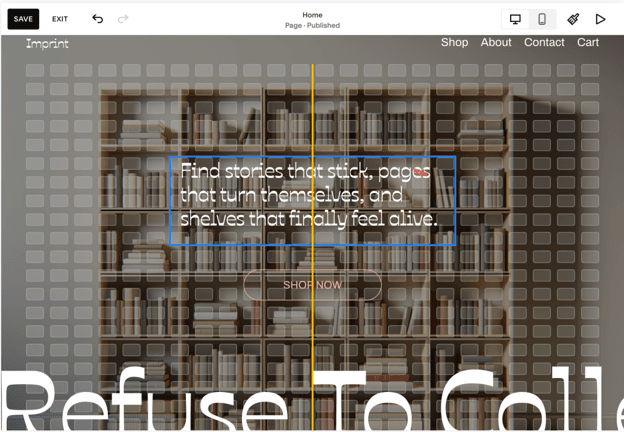
Squarespace features an intuitive grid when moving items to help align them and have a better visual idea of how items line up with each other.
Squarespace’s drag-and-drop functionality is easy to use and triggers the display of a grid, allowing perfect positioning and alignment of items. Source: Squarespace
Wix
Each editable item in Wix can be dragged, dropped and size adjusted.
Wix works like an unstructured canvas, which can make positioning and aligning elements more difficult.
Best drag-and-drop functionality
Squarespace
Squarespace has better drag-and-drop functionality. Its grid makes it easy to align items and understand how you are positioning elements within the webpage. While both services make it easy to move things, Squarespace is the more intuitive of the two. Squarespace’s perfect positioning also makes it easier to design mobile-friendly websites.
FYI
The importance of drag-and-drop functionality depends on how hands-on a user is planning to be in the website’s development. Users who expect to revise templates or AI-generated builds may find Squarespace’s grid and alignment tools helpful. But users who want to just use templates may not find this helpful.
Squarespace vs. Wix summary
Both Squarespace and Wix are strong and competent web builders that most users could interchangeably use. However, each platform is slightly better than the other for specific use cases.
Squarespace is best for general ease of use.
For users looking for the most straightforward web builder right out of the box, Squarespace is the best choice. Its pricing tiers make it clear what functions are available. We also appreciated how the Core tier has all the web builder functionality you would need to build everything from a simple portfolio page to a fully functioning online store. Squarespace’s drag-and-drop functionality, clear webpage builder with Blueprint AI and impactful, built-in integrations make Squarespace best for users who want to build a functioning webpage quickly, efficiently and with little muddling about.
Wix is best for templates.
Wix is a great choice of website builder for users looking for options. Nowhere is this more apparent than its template library. With over 2,000 customizable templates, Wix provides a starting point for webpages across most imaginable use cases and industries. But this level of options shines through Wix’s other features, whether it’s the wide app marketplace or its chatbot-based website builder. All of these options can be confusing and overwhelming. But for users who go into Wix knowing what they are doing and what they are looking for, it’s a powerful builder.
FAQs
Squarespace and Shopify are different tools that have different goals. While Squarespace does have strong e-commerce features, its primary focus is a design-first website builder. Shopify, on the other hand, is first and foremost a commerce platform built for running online stores.
Squarespace and Wix are both powerful website builders with different focuses. Squarespace works better for those looking to build a website with minimal effort, while Wix can be a superior choice for individuals looking for more options and overall freedom.
Squarespace can have design limitations, especially compared to building a website from scratch. Additionally, like with any webbuilder, users do not end up owning any of the underlying code for the website. However, the lack of code ownership is a problem for Wix as well.
Yes, users can build and publish websites through Wix’s free tier without even needing to input credit card information. However, this tier does come with multiple downsides. First, the website includes a banner ad saying it was built on Wix. Secondly, the URL by default is a generic subdomain (like username.wixsite.com/page-name), though this can be changed by purchasing a domain. Lastly, the page has capped storage of 500MB.
Unlike other webbuilders, Wix offers total creative freedom. This can make the process unintuitive with a steep learning curve. With complete freedom to drag-and-drop elements anywhere on a screen, it can also be harder to get on-page alignment right. Finally, Wix users also cannot easily switch between templates once a site is built, making it time-consuming to change the layout of a page.
Did you find this content helpful?
Thank you for your feedback!
Share Article:
Written by: Jeremy Bender, Senior Writer
Jeremy Bender is a proven cybersecurity expert with a Certified Ethical Hacker credential from the EC-Council and a CompTIA Security+ ce certification. He has spent nearly 10 years studying and advising on intelligence reports and threat analysis.
At business.com, Bender covers topics related to cybersecurity, like credit card fraud, remote access software and data minimization, as well as other IT subjects, such as laptop performance and internet connectivity.
Bender's background in geopolitics gives him a unique perspective on the global security threats affecting small and midsize businesses. His insights on emerging cybercrime trends and mitigation strategies are invaluable for business owners.