Business.com aims to help business owners make informed decisions to support and grow their companies. We research and recommend products and services suitable for various business types, investing thousands of hours each year in this process.
As a business, we need to generate revenue to sustain our content. We have financial relationships with some companies we cover, earning commissions when readers purchase from our partners or share information about their needs. These relationships do not dictate our advice and recommendations. Our editorial team independently evaluates and recommends products and services based on their research and expertise. Learn more about our process and partners here.
Helcim Review and Pricing
Helcim is a great credit card processor for businesses that need an all-in-one platform with POS and financial tools.
Business.com earns commissions from some listed providers. Editorial Guidelines.
Table of Contents
Editors Score:8.9/10
Helcim is a great credit card processor for businesses that want an all-in-one payment and POS platform. We like that businesses can take payments in person or online, send invoices and set up recurring payments, all without paying a monthly fee.
Pros
Helcim's all-in-one platform features an intuitive user interface with simple, easy-to-use tools.
Businesses can accept in-person, online, invoiced and recurring payments from the same platform.
Helcim doesn't charge monthly fees or lock businesses into long-term contracts.
Cons
Businesses will need to purchase Helcim's payment hardware separately.
Helcim's POS may be too basic for retailers and restaurants that need more specialized features.
Helcim doesn't offer same-day deposits, and free next-business-day funding is limited to eligible banks and transactions.
Businesses need a credit card processor that makes it easy to accept credit card payments and digital payment methods wherever their customers want to pay. Helcim is an excellent choice for businesses looking for an all-in-one platform that brings payment processing, point-of-sale (POS), invoicing and other payment tools together in one place. The software is easy to use, with options for accepting payments in person, online, over the phone and through invoices. We also like Helcim’s transparent interchange-plus pricing, which includes automatic volume discounts without monthly fees or long-term contracts. Here’s what you should know when considering Helcim for your business.
Helcim Editor's Rating:
8.9 / 10
Pricing and fees
9.2/10
Customer service
9.2/10
Third-party integrations
8.5/10
Payment options
9.2/10
Added POS tools
8.5/10
Why We Chose Helcim for Businesses That Want an All-in-One Platform
Helcim stood out to us because businesses can manage so many of their payment needs from one platform. In addition to credit and debit card processing, Helcim includes POS software, invoicing, recurring payments, a virtual terminal, Payment Pages and online checkout tools. That gives businesses several ways to accept payments without having to piece together separate systems.
We especially like Helcim for businesses that sell through more than one channel. You can take payments at the counter with Helcim’s POS system and hardware, accept payments online, send customers invoices or take payments over the phone using the virtual terminal. The platform also includes customer management, inventory and reporting tools. For businesses with more specific needs, Helcim offers integrations and APIs that can connect payment processing with other software tools in their tech stack.
Helcim’s pricing adds to its appeal. There are no monthly software fees or long-term contracts, and its interchange-plus pricing makes it relatively easy to see what you’re paying for payment processing. Helcim also automatically lowers its processing margin as monthly processing volume increases. We appreciate that businesses don’t have to negotiate for those volume discounts as they grow.
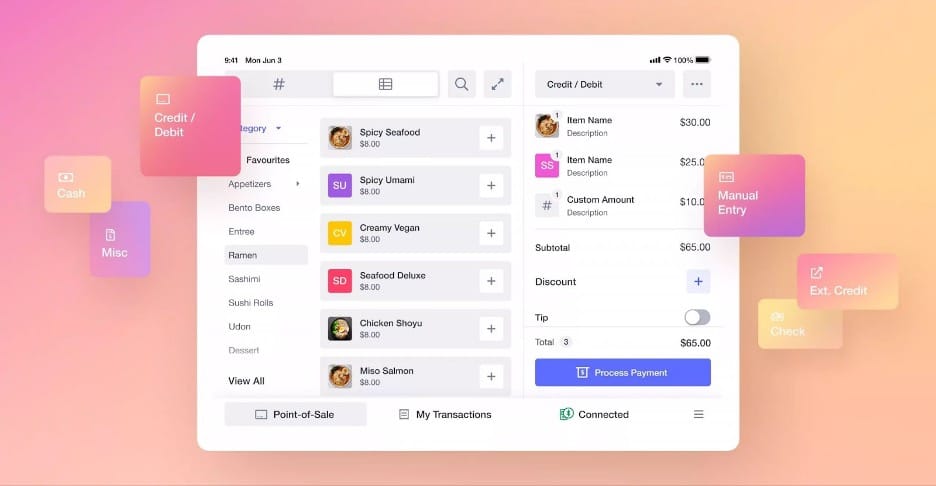
Helcim’s built-in POS software lets businesses manage orders and process payments from the same interface. Source: Helcim
Ease of Use
During our hands-on demo, we were impressed by Helcim’s clean interface and straightforward navigation. Despite the number of tools included with the platform, it doesn’t feel overwhelming. Payment and merchant tools are clearly organized, and common tasks like creating an invoice, sending a payment link or pulling up a customer record are easy to find.
A few things stood out to us:
Simple navigation: Payment and merchant tools are grouped into clearly defined sections, making it easy to move between payment processing, invoicing, customer information and reporting.
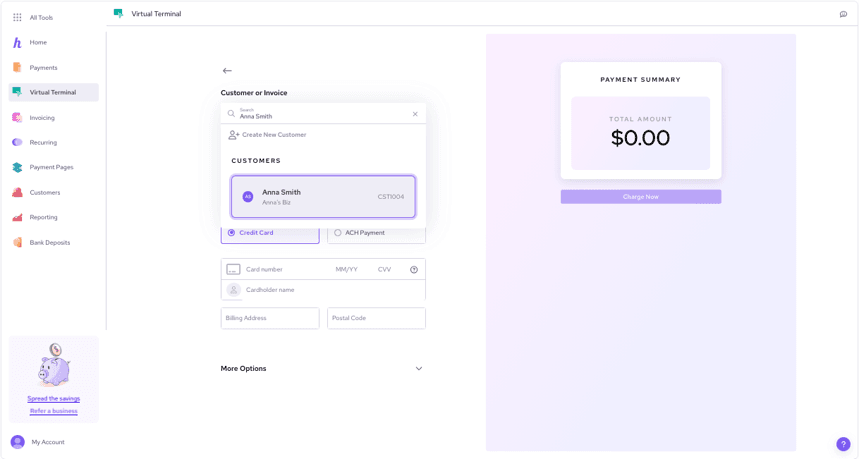
Virtual terminal: The virtual terminal has a straightforward layout for entering and processing payments, including transactions taken over the phone.
Invoices and billing: Businesses can customize invoices and billing templates, making it easier to create professional-looking documents for customers.
Payment links and QR codes: Helcim makes it easy to create payment links and QR codes, giving customers another convenient way to pay.
Reporting: Built-in reporting tools give businesses a clear view of transactions, sales and other payment data without requiring separate reporting software.
Mobile POS: The mobile app serves as a mobile POS, allowing businesses to accept payments on the go while also accessing customer information, transaction history, inventory and sales data.
Helcim’s clean navigation makes it easy to move between the virtual terminal, invoicing, recurring payments and other commonly used tools. Source: Helcim
Helcim Features
Helcim gives businesses plenty of ways to accept payments, whether customers are shopping in person, online or paying an invoice. We were also impressed by how many additional tools are included with the platform, from POS and customer management to recurring billing and reporting. Here are some of the features we found most useful.
Payment Processing and Acceptance
Payment flexibility is one of Helcim’s biggest strengths. Businesses can accept payments at the counter, online, over the phone or through an invoice, all while keeping transactions within the same platform. We also like that Helcim goes beyond basic credit card processing with tools for recurring billing, ACH payments and online sales. This range of options makes it especially appealing to businesses that serve customers across multiple channels. Here’s what stood out to us:
Omnichannel payments: Businesses can accept in-person and online payments, giving customers several ways to pay from the same platform.
Virtual terminal: Helcim’s virtual terminal lets businesses manually enter credit card or ACH payments from a computer, tablet or phone. It’s particularly useful for taking payments over the phone without additional hardware.
Recurring payments: Businesses can automate subscriptions, memberships, payment plans and retainers with customizable billing cycles. Helcim also supports free trials, payment recovery and recurring credit card or ACH payments.
Online invoicing: Businesses can create and send professional invoices and give customers an easy way to pay remotely.
Online store: Helcim’s Online Checkout lets businesses create a free, fully hosted online store using products and services from their Helcim catalog. Businesses can customize the store, offer shipping or pickup and accept payments through Helcim.
Payment Pages: Businesses can create custom Payment Pages to collect payments through an existing website without any programming. They can also share payment links directly with customers.
QR code payments: Businesses can create QR codes that customers scan to make payments from their mobile devices.
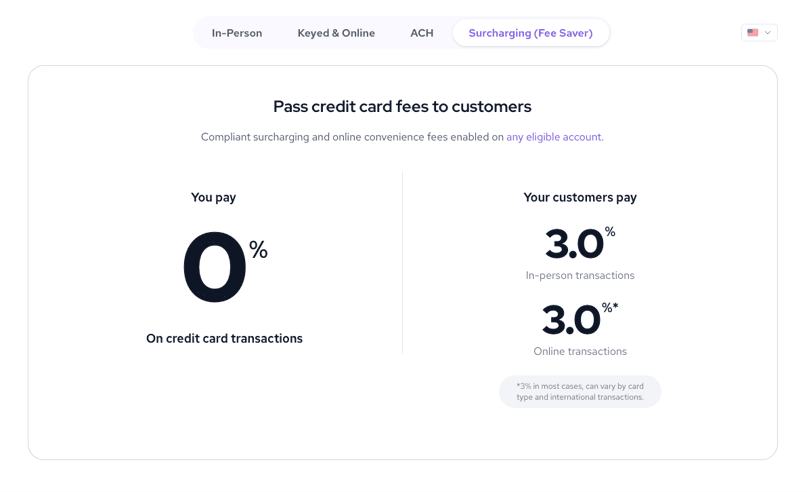
Fee Saver: Businesses can use Helcim’s optional Fee Saver to pass credit card processing fees on to customers who choose to pay by card. (Because credit card surcharging rules vary by location, businesses should check their state or local requirements before using the feature.)
Faster Deposits: With Helcim’s Faster Deposits feature, eligible U.S. and Canadian businesses can receive credit and debit card deposits the next business day at no additional cost. U.S. banks must participate in RTP or FedNow, and other eligibility requirements apply.
FYI
While Helcim's invoicing functions work well, the platform also integrates with some of the best accounting software, including QuickBooks Online and Xero.
Helcim’s Fee Saver lets eligible businesses pass credit card processing fees to customers who choose to pay by card. Source: Helcim
POS Tools
Helcim’s free POS software gives businesses more than a basic way to ring up sales. It works across computers, tablets and smartphones and connects payment processing with inventory, customer information and sales reporting. We especially like that businesses can start with devices they already own and add Helcim hardware as their needs grow. Here are some of the POS features that stood out to us:
POS software: Helcim’s POS software is included with a free account and works on laptops, tablets and smartphones. Businesses can process payments (including NFC mobile payments), issue refunds, split transactions, accept tips and keep track of sales from the same system.
Card Reader: The $199 Helcim Card Reader accepts tap, chip-and-PIN and mobile wallet payments. The latest model has a 4-inch touchscreen and can handle simple payments on its own or pair with Helcim’s POS software for access to products and customer profiles.
Smart Terminal: Helcim’s $349 Smart Terminal combines its POS software, payment reader and receipt printer in one portable device (you can also send digital receipts). Businesses can use it on its own or connect it to a Windows or Mac computer for a more traditional checkout setup. Financing is available for $32 per month for 12 months.
Mobile POS: The Helcim POS app works on compatible iOS and Android phones and tablets, allowing businesses to access their POS and accept payments away from a traditional checkout counter. U.S. merchants can also use Tap to Pay on iPhone without purchasing additional payment hardware.
Desktop POS: Businesses can download Helcim’s POS app for Windows or Mac and turn a computer into a checkout workstation. The desktop setup can be paired with a Card Reader or Smart Terminal for in-person payments.
Inventory and customer management: Businesses can track stock levels, SKUs, product variants and other inventory details from the POS system. Inventory syncs across sales channels, while customer profiles can store purchase history and saved payment information.
Bottom Line
Helcim's free cloud-based POS software is a nice addition for businesses that want payment processing and basic sales management in one system. Its flexible device options also let businesses build a checkout setup without paying a separate monthly POS software fee.
Helcim’s Smart Terminal combines payment processing, POS software and a built-in receipt printer in one portable device. Source: Helcim
CRM Tools
Helcim’s customer management tools keep payment and customer information together, which is especially handy for sellers with a lot of repeat business from the same customers. Each customer can have a profile with contact information, payment methods, transaction history and invoices. Helcim also includes a secure card vault that uses tokenization to store payment information for future purchases, invoices or recurring payments.
Customers can do quite a bit on their own, too. Helcim’s Customer Portal lets them view their order and invoice history, pay outstanding invoices and update saved payment information. Businesses can add their logo and customize the colors and fonts so the portal feels more like part of their own site.
For businesses that need more advanced CRM features or field-service tools, Helcim offers its Payment Extension, a browser-based tool that connects Helcim’s payment processing with other web-based platforms. It works with software such as Jobber, Workiz and GoHighLevel, letting you take payments through Helcim while continuing to manage scheduling, customer records and other day-to-day work in the software you already use.
Integrations
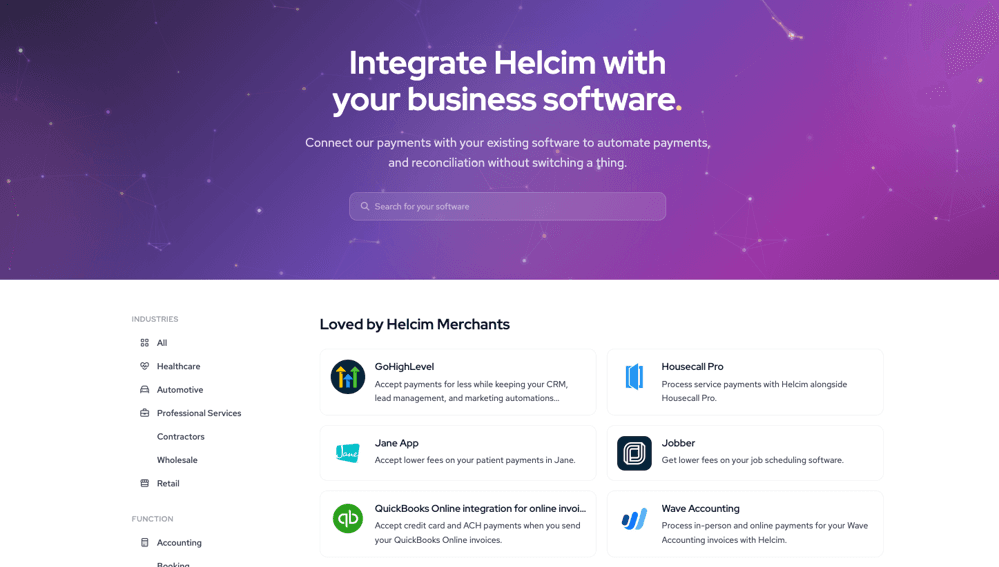
Helcim has a growing integration library, with more than 45 currently available options and more on the way. The selection covers accounting, e-commerce, CRM, field-service and healthcare software, so businesses have a good chance of finding tools they already use. Some notable options include:
CRM and field service: GoHighLevel, Jobber, Workiz and Housecall Pro
Health and wellness: Jane App
Healthcare: DrChrono, Tebra, Ava EMR, Optimantra and Sessions Health
How the connection works depends on the software. Helcim offers direct integrations and plugins for some platforms, while others connect through its Payment Extension, a browser-based tool that lets you process Helcim payments while working in another web-based platform.
For businesses that need something more specific, developers can also use Helcim’s API and HelcimPay.js to build custom payment integrations for websites, apps and other systems.
Helcim offers more than 45 integrations across accounting, CRM, field service, healthcare and other business software categories. Source: Helcim
Security
Payment processors handle sensitive customer and card information, so we took a close look at Helcim’s security measures. The platform combines payment security with safeguards for merchant accounts and stored data. Here’s what we found most useful:
PCI Level 1 compliance: Helcim is a PCI Level 1 service provider and undergoes on-site audits, vulnerability scanning and penetration testing to maintain PCI compliance.
Encryption and tokenization: Helcim uses AES-256 encryption for sensitive merchant and cardholder data and TLS 1.2 or higher for data in transit. Its Card Vault uses tokenization so businesses can securely store payment information without keeping actual card numbers on their own systems.
Multifactor authentication: Merchants can enable multifactor authentication for their accounts and staff, adding another layer of protection when users log in.
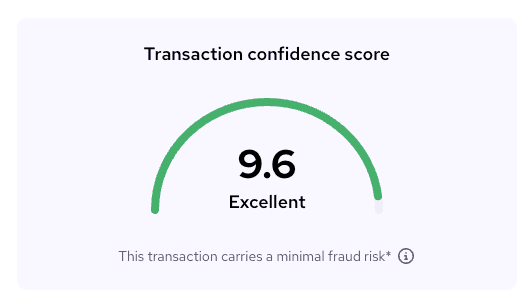
Fraud Defender: Helcim’s built-in online payment fraud tool evaluates transactions and gives each one a confidence score based on factors such as the CVV, billing address, transaction size and IP location. You can also set a minimum score and have higher-risk transactions automatically voided.
Network and data security: Helcim uses firewalls and intrusion detection and prevention systems to monitor its network for potential threats. Databases are backed up daily, and its data center providers use 24/7 physical security and restricted access controls.
HIPAA compliance: Healthcare businesses get additional protections for sensitive patient information. Helcim is HIPAA compliant and uses safeguards including encryption, access controls and audit logging, making it suitable for practices that need to accept payments while protecting PHI.
Helcim’s Fraud Defender gives online transactions a confidence score so you can quickly spot potential fraud risk. Source: Helcim
Helcim Pricing
Helcim doesn’t charge a monthly subscription fee. Instead, it uses interchange-plus pricing, so businesses pay the card network’s interchange rate plus Helcim’s markup on each transaction. That markup also drops automatically as monthly processing volume increases. Here’s what you should know:
Transaction type
Pricing
Key details
In-person payments
Interchange + 0.40 percent + 8 cents
Volume discounts apply automatically as monthly card processing increases
Keyed and online payments
Interchange + 0.50 percent + 25 cents
Covers keyed and online card transactions; volume discounts apply
ACH payments
0.50 percent + 25 cents
Capped at $6 for transactions under $25,000; larger transactions are not capped and incur an additional 0.05 percent on the portion above $25,000
Fee Saver
0 percent merchant credit card processing cost
Eligible businesses can pass a surcharge to customers who pay by credit card, subject to applicable rules
Additional Pricing Considerations
Helcim’s lack of a monthly subscription fee keeps the basic pricing structure fairly simple, but there are a few other costs and policies to consider:
No monthly or setup fees: You won’t pay a monthly account fee, setup fee, statement fee, PCI compliance fee or cancellation fee. There are also no long-term contracts.
Volume discounts: Helcim automatically lowers its markup as your processing volume increases.
Hardware: The Helcim Card Reader costs $199, while the Smart Terminal costs $349.
Tap to Pay on iPhone: Businesses that don’t need separate payment hardware can accept contactless payments on an iPhone for an additional 10 cents per transaction.
Chargebacks: Helcim charges $15 for a lost credit card chargeback. According to its current pricing information, there’s no charge when a dispute is resolved in the merchant’s favor.
Recurring payments: Helcim adds 0.40 percent per transaction for recurring subscription billing.
Fee Saver: Eligible merchants can pass credit card processing costs to customers through Helcim’s surcharging program.
Deposits: Next-business-day deposits for credit and debit transactions are included at no additional cost where supported.
ACH returns: Helcim charges $5 when an ACH payment is rejected or returned by the customer’s bank.
Tip
If your business processes a growing volume of card payments, keep an eye on Helcim's volume discounts. Your processing markup drops automatically as your monthly volume increases, so you don't have to negotiate a new rate each time you reach a higher tier.
Implementation and Onboarding
Getting started with Helcim is fairly straightforward. Here’s what to expect as you get set up:
Online application: You’ll enter your business and ownership information, describe the products or services you sell and provide estimates for your monthly revenue and average transaction size.
Account review: Helcim reviews new accounts before merchants begin processing. In some cases, the Trust & Safety team may ask for additional information or documents to verify your business.
Guided onboarding: Helcim provides a seven-step onboarding guide that walks you through the essentials, including connecting your bank account, setting up taxes and taking a test payment. You can follow the steps in order or work through them at your own pace.
Setup resources: Helcim Learn includes instructions for setting up payment tools, adding products, configuring invoices, ordering equipment and connecting integrations such as QuickBooks Online and Xero.
Business restrictions: Helcim doesn’t accept businesses in certain prohibited industries, including gambling, cannabis and some financial services. Other businesses in higher-risk industries may still qualify but could face additional review and documentation requirements.
We especially like that you don’t have to wait around during the account review to start learning the software. Helcim provides plenty of guides and tutorials, so you can familiarize yourself with the platform and start getting things set up while your information is being reviewed.
If you’re ordering hardware, standard shipping typically takes three to five business days. Helcim also offers expedited two-day and next-day shipping for an additional charge.
Customer Support
Helcim provides in-house customer support, with several ways to get help when you need it. We also like that support comes from Helcim’s own team rather than an outsourced call center. Here are the options available:
Phone support: You can reach a Helcim support specialist Monday through Friday from 7 a.m. to 5 p.m. MT and Saturday from 9 a.m. to 5 p.m. MT.
Online support: If you’d rather not call, you can submit a question online or open a support ticket through your Helcim account.
Helcim Learn: The online help center has an extensive collection of step-by-step guides covering account setup, payments, invoicing, POS hardware, integrations and other features.
Developer resources: Businesses building custom payment solutions can also access separate API documentation and developer guides.
Limitations
Helcim offers a lot for businesses that want payment processing and business tools in one platform, but it won’t be the right fit for everyone. Here are the main drawbacks to consider:
Limited hardware selection: Helcim sells a Card Reader and Smart Terminal, but its proprietary hardware lineup isn’t as extensive as some competitors’. Businesses looking for a wider range of purpose-built POS equipment may prefer another provider. See our Clover review if you want a wider selection of POS hardware.
No same-day deposits: Helcim’s Faster Deposits feature provides free next-business-day deposits for eligible credit and debit transactions, but same-day funding isn’t available. If getting your money the same day is a priority, check out our Chase Payment Solutions review.
Some businesses aren’t eligible: Helcim prohibits certain types of businesses, including gambling, cannabis and some financial services. Other higher-risk businesses may be accepted but could face additional review and documentation requirements. See our review of pmtbox (formerly National Processing) if your business needs a processor that works with a wider variety of organizations.
POS features may be too basic for some businesses: Helcim includes useful POS, inventory and customer management tools, but businesses with more complex retail or restaurant operations may want a system with more specialized features. See our Toast review for a POS system built specifically for restaurants.
Methodology
We researched and analyzed the best credit card processors to find the top options for small businesses. Our evaluation included product demos, hands-on testing, user reviews and interactions with vendor customer service teams. We compared each processor’s rates and fees, contract terms, payment options and the usability of its software and hardware.
To determine the best all-in-one credit card processing platform, we looked closely at how much businesses can do within one system. We gave particular weight to POS and payment tools, invoicing and billing, customer management, integrations and other features that can reduce the need for separate business software.
Helcim FAQs
Credit and debit card deposits generally take one to two business days. With Faster Deposits, eligible businesses can get card payments the next business day for free if their bank supports RTP or FedNow. ACH payments take longer, typically three to five business days.
Yes. Helcim includes a payment gateway for accepting credit card payments online. Businesses can use Helcim's hosted payment tools or its API to add payment processing to their website or app.
Yes. Helcim supports ACH payments at 0.50 percent plus 25 cents per transaction, with the fee capped at $6 for transactions under $25,000. For transactions of $25,000 or more, the cap no longer applies. Helcim charges 0.50 percent plus 25 cents on the full amount, plus an additional 0.05 percent on the portion above $25,000.
Yes. Helcim's Fee Saver lets businesses pass credit card processing fees on to customers who choose to pay by credit card, which can bring the merchant's processing cost down to 0 percent. Surcharging rules vary by location, so businesses should check the requirements that apply to them before using Fee Saver.
Bottom Line
We recommend Helcim for …
Omnichannel businesses that want to accept payments in person, online, over the phone and through invoices from one platform.
Small businesses that want transparent interchange-plus pricing without monthly fees or long-term contracts.
Seasonal businesses that don’t want to pay a monthly processing fee when business slows down.
We don’t recommend Helcim for …
Businesses that want free payment hardware or a wider selection of proprietary POS equipment.
Retailers and restaurants that need more specialized POS features.
Businesses in industries that Helcim prohibits or that may have difficulty meeting its underwriting requirements.
Mike Berner brings to business.com over half a decade of experience as a finance expert, having previously served as an economic analyst for the U.S. Army Corps of Engineers. His expertise lies in conducting quantitative analysis and research, providing invaluable guidance for navigating the modern financial landscape.
Berner, who has a bachelor's degree in economics and a bachelor of business administration in finance, enjoys simplifying complicated financial concepts for entrepreneurs and business owners. From deciphering the intricacies of business loans and accounting to identifying the best payroll systems and credit card processors, he offers comprehensive insights tailored to meet diverse business needs.
At business.com, Berner covers business plans, funding solutions, accounting software, the ins and outs of credit card processing and more.
Beyond dedicating himself to exploring and evaluating the latest financial solutions, Berner has also become adept at explaining how businesses can take advantage of artificial intelligence tools. His passion for sharing knowledge extends to various platforms, including Substack, TikTok and YouTube, where he imparts tips and strategies on topics like sales tactics, savvy investing and tax saving.