Business.com aims to help business owners make informed decisions to support and grow their companies. We research and recommend products and services suitable for various business types, investing thousands of hours each year in this process.
As a business, we need to generate revenue to sustain our content. We have financial relationships with some companies we cover, earning commissions when readers purchase from our partners or share information about their needs. These relationships do not dictate our advice and recommendations. Our editorial team independently evaluates and recommends products and services based on their research and expertise. Learn more about our process and partners here.
Capture more leads and convert traffic with email pop-ups on your website.


While e-commerce website visitors can often be high-potential leads, many engage in “window shopping” and leave without making a purchase. Email pop-ups can help bridge the gap between casual browsing and real conversions by giving visitors a reason to stay connected. Used thoughtfully, they’re a practical digital marketing strategy that can help grow your customer base, encourage engagement and support long-term revenue. We’ll explain the benefits of email pop-ups and share best practices for using them strategically to improve conversion rates.
An email pop-up box is a message that appears to website visitors as they browse your online store. These automated messages are typically triggered by a visitor’s behavior and often appear as overlays that draw attention without requiring users to leave the page. They’re designed to encourage visitors to keep engaging with your brand through clear calls to action (CTAs).
Pop-ups often ask for a visitor’s email address in exchange for a benefit, such as a promo code or access to exclusive content, and they can also encourage shoppers to complete a purchase. Many of the best email marketing services help businesses create and manage pop-ups while organizing subscriber lists.
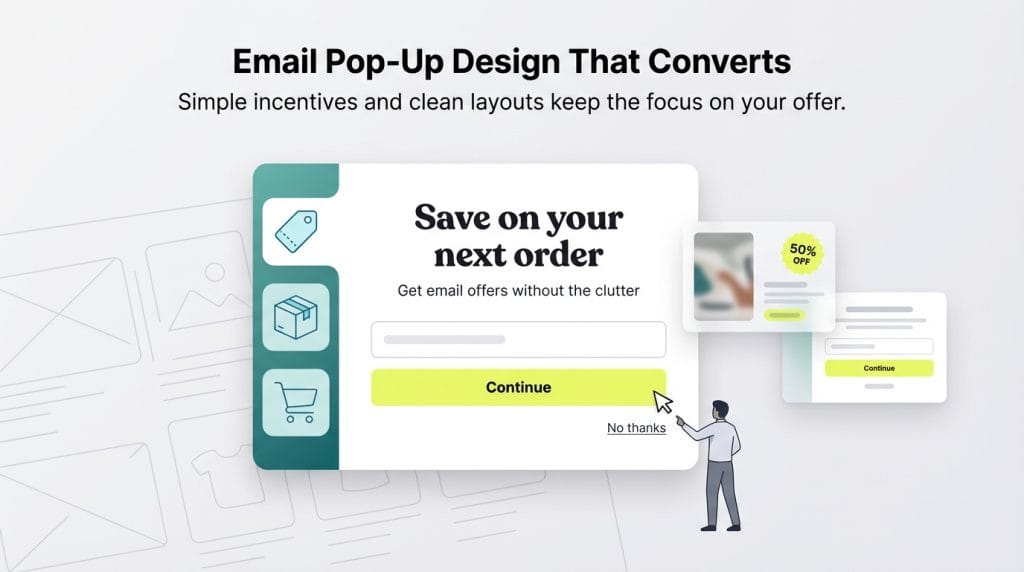
Pop-ups can be an effective e-commerce marketing tool that supports brand awareness and business growth. Here are some of the benefits of an email pop-up campaign:
Email pop-ups can work well when they feel connected to the rest of the browsing experience. The strongest examples don’t overwhelm visitors; instead, they rely on clear messaging, relevant timing and a sense that the offer belongs on the page. When those pieces come together, it’s easier to capture signups without making the interaction feel intrusive.
Below are several best practices to help you create pop-up campaigns that feel helpful, not disruptive.
Poorly timed or intrusive email pop-ups are one of the fastest ways to frustrate visitors. For example, repeating the same pop-up after someone has already closed it or subscribed can feel pushy, and triggering a message the moment a user lands on a page often interrupts their experience. In some cases, aggressive overlays can also create website accessibility concerns and affect how pages perform in search.
Not every brand or situation calls for aggressive pop-up tactics. While bold overlays may work for e-commerce retailers promoting flash sales, they can feel out of place in other industries. Pop-ups are often a better fit for retail offers, email newsletters and event promotions, where the tone is lighter and more promotional. In contrast, highly serious or sensitive spaces, such as healthcare or finance, may require a more restrained approach to avoid disrupting trust.
Many types of pop-up messages exist, and selecting the right format depends on your goals and audience. Here are a few common examples:
When using pop-up messages, timing and segmentation often play a key role in how visitors respond:
The success of a pop-up often depends on how well the offer fits the visitor’s expectations and current needs or interests. What the pop-up offers should feel relevant to the moment, match your brand voice and give visitors a clear reason to engage without feeling pressured.
Offer types can vary by industry and goal. Common examples include discounts, free shipping, coupons, sweepstakes entries, free resources or early access to future promotions. Some brands use gamified formats, like spinning-wheel discounts, though these may not suit every audience or a more premium brand experience.
Context matters here. A pop-up tied to a specific product page, for example, can feel more connected to what someone is already looking at than a generic sitewide message. Timing and relevance often shape whether an offer comes across as helpful or distracting.
The messaging of a pop-up is crucial; it should address the different uncertainties people experience at various points during a website visit. Try to include the following elements in your pop-up messaging:
Many people navigate the web via mobile devices, so pop-ups that feel manageable on a desktop can quickly become overwhelming on a smaller screen. Just as mobile-friendly e-commerce websites matter, mobile-friendly pop-up design plays a role in keeping visitors engaged. On mobile, less intrusive formats such as sidebars or floating bars near the top of the screen tend to feel easier to dismiss and less disruptive.
Pop-ups that block the main content or make navigation harder — often referred to as “intrusive interstitials” — can create accessibility issues and may affect how a page performs in search. Google’s guidance notes that overlays covering primary content, especially right after someone lands on a page or while they’re scrolling, can hurt search visibility.
On desktop, pop-ups are often larger and more visible, which can draw attention but also increase the risk of feeling intrusive. Many brands reserve full-screen pop-ups for moments that signal strong intent, such as when a visitor appears ready to leave the site.
Your pop-ups’ visual content matters just as much as the text. The right image can draw a visitor’s attention, reinforce the value of subscribing and help people feel more comfortable sharing their contact information.
Consider the following ways brands often use images in pop-ups:
You don’t want your pop-ups to disappear into the background or look exactly like what competitors are doing. Color and layout decisions play a big role here. Some brands stick closely to their site’s palette, while others use contrast — like a brighter CTA next to a quieter decline option — to pull the eye without taking over the page.
You’ll also notice “success” pop-ups that appear right after a signup, often reinforcing the idea that someone has joined a brand’s community. In other cases, returning visitors may see a slightly different version of the same offer than first-time shoppers. These kinds of small adjustments don’t change the overall design much, but they can shift how the interaction feels from one visit to the next.
Here are a few pop-up examples to show how different brands approach email capture.
Soon after arriving on Anthropologie’s website, visitors see a pop-up offering a discount on a future full-price purchase in exchange for an email signup. The timing places the message early in the browsing experience while the rest of the page remains visible behind it.
The discount text sits prominently at the center of the design, surrounded by plenty of white space and minimal visual elements. Neutral tones and minimal text ensure the offer is the focus.
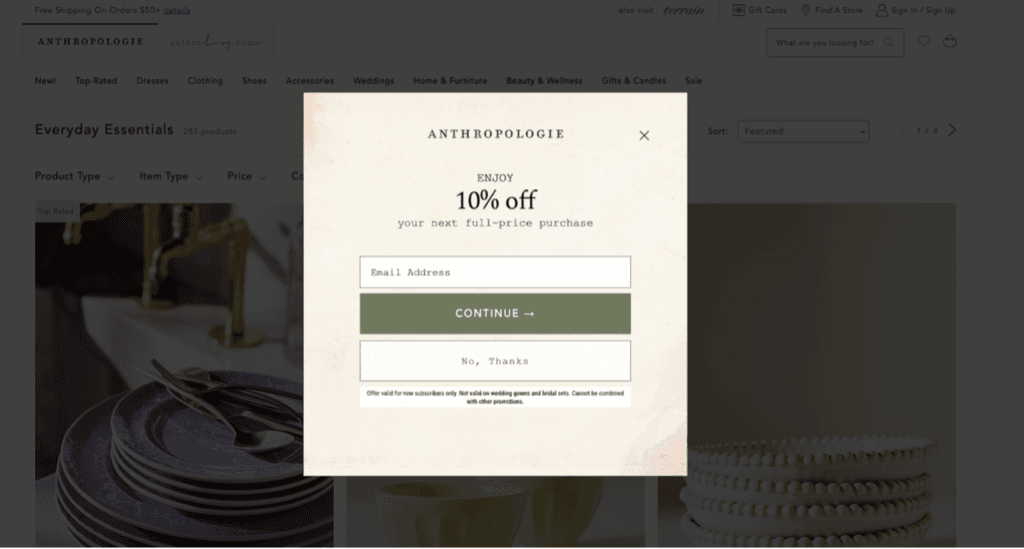
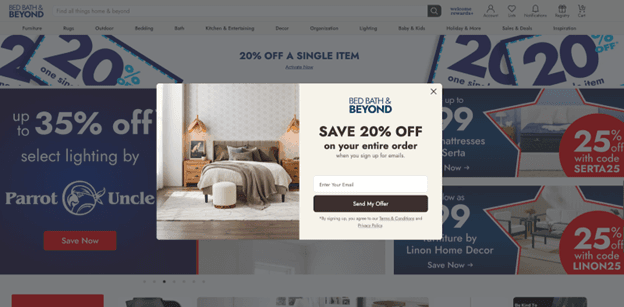
A discount pop-up appears shortly after the page loads, sitting over the shopping page. The rest of the page remains visible behind it.
The offer sits next to a product image, with a single email field and a “Send My Offer” button underneath. The layout stays straightforward, keeping the focus on the deal without adding extra steps or visual clutter.
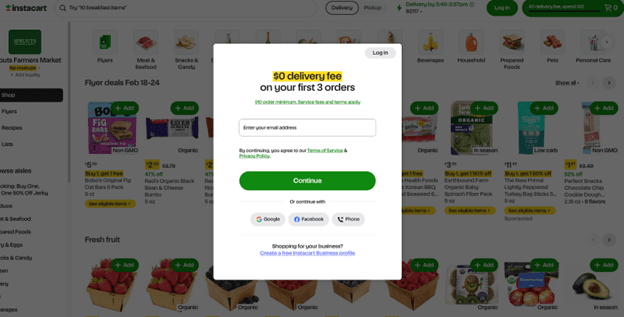
A centered pop-up on Instacart promotes a delivery fee discount for new accounts, appearing over the grocery browsing page and keeping attention on the offer.
The layout is straightforward: an email field, a green “Continue” button and optional social login choices below. The simple structure keeps the interaction quick without pulling too much attention away from the shopping page behind it.
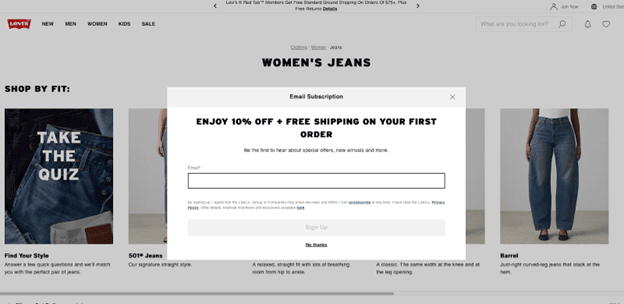
The Levi’s website quickly presents a centered pop-up inviting visitors to sign up for emails in exchange for a first-order discount and free shipping. The offer appears in large text against a clean white background, making it easy to spot without adding extra graphics.
Below the message is a single email field, followed by a “Sign Up” button and a small “No thanks” link. Nothing else competes for attention, so the promotion stays front and center.
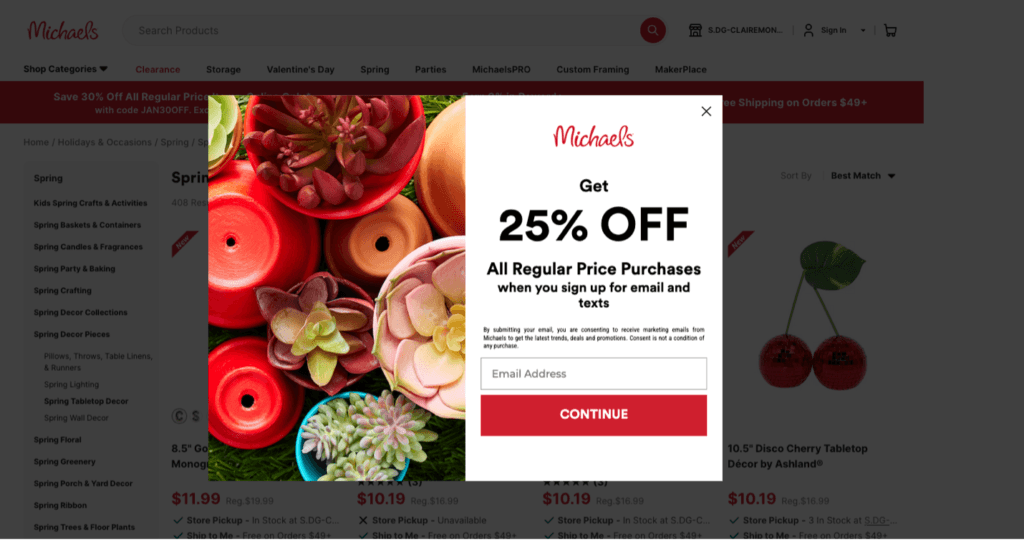
A large discount headline appears alongside craft imagery, with the signup form positioned to one side of the pop-up. The browsing page stays visible behind it.
Under the offer is an email field and a red “Continue” button. A small line references signing up for both email and texts, while the rest of the modal stays fairly minimal.
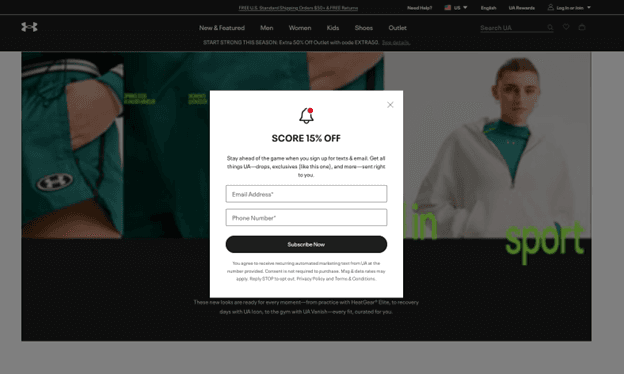
A centered pop-up highlights a percentage-off offer over the dark homepage background, with a white modal that stands out from the rest of the page.
The form includes fields for an email address and phone number, followed by a “Subscribe Now” button. Aside from the discount message, there isn’t much additional text or decoration, keeping the focus on the offer.
Jennifer Dublino contributed to this article.