Your free business.com+ membership unlocks exclusive tech deals and advisor support
Join Free
BDC Hamburger Icon

Menu

Close
BDC Logo with Name
Search Icon
Search Icon
Advertising Disclosure
Close
Advertising Disclosure

Business.com aims to help business owners make informed decisions to support and grow their companies. We research and recommend products and services suitable for various business types, investing thousands of hours each year in this process.

As a business, we need to generate revenue to sustain our content. We have financial relationships with some companies we cover, earning commissions when readers purchase from our partners or share information about their needs. These relationships do not dictate our advice and recommendations. Our editorial team independently evaluates and recommends products and services based on their research and expertise. Learn more about our process and partners here.

The Best Accounting Software Services for Self-Employed and Freelancers in 2026

You may already be familiar with the QuickBooks brand, but competitors like Xero and Zoho Books are worth considering, too.

author image
Written by:
Max Freedman, Senior Analyst
Editor verified:
Sandra Mardenfeld,Senior Editor
Last Updated Nov 04, 2026
Business.com earns commissions from some listed providers. Editorial Guidelines.
9.4 /10
Editor's rating
Best Overall
  • Paid plans from $38 per month
  • Free plan + four paid plans
  • Up to 25 users
Visit Site
Links to Intuit QuickBooks Online
9.1 /10
Editor's rating
Best for Invoicing
  • Starts at $23 per month
  • Four pricing plans
  • $11/user/mo for additional users
Visit Site
Links to FreshBooks Accounting
9.1 /10
Editor's rating
Best for Tracking and Paying Bills
  • Starts at $27 per month
  • Three pricing plans
  • Unlimited users
Visit Site
Links to Xero Accounting Software
9.1 /10
Editor's rating
Best for Combined Business & Personal Finances
  • Starts at $8.99 per month
  • One pricing plan
  • One primary user
Visit Site
Links to Quicken Business & Personal
Zoho Books logo
Zoho Books
9.1 /10
Editor's rating
Best for Microbusinesses
  • Paid plans from $20 per month
  • Free plan + five paid plans
  • Up to 15 users
Table Of Contents Icon

Table of Contents

Open row

business.com’s team of experts regularly test, evaluate and compare business solutions to identify the best software and services across industries. These independent investigations involve extensive research, hands-on testing and head-to-head product comparisons. Every review is checked by a top editor to guarantee quality, fairness and accuracy.

In determining the best accounting software for self-employed professionals and freelancers, we looked for platforms that could simplify income tracking, expense management and quarterly tax preparation. We tried a number of systems to gauge their ease of use, invoice creation tools and mileage tracking features. We favored vendors that offered affordable pricing for sole proprietors, automatic expense categorization and straightforward tax deduction identification to help independent workers maximize their financial efficiency. Learn more about our methodology and editorial process.

As a one-person or very small team, you need all the help you can get streamlining your processes and cutting down on manual work. That’s especially true in regard to your finances. In the course of doing business, you’ll need to create invoices, maintain records, claim applicable tax deductions, and pay your quarterly taxes. The best accounting software services do all this and more for freelancers and self-employed people. Without these services, managing your finances might start to feel like its own full-time job.

To help you decide which accounting platform might best serve you as a sole proprietor, we tested several dozen leading services. Among these, we chose the six that we felt best met self-employed and freelance needs. We focused on basic tools such as automated bookkeeping as well as sole proprietor-specific tools including quarterly estimated tax calculation, filing and payment.

How We Decided

Tip Bulb

How We Decided

In recommending the best accounting and invoice-generating software, we explored each program’s features, paying close attention to automated tools, payments and invoicing capabilities, bank reconciliation and reports. We considered how well the solutions integrated...

MoreMore

In recommending the best accounting and invoice-generating software, we explored each program’s features, paying close attention to automated tools, payments and invoicing capabilities, bank reconciliation and reports. We considered how well the solutions integrated with related software like payroll services and POS systems, as well as whether the platform offered robust mobile functionality. Pricing and the availability of free trials and scalable plans also factored into our assessments.

304

evaluated

34

researched

6

chosen

Compare Our Best Picks

BDC Ribbon
Our Top Picks for 2026
Intuit QuickBooks Online
FreshBooks Accounting
Xero Accounting Software
Quicken Business & Personal
Zoho Books
1-800Accountant
Rating (Out of 10)9.49.19.19.19.18.5
Best use case

Overall

Invoicing

Tracking and Paying Bills

Combined Business & Personal Finances

Microbusinesses

Outsourced Tax and Accounting Support

Starting Price

Free; paid from $20

$23

$27

$8.99 equivalent; annual

Free; paid from $20

$209 equivalent (annual)

Free Trial Period

30 days

30 days

One month free; terms apply

30-day money-back guarantee

14-day trial on paid plans

Free consultation

Included users

1 / 1 / 5 / 25 by plan

Owner; $11/additional; Select adds 2

Unlimited

Owner + unlimited installations across devices

1 + accountant to 15; paid add-ons

No standard seats

Third-party integrations

800+

100+

1,00+

Limited

50+

Limited

Invoicing tools

Limited

Custom branded invoices, recurring invoices, automatic late fees and payment reminders, deposit collection, proposals with e-signature, mobile invoicing

Custom invoices, project-based invoicing, one-click invoice distribution, automatic payment reminders, mobile invoicing

Custom invoicing, expense and bill tracking, receipt storage

Custom invoices, automatic payment reminders, collect deposits, mobile invoicing

Custom invoices, invoice tracking, automatic bookkeeping integration

AI features

AI chat, accounting cleanup and payment follow-ups; tier/beta limits apply

Read-only Claude connector; separate Claude account required

JAX financial Q&A; bank auto-reconciliation, with plan/beta limits

AI chat for financial questions and search; Early Access

Ask Zia queries/transaction creation; Zia Insights, when enabled

AI-assisted tax filing with expert review on filing packages

Review Link
Scroll Table

Our Review

Intuit QuickBooks logo
Editor's Rating: 9.4/10
Visit Site
Links to Intuit QuickBooks Online

Starting at just $20 per month, QuickBooks Solopreneur is among the most affordable accounting services for those self-employed. You can use the platform’s mobile app to track mileage and categorize trips, and we like that this facilitates your claiming of travel-based tax deductions. We also liked that you can use both mobile and desktop to sort, match and import expenses, including from paper receipts. On top of all this, for the Solopreneur self-employed accounting platform, the breadth of reporting features impressed us. You can run and export profit and loss reports, sales reports and taxable sales, while seeing where you make and spend money.

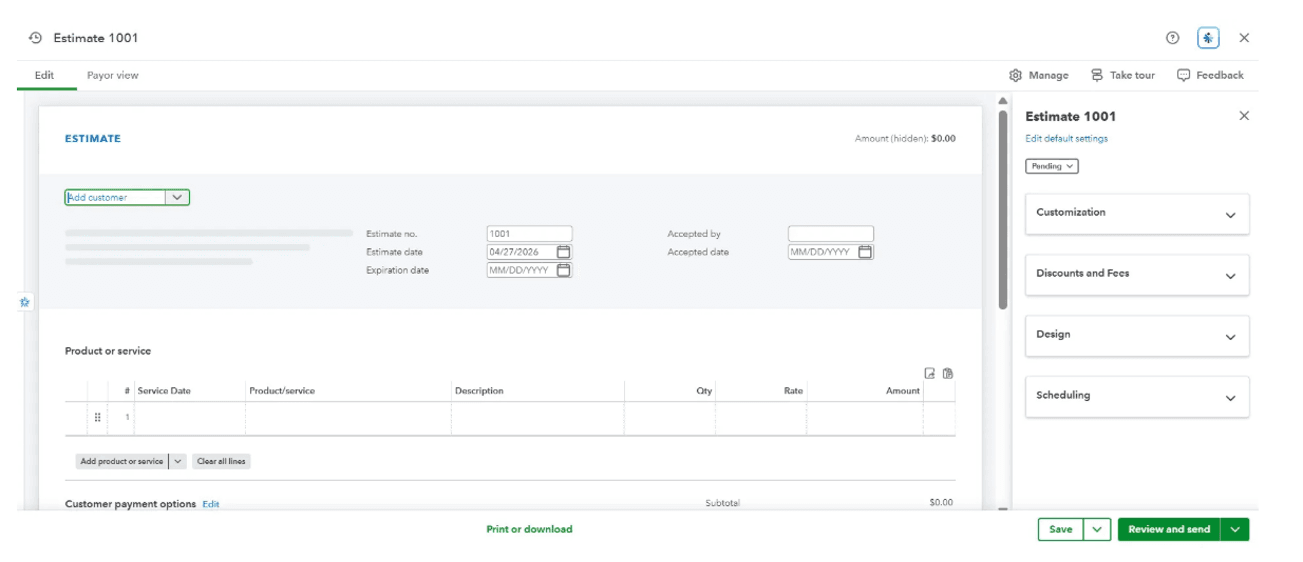
mage of QuickBooks dashboard showing an estimate screen

QuickBooks allows you to generate estimates (as seen above). Source: QuickBooks

Where QuickBooks truly shines, though, is its sole proprietor tax features. Through QuickBooks Solopreneur, you get expert tax help for books-to-tax expense moving and tax deductions. The platform also automatically organizes income and expenses into tax categories. However, if you want automatic quarterly tax calculations alongside these tax tools for maximizing your deductions, you’ll need to upgrade to the Simple Start plan.

PlanPrice (Monthly)Top Features
Free$01 user; 1 connected bank account; 2 invoices/month, or unlimited invoices with qualifying QuickBooks Payments use; basic income and expense tracking
Lite (Solopreneur)$201 user; built-in tax experts; unlimited invoices, receipts and mileage
Simple Start$381 user plus accountant access; invoicing, expenses, receipts, bank feeds, sales tax and standard reports
Plus$1405 users; inventory, project profitability, budgeting and class/location tracking
Advanced$34025 users; custom permissions, workflow automation, batch invoicing and priority support

Regular U.S. prices before temporary offers and taxes. Each paid company file requires its own subscription. Payroll, payment processing and bookkeeping services cost extra. A 30-day paid-plan trial may be offered as an alternative to an introductory discount. The Free plan has no accountant access.

  • Be tax ready with receipt capture, business and personal expenses automatically separated, mileage and finance tracking, customizable estimates and invoices and accepting payments. Track profitability by setting and tracking growth goals, sales and sales tax, while having bank transaction rules and accountant access.
  • You get live expert tax guidance over the phone to prepare tax returns.
  • Broad app ecosystem supports connected workflows.
  • Project profitability and inventory require Plus or Advanced.
  • Separate paid companies require separate subscriptions.
  • Payroll, processing and specialist integrations can add cost.

Intuit QuickBooks Online earned 8.0 out of 10 on TrustRadius, with more than 2,300 reviews. Reviewers praise its ease of use, bank connections and familiar accounting workflows. Recurring complaints involve subscription increases, support and occasional connection problems.

“It is easy to use, easy to train on, and integrates well with other tools your company uses and your bank,” one user wrote.”They are constantly making changes to keep up with making things easier on a business owner to manage their accounting.”

Editor's Rating: 9.1/10
Visit Site
Links to FreshBooks Accounting

When you work for yourself, your income arrives one invoice at a time. Every day a bill sits unpaid is a day you are effectively financing a client’s business instead of your own, and chasing that money is unpaid work. FreshBooks is built around solving that problem, which is why we named it our best pick for invoicing. You can brand invoices with your own logo and colors, set them to recur on a schedule for retainer clients, collect deposits before you start work and attach proposals that clients sign electronically. Once an invoice is out the door, FreshBooks handles the follow-up: automated reminders go out on a schedule you set, and late fees apply themselves without you having to write an uncomfortable email.

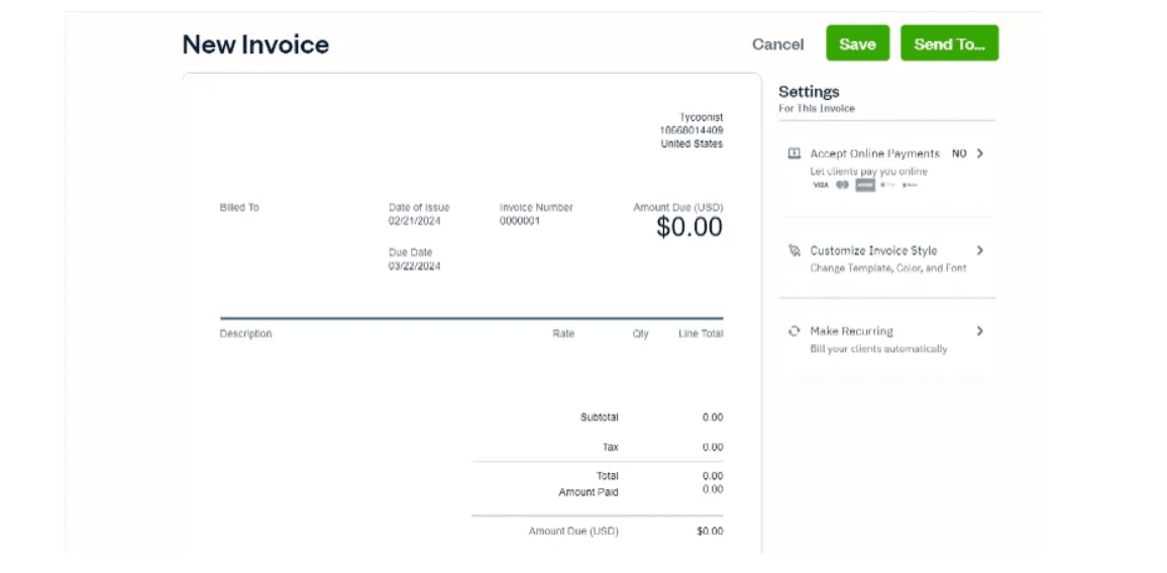
image of FreshBooks accounting’s new invoice dashboard

FreshBooks offers robust invoicing tools. Source: FreshBooks

The time-tracking tools are what elevate FreshBooks from an invoice generator to a full accounting platform for hourly workers. We like that logged time flows straight onto an invoice as a billable line item, so there is no reconstructing your week from memory or exporting a timesheet into a separate tool. Consultants, designers, writers and anyone else billing by the hour will find this removes the most tedious step in getting paid. FreshBooks also tracks expenses against individual projects, which gives you a clear picture of which clients are actually worth your time.

Choose around your billable client count: Lite allows 5, Plus 50, and Premium/Select unlimited. Additional collaborators usually cost $11 each per month, although Select includes two additional team-member accounts.

PlanPrice (Monthly)Top Features
Lite$23Up to 5 billable clients; invoices, estimates, expense and time tracking, projects and online payments
Plus$43Up to 50 billable clients; accounting reports, accountant access, proposals, retainers and bank reconciliation
Premium$70Unlimited billable clients; project profitability, accounts payable and bill receipt scanning
SelectCustom quoteUnlimited billable clients; dedicated support, onboarding/migration assistance, Advanced Payments and 2 additional team-member accounts

Regular monthly prices before promotions. Extra team-member accounts cost $11 each per month; Select includes 2 additional accounts. Advanced Payments costs $20 per month on other plans and is included with Select. Payment processing and payroll cost extra. A 30-day trial is available.

  • Invoicing is the most polished of any platform on this list, with custom branding, recurring billing, deposits and e-signed proposals.
  • Built-in time tracking turns billable hours into invoice line items without a separate timesheet tool.
  • Automated payment reminders and late fees collect on overdue invoices so you are not chasing clients yourself.
  • No automated quarterly estimated tax calculation, filing or payment tools.
  • The Lite plan caps you at five billable clients, and archived clients count toward the limit.
  • Every plan includes just a single user, and added collaborators cost $11 per month each.

FreshBooks Accounting earned 9.2 out of 10 on TrustRadius, with more than 200 reviews. Users value the approachable interface, invoice tracking, automated reminders and connected expense/time records. Some want deeper reports or customization, and others mention client caps and mobile limitations. These strengths fit freelancers who invoice for their own time and projects.

“FreshBooks is perfect for solopreneurs or very small shops where all administrative work is handled in-house.” one user wrote.

Xero logo
Editor's Rating: 9.1/10
Visit Site
Links to Xero Accounting Software

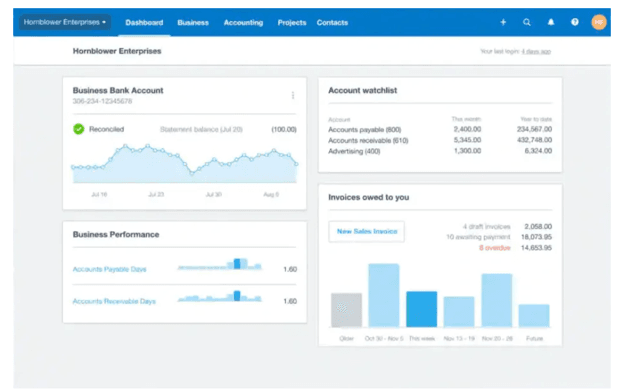
Although many freelancers operate with minimal overhead, including very few vendor payments, Xero is great for self-employed people who do work with many vendors. We like Xero’s bill pay tools more than those of any other vendor we reviewed — they’re intuitive and comprehensive for small businesses and self-employed people alike. You can view all your outstanding bill payments from Xero’s dashboard and schedule payments with one click. This lessens the chances that you’ll pay costly late fees and helps you keep your books in the black.

mage of Xero accounting’s dashboard

You can track invoices, bank balances and bills from the main dashboard. Source: Xero

Xero’s invoicing tools are thorough and user-friendly as well. We like how easily you can customize your invoices and build them from projects or hours worked. Plus, you can distribute them quickly from either mobile or desktop, and the platform also automates your client payment reminders.

We appreciate how meaningful this is for freelancers — you’ll stop spending extra hours chasing payment and get time back for your actual work. For any sole proprietor — especially self-employed operations growing to include more bill payments — Xero is a winner.

PlanPrice (Monthly)Top Features
Early$27Unlimited users; 20 invoices and 5 bills/month; bank reconciliation, Smart Document Capture and 30-day cash flow forecast
Growing$59Unlimited users; removes Early invoice/bill caps; automated bill entry, bank auto-reconciliation and 60-day cash flow forecast
Established$97Unlimited users; multicurrency, project time/cost tracking, employee expense claims and 180-day cash flow forecast

Regular U.S. monthly prices before promotions. All plans include unlimited users; each organization needs its own subscription. Inventory Plus is a separate paid add-on for Growing and Established. Payroll and some payment services cost extra. Xero offers a one-month free option; check the terms when choosing between a trial and a promotion.

  • Unlimited users are included in every plan.
  • Xero’s leading bill tracking and paying tools are ideal if you work with many vendors.
  • With Xero, you can generate and customize invoices based on projects via mobile or desktop and send them in one click. Xero automates your payment reminders too.
  • Early caps invoices at 20 and bills at five per month.
  • Expense management tools are only available with Xero’s most expensive pricing package, which is designed and priced for small-to-midsize businesses rather than self-employed users.
  • Project tracking is also only available with the most expensive plan.

Xero Accounting Software earned 8.5 out of 10 on TrustRadius, with more than 850 reviews. Reviewers appreciate straightforward bank reconciliation, invoicing and collaboration with an accountant. Some want more reporting customization and deeper inventory tools; others cite integration or reconciliation issues. For solo owners working with a bookkeeper, shared access is useful; the bill and invoice caps matter more than unlimited users if your transaction volume grows.

“Xero is a great platform for you to easily communicate between your bookkeeper or accountant and your leadership team,” one user wrote. “It’s easy to access and navigate, which makes it easier for internal adoption.”

Quicken logo
Editor's Rating: 9.1/10
Visit Site
Links to Quicken Business & Personal

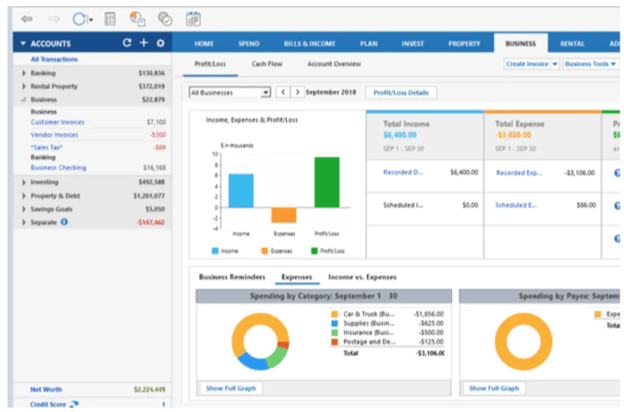
Quicken Business & Personal stands out as the best option for self-employed people who want to manage business and personal finances in one place. Many sole proprietors and freelancers blur the lines between work and personal spending, and Quicken is built around that reality. Its system lets you track all transactions together while tagging and categorizing them for clear separation at tax time or when reviewing your financial reports, which is a practical advantage when you’re a one-person operation without a bookkeeper drawing those lines for you.

mage of Quicken accounting’s dashboard

With Quicken’s dashboard, you can see a broad overview of your finances. Source: Quicken

We also appreciate that Quicken is “right-sized” for independent workers rather than full-on businesses. Instead of enterprise-level complexity, it offers the essentials a freelancer actually uses: invoicing, sales tax tracking, profit and loss statements, cash flow and balance sheet reporting, and support for tax schedules C and E. For a self-employed filer who reports business income on a Schedule C, that built-in support is genuinely useful come tax season.

The main caveat for this audience: Quicken doesn’t calculate, file or pay quarterly estimated taxes, which is a core need for many freelancers whose clients don’t withhold. If automated quarterly tax tools are a priority, QuickBooks Solopreneur is the stronger fit. But for sole proprietors who mainly want one affordable, easy-to-navigate home for both sides of their finances, Quicken is hard to beat.

PlanPrice (Monthly)Top Features
Business & Personal (web/mobile)$8.99 equivalent; $107.88 billed annuallyBusiness and personal finances; up to 10 businesses; invoicing, expense tracking and Schedule C, E and F reports

This is the web/mobile Business & Personal product, billed annually at the regular rate; introductory offers and Classic desktop editions are separate. Sharing permits an owner and 1 invited member per Space, with up to 3 Spaces. Ten businesses does not mean 10 users. A 30-day money-back guarantee is different from a free trial.

  • Simple, approachable interface that doesn't require an accounting background.
  • Low cost relative to running separate personal and business finance tools.
  • Built-in Schedule C and E support aligns with how most freelancers file.
  • No automated quarterly estimated tax calculation, filing or payment — a key gap for many freelancers.
  • Limited integrations compared with QuickBooks, Xero and Zoho Books.
  • Not built to scale — better suited to solo operators than growing teams.

Quicken Business & Personal earned 3.6 out of 5 on Trustpilot. Company-wide score; not specific to Business & Personal. Customers appreciate organized accounts, financial history and downloaded transactions. Common concerns include subscription increases, bank connection problems and support experiences. For a sole proprietor, the combined financial view can be useful, but this company-wide score should not be treated as a review of Business & Personal alone.

“My experience is that of a non accounting background, but running a small independent business.” one user wrote. “As an older non computer person it has been somewhat easy to learn how to set it up and learn steps that are pertinent to my business.”

Zoho Books logo
Editor's Rating: 9.1/10

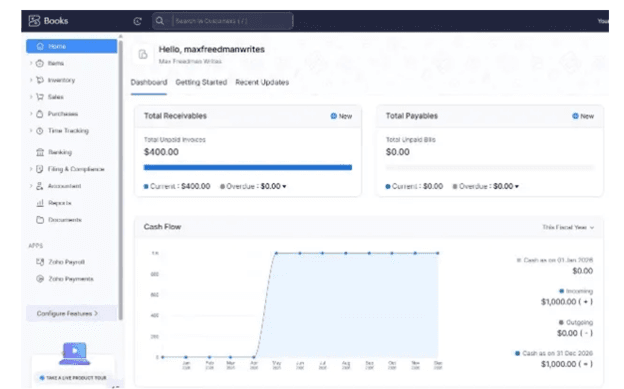
The very smallest businesses excel when using Zoho Books. That’s because this feature-rich accounting platform comes with a free monthly subscription for users with annual business revenue of at most $50,000. We like how accessible this makes Zoho Books for new freelancers, whose annual income may initially fall under this cap. If this sounds like you, we recommend Zoho Books for state-of-the-art accounting tools that far outperform other free platforms.

mage of Zoho accounting’s dashboard

Zoho’s dashboard lets you manage your finances easily. Source: Zoho

We find Zoho Books’ invoicing and tax calculation tools especially impressive. Although FreshBooks is overall our top pick for invoicing, Zoho Books comes close with its intuitive drag-and-drop custom invoicing and deposit collection tools. We also like Zoho’s tax suite, which you can use to calculate income tax and file GST (goods and services tax) returns.

PlanPrice (Monthly)Top Features
Free$0Eligible businesses with annual revenue up to $50,000; 1 user + 1 accountant; 1,000 invoices and 1,000 expenses/year; manual reconciliation
Standard$203 users; bank feeds, recurring expenses and custom reports
Professional$505 users; inventory, multicurrency, project tools, workflows and purchase approvals
Premium$7010 users; fixed assets, budgets and custom functions/modules
Elite$15010 users; advanced inventory, warehouses and serial/batch tracking
Ultimate$27515 users; advanced analytics and reporting

Table shows regular U.S. month-to-month pricing. Annual-billing monthly equivalents are $15, $40, $60, $120 and $240 for Standard through Ultimate. Additional paid-plan users cost $3/month or $2.50/month with annual billing. Each organization needs its own subscription. Paid plans offer a 14-day trial.

  • If you earn under $50,000 per year, your Zoho Books monthly subscription will be entirely free.
  • Zoho offers powerful drag-and-drop, customizable invoices alongside an income tax calculator. There are six different plans you can choose from, so your business can grow easily.
  • Advanced inventory and analytics are available as needs grow.
  • Zoho Books’ 14-day free trial lasts half as long as our other picks for the best self-employed and freelance accounting software. This can lead to you needlessly rushing to decide whether Zoho Books is right for you.
  • To get the cheapest paid plan at $15 you need to select the annual plan. Otherwise, it’s $20 a month with no yearly commitment.
  • The maximum number of locations you can expand to with Zoho Books is eight (without add-on purchase).

Zoho Books earned 8.7 out of 10 on TrustRadius, with about 200 reviews. Reviewers praise automated invoicing, expense tracking and visibility into sales and business performance. Some describe bank or third-party connection difficulties and would like more interface flexibility.

“Well suited for entering and tracking sales and expenses, especially if you want a one stop platform to house all the data.” one user wrote. “It’s also good for reports, gives specific insights on sales through a variety of metrics. Where it’s less suited for are integrations with other platforms such as your bank netbanking, payroll, etc.”

1-800accountant logo
Editor's Rating: 8.5/10

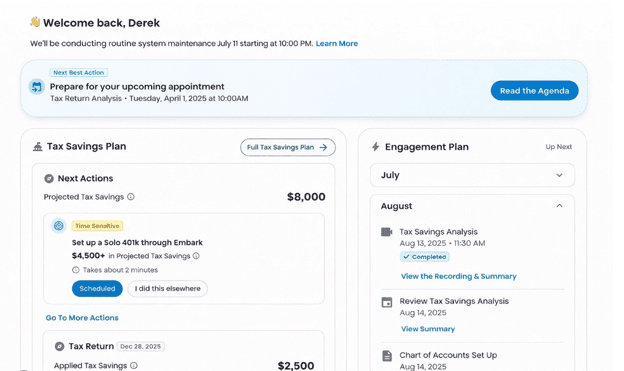
1-800Accountant suits self-employed owners who would rather get professional support than manage every tax and bookkeeping task themselves. It is our outsourced accounting pick because it combines access to accounting professionals with tax planning and, on the appropriate package, hands-off bookkeeping. We like the ability to choose how much work to delegate. However, the entry-level Tax Advisory package is not a full-service bookkeeping subscription.

image of 1-800Accountant Tax Savings Plan dashboard

1-800Accountant allows you to create tax savings plans. Source: 1-800Accountant

A dedicated accountant and tax advice are included in Tax Advisory; Starter adds personal and business tax preparation for one entity and ClientBooks access. Full-service bookkeeping starts with Business Complete, not the entry package. The advertised $209, $299 and $469 monthly amounts are annual-billing equivalents, so compare the full yearly commitment with the cost of self-service software. Confirm which returns, entities, bookkeeping volume and owner payroll work are included before signing.

PlanPrice (Monthly)Top Features
Tax Advisory$209 equivalent; $2,508 billed annuallyDedicated accountant, tax advice and planning; does not include full-service bookkeeping
Starter$299 equivalent; $3,588 billed annuallyPersonal and business tax preparation for 1 entity, ClientBooks, tax strategy and quarterly reviews
Business Complete$469 equivalent; $5,628 billed annuallyFull-service bookkeeping starting at 75 monthly transactions, owner payroll and quarterly estimated tax support

All packages require annual billing. Compare the annual payment and included services with the cost of software plus professional support; the products are not direct substitutes. Ask how extra transactions, additional entities and catch-up work are priced.

  • A dedicated accountant provides professional guidance.
  • Starter includes personal and business tax preparation for one entity.
  • Business Complete adds full-service bookkeeping.
  • Full-service bookkeeping requires the higher-priced Business Complete package.
  • There is no free trial for 1-800Accountant’s services, although you can schedule a free consultation.
  • Advertised prices require annual billing, which creates a larger upfront commitment.

1-800Accountant earned 4.5 out of 5 on Trustpilot, with more than 13,000 reviews. Customers frequently praise patient, knowledgeable representatives, clear explanations and reassuring onboarding. Some raise concerns about costs, upfront fees or pressure during sales consultations.

“Their software is also very intuitive and if we were to have questions, there is someone there to assist.” one user wrote.

Costs of Accounting Software for Self-Employed and Freelancers

Accounting software requires a paid monthly subscription, though fret not — these monthly prices are among the lowest you’ll encounter when pursuing business technology. Plus, if your business income is under $50,000, Zoho Books is entirely free. Otherwise, you might pay as low as $20 for a basic plan.  Although each vendor offers more expensive plans, these include features designed for full-on businesses. Self-employed users, though, generally only need what’s in a vendor’s lowest-priced package.

Additionally, our top picks for the best accounting software for self-employed and freelance people lack implementation and setup fees. You might encounter these with other accounting platforms, but not the six we’ve reviewed here. This further lowers the overall cost of accounting software.

Occasionally, you’ll encounter accounting software for which you’ll pay an extra fee per user per month. Admittedly, this is more common with other types of business software, and if you’re truly a one-person operation, you’ll never pay this added fee. However, if you use FreshBooks and take on employees or contractors who need access to your accounting platform, you’ll pay an additional $11 per user. We recommend watching out for add-on fees as you compare and contrast accounting platforms.

If you plan to receive payment on your invoices directly from your accounting software, you may also need to factor in credit card processing costs. These are typically a small percentage of each transaction plus a tiny flat fee. For example, a processor may charge you 2.9 percent plus 30 cents per transaction. That said, if selling products rather than offering services is key to your self-employment, perhaps you’ve already implemented credit card processing. You can use this setup instead of your accounting software to receive payments.

TipBottom line
Not yet set up with credit card process? Look over our picks for the best credit card processors to start implementing this key client and customer payment technology.

Features of Accounting Software for Self-Employed and Freelancers

If you’re self-employed and seeking accounting software, prioritize the following features in any platforms you’re considering.

Bank Feeds and Reconciliation

If you’re a self-employed person, you’re not getting regular paychecks from an employer. Instead, your cash flow is at the mercy of when your clients choose to pay their invoices. This makes bank feeds an important accounting tool — they’re how you quickly review all your cash inflows and outflows.

These feeds, when combined with bank reconciliation tools, automate the alignment of your bank data and financial records. An accounting platform that offers both tools gives you full insight into and control over your money.

Bill Pay

Although some self-employed people operate while paying few to no monthly business expenses, that’s not always the case. The more business products and services you pay for monthly, the more you’ll benefit from accounting software bill pay tools.

You can use these tools to view what you owe and to which vendors you owe it. Plus, with the best accounting platforms, you can make one-click bulk payments. This way, you’re unlikely to be saddled with late payment fees that cut away at your profit and cash flow.

Client and Customer Payment

A big part of being self-employed is, in many cases, working with less infrastructure than a full-on business. This makes offering your customers or clients extra convenience a key competitive advantage.

Enter payment options embedded in invoices — no more clients logging into their bank accounts or peer-to-peer payment platforms (or writing and mailing checks). Instead, everyone who owes you money can pay it right from where they see their charges detailed. This convenience can encourage repeat customer and client transactions while streamlining your cash flow.

Dashboard

As with any platform, great accounting software should be easy to use and navigate from the very moment you log in. Only choose platforms you can intuitively move through from the initial dashboard all the way through sending an invoice.

Expense Tracking

This is a huge one for freelancers — you very well might be missing out on key tax-deductible expenses and thus overpaying your taxes. The best accounting software for self-employed people automates the identification, capture and organization of these expenses via digital records and paper receipts. This way, come tax time, claiming your deductions and lowering your taxable income is a walk in the park.

TipBottom line
We’ve prepared a guide to paying taxes as a freelancer to demystify this seemingly complex, but often quite easy, part of flying solo.

Financial Analysis

As a freelancer, you might benefit from fundamental financial analyses such as cash flow graphs and charts. It’s worth seeking accounting platforms that include these basic analyses, though you might not need other financial reports — these are often geared toward full-on businesses. However, if you do get other reports with your accounting software, you might have an easier time growing from a one-person operation into a team.

Integrations

Great business software of all kinds integrates seamlessly with other key platforms. Look for accounting platforms that integrate natively or via third-party connections with other tools you use. For example, if you use BILL to generate and track invoices, QuickBooks Self-Employed integrates seamlessly with this service for consistent invoicing records across platforms. Even if you use relatively few business platforms, connecting them substantially streamlines your operations.

Invoicing, Estimating and Quoting

Sending invoices — and generating them in just seconds from estimates and quotes — are how you start the client payment process as a self-employed person. This makes the invoicing, estimating and quoting tools within accounting software perhaps the most important features within any platforms you’re considering.

During your free trials of several platforms, compare each vendor’s invoicing suite in particular. Place whichever one you found most intuitive, helpful and feature-rich toward the top of your list. Then, compare your best picks across the other factors on this list while still prioritizing invoicing. Your ideal choice of platform should be pretty clear thereafter.

Mileage Tracking

This feature goes hand in hand with expense tracking — it’s how you turn work-related trips into tax-deductible expenses. Look for accounting platforms with mobile apps that automatically track your miles traveled and convert them to expenses. This is among the most hassle-free ways to lower your tax burden.

Mobile Apps

Accounting software mobile apps are good for more than just tracking miles. The best apps also include tools for snapping photos of receipts, invoicing clients on the go and more. The more a platform’s mobile features overlap with those of its desktop suite, the better.

Quarterly and Annual Tax Payments

Self-employed people may need estimated income and self-employment tax payments during the year, as well as an annual return. The calculation depends on the individual’s full tax situation, not simply the business’s bank balance. Although this feature isn’t common among even the very best accounting software platforms, it’s key for freelancers and self-employed people. Since your clients don’t withhold taxes from your payments, you’re responsible for quarterly, not just annual, tax payments.

Distinguish bookkeeping, tax estimates and return preparation. Accounting software can organize records, but it does not necessarily calculate, file or pay your income taxes. 1-800Accountant’s Starter includes personal and business preparation for one entity; Business Complete adds bookkeeping and quarterly estimated tax support.

Choosing Accounting Software for Self-Employed and Freelancers

You might be itching to get started on organizing your finances and streamlining your client payments, but we suggest never rushing into any business decision. Instead, make your way through the following steps as you choose the right accounting software.

1. Decide what you’re looking for from your accounting software.

Maybe you’re already happy with your invoicing process and just need a place to track and store earnings and payments. Or maybe you need a way to accurately pay quarterly taxes and expedite the whole process. Whatever you need, look for platforms with the best tools for addressing these pain points. Other features, even if they seem super impressive, just might not be necessary for you. Avoiding these features can lower your costs.

2. Compare your choices and look at customer reviews.

After getting a sense of which accounting platforms best serve your precise needs, review each vendor’s pricing table. These charts are typically quite clear on what you do and don’t get with the platform and at what prices. This way, you can compare features and prices across several appealing vendors.

Tools and costs, though, don’t tell the whole story — real reviews from real customers complete the picture. Look at what actual users have said about the platform on websites such as TrustPilot and the Better Business Bureau. Does their praise make you feel reassured, or do their complaints automatically eliminate any platforms for you? Although each review speaks to only one person’s experience, horror stories and effusive praise are both worth keeping in mind.

3. Accept free trial offers.

It’s much easier to make smart decisions about accounting platforms once you’ve actually tried several of them for yourself. Go ahead and, one by one, use the trial version of all the platforms you’re considering. During each trial, fully implement the platform into your workflows as though you’ve already committed to using it. With the platform integrated into your everyday processes, you’ll really see whether it works for you.

We always recommend pursuing free trial offers. Sure, you might be tempted to just dive right into using a platform that sounds appealing. However, that requires paying for it — and if you wind up not liking it, you can’t take your payments back. Test things out first so that you only put money toward technology you like and find useful.

4. Make one final comparison.

Go over all the platforms you’ve tried hands-on and enjoyed. How do their prices and features compare? Which ones are the easiest to use? The best platform for your precise business finance needs balances all these scales. Plus, since you’ve taken this longer-term approach to choosing a platform, chances are you’ll be happy with your choice from the get-go.

Did You Know?Did you know
With most free trials, if you decide to move forward with the technology, little to no additional setup is needed. You’ll be ready to upgrade to the full experience in just a few clicks, and experienced enough with the platform for instant success.

Advantages of Accounting Software for Self-Employed and Freelancers

As a freelancer or self-employed person, you might feel that requesting client payment and chasing overdue payments is a second job in and of itself. That stops being the case when you implement accounting software, which is advantageous for the following reasons:

  • It automates client payment reminders. Set it and forget it — once you’ve sent an invoice, many accounting platforms automatically send client payment reminders at recurring intervals. This increases the likelihood of timely client payment without any additional work on your end.
  • It makes invoices easier to create, send and track. It’s one thing to generate an invoice in Word or Excel and email a PDF to a client. It’s another to create and send invoices through a dedicated accounting platform that also shows the client’s payment status. Chances are that this platform will also give you tools for following up on payments and automatically adding late fees. With these extra tools, on-time full client payments become more realistic.
  • It streamlines all things tax. Instead of manually logging your tax-deductible expenses and spending a ton on hiring an accountant, let your accounting software handle your quarterly and annual taxes. Some platforms handle the entirety of tax calculation, filing and payment both quarterly and annually, automating an especially arduous part of self-employment.
  • It minimizes human error. It’s pretty embarrassing to track all that time on a project only to bill a client for $200 instead of the $2,000 you intended. It’s also uncomfortable to send a revised invoice and dramatically shift the client’s expectations. This is much less likely, if not impossible, with accounting software. Since this software is automated, data errors and corresponding mistakes border on nonexistent.
  • It organizes all your recordkeeping and paperwork. Nobody likes shuffling through a messy file cabinet full of haphazardly stored paper records. Accounting software is exactly the opposite. It creates a clear, logical, 100 percent digital record of all your cash inflows and outflows, not to mention your invoices and tax-deductible expenses. Whether you’re paying taxes or checking on client payment status, accounting software nearly perfects it all.

Accounting Software for Self-Employed and Freelancers FAQs

QuickBooks Online Simple Start can suit a freelancer who needs one user, bank feeds, invoices and accountant access for $38 per month. The Free and Lite plans are more limited, while Plus and Advanced are more relevant to inventory, project or multi-user needs.

Accounting software is a tool for keeping financial records; it is not a universal legal requirement. Self-employed owners still need accurate income and expense records and must meet applicable filing and payment obligations. The right software can make that easier.

Accounting software is the easiest way to improve your bookkeeping if you’re freelance. Connect this software with your business bank accounts, and you’ll separate business and personal finances while creating organized records of your spending, earning and taxes.

You may prefer cash accounting instead of accrual accounting since you might be making few enough transactions that this simpler approach is manageable. In cash accounting, you record your transactions once you actually get client payments or make vendor or tax payments. This is in contrast to accrual accounting — recording transactions once invoiced — which may be better for operations with several employees and vendors.

If you can afford to hire an accountant, we recommend doing so. However, if your budget is tight, accounting software that allows for seamless invoicing, expense management and quarterly and annual tax payment should do the trick. The best combination, though, is implementing accounting software that you then give an accountant access to — it’s how you get both financial infrastructure and support.

Did you find this content helpful?
Verified CheckThank you for your feedback!
author image
Written by: Max Freedman, Senior Analyst
For almost a decade, Max Freedman has been a trusted advisor for entrepreneurs and business owners, providing practical insights to kickstart and elevate their ventures. With hands-on experience in small business management, he offers authentic perspectives on crucial business areas that run the gamut from marketing strategies to employee health insurance. At business.com, Freedman primarily covers financial topics, including debt financing, equity compensation, stock purchase agreements, SIMPLE IRAs, differential pay, workers' compensation payments and business loans. Freedman's guidance is grounded in the real world and based on his years working in and leading operations for small business workplaces. Whether advising on financial statements, retirement plans or e-commerce tactics, his expertise and genuine passion for empowering business owners make him an invaluable resource in the entrepreneurial landscape.