Your free business.com+ membership unlocks exclusive tech deals and advisor support
Join Free
BDC Hamburger Icon

Menu

Close
BDC Logo with Name
Search Icon
Search Icon
Advertising Disclosure
Close
Advertising Disclosure

Business.com aims to help business owners make informed decisions to support and grow their companies. We research and recommend products and services suitable for various business types, investing thousands of hours each year in this process.

As a business, we need to generate revenue to sustain our content. We have financial relationships with some companies we cover, earning commissions when readers purchase from our partners or share information about their needs. These relationships do not dictate our advice and recommendations. Our editorial team independently evaluates and recommends products and services based on their research and expertise. Learn more about our process and partners here.

The Best Business Phone Systems of 2026

Cloud-based VoIP solutions like RingCentral, Nextiva and Dialpad offer softphone applications that bypass the need for physical desk hardware, reducing costs and supporting remote teams.

Jessica Elliott
Written by:
Jessica Elliott, Senior Analyst
author image
Editor verified:
Chad Brooks,Managing Editor
Last Updated Sep 16, 2026
Business.com earns commissions from some listed providers. Editorial Guidelines.
9.1 /10
Editor's rating
Best for Ease of Use
  • Starts at $19.95/user/month
  • Video capacity: 100
  • 30-day money back guarantee
Visit Site
Links to Ooma Office
9.0 /10
Editor's rating
Best for Customer Communication
  • Starts at $30/user/per month
  • Video capacity: 5 participants
  • 7-day free trial
Visit Site
Links to Aircall
8.7 /10
Editor's rating
Best for Small Teams
  • Starts at $15/user/month
  • Video capacity: N/A
  • 7-day free trial
Visit Site
Links to Quo
9.0 /10
Editor's rating
Best for Video Conferencing
  • Starts at $10.50/user/month
  • Video capacity: 1000
  • 7-day free trial (Zoom Phone)
Visit Site
Links to Zoom Phone
GoTo Connect company logo
GoTo Connect
8.6 /10
Editor's rating
Best for Multi-Site Management
  • Requires a quote
  • Video capacity: Up to 250
  • 14-day free trial
Table Of Contents Icon

Table of Contents

Open row

At business.com, our team of technology experts has analyzed hundreds of tools and services designed to improve essential business operations, from POS systems to GPS fleet management services to remote PC access software, and we use these experiences to provide business owners with actionable guides and industry insights. Every playbook and explainer is infused with advice from real IT consultants, implementation experts, security specialists, software developers and more.

Our rigorous product review process involves in-depth industry research, vendor interviews, hands-on testing and service comparisons. Each analysis — whether for a business phone system, CRM platform, call center software or website builder — is independently verified by a business.com editor to ensure our recommendations are free of bias and errors. Learn more about our editorial process.

Tip Bulb

How We Decided

In identifying the best business phone systems, we researched whether each platform facilitated unlimited calling, international calling, video calling and text messaging — and how well. We examined usage rates and caps, tried the software to gauge user-friendliness...

MoreMore

In identifying the best business phone systems, we researched whether each platform facilitated unlimited calling, international calling, video calling and text messaging — and how well. We examined usage rates and caps, tried the software to gauge user-friendliness and explored each program’s reporting functionality. We favored solutions that featured AI tools and allowed customization and integrations. In addition to comparing plan options, we sought free trials and tried the customer service resources.

75

evaluated

20

researched

10

chosen

In identifying the best business phone systems, we researched whether each platform facilitated unlimited calling, international calling, video calling and text messaging — and how well. We examined usage rates and caps, tried the software to gauge user-friendliness and explored each program’s reporting functionality. We favored solutions that featured AI tools and allowed customization and integrations. In addition to comparing plan options, we sought free trials and tried the customer service resources.

75

evaluated

20

researched

10

chosen

Find the Right Business Phone System for Your Business

Compare Our Best Picks

BDC Ribbon
Our Top Picks for 2026
Ooma Office
Aircall
Zoom Phone
GoTo Connect
Vonage
Nextiva
Dialpad Connect
Verizon Business Digital Voice
RingEX
Rating (Out of 10)9.19.08.79.08.68.48.58.88.58.9
Best For

Ease of Use

Customer Communication

Small Teams

Video Conferencing

Multi-Site Management

Customization

Customer Support

Voice Intelligence

Bundled Phone and Internet

Collaboration

Starting Cost

$19.95 per user, per month

$30 per user, per month (billed annually); $40 per user monthly

$15 per user, per month (billed annually); $19 per user monthly

$10 per user, per month

Custom

$13.99 per user, per month (billed annually); $19.99 per user monthly

$15 per user, per month (billed annually); $23 per user, per month

$15 per user, per month (billed annually); $27 per user monthly

$20 per user, per month (with Fios bundle); $35 standalone

$20 per user, per month (billed annually); $30 per user monthly

Free Trial

30-day money-back guarantee

7 days

7 days

Free Basic plan

14 days

None

Demo available

14 days

30-day money back guarantee

14 days

Video Meeting Capacity

Up to 100 participants

Up to 5 participants

N/A

Up to 1,000 participants

Up to 250 participants

Up to 200 participants

Up to 25 participants (250 total with audio dial-in)

Up to 10 participants

Up to 15 participants

Up to 200 participants

SMS/MMS Limits

250 to 1,000 per account

50 to 250 per user, per month

Unlimited (in U.S. and Canada)

Varies

N/A

2,000 messages per day

Varies by plan

250 outbound and unlimited inbound

Not included

25 to 200 per user

Unlimited International Calling

No

Yes

No

Yes, add-on

Yes

No (Minute bundles available)

No

No

No (unlimited nationwide calling included)

No

Review Link
Scroll Table

Our Reviews

Editor's Rating: 9.1/10
Visit Site
Links to Ooma Office

Ooma Office is an excellent choice for business phone service that can be deployed in minutes, not hours. It features a clean, redesigned desktop client, a Chrome extension and intuitive mobile apps that display ring group names on incoming calls so small teams know exactly how to greet customers. Admins can configure the system in three steps using the Express Setup Assistant, and preconfigured IP phones can ship within 24 hours of purchase. We appreciate how Ooma has evolved to compete with industry leaders while maintaining its small business focus, which is why Ooma is our top pick as the best VoIP system for ease of use.

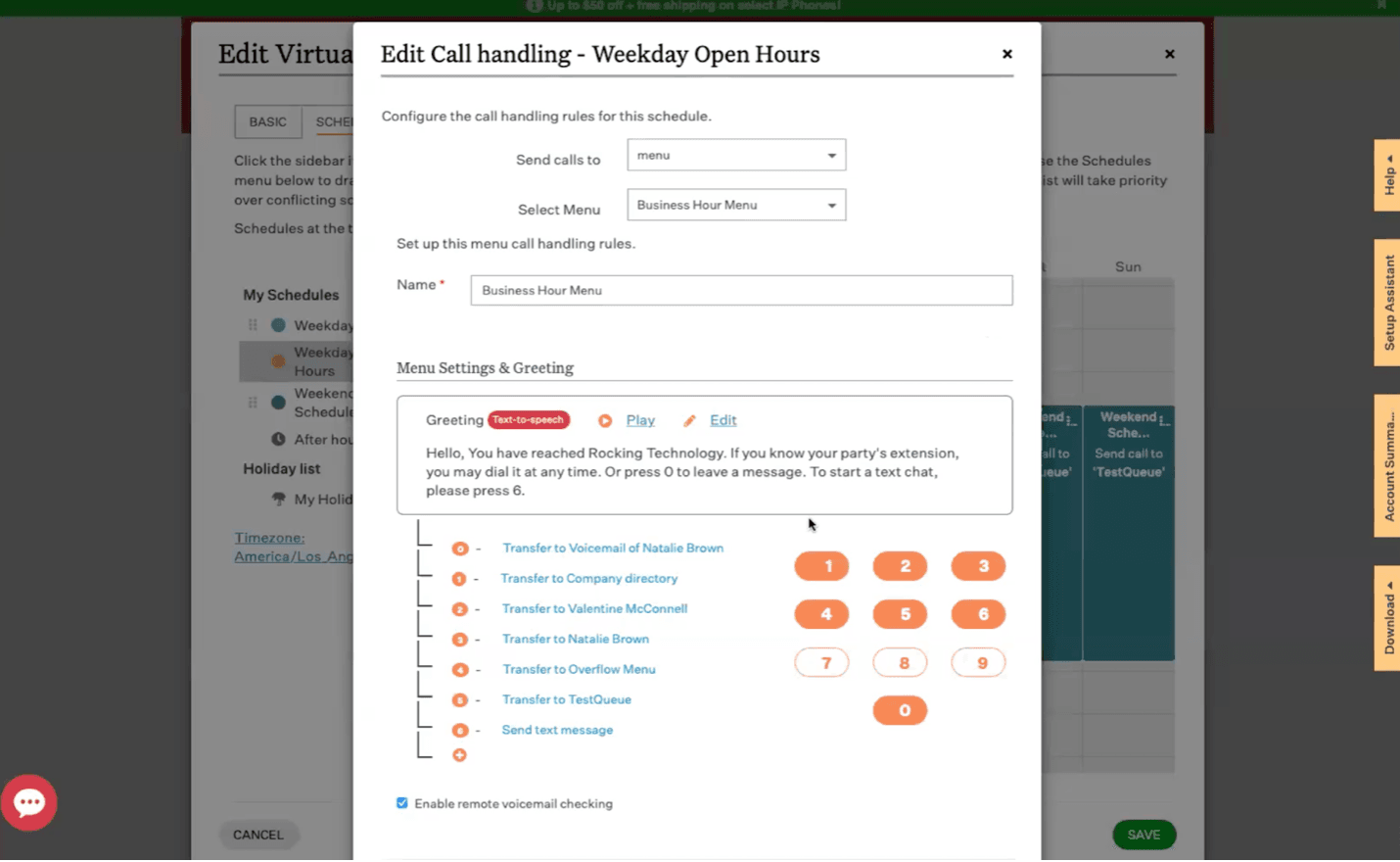
Ooma platform

Customizing the Ooma platform is an easy process thanks to the platform’s intuitive interface. Source: Ooma

First-time administrators can set up business hours and call handling settings through the Ooma Office Manager. It’s uncluttered and easy to navigate, allowing for central management of auto receptionists with ring groups, call queues and shared text messages or voicemail boxes. The expanded virtual receptionist now supports up to five custom schedules on Pro Plus plans, covering weekends, peak hours and holidays. We were also impressed with recent updates to collaboration and productivity tools, including SMS scheduling, message templates and early-access whiteboard features in Ooma Meetings.

Small business integrations with QuickBooks Online, Square and the newly added Zapier connector give teams more context about callers and enable no-code automation across thousands of apps. Syncing Microsoft 365 or Google Workspace calendars with Ooma’s built-in online booking tool lets companies automate reminders and confirmations. With video conferencing for up to 100 participants, team chat and a Contact Us website widget, teams can collaborate effectively and engage customers across channels.

Ooma also sells a custom-priced Enterprise tier for larger organizations that need SIP trunking, Microsoft Teams Direct Routing or contact center tools, so the platform scales without forcing a migration. The system scales with your business without creating complexity whenever your company evolves or expands.

Ooma Office PlansMonthly Price (per user)What’s Included
Ooma Office Essentials$19.95Unlimited calling; call forwarding; ring groups; virtual receptionist; call park; extension monitoring; hunt groups; overhead paging and intercom; analog and virtual fax; basic call blocking; Google Chrome extension; mobile and desktop apps; call flip; multi-site support
Ooma Office Pro$24.95Includes everything in Ooma Office Essentials, along with: SMS/multimedia messaging service; shared inboxes; video meetings with 25 participants for four hours; hybrid ring groups; dynamic caller ID; advanced call blocking with Nomorobo; call recording; voicemail transcription; call, message and fax analytics; messaging templates; Microsoft and Google integrations; advanced call logs
Ooma Office Pro Plus$29.95Includes everything in Ooma Office Pro, along with: call queues; find me, follow me; video conferences with 100 participants for 12 hours; expanded virtual receptionist; QuickBooks, Square and CRM integrations; shared voicemail box; call screening; shift-to-text; online bookings; video recordings; hot desking
Ooma Office EnterpriseCustomIncludes everything in Ooma Office Pro Plus, along with: SIP trunking; Microsoft Teams Direct Routing; contact center features

Note: Ooma bills its three self-serve plans month to month with no contract, so there is no discounted annual rate.

  • Ooma's Express Setup Assistant walks small businesses through the simple three-step process.
  • All accounts include toll-free and company numbers; plans come with an employee number and fax line.
  • Ooma's AI call transcription makes it easy to archive every meeting and conversation.
  • It allows fewer monthly inbound and outbound text messages than some rivals.
  • Ooma Office does not allow companies to mix and match VoIP service plans.
  • CRM system, Square and QuickBooks Online integrations are only available to Ooma Pro Plus subscribers.

TrustRadius: 6.6/10 across more than 80 reviews

“Ooma Office is our primary office phone. While we have old-school office phones, we primarily use them on our mobile devices with the Ooma Office app, allowing us to ‘be in the office’ from anywhere. The virtual assistant is suitable for routing calls and handling frequently asked questions, and although we have used it in the past, we currently ring through. It’s a full-featured solution for a very reasonable price,” one user wrote.

Trustpilot: 3.4/5 across more than 2,300 reviews

“About once a month, sometimes more, the handheld phones will stop functioning and say searching for base unit. We then have to un-register the phones then re-register them to the base unit to regain use of the phones. This seems to happen more if we have voice mails occurring. Also when we receive phone calls many times we will answer and not be able to hear whoever is calling. Usually takes several attempts to get the call when this happens. This also will occur when we attempt to call out,” one user wrote.

Aircall logo
Editor's Rating: 9/10
Visit Site
Links to Aircall

Aircall takes customer communication to the next level. With robust features to support sales representatives and customer service teams, the platform excels at facilitating inbound and outbound calls enhanced with AI-powered technology. We were impressed with two cutting-edge functions in particular: AI Assist and AI Voice Agent.

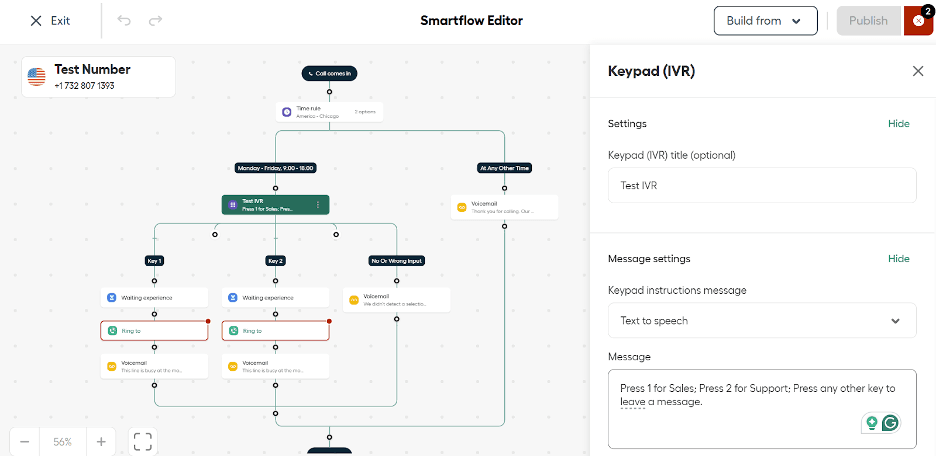
aircall workflow

You can use Aircall to build automated workflows, such as the test IVR tree above. You can build these workflows from scratch or use one of Aircall’s helpful templates as a jumping off point. (Source: Aircall)

AI Assist coaches your sales and customer service agents in real time as they talk with customers, providing tips and insights to improve call outcomes. AI Voice Agent answers inbound calls on your behalf, autonomously responding to common customer questions, qualifying leads and collecting caller details for human follow-up. This easy-to-set-up automation saves your business both time and money. Every Aircall account now gets 50 AI Voice Agent minutes a month at no charge, plus 100 bonus minutes at sign-up, which is enough to see whether the automation fits your call flow before you commit to metered minutes.

Of course, you’ll also find plenty of traditional phone system features, like ring groups, auto-dialing and warm transfers. We also appreciate Aircall’s automated workflow builder, which makes it easy to edit automations with a drag-and-drop interface. Choose from pre-set templates or build your own workflows from scratch, helping to improve customer experience and direct calls to the right agents. Aircall also integrates with more than 250 popular business software, including Salesforce, HubSpot, Zendesk, Microsoft Teams, Slack and Shopify.

Service PlanMonthly Cost (per user)Annual Cost (per user, per month)What’s Included
Essentials (minimum 3 licenses)$40$30Unlimited calls in the U.S. and Canada; essential telephony features; desktop and mobile softphones; unlimited simultaneous outbound calls; SMS/MMS; integrations; API access
Professional (minimum 3 licenses)$70$50Everything in the Essentials plan, plus: mandatory call tagging; advanced sales team features; advanced customer support team features; advanced analytics and live monitoring; Salesforce integration
CustomCustom quoteCustom quoteEverything in the Professional plan, plus: unlimited international calling; personalized onboarding; prioritized customer support; API developer support; service-level agreement; single sign-on

Note: Essentials and Professional require a minimum of three licenses, so the true entry cost is $90 a month on annual billing. The Custom plan requires 25 licenses.

  • Aircall's phone system has a speedy implementation process that rivals Ooma's.
  • Sales and customer support teams can easily collaborate through a shared inbox and shared contacts.
  • The noise cancellation function is especially valuable for agents in busy call centers.
  • Aircall’s Essentials and Professional tiers require a minimum of three licenses, which brings the true starting monthly costs to $90 and $150 per month, respectively, when billed annually.
  • Aircall's deepest AI tools still cost extra: AI Assist is a $9-per-license add-on on the Essentials plan, AI Assist Pro runs $49 per license, per month on every tier, and AI Voice Agent minutes are metered once you use up the 50 free ones each month.
  • Aircall only supports video conferencing for up to five participants.

TrustRadius: 8/10 across more than 140 reviews

“Our connection rate has improved since using Aircall and our team has benefited from it and so have clients,” wrote one user.

Trustpilot: 3/5 across more than 1,000 reviews

“Features like call recordings and live monitoring are extremely helpful for optimizing our customer service process,” one user said.

Quo logo
Editor's Rating: 8.7/10
Visit Site
Links to Quo

Quo (formerly OpenPhone) is purpose-built for small, customer-facing teams that need a professional phone presence without the complexity of a full unified communications platform. Where most competitors on this list were designed for enterprise and scaled down, Quo was built from the ground up for businesses with one to 15 employees, such as home services providers, law firms, real estate agents, professional services firms and other operations where every missed call could mean lost revenue. That focus on simplicity and team-level collaboration is why Quo earned our pick as the best business phone system for small teams.

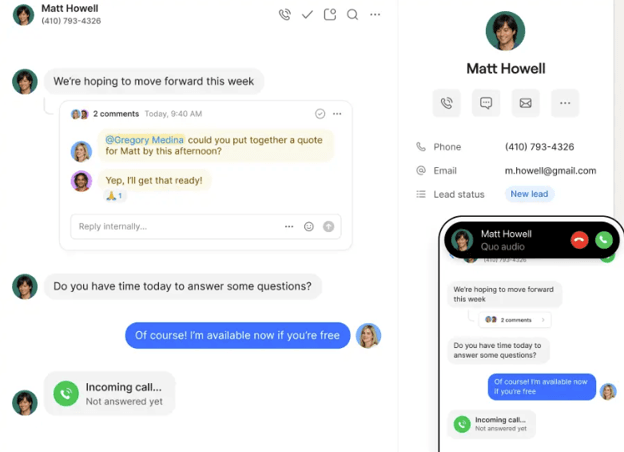
Quo convos

Quo centralizes your conversations and allows multiple team members to get involved with conversations. (Source: Quo)

The standout feature is Quo’s shared phone numbers and unified inbox. Multiple team members can see and manage the same call, text and voicemail history in a single view, with internal threads for behind-the-scenes coordination. This means a small team can cover a business line without anyone’s personal number being exposed to customers and without conversations falling through the cracks. We appreciated that the interface feels more like a modern messaging app than a traditional phone system. Setup takes minutes, not hours, and there is no IT department required.

Quo’s AI capabilities are surprisingly robust for a system at this price point. It includes seamless integrations with Claude and ChatGPT on all plans, which users can use to analyze calls, texts and contacts directly from their preferred AI assistant.

Additionally, Sona, the platform’s AI agent, is included on every plan with 1,000 free automation credits per month (roughly 10 AI-answered calls). Sona can answer calls when the team is busy or after hours, capture caller details and respond to common questions, a feature that competing platforms typically reserve for higher-priced tiers or sell as a premium add-on. The Business plan and above add AI call summaries, full transcripts and AI call tagging for automatic categorization.

On the integration side, Quo connects with HubSpot, Salesforce, Zoho CRM, Pipedrive, Slack, Zapier, Make and Jobber, among others. It also offers an open API and webhooks on all plans, which gives technically inclined teams flexibility to build custom workflows. However, businesses should be aware that Quo does not offer video conferencing, call center queue management or desk phone support on its base plan. Companies that need those capabilities or that require deep legacy PBX integrations will want to look elsewhere on this list.

Quo PlansMonthly Price (per user)Annual Price (per user, per month)What’s Included
Starter$19$15One local or toll-free number per user, unlimited calling and messaging to U.S. and Canadian numbers, voicemail transcripts, auto-replies, scheduled messages, shared phone numbers (up to 10 users), Sona AI agent (1,000 credits), internal threads, business hours settings, basic call forwarding, Slack and Zapier integrations, Quo API, email support
Business$33$23Everything in Starter, plus: AI call summaries and transcripts, phone menus (IVR), automatic call recording, call transfers, group calling, custom ring orders, analytics and reporting, HubSpot, Salesforce, Zoho CRM, Pipedrive and Jobber integrations, shared numbers for unlimited users, live chat support
Scale$47$35Everything in Business, plus: AI call tags, dedicated onboarding support, priority live chat and email support, inbound phone support
  • Quo's shared inbox model gives every team member visibility into calls, texts and voicemails, which eliminates the common small-business problem of leads slipping through the cracks.
  • Sona AI agent is included on all plans, providing after-hours call answering that competitors typically gate behind premium tiers.
  • Setup is fast and requires no IT expertise — business owners can be operational with a new or ported number in minutes.
  • Quo does not offer native video conferencing, which means teams that need voice, video and messaging in a single platform should consider alternatives like Zoom or RingEX.
  • Customer support on the Starter plan is limited to email only; live chat requires the Business plan and phone support requires Scale.
  • Some users report call quality issues on cellular connections, with the system performing most reliably over Wi-Fi.

TrustRadius: 8.2/10 across more than 20 reviews

“We use it to communicate with our customers, mostly via texts, not as much calling unless a customer specifically asks for a phone call. OP addresses the ease of setting up and using a phone number by making it a SAAS. We use it for day to day communication for high value customers, some transactional texts, some promotional texts as well,” one user wrote.

Trustpilot: 4/5 across more than 1,000 reviews

“Quo has been a godsend for my small business. I tried live receptionist services for my business but the overhead was too high and call answering times and responses weren’t always reliable. The Sona AI receptionist does everything right, 24/7, and I couldn’t be happier,” one user wrote.

zoom logo
Editor's Rating: 9/10
Visit Site
Links to Zoom Phone

Zoom’s familiar video meeting software, paired with its full-featured business phone system, make it a flexible single platform solution. You can equip employees in video-intensive roles with top-rated technologies and achieve cost savings through metered and unlimited phone licenses. It offers unique tools for prioritizing voicemails and an embedded AI assistant. For these reasons and others, Zoom is the best business phone service for video conferencing.

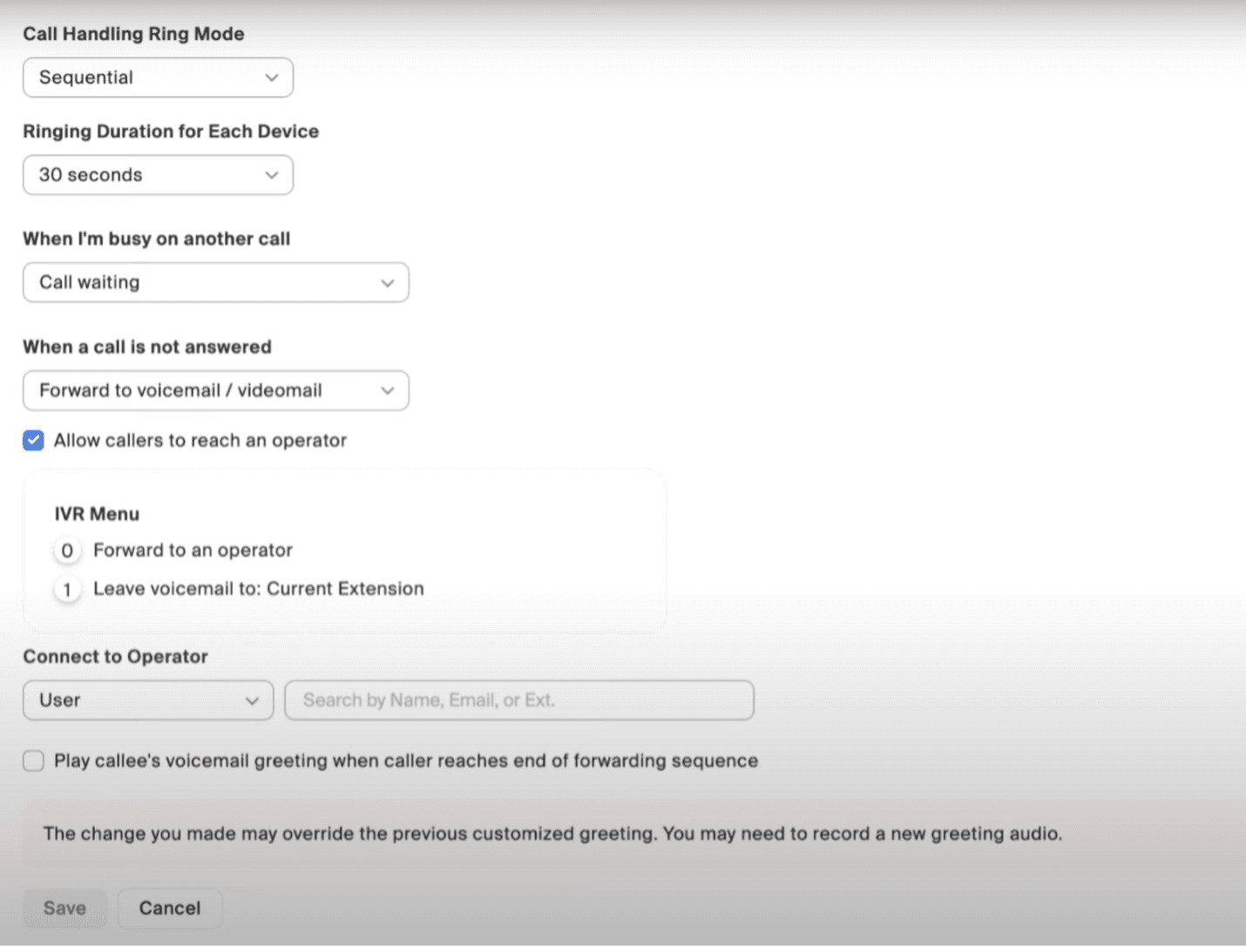
Zoom call rules

See next steps while on a call using Zoom Phone with AI Companion. Source: Zoom

During our evaluation, the AI Companion demonstrated its value as a productivity tool. It helped us find available meeting times among participants by scanning connected calendars, answering participant questions during video meetings and creating action items afterward. We appreciate that you can quickly surface recent chats from conferences, thanks to a recently refreshed Team Chat interface. Users can also filter voicemails by labels such as “scheduling conflict” or “meeting cancellation.”

We were impressed with Zoom’s whiteboard updates. Layer management options let presenters “hide” layers during meetings or walk clients through phases. The AI Companion can group sticky notes by sentiment or topic. Zoom Phone plans include free video meetings, while Zoom Workplace subscriptions have advanced capabilities and are priced competitively with RingEX and Dialpad.

Zoom planMonthly Cost (per user)Annual Cost (per user, per Month)What’s Included
Basic (Zoom Workplace)FreeFreeUp to 40 minutes per group meeting; up to 100 participants; access to basic features like Zoom Chat, Whiteboards and Clips.
Metered (Zoom Phone — added to Zoom Basic)$12$10.50Metered domestic and international voice calls; unlimited 40-minute video conferences; 100 meeting participants; virtual fax; Team Chat; voicemail prioritization; AI summaries for audio calls
U.S. & Canada Unlimited (Zoom Phone — added to Zoom Basic)$18$16Everything in the Zoom Phone Metered plan, plus: unlimited U.S. and Canada voice calls; SMS/MMS available in the U.S. and Canada
Pro Plus (Zoom Workplace)$24$20.50Everything in the Zoom Phone U.S. & Canada plan, plus: unlimited 30-hour video meetings with 100 participants; AI-powered task management; toll-based dial-in numbers; Clips Plus
Business Plus (Zoom Workplace)$29$24.50Everything in the Zoom Workplace Pro Plus plan, plus: Zoom Scheduler, Reservations and Visitor Management; unlimited fax and whiteboards; 300 video meeting participants
  • Zoom AI Companion offers productivity and communication tools for summarizing voice and video calls, chats and whiteboards.
  • You can mix and match service plans based on individual employee needs.
  • Zoom Phone and Workplace subscriptions support live and asynchronous video interactions.
  • Zoom doesn't receive the highest marks for customer service.
  • There are no phone dial-in numbers when using the free video service plan.
  • Zoom Phone integrates with fewer CRMs than other business phone systems.

TrustRadius: 8.6/10 across more than 5,900 reviews

“Zoom Phone was a great fit for us as our staff, mostly non-technical, was all-in on Zoom. We were able to go fully cloud-based with just a handful of handsets. It was easy to use personal cell phones as office phones,” one user wrote.

Trustpilot: 1.3/5 across more than 1,500 reviews

“App itself is good until you run into an issue and need support and that’s where the gold stops and the nightmare begins” one user wrote.

GoTo Connect company logo
Editor's Rating: 8.6/10

GoTo Connect takes the complexity out of managing business phone systems across multiple offices and job sites. In our testing, we were impressed by its centralized admin tools for handling user licenses, device provisioning, call quality monitoring and even SMS campaign performance tracking. It supports unlimited locations, extensions and dial plans on every plan tier — a level of flexibility that competitors like RingEX and Dialpad reserve for higher-priced packages or don’t match at all.

Where GoTo Connect really separates itself is multi-site visibility and scalability. The system health dashboard lets admins monitor call quality metrics across offices from a single view, and the platform scales from a standard phone system to an omnichannel contact center by adding licenses directly from the admin portal. Not all competitors offer that kind of upgrade path without switching platforms entirely.

We also appreciated the AI features that streamline multi-site administration. GoPilot, GoTo’s built-in digital assistant, answers questions and surfaces how-to resources directly in the admin portal. Text-to-speech tools generate professional greetings for dial plans without requiring audio recordings, and the AI receptionist add-on can handle inbound calls, capture caller details and transfer to live agents. Combined with a drag-and-drop dial plan editor that felt more intuitive than competitors’ routing tools, GoTo Connect earned our pick as the best business phone system for multi-site management.

Choose from various voice actors and set up interaction rules to shape your GoTo AI Receptionist’s identity. Source: business.com

GoTo does not publish per-user rates for any of its tiers; every plan is quoted. In our past reviews, we’ve seen pricing start around $29 to $39 per user per month, but costs vary depending on the plan, contract length and number of locations.

Service PlanCostWhat’s Included
Phone SystemCustom; contact GoTo for pricing detailsCall from any device; video meetings; AI text-to-speech sound clips; smart call routing; team messaging; unlimited auto-attendants, dial plans and ring groups; call queues; hot desking; paging; intercom; call recording; smart notes; AI meeting transcription; automated SMS messages; real-time and historical reports
Connect CXCustom; contact GoTo for pricing detailsEverything in Phone System plan, plus: AI messaging assistant; shared inbox; custom surveys; AI call summaries and transcripts; SMS and MMS campaigns; webchat widget; customizable dashboard; custom roles and permissions
Contact CenterCustom; contact GoTo for pricing detailsEverything in Connect CX plan, plus: intelligent call routing; skills assignment; tag management; call campaign; ring strategy; autodialer; monitor and coach agents; chat assistant; agent softphone and dashboard; supervisor analytics; AI chat analysis
  • Without upgrading plans, companies can add ring groups, call queues or other dial plan features to improve call flows.
  • GoTo Connect helps businesses open new sites fast, thanks to simple setup processes and provisioning templates.
  • All plans have international calling options to 50+ countries.
  • GoTo Connect support documentation and customer service options can be challenging to navigate.
  • In the Phone System plan, AI tools for voice calls are not included.
  • Custom permissions for branch managers or other departments require upper tier plans.

TrustRadius: 8.5/10 across more than 1,900 reviews

“This tool has helped me connect with clients, coworkers, and employers. In addition, its function that allows you to record the sessions has been ideal for replaying our meetings if necessary in the future. It has also allowed us to have a video backup of everything that is said in each of our meetings which has been very helpful in re-watching meetings,” one user wrote.

Trustpilot: 2/5 across more than 200 reviews

“Its not always reliable. Drop calls. No one can figure out why. We sometimes may be missing calls. Bad for business. The rate increase doesn’t make sense & not worth it in my case,” one user wrote.

Editor's Rating: 8.4/10

Vonage stands out for its customization thanks to its a la carte features, pay-as-you-go APIs and low- and no-code design tools. It offers over a dozen add-ons to expand your capacity during peak season. With a couple of clicks, you can add metered or unlimited extensions, call queues or call recording. Likewise, we appreciate the available credits and sample code to embed the voice and messaging APIs.

Vonage offers flexibility based on a business’s unique needs. Lower-tier plans don’t include all the same features as higher-tier plans — if an employee doesn’t require desk phone or fax functionality, there’s no need to pay for it. We were impressed with the extensive add-ons Vonage offers as well. It includes a mix of core features and add-ons, from a shared business inbox to an AI virtual assistant.

Vonage hardware

Vonage offers a combination of hardware and software solutions to support your unified communications. Vonage’s softphone works well with both desktop and mobile, and hardware like the Yealink SIP-T46U supports a more conventional office setup. (Source: Vonage)

Vonage offers three pricing tiers, each of which is suited to the needs of businesses as they grow. The basic tier offers lightweight but effective business phone options at a cost-effective price, while the highest tier combines all the advanced communications features a large business might need.

PlanMonthly Cost (per line)Annual Cost (per line, per month)Features
Mobile$19.99$13.99Desktop and mobile app, unlimited domestic calling, SMS/MMS messaging, voicemail, phone number porting, virtual receptionist, admin portal.
Premium$29.99$20.99All Mobile features plus desk phone support, team messaging, Vonage Meetings (video conference), VBC App Center, single sign-on.
Advanced$39.99$27.99All Premium features plus call groups, call recording, visual voicemail.

Note: Rates shown are for 1 to 4 lines; Vonage lowers the per-line price again at 5 to 19 lines (starting at $12.59 per line, per month) and at 20 or more (starting at $10.49 per line, per month.)

  • Entry-level plans offer a low starting price for small or new businesses.
  • Flexible plans with discounts for annual contracts.
  • Customizable add-ons that can be tailored to your business's individual needs.
  • Call recording requires a higher-tier plan or add-on.
  • Customer support isn't available 24/7.
  • Some customers report inconsistent call quality and reliability.

TrustRadius: 8.7/10 across more than 100 reviews

“I have been using Vonage Business Communications [for a] decade and found [it] very easy to use, especially for calls & texts to USA candidates. I have installed [the] app [on] my cell phone which is very, very easy and you can use anywhere,” one user wrote.

Trustpilot: 2.1/5 across more than 1,500 reviews

“I give the actual phone service a 4 or 5. That’s the good news. Clear connections and hardly any downtime. The challenge is in Customer Support. I have a feature that is not working since mid January and I have spent a good 20 hours (probably more) in Chat trying to resolve the problem,” one user wrote

Editor's Rating: 8.5/10

Nextiva’s round-the-clock support hours and friendly representatives won us over, which is why we chose Nextiva as the best business phone system for customer support. We spoke with various support agents while testing Nextiva and were pleased they could answer some of our more challenging questions. Verified user reviews mirror our experiences, and the onboarding process was straightforward. These factors make it easy for small businesses to add VoIP phones without extensive training and configuration.

Nextiva threaded conversations

Employees can view all communications in the Nextiva desktop app or click the waffle icon at the top left to switch to the review and social management app. Source: Nextiva

But Nextiva isn’t only a business phone service. It bundles review management and digital engagement tools with VoIP or offers a digital-only package for social media and e-commerce sellers who don’t need phone services. This scalability is ideal for online startups, allowing them to add communication channels as demand grows while keeping their team lean and efficient.

Nextiva’s Unified CXM platform also allows for some flexibility. For example, you can assign remote employees their own phone number but give on-site staff company extensions. Co-workers with phone licenses can join team collaboration spaces, share files and chat or meet by video. Bear in mind that the $15 headline rate assumes annual billing; month-to-month subscribers pay $23 per user for the same Core plan.

PlanMonthly Price (per user)Annual Price (per user, per month)Key features
Core (Small Business)$23$15Unlimited calling; auto attendant; voicemail transcription; team messaging and video meetings; basic call routing; Nextiva app (desktop and mobile)
Engage (Small Business)$50$25Everything in Core, plus: SMS, email and social media messaging; live chat and chatbot tools; higher messaging limits; expanded integrations; enhanced reporting and analytics
Scale (Small Business)$75$75Everything in Engage, plus: skills-based and priority routing; built-in call center features; AI-powered transcription and summaries; advanced analytics and reporting; higher usage limits across channels
Essential (Enterprise)$75$75Omnichannel capabilities, journey orchestration, AI transcription and summary, skills-based routing, voice and web chat.
Professional (Enterprise)Requires quoteRequires quoteEverything in Essential, plus: advanced self-service, real-time supervisor support, secure payment (PCI-DSS), progressive and predictive dialing, additional channel support.
Premium (Enterprise)Requires quoteRequires quoteEverything in Professional, plus: workforce management, unlimited skills-based routing, advanced analytics, unlimited channels, in-conversation payments.
  • Nextiva offers 24/7 phone support, plus live chat, email and ticketing options.
  • Small businesses can save time by managing VoIP, social media, email and messaging in one platform.
  • Nextiva supports growing teams with flexible call routing, collaboration tools and higher-tier CX features.
  • Nextiva's bundled social media and review management tools can make its entry-level plans pricier than some alternatives.
  • Unlike RingEX and Dialpad, Nextiva reserves AI-generated call and video transcription for higher-tier plans or add-ons.
  • Integrations and certain advanced features may require add-ons, which can increase your total cost.

TrustRadius: 7.9/10 across more than 360 reviews

“Round robin was super easy to get set up, and the team was very helpful throughout the onboarding process,” one user wrote.

Trustpilot: 4.5/5 across more than 9,000 reviews

“We have been using the new Nextiva One platform for several months and really enjoy it. The ability to have access to your ‘phone’ on any device has been great. Customer service has been very responsive,” one user wrote.

Editor's Rating: 8.8/10

Dialpad Connect is the right business phone system for sales and recruiting teams that want to leverage AI for voice intelligence. The vendor trained DialpadGPT on over 6 billion minutes of conversational business data from sales, collaboration and service spaces. Its company dictionary feature elevates Dialpad above similar phone services. We appreciate that it picks up keywords specific to your brand or industry. Indeed, every recorded call turns into an easy-to-digest email with action items and a searchable transcript.

Dialpad connect

AI transcription records details of calls, turning conversations into a searchable archive so that nothing gets lost. (Source: Dialpad)

The business communication plans provide basic speech coaching cards, which we found helpful for entry-level agents. Most advanced AI tools, like Ai Assist or Playbooks, are optional add-ons or live in Dialpad Sell, the vendor’s separate outbound sales product, which starts at $39 per user, per month. Likewise, Dialpad doesn’t include generative AI video meeting tools with VoIP services. This is disappointing since RingEX, GoTo Connect and Zoom offer AI-powered video summaries.

Businesses that need full contact center functionality should note that this is a third product line, Dialpad Support, which starts at $80 per user, per month. Buying into the Dialpad ecosystem at the $15 entry price is straightforward, but the features many growing teams actually want sit in adjacent products rather than higher Connect tiers.

Dialpad Connect planMonthly cost (per User)Annual cost (per User, per Month)What’s Included
Standard$27$15Unlimited calling, with support for one location; visual voicemail; three ring groups; call recording; unlimited AI meetings for up to 10 participants; SMS, MMS and team messaging; Google Workspace and Microsoft 365 integrations; visual voicemail and transcription
Pro$35$25Everything in Standard, plus: support for 10 locations; 25 ring groups; CRM integrations; hold queues; international SMS and phone numbers; open APIs and webhooks
EnterpriseCustomCustomEverything in Pro, plus: unlimited ring groups and office locations; dial by extension; priority routing; data retention policies; single sign-on provider integrations

Note: Pro requires a minimum of three users and Enterprise a minimum of 100.

  • Generative AI technology converts voice calls into searchable and actionable summaries.
  • Out-of-the-box reports cover calling habits, interactive voice response (IVR) call flows and more.
  • There are robust speech coaching tools that can be super valuable for both sales and customer service teams.
  • Video conferencing is limited to 10 participants at a time.
  • The video conferencing AI tools and capacity fall behind rival business phone solutions.
  • Users have reported glitches in the mobile app.

TrustRadius: 8.3/10 across more than 500 reviews

“Since transitioning to Dialpad Ai Voice, we have benefited from having a single, dependable, user-friendly platform that is easy to oversee. As a result, staff morale has improved, and customer satisfaction has increased,” one user wrote.

Trustpilot: 4/5 across more than 3,000 reviews

“Been with Dialpad for years and always has worked as designed, clean and clear with just the right admin features,” one user wrote.

Verizon Business logo
Editor's Rating: 8.5/10

Verizon Business Digital Voice takes the opposite approach from most systems on this list: instead of tiering features across multiple plans, Verizon includes more than 45 calling features on a single flat per-line rate. There is no Standard-versus-Pro decision to make and no upgrade path to budget for, because the Auto Attendant, Hunt Group, call recording controls and analytics that competitors reserve for mid- and upper-tier plans all come in the box. For a small business that wants a conventional desk-phone system without a feature matrix, that simplicity is appealing; it’s also why Verizon Business Digital Voice is our pick for businesses bundling phone service with business internet.

Verizon Connect

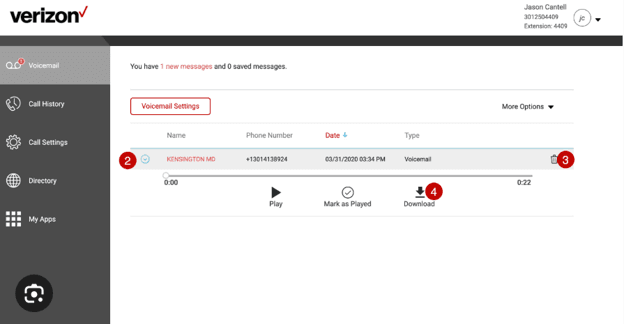
Verizon Business Digital Voice offers a simple softphone interface that makes it easy to navigate voicemail, call history, settings, your contacts and third-party applications you’ve integrated. (Source: Verizon)

A Business Digital Voice line runs $35 per month on its own, but drops to $20 for the first line when paired with Fios Business Internet at 300/300 Mbps or higher, with additional lines at $25. Service scales to 99 lines, so the same flat-rate structure holds whether you’re outfitting a three-person office or a regional operation. Because call handling lives in the cloud rather than in an on-premises PBX, the system can reroute calls to a preset number during a power or internet outage, and administrators manage the whole system from the My Account portal while individual employees control their own voicemail and call history from a separate end-user portal.

However, Business Digital Voice requires IP phones purchased through Verizon — the company does not permit customers to bring their own VoIP equipment — with desk phones starting at $85 and analog adapters at the same price if you want to keep existing handsets. That’s an expense beyond the sticker price that also becomes a barrier to switching carriers later, since you’ll have Verizon-specific hardware that might not be able to follow you to a new provider.

Verizon provides mobile and desktop apps with audio and video conferencing, but if your team works primarily from mobile phones rather than desks, Verizon’s One Talk is the better fit within the same portfolio. You’ll need an existing Verizon  Wireless plan to use One Talk, which starts at an additional $20 per line, per month with discounts at 10 or more lines, assigns one business number that rings across smartphones, tablets, desktops and desk phones, and works on non-Verizon devices through the One Talk app. Be aware, though, that One Talk calls route over Verizon’s cellular voice network, so a call can drop if you leave 4G LTE coverage without Wi-Fi Calling enabled, and the Automated Receptionist and Hunt Group features bill as separate line items rather than coming included.

Business Digital Voice uses a single service tier priced per line, with the rate determined by whether you bundle internet service. Every line includes unlimited nationwide calling and the full 45-plus feature set.

ConfigurationMonthly Price (per line)What’s Included
Business Digital Voice with Fios Business Internet (300/300 Mbps or higher)$20 first line; $25 each additional lineUnlimited nationwide calling, 45+ call management features, Auto Attendant, Hunt Group, Call Park and Retrieve, shared call appearance, visual voicemail, announcements on hold, call history, administrator and end-user web portals, mobile and desktop apps with audio and video conferencing
Business Digital Voice standalone$35 per lineSame feature set; requires an existing internet connection of 5 Mbps or higher
Verizon One Talk (alternative)Starting at $20 per line, with discounts at 10+ linesOne business number across smartphones, tablets, desktops and desk phones; Automated Receptionist, Hunt Group, Call Queue, simultaneous ring and visual voicemail available, some as separately billed features

Verizon supports up to 99 lines.

Standalone Business Digital Voice carries a $99 activation fee ($49 when you sign a two-year contract), and phone equipment must be purchased from Verizon starting at $85.

Early termination on a two-year agreement runs 35 percent of the remaining base monthly charges.

  • All 45-plus calling features come on one flat per-line rate, so there's no tier to outgrow or upgrade to budget for.
  • Bundling with Fios Business Internet cuts the per-line cost from $35 to $20, among the lowest entry rates of any pick on this list.
  • Cloud-based call routing can redirect calls to a preset number during a power or internet outage, which on-premises systems can't do.
  • IP phones must be purchased from Verizon starting at $85, and the company does not allow customers to supply their own VoIP equipment.
  • Standalone service adds a $99 activation fee (discounted to $49 when signing a two-year contract).
  • Verizon Business Digital Voice does not support SMS/MMS messaging.

Verizon Business Digital Voice does not have a significant number of customer reviews on TrustRadius or Trustpilot. Reviews of the platform may be conflated with the company’s broader offerings, such as Verizon Wireless or Business Internet. For this reason, we’ve omitted user reviews here.

RingCentral logo
Editor's Rating: 8.9/10

RingEX from RingCentral is our top pick for collaboration because it connects internal and external partners in interactive spaces with a depth of features we didn’t find in other systems we tested. Its collaborative notes, integrated whiteboards and productivity integrations distinguish RingEX from its competitors, making it an ideal choice for established and growing companies alike.

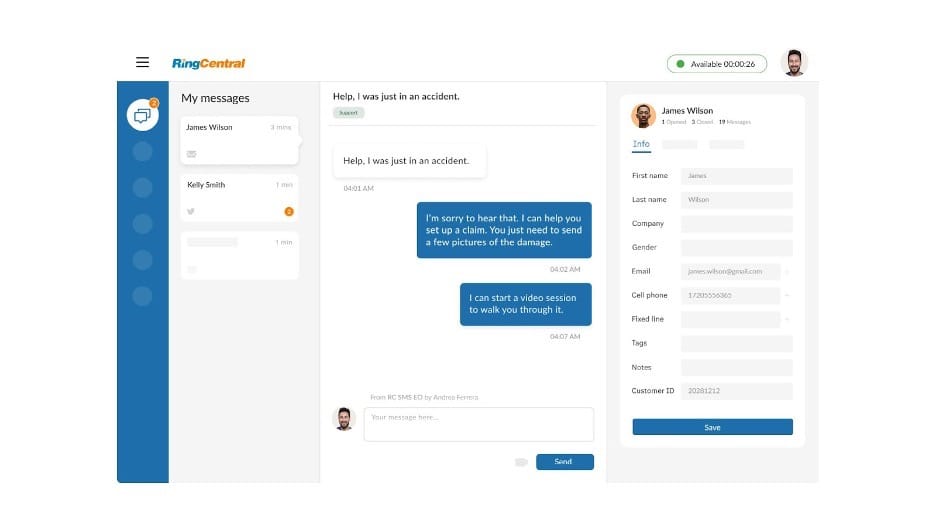
RingEX threads

RingEX makes it simple to manage all of your communication threads via its desktop application. Source: RingCentral

During our hands-on evaluation, we appreciated how easy it was to organize chat messages, pin key details for team visibility and turn shared notes into formatted documents. We were especially impressed by RingCentral’s AI Assistant, which generates searchable voice and video meeting summaries, tracks decisions and action items during calls, and lets users assign tasks or schedule follow-ups directly from the conversation. We confirmed these AI tools come standard with all plans for voice and video — a notable advantage over competitors that reserve similar features for premium tiers.

The unified communications platform offers persistent chat and video spaces where employees can share ideas and files or jump into a call or video meeting with one click. We also tested RingEX’s 500-plus integrations library, the largest we encountered in our research, and found the workflow builder intuitive for automating call routing, messaging and other routine tasks.

Throughout our testing, we had consistent user experiences across desktop, mobile and iPad apps. However, we did find that some advanced AI features listed as standard require a paid upgrade, so we’d recommend confirming feature availability for your specific plan before committing. For collaborative teams needing advanced communication tools, RingEX offers capabilities we didn’t encounter elsewhere.

Service PlanMonthly Price (per User)Annual Price (per User, per Month)Key Features
Core$30$20Unlimited domestic calling in the US & Canada (local number); 100 toll-free minutes; AI assistant for video (closed captions, transcriptions, live translations, highlights and summaries); AI assistant for phone (closed captions, real-time note taking, action items, call history sync and transcriptions); Microsoft Teams, Google and Slack integrations; basic call queues; on-demand call recording; team messaging; unlimited audio conferencing; 25 business SMS per user per month; multilevel auto attendant/interactive voice response; API access; single sign-on (SSO); video conferencing with 200 participants; call logs; unlimited video recording; visual voicemail; mobile app
Advanced$35$25Everything in Core, plus: 1,000 toll-free minutes; AI assistant for team messaging (drafting and editing messages, translations and unread message summaries); AI assistant for SMS (translations and drafting and editing messages); on-demand or automatic call recording; hot desking; custom roles and permissions; CRM and industry-specific integrations; unlimited internet fax; Business Analytics Essentials; advanced call queues; call monitor, whisper and barge; 100 business SMS per user per month
Ultra$45$35Everything in Advanced, plus: 10,000 toll-free minutes; unlimited cloud storage; webinars with 500 attendees; device analytics and alerts; video conferencing with 200 participants; Business Analytics Pro; 200 business SMS per user per month
Customer Engagement BundleCustom pricingCustom pricingEverything in Ultra, plus: Business SMS Booster (shared SMS inbox, reply templates, compliance and analytics); Call Queues Booster (estimated wait time and place announcements, call back from queue and live reports)
  • Feature-rich team spaces support real-time interactions, ideal for increasing engagement among growing businesses.
  • RingCentral AI summarizes voice and video interactions.
  • A robust set of integrations allows established businesses to get even more out of the system, without having to switch up any of the other programs they are utilizing.
  • RingCentral supplies fewer short message service (SMS) text messaging credits per user than most competitors.
  • Virtual faxing is only included in some service plans.
  • Custom pricing is only available to businesses with more than 100 users.

TrustRadius: 8.8/10 across more than 500 reviews

“RingCentral is used for all our business client calls and for some intra-organizational messaging. It helps us keep track of our incoming and outgoing calls. Additionally, because we have the app on our mobile phones, it comes in handy when we are on the move. We can pick up our calls and respond to clients on the go, which means fewer missed calls and communications. Additionally, we can keep our work communications separate from our personal calls without using 2 devices,” one user wrote.

Trustpilot: 1.7/5 across more than 2,000 reviews

“I have been with this service off and on since 2008. While the phone service is satisfactory and they have some neat features, they care nothing about their customers. I had to agree to a two year agreement in November 2024 and wound up with some heart issues and decided to retire. I have ported my number out but still have to pay for services I am not using until November 2026,” one user wrote.

What is a Business Phone System?

A business phone system is more than just a tool for making and receiving phone calls. Today’s business phone systems are complete unified communications systems that allow businesses, especially established companies with more advanced needs, to communicate with customers and clients through multiple channels. Modern systems provide phone service, video conferencing, text messaging, internal messaging, online faxing and much more. This ensures growing businesses can meet their customers and clients wherever they are on whatever type of platform they prefer.

Most of the leading business phone systems utilize VoIP technology, which provides the functionality needed to offer dozens of useful tools and features, like unlimited calling, visual voicemail, call recording and automated attendants. Additionally, advanced AI capabilities are becoming standard, with features like real-time transcription, sentiment analysis and intelligent call routing based on customer history.

In addition, most of the best phone systems don’t require a standard office phone. Many have desktop and mobile apps that let users operate the entire system from the desktop computer or mobile device. That shift is well underway: research firm Metrigy found that 50.4 percent of businesses now run cloud-based unified communications alone, while 39.2 percent are still juggling more than one phone system.

Which Virtual Phone Systems Are Best for Remote Teams?

The best virtual phone systems for remote teams are Quo, Ooma Office, Zoom Phone, RingCentral, Nextiva and Vonage, all of which are cloud-based VoIP platforms that let distributed employees make calls, join video meetings, send texts and collaborate from any device, anywhere. These systems require no on-premises hardware and typically cost between $10 and $80 per user per month depending on features and plan tier. Because everything runs through desktop and mobile apps, remote and hybrid teams can maintain a unified business phone presence without being tied to a physical office.

Several cloud-based platforms stand out based on our hands-on testing, each suited to different remote work needs.

  • Quo is a strong choice for small distributed teams. It offers seamless integration with Claude and ChatGPT, strongly integrated AI through its Sona AI agent, and AI call summaries and transcripts for full visibility regardless of location. Starting at $15 per user, per month, it is a competitively priced solution, as well, allowing small teams to stay within budget while still accessing the cloud-based tools they require to grow across geographic lines.
  • Ooma Office is the best virtual phone system for easy setup. First-time admins can configure business hours, ring groups and call handling in minutes using the Express Setup Assistant, and preconfigured IP phones ship within 24 hours. The mobile app displays ring group names on incoming calls so remote employees know how to greet callers. Plans start at $19.95 per user per month.
  • Zoom Phone is the best option for teams already using Zoom for video meetings. It pairs a full-featured phone system — including voicemail prioritization, call queues and an embedded AI assistant — with the video conferencing platform remote teams already know. Mixing and matching plans by employee keeps costs flexible. Plans start at $10.50 per user per month.
  • RingCentral (RingEX) is the strongest choice for team collaboration across locations. Integrated whiteboards, collaborative notes, task management and over 500 integrations make it easy for distributed teams to move between calls, chats and projects without switching apps. Plans start at $30 per user per month, or $20 when paid annually.
  • Nextiva is a top pick for remote teams that need responsive support around the clock. It offers 24/7 customer service, bundled review and social media management tools, and a clean interface for managing voice, video, messaging and customer interactions from one dashboard. Plans start at $15 per user per month when paid annually and $23 month to month.
  • Vonage is ideal for remote teams with specialized workflow needs. Its à la carte add-ons and pay-as-you-go communication APIs allow businesses to build a custom phone setup tailored to specific departments or use cases. Plans start at $19.99 per line per month, or $13.99 on an annual contract.

What Are the Advantages of Using a Business Phone System?

Businesses that have been up and running for a while know just how critical it is to present a professional image while staying connected with their customers and clients. Cloud-hosted phone services improve customer experiences while increasing efficiency. A professional phone number boosts a business’s credibility in the eyes of consumers, while automation features fuel productivity.

Cost-Effective

Many companies switch to VoIP to save money. Unlike an on-premises system, your business isn’t responsible for server maintenance or upgrades. A cloud service’s flexibility means you don’t necessarily need hardware. Employees can use their existing computers or cell phones for free or add an analog telephone adapter to connect traditional desk phones.

Better Customer Experiences

Advanced features like auto attendants and customer relationship management (CRM) integrations translate into satisfying customer experiences. Clients can reach the correct department or select an employee by name through the company directory. Modern systems now incorporate AI-powered virtual assistants that can handle routine inquiries, schedule appointments and even process basic transactions without human intervention. Likewise, employees see ring group details (the line your caller chose) and customer information, such as when they last called or their survey results. This enables your staff to personalize their greeting and meet customer expectations.

Scalability

Cloud-based phone systems offer unprecedented flexibility for growing businesses. With a VoIP phone service, you can add or remove lines, features and user permissions from the admin dashboard. Call reports provide insights about call volumes and missed calls, which informs scheduling and hiring decisions. Real-time analytics dashboards now use predictive modeling to forecast call volume trends, helping businesses proactively adjust staffing levels. These capabilities help small businesses scale operations to meet demand.

Enhanced Professional Image

Business phone systems strengthen your brand image and present your business as professional and well-established. Features like dedicated business lines and auto attendants lend an air of legitimacy to even the smallest businesses. Brand reputation starts with presenting a buttoned-up, polished appearance, and your communications system is the first touchpoint for most people who are getting to know your business. Choosing the right business phone system can go a long way toward making a good first impression.

Increased Productivity

The best business phone systems unify business communications, resulting in less application switching. They also provide virtual receptionists and IVR menus, reducing call transfers. AI-powered tools can generate voice and video summaries, highlight action items and track assigned task progress. Recent advancements include automatic meeting scheduling, intelligent follow-up reminders and cross-platform synchronization that keeps all team members aligned regardless of their location or device. Moreover, admins can schedule recurring reports to keep leaders abreast of call volumes without performing the same steps weekly or monthly.

Flexibility

A reliable, user-friendly business phone system allows you to employ hybrid and remote workers, expanding your access to talent and giving your employees the flexibility to work in the way that’s most convenient for them. It also means that traveling employees can remain available, accessing your communications tools from whatever devices they have handy. A business trip no longer means a team member will be incommunicado, helping you stay lean as you grow your business.

TipBottom line
Boost productivity by selecting a phone system that offers task management, collaboration, integrations and video services. This will reduce the time your employees spend toggling between programs.

Key Features of a Business Phone System to Keep in Mind

Business phone systems are full of valuable features and tools. Some VoIP providers offer only a few dozen features while others have over 100. As your business grows, many of these features become increasingly valuable. Ensuring your employees have the tools they need to easily communicate with your clients and each other is critical as your venture grows and becomes more complex. The most sought-after features combine traditional telephony with AI-enhanced capabilities that automate routine tasks and provide actionable insights. As you can see with many of the tools below, while they might not be as valuable to a business with a couple employees, they are vital for those with a larger staff that have varying needs and responsibilities.

Metered or Unlimited Calling

Most VoIP phone services today allow unlimited incoming and outgoing calls. However, this usually only applies to domestic calls and calls using local phone numbers. As of 2026, many providers offer unlimited calling areas to include Canada and Mexico at no additional charge, reflecting the increasing integration of North American business markets. Many providers impose extra charges and restrictions for toll-free calling. In addition, some cloud phone systems offer metered extensions or pay-as-you-go phone lines.

Voicemail Options

Business phone systems may offer shared and individual voicemail boxes. Most let users check messages from anywhere. VoIP providers also offer visual voicemail and voicemail-to-email. The former displays a list of your voicemails and you can listen to them in any order while the latter sends an email with your message as an audio attachment. Voicemail transcription accuracy has improved significantly thanks to advanced natural language processing, and many providers include multilingual transcription capabilities as standard features.
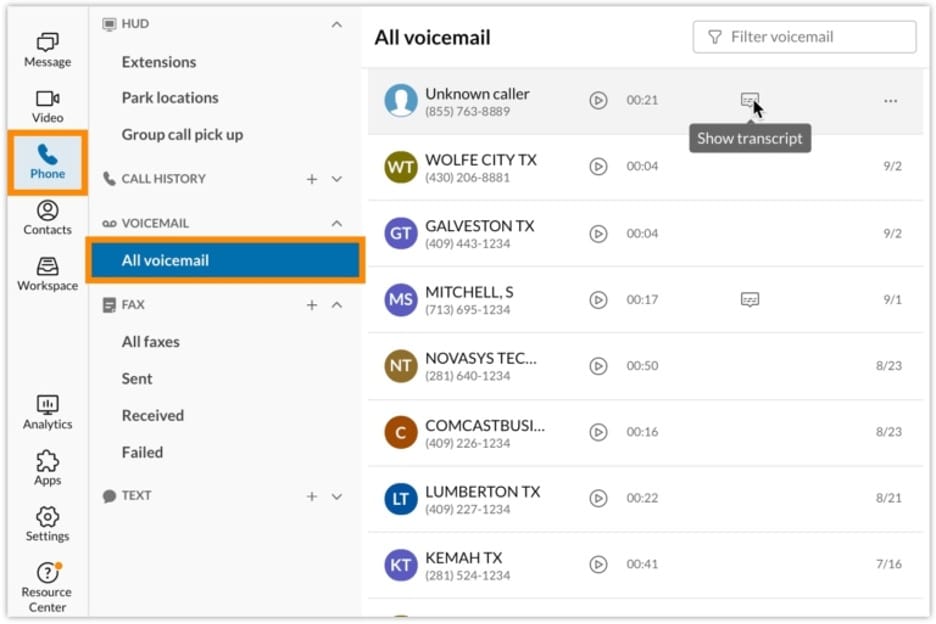
RingCentral voicemail

Most business phone systems offer users the ability to read their voicemail messages directly from their desktop or mobile app. Source: RingCentral

Caller ID

Modern caller ID systems go beyond displaying phone numbers. This basic function shows the number of the person calling you. Enhanced caller ID now includes spam detection, reputation scoring and integration with business databases to provide context about unknown callers, including their company affiliation and potential business value. The caller ID appears on desk phones or through a softphone on your computer or mobile device.

Speed Dial

Instead of dialing a seven-digit number, you can push one button to connect to the numbers you call most. This feature applies to desk phones but many softphone apps provide a favorites list for your most-used contacts. Voice-activated dialing has become increasingly sophisticated, allowing users to call contacts using natural language commands like “call my last customer” or “dial the shipping department.”

Did You Know?Did you know
Softphone apps connect your tablet, computer or cell phone to your business phone service. This software provides a keypad and other call handling features for placing a caller on hold or transferring them to a co-worker.

Personal and Company Directories

A personal directory is an easy way to manage your contacts. It gives you access to your contacts’ phone numbers whenever needed. A company directory displays every employee (and their contact information).

Do Not Disturb

When working on a big project or important task, you can put your phone in this mode to prevent interruptions. Your phone will not ring and all callers are sent directly to voicemail.

Single and Multilevel Automated Attendants

An auto attendant answers calls to your business, plays a greeting and directs the caller to the person or department they are trying to reach automatically. Advanced systems may offer multilevel auto attendants, which offer more extensive options, including transferring the caller to another auto attendant or IVR system.

TipBottom line
Even small businesses benefit from using a virtual receptionist to improve experiences. Automated attendants can answer lines promptly during peak hours. The systems also handle after-hours calls and reassure clients that you will receive their messages and respond upon opening.

On-hold Music

You can choose the music callers hear while they wait on hold. Most vendors offer prerecorded tracks while others let you upload a custom music playlist, which may include messages for callers.

Paging

You can use your phone to send messages to everyone, similar to a traditional intercom system. Certain services can also connect your VoIP system to a physical paging system.

Call Flip

This option allows users to move seamlessly between devices while on a call without putting the caller on hold. It’s ideal for business owners who run their company from a smartphone or anyone who shifts between mobile and desktop devices frequently.

Presence

The presence status shows employees whether their colleagues are on a call or available to chat. Some solutions let users choose a status like out-of-the-office, away from my desk or in a meeting.

Call Reports

Call logs provide basic analytics on your company’s phone usage. You can often break down usage statistics by filters, such as by employee or department.
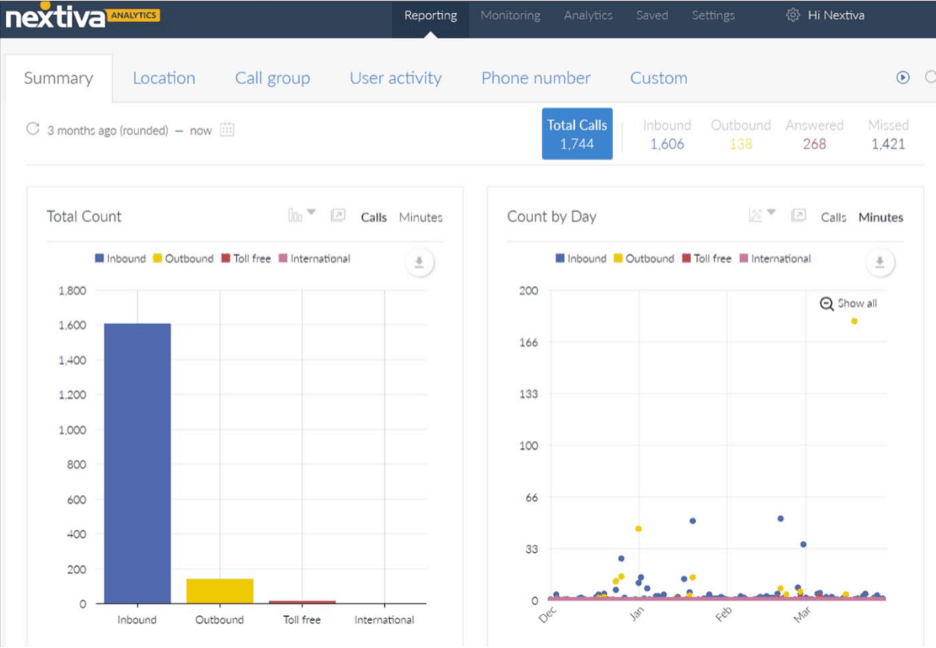
Nextiva reporting

Business phone systems include various reports and analytics that give businesses better insight into the calls their organization is making and receiving. Source: Nextiva

Online Management

All VoIP systems can be managed in an online portal. From the dashboard, you and the other administrators can add users, set phone numbers, review call reports, create ring groups and see monthly statements. Employees can also access the portal to check their voicemail, view a company directory and set call forwarding routes.

Bottom LineBottom line
Online admin tools centralize emergency management. Some systems let employers establish 911 locations and forwarding rules for internet outages. These tools are critical to business continuity and disaster prep planning.

Call Forwarding

Your office phone can forward calls to another number automatically. This could be a mobile phone, another employee’s line or an external VoIP or analog phone.

Extension Dialing

Employees can dial a co-worker by a three-, four- or five-digit extension instead of their entire phone number.

Call Recording

Many cloud-based phone systems give you the ability to record your calls. Depending on the phone provider and administrator settings, this feature may be on-demand or automatic.

Ring Groups

You can create ring groups for employees who answer calls from the same group of customers. For example, your customer service team might have its own ring group. The entire group is notified when a caller asks to speak to a customer service representative.

Call Queues

This tool is typically used in call centers or companies with high call volumes. However, even small businesses like restaurants can use this feature during peak hours to manage phone orders. It puts callers “in line” so that their calls can be answered when operators become available.

Speakerphone

Many IP phones include a speakerphone option that allows you to speak to a caller without using the phone’s handset.

Call Transfer

Employees can quickly transfer calls to their colleagues. Some solutions offer warm transfers, which let you speak with your co-worker before passing the call.

Audio and Video Conferencing

Top-rated phone systems typically support three-way calling, one-to-one video meetings or larger conferences on one or more service plans. Native online meeting technologies let your team convert a chat or voice conversation into a video call with one click.

Team Messaging and SMS

Most business phone systems offer SMS/MMS text messaging options and team chat tools. Employees can use softphone or browser-based apps to communicate one-on-one or in groups. The team messaging services usually support file sharing while business texting solutions may vary by subscription.

CRM Integration

Your business phone system will be one of the primary ways you talk to prospects and customers, so an integration with your CRM system is crucial. Business phone systems that integrate with your CRM system can automate updating contact profiles and ensure you have the latest data, such as when the last contact was made, who initiated it, what was discussed, and customer sentiment.

Reporting and Analytics

Business phone systems with detailed reporting and analytics tools help managers track call metrics like call volume and wait times. These metrics can help monitor team performance and identify areas of opportunity to improve the caller experience.

FYIDid you know
Due to text messaging laws and regulations, many VoIP providers no longer offer unlimited texting with service plans. Clarify the limitations and overage fees before choosing a phone system.

How Much Will a Small Business Phone System Cost?

Cloud-based phone systems typically cost $10 to $80 per user, per month. Pricing has slightly increased due to the addition of AI features and enhanced security protocols, but the value proposition has improved significantly. Many office phone and UC system providers have several service plans that vary in price and features. Restaurants and retail shops use a mix of dedicated and shared VoIP numbers while remote team members may require metered or unlimited phone lines. Some providers allow companies to mix and match subscriptions, ensuring each employee has access to the tools they need.

Most vendors ask for annual prepayment or extended contract terms for the lowest pricing. RingEX Core drops from $30 to $20 per user on an annual term, Dialpad Standard falls from $27 to $15, and Vonage shaves roughly 30 percent off every tier.

However, the industry has seen a shift toward more flexible month-to-month options, with many providers now offering no-contract plans at competitive rates. A long-term agreement can result in early termination fees if you cancel before it expires or forget to stop the auto-renewal, which is a standard practice in the industry. These costs can be significant, especially if you participated in a promotion for free desk phones or headsets.

Since the hosted PBX equipment is stored in the cloud, there are usually no large installation or setup costs. Unlike a traditional office phone system, modern phone services work with your existing hardware, such as tablets, cell phones and computers. Softphone apps and browser-based programs provide full business phone functionality.

Progressive web apps (PWAs) have emerged as a popular option, offering native app-like experiences without requiring downloads or installations. For example, a user would access a PWA via their browser, but could save the softphone to their device’s homescreen, just like they would an installed app.

Several multiline business phone systems sell or lease hardware with service plans. Renting phones can reduce capital costs but we recommend purchasing them outright. Buying them through the phone provider does have its benefits as it’s often preprovisioned for your account.

How to Choose a Small Business Phone System

The best business tools and technology seamlessly integrate into existing workflows and enhance communications. In Metrigy’s 2025 Employee Engagement Optimization study of 400 businesses, 68 percent of participants said the phone system remains critical to their communications. To best understand the process of choosing a business phone system, we spoke with business owners who have gone through the process to understand the steps they took and prioritized along the way.

Integration

It is vital to ensure that your business phone system easily integrates with other software and technology you have employed, such as CRM systems, collaboration tools, customer support software, ERP systems and marketing automation tools.

Dan Khasis, founder and CEO of Route4Me, prioritized flexibility and integration when choosing his business phone system.

“Your communication needs will evolve as your business grows, so choose a system that can easily adapt and integrate with other tools in your tech ecosystem,” Khasis said. “Don’t just look for a phone system, seek out a communication hub that can scale with you and enhance overall operational efficiency.”

Collen A. Clark, a founding partner of Schmidt & Clark, LLP, agrees that integration with their existing platforms was the priority. He said his firm relies on a suite of specialized software for case management, client communication and document storage. The phone system had to work seamlessly with these tools to ensure that calls could be logged, client interactions could be tracked, and important data could be easily accessed during calls.

“I spent considerable time assessing whether the phone system could connect with our existing infrastructure without causing disruptions or requiring extensive customization,” Clark said. “The last thing I wanted was a system that would create silos of information or require our team to spend more time navigating technology than serving our clients.”

Scalability

Ideally, your business will constantly be growing. You need a business phone system that can keep up with that growth. It is inefficient in many ways to always change phone systems each time you reach a new stage in your business’s life. The system you choose must be able to easily scale.

“Route4Me’s growth trajectory meant that the phone system needed to scale with us without compromising functionality,” Khasis said.

Team needs

It is important to think about your specific needs and those of the people using the system each and every day. Talk to your staff to learn more about their communication needs and their pain points around those needs. Then work to find a business phone system that can solve those pain points.

“My tip for other business owners would be to think about what your team needs most from a phone system and make that your focus,” said Rob Stevenson, founder of BackupVault. “Whether it’s reliability, ease of use, or integration with other tools, make sure the system you choose excels in the areas that matter most to your business. Don’t just go with the most popular option – choose the one that fits your specific needs.”

Cost

Price will always be a crucial factor regardless of what you purchase for your business. However, it’s not always about choosing the cheapest option. Many business owners we spoke to said that finding the best value was vital.

In addition, don’t just consider those initial costs. Consider how much the system will cost you annually on an ongoing basis.

“We carefully evaluated pricing–considering not just the upfront costs, but also ongoing fees and any potential hidden charges. We wanted to understand the total investment over time,” said David Primrose, president of Metal Marker Manufacturing.

Onboarding and customer support

It’s one thing to choose a quality system, it’s another to choose a system with a team behind it that will help ensure you are able to get it up and running quickly and is there to solve any problems should they arise. Every second your system is down could be costing you money, so look for a business phone system that has a strong support team.

Sarah Fletcher, CEO of Flower Delivery, said first and foremost she wanted a business phone system that was easy to use.

“As a fast-growing company, I know the phone system has to be user-friendly enough for fast onboarding and efficient usage,” Fletcher said. “It was important that our team could pick up the system without extensive training. We also needed solid customer support because every minute that we’re down directly impacts our bottom line.”

In addition to conducting extensive research before choosing a system, many of the business owners we spoke to emphasized the importance of demoing platforms before making a final choice.

“One of the most important steps in our decision-making process was conducting thorough demos of potential systems,” Clark said. “Instead of just simply reading reviews or comparing specs on paper, we took the time to experience each system firsthand. This allowed us to evaluate the user interface, call quality, and the ease with which our staff could navigate the system.”

Methodology

To determine the best business phone systems on the market, our team of communications experts evaluated an initial list of 75 platforms. We examined all 75 and eventually started to pare down the list by looking at several critical factors, including cost, how many service plan offerings were available, the included features in each service plan, and the integration offerings. After whittling our list down to 20, we chose 10 business phone systems as our top recommendations. Our experts and analysts studied each platform’s functionality and evaluated each on more than 25 factors.

These factors were weighted differently in our overall conclusion. The weights were determined based on how much business owners prioritize these criteria when shopping for business software and services and making purchasing decisions.

  • Pricing (30%): Our experts and analysts compared and contrasted each vendor’s communication service plans, judging which packages offered the best value. We took into account plan options, monthly fees, extra charges and the costs of add-on services.
  • Features (25%): We looked for standard phone system tools like automated attendants, call forwarding, call monitoring, call recording, audio conferencing and SMS and internal messaging. We also awarded extra points for advanced services, like AI-powered tools.
  • Ease of Use (20%): We tested the platforms ourselves, gauging each’s learning curve, user-friendliness and customization options. We also considered whether there was a fully featured mobile app and softphone for accessing your business phone line on the go.
  • Integrations (15%): Knowing how important this is to users, we considered the number of built-in integrations that made it easy to connect to the other programs businesses use. In addition, we factored in whether an API was available for needed integrations that weren’t already built-in.
  • Customer Service (10%): We evaluated the range of customer service options, including whether phone assistance was provided with all package tiers. We also examined each vendor’s online resources for those interested in self-guided help.

Based on these criteria, we not only determined which business phone systems our readers could trust but also the ways in which each solution could best serve different business needs. Some platforms were better at certain tasks than others or more suited to a particular type of company. These takeaways informed the “Best for” use cases you see on this page.

To learn more about our methodology, see our full editorial process.

FAQs

By ordering a virtual phone number, you can forward calls to your current phone without adding another cell line or buying a separate device. Softphone apps display incoming calls by line, so you always know when a customer is calling. Many providers now offer multiple virtual numbers on a single account, allowing businesses to maintain separate lines for different departments, marketing campaigns, or geographic regions without additional hardware.

This figure depends on your business model. A small restaurant with two counter phones and one in the office may pay for two to four users and numbers while a five-member remote staff needs at least five subscriptions.

Business phone systems offer hundreds of integrations. The most valuable are those that help to keep your customer interactions recorded and organized. That’s why having a solid CRM integration is vital. Most top platforms integrate with top-rated CRM systems, such as Salesforce, Zoho and Hubspot. Other valuable integrations seen in many business phone systems include:

  • Microsoft Office
  • Google
  • Zendesk
  • Monday.com
  • Asana
  • Zapier
  • Slack
  • Notion
  • Marketo
  • Evernote
  • Confluence
  • Dropbox
  • Microsoft Teams
  • QuickBooks
  • Shopify

Before choosing a system, you should review the available integrations to ensure the business phone system you implement can connect to the programs you want it to.

Yes, business phone system providers include various protocols to ensure security. These protocols include encryption, password requirements, single sign-on options, multifactor authentication and spam blockers.

It is important to remember that many systems are cloud-hosted, so in addition to the security protocols of the system itself, you want to ensure that your business’s network is also secure. Consider implementing zero-trust network architecture and regular security audits to maintain the highest level of protection for your communications infrastructure.

Did you find this content helpful?
Verified CheckThank you for your feedback!
Jessica Elliott
Written by: Jessica Elliott, Senior Analyst
Jessica Elliott is a trusted expert in the realm of business software and technology, with nearly two decades of hands-on experience. Her keen insights span a wide array of sectors, including cloud computing, SaaS solutions and business phone systems. With a knack for evaluating and dissecting various business applications, Elliott specializes in advising business owners on the best platforms suitable for companies of all sizes. At business.com, Elliott covers business phone system providers and payroll companies. In addition to her technical acumen, Elliott holds certifications from HubSpot and is also well-versed in digital marketing, sales funnels and finance. Her valuable insights have been featured in esteemed publications such as U.S. News & World Report, USA Today and Investopedia.