
Business.com aims to help business owners make informed decisions to support and grow their companies. We research and recommend products and services suitable for various business types, investing thousands of hours each year in this process.
As a business, we need to generate revenue to sustain our content. We have financial relationships with some companies we cover, earning commissions when readers purchase from our partners or share information about their needs. These relationships do not dictate our advice and recommendations. Our editorial team independently evaluates and recommends products and services based on their research and expertise. Learn more about our process and partners here.


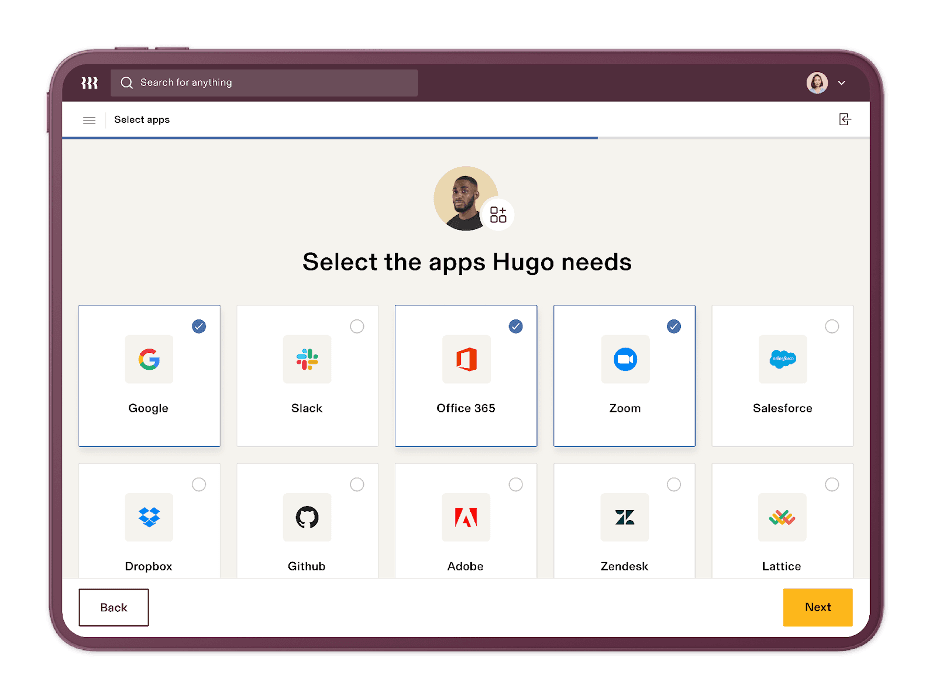
Manual data entry is time-consuming and error-prone for human resources, especially when using multiple platforms to onboard or offboard employees. Rippling’s single-system solution stands out for its sophisticated workflow automation tools. These tools enable businesses to create custom triggers that initiate actions within Rippling and even third-party apps. It streamlines payroll and employee management, which makes Rippling the best payroll software for automating processes.
Rippling is an employee management system with HR, IT and finance capabilities. The platform serves more than 31,000 companies worldwide, from small businesses to large enterprise organizations with more than 10,000 employees, across multiple industries. The Rippling payroll module delivers everything you would expect from a top-rated payroll service, including automatic tax filing, payroll processing and unlimited pay runs. But when we tested Rippling, its real value became clear through its ability to automate tasks and unify data across the platform.
Rippling houses your documents, policy and permission guidelines and employee data. When we explored the automation tools during our review, we found they streamlined the onboarding process tremendously for both HR and new employees.
For instance, we noticed that Rippling automatically reminds potential new hires if their offer letter is expiring soon and sends employees and contractors welcome letters, which you can tailor as needed. When we compared this to other payroll providers we reviewed, like Gusto, we found they didn’t offer these kinds of automation tools, even when they included HR and onboarding features.
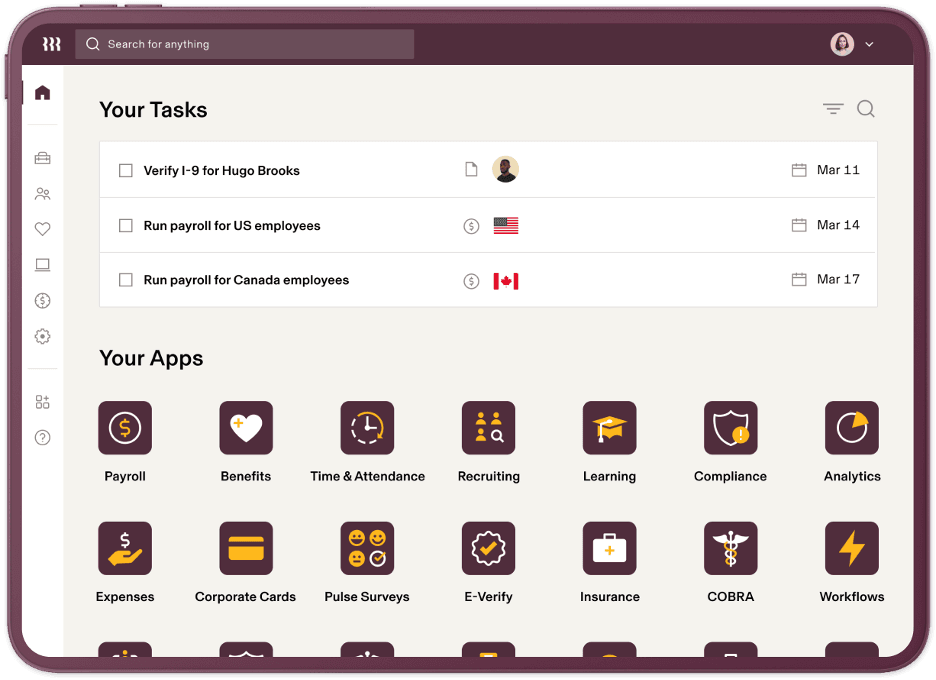
We were also impressed by how customizable the data fields are. Your HR team can add fields for any information relevant to a new hire. Schools, for instance, could use the system to track teacher license verification. Need to issue a uniform or welcome a new hire with a company t-shirt? We found it as easy as a few clicks to add a field requesting that information directly in the onboarding flow.
After HR has completed the onboarding checklist, the new employee will receive a link to complete the onboarding process. During our testing, we confirmed that new hires also automatically get access to any other relevant Rippling modules, such as time and attendance. The platform is built so that any updates to an employee’s profile — new or existing — automatically trigger appropriate changes to their roles and permissions within the system, which significantly reduces the manual work we’ve seen required by other platforms.
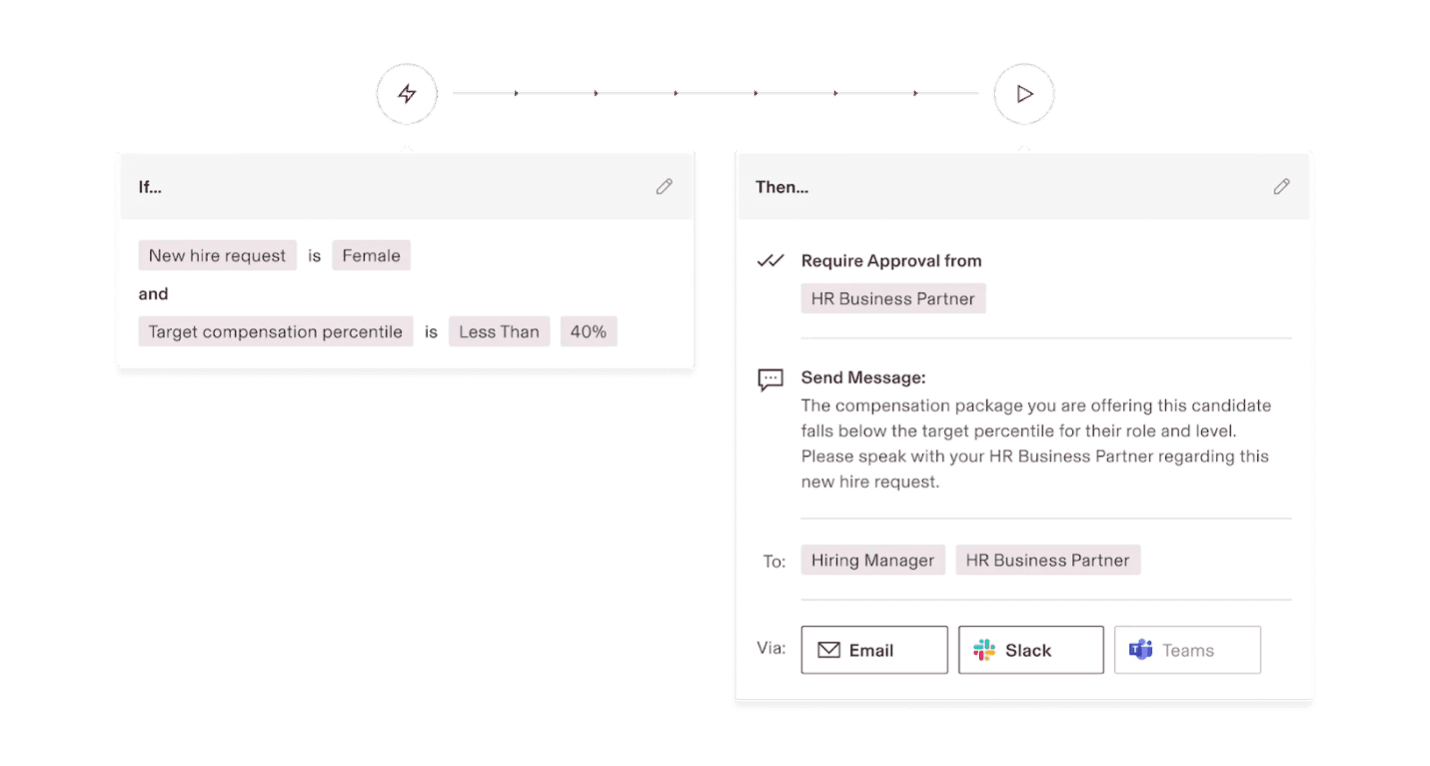
The automation features extend well beyond the onboarding process. In our review, we explored workflow triggers for a wide range of scenarios: assigning a task to pay a referral bonus after 120 days for employee referral programs, updating calendars for multiple users when the benefits enrollment period opens, and triggering actions when employees request time off, sign up for employee benefits, or receive a retroactive pay raise. When we simulated a promotion scenario, Rippling made it easy to automate the downstream changes, such as salary updates, without manual data entry.
Rippling also provides hundreds of prebuilt templates and custom HR reports. When our team tested the reporting tools, we could view pay by location, date or team member and set payroll reports to run automatically — a level of flexibility that stood out among the platforms we reviewed.
We also found Rippling’s document management system particularly useful for multi-state employers. The system automatically tailors documentation according to state-specific requirements. For example, if your company is hiring someone who resides in Los Angeles, Rippling has templates ready to go for new California employees, saving your HR team from having to track those requirements manually.
Rippling’s HR products like Rippling Surveys (which handles employee surveys) were also a bonus, as few payroll providers offer this service, let alone automate it. Similar to competitors, Rippling’s workforce systems support employees and contractors. But other solutions may not work worldwide. While Deel is our first choice for global payments, small businesses can still benefit from Rippling’s add-on global payroll services.
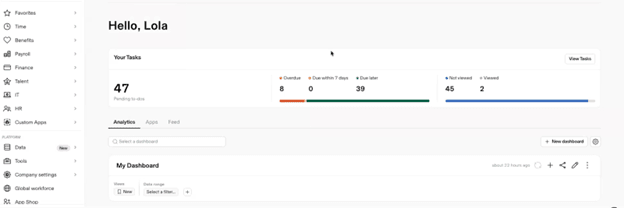
On the left-hand side of the screen, we could see a toolbox with prebuilt reports, a document repository, payroll and time. It also houses HR tools like your company directory, applicant tracking system, insurance and benefits. In the center, a to-do list reminded us to run payroll or reach out to employees who needed to e-sign benefits forms — a helpful touch that kept key tasks visible without requiring us to dig through menus.
As part of our review process, we sent offer letters to potential new employees with automatic expiration date reminders. Upon acceptance, our team member received a welcome email explaining the onboarding process. We could share health insurance plans and request direct deposit and tax information. The entire process of setting up a new employee profile can take less than two minutes.
After creating an employee profile, Rippling syncs this information across the system. When we changed a pay rate during our review, the payroll software updated automatically — the same applied when a staffer updated their insurance coverage.
However, this feature-rich platform does have a learning curve for companies that want more than payroll management. Each module has a row of tabs for settings, policies, access levels and more. A few times, we got lost, and it took a few clicks to find our way back. Employees without administrative access see fewer tabs, so their time-tracking or benefits screen is more user-friendly than what we saw on the back end. With Rippling’s expansive customer-only help center and Rippling U resources, though, most solutions are only a click or two away.
With tools for human resources and payroll in an integrated system, your team can manage people and processes effectively. Unlike many of its rivals, Rippling’s base system includes onboarding and employee management tools. You can add full-service payroll and dozens of other modules.
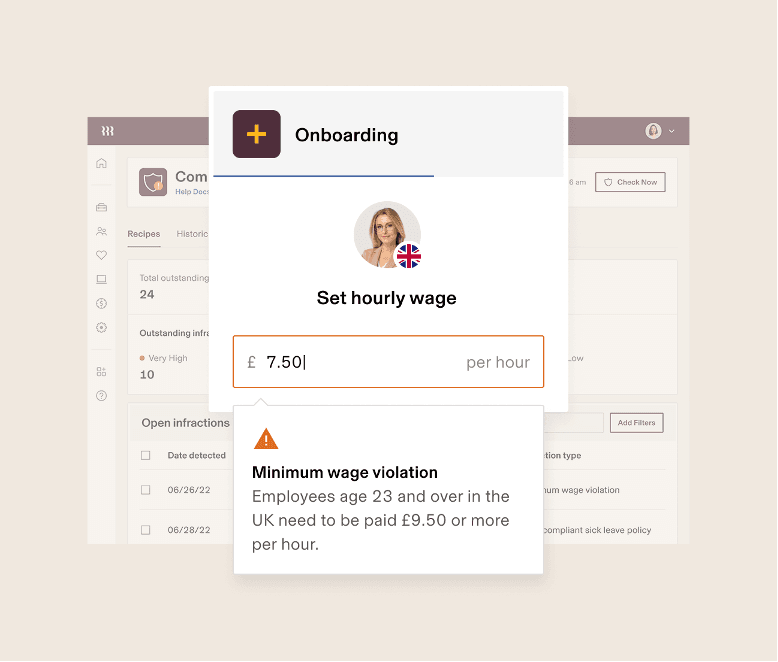
Although several payroll systems we reviewed automate basic payroll functions, few support custom configurations. Rippling offers predefined reports and also allows you to create your own with their Workflow Studio feature. During our testing, we found it could automatically send an email or notification, assign a task, update calendars or support actions in third-party applications. We also didn’t have to worry about important tasks slipping through the cracks with auto-alerts. If payroll auto-approval fails or a remote employee moves to a new state, your admin gets alerted immediately.
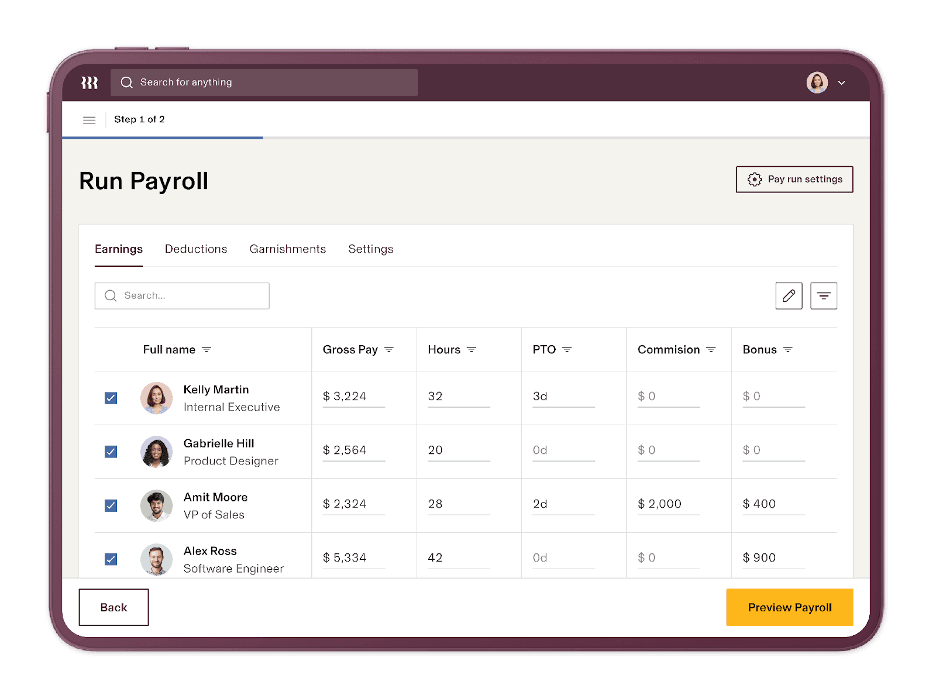
With Rippling’s full-service payroll software, you can automatically run payroll or complete a manual pay cycle. It works in all 50 states, offers direct deposit or paper checks, and pulls time-tracking data from internal or third-party attendance apps. Plus, Rippling can handle and remit garnishments on your behalf — a service not all payroll solutions offer.
When we explored the payroll settings, we found that Rippling allows unlimited payroll runs and custom pay schedules, which can be set up directly by your admin without contacting the platform for custom development. Whether you need to create a custom “Christmas Bonus” payment schedule or add an additional column to your regular payroll schedule grid, Rippling gives you the tools to do so independently.
Like most full-service payroll systems, Rippling calculates and files your federal, state and local payroll taxes. Your HR team doesn’t have to manually compute payroll withholding amounts or complete tax forms, so this helps minimize errors and payroll discrepancies. Rippling can oversee your annual tax filing paperwork, including W-2, W-4 and 1099 forms. And it provides a 100 percent error-free guarantee. Employees can also electronically sign and update tax documents online; Rippling stores everything in a central repository.
We found that Rippling’s platform is also equipped to handle complex tax situations. If you have an employee moving from California to New York for a new role, all you have to do is add an effective date to their profile for the new position. When we tested this scenario, Rippling automatically calculated any adjustments and prorated as needed.
While OnPay, Square Payroll and other solutions integrate with some accounting software, few have the extensive integrations Rippling provides. It syncs with over 650 programs, including Google Workspace, Slack, monday.com and more.
In our testing, once we approved and ran payroll, Rippling created a journal ledger entry and sent it to our accounting software’s general ledger. You can also use Rippling as an app management tool, as it has a built-in password manager.
Similar to its competitors, Rippling’s workforce systems support employees and contractors. However, other solutions may not work worldwide. While Deel is our first choice for global payments, we like that small businesses can add global payroll services to Rippling, including native payroll and employer of record (EOR) services. Rippling supports over 185 countries and territories, with tax compliance guaranteed in over 88 countries.
Companies can use one system even if remote workers move abroad. Because everything is easily laid out in one central spot, admins running payroll in multiple international locations can still enjoy a user-friendly process, almost identical to running payroll for U.S.-based employees.
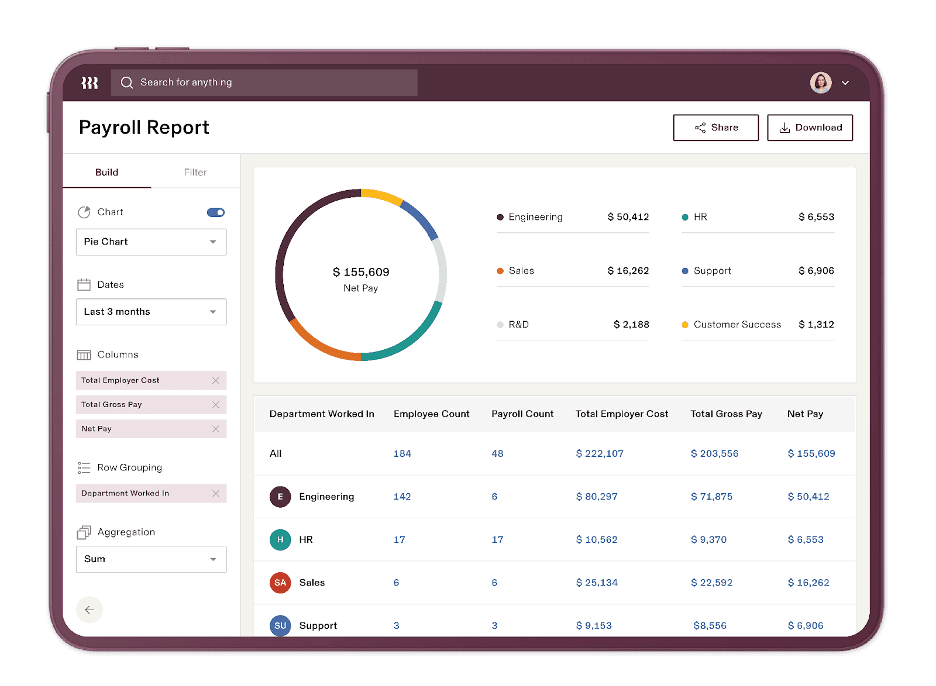
Many payroll services provide basic reports. However, Rippling’s data visualization tools were the best we evaluated. For example, when our team ran a comparison report, it illuminated any changes between the current and previous payroll run. We could see updates to any employees highlighted, so if anyone’s salary had changed in the period between the last payroll, we didn’t have to guess why their pay total was different.
Since Rippling hosts all employee data and can pull information from third-party services, you can create custom reports from various products and modules. It has prebuilt reports but also allows you to build your own. When we tested the report builder, we used the search function to choose from hundreds of data points, then dragged and dropped to arrange columns, aggregate information or add more filters.
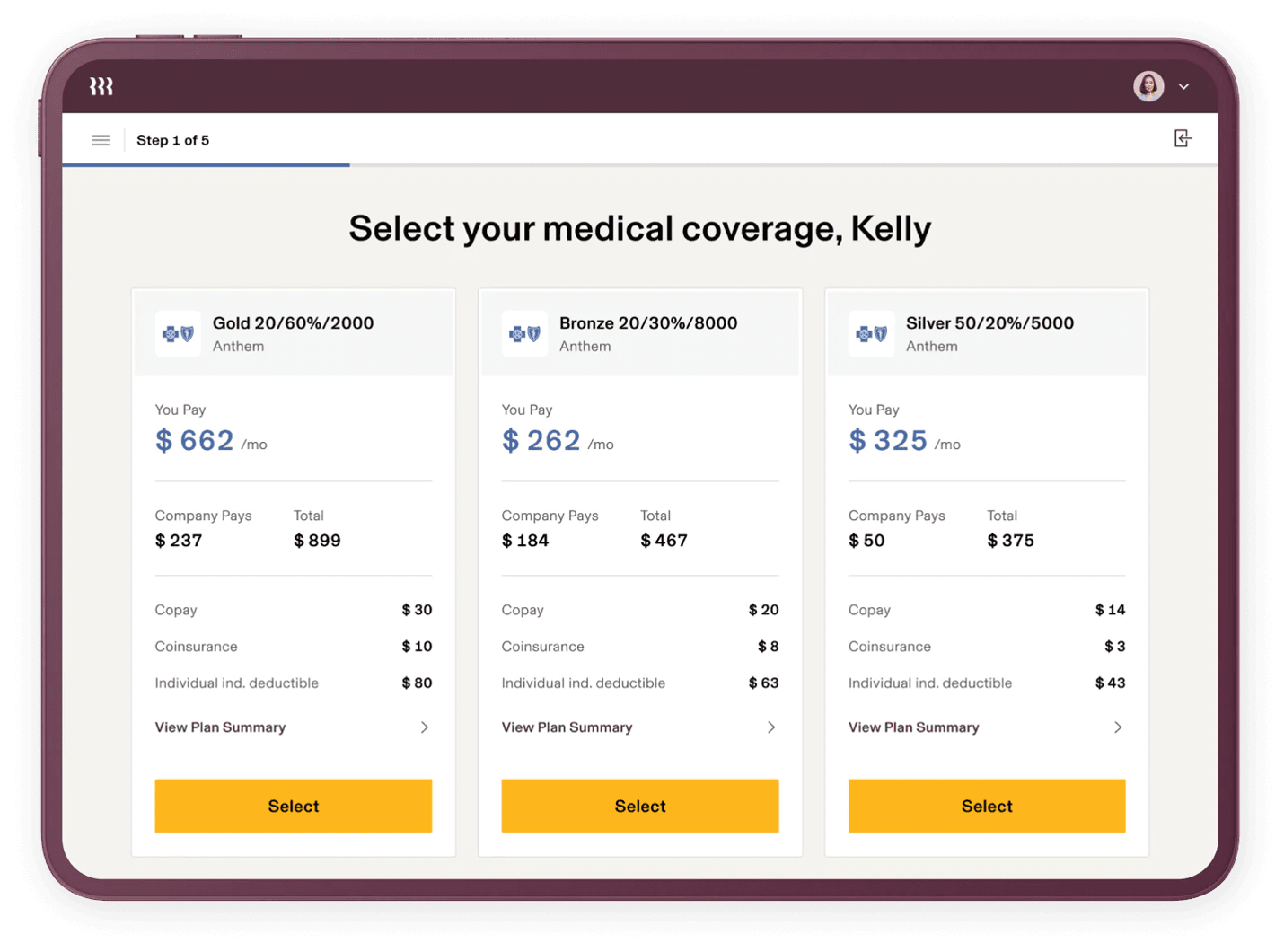
Whereas competitors offer benefits management and administration with most payroll plans, Rippling requires businesses to buy the Rippling Benefits Administration module. However, Rippling may waive fees if you partner with Rippling as your benefits broker or use its professional employer organization (PEO) services. As your benefits broker, new hires’ retirement benefits and health insurance deductions sync automatically with payroll.
Rippling’s pricing structure includes:
Additionally, each Rippling add-on product costs extra. Your price will vary based on employee numbers and selected systems. For example, you will pay more for device management and benefits administration services. Other a la carte solutions include time and attendance tracking, global payroll taxes, and talent management.
Despite the higher costs, Rippling offers other benefits that most competitors lack. For example, its core system includes automated compliance management. This feature ensures your break, overtime and paid time off policies comply with tax and employment regulations worldwide.
Additionally, Rippling’s automation tools extend to learning management platforms and even sync employee expenses with payroll. Rippling could pay off in the long run for businesses in need of a scalable solution that can someday support global employees.
Onboarding with Rippling takes an average of six weeks, depending on your plan and the complexity of your needs. Simple implementation can happen as quickly as one week, but companies that need to migrate a high volume of data or set up international payroll will have a longer setup period.
With a payroll system like Intuit QuickBooks Payroll or Paycor, you mainly configure employees’ payroll profiles. In contrast, business owners use Rippling as a complete human resources platform. Switching to an automated HR system with a staff directory and organizational chart requires more time investment because you need to build comprehensive profiles. Depending on your selected modules, you may be responsible for device management, health insurance administration or job postings.
Rippling guides you through each step. Most pages have a few questions that allow you to select responses from drop-down boxes or click the box next to the desired option. The platform’s user-friendly interface makes the process straightforward.
Rippling has some unique features we didn’t find with other payroll software we reviewed. First, you can import payroll data from certain applications like ADP Run, Zenefits or Gusto. Also, when your staff fills out their benefits forms, most of the information is auto-populated because it pulls from the Rippling platform.
Your dashboard keeps track of onboarding tasks like setting up a pay period or connecting your bank account. Setup may seem daunting, but customer support assistance is available, and once the initial configuration is finished, you can add new team members quickly.
Rippling offers excellent support transparency. Its website displays real-time data for live chat and email response times. The company averages less than 27 seconds for a live chat agent to respond to an inquiry and an email response time of 48 hours or less. You can also convert a live chat to a Zoom for further assistance. According to Rippling, approximately 35 percent of customers request this option. Furthermore, Rippling maintains a customer satisfaction score (CSAT) above 90 percent, with about 42 percent of cases resolved on the first response.
Rippling customers in higher plan tiers will have access to dedicated account managers, including a direct phone line for your technical account manager for IT-based questions. Along with a customer support team, Rippling has many digital resources, but only account administrators can access these. Employees who use Rippling must contact your HR team with questions, as they aren’t able to view the knowledge base. This could be problematic for small businesses. We prefer solutions like Gusto or QuickBooks Payroll that provide online help guides for staff. [See our Gusto review to learn why it’s our top pick for HR integration.]
Rippling has many upsides, but we did identify some limitations:
Our research for this piece included an exclusive demo with Rippling’s team. When researching the best payroll companies and software for small businesses, we investigated dozens of vendors and their platforms. We worked with payroll software, interacted with customer support agents, and read user reviews. We considered factors like usability, third-party integrations and HR features. When looking for the best payroll service for automation specifically, we looked at each system’s ability to automate workflows such as onboarding and running payroll. Our goal is to help businesses choose the right payroll provider for their needs.
We recommend Rippling for …
We don’t recommend Rippling for …