Business.com aims to help business owners make informed decisions to support and grow their companies. We research and recommend products and services suitable for various business types, investing thousands of hours each year in this process.
As a business, we need to generate revenue to sustain our content. We have financial relationships with some companies we cover, earning commissions when readers purchase from our partners or share information about their needs. These relationships do not dictate our advice and recommendations. Our editorial team independently evaluates and recommends products and services based on their research and expertise. Learn more about our process and partners here.
Learn how cloud services can help SMBs work smarter, save money and grow.


Large enterprises have been leveraging the benefits of cloud computing for years. Now that the cloud is more widely accessible, small and midsize businesses (SMBs) can realize those same returns. This guide will help you understand the cloud, how the cloud can help grow your business and what a migration strategy might look like.
Cloud services are online tools and technologies that let businesses store information, run software and access computing power without relying on their own servers. This flexibility allows companies to use technology on demand without purchasing, maintaining or managing the underlying hardware.
By comparison, a traditional IT infrastructure is a closed, proprietary loop. All applications run on a private internal network, and business data is stored on in-house or offsite servers:
In contrast, cloud computing uses the internet to open that loop so users can house data, access processing power and run applications on a server where they essentially rent rather than own space. Cloud-based tools — such as the best customer relationship management (CRM) software, word processing solutions and accounting software — take advantage of this remote infrastructure. Think of the cloud as a large, offsite server farm connected to local users through providers such as Amazon Web Services or Microsoft Azure.
Organizations that use the cloud don’t have to manage their own storage and power. They can access applications from anywhere at any time and only pay for what they use.
Many retailers use point-of-sale (POS) systems to accept customer payments. Today, many of the best POS systems are cloud-based and offer a clear example of how cloud services can be a convenience game-changer for SMBs. Cloud-based POS software allows you to access back-office features from any browser, so you can view your store’s sales performance and run POS reports wherever you are.
With cloud POS systems, business owners can quickly get up to speed on sales, inventory and other data without interrupting workflows or even stepping inside the store.
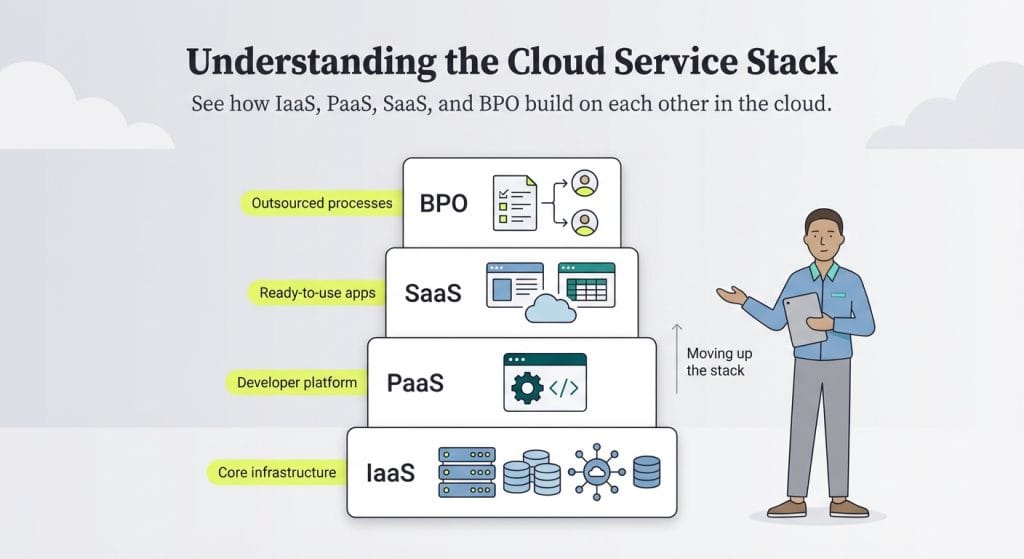
The three primary cloud service layers include infrastructure as a service (IaaS), platform as a service (PaaS) and software as a service (SaaS). Some consider business process outsourcing (BPO) to be a fourth layer. The term “moving up the stack” refers to progressing through these layers.
Here’s a brief overview of these cloud service types.
IaaS is the bottom and most foundational layer of the stack. It provides essential computing resources, such as servers, storage, hardware and networking. Organizations that want to develop and manage their own applications rely on IaaS providers for these elements, as well as underlying security and maintenance support.
There is an IaaS provider for almost every use case. Amazon Web Services (AWS), Microsoft Azure and Google Cloud are among the most popular offerings.
Moving up the stack, we come to PaaS. This layer provides a platform for building, testing and deploying software applications. If you buy a PaaS offering, you’ll pay a provider to manage most of the servers, operating systems and network infrastructure so your team can focus on creating and refining the actual application. AWS Elastic Beanstalk, Microsoft Azure App Service and Google App Engine are examples of PaaS providers.
SaaS is the next layer of the stack. While they’re similar to traditional on-premises software, SaaS applications are cloud-based and run on remote servers. These servers are accessible via the internet to anyone with a subscription.
SaaS applications are fully managed solutions that companies don’t have to worry about maintaining. Businesses typically use them in a pay-as-you-go model instead of paying a high upfront cost. Salesforce, Microsoft 365, Google Workspace and Dropbox are all examples of commonly used SaaS applications. (Read our Salesforce CRM review to learn more about this cloud-based SaaS solution.)
When BPO is considered part of cloud services, it is sometimes said to be at the top of the stack. However, it’s crucial to understand that BPO is not a technology layer — it’s a business model. In this model, entire processes, such as procurement and accounting, are outsourced to vendors.
BPOs can be:
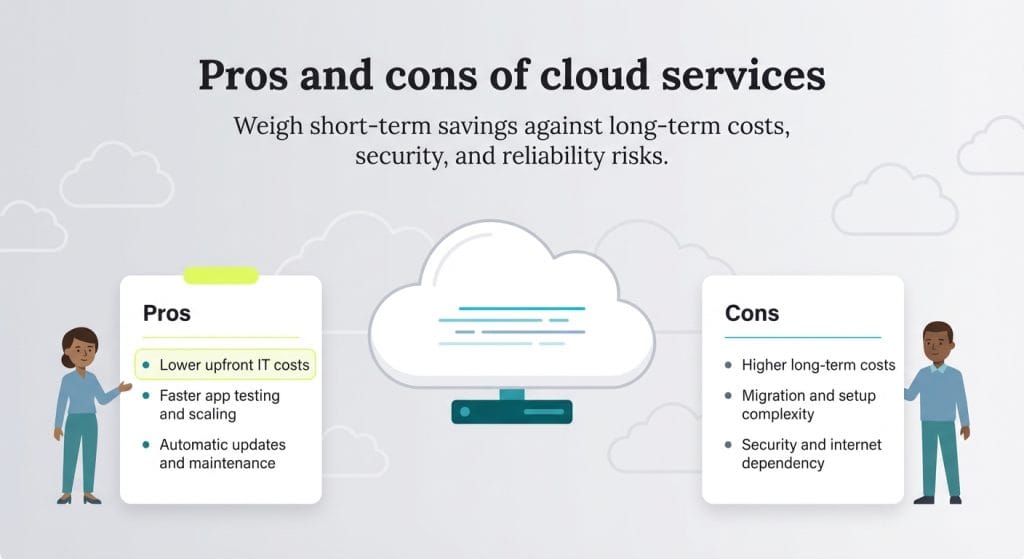
Cloud computing’s pay-as-you-go nature is transformative, helping businesses increase productivity and profits. However, cloud migration comes with challenges and requires research, careful planning and thoughtful change management. The benefits can be significant, but poor execution can be costly. Here’s an overview of the cloud’s pros and cons.
If you decide your SMB will benefit from cloud services, it’s time to create an implementation plan with clear, sequential steps:
Numerous vendors provide cloud computing services, and selecting the right one for your business can be confusing. Here are a few top contenders in various cloud service categories to consider as you conduct your research.
Google Drive is a widely used cloud service that integrates seamlessly with Google’s suite of business tools, including Google Docs (word processing), Sheets (spreadsheets), Gmail (email), Slides (presentations), Drive (storage and collaboration), Calendar and Meet (video conferencing) — all available for free with a Google account. Users can share documents within Google’s cloud-based apps for real-time collaboration or send large files that can’t be emailed.
Businesses must pay for premium features through Google Workspace, such as custom email domains and enhanced security controls. Google provides 15 GB of free storage across Gmail, Drive and Photos. Individual users can upgrade their storage through Google One starting at $1.99 per month, while businesses that need custom email domains, administrative controls and advanced collaboration tools must subscribe to Google Workspace, which starts at $7 per user, per month.
Microsoft Azure is a comprehensive cloud platform that allows businesses to build, manage and deploy applications. It offers a wide range of tools for data analysis, AI, app development and infrastructure management. Azure provides more than 25 services that are always free, including Azure App Service and Azure Functions, while other offerings — such as virtual machines and SQL databases — are free for the first 12 months with usage limits.
Microsoft also offers Microsoft 365 (formerly Office 365), which includes popular business software tools like Word, Excel and PowerPoint, as well as OneDrive for cloud storage and file sharing. Microsoft 365 is a separate paid subscription, with business plans starting at around $6 per user, per month when billed annually.
OpenDrive is a cloud storage and file-sharing platform that works across iOS, Android and Windows devices, making it easy for teams to store documents, collaborate and stay organized. In addition to file storage, OpenDrive includes built-in Notes and Tasks modules that help remote teams manage projects and shared work.
OpenDrive offers personal and business plans, with business pricing starting at $7 per month (or $70 per year) for 500 GB of storage, and $29.95 per month (or $299 per year) for unlimited storage.
Businesses benefit enormously from using the best accounting software to manage their finances, track taxes and monitor accounts payable and receivable. Cloud-based accounting software enhances these functions with better security, accessibility and scalability.
QuickBooks Online is a leading cloud-based accounting solution for SMBs. It allows you to manage core accounting and bookkeeping tasks and access real-time financial data, helping your business stay agile and make more informed strategic decisions. Pricing for the Simple Start plan is $38 per month, though Intuit frequently offers promotions that can significantly reduce the cost. Our detailed QuickBooks Online review outlines this platform’s full pricing structure and numerous cloud-based features.
Email is a critical part of any business’s marketing strategy, and the best email marketing services help remove the guesswork from creating and running campaigns. Constant Contact is a strong example of a cloud-based email marketing platform. It offers numerous templates to help you build lead nurturing campaigns, email newsletters and promotional emails. It also supports A/B testing to optimize performance and includes analytics tools that show what’s working and what needs improvement.
Pricing starts at around $12 per month, but actual costs depend on your contact list size and email volume. Check out our comprehensive Constant Contact review for more details.
Earlier, we touched on the benefits of cloud-based POS software. Clover POS is a top option, particularly for businesses that need a customizable and easy-to-use system. As our Clover POS review explains, Clover’s feature-rich platform helps small business owners manage customer communications, payments, marketing, employee scheduling and inventory. It also offers industry-specific POS systems for retailers, service providers and restaurants with specialized features. Clover’s pricing varies by hardware type, software tier and industry.
Cloud adoption is accelerating as businesses of all sizes look for more flexible, scalable and cost-effective technology solutions. Recent market data shows a clear shift, as organizations continue increasing their budgets and rely more heavily on cloud platforms to power more of their core operations.
Here’s what’s driving the acceleration:
What was once a strategic advantage reserved for large enterprises is now becoming accessible to small and midsize businesses. Pay-as-you-go pricing, lower upfront costs and user-friendly cloud tools give SMBs the ability to operate more efficiently, innovate faster and scale with confidence.
The expensive hardware and software once required to run sophisticated business applications are now within reach for SMBs. This is the true beauty of cloud computing: It levels the playing field. With research, thoughtful planning and a little faith in the process, SMB owners can implement enterprise-grade solutions that help them work smarter, operate more efficiently and strengthen their businesses.
Jennifer Dublino contributed to this article.