Your free business.com+ membership unlocks exclusive tech deals and advisor support
Join Free
BDC Hamburger Icon

Menu

Close
BDC Logo with Name
Search Icon
Search Icon
Advertising Disclosure
Close
Advertising Disclosure

Business.com aims to help business owners make informed decisions to support and grow their companies. We research and recommend products and services suitable for various business types, investing thousands of hours each year in this process.

As a business, we need to generate revenue to sustain our content. We have financial relationships with some companies we cover, earning commissions when readers purchase from our partners or share information about their needs. These relationships do not dictate our advice and recommendations. Our editorial team independently evaluates and recommends products and services based on their research and expertise. Learn more about our process and partners here.

The Best Email Marketing Services and Survey Software of 2026

Compare email marketing platforms for newsletters, automation and customer engagement, with clear pricing and plan limits.

Mark Fairlie
Written by:
Mark Fairlie, Senior Analyst
author image
Editor verified:
Chad Brooks,Managing Editor
Last Updated Nov 06, 2026
Business.com earns commissions from some listed providers. Editorial Guidelines.
9.4 /10
Editor's rating
Best for Beginners
  • From $13 per month
  • Starts at 500 emails per month
  • 14-day free trial
Visit Site
Links to Mailchimp
9.4 /10
Editor's rating
Best for Small Businesses
  • From $12 per month
  • From 10x contacts emails monthly
  • 30-day free trial
Visit Site
Links to Constant Contact Email Marketing
8.5 /10
Editor's rating
Best for Email List Management
  • From $9 per month
  • From 10x contacts emails monthly
  • 30-day free trial
Visit Site
Links to iContact
9.1 /10
Editor's rating
Best for E-commerce marketing
  • Free plan available
  • Starts at 500 emails per month
  • 30-day free trial on paid plans
Visit Site
Links to Omnisend
9.0 /10
Editor's rating
Best for Larger Businesses
  • From $14 per month
  • Unlimited email sends
  • 30-day free trial
Visit Site
Links to Campaigner
Table Of Contents Icon

Table of Contents

Open row

At business.com, our marketing software experts and operations analysts routinely evaluate the essential marketing tools and services small and growing businesses require, while providing playbooks for executing social media campaigns, email marketing newsletters, text message marketing promotions and more. Our guides are infused with advice from real digital marketing experts, project managers, SEO professionals, social media directors and advertising consultants. Our rigorous review process includes vendor interviews, product demonstrations, firsthand testing and head-to-head comparisons. After each assessment is completed, it’s verified by a top editor to ensure accuracy and objectivity. Learn more about our editorial process.

Tip Bulb

How We Decided

When it comes to email marketing services and survey software, we tried a number of platforms and judged their user-friendliness, functionality, integrations and more. We looked for features like customizable templates, A/B testing, automated workflows,...

MoreMore

When it comes to email marketing services and survey software, we tried a number of platforms and judged their user-friendliness, functionality, integrations and more. We looked for features like customizable templates, A/B testing, automated workflows, drag-and-drop editors and campaign analytics. Pricing and plan options also factored into our ratings, as did customer service quality.

25

evaluated

14

researched

10

chosen

When it comes to email marketing services and survey software, we tried a number of platforms and judged their user-friendliness, functionality, integrations and more. We looked for features like customizable templates, A/B testing, automated workflows, drag-and-drop editors and campaign analytics. Pricing and plan options also factored into our ratings, as did customer service quality.

25

evaluated

14

researched

10

chosen

Email is still one of the most direct ways to reach customers, but choosing the right platform can feel overwhelming when every vendor promises easy campaigns and powerful automation. The real differences are in how contacts are counted, what each plan allows you to send and which features are locked behind higher pricing tiers.

The right email marketing software gives you an easy way to build campaigns, organize your audience and see what’s working, without paying for tools you won’t use. To find the best options, we evaluated 25 platforms, researched 14 in depth and tested each one through demos and free trials. Below, we break down our top picks, including pricing, plan limits and who each platform serves best.

Compare Our Best Picks

BDC Ribbon
Our Top Picks for 2026
Mailchimp
Constant Contact Email Marketing
iContact
Omnisend
Campaigner
Klaviyo
HubSpot
Campaign Monitor
GetResponse
Freshworks Freshmarketer
Rating (Out of 10)9.49.48.59.19.09.19.29.09.39.2
Best use case

Beginners

Small Businesses

Email List Management

E-commerce Marketing

Large Businesses

Data-Driven Marketing

Bundled Marketing Solution

Deliverability

AI-Powered Automation

Marketing Integrations

Price

Free: $0
Essentials: From $13 per month
Standard: From $20 per month
Premium: From $350 per month

Lite: From $12 per month
Standard: From $35 per month
Premium: From $80 per month

Standard: From $9 per month
Premium: From $16 per month
Custom: Requires quote

Free: $0
Standard: From $16 per month
Pro: From $59 per month

Essentials: From $14 per month
Advanced: From $35 per month
Custom: Requires quote

Free: $0
Email: From $20 per month
Marketing: From $90 per month

Free: $0
Starter: From $20 per month
Professional: From $890 per month
Enterprise: From $3,600 annually

Lite: $13 per month
Essentials: $31 per month
Premier: $171 per month
Enterprise: Custom

Starter: From $19 per month
Marketer: From $59 per month
Creator: From $69 per month
Enterprise: Requires quote

Free plan available; paid plans start at $18 per month

Free Trial

14-day free trial

30-day free trial

30-day free trial

30-day free trial

30-day free trial

No free trial on paid plans

14-day free trial

30-day free trial

14-day free trial

21-day free trial

Contact List Limits

Free: 250 contacts
Essentials: 50,000 contacts
Standard: 100,000 contacts
Premium: 200,000+ contacts

Lite: 50,000 contacts
Standard: 100,000 contacts
Premium: 200,000 contacts

Free: 250 contacts
Standard: Up to 50,000 contacts
Premium: Up to 50,000 contacts
Custom: Custom

Free: 250 contacts
Standard: Up to 150,000 contacts
Pro: Up to 150,000 contacts

Up to 100,000 contacts on all plans

Free: 250 contacts
Email: Up to 150,000+
Marketing: Up to 150,000+

Free: 1,000 contacts
Starter: Starts at 1,000 contacts
Professional: Starts at 2,000 contacts
Enterprise: Starts at 10,000 contacts

Additional contacts can be purchased in blocks of 1,000, 5,000 or 10,000 contacts

Up to 50,000+ contacts on all plans

Free: 500 contacts
Starter: Up to 100,000 contacts
Marketer: Up to 100,000 contacts
Creator: Up to 100,000 contacts
Enterprise: Custom

Free: 100 marketing contacts
Enterprise: 500 marketing contacts include

Additional contacts can be purchased in blocks of 5,000 for $100 per month at anytime

Monthly Email Send Limits

Free: 500 emails monthly (250 emails per day)
Essentials: 10x contact limit
Standard: 12x contact limit
Premium: 15x contact limit

Lite: 10x number of contacts
Standard: 12x number of contacts
Premium: 24x number of contact

Free: 5,000 emails monthly
Standard: 10x number of contacts
Premium: 12x number of contacts
Custom: 15 x number of contacts

Free: 500 emails monthly
Standard: 12x number of contacts
Pro: Unlimited emails monthly

Unlimited

Free: 500 emails monthly
Email: Monthly send allowance varies by active-profile tier; additional capacity costs extra
Marketing: Monthly send allowance varies by active-profile tier; additional capacity costs extra

Free: 2,000 emails monthly
Starter: 5x number of contacts
Professional: 10x number of contacts
Enterprise: 20x number of contacts

Lite: 5x contact limit
Essentials: Unlimited
Premier: Unlimited
Enterprise: Custom

Unlimited on all paid plans

Free: 500 emails monthly
Enterprise: 20x marketing contacts limit

User Limits

Free: 1 user
Essentials: 3 users
Standard: 5 users
Premium: Unlimited

Lite: 2 users
Standard: 3 users
Premium: Unlimited

Free: 1 user
Standard: 1 user
Premium: Unlimited
Custom: Unlimited

Unlimited user seats on all plans

Unlimited user seats on all plans

Unlimited user seats on all plans

Free: 2 users
Starter: Priced by seat
Professional: 3 users included
Enterprise: 5 users included

Additional user access can be purchased on each tier.

Unlimited user seats on all plans

Free: 1 user
Starter: 3 users
Marketer: 5 users
Creator: 5 users
Enterprise: Unlimited

Unlimited user seats on all plans

A/B Testing

Available on all paid plans

Standard plan and above; email subject lines only

Available on all paid plans

Available on all plans (inlcuding free)

Available on all paid plans

Available on all plans (limited on free)

Available on Professional plan and above

Available on all paid plans

Available on Marketer plan and above

Requires Conversion Rate Optimization add-on starting at $219 per 10,000 monthly unique visitors per month

AI Features

Content generation; verify eligible paid plan and usage limits.

AI copy generator on Lite; AI campaign builder on Standard and above.

AI content assistant on Premium; confirm current limits.

AI tools vary by tier; advanced AI on Pro.

AI subject line generator; confirm plan eligibility.

Predictive insights and content tools; eligibility depends on data and product.

Breeze tools; features and credits vary by subscription.

AI Writer; advanced send-time optimization on Premier.

AI email, subject line and campaign generation; Starter usage limits apply.

AI campaign assistant on Enterprise; Freddy AI Agent is a paid add-on.

Review Link
Scroll Table

Reviews

Editor's Rating: 9.4/10
Visit Site
Links to Mailchimp

Of all the more than 20 email marketing platforms we’ve reviewed, we found Mailchimp to be one of the easiest to set up and get started with even for email marketing newbies. Its templates and email builder give beginners a practical starting point, while its AI content tools can help draft campaigns with ease (though the availability of these tools depends on the plan you choose.)

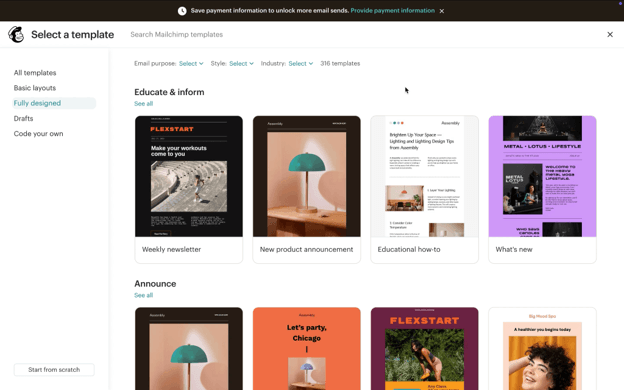
Mailchimp template library displaying predesigned email templates for newsletters, product announcements, educational content and other campaigns.

We tested dozens of Mailchimp’s predesigned templates and found plenty of options for different types of campaigns. Beginners can start with a finished design and customize the colors, fonts, images and other elements to match their brand.

Mailchimp also offers helpful marketing tools for building contact lists and automating campaigns so you and your staff save time. The platform’s segmentation tools are among the best we tested too, allowing you to separate users based on factors like subscriber data, behavior, and predictive analytics, allowing you to tailor your message to suit each customer segment. The easy-to-use reporting and analytics tools are superb and will help you understand which campaigns perform best. Best of all, for those new to email marketing, Mailchimp offers a free plan so you can test-drive the platform before committing to a paid plan.

PlanPrice (Monthly)Top Features
Free$0250 contacts; 500 monthly sends, 250 daily; basic templates and reporting.
EssentialsFrom $13500 contacts; 5,000 monthly sends; A/B testing; flows up to four steps; three seats.
StandardFrom $20500 contacts; 6,000 monthly sends; expanded flows, advanced segmentation and multivariate testing; five seats.
PremiumFrom $35010,000 contacts; 150,000 monthly sends; unlimited seats; phone and priority support.

Prices listed above are starting monthly U.S. rates before tax and overages, without introductory discounts. Contact counts are determined by tier; unsubscribed and non-subscribed contacts can count unless archived, cleaned or deleted.

  • Mailchimp's intuitive drag-and-drop email builder makes it easy for beginners to create professional-looking campaigns without any coding experience.
  • We love the user experience in Mailchimp. Every aspect of the platform has been simplified so that it’s easy to build lists and launch campaigns straight away for first-time users.
  • Mailchimp offers AI-powered tools that can help beginners generate campaign ideas and create email content without starting from scratch.
  • We love the Send Time Optimization feature, which determines when contacts are most likely to open an email. However, it's available only with the Standard plan or higher.
  • Mailchimp counts unsubscribed contacts toward your monthly contact limit unless you archive them. This means you can pay for contacts who can no longer receive your marketing emails.
  • Although the on-site knowledge base is excellent, Mailchimp reserves phone support for Premium subscribers, with plans starting at $350 per month. Essentials and Standard customers still get 24/7 email and chat support, but businesses that prefer phone assistance will have to pay considerably more for that option.

Mailchimp earned an 8.4 out of 10 on TrustRadius across more than 2,800 ratings. Users praise the email builder, audience segmentation and time saved managing campaigns. Complaints include rising costs as lists grow, confusing navigation and design restrictions.

“Mailchimp is fairly easy to onboard, even for those who would consider themselves less technologically inclined. It can be as simple as plug-and-play for simpler campaigns or scale up as needed. It also makes it easy to build, send out for internal review and feedback, and track all the needed changes,” one user wrote.

constant contact logo
Editor's Rating: 9.4/10
Visit Site
Links to Constant Contact Email Marketing

Many SMB owners who start off with a basic email marketing plan eventually want to scale up, but find that plans with the list size, send limits and features they want are too expensive. We found that, out of every email marketing platform we reviewed, Constant Contact achieves the best balance, offering competitively-priced plans with generous sending volumes and a comprehensive range of useful features.

On its reasonably-priced $12 per month entry-level plan, you get access to tools like the system’s excellent customizable drag-and-drop email templates, AI content generator and contact management tools. We loved the extra features on the next tier up, particularly the scheduled email feature allowing you to time campaigns up to a year in advance.

Constant Contact AI system to build campaigns

Constant Contact includes helpful marketing tools that guide you in setting up your campaigns, so you don’t need to be a professional marketer to get started.

Constant Contact’s paid tiers offer monthly sending allowances of 10, 12 or 24 times the contact tier, depending on the plan. On the upper end, 24x is the highest multiple we encountered in our review of email marketing platforms. We like having that room to grow without rebuilding campaigns in another platform.

Other stand-out features include its excellent segmentation options, subject line personalization and resends to recipients who don’t open your emails. Step up to the top tier and your send limit doubles and you can now use features like dynamic content for super-personalized campaigns and engagement heatmaps showing you which parts of your email recipients viewed the most. With a free 30-day trial, a 30-day money-back guarantee and a range of competitive pricing options, Constant Contact enables SMBs to optimize their email marketing without breaking the bank.

PlanPrice (Monthly)Top Features
LiteFrom $12500-contact entry tier; 5,000 sends; one user; AI copy generator; one automation template.
StandardFrom $35500-contact entry tier; 6,000 sends; three users; subject line testing; three automation templates; AI campaign builder.
PremiumFrom $80500-contact entry tier; 12,000 sends; unlimited users; custom automations and dynamic content; first 500 SMS messages monthly for U.S. customers.
Multi-AccountCustom quoteCentral management for teams needing five or more accounts.

For all plans, there is an option to add an Inbox Preview for $10 per month. Lite and Standard users also have the option to add on an SMS marketing plan (which comes included with Premium) for a starting price of $10 per month.

You can save 15 percent on subscription fees by paying annually, and there are additional discounts available for nonprofit organizations. Constant Contact offers a 30-day money-back guarantee on all plans.

  • The monthly plans are affordable and all plans, including the entry level plan, offer an impressive range of easy-to-use features.
  • We really like the BrandKit feature that will populate all templates with your brand’s logo, images and color by providing the platform with your URL. It’s available to all subscribers.
  • In addition to your free 30-day trial, Constant Contact will refund you if you decide to close your paid account within 30 days of signing up.
  • The built-in A/B testing functionality only allows you to change subject lines and not the content of the email. There is no multivariate testing, either. Any additional campaign testing must be set up and tracked manually.
  • Unlike some of its competitors, Constant Contact doesn’t have a forever-free plan for SMBs with small contact lists and send volumes.
  • Dynamic content, one of the platform’s break-out features, is only available to customers on the Premium plan.

Constant Contact earned an 8 out of 10 on TrustRadius across more than 890 ratings. Users value the templates, reporting and tools for organizing contacts and events. Some report confusing scheduling, editing restrictions and higher costs.

“The price is very competitive. We have had a very good tick-up in email clicks and views since we started using Constant Contact, the templates are very professional. It is generally easy to use, and we can have multiple users to work on projects. I think Constant Contact is the best email service for my business,” one user wrote.

Editor's Rating: 8.5/10
Visit Site
Links to iContact

iContact is a solid email marketing platform designed for small and medium-sized businesses that prioritize simplicity and hands-on support over advanced feature depth. We found it especially useful for small teams that value human support and simplicity.

The drag-and-drop editor and library of over 35 customizable templates make it easy to create professional-looking campaigns without any design or coding expertise. We especially liked the Smart Sending feature, which optimizes email delivery timing based on each subscriber’s past engagement patterns, and the built-in SpamCheck tool, which scans outgoing messages to help ensure they reach inboxes rather than spam folders.

iContact

During our review, we found iContact’s drag-and-drop email builder intuitive; we were able to build a serviceable newsletter in about 15 minutes and with minimal background knowledge of the platform. iContact’s strong selection of templates and themes provided a nice jumping off point even though our tester lacked design experience.

The existing Standard and Premium plans offer different levels of automation and content tools. Before choosing a tier, confirm the current pricing, plan names and limits for your subscriber count.

The Standard plan ($9/month) covers the essentials for getting started, including pre-designed templates, a drag-and-drop editor, and landing page templates. The Premium plan ($16/month) adds meaningful upgrades including unlimited users, social media posting, an AI content assistant, unlimited landing pages, and more advanced automation capabilities. For businesses with specialized requirements, a custom tier is also available with tailored features and dedicated support. All paid plans include access to a dedicated Success Manager and award-winning technical support via phone, email, and live chat — a level of guided support that most competitors reserve for their higher-priced tiers.

Where iContact falls short is in the depth of its automation and integrations. Businesses that need complex multi-step workflows, advanced tagging or extensive third-party integrations may find the platform limited compared to rivals like Mailchimp or HubSpot. The platform offers around 35 direct integrations plus Zapier and LeadsBridge connectivity, which may not be sufficient for organizations with complex tech stacks.

PlanPrice (Monthly)Top Features
StandardFrom $9500 contacts, templates, editor, basic automation, A/B testing and reporting.
PremiumFrom $16AI content assistant, social posting, unlimited users and landing pages.
CustomRequires quoteCustom plan

iContact’s pricing is based on the number of subscribers and is offered at monthly or annual rates, with a 15% discount for annual prepayment. Nonprofits can receive a 20% discount by emailing proof of 501(c)(3) status to billing@icontact.com.

  • The platform's intuitive interface and drag-and-drop editor make it one of the easiest email marketing tools to learn, even for users with no prior experience.
  • Every paid plan includes a dedicated Success Manager who provides strategic marketing guidance — not just technical support — which is a standout benefit for small teams without in-house marketing expertise.
  • Hands-on support can help small teams organize campaigns and lists.
  • Automation capabilities are adequate for basic workflows like welcome sequences and drip campaigns but fall behind specialized competitors for complex, multi-step automation.
  • With roughly 35 native integrations (plus Zapier and LeadsBridge), the platform's connectivity options are more limited than what rivals like Mailchimp or HubSpot offer.
  • Subscriber-based pricing can escalate quickly as your contact list grows, and some users report that pricing has increased notably over time.

iContact earned a 6.8 out 10 on TrustRadius across 97 ratings. Users appreciate simple templates and contact-list tools. Complaints include slow list uploads, limited customization and scheduling that could be improved.

“We originally signed up with the program to help with email marketing and campaigns. Before signing up, we were not getting a lot of traffic to the website, and it would take 24-48hrs to complete an email campaign. This helped us tremendously after working with it for about six months. Our email campaigns doubled our website traffic, and we saw a 12% increase in donations in the first three months and a 20% increase by the 6th month of using the system,” one user wrote.

Omnisend logo
Editor's Rating: 9.1/10
Visit Site
Links to Omnisend

Omnisend makes it easy to use email marketing to support your e-commerce company, allowing you to quickly build and send shoppable emails highlighting your business’s products. The product recommender feature can automatically pull in your best-selling or newest items or select personalized products based on a customer’s order history. We love that there are prebuilt automated workflows for sending cart abandonment emails and confirmations for purchase and shipping, but you also have the option to create your own. You can also send your contacts unique coupon codes.

One fun e-commerce tool is what Omnisend calls “Wheel of Fortune” — a pop-up that lets your online store visitors spin a virtual wheel for a discount or other prize in exchange for providing their email address. Plus, with the platform’s sales and performance reports, you can get insights into which email campaigns drive the most revenue, which is valuable for optimizing your marketing efforts. E-commerce businesses can also use connected customer segments to support retargeting. For new paid accounts, budget for Pro and a separate SMS subscription if you want to coordinate email with text messaging.

Omnisend Wheel of Fortune

Omnisend’s “Wheel of Fortune” incentivizes potential customers to sign up for your email list. Source: Omnisend

Use regular prices when budgeting; an introductory discount requires prepayment and expires. For new paid subscriptions from May 4, 2026, SMS requires Pro and a separate credits subscription. Legacy Standard SMS customers may have different terms. Billable contacts can include non-subscribers.

PlanPrice (Monthly)Top Features
Free$0Up to 250 unique contacts and 500 emails monthly; try the platform before upgrading.
StandardFrom $16Entry tier: 500 contacts and 6,000 emails; email allowance equals 12x billable contacts. SMS unavailable to new Standard subscriptions.
ProFrom $59Unlimited emails and web push; advanced AI; SMS purchased separately with volume- and country-based rates.
  • Omnisend’s automation and store tools make it a strong fit for merchants.
  • The platform integrates with popular e-commerce solutions, including Shopify, WooCommerce and BigCommerce.
  • All customers have access to 24/7 email and live chat support.
  • For new paid subscriptions from May 4, 2026 onward, Standard does not support SMS; Pro and a separate subscription are required.
  • Billable contacts can include non-subscribers, so a growing stored audience can raise the bill.
  • To access an Account Expert requires at least $400 in monthly plan spending.

Omnisend earned a 4.3 out of 5 on Trustpilot across more than 500 reviews. Positive reviews praise approachable support and help migrating to the platform. Other reviewers describe delays resolving account, integration or billing issues.

“I’ve been using Omnisend for a little over a year now, and by far the best aspect of the platform is the customer service. Although I’ve had a few connectivity issues, the Omnisend agents are always available and really helpful,” one user wrote.

Editor's Rating: 9/10
Visit Site
Links to Campaigner

Campaigner stands out for large businesses that need more control over segmentation, personalization and workflows. Its current pricing separates Essentials, Advanced and Custom tiers, so growing teams can choose the automation and service level that matches their operation.

Campaigner email templates

Campaigner offers hundreds of customizable email templates in its drag-and-drop builder so you can create stunning email marketing campaigns, even if you have limited design experience. (Source: Campaigner)

Campaigner’s Essentials plan starts at $14 per month for 1,000 contacts. Advanced starts at $35 at that contact tier and adds automation workflows, advanced segmentation and personalization. Larger senders can request a Custom quote for account management and deliverability consulting.

Campaigner’s drag-and-drop functionality makes it easier to design campaigns and work with automation. Deliverability tools can support list quality, but they do not guarantee inbox placement.

PlanPrice (Monthly)*Top Features
EssentialsFrom $141,000-contact entry tier; drag-and-drop editor, templates and campaign reporting.
AdvancedFrom $351,000-contact entry tier; automation workflows, advanced segmentation and personalization.
CustomCustom quoteSending at scale; full feature set, dedicated account management and deliverability consulting.

*Prices increase with contact count.

  • Campaigner is highly customizable and supports email automation, personalization, experimentation and reporting.
  • Built-in marketing automation tools enable users to easily segment contacts and optimize email marketing campaigns with minimal manual input.
  • Integrated social media feeds and the option for an SMS add-on bundle support a holistic marketing strategy and makes it easier to unify marketing efforts across multiple digital channels.
  • There is no free plan available for Campaigner and you’ll need to provide your credit card information to access the 30-day free trial.
  • Some customers reported deliverability issues, especially when it came to SMS campaigns.
  • Automation workflows require Advanced or Custom plans.

Campaigner earned a 3.3 out of 5 on Trustpilot across 84 reviews. Many customers praised the company’s customer service, though some complained that it was difficult to cancel their subscription.

“The platform is (in my opinion) easy to use. The learning curve from what I remember was a bit long, but that’s mostly due to all of the features I wanted to use and all of my ideas that I wanted to implement. When everything was up and running it was very easy to use, more so than a lot of other email marketing software I’ve used in the past,” one user wrote.

Klaviyo logo
Editor's Rating: 9.1/10
Visit Site
Links to Klaviyo

Klaviyo is especially useful for teams that want to act on customer and purchase data. We like how behavior-based segments and automated flows can support more relevant campaigns. Its current platform also offers AI tools for analyzing data and creating campaigns, while the free plan includes limited Composer usage. Test predictive features with your own data and price each product you need.

Klaviyo’s AI-powered tools like predictive analytics, personalized product feeds and industry-specific benchmarks, enhance email marketing by delivering highly targeted, data-driven campaigns that boost engagement and revenue. Klaviyo also integrates with 400 third-party applications.

Klaviyo dashboard

Klaviyo’s dashboard shows alerts and overall conversion metric performance. Source: Klaviyo

PlanPrice (Monthly)Top Features
Free$0250 active profiles; 500 emails monthly; $5 of mobile messages and $5 of Composer usage monthly; email support for first 60 days.
Email$20A/B testing; social content library; audience and conversion dashboards; security features; 400+ integrations
Marketing$90Push notifications and in-app messages; predictive analytics; marketing and segment performance reports; social engagement data; advanced auto-reply and content tools; onsite personalization; product recommendations; loyalty rewards; order tracking; self-service
  • Klaviyo seamlessly integrates with major e-commerce platforms like Shopify, WooCommerce and Magento.
  • It uses AI to forecast customer behavior, such as predicting a customer’s next purchase date, lifetime value and churn risk.
  • Klaviyo provides industry-specific performance benchmarks.
  • Klaviyo’s pricing scales with the size of your email list, making it expensive for businesses with large subscriber bases.
  • Its advanced features and automation tools can be complex for beginners or those unfamiliar with data-driven email marketing.
  • Klaviyo's customer support can be slow to respond, especially for users on lower-tier plans.

Klaviyo earned an 8.3 out of 10 on TrustRadius across more than 300 reviews. Users praise behavior-based segmentation, automated flows and Shopify integration. Complaints focus on rising prices, setup complexity and reporting limitations.

“I am a Klaviyo evangelist and will always sing its praises to colleagues and fellow marketers,” one user wrote.

Hubspot logo
Editor's Rating: 9.2/10
Visit Site
Links to HubSpot

HubSpot offers the set of features companies need to overcome two modern marketing challenges – keeping your messaging consistent and getting great results across email, SMS, social media, and other media. Focusing on email first, HubSpot’s range of tools like drag-and-drop email design, optimization features and goal-based templates, make it easy to quickly create and refine campaigns. We were impressed by HubSpot’s customer segmentation tools in particular and how they let you tailor individual emails based on recipient demographics, psychographics and their past interactions. HubSpot’s reporting tools give marketers deep insights into email campaign performance and subscriber data to help them understand which approaches are working and which aren’t. Beyond email marketing, this is a highly-capable, user-friendly one-stop service that shines in helping companies organize and manage coherent marketing campaigns across multiple channels including social media, SEO, blogging and more.

Hubspot personalized email details

With HubSpot, you can personalize emails by including recipients’ names, company names, and many other custom fields Source: HubSpot

Below are prices for HubSpot’s Marketing Hub. Professional and Enterprise have additional contact, seat and onboarding costs.

PlanPrice (Monthly)Top Features
Free tools$0Basic email marketing and CRM tools; lower sending and feature limits.
Marketing Hub StarterFrom $20 per Core Seat1,000 marketing contacts; email allowance of 5x contact tier; basic automation.
Marketing Hub ProfessionalFrom $890 monthly; $800 with annual billingThree Core Seats; 2,000 marketing contacts; 20,000 monthly emails; workflows and A/B testing. Required $3,000 onboarding fee.
Marketing Hub EnterpriseFrom $3,600; billed annuallyFive Core Seats; 10,000 marketing contacts; advanced governance and permissions.
  • HubSpot connects marketing campaigns with CRM records and other business tools, helping teams coordinate customer communication.
  • There is an impressive range of well-executed tools for each stage of email marketing from content creation through to reporting and analytics.
  • The broader HubSpot platform supports multiple marketing channels; availability, add-ons and costs depend on the subscription.
  • You can only send email campaigns to “marketing contacts” on your HubSpot database. You can buy additional marketing contacts for your plan, but this will push up the cost.
  • Many of the most useful features like A/B testing and duplicate data record management are only available on the more expensive tiers.
  • Starter does not include phone support; more advanced tools and support can require a substantial upgrade.

HubSpot earned an 8.4 out of 10 on TrustRadius across more than 2,300 reviews. Users value centralized CRM data and email nurturing workflows. Some find the contact-based costs, customization and reporting limits difficult to justify.

“It’s great if you’re an SME that is starting to struggle with using multiple tools to collect, store, and contact leads. Building Zaps is great but having it all in one platform saves hours – and mistakes! It’s not a good fit if you only have a few hundred customers or rarely send emails,” one user wrote.

Campaign Monitor logo
Editor's Rating: 9/10

There’s little point in signing up for an email marketing service if the vendor can’t reliably deliver your emails. Fortunately, Campaign Monitor excels at deliverability. With the software’s segmentation tools, you can create custom email lists to send messages tailored to specific audience groups. The real-time analytics track the deliverability rate for each campaign, and we love that for all packages, including even the free plan, Campaign Monitor provides deliverability support, vowing to investigate and resolve any delivery problems that occur. You can also sign up for a best practices training session with one of the company’s deliverability experts to ensure you’re giving your email sends the best chance of reaching subscribers’ inboxes.

In addition to traditional email marketing features like customizable templates, A/B testing and e-commerce integrations, we were impressed that Campaign Monitor also offers some cutting-edge functionality. We like the new Link Review tool, which automatically checks your email to make sure it doesn’t include any broken links, and the AI Writer, which generates optimized content for your campaigns. There’s even a tool that will help you determine the best subject lines.

Campaign Monitor contacts

Campaign Monitor lets you drill down into the details for each of your contacts. In this example, the subscriber is segmented into nine different contact lists. Source: Campaign Monitor

Pricing scales with active subscribers. A free account lets you explore the platform and send limited tests. Unlimited sends still apply to the subscriber tier you purchase.

PlanPrice (Monthly)Top Features
LiteFrom $13500-subscriber entry tier; 2,500 monthly emails; drag-and-drop builder, segmentation and AI Writer.
EssentialsFrom $31Unlimited monthly sends at selected subscriber tier; automated emails, testing and priority email support.
PremierFrom $171Advanced engagement segments, send-time optimization, email section locking and phone support.
  • Campaign Monitor provides dedicated deliverability support.
  • The vast majority of features are available with the entry-level Lite plan.
  • You can also sign up for the vendor's SMS marketing platform for text message marketing.
  • There is a significant — and possibly financially prohibitive — price jump between the two lower-tier plans and the top-tier Premier offering.
  • Multiple customers have reported struggling with the software's HTML coding.
  • Only users on the most expensive plan have access to phone support.

Campaign Monitor earned a 9.1 out of 10 on TrustRadius across more than 100 reviews. Positive reviewers praise the straightforward newsletter builder and responsive support. Recent negative reviews raise concerns about account closures after inactivity, access to stored data and support; assess those policies before committing.

“Campaign Monitor has been well-suited for the email campaigns that we send out both internally and externally. Our internal weekly email has been created with Campaign Monitor for some time now, and we have found it very easy to use for both colleagues who have used it for some time and those using it for the first time,” one user wrote.

Editor's Rating: 9.3/10

For businesses eager to use AI and automation in email marketing, GetResponse offers tools to draft emails and subject lines and assemble campaigns. We like how the content tools connect with forms, landing pages and triggered messages. Starter includes one custom automation workflow limited to six elements; more advanced journeys require a higher tier.

Beyond email marketing, GetResponse offers AI-assisted landing pages and creator tools. Plan eligibility matters: compare the features you will actually use rather than assuming the entry tier includes the full suite. The vendor currently distinguishes its round-the-clock chatbot from its human expert team, available Monday through Friday.

Getresponse AI email writing

GetResponse’s AI-powered email writing tool generates emails in less than a minute. Source: GetResponse

Prices shown are for the entry list tier. Annual prices require upfront annual payment; the lower advertised figures are not month-to-month rates. Premium features can be tested for 14 days without a credit card.

PlanPrice (Monthly)Top Features
StarterFrom $19; $15.58 with annual billing1,000 subscribers; unlimited sends; AI email tools; one custom workflow limited to six elements.
MarketerFrom $59; $48.38 with annual billingAdvanced automation, segmentation, abandoned cart recovery and web push.
CreatorFrom $69; $56.58 with annual billingCreator tools including courses, premium newsletters, websites and webinars.
Enterprise / MAXCustom quoteTailored high-volume solution, advanced features and premium support.
  • AI email and campaign tools can reduce the work required to produce a first draft.
  • Paid plans include unlimited email sends at the subscriber tier you purchase.
  • The platform can also be used to create monetized newsletter subscriptions and online courses, expanding your revenue sources.
  • Starter allows only one custom automation workflow, limited to six elements; AI usage allowances also vary by tool and plan.
  • Some advanced features and premium support require Enterprise.
  • Some customers have complained about long-term, auto-renewing contracts.

GetResponse earned a 4.2 out of 5 on Trustpilot across more than 1,000 reviews. Users praise onboarding help and a dashboard that is easy to navigate. Some describe billing disputes, account restrictions and difficulty resolving technical or verification issues.

“Expert advice, patient and assisted fantastically,” one user wrote.

Editor's Rating: 9.2/10

Freshmarketer’s main appeal is its connection with the Freshworks ecosystem. We like the ability to bring customer data and marketing activity together so teams can coordinate communication. The current paid Enterprise plan includes advanced segmentation, transactional emails and webhooks, with an AI campaign assistant to support campaign work.

The free plan provides a way to try list management, basic segmentation, tracking and forms with 100 marketing contacts and 500 monthly sends. Before upgrading, confirm how the integrations you need sync purchase data, consent and campaign activity. Additional contacts, conversion optimization and customer-facing AI agents have separate charges.

FreshWorks FreshMarketer edtori

The WYSIWYG (what-you-see-is-what-you-get) drag and drop editor in Freshmarketer is intuitive and easy to use. S

The WYSIWYG (what-you-see-is-what-you-get) drag and drop editor in Freshmarketer is intuitive and easy to use. Source: Freshworks Freshmarketer

We also liked the vast marketplace that has hundreds of apps including very well-executed integrations with Shopify and WooCommerce, and found it excellent for emailing online customers using the latest purchasing data. Better still, Freshmarketer plugs directly into the wider Freshworks suite, a very capable CRM platform that bridges the gap between marketing and sales.

PlanPrice (Monthly)Top Features
Free$0100 marketing contacts; 500 monthly email sends; list management, basic segmentation, web tracking and forms.
EnterpriseFrom $18; $15 per month, billed annually500 marketing contacts; AI campaign assistant, transactional emails, advanced segmentation and webhooks. Extra contacts from $100 per 5,000 monthly.
  • Freshmarketer connects marketing activity with the wider Freshworks ecosystem.
  • A free plan supports 100 marketing contacts and 500 monthly sends.
  • The paid plan includes an AI campaign assistant and advanced segmentation.
  • The advertised $15 monthly rate requires annual billing.
  • Extra marketing contacts and conversion optimization can add significant costs.
  • AI agents and a dedicated IP have separate charges.

Freshmarketer wins the seal of approval for the platform from its customers on review sites. Scoring 4.4 out of 5 on Capterra, one user mentioned the following features as its main pros – “heatmaps, session replay, A/B testing, among others (as well as) integrated form analysis”. On G2 (4 out of 5), the platform’s three most popular features were its integrations, email marketing, and ease of use.

What is Email Marketing and How Does it Work?

Email marketing offers a direct line to your audience’s inbox, allowing you to send a wide range of content and keep your brand at the top of their mind. This content may include promotional content, information about sales and discounts, and behaviorally triggered emails like reminders to check out when a user leaves products in their e-commerce cart.

Email marketing software transforms what could be a tedious manual process into a streamlined operation. Import your contact list, segment your audience by interests or behavior and create professional-looking emails using drag-and-drop builders — no design experience required. Planning to send a monthly newsletter? Save it as a template and maintain consistent branding without starting from scratch each time.

Modern email marketing platforms go beyond basic sending. Look for compliance features that protect you by ensuring subscribers have genuinely opted in to hear from you. The best platforms now leverage AI to optimize your content for higher conversions and personalize messages to individual recipients, turning generic blasts into relevant conversations that drive engagement.

What Are the Benefits of Using Email Marketing?

Email marketing is an effective, low-cost method of communicating with your customers and building loyalty to your company when executed correctly.

“Give compelling content and a valid reason for the customer to open your email and act the way you want them to,” Cross said. “If you provide valuable and relevant content that addresses the customer’s needs and interests, you’ll attract and retain customers.”

Here are just a few of the benefits of investing in a software solution for email marketing.

1. Easily manage your campaigns and contacts.

An email marketing service provides a centralized place to create, manage and analyze your email campaigns. The software manages the entire process of creating and sending your email campaigns. Instead of juggling spreadsheets and manual sends, you get automated workflows and real-time performance feedback—all in one place.

2. Improve click-throughs and engagements on your website.

A professionally designed email doesn’t just look good — it drives higher clickthrough rates. When your emails are polished and relevant, subscribers are far more likely to click through to your website, boosting both traffic and engagement.

3. Provide personalized, one-to-one communications with your customers.

Today’s customers expect content that is personally tailored to them, rather than a rote email going out to a company’s entire customer base. Email marketing services allow you to segment your customers by qualifiers such as age, gender, location and interests to help you customize your messages.

4. Integrate email with your other digital marketing channels.

The best email platforms integrate seamlessly with your social media channels, letting you embed links or social feeds directly in your emails. This cross-channel approach amplifies your brand awareness and keeps customers engaged across multiple touchpoints.

Bottom LineBottom line
Choosing the right email software for your business can be a tough task, so it is important to prioritize your needs and the benefits you are looking for to make sure the software you ultimately select hits all of those notes.

How Much Will an Email Marketing Service Cost?

Entry paid plans among our picks generally start around $9 to $20 monthly, depending on contacts, features and billing term. Higher tiers can cost hundreds or thousands per month. Free plans and trials have different limits, and annual rates require annual payment. Budget for list growth, extra seats, onboarding, SMS credits and overages as well as the base subscription.

Most email marketing service providers charge a monthly subscription fee based on the number of contacts you want to engage with and the number of emails you plan to send. Plans then vary further based on specific features. Some providers offer free versions of their software with limited features, subscribers and sends, which are a great way for businesses to try out email marketing risk-free.

For businesses that only occasionally need an email marketing service, some providers offer per-email or pay-as-you-go pricing. This is a flexible option, as you pay only for what you use rather than paying the same amount each month for a subscription that may largely go to waste.

TipBottom line
Use as many free trials as you can during your search to determine which email marketing service is right for your business. Pay attention to how easy it is to design emails and build your audience with each platform.

How to Choose an Email Marketing Platform

Choosing the right platform requires balancing your must-have features against real-world usability. Here’s how to narrow down your options without getting overwhelmed:

Start with your non-negotiables.

Before browsing vendor websites, list your essential requirements. Do you need to import an existing contact list from a spreadsheet? Is audience segmentation critical for organizing leads versus repeat customers? Would a drag-and-drop builder be easier than coding emails from scratch?

“Our research was directed by the identification of our unique needs in email marketing at the outset of the journey,” explains Jake Munday, co-founder and CEO of Custom Neon. “We were able to determine real-world application and satisfaction levels by reading through many customer reviews and case studies.”

Common priorities include available features and ease of use, balancing advanced functionality with complexity, customization and scalability for growing businesses, responsive customer support, and cost-effective pricing.

Build your shortlist strategically.

Research the leading platforms and create a preliminary list based on your priorities. If budget is your primary concern, only include options that deliver your must-have features at a price that makes sense. If integration with your existing CRM is critical, cross off any platforms that don’t support it.

“We initially carried out an exercise to look at as many different options as possible and compare costs for different numbers of subscribers and to check if specific automation functionality we needed was available,” says Laura Grant, marketing manager at Bluesky Solutions. “This then gave us a small shortlist of potential software which we looked at in more detail.”

Focus on functionality without sacrificing usability.

Great features mean nothing if the platform is too complex to use effectively. Look for robust analytics, segmentation tools, and customization options, but make sure they’re accessible without a steep learning curve.

“To support targeted campaigns, we searched for strong analytics, extensive segmentation tools and customization choices,” Munday notes. “Ease of integration with our existing CRM and e-commerce platforms was crucial to streamline our workflows.”

The challenge is finding the sweet spot.

“I needed robust automation, list segmentation capabilities and integration with other tools like my CRM and analytics platform,” says Bassem Mostafa, market analyst and owner of GlobeMonitor Market Research Agency. “Some tools were feature-rich but overly complex, so it was essential to strike the right balance.”

Don’t chase the cheapest option; chase the best value.

“I personally recommend that while considering tools, think about long-term value, not just the initial price,” advises Tom Jauncey, CEO of Nautilus Marketing. “A more expensive option may save you time and ramp up your results in the longer term.”

Test extensively before committing.

Once you’ve narrowed your list, schedule live demos and sign up for every free trial available. Live demonstrations let you ask questions and see the platform in action, while hands-on trials reveal how the software performs in your actual workflow.

“There is no replacement for a good free trial,” emphasizes Brandon Rollins, founder and CEO of Pangea Marketing Agency. “Blog posts, reviews, and even videos are all helpful, but there’s no replacement for using the tool directly and seeing if [it] does exactly what you need it to do.”

Don’t overlook onboarding support.

Email platforms are generally straightforward, but implementation support makes the process smoother—especially if you’re new to email marketing or migrating a large contact list. Look for dedicated account managers or comprehensive self-service resources.

“For some platforms, the onboarding process was included in the demo, which gave me a good sense of how much support and training was available,” Mostafa notes.

Measure results after launch

Treat your first month as an extended trial period. Track key metrics to confirm the platform is delivering results. You should see improvement in open rates, click-throughs, and conversions—especially if you’re upgrading from manual processes.

“When it came to user engagement, conversion rates, and deliverability, the platform [we chose] not only met but surpassed our expectations,” says Munday. “Customer satisfaction and retention have significantly improved as a result of the capacity to produce tailored content depending on user behavior and preferences.”

If metrics remain flat or decline, audit your usage. Are you segmenting properly? Crafting compelling subject lines? Ensuring emails reach inboxes rather than spam folders? If you’re following best practices but still seeing poor results, it may be time to reconsider your choice.

TipBottom line
Define specific campaign goals during the planning phase so you can focus your efforts and accurately measure success.

What Are Some Features of an Email Marketing Platform?

As you compare email marketing services, look for these core features:

A/B Testing

Many services offer A/B testing, which is the ability to test out various components of an email message to see what will resonate more with your audience. Before you do, it is important to understand how A/B testing works. A specific example is to try out two different subject lines. You can send a portion of your email list one subject line and another section of your list a different subject line. Whichever gets more engagement can be used for the majority of your audience.

Test different iterations of email campaigns with A/B testing. Confirm which variables and testing methods your selected plan supports.

iContact A/B testing

Test different iterations of email campaigns with A/B testing. Above is multivariant testing on the iContact platform. Source: iContact

Drag-and-Drop Email Design Tools

Most services provide a user-friendly drag-and-drop tool that allows you to customize your emails or customizable premade templates. Some providers have templates that show you how your email will look on multiple devices (laptops, tablets and mobile phones), which can help you design a flexible and responsive email.

Analytics and Reporting

The ability to measure campaign performance is critical to understanding your return. Compare clicks, conversions, revenue, bounces and unsubscribes. Privacy features and automated activity can distort opens and clicks, so check how the platform filters nonhuman engagement and attributes sales.

Marketing Automation

With marketing automation features, you can configure your email marketing software to automatically send targeted emails to certain customers when they take a specific action. For example, if a visitor to your website signs up to receive emails from you, a marketing automation workflow triggers a welcome email to go to that customer’s inbox.

FYIDid you know
Marketing automation can be an effective timesaver, and many email marketing services offer ways to make automated emails more personal, which leads to higher engagement and ROI.

Segmentation

Segmentation is another helpful way to improve email deliverability to your audience by grouping or tagging them by factors like age, location, gender, industry or interests. Email segmentation allows you to target different groups rather than sending one mass email that may not be relevant to your entire customer base.


Campaigner segmentation

Most platforms, like Campaigner above, allow you to segment your data allowing you to send campaigns with different offers to different audiences based on their interests. Source: Campaigner

Contact Management

Contact management tools organize imports, segments, exports and suppression lists. Ask how the platform counts unsubscribed, duplicate and non-subscribed contacts for billing, and test whether opt-outs stay suppressed when you sync data with your CRM.

Social Media Integration

Integrating your social media with email marketing helps make the most of multichannel marketing by providing more information about your customers as well as more opportunities for them to see messages from you. You’ll be able to grow your contact list, schedule posts and track your followers’ engagement to determine what’s popular.

AI-Driven Technology

Some email marketing experts also advise looking for AI-powered features. “AI can definitely help with efficiencies like automation, writing content, optimizing send times, subject lines and other content,” said Jon Cross, CEO of All In One Email.

Dave Charest, director of small business success for Constant Contact, agreed. “AI makes digital marketing easier for small businesses to create, design and send their campaigns. Spending less time on marketing minutiae helps you get back to running other aspects of your business,” he said. Charest pointed out that his platform’s AI technology “lets our customers use our almost 30 years of marketing experience to create campaigns and reach the right customers with the right messages … It’s certainly enabled some new outcomes we’re able to offer our customers.”

However, Cross cautioned such tools are “still fairly new” and said “not to rely on it too much” if your experience with using AI is limited. Users need to “know what they’re doing enough to know when [or] if AI steers them in the wrong direction.”

Compare specific AI capabilities, including content drafting, send-time recommendations, predictive segments and workflow generation. Ask which are included, what data they need, whether credits expire and what happens when you reach a limit. Review generated content and audience rules before activating a campaign.

Is Email Marketing Worth It?

Email marketing can be worthwhile when it creates profitable customer activity at a sustainable cost. In Omnisend’s 2026 report, based on 2025 activity from its e-commerce customer base, automated emails generated 30 percent of email-driven revenue from 2 percent of sends. Those vendor-specific results are not a forecast for every business, but they show why timely welcome and cart-recovery messages deserve a place in a trial.

Of course, email marketing is only worth it if you do it correctly. That means understanding the best practices surrounding email marketing and sticking to them from day one.

Best Practices for Email Marketing

To make the most of your email marketing campaigns, make sure you’re adhering to email best practices. These include meeting basic compliance requirements and setting your email content up for success.

Use the double opt-in method

Double opt-in asks new subscribers to confirm their email address after signing up. It can improve list quality and provide a clearer permission record. Keep consent records and unsubscribe preferences in the platform; the appropriate legal requirements depend on the audience and jurisdiction.

Create a triggered welcome email

Welcome emails confirm the subscription and give new readers a clear next step. Trigger the message promptly, explain what subscribers will receive and test one useful offer or resource. Measure clicks, conversions and unsubscribes rather than borrowing a universal open-rate benchmark.

Segment your audience

Your email contact list likely contains several types of users, so you should segment them accordingly to better target them with relevant content. Some may be leads that have never purchased your products or services before, while others may be repeat customers. Others still might be lost subscribers that you’re trying to win back. By segmenting your audiences, you can direct the most relevant content their way and boost opens and clicks.

Cull inactive subscribers

Review inactive subscribers using clicks, purchases and other meaningful activity, alongside opens. Try a re-engagement campaign, then suppress contacts who remain inactive. Keep suppression and unsubscribe records so an imported list does not accidentally reactivate them.

Create engaging subject lines

Engaging subject lines that make users want to open an email are critical. If they don’t open your email, there’s no chance they’ll convert by clicking through to your website or making a purchase — so try to hook their attention with a grabby email subject line.

Personalize email content

By personalizing email content to include a user’s name and surface products they were browsing in your store, for example, you can boost open and engagement rates. Many email marketing platforms include tools that support content personalization, so consider these when making a buying decision.

TipBottom line
Use a domain you control, configure the authentication records requested by your provider and test messages across the inboxes your customers use. Compare suppression handling, bounce reporting and unsubscribe workflows. A vendor’s delivery rate does not guarantee that your campaign reaches the primary inbox.

What Are Some Alternative Email Marketing Services?

If our best picks above don’t suit your business, these fine alternatives might.

Active Campaign

ActiveCampaign connects customer data with email automation and a broad app ecosystem. We like its ability to build behavior-based journeys for stores using integrations such as Shopify and WooCommerce. Check whether the specific integration you need is native or requires another service.

Fin-

Active Campaign includes automation tools like ‘goal actions’ and ‘go actions,’ which take email recipients to the next sales stage if they choose an action like making a purchase before, for example, a drip campaign ends. Marketing teams can also score contacts based on factors like location and email opens as well as build specific landing pages for campaigns to generate better responses.

iContact

The steps between plans offered by many email marketing platforms can be steep. For example, moving from paying for 2,000 emails and contacts up to the next plan with 10,000 emails or contacts pushes the price, denting campaign profitability until subscriber numbers increase.

iContact allows you to start with a free plan and scale up gradually (750, 1,500, 2,500, 5,000 contacts) with small and manageable increases in price ($8.50, $27, $41, $73). We also appreciate how iContact makes every feature available to subscribers at all levels.

There was a lot else we really liked about this platform when we reviewed it. The drag-and-drop email designer was one of the easiest we’ve used. Their library of customizable and professional templates is also very generous. Sending out campaigns takes no time. We also thought the real-time reporting on live campaigns was excellent, which gives marketing teams instant insights into engagement and revenue.

Salesforce Marketing Cloud Next

When creating campaigns across channels like email, SMS and social media, marketing teams need a way to coordinate customer data, personalization and automation from one place. We were impressed by how Salesforce Marketing Cloud Next brings together CRM data, AI-powered campaign creation and customer journey orchestration to help businesses deliver more consistent experiences across every customer touchpoint. Because it’s built on Salesforce CRM and part of Agentforce Marketing, marketers can create more personalized campaigns using real-time customer data.

We especially liked how Marketing Cloud Next combines AI with marketing automation. Agentforce can help marketers generate campaign content, build audience segments and create customer journeys, while Salesforce CRM data helps personalize messaging based on customer behavior and engagement history. The platform also makes it easy to measure campaign performance and optimize marketing efforts over time.

Marketing Cloud Next’s analytics and reporting tools give businesses a clear view of campaign performance across channels, while the broader Salesforce ecosystem allows organizations to expand the platform with products for marketing intelligence, personalization and more as their needs grow.

Click here for our Salesforce Marketing Cloud Next review.

Methodology

To determine the best email marketing services and survey software on the market, our team of marketing experts and software analysts evaluated an initial list of 25 platforms.

We narrowed this list down by examining key criteria such as pricing plans, available features, onboarding support and customer service. We also took a look at customer reviews to see what real entrepreneurs had to say about their experiences with each platform. We used these insights to narrow our initial list down and select the email marketing software we wanted to put through more in-depth testing.

After narrowing our list down to 14, we participated in live demonstrations and signed up for free trials with each company to test out their offerings firsthand. We asked pointed questions of company representatives and put their platforms to the test in real-world situations. This page features 10 email marketing platforms as our top recommendations. Our experts and analysts studied each solution’s functionality and evaluated the products on nearly 30 factors.

These factors were weighted differently in our overall conclusion. The weights were determined based on how much business owners prioritize these criteria when shopping for business software and services and making purchasing decisions.

  • Pricing (30%): Our experts and analysts compared and contrasted each vendor’s plans, judging which packages offered the best bang for your buck. They took into account monthly subscription fees, the number of contacts and email sends allowed, pay-as-you-go options, and the quality of free versions and free trials.
  • Features (25%): We looked for standard email marketing functions like email builders, contact management tools, A/B testing abilities, workflow automations and analytics. We also assessed the available integrations and awarded extra points for advanced services, like AI tools for generating email content, customizing campaigns and analyzing metrics.
  • Ease of Use (20%): We tested the software ourselves, gauging each solution’s learning curve, user-friendliness and customization options. We also considered whether the platform included easy-to-use survey tools and if the vendor offered a fully featured mobile app for executing email marketing tasks on the go.
  • Customer Service (15%): We evaluated the range of customer service options, including whether phone assistance was provided with all package tiers. We also examined each vendor’s online resources for businesses interested in self-guided help.
  • Integrations (10%): Email marketing software can tie in with your tech stack’s other marketing tools and business software. We gave extra points to platforms that offered extensive pre-built integrations with some of the most popular business software on the market.

Based on these criteria, we not only determined which email marketing services and survey software our readers could trust but also the ways in which each solution could best serve different business needs. Some platforms were better at certain tasks than others or more suited to a particular type of company. These takeaways informed the “Best for” use cases you see on this page.

To learn more about our methodology, see our full editorial process.

FAQs

There are several types of email marketing. The most common type is the informational newsletter, which provides general company news and updates, transactional emails that are part of the sales or billing process (order and shipping confirmations, receipts, invoices, etc.), and behavioral emails that are sent after a subscriber takes a certain action on your website (signs up for a mailing list, abandons their cart, sends an inquiry, etc.).

Any business that wants to build strong customer relationships and improve their website traffic and revenue for a relatively low cost should consider email marketing.

Yes, email marketing software integrates with other business software, such as top CRM systems and other marketing tools. These integrations create a seamless connection that allows these individual platforms to share data, reducing the need for double-entry and the risk of human error, as well as keeping all stakeholders apprised of new developments in real time.

Yes, you can automate email marketing blasts so they’re scheduled for delivery ahead of time. You can set these up to run once or on a recurring basis. However, when setting up automated email marketing blasts repeatedly, you should periodically check the content to ensure it remains accurate and up to date.

Email marketing can pay off when the revenue or other business value it creates exceeds software, production and list-management costs. Set a baseline, test relevant segments and judge results against your own goals.

Yes. AI can draft content, suggest subject lines and help build segments or workflows. Availability, usage caps and credit charges differ by product and plan. Review generated work for accuracy and test audience rules before sending.

Did you find this content helpful?
Verified CheckThank you for your feedback!
Mark Fairlie
Written by: Mark Fairlie, Senior Analyst
Mark Fairlie brings decades of expertise in telecommunications and telemarketing to the forefront as the former business owner of a direct marketing company. Also well-versed in a variety of other B2B topics, such as taxation, investments and cybersecurity, he now advises fellow entrepreneurs on the best business practices. At business.com, Fairlie covers a range of technology solutions, including CRM software, email and text message marketing services, fleet management services, call center software and more. With a background in advertising and sales, Fairlie made his mark as the former co-owner of Meridian Delta, which saw a successful transition of ownership in 2015. Through this journey, Fairlie gained invaluable hands-on experience in everything from founding a business to expanding and selling it. Since then, Fairlie has embarked on new ventures, launching a second marketing company and establishing a thriving sole proprietorship.