Business.com aims to help business owners make informed decisions to support and grow their companies. We research and recommend products and services suitable for various business types, investing thousands of hours each year in this process.
As a business, we need to generate revenue to sustain our content. We have financial relationships with some companies we cover, earning commissions when readers purchase from our partners or share information about their needs. These relationships do not dictate our advice and recommendations. Our editorial team independently evaluates and recommends products and services based on their research and expertise. Learn more about our process and partners here.
What Is a Payment Gateway? How It Works for Small Businesses
From checkout security to processing fees, here's what small businesses need to know before choosing a payment gateway.
Business.com earns commissions from some listed providers. Editorial Guidelines.
Table of Contents
If you sell products online, accept credit card payments over the phone or send digital invoices with a “pay now” button, there’s a good chance a payment gateway is already working behind the scenes. Most customers never see it, and many business owners don’t think much about it — until something goes wrong at checkout.
A payment gateway plays a critical role in getting transactions approved quickly, securely and with as little friction as possible. For small businesses, understanding how payment gateways work and how they fit into the bigger payment process can help you choose the right tools, avoid unnecessary fees and create a smoother checkout experience.
What is a payment gateway?
A payment gateway is the technology that securely captures a customer’s payment information and transmits it to your payment processor for authorization and settlement.
Think of it this way: If the payment processor is the engine that moves money between banks, the gateway is the front door where the transaction data enters the system. The gateway encrypts sensitive card information the moment a customer submits it, helping ensure that data moves securely through the payment chain.
How a payment gateway works
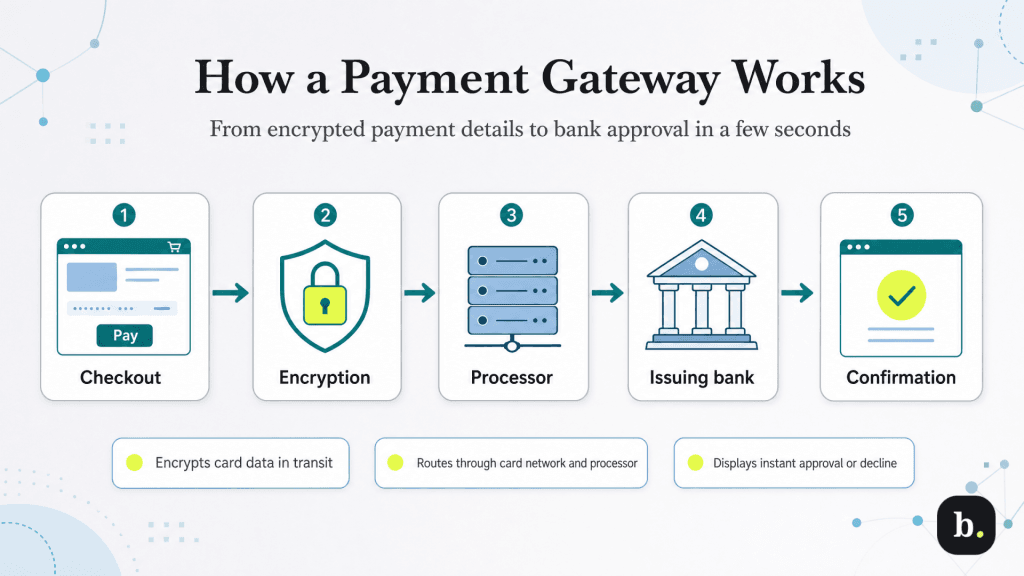
When a customer clicks “pay” on your online store, enters their card details over the phone or submits an online invoice, a lot happens behind the scenes, and it usually takes just a few seconds. Here’s what’s happening while your customer waits for an approval or decline message.
The customer enters their payment information. The transaction starts when the customer enters their card details on your checkout page, payment form or digital invoice.
The gateway encrypts the payment data. As soon as the customer submits their payment, the gateway encrypts the card data using secure protocols such as TLS (Transport Layer Security). This online payment security measure helps protect sensitive information like the card number, expiration date and CVV while it’s in transit.
The payment processor routes the transaction. The encrypted payment data is sent to your payment processor, which routes the request through the appropriate card network, such as Visa, Mastercard, American Express or Discover, and on to the customer’s issuing bank.
The issuing bank approves or declines the transaction. The issuing bank verifies the card details, checks for available funds or credit and runs any applicable credit card fraud screening. It then sends back an approval or decline response.
The gateway returns the result. That response travels back through the same chain, from the issuing bank to the card network, then to the processor and finally to the gateway. The customer sees a confirmation or error message, and you see the transaction recorded in your dashboard.
For most businesses, this entire round trip takes two to three seconds. And while the gateway plays a critical role in keeping payment data secure and moving it where it needs to go, it doesn’t actually hold funds, settle transactions or move money between accounts. Those responsibilities belong to the payment processor and the acquiring bank.
Payment gateway vs. payment processor
The terms payment gateway and payment processor are often used interchangeably, and for small businesses, that’s understandable. The two work hand in hand during every transaction, and many modern payment providers bundle both into a single platform. But behind the scenes, they’re handling very different parts of the payment process.
Here’s the simplest way to think about it:
Payment gateway: Captures, encrypts and securely transmits payment data from your website, payment form or virtual terminal.
Payment processor: Takes that payment data and actually moves the transaction through the banking system, routing it through the card networks, communicating with the issuing and acquiring banks and helping ensure funds eventually reach your business bank account.
However, the distinction can feel a bit blurry because many of the best credit card processors bundle both functions under one roof. If you accept online payments through Stripe, Square or PayPal, you’re typically using that provider’s gateway and processing service at the same time, all under one account, one dashboard and one fee structure.
That said, some businesses (especially those with higher transaction volumes, custom checkout requirements or specialized compliance needs) choose a standalone gateway paired with a separate payment processor. That setup offers more flexibility and can make it easier to mix and match providers, but it also adds another layer of setup, integration and ongoing management.
Payment gateway vs. merchant account
Another common point of confusion, especially for small business owners, is the relationship between a payment gateway and a merchant account. The two often work together behind the scenes, but they serve very different purposes.
Payment gateway: Captures, encrypts and securely transmits payment data during a transaction.
Merchant account: A specialized business account that temporarily holds card payments before the funds are transferred to your business bank account.
In the traditional payment processing model, businesses often had to set up each piece separately — a merchant account through an acquiring bank, a payment gateway through a technology provider and a payment processor to connect everything behind the scenes.
However, this distinction feels a bit less obvious today because many all-in-one providers, such as Stripe, Square and PayPal, bundle the merchant account, gateway and processing services into one platform. That means most small businesses can start accepting credit card payments and digital payment methods without applying for a separate merchant account or configuring a standalone gateway.
That said, the traditional multi-provider model still exists, and for larger or higher-volume businesses, it can offer advantages such as rate negotiation, deeper customization and more control over the payment stack.
FYI
If your business eventually outgrows an all-in-one platform, comparing the best merchant account services is often one of the first steps toward building a more customized payment setup.
Types of payment gateways
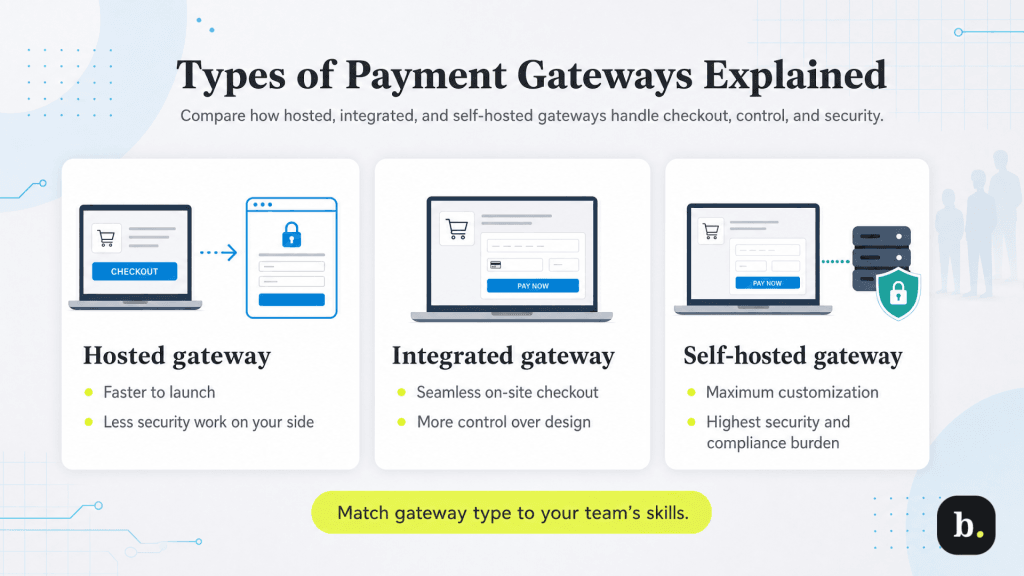
Not all payment gateways handle checkout the same way. Some send customers to a third-party payment page. Others keep the entire checkout experience right on your website. The type you choose can affect everything from the customer experience to your security and compliance responsibilities and how much control you have over the checkout process.
Here are the primary types of payment gateways to consider.
Hosted payment gateways
With a hosted payment gateway, the customer leaves your website during checkout and completes the payment on the provider’s secure payment page before being redirected back to your site. PayPal’s standard checkout is a familiar example.
Why businesses choose them: Hosted gateways are often the fastest and simplest option to set up. Because your website never stores, processes or transmits card data directly, there’s less security and compliance work for your business to manage behind the scenes. They’re also typically quicker to launch because there’s no complex checkout integration to build.
What to watch for: Redirecting customers away from your website can create a little extra friction. If the checkout page suddenly looks different from the rest of your site, or the handoff feels abrupt, some customers may pause before finishing the purchase, especially if they weren’t expecting to leave your website in the first place.
Integrated (API-based) payment gateways
With an integrated payment gateway, the payment form is built directly into your website using the provider’s technology. Instead of being sent somewhere else to pay, customers enter their card information right on your checkout page. Stripe Elements and Braintree’s drop-in checkout are two well-known examples of this approach.
Why businesses choose them: Integrated gateways create a more seamless checkout experience. The payment form matches your site’s design, the customer stays on your domain and the entire checkout process feels more consistent from start to finish. For many businesses, that smoother experience can help reduce e-commerce website friction and keep more customers moving toward purchase.
What to watch for: Setup is usually more technical than with a hosted gateway and may require developer support or a compatible e-commerce platform. Because checkout happens on your website, your business also takes on a little more responsibility for securely handling payment information, even though modern gateways are designed to keep sensitive card data off your servers.
Tip
For a closer look at integrated payment gateways in action, Stripe and Braintree are two popular examples worth exploring. Our Stripe Payment Processing review breaks down Stripe Elements, while our PayPal alternatives guide features Braintree as another flexible checkout option.
Self-hosted payment gateways
With a self-hosted payment gateway, the customer enters their card information on your website, and your business temporarily handles that payment data before passing it to the gateway for authorization. That gives you the highest level of control over the checkout experience, design and backend customization.
Why businesses choose them: Self-hosted gateways offer maximum flexibility. Businesses with highly customized checkout flows, proprietary e-commerce platforms or complex enterprise integrations may want that level of control.
What to watch for: That control comes with significantly more responsibility. Because sensitive card data passes through your systems, your business takes on much stricter security and compliance obligations, including full Payment Card Industry Data Security Standard (PCI DSS) requirements and other payment processing laws and regulations. For most small businesses, that level of e-commerce website security management is more complexity than it’s worth, which is why hosted or integrated gateways are usually the better fit.
What features should you look for in a payment gateway?
The right payment gateway should do far more than simply approve a transaction. It should fit the way your business sells, integrate with the tools you already use and help create a checkout experience customers actually trust. Here are some of the most important features to compare before you commit.
Security: Tokenization, encryption, PCI DSS compliance and built-in fraud detection tools should be standard. A good gateway should handle most of the security heavy lifting behind the scenes so your business doesn’t have to manage raw card data directly.
Platform compatibility: Your gateway should work with your e-commerce platform, whether that’s Shopify, WooCommerce, BigCommerce or Squarespace, along with your shopping cart and your payment processor if you’re using a separate one. Most popular gateways offer prebuilt plugins for major platforms, but it’s still worth verifying compatibility before you commit.
Payment method support: Credit and debit cards may be the starting point, but many businesses also need to accept mobile wallets like Apple Pay and Google Pay, ACH transfers, buy now, pay later options or international payment methods. The more e-commerce payment options you offer customers, the less likely they are to abandon their shopping carts at checkout.
Multi-currency support: If you sell to customers in other countries, look for a gateway that supports multiple currencies and handles currency conversion. For international e-commerce, this can be essential. For a business that sells only domestically, it may not matter much.
Recurring billing: If your business runs on a subscription business model or includes memberships, retainers or other recurring payments, make sure the gateway supports automated billing. Features like card-on-file tokenization, automatic retries for failed payments and subscription management tools can save a lot of manual work later.
Reporting and management: A good gateway should give you a clear dashboard for reviewing transactions, issuing refunds, managing disputes, downloading reports and keeping an eye on payment activity. Dashboard quality varies more than many business owners expect, so it’s worth spending a little time with a demo before making a final decision.
Payment gateway costs
Payment gateway pricing isn’t always as simple as a single transaction fee. Depending on the provider, you may see per-transaction charges, monthly platform fees, setup costs or additional charges tied to compliance, credit card chargebacks or international payments.
For many small businesses, the most common pricing model is a flat per-transaction fee, often a percentage of the sale plus a fixed fee, with no monthly subscription required.
When comparing costs, don’t get too hung up on the headline rate. A gateway with a monthly fee and lower per-transaction pricing may save money once your sales start picking up. If you’re processing fewer payments, a no-monthly-fee provider is often the easier place to start.
Here’s an at-a-glance look at some of the most common payment gateway costs.
Fee type
Typical range
Notes
Transaction fees
2.9% + $0.30 per transaction
Standard baseline for online payments; varies by provider and volume
Monthly fees
$0-$50+/month
Many providers charge no monthly fee; some charge for premium plans
Setup fees
$0-$100+
Rare with modern providers and often associated with older or specialized payment systems
No single payment gateway is right for every business, and many of today’s most popular options bundle gateway technology, payment processing and merchant services into a single platform. The best fit depends on how you sell, which platforms you use, how much customization you need and whether you’re managing payments in person, online or both. Here are a few of the most widely used options.
Square: Square is a natural fit for businesses that already use Square’s point-of-sale system in person and want online and in-store payments under one roof. Its e-commerce tools integrate tightly with Square’s broader ecosystem, making setup straightforward for nontechnical users. Our Square review covers Square’s pricing, hardware and omnichannel tools in more detail.
Stripe: Known for its developer-friendly tools and flexible APIs, Stripe is a popular choice for businesses that want a highly customizable checkout experience within a single platform. It supports cards, digital wallets, ACH transfers and a growing range of international payment methods. If you’re deciding between two of the most popular all-in-one platforms, our Stripe vs. Square comparison breaks down pricing, features and ease of use side by side.
PayPal and Braintree: PayPal offers strong brand recognition at checkout, which can help build customer trust, especially with first-time buyers. Our PayPal Credit Card Processing review takes a closer look at how PayPal handles online payments for small businesses. Braintree, which is owned by PayPal, offers a more developer-focused integrated solution with support for cards, PayPal, Venmo and digital wallets, making it an appealing option for businesses that want more checkout flexibility.
Authorize.net: One of the longest-established names in online payments, Authorize.net remains popular with businesses that use a traditional merchant account and a separate payment processor. Its biggest strength is broad compatibility across processors, shopping carts and e-commerce platforms. For a side-by-side look at two very different payment approaches, our Stripe vs. Authorize.net comparison breaks down pricing, features and flexibility.
Did You Know?
Your checkout experience may be costing you sales without you even realizing it. Baymard Institute estimates that about 70 percent of online shopping carts are abandoned, and checkout friction is one of the biggest reasons customers drop off before they ever hit "buy."
How to choose a payment gateway
By this point, you may have a few front-runners in mind. Now it’s time to look beyond the marketing claims and focus on what really matters for your business. Here are some of the most important things to consider.
Start with your e-commerce platform: If you’re using Shopify, WooCommerce, BigCommerce or another major platform, start by checking which gateways are supported. Built-in integrations usually mean faster setup, fewer compatibility issues and less maintenance over time compared to custom or third-party connectors.
Think about your transaction volume: At lower volumes, the simplest option — often an all-in-one provider with no monthly fee — usually makes the most sense. As your sales grow, per-transaction fees start to matter more, and it may be worth comparing providers that offer lower rates in exchange for a monthly fee or volume commitment.
Consider the checkout experience: If cart abandonment is already on your radar, an integrated gateway that keeps customers on your site from start to finish may be worth the extra setup. Sometimes all it takes is one unexpected redirect for a customer to pause, second-guess the purchase and move on.
Match the gateway to your business model: If you sell internationally, confirm multi-currency and cross-border payment support. If you run on a subscription business model, make sure the gateway’s recurring billing tools can handle your needs. And if you operate in an industry with elevated fraud risk, take a close look at the provider’s fraud prevention tools.
Read the fine print: Before signing up, take time to review the terms of service, contract length, cancellation policies and the full fee schedule. Pay close attention to charges that aren’t always front and center, such as chargeback fees, PCI noncompliance fees or batch settlement fees.
How to set up your payment gateway
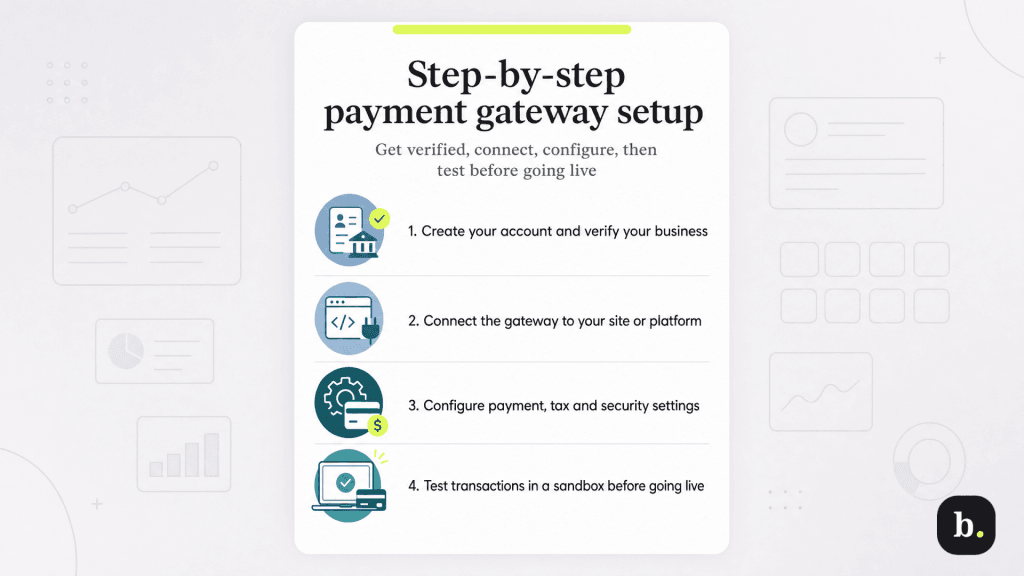
The exact setup process varies by provider, platform and integration type, but for most small businesses, the basic rollout looks pretty similar. Here’s what to expect.
Create your account and complete business verification. Start by signing up with your gateway provider and working through its verification process. For most businesses, that means sharing the basics — your business name, address, tax ID and bank account information for deposits. Some providers may also want a quick description of what you sell. With all-in-one platforms like Stripe or Square, this can happen surprisingly fast. Traditional gateways that require underwriting may take a little longer.
Connect the gateway to your website or e-commerce platform. If you’re using a built-in integration with Shopify, WooCommerce or another major platform, setup may be as simple as installing a plugin and entering your API credentials. More customized checkouts may require developer support and direct API integration. If you’re using a hosted gateway, setup may be even simpler; sometimes it’s just a payment link, embedded button or hosted checkout page.
Configure your payment settings. Before going live, choose your accepted payment methods, supported currencies, tax settings and customer receipt preferences. This is also the time to review fraud settings, refund permissions and any recurring billing options your business may need.
Test everything before you start taking real payments. Use the provider’s test or sandbox environment to run transactions the same way your customers will. Test every payment method you plan to accept, confirm that receipts are sent correctly, make sure transactions appear in your dashboard and verify that refunds work the way you expect. Don’t go live until you’ve tested the full customer experience from checkout to confirmation.
Getting payment gateways right
A payment gateway is essential for any business that accepts payments online, over the phone or through digital invoicing. It’s the secure connection between your customer’s payment information and the financial system that approves and routes the transaction.
For most small businesses, an all-in-one provider that bundles the gateway, processor and merchant account into a single service is the simplest and most cost-effective place to start. These providers handle much of the technical complexity behind the scenes, reduce the amount of security and compliance work your business needs to manage and can get you up and running quickly.
If your business grows to a point where you need more control, lower rates or specialized features, you can always explore standalone gateways and separate processors later.
Whatever path you choose, prioritize security, compatibility with your e-commerce platform and total cost. A reliable gateway that works cleanly with your existing tools — and creates a smooth checkout experience for your customers — can have a direct impact on sales, cash flow and long-term growth.
Adam Uzialko, the accomplished senior editor at Business News Daily, brings a wealth of experience that extends beyond traditional writing and editing roles. With a robust background as co-founder and managing editor of a digital marketing venture, his insights are steeped in the practicalities of small business management.
At business.com, Adam contributes to our digital marketing coverage, providing guidance on everything from measuring campaign ROI to conducting a marketing analysis to using retargeting to boost conversions.
Since 2015, Adam has also meticulously evaluated a myriad of small business solutions, including document management services and email and text message marketing software. His approach is hands-on; he not only tests the products firsthand but also engages in user interviews and direct dialogues with the companies behind them. Adam's expertise spans content strategy, editorial direction and adept team management, ensuring that his work resonates with entrepreneurs navigating the dynamic landscape of online commerce.