Business.com aims to help business owners make informed decisions to support and grow their companies. We research and recommend products and services suitable for various business types, investing thousands of hours each year in this process.
As a business, we need to generate revenue to sustain our content. We have financial relationships with some companies we cover, earning commissions when readers purchase from our partners or share information about their needs. These relationships do not dictate our advice and recommendations. Our editorial team independently evaluates and recommends products and services based on their research and expertise. Learn more about our process and partners here.


Reliable communication is vital for enterprises managing multiple offices and high volumes of calls and data. Comcast Business delivers scalable cloud-based phone systems and on-premises solutions built on the nation’s largest gig-speed network. Its VoiceEdge, Voice Mobility and PRI/SIP trunking services give companies flexible options for unified communications, whether they operate a few regional branches or hundreds of nationwide locations. With this strong infrastructure and range of enterprise-grade tools, Comcast Business is our choice for the best business phone system for large organizations with complex network needs.
Enterprises with multiple locations or heavy data demands need a business phone system and unified communications provider that can deliver both speed and stability. Comcast Business meets those needs through its vast gig-speed network and a portfolio of scalable UC solutions designed for different infrastructures.
We like that Comcast Business supports nearly every type of phone system setup — from fully cloud-hosted systems to on-premises PBX integrations — allowing large organizations to modernize without disrupting existing hardware. Its VoiceEdge unified communications (UC) platform includes advanced call management and collaboration tools, helping sales teams and support staff stay connected across offices, while Voice Mobility extends business numbers to mobile devices for hybrid and remote teams. For companies that rely on traditional PBX systems, Comcast’s SIP and PRI trunking services provide dependable failover and disaster recovery options.
This mix of flexibility, nationwide coverage and proven reliability makes Comcast Business a go-to option for enterprises that can’t risk dropped calls or network interruptions between locations.

Comcast Business phone systems are relatively easy to set up and manage once deployed. The secure online portal lets administrators add users, change extensions and adjust settings in real time without calling support. We like that managers can make updates from anywhere, whether they’re at a headquarters location or working remotely.
VoiceEdge offers clear setup guidance and in-app tips that make getting started easy. The mobile app handles calling and voicemail without fuss. Bigger companies may need a little extra time to choose and configure the right features, but once set, the system is easy to manage.
Comcast Business offers cloud-based and on-premises phone solutions designed to support organizations of all sizes. We analyzed the tools and capabilities that make it a strong choice for large enterprises with complex communication and network requirements. Here are some standout features:
Comcast Business Voice Mobility lets employees take and make calls from any device. It supports simultaneous ringing to desk and mobile phones, unlimited nationwide calling, call forwarding, transfers and voicemail — key features of a modern multiline phone system designed to handle high call volumes across departments. We like that users can manage everything from a single app, which makes it easy to stay connected and access their business phone number while moving between the office and remote work locations.

VoiceEdge is Comcast Business’s full-featured unified communications platform. It includes desktop and mobile calling apps, readable voicemail, audio conferencing, Webex team messaging, screen sharing, auto-attendant, virtual receptionist and interactive voice response (IVR) features, hunt groups and a receptionist console — tools that can also support small call center systems or customer-facing teams.
Administrators can manage multiple sites from a single cloud portal, while employees benefit from integrated collaboration tools that simplify day-to-day communication.
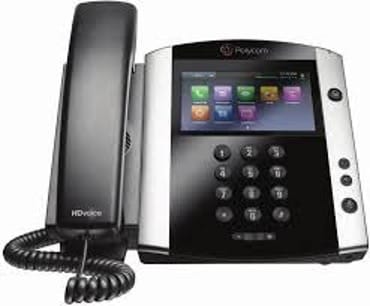
For companies that use on-premises PBX systems, Comcast Business offers PRI and SIP trunking. These services integrate easily with existing hardware and include features like Caller ID name delivery, Direct Trunk Overflow and automatic failover for business continuity. This setup provides the reliability of a traditional phone system with the scalability of modern IP-based communications.

Mobility Tools
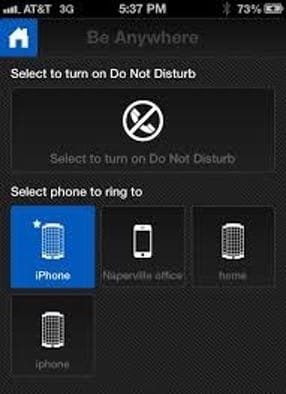
All Comcast Business cloud-hosted systems include features that keep teams connected across devices. The Be Anywhere tool, sequential and simultaneous ring options, mobile caller ID, voicemail notifications, and the Comcast Business App give users the flexibility to manage calls from virtually anywhere.
Comcast Business offers a wide range of communication solutions for companies of all sizes, from bundled internet and phone packages for small businesses to comprehensive UC systems for large enterprises. Because its services span everything from simple business lines to cloud-based Unified Communications as a Service (UCaaS) platforms, pricing varies widely by product, location and bundle type.
For most businesses, especially those interested in advanced UC features through VoiceEdge, you’ll need a tailored quote. Comcast structures its plans per line or per user and often includes discounts when phone service is bundled with business internet or TV.
Additional pricing notes to consider include the following:
Comcast Business offers several ways to get started, depending on your system and service plan. Smaller teams using Voice Mobility or VoiceEdge Select can self-install, activating service and equipment through a guided online setup. The process includes testing network speeds, configuring call settings and linking mobile devices through the Comcast Business App, which functions as a VoIP softphone for desktop or mobile use.
Larger organizations implementing VoiceEdge or trunking services typically work with a Comcast Business representative for onboarding. These consultation-based deployments may include professional installation, number porting and customized network configuration to ensure consistent performance across multiple locations.
Once live, administrators can add or remove users, adjust call routing and access training resources from the online portal. Comcast also provides an extensive help center with tutorials and visual walkthroughs to simplify onboarding for new users.
Comcast Business offers customer support by phone, live chat and online resources. Response times are generally quick, but support agents often ask for detailed business information before providing specific help, which can slow down simple requests.
We like that the company’s online help center includes self-service guides, troubleshooting tips and configuration tutorials, making it easy for users to find answers without calling in. Administrators can also access account tools directly through the online portal to manage services or submit support tickets.
Comcast Business is not currently accredited by the Better Business Bureau (BBB) and holds a B- rating. BBB feedback reflects Comcast’s overall company performance, not just its business phone division, but it’s still something to keep in mind when evaluating long-term service expectations.
Comcast Business has much to offer large organizations, but consider the following potential drawbacks before committing:
In evaluating Comcast Business and other leading business phone systems, we examined each provider’s latest features, service options and user experience. Our process included reviewing product documentation, analyzing setup and management tools, and gathering customer feedback from multiple channels.
We compared Comcast Business’s VoiceEdge, Voice Mobility and trunking solutions against competing Voice over Internet Protocol (VoIP) and UCaaS platforms to understand how each helps companies choose a business phone system that fits their size, structure and communication needs. We also considered factors like scalability, pricing transparency and customer support responsiveness.
Comcast Business stood out for its flexible deployment options and enterprise-grade infrastructure, though its limited service availability and quote-based pricing may affect accessibility for smaller organizations.
We recommend Comcast Business for …
We don’t recommend Comcast Business for …