Business.com aims to help business owners make informed decisions to support and grow their companies. We research and recommend products and services suitable for various business types, investing thousands of hours each year in this process.
As a business, we need to generate revenue to sustain our content. We have financial relationships with some companies we cover, earning commissions when readers purchase from our partners or share information about their needs. These relationships do not dictate our advice and recommendations. Our editorial team independently evaluates and recommends products and services based on their research and expertise. Learn more about our process and partners here.
Cloud PBX is an internet-based virtual PBX system that routes and manages calls. Learn how it compares to on-premises PBX and hosted VoIP solutions.


Before the internet, if you wanted business phone system features like call forwarding, hunt groups and voicemail for your business, you had to invest in an expensive, bulky PBX system. Plus, you had to pay an IT specialist to operate these features.
Now, many firms use modern cloud PBX phone systems. These systems offer the same core functionality — including call forwarding, voicemail and more — but in a simpler, internet-based format that doesn’t require on-site hardware. They also let you stay in touch with customers through channels like SMS, MMS, WhatsApp and social media messaging. We’ll explore cloud PBX systems and share what to look for in a cloud PBX provider if you’re ready to make the switch.
Searching for a business phone system and not sure where to start? Tell us a little more about your business and get customized quotes from qualified providers.
A cloud private branch exchange (PBX) is an internet-based phone system that routes and manages business calls through a provider’s servers rather than with your own hardware. These systems offer companies a modern way to communicate and route calls via the internet. Cloud PBX systems often replace costly on-premises PBX hardware that uses traditional telephone equipment and phone service providers to handle voice communications.
The term “cloud PBX” is often used interchangeably with “hosted PBX” because a third party manages the equipment. However, a hosted PBX is a more general term that can refer to any business telephone system housed outside of your premises.
For businesses looking to modernize their communications, cloud-based phone systems provide significant advantages, including enhanced mobility, seamless integration capabilities and lower operating costs. Nextiva reports that businesses can save up to 60 percent on telecommunications expenses by switching to VoIP, highlighting how cloud PBX systems often cost far less than maintaining traditional on-premises equipment.
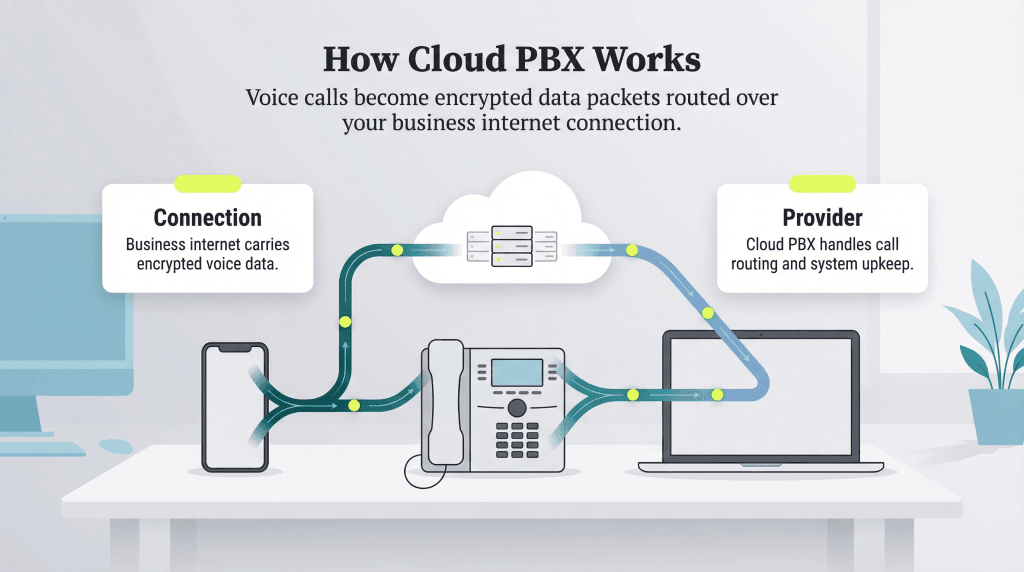
Unlike a traditional telephone system, which uses copper landlines to transmit voice data, a cloud PBX uses your business broadband connection to route and manage calls over the internet. With cloud or hosted systems, voice data from your device is transformed into encrypted data packets that travel through your ISP’s network to connect the call and keep audio flowing in real time.
Your cloud PBX provider manages all major equipment in the system, but you’ll still need a reliable connection from one of the best internet service providers to keep calls clear and stable. You simply supply an internet-connected device or IP phone, and the provider handles the rest, from call routing to system maintenance.
When choosing a business phone system, it helps to understand how cloud PBX, on-premises PBX and hosted VoIP solutions differ. Each option has strengths, and the right fit depends on your company’s size, budget, IT resources and long-term growth plans. The chart below highlights the key differences to help you identify the system that best supports your needs.
| Cloud PBX | Hosted VoIP | On-Premises PBX | |
|---|---|---|---|
| Infrastructure | Provider-managed servers in the cloud | Third-party hosts equipment off-site | Company owns and maintains on-site hardware |
| Upfront cost | Minimal (subscription-based) | Low to moderate | High (hardware + installation) |
| Maintenance | Provider handles all updates and maintenance | Provider handles most maintenance | In-house IT team required |
| Best for | Remote/hybrid teams, scaling businesses | Businesses wanting off-site hosting with more control | Large enterprises with strict compliance or customization needs |
| Scalability | Add/remove users instantly | Moderate — depends on hosting agreement | Requires hardware upgrades |
| Call quality depends on | Internet connection | Internet connection | Dedicated phone lines (more consistent) |
| Typical cost | $15 – $45 per user per month | $15 – $50 per user per month | $500 – $1,000+ per user upfront, lower ongoing |
Virtual and cloud PBX systems are similar because neither requires the onsite hardware that on-premises systems depend on. A virtual PBX handles basic call routing through features like interactive voice response (IVR) or auto-attendants, making it a simple option for smaller organizations.
IVRs greet callers with prerecorded messages and let them choose which team or department they need using dial-pad entries or voice commands. For example, if you’re calling your internet service provider, you might get the option to speak with the billing or technical support team. A virtual PBX lets you offer the same kind of menu-driven experience.
Virtual PBX systems are typically used by small businesses that handle a low call volume and don’t need a full business phone system. Cloud PBX solutions, on the other hand, are used by companies of all sizes and industries that rely heavily on phone communication, collaboration tools and video conferencing.
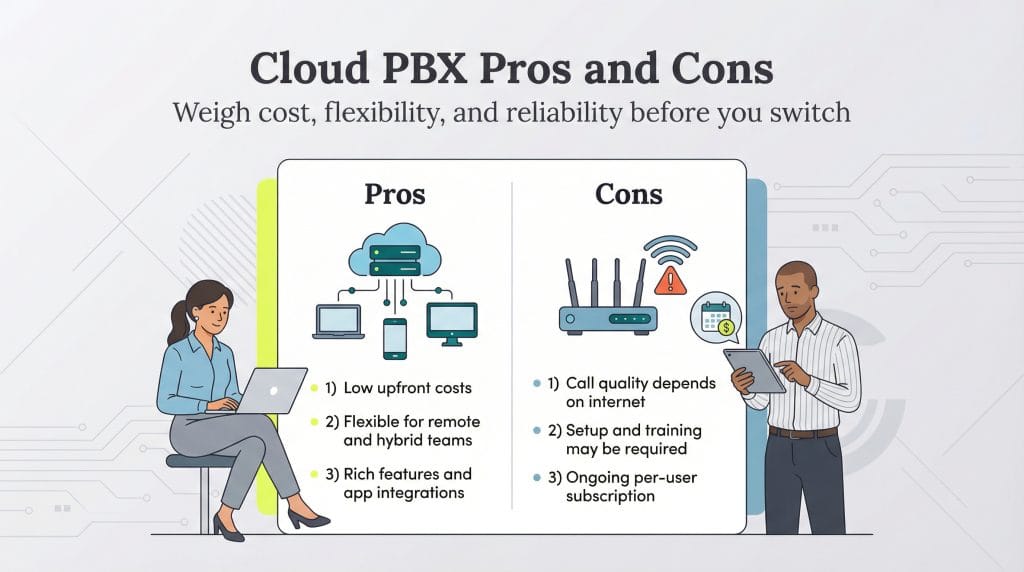
The benefits and cost-saving potential of cloud PBX generally outweigh its disadvantages. However, cloud PBX phone systems aren’t perfect for every business. Here are the key pros and cons to consider:
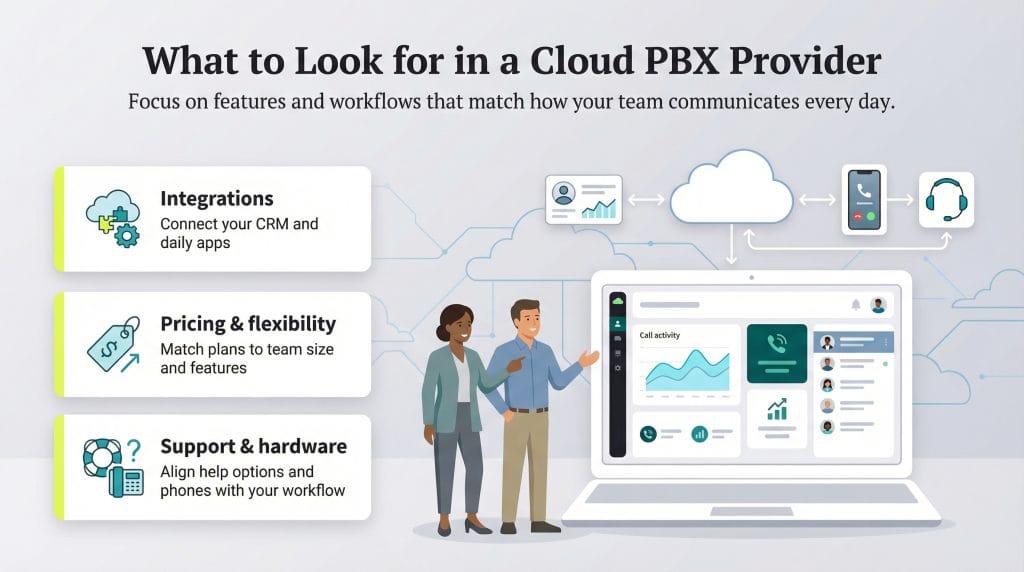
Choosing the right cloud PBX provider comes down to finding a system that supports how your team actually works each day. Most vendors now offer reliable service with well over 99 percent uptime, a strong set of calling and team collaboration features and integrations with popular business tools. The differences often come down to which features your employees will use most and how easily the cloud-based phone system fits into your existing workflows.
Before selecting a provider, think about what matters most: call quality, ease of use, mobility for remote teams and the level of support you’ll need during and after setup. The goal is to make the transition to cloud PBX smooth without disrupting how your employees communicate.
Here are a few key things to look at when comparing providers:
Our team of business software experts spent countless hours reviewing the industry’s best business phone systems. We considered the most popular providers and identified top options for businesses of all sizes.
For your convenience, we’re highlighting eight of our favorite business phone system providers that include cloud PBX in their service plans. Many of these companies use terms like “VoIP,” “cloud PBX,” “hosted PBX” and “virtual phone system” interchangeably.
Pricing for cloud PBX services typically ranges from $15 to $45 per user per month, with enterprise discounts available for organizations with more than 20 users. Most providers offer flexible contract terms and free trials to help you test the platform before committing.
Dialpad stands out for its strong AI capabilities, which run across all of its business phone plans. Dialpad AI provides real-time call transcription, live sentiment analysis and coaching recommendations that help sales and support teams work more efficiently. These tools are available out of the box, with no separate AI add-on required.
Dialpad includes a range of useful features, such as:
Pricing: Dialpad costs $15 per user per month for the Standard plan and $25 per user per month for the Pro plan when billed annually. Monthly billing is available at a higher rate. Pro includes 24/7 support, advanced call analytics, expanded integrations and global SMS. Enterprise plans are available with custom pricing and include a 100 percent uptime SLA, priority support and unlimited office locations and ring groups.
Read our full Dialpad review for a deeper look at features, AI tools and pricing.
GoTo Connect’s hosted PBX helps businesses migrate from legacy phone systems to a modern, cloud-based communications suite with robust administration controls and flexible configuration options.
GoTo Connect includes a wide range of useful features, such as:
Pricing: GoTo Connect does not publish public pricing. All plans — Phone System, Connect CX, and Contact Center — are available by custom quote only, with volume discounts typically available for organizations with 10 or more users.
Read our full GoTo Connect review for more on features, performance and integrations.
Nextiva has expanded beyond traditional phone services to become a comprehensive customer experience platform. Its unified communications solution now includes advanced workflow automation, predictive analytics powered by machine learning, and customer journey mapping.
Across most plans, Nextiva includes a strong mix of essential VoIP features, such as:
Pricing: Nextiva’s Business Communication plans start at $15 per user per month when billed annually. As you move up the tiers, you get access to more collaboration tools, analytics and advanced calling features. Pricing also scales based on team size; larger user counts typically qualify for lower per-user rates.
Nextiva also offers free demos and short trial options to help businesses evaluate the platform. Companies can purchase or lease VoIP hardware, with occasional manufacturer rebates available, depending on the device.
Read our full Nextiva review for additional details.
RingEX was one of the earliest cloud PBX innovators, helping businesses lower costs, modernize communications and support remote and hybrid teams. The platform remains a strong choice for growing companies that want flexible configuration options and reliable performance across devices.
Most RingEX plans include:
Common add-ons include high-volume SMS packages, conference room licenses and additional toll-free, international or vanity numbers.
Pricing: RingEX plans start at $20 per user per month when billed annually, with discounts available for larger teams. The platform offers three subscription tiers — Core, Advanced and Ultra — which scale up to include features such as call monitoring, hot desking, expanded toll-free and SMS allocations and increased storage.
Read our RingEX review for a deeper look at features, usability and plan differences.
Ooma Office is designed for small and midsize businesses that want an easy-to-manage VoIP system with dependable call quality. The platform includes built-in tools like spam call blocking, advanced call routing and a simple admin dashboard that helps teams stay connected without added complexity.
Most Ooma Office plans include:
Pricing: Ooma offers three plans billed per user, per month: Essentials ($19.95), Pro ($24.95) and Pro Plus ($29.95). There are no long-term contracts, and all plans include a 30-day money-back guarantee. Higher tiers include features like text messaging, video conferencing, voicemail transcription, analytics and CRM integrations, along with more advanced call-management tools.
Read our comprehensive Ooma review for more on performance, features and plan differences.
Vonage supports more than 100,000 businesses worldwide with an easy-to-use cloud PBX platform that works across desktop and mobile devices. It’s a practical option for teams that want dependable calling, built-in messaging and quick setup across remote and in-office environments.
Most Vonage plans include:
Pricing: Vonage offers three plans, starting with the Mobile tier at $19.99 per line per month with annual billing. The higher tiers add useful capabilities such as desk-phone support, analytics and reporting, team messaging, unlimited video meetings and more advanced call-handling tools. Vonage also runs frequent promotions that can lower your first-year costs.
Read our comprehensive Vonage review for more details.
8×8 is a long-standing VoIP and unified communications provider known for its global calling capabilities and flexible cloud PBX tools. It supports businesses with distributed teams and international customers, offering strong reliability, secure HD voice and a wide range of switchboard-style features.
All 8×8 subscribers get access to the following capabilities, either as standard features or optional add-ons, depending on the plan:
Pricing: 8×8 doesn’t publish plan pricing publicly. All subscriptions are available by custom quote, and costs vary based on user count, international calling needs and required features. Higher-tier plans offer advanced tools like call barging, whispering and monitoring, multi-level analytics dashboards, skills-based routing, post-call surveys, omnichannel routing and agent workspaces.
Read our updated 8×8 review for a full breakdown of features and functionality.
Zoom is best known for its video meetings, but Zoom Phone has become a reliable cloud PBX option for businesses that want straightforward calling tools inside a platform their teams already use. It’s simple to deploy, easy to manage and works well for hybrid and remote teams.
Most subscribers can access the following features:
Pricing: Zoom Phone plans start at $15 per user per month for unlimited calling in the U.S. and Canada. All plans include essentially the same core features, with calling regions and usage allowances being the primary differences.
Read our updated Zoom review for more on features, functionality and plan options.