Business.com aims to help business owners make informed decisions to support and grow their companies. We research and recommend products and services suitable for various business types, investing thousands of hours each year in this process.
As a business, we need to generate revenue to sustain our content. We have financial relationships with some companies we cover, earning commissions when readers purchase from our partners or share information about their needs. These relationships do not dictate our advice and recommendations. Our editorial team independently evaluates and recommends products and services based on their research and expertise. Learn more about our process and partners here.
Business.com earns commissions from some listed providers. Editorial Guidelines.
Table of Contents
Editors Score:9.2/10
Gusto brings payroll, HR and benefits together in one platform, making it easier for small businesses to manage employees from hiring and onboarding through payday. We especially like how well these tools work together, which makes Gusto our top payroll service for HR integration.
Pros
Gusto's payroll software has a minimal learning curve, making it easy for small businesses to manage payroll.
Gusto connects payroll with time tracking, hiring, onboarding, benefits and other HR tools in one platform.
Even Gusto's base plan supports more complex payroll needs, including wage garnishments, multiple pay rates and tip credits.
Cons
Many of Gusto's best HR and time-tracking tools require the Plus or Premium plan, which can get expensive as your workforce grows.
Gusto offers relatively few options for customizing the user experience, which may be limiting for businesses that prefer highly configurable software.
Live phone support isn't available 24/7, which may be a drawback for businesses that need help outside regular support hours.
Small businesses often need more than a way to pay employees. As a company grows, payroll becomes increasingly connected to hiring, onboarding, time tracking, benefits and other HR responsibilities. Gusto brings these functions together in one platform, with tools for employee recruitment, new hire reporting, digital onboarding, benefits administration and more. Its three payroll plans serve businesses with different needs, from straightforward payroll and basic HR tools to more advanced time tracking, hiring and workforce management features. Gusto also offers 150 integrations, giving businesses plenty of options to connect the platform with the HR, accounting and other software they already use.
Gusto Payroll Software Editor's Rating:
9.2 / 10
Pricing
9/10
Customer service
8.9/10
Third-party integrations
9.3/10
User interface
9.3/10
Added HR tools
9.4/10
Why We Chose Gusto as Best for HR Integration
Most payroll services include at least a few HR tools, but Gusto goes considerably further. Payroll sits within a broader HR platform that can handle hiring, onboarding, time tracking, benefits and other workforce tasks, so employee information doesn’t have to live in separate systems. Gusto also offers 150 integrations with accounting, recruiting, time-tracking, performance management and other business software, making it easier for companies to keep using tools they already rely on.
We especially like how much of the employee lifecycle can be managed through Gusto. Hiring and onboarding tools include offer letter templates, document storage and background checks through Checkr, along with email and software provisioning. New hires can use the intuitive employee self-service portal to enter their own payroll details, complete onboarding tasks and access important documents.
Gusto’s mobile app extends many of these capabilities beyond the desktop. Employees can track their pay and benefits, clock in and out, access important documents, submit expenses and manage personal finances. Business owners and payroll administrators can run payroll and manage employee information from their phones, while expanded mobile tools provide access to compliance dashboards, tax tasks and reports. In our testing, we found the app far more flexible than earlier versions, reducing the need to return to a computer for routine payroll and HR work.
The Plus plan is where Gusto’s payroll and HR capabilities become much more closely connected. It includes built-in time tracking and scheduling, job postings, an applicant tracking system, custom onboarding tools, document e-signing and software provisioning. Businesses can also customize paid time off (PTO) policies and manage performance and compensation from the same system. These tools cost more than Gusto’s entry-level plan, but they can reduce the need for separate HR applications.
Gusto has also addressed one of the weaknesses we previously found with the platform by adding more payroll automation. Newer tools can automatically reroute failed payroll deposits, flag unusual payroll entries before submission and schedule contractor payments in advance, reducing some of the manual work required to run payroll.
Tip
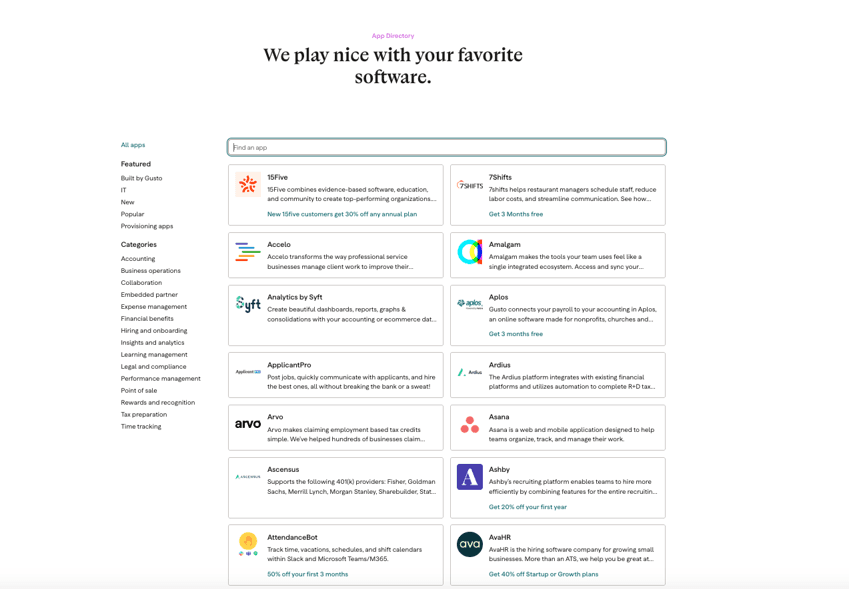
Before choosing a payroll provider, check Gusto's App Directory to make sure the HR, accounting and other business software you already use connects with the platform.
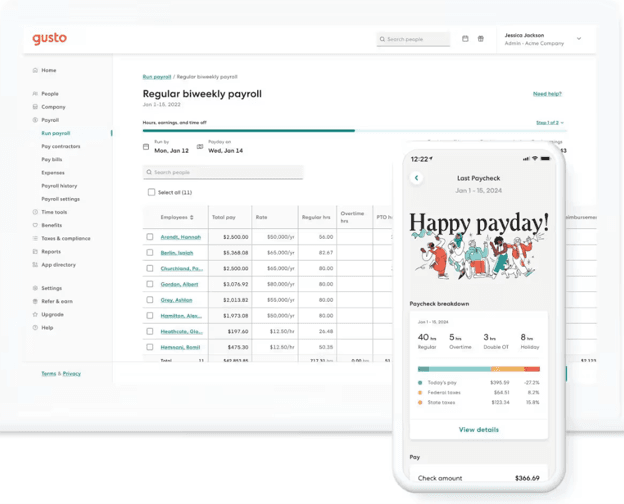
Gusto connects payroll administration with a mobile app where employees can access paycheck information and other self-service tools. Source: Gusto
Ease of Use
Gusto is a user-friendly platform that most teams can pick up quickly. Here are a few features we noted during testing that make it especially easy to use:
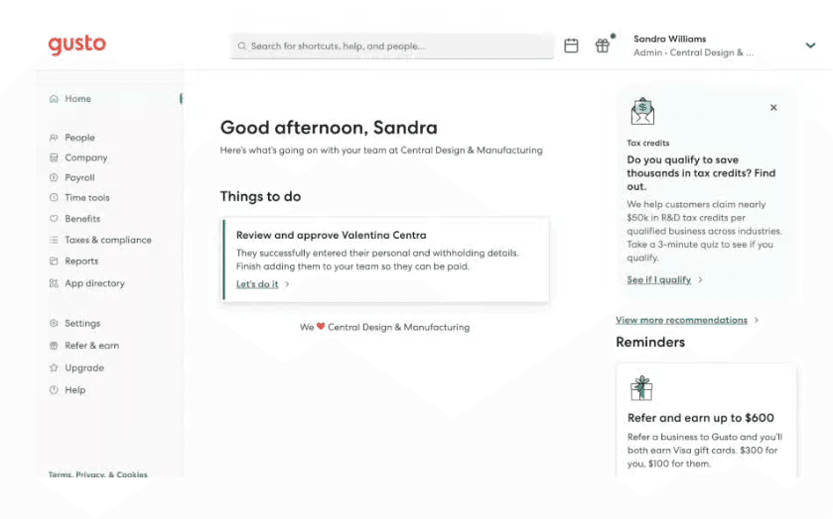
User interface: We found Gusto’s web interface exceptionally easy to navigate. The homepage highlights important reminders and upcoming tasks, which Gusto can also send by email.
Payroll management: It’s easy to add bonuses and other earnings to payroll and see the calculations update in real time. Plus and Premium users can also reimburse employee expenses, which is useful for handling one-off payments. We also liked the ability to add personal notes to pay stubs and include comments in employee emails.
Automated payroll: Gusto’s Autopilot feature can automatically run payroll for eligible employees with fixed hours or salaries. This is a great option for small businesses with predictable payrolls because it eliminates another routine administrative task.
Mobile app: Gusto’s mobile app gives employers and payroll administrators access to many everyday tasks without requiring a computer. Users can run regular and off-cycle payrolls, add and manage employees, review payroll alerts and access additional tax, compliance and reporting tools. Employees can view pay stubs and tax documents, clock in and out, request time off, manage benefits and submit expenses.
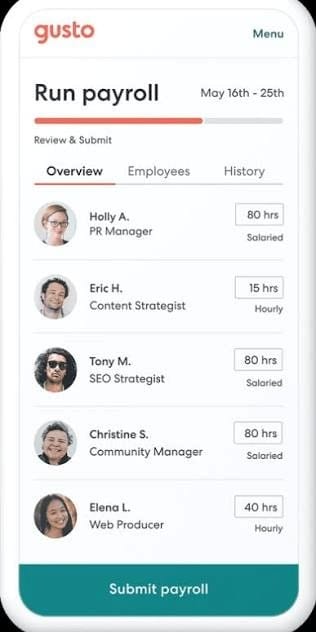
Gusto keeps the payroll process simple, with employee hours and pay information displayed in an easy-to-review format before payroll is submitted. Source: Gusto
Gusto Features
Gusto makes it easy for businesses to run payroll accurately and stay on top of tax filing deadlines. Some standout features include:
Integrations
Gusto’s extensive integration library impressed us. The platform offers 150 integrations, considerably expanding what businesses can manage alongside payroll. These include many of the best accounting software solutions, along with popular HR and business tools for:
Applicant tracking and hiring, including JazzHR, Greenhouse, Breezy HR and Workable
Legal and compliance management, including Mineral
We see particular value in these integrations for businesses that don’t want to give up their existing HR or business software when they move to Gusto. Connecting these systems can reduce duplicate data entry and help keep payroll, HR, benefits and accounting information in sync.
Gusto offers 150 integrations across HR, accounting, time tracking and other business software categories. Source: Gusto
FYI
Accounting integrations are particularly useful for keeping payroll and bookkeeping data connected. Read our review of QuickBooks Online, our FreshBooks review and our review of Xero to learn more about three accounting platforms that integrate with Gusto.
Automations
We previously criticized Gusto for offering fewer automations than some competitors, but the platform has made meaningful improvements in this area. Gusto can now automate several time-consuming payroll tasks, including rerouting failed direct deposits when an employee adds a new bank account, flagging unusual entries during payroll prep and scheduling contractor payments in advance.
Gusto has also expanded how businesses can use AI-powered tools with payroll. Integrations with ChatGPT, Claude and Slack allow owners and administrators to ask questions about their payroll and business data and analyze trends using natural language. Eligible customers can even run payroll directly from these workflows.
We also like Gusto’s growing use of automation for tax credits. The platform can review payroll and benefits data to estimate eligible tax credits and generate ready-to-file documents. An interactive R&D tax credit calculator helps employers estimate potential savings, while Gusto also supports the FICA Tips Tax Credit and 401(k) Tax Credit.
Gusto uses payroll and benefits data to help identify tax credits a business may qualify for and surfaces recommendations directly in the dashboard. Source: Gusto
Payroll Processing
Gusto handles the core payroll process well. Employees and contractors can enter their own bank and tax information, while administrators manage pay rates, deductions and other payroll details. Each pay period, businesses can enter hours manually or sync them from a time-tracking app. Gusto’s built-in time tracking, included with Plus and Premium or available as an add-on to Simple, also syncs hours directly with payroll.
We like that Gusto supports different types of earnings, including bonuses, commissions and tip credits. Businesses can run unlimited payrolls at no additional cost, which is particularly useful when an off-cycle payment is necessary. Gusto’s AutoPilot feature can also run payroll automatically for eligible employees with predictable pay, reducing the amount of routine work required each pay period.
Did You Know?
Not all payroll services help calculate the FICA tip credit, an important consideration in restaurant accounting. Gusto can calculate the credit for eligible businesses and provides a year-end report with the information needed to claim it on a business tax return.
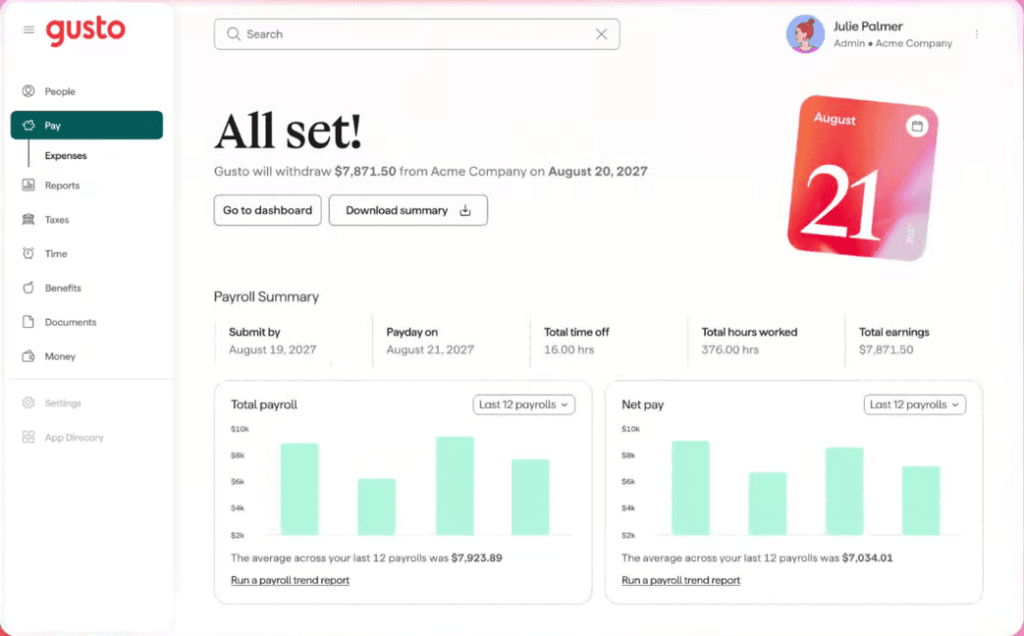
After payroll is submitted, Gusto provides a summary of employee hours, earnings, payday and recent payroll trends. Source: Gusto
Payment Options
Employees can receive their pay by direct deposit, with deposit speeds depending on the Gusto plan and account eligibility. Paper checks are also an option, as are payroll cards (also called prepaid debit cards). Gusto doesn’t provide its own payroll card, but employees can have their pay deposited onto a compatible prepaid card by entering the card’s routing and account numbers.
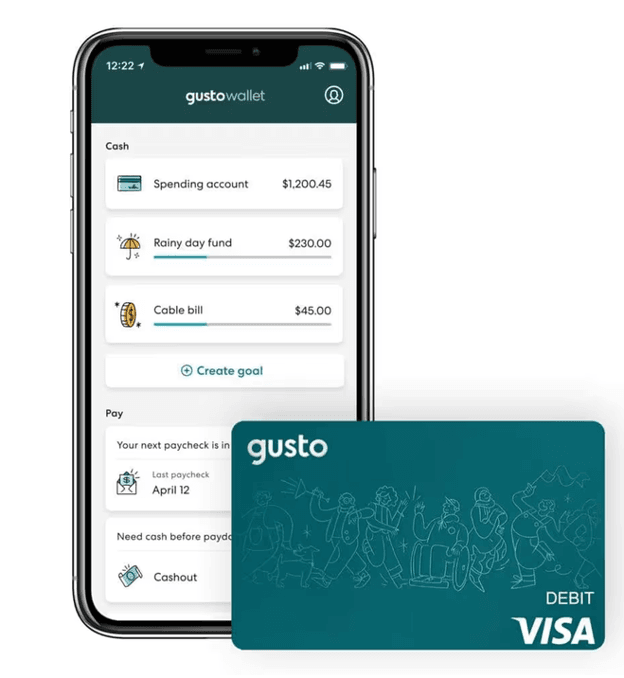
We appreciate the flexibility Gusto gives employees over where their pay goes. Employees and contractors can add up to five bank accounts and split payments among them by percentage or dollar amount. Eligible employees can also use Gusto Wallet, which includes a Spending Account with a Gusto debit card, savings and budgeting tools and the option to receive pay up to two days early.
Employees can use Gusto Wallet to manage their pay, spending and savings and access a Gusto Spending Account with a debit card. Source: Gusto
Tip
Direct deposit alternatives, such as payroll cards, can be a valuable perk that boosts employee satisfaction and retention.
Payroll Taxes
Gusto automatically calculates, pays and files federal, state and local payroll taxes. It also generates W-2 and 1099 payroll forms for employees and contractors. Digital copies are available to send or print, and Gusto can mail physical copies for an additional fee.
Once payroll is processed, Gusto debits the required payroll taxes from your connected account and files quarterly and annual tax forms, including Form 941. Administrators can view company and employee tax payments in payroll history, while employees can see tax details on their pay stubs.
Gusto’s Plus and Premium plans support multi-state payroll. If you hire an employee in a new state, Gusto can also handle state tax registration for an additional fee.
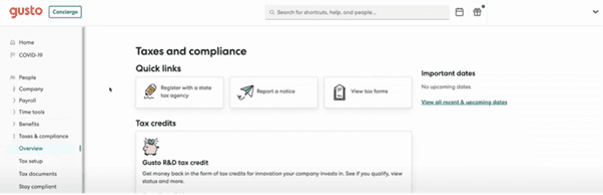
Gusto’s tax dashboard gives businesses quick access to tax forms, filing dates and state tax registration tools. Source: Gusto
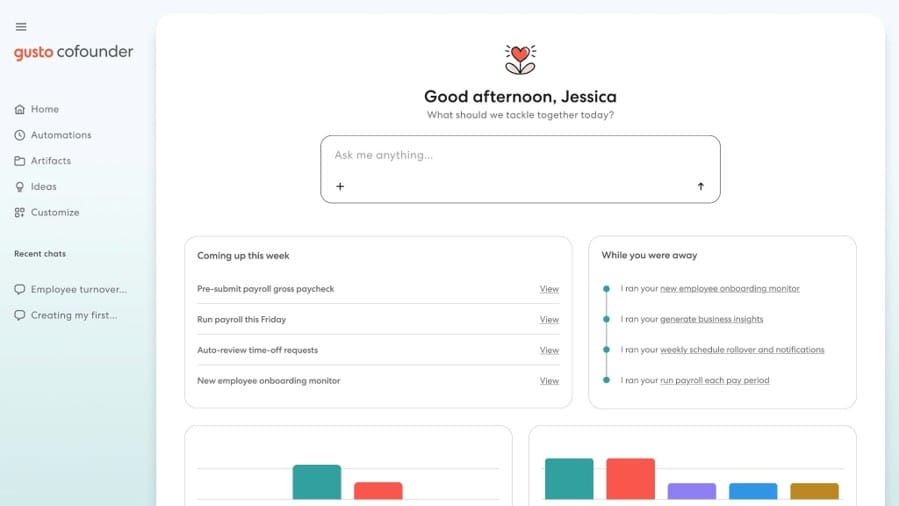
Gusto Cofounder
Gusto Cofounder is an AI assistant designed to help small business owners automate administrative work across payroll, HR and connected business tools. Instead of simply answering questions, Cofounder can take action on a user’s behalf, such as flagging unusual payroll activity, tracking deadlines, scheduling recurring workflows and identifying overdue approvals. It can also generate reports and help manage tasks related to time off and employee expenses.
We especially like that Cofounder can work through tools businesses may already use. It connects with platforms such as Slack, Google Workspace and Notion, and users can complete certain Gusto tasks without returning to the main platform. For example, Gusto says businesses can run payroll through Slack or SMS and receive proactive alerts when something needs their attention.
Cofounder could be particularly useful for small business owners who don’t have dedicated payroll or HR staff and want to reduce routine administrative work. However, availability may be limited, so businesses interested in the feature should check with Gusto to determine whether they have access. As with other AI tools, Gusto recommends reviewing Cofounder’s output before acting on it, particularly for payroll, tax and compliance decisions.
Gusto Cofounder can automate payroll, onboarding and other recurring administrative tasks while surfacing upcoming work that needs attention. Source: Gusto
Specialized HR Services
Depending on your plan and selected add-ons, Gusto provides many of the capabilities you’d normally expect from dedicated HR software. We think these tools are particularly valuable for small businesses that want to manage payroll and HR in the same system.
Recruiting and onboarding: All Gusto plans include basic hiring and onboarding tools, including offer letter templates, digital I-9 and W-4 forms, document storage and employee self-onboarding. Plus and Premium add more advanced capabilities, including job postings, an applicant tracking system, custom onboarding checklists and custom offer letter templates. Background checks are also available, and Gusto handles required state new hire reporting. These features give businesses a way to move employees from recruiting and onboarding directly into payroll without entering the same information in separate systems.
Benefits administration: Businesses can offer medical, dental and vision insurance through Gusto, with benefits deductions automatically synced to payroll. Companies that want to keep their existing benefits broker can integrate their plans with Gusto for $6 per eligible employee per month with Plus, while broker integration is included with Premium. Gusto also supports workers’ compensation, life and disability insurance and add-on benefits such as commuter accounts, HSAs, FSAs, 401(k) retirement plans and dependent care FSAs.
Time and attendance: Gusto’s time and attendance tools can track employee hours, projects, time off and schedules, with the information syncing directly to payroll. Employees can clock in and out from their mobile devices or use Gusto’s Time Kiosk, while administrators can track hours by employee, project or job type to support job costing. Plus and Premium include time-tracking capabilities, while Simple customers can add more advanced time and attendance features for an additional per-person fee.
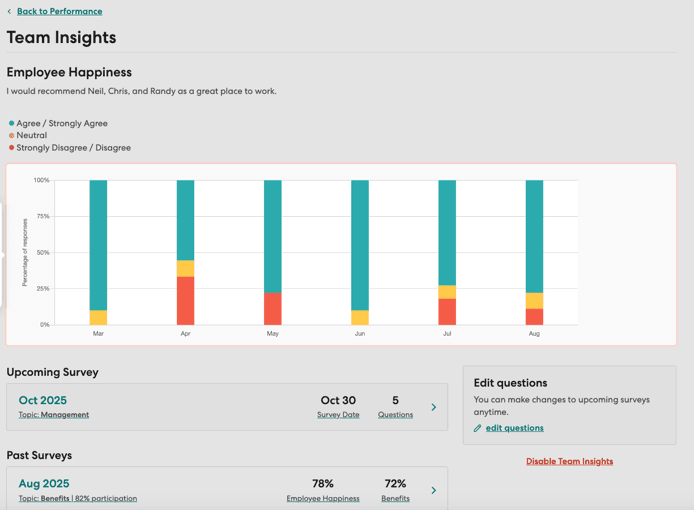
Employee management: Gusto provides tools for managing employees after they’re hired, including e-signatures, employee directories, org charts, surveys, reports and performance management. Businesses can also access HR compliance resources, compliance alerts and certified HR professionals depending on the plan or add-ons selected. Performance management includes reviews, employee feedback, goal tracking and surveys and is included with Plus and Premium or available as an add-on to Simple.
Gusto’s Team Insights dashboard helps businesses track employee survey responses and workplace sentiment over time. Source: Gusto
Gusto Pricing
Gusto offers three full-service payroll plans, all of which include unlimited payroll runs, automated tax filings and contractor payments. There’s also a Contractor Only plan for businesses without W-2 employees and Gusto Solo for owner-only businesses. Gusto doesn’t require a long-term contract, so businesses can change plans as their needs evolve.
Here’s how the plans break down:
Plan
Pricing
Key Features
Simple
$49 per month + $6 per person per month
Single-state payroll
Unlimited payroll runs
Tax filings and payments
Multiple pay rates and schedules
AutoPilot
Basic PTO and holiday pay
Employee self-onboarding
Health insurance administration
Employee and employer mobile apps
Plus
$80 per month + $12 per person per month
Everything in Simple, plus:
Multi-state payroll
Next-day pay
Time tracking and scheduling
Time Kiosk
Custom PTO policies
Workforce costing
Expenses and reimbursements
Job postings
Applicant tracking
Custom onboarding
Employee directory and org chart
Performance and compensation management
Premium
$180 per month + $22 per person per month
Everything in Plus, plus:
A dedicated service advisor
Certified HR experts
HR Resource Center
Custom reports
Priority support
Payroll migration and account setup
Health insurance broker integration
Contractor Only
$35 per month + $6 per contractor per month
Unlimited domestic contractor payments
Four-day direct deposit
Contractor self-onboarding
1099 creation and filing
Required state new hire reporting
Optional international contractor payments
Solo
$49 per month + $6 per payroll recipient per month
Owner payroll and automatic tax filing
Reasonable salary calculator
S corp election and compliance support
W-2 and 1099 generation
Compliance hub
Bill pay and invoicing
Contractor payments
Access to additional benefits and Solo 401(k) options
Additional pricing considerations include the following:
No long-term contracts: Gusto is month-to-month, and businesses can cancel at any time.
Limited-time promotions: Gusto occasionally offers promotional pricing for new customers, so check the company’s website for current offers before signing up.
Employee and contractor billing: Businesses pay the per-person fee for active employees each month. U.S. contractors are charged only in months they’re paid.
Health insurance: There is no additional administration charge beyond premiums when Gusto serves as your benefits broker. Businesses that retain their own broker can integrate their existing plans for $6 per eligible employee per month with Plus; broker integration is included with Premium and isn’t available with Simple.
HR add-ons: Simple and Plus customers can add HR Resources for $50 per month plus $5 per person per month. Performance tools are available to Simple customers for $3 per person per month.
Time and attendance: Simple customers can add Gusto’s more advanced time and attendance tools for $6 per person per month; they’re included with Plus and Premium.
Faster payroll: Simple customers can add next-day pay for $15 per month plus $3 per person. Gusto also offers same-day and Instant Pay options for additional per-payroll fees.
FYI
Gusto's health insurance broker integration lets you connect your existing employee benefits program to the platform. Alternatively, businesses can choose from thousands of Gusto-brokered health, life, disability and workers' compensation plans.
Implementation/Onboarding
By the complex standards of this industry, Gusto is one of the easier payroll services to set up and use. The company provides a clear self-onboarding process with step-by-step instructions for business owners and administrators. Setup involves adding employees, tax information and banking details, as well as choosing a pay schedule and entering any historical payroll data.
Most businesses should be able to work through Gusto’s online setup without much trouble. Account verification and required forms are handled online (note that Gusto may ask for additional financial documents in some cases). Support is available if you need help along the way.
We also found employee onboarding exceptionally easy. During setup, you can enter employees’ email addresses to automatically invite them to Gusto or add them later. Employees then receive an email with a link to complete their own onboarding, including entering the personal, tax and payment information Gusto needs for payroll.
Customer Support
We had excellent experiences each time we contacted Gusto’s customer support team. Representatives were patient, knowledgeable and responsive, and we never experienced long wait times or felt pressured to upgrade or purchase additional services.
Here’s what to expect:
Channels and availability: Gusto provides support through live chat, callbacks and email. Chat is available from 5 a.m. to 5 p.m. PT Monday through Friday and 5 a.m. to 3 p.m. PT on weekends. Callbacks are available from 5 a.m. to 5 p.m. PT Monday through Friday, although availability may vary by plan and issue. Email is available outside standard support hours, and Gusto offers Voice AI after hours for basic support needs.
Online resources: All plans include 24/7 access to Gusto’s Help Center. We found it easy to navigate, with step-by-step guides covering payroll, taxes and compliance, benefits, employee management and other common tasks.
Premium support: Premium subscribers receive Priority Support and a Dedicated Service Advisor for personalized assistance. The plan also includes access to certified HR experts and the HR Resource Center, as well as payroll migration and account setup assistance.
Upgraded support: Simple and Plus subscribers can add Priority Support for $30 per month plus $3 per person per month, which provides prioritized access to phone and chat support for faster response times. They can also add HR Resources for $50 per month plus $5 per person per month for access to certified HR experts, the HR Resource Center and compliance alerts.
Limitations
Gusto would be an excellent option for many small businesses. However, there are a few potential downsides to consider:
Higher cost for advanced HR features: You’ll need to move beyond Gusto’s Simple plan to get many of its more advanced HR tools. Simple starts at $49 per month plus $6 per person, while Plus jumps to $80 per month plus $12 per person. That difference can add up quickly for a larger team.
Limited interface customization: Gusto keeps its interface fairly simple, which we generally like, but there isn’t much room to tailor it to your preferences. If having more control over your payroll workspace matters to you, consider ADP. Our ADP Payroll review explains its customization options in more detail.
Benefits administration add-on costs: Although Gusto-brokered health insurance doesn’t carry an additional administration fee beyond premiums, several other benefits cost extra. HSAs, FSAs, commuter benefits and 401(k) plans carry additional administration or integration fees, which can increase the overall cost for businesses offering a broader benefits package.
No 24/7 human phone support: Gusto doesn’t provide round-the-clock access to human phone representatives. Callbacks are limited to weekdays, while after-hours phone assistance is handled by Voice AI for basic support needs. Businesses that want 24/7 payroll support may prefer Paychex. Read our Paychex review to learn more.
Tip
If advanced workflow automation is a priority for your business, Rippling is another strong option to consider. Read our Rippling vs. Gusto comparison to see how the platforms differ, or check out our detailed Rippling review to learn more about its customizable workflows and automation tools.
Methodology
We researched and analyzed dozens of the best online payroll services to identify the top solutions for small businesses. We evaluated usability, pricing, HR tool availability, payment options, direct deposit speeds, payroll tax support and other essential features to help organizations choose the right provider for their needs. Our research included hands-on testing when possible, along with software demos, product videos and direct interactions with customer support teams.
To determine the best payroll service for HR integration, we paid particular attention to each platform’s built-in HR capabilities, number and variety of third-party integrations and ability to connect payroll with other workforce tools. We closely examined integrations for time tracking, recruiting and onboarding, performance management, benefits administration, accounting and other common business needs.
Gusto FAQs
Gusto offers next-day, two-day and four-day direct deposit speeds, although availability depends on the employer's plan, payment history and account standing. Most new employers start with four-day pay and can gain access to two-day pay after a 15-day waiting period and one successful payroll debit. Next-day pay is also available to eligible employers. Gusto may offer Same-day Pay or Instant Pay for qualifying late payrolls.
If a scheduled payday falls on a weekend or bank holiday, Gusto moves the check date to the previous business day.
Gusto uses a redundant banking system designed to keep payroll running if one of its banking partners experiences an outage, delay or failure. The company works with major national banks, including JPMorgan Chase and PNC, and can rely on another banking partner if one experiences a disruption. This redundancy helps reduce the risk that a problem at a single bank will interrupt payroll processing.
Yes. Employers can print and distribute paper checks themselves or have Gusto print and mail checks directly to employees. Gusto charges $1.50 to print each check, plus $1.49 for standard delivery, which typically takes five to 10 business days, or $17.49 for next-business-day delivery. Check mailing is available for regular and off-cycle employee payrolls but isn't currently available for contractor payments or dismissal payrolls.
Bottom Line
We recommend Gusto for …
Small businesses that want robust HR tools alongside a full-service payroll provider.
Companies looking to connect payroll with third-party HR, accounting and other business software.
Businesses that want to manage payroll, onboarding, time tracking, benefits and performance management in one system.
We don’t recommend Gusto for …
Businesses that require 24/7 access to human phone support.
Companies that need advanced HR capabilities but have a tight software budget.
Very small teams seeking the lowest-cost payroll option.
Jessica Elliott is a trusted expert in the realm of business software and technology, with nearly two decades of hands-on experience. Her keen insights span a wide array of sectors, including cloud computing, SaaS solutions and business phone systems. With a knack for evaluating and dissecting various business applications, Elliott specializes in advising business owners on the best platforms suitable for companies of all sizes.
At business.com, Elliott covers business phone system providers and payroll companies.
In addition to her technical acumen, Elliott holds certifications from HubSpot and is also well-versed in digital marketing, sales funnels and finance. Her valuable insights have been featured in esteemed publications such as U.S. News & World Report, USA Today and Investopedia.