Business.com aims to help business owners make informed decisions to support and grow their companies. We research and recommend products and services suitable for various business types, investing thousands of hours each year in this process.
As a business, we need to generate revenue to sustain our content. We have financial relationships with some companies we cover, earning commissions when readers purchase from our partners or share information about their needs. These relationships do not dictate our advice and recommendations. Our editorial team independently evaluates and recommends products and services based on their research and expertise. Learn more about our process and partners here.
Business.com earns commissions from some listed providers. Editorial Guidelines.
Table of Contents
Editors Score:9.2/10
Salesforce CRM offers tailored workflows, integrated apps and a robust API, helping businesses build a flexible, scalable solution for sales, marketing and support teams. This adaptability makes Salesforce our pick for the best customer relationship management (CRM) platform for customization.
Pros
Salesforce CRM is highly customizable; with time, you can modify almost every element to fit your specific business needs.
The lowest-priced plan includes advanced features, such as some Einstein AI tools, customizable reports and dashboards, products and price books, email templates and mass emailing.
Salesforce offers an extensive selection of support materials, videos and tutorials, as well as a helpful online community.
Cons
Due to the sheer volume of customization and automation options, setup can be time-consuming and will likely require training for your in-house marketing team and administrators.
Customizing specific elements within Salesforce requires knowledge of Cascading Style Sheets (CSS), HTML and other computer languages.
With numerous products, options and paid add-ons, selecting a Salesforce plan — and sticking to your budget — can be challenging.
Editor's Rating9.2/10
Salesforce CRM is customizable and feature-rich, providing the tools you need to generate and convert leads and allowing you to configure them in the way you prefer to use them. As a leader in the CRM space, Salesforce is suitable for businesses of all sizes and industries. You can adapt nearly every aspect of the software’s interface and performance to help sales, marketing, customer service and technical support teams reach their goals.
Salesforce CRM includes thousands of fully integrated apps, plug-in scripts, AI agents and subagents, and a robust application programming interface (API) to help businesses build a flexible, customized solution. Once implemented, you’ll enjoy a well-designed product that’s speedy, powerful and perfectly tailored to your company’s specific needs and processes.
Salesforce CRM Editor's Rating:
9.2 / 10
Pricing/value
9.2/10
Features
9.7/10
Customization, add-ons and integrations
9.8/10
Ease of use
8.7/10
Customer service
8.5/10
Why We Chose Salesforce as the Best CRM for Customization
Unlike more rigid competitors, Salesforce CRM provides countless personalization and customization options, giving businesses of all sizes a high level of control over how the system looks and functions. We were particularly impressed by how Salesforce handles workflow automation and by its integration of artificial intelligence (AI) in CRM customization.
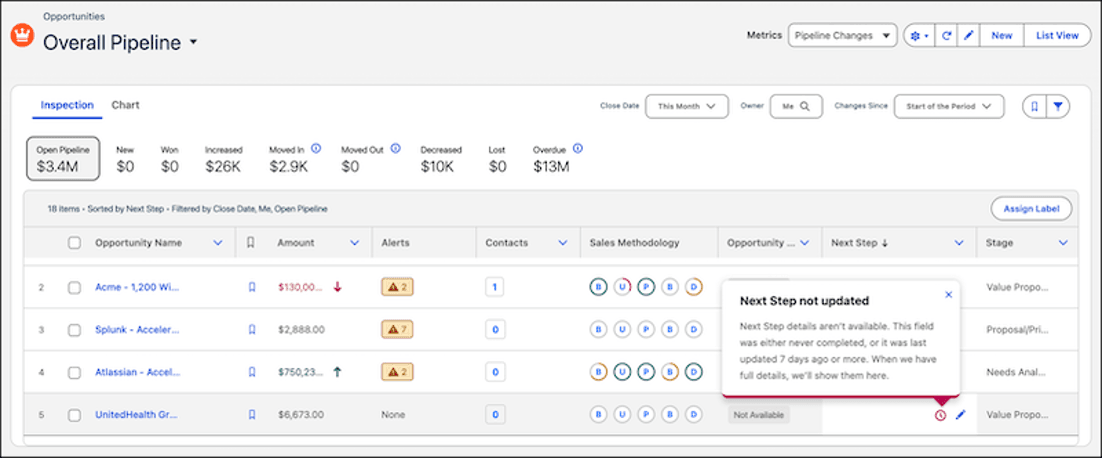
Salesforce CRM’s pipeline management feature provides a comprehensive view of your sales opportunities. Source: Salesforce
Salesforce was an early adopter of AI tools, and its offering has only grown and evolved since the last time we reviewed the platform. Salesforce’s Einstein, which offers predictive analytics support, has been around for a while now, but in recent years the platform has added Agentforce. Agentforce serves as an AI agent integrated with the broader Einstein system and it can execute complex tasks independently, adding a powerful layer of automation that can help users save time and get more out of Salesforce.
Notably, Salesforce was also one of the first CRM platforms to open itself to third-party developers, giving it more apps and customization options than any other provider. If Salesforce doesn’t have a built-in function you need, there’s almost certainly an app to compensate. If not, a developer can create and deploy a tailored solution.
Salesforce CRM’s initial setup requires time and technical expertise and its learning curve is steeper than that of many other CRM providers we reviewed. However, it delivers flexible CRM software designed to accommodate custom processes and adapt to your business’s changing needs. For all these reasons and more, Salesforce is our top CRM choice for customization.
Tip
If your small and medium-sized business's CRM needs are straightforward, check out our Salesforce vs. monday sales CRM comparison to compare and contrast Salesforce with a more straightforward solution.
Ease of Use
Despite its complexities, Salesforce is surprisingly easy to implement and use after the initial setup and customization.
Pros
Straightforward navigation: We like that Salesforce keeps the navigation process simple. The upper tab-style layout is common across business and personal software, making it easy to grasp; categories like “Home,” “Contacts,” “Accounts,” “Leads,” “Tasks,” “Reports” and “Opportunities” need no explanation. You can get instant help from the question mark icon in one of the corners of the screen — a handy feature we’ve seen on many other CRM packages.
Robust onboarding help and support resources: We were pleased to see that Salesforce offers a wealth of support materials, webinars and guides to facilitate CRM implementation and resolve usability issues. Its global Trailblazer community is an excellent resource. You can also pay extra for a dedicated account manager and 24/7 phone support.
Straightforward admin controls: While in-house administrators may need specific training, we appreciate that Salesforce provides excellent admin controls. If you have even moderate technical expertise and admin experience, you should have no trouble onboarding users, updating permissions or managing this CRM daily.
Cons
Limited out-of-the-box usability: Because of its numerous features and customizations, setting up Salesforce CRM takes more time and expertise than other solutions we reviewed. However, we appreciate that Salesforce’s smart default setup options help businesses use the CRM out of the box. You can modify contact, opportunity, account, task and workflow elements gradually as you explore the software’s full scope over time.
No practice data: Note that you’ll need data to practice on during onboarding; Salesforce doesn’t supply sample data. To get practice data, you can duplicate and isolate existing data or use a service like Mockaroo to create dummy data.
FYI
Salesforce CRM's Pro Suite plans can be bundled for an added fee with the Premier Success Plan, which includes 24/7 support, health checks and recommendations. For the most personalized support, you can pay for the Signature Success Plan, which comes with a dedicated account manager.
Salesforce Features
Here’s a look at Salesforce’s impressive array of essential CRM features and unique aspects.
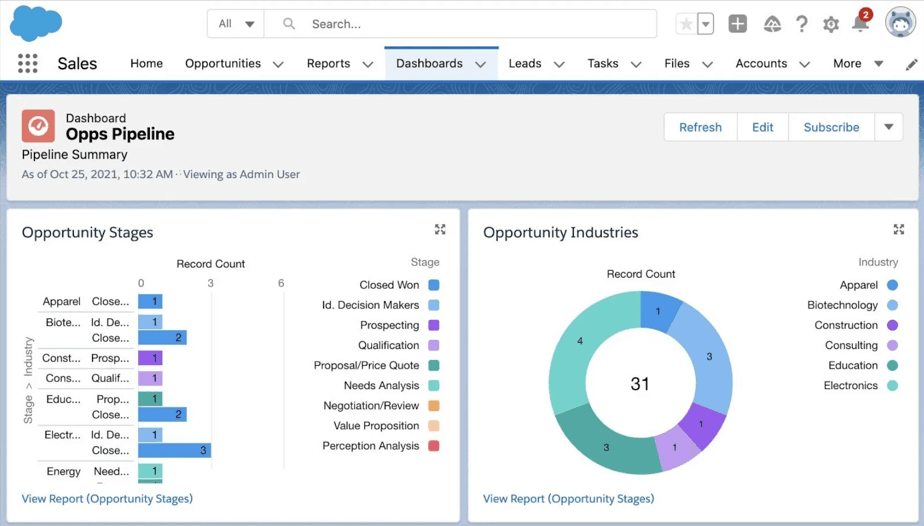
Salesforce’s visual dashboards help your team pinpoint problems and work on solutions. Source: Salesforce
Comprehensive Business Ecosystem
We like that Salesforce’s business products seamlessly integrate, allowing organizations to grow with Salesforce CRM and gradually adopt new platforms, products and features as needed. Salesforce product categories include:
Agentforce AI: Artificial intelligence and agentic AI technology
Agentforce Sales: Tools to manage leads, opportunities and sales processes
Agentforce Service: Customer service, case management and contact center platform
Agentforce Marketing:Digital marketing automation across various channels
Data 360: Real-time customer data platform for customer data management
Agentforce Commerce: E-commerce platform for business-to-consumer and business-to-business commerce
MuleSoft: Integration platform for connecting applications and data
Slack: Messaging and collaboration platform
Net Zero Cloud: Platform for managing environmental, social and governance data
Heroku: Application development platform for building and deploying applications
Salesforce Platform: Tools for development, customization, analytics and built-in AI
Salesforce’s impressive range of third-party apps allows businesses to manage various functions, from marketing to fulfillment. Human resources (HR), data analytics, workforce collaboration and finance apps plug directly into Salesforce CRM. You can even integrate enterprise resource planning (ERP) software with Salesforce to build a system similar to the ERP platform described in our review of Oracle NetSuite CRM.
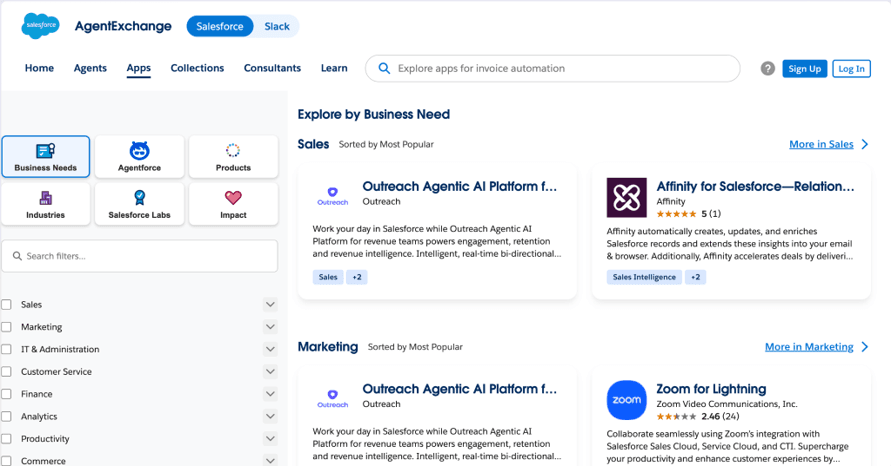
We also like how Salesforce’s AgentExchange organizes AI agents, apps and other partner solutions across categories, including finance, human resources, sales, customer service, marketing and analytics.
Tip
Salesforce is an excellent solution for companies looking to improve customer service performance. Read our Salesforce Agentforce Service review to see how it helps supervisors and teams manage ongoing customer relationships.
Customization
We were impressed by Salesforce CRM’s vast customization capabilities, which truly stand out among the competition. While many CRMs we reviewed offer options for customizing deal and contact fields, email templates and dashboards, Salesforce lets you do much more.
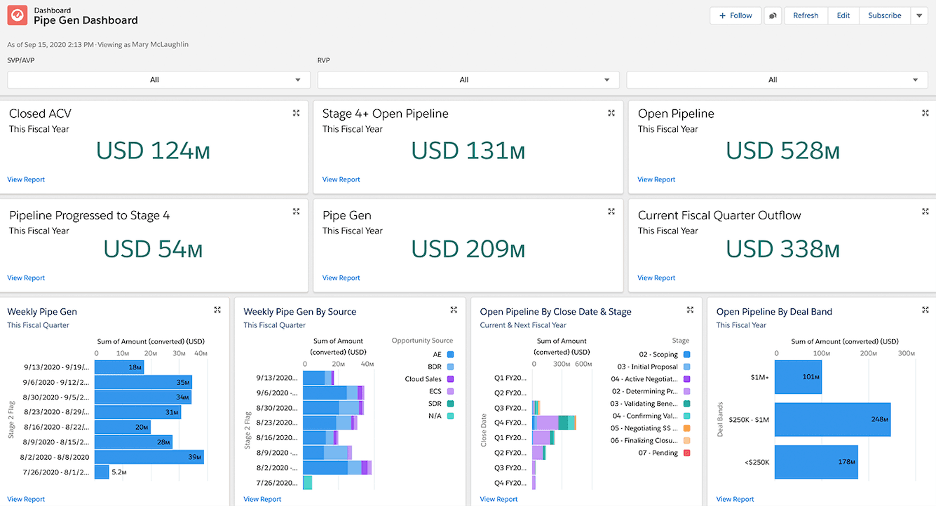
Sales managers can customize their dashboards with specific objects. Source: Salesforce
Here are some highlights we found when putting Salesforce’s customization to the test:
Page customization: You can change how pages look and function to suit your needs. Use CSS settings to adjust spacing between page elements, colors and fonts. You can also modify customer records to display only the lists, sections and fields specific co-workers need to see, improving employee collaboration.
Object control: Salesforce CRM’s object control is superior to that of other CRMs we tested. Objects are fields within databases, such as name, address and email. Salesforce makes it easy to add objects to capture exactly the information you need on accounts, contacts and leads. You can set permissions on records and fields to control who can view and edit them. You can even make objects actionable by adding buttons, actions, triggers and links to streamline processes such as adding a new customer, supplier or co-worker to the database.
Developer console to create custom apps: We liked Salesforce’s developer console. Many businesses hire freelance developers to create custom functions within Salesforce and the platform provides a developer console where they can write, test and debug code for custom applications. We found the inclusion of Apex triggers particularly helpful, as they can shorten development cycles in most cases. A developer sandbox and an app builder are included with every plan.
Integrations and Add-ons
We like that CRM users can build customizable systems and integrate their favorite business apps via the Salesforce AgentExchange store. Other CRM software companies we reviewed have similar online stores for add-ons, but Salesforce’s is far more comprehensive, with more than 10,000 available integrations. Unlike other add-on stores, AgentExchange is also a unified marketplace bringing together the former Salesforce AppExchange, Slack Marketplace, and the old Agentforce ecosystem.
New apps, agents, and tools are added to the AgentExchange daily, enhancing its appeal further. Source: Salesforce
This unified ecosystem is intended to allow users to seamlessly discover and deploy tools across the entire business from a single, trusted point of truth.
AgentExchange’s offerings have grown to encompass a broad range of solutions, including the following:
Apps: Over 10,000 AgentExchange direct, preprogrammed plug-ins that interact with Salesforce. Apps add new functions or improve and augment existing functions on your platform.
Agents: Over 1,000 agents, subagents, tools, and MCP servers from trusted companies for next generation work capabilities and applications across your business.
Collections: The marketplace features a robust assemblage of Collections, which are curated groupings of apps based on product, industry, and theme.
Consultants: Tailored consulting expertise, available through the marketplace, matched across Salesforce products, user industry, and services offered.
Did You Know?
Salesforce is embracing the low-code and no-code trends with its Lightning App Builder and Salesforce Flow drag-and-drop tools. Read our HubSpot CRM review to learn about another CRM with drag-and-drop functionality.
Intuitive Productivity Tools
We were pleased to see Salesforce’s intuitive productivity-boosting tools, particularly its built-in project management features. (Freshworks has similar tools; read our Freshworks CRM review to learn more.) Once implemented, sales and marketing teams and managers can easily build workflows, assign and track tasks and manage permissions.
Salesforce’s visual dashboards allow sales reps to check key performance indicators and track their progress toward quotas, facilitating productivity and accountability. We like that you can add meetings straight from the calendar tab and see an instant overview of your schedule.
Additional add-on productivity tools are available through the AgentExchange.
AI
Salesforce’s AI advancements have significantly outpaced many competitors:
Einstein: As a pioneer in CRM-AI integration, Salesforce introduced its high-profile AI tool, Einstein, in 2016.
Einstein GPT: In 2023, it launched Einstein GPT, a generative AI service that integrates with CRM data. It helps users create AI-driven content, automate tasks, analyze data and more.
Agentforce: Salesforce also introduced Agentforce in 2024. This platform of autonomous AI agents is designed to assist with customer service, develop marketing campaigns and coach sales teams. Agentforce also helps users build custom AI agents.
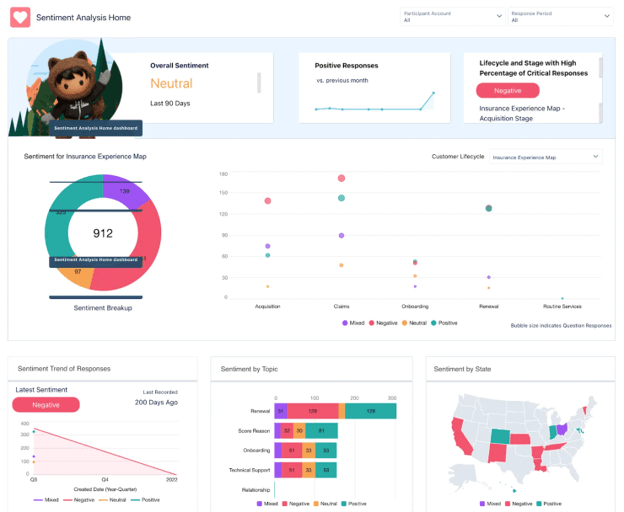
Salesforce’s AI tools can help with sentiment analysis so you understand how your brand is perceived. Source: Salesforce
Einstein can perform the following tasks after gathering data from system usage and user input:
Einstein is available in some functionality across all Salesforce plans, with higher-tier plans offering expanded uses. Its current form is impressive and we anticipate further enhancements in future iterations. AI tools like Einstein are poised to become integral to corporate operations and CRM adoption in the coming years.
FYI
Einstein can flag emails in which leads express critical concerns that could prevent a deal from moving forward, allowing a sales rep to prioritize those messages and act fast to grow and sustain customer relationships.
Trailblazer Community
Nearly every CRM vendor we reviewed has some form of an online community. However, Salesforce’s Trailblazer community is particularly impressive, replete with documentation invaluable for admins. You can find step-by-step guides on everything from creating custom CRM reports to turning on user notifications.
There’s also an extensive members-only forum for direct communication with other admins and CRM users, as well as a comprehensive Trailhead learning platform featuring product-related courses, upskilling opportunities and official Salesforce certifications.
Salesforce Pricing
Salesforce has an extensive range of offerings and plans, many of which contain some amount of overlap. For the purposes of this review, we’ll focus on Salesforce’s CRM plans, although some businesses may also be interested in the capabilities and plans offered within Salesforce’s more expensive — but also more robust — Sales Cloud offerings.
The Salesforce CRM plans are:
Plan
Price
Features
Free Suite
$0 per user, per month
Includes two user licenses, with no contract or credit card required
Lead, opportunity, and customer case management
Assistive AI with employee agent
Einstein email send time optimization
Connected Slack Conversations
AI email drafting
Starter Suite
$25 per user, per month (billed monthly or annually)
Everything in Free Suite, plus:
Unlimited Users
Built-in sales flows and lead routing
Lead scoring
Dynamic email nurture campaigns
Secure payment links
Ecommerce storefront
Conversational AI assistant
Pro Suite
$100 per user, per month (billed annually)
Everything in Starter, plus:
Enhanced, real-time chat
Sales quoting and forecasting
Access to AgentExchange
Premier Support (add-on)
Custom apps and objects
While the Free Suite offers a range of basic functionality and Starter Suite is reasonably priced, add-ons and customizations can increase costs, making Salesforce one of the pricier CRMs we’ve reviewed.
For example, you may want to add the Premier Success plan. This provides 24/7 support, health checks and recommendations, and a bundle with Unlimited and Agentforce 1 editions; however, it costs an additional 30% of net license fees and is only available with the Pro Suite.
We recommend taking advantage of Salesforce’s 30-day free trial to ensure this CRM meets your business needs.
Tip
Check out Salesforce competitors like monday sales CRM and HubSpot if you're looking for a more affordable solution.
Onboarding and Implementation
Implementing CRM software always takes care and patience. However, due to its breadth of customization options, Salesforce CRM’s implementation process can vary drastically, taking anywhere from a few days to several weeks. While that may seem alarming, users will see quickly that this CRM is worth the effort once set up. Keep the following in mind:
Implementation assistance: Salesforce and third-party agencies can manage your initial implementation and launch. However, this assistance comes at an additional cost, depending on your company size, number of employees, data volume and complexity, third-party integrations and customization level.
Out-of-the-box functionality: Fortunately, you don’t need to create a complex solution immediately. Salesforce CRM can be used out of the box, allowing businesses to start with basic functionality and customize it over time as needs evolve. Thanks to Salesforce’s intuitive design and robust features, the learning curve isn’t steep for nonadmin users after implementation.
Ongoing guidance: In addition to a vast library of training materials, Salesforce offers adoption guidance and coaching services for an extra cost. These add-ons may be worth it for business owners concerned about setting up the CRM and onboarding users.
FYI
The Data Import Wizard from the Setup menu can import up to 50,000 standard objects — like contact, lead and account information — from a comma-separated values file.
Customer Support
Salesforce includes its Standard Success Plan on all service tiers, which primarily offers self-guided resources like:
Access to the Trailhead online training platform
Participation in the Trailblazer Community
Access to Salesforce’s Help documentation
If you want 24/7 support and more personalized assistance, you’ll need to upgrade to the Premier Success Plan.
When we contacted Salesforce during our testing, we experienced a delayed response. However, when we did connect with representatives, they were highly knowledgeable and provided helpful guidance. They used real-life scenarios to explain the product’s features and answer our questions. Their explanations were clear and they offered multiple solutions to enhance our understanding.
Salesforce has an A-minus rating with the Better Business Bureau (BBB) but isn’t an accredited BBB business.
Limitations
Salesforce CRM is an excellent solution; however, we did identify some limitations:
Complex customizations: Salesforce’s biggest strength — its customization capabilities — is also a potential downside. Setting up a fully customized CRM tailored to your business’s specific sales funnel, structure and workflows requires time and, ideally, a dedicated IT team. Entrepreneurs and smaller companies might be better off with a more user-friendly yet customizable solution like Zoho. (Learn more in our detailed Zoho CRM review and Zoho vs. Salesforce comparison.)
Highly technical: Many of Salesforce CRM’s customization features require some basic technical knowledge of CSS and HTML. However, this is improving with tools like the Lightning App Builder and Salesforce Flow. For example, Lightning Email Templates now offer interactive drag-and-drop functionality, similar to what some rival CRMs provide. While Salesforce still has a learning curve, its interface is becoming more intuitive.
Confusing pricing: Due to the wide range of add-ons and platforms, estimating the final price of your CRM solution can be challenging. However, Salesforce’s sales and support teams can provide a tailored quote based on your business’s specific needs.
Methodology
When evaluating the best CRM software, we conducted extensive comparative research on dozens of software solutions in this category. Our product review process was designed to help you achieve CRM success with the right platform. It included communication with customer support teams, trials to evaluate product functionality and an evaluation of each provider’s tutorials, webinars and support materials. We also considered pricing. When looking for the best CRM for customizability specifically, we examined customization options, available integrations, reporting and analytics and sales automation.
Salesforce CRM FAQs
Though the Salesforce system has an extensive collection of CRM features and add-ons and the initial implementation can be complex, its intuitive design and standard CRM lingo make it relatively easy to learn (once set up). The vendor also provides various training materials and courses on Trailhead, the company's free online learning platform, to get you started.
Salesforce does offer a limited, free CRM tier. While this tier may be ideal for smaller businesses or startups, larger enterprises may find some of the functionality lacking. However, the company offers a 30-day free trial of costlier plans, so you can assess whether it's a good fit for your business.
There are numerous companies competing with Salesforce for market share. The company’s main competitor across cloud business and CRM tools, however, is likely Microsoft Dynamics 365. However, Oracle, Zoho, SAP, and HubSpot CRM are also major players and rivals in the field.
Bottom Line
We recommend Salesforce CRM for …
Businesses that need a flexible and highly customizable CRM solution.
Companies that want access to an extensive collection of integrations and add-ons to suit their processes and industries.
Businesses looking for a CRM that can expand with their evolving needs.
We don’t recommend Salesforce CRM for …
Businesses that want advanced CRM functionality at an affordable price.
Entrepreneurs and small businesses with limited IT resources.
Companies that need a straightforward CRM system that works right out of the box, is easy to customize and does not require technical skills.
Nadia Reckmann has spent years exploring her passions for advertising, customer relationship management and SaaS software more generally. With a master's degree in advertising, she started her career working on B2C and B2B marketing campaigns, executing everything from white papers to social media posts with the help of A/B testing and data-driven strategies.
For business.com, Reckmann covers CRM solutions and remote access PC software.
At OnePageCRM, Reckmann worked with software developers, UX designers and product managers to properly convey the CRM's value proposition and overhauled the company's website. She also worked with the CEO on thought leadership and launched a video learning hub for salespeople. With her intimate understanding of customer relationship management, Reckmann has gone on to analyze leading CRM solutions and other business software and provides detailed recommendations to business owners.