Business.com aims to help business owners make informed decisions to support and grow their companies. We research and recommend products and services suitable for various business types, investing thousands of hours each year in this process.
As a business, we need to generate revenue to sustain our content. We have financial relationships with some companies we cover, earning commissions when readers purchase from our partners or share information about their needs. These relationships do not dictate our advice and recommendations. Our editorial team independently evaluates and recommends products and services based on their research and expertise. Learn more about our process and partners here.
monday CRM Review and Pricing
Written by:
Natalie Hamingson, Senior Writer
Editor verified:
Gretchen Grunburg,Senior Editor
Last Updated Oct 16, 2026
Business.com earns commissions from some listed providers. Editorial Guidelines.
Table of Contents
Editors Score:9.5/10
monday CRM is our pick for the best CRM for SMBs thanks to its customizable sales pipelines and easy-to-use interface. Our reviewer, Natalie Hamingson, used its AI builder to create a working sales pipeline in minutes, with no technical expertise required.
Pros
We used monday CRM's AI builder to create a working sales pipeline in just a few minutes, without needing any technical expertise.
Built-in automation tools help sales teams save time on repetitive tasks, such as assigning leads, updating deal statuses and sending follow-up notifications.
monday CRM offers a wide range of integrations and a built-in API, giving growing businesses the flexibility to connect their existing tools and expand their CRM capabilities.
Cons
monday CRM requires a minimum of three paid seats, and its bundled pricing may leave smaller teams paying for seats they don't need.
The Basic plan lacks email integration and custom automations, while Standard limits custom automations to 250 per month.
Advanced sales features, including mass emails and automated email sequences, require the more expensive Pro plan or higher.
Many small and midsize businesses (SMBs) need a customer relationship management (CRM) system that offers a middle ground between basic functionality and a complex, enterprise-scale solution. monday CRM strikes that balance. It’s easy to use, reasonably priced and flexible enough to grow with your business. Its user-friendly interface makes it easy to manage sales activities, collaborate with team members and keep track of customer relationships. monday CRM’s wide-ranging features help with contact management, lead generation and sales pipeline management, while its built-in communication tools keep customer interactions organized. With customizable dashboards, pipelines, workflows, forms and templates, monday CRM is a great choice for SMBs looking to improve efficiency without adding unnecessary complexity.
monday CRM Editor's Rating:
9.5 / 10
Pricing/value
9.6/10
Features
9.6/10
Customization, add-ons and integrations
9.8/10
Ease of use
9.3/10
Customer service
9.1/10
Why We Chose monday CRM as Best for SMBs
SMBs rely on their sales and marketing teams to bring in quality leads and close deals. monday CRM offers a wealth of features to help managers support their teams and improve productivity. During our testing, we explored customized workflows and automations designed to reduce administrative tasks, improve collaboration and streamline customer communication.
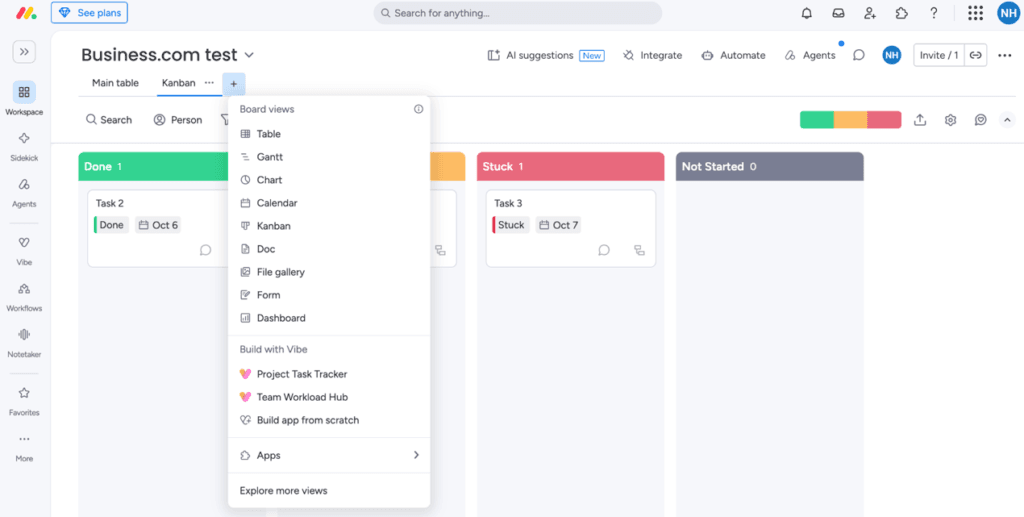
We were impressed by the interface’s user-friendly, drag-and-drop functionality, which makes it easier to create workflows and manage even complex sales funnels. Users can create multiple pipelines for different products and campaigns, as well as customize dashboards with real-time charts, graphs and tables to monitor deals as they move through the sales process. We also liked having multiple ways to view our boards, including Kanban boards and Gantt charts.
We liked how easy it was to switch between different board views in monday CRM, including Kanban boards, Gantt charts and calendars.
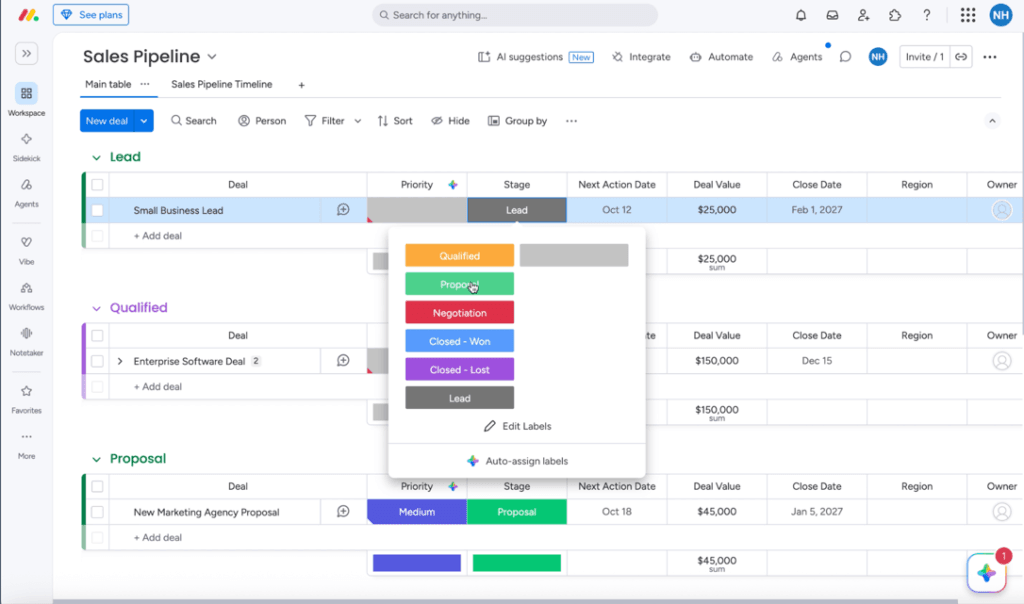
During our free trial, we were able to set up a sales pipeline board in just minutes using monday CRM’s AI builder. All we had to do was type “Sales Pipeline” into the AI prompt tool, and monday generated a fully functional board with stages for Lead, Qualified, Negotiation, Closed – Won and Closed – Lost. We could then customize the stages to fit our sales process, making it easy to get started without building a pipeline from scratch.
We found it easy to customize our monday CRM sales pipeline, including editing deal stages and tracking opportunities as they move through the sales process.
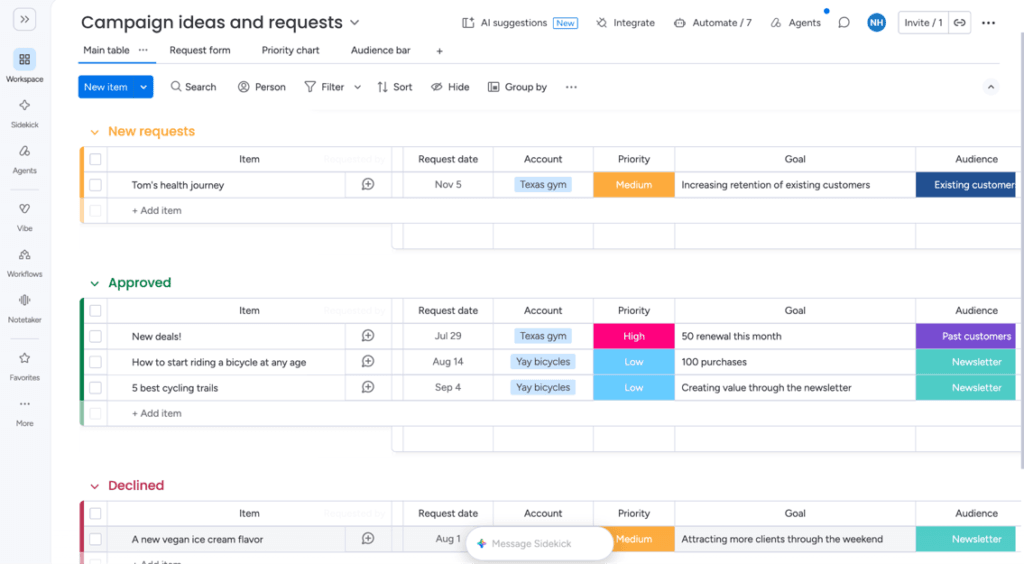
We also found plenty of useful tools for marketing teams that need to organize campaigns and manage content. The strategic planning tools help teams map out upcoming campaigns and assign responsibilities, while the email marketing templates can help with lead generation and sales outreach. Just as we did with our sales pipeline, we used monday’s AI-powered tools to set up a board for tracking upcoming marketing campaigns in just a few clicks. The board included sections for new, approved and declined requests, with campaigns organized by account and priority level.
For SMBs looking to boost efficiency and improve sales without investing in a complicated enterprise CRM, monday CRM is an excellent choice. It’s one of the more flexible CRMs we evaluated, with customizable workflows, AI-assisted setup and an intuitive interface that make it particularly appealing to growing teams. For these reasons and more, monday CRM is our pick for the best CRM for SMBs.
We liked how monday CRM’s customizable marketing templates let us organize campaign requests, track approvals and keep tabs on marketing priorities.
Did You Know?
AI is becoming a regular part of the sales process. In fact, Salesforce's 2026 State of Sales report found that nearly nine in 10 sales teams already use AI agents or plan to within two years. For smaller businesses, these tools can take some of the busywork out of sales and help improve productivity.
Ease of Use
A successful CRM implementation starts with software that’s easy to use. SMBs often have limited IT resources and don’t have time for extensive employee training on complicated systems. Fortunately, monday CRM is relatively easy to get the hang of, even if you’re new to CRM software.
Here are a few ease-of-use features that stood out during our evaluation:
Customer data management: We found monday CRM’s customer data management functionality excellent. Everything is neatly arranged into folders representing different departments or stages of the sales process. Each folder can contain customizable boards and dashboards for tracking customers and leads, cross-departmental projects, campaigns, budgets, timelines and more. For SMBs that struggle to get a complete picture of their operations, having this information organized in one place is particularly helpful.
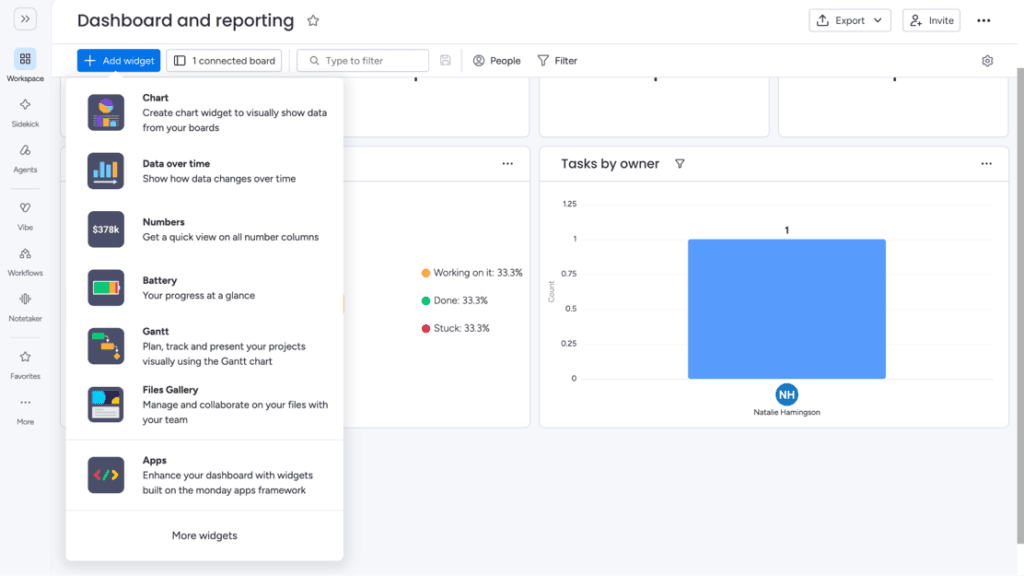
Customizable dashboards: We appreciated being able to set up and customize dashboards to suit our business’s needs. We could choose from more than 30 available widgets, with up to 30 on a single dashboard, including data visualization charts, file management tools for easier collaboration and Gantt charts for project planning. We liked having the flexibility to decide which information was most important to display.
Template-based dashboards and pipelines: monday CRM’s templates take much of the work out of creating dashboards and sales pipelines from scratch. (This feature is similar to rival Zendesk’s smart list templates. Read our Zendesk review to compare these features.) Template choices include project management, workflow tracking, customer onboarding, support ticket management, invoicing and marketing campaign management.
CRM-specific templates: We particularly liked monday’s CRM templates, which help teams organize contacts, manage leads and create workflows without starting from scratch. There are also dedicated templates for industries such as nonprofits, real estate, construction and education. For example, real estate agents get access to a sales enablement kit and a sales material repository.
Business app integrations: We appreciated how straightforward monday CRM makes connecting other business apps. Many integrations can be added in just a few clicks from the Integrations Center, without any coding. Popular options include Mailchimp, Slack and Zoom. Businesses can also connect additional tools through Zapier, explore monday’s app marketplace or use its open API for more customized connections.
Extensive online resources: We found monday CRM intuitive enough that we didn’t need much guidance to explore its core features. Still, there’s plenty of help available if you run into problems or want to learn more. The company offers online support resources, a community forum, video tutorials and monday Academy, which provides interactive courses and webinars.
We appreciated how easy it was to customize our monday CRM dashboard with widgets for tracking tasks, monitoring performance and managing projects.
FYI
monday CRM lets you import information from Excel, Google Sheets and other popular platforms, although you may need to adjust how some data is organized. This can make the transition easier if your SMB is switching CRM systems.
monday CRM Features
monday CRM offers a wide range of useful CRM features that help SMBs stay organized, improve efficiency and get more from their sales, marketing and customer service teams.
Workflow Automation
Automated workflows help businesses stay on top of important tasks without constantly updating their CRM databases. We like how monday CRM uses workflow automation to send emails and notifications, move contacts and deals through the sales process, create reminders and assign tasks. For SMBs with smaller teams, these automations can save valuable time that employees can spend building customer relationships and closing deals.
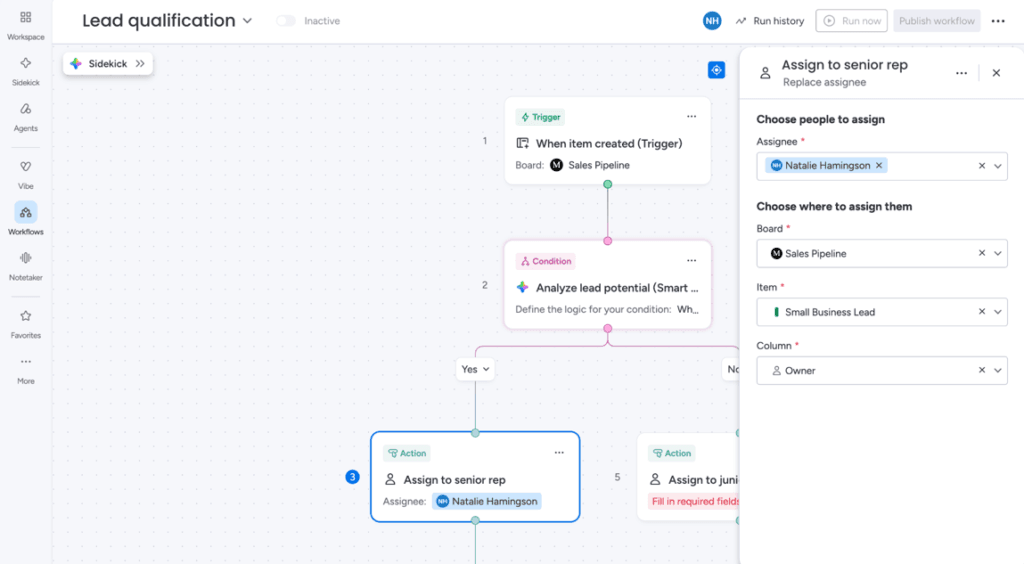
During our testing, we could choose from an extensive list of predefined automations or create our own using triggers, conditions and actions. We also appreciated the ready-made options, such as automatically sending a customized email when a lead becomes qualified or assigning leads to specific sales reps based on their pipeline stage.
Tip
monday CRM offers predefined automations that are relatively easy to set up, but more complex workflows may take some practice. If you're comparing automation tools, read our HubSpot review and HubSpot vs. monday comparison to see how the platforms differ.
We liked how monday CRM’s visual workflow builder let us configure lead qualification rules and actions for assigning prospects to different sales reps
Full-Cycle Lead Management
Many CRMs focus primarily on closing sales, leaving businesses to rely on other software to manage post-sale activities. We appreciate that monday CRM helps businesses manage the entire customer journey, including lead generation, invoicing, contracts and onboarding. During testing, we could easily update a prospect’s or customer’s stage in the Status column, using labels such as “qualified,” “closing” or “follow-up.”
We also liked being able to create custom dashboards that reflected our business’s structure and set up automated workflows to move contacts through different stages of the sales process. This flexibility makes monday CRM a great choice for businesses in a variety of industries, from real estate to software development.
monday CRM’s lead management features also impressed us, including the ability to merge duplicates when importing leads from two or more sources or working with colleagues on a shared board. Disjointed data in different files is a big problem for many SMBs, and monday CRM solves this problem well.
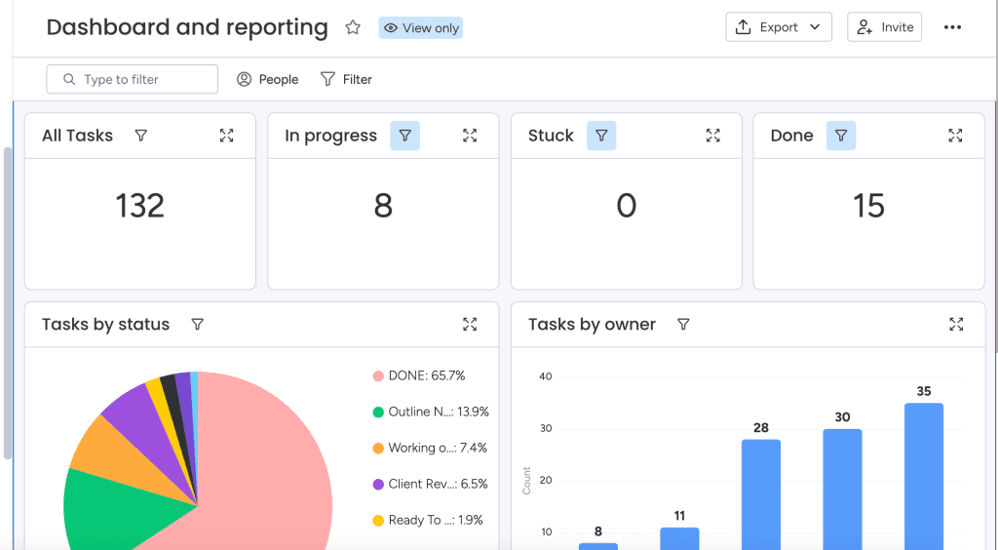
We liked how monday CRM’s customizable dashboard gave us a clear view of task progress, completion rates and team workloads.
Data Visualization
CRM software is great for capturing and managing customer information. However, its real value for SMBs is the ability to use that data to improve decision-making and develop actionable business strategies.
We were pleased to see that monday CRM offers several ways to view data and share it internally or publicly:
Kanban view: monday CRM’s Kanban view is excellent for drag-and-drop deal management.
Files view: The Files view organizes documents and images for easy access.
Gantt view: The Gantt view identifies timelines and dependencies at a glance.
Cards view: The Cards view gives you a visual snapshot of key item information.
monday CRM’s data visualization tools allowed us to do the following:
Monitor our team’s workload for optimal performance
Set up and display information collected through custom-made forms
Users can add multiple views and dashboards to keep an eye on the data that matters most to their business’s success.
Team Collaboration
Teams and departments often rely on each other to accomplish their work, so everyone needs access to the same information. We were impressed by monday CRM’s team collaboration features. For example, ready-made templates and customizable dashboards provide a central place for teams to communicate, keep everything on track and improve productivity.
We also like that businesses on Standard and higher plans can provide guest access to specific boards and files, making monday CRM a great choice for companies that work with freelancers, contractors or hands-on clients who want to collaborate in real time. Additionally, we were able to set a work status to indicate whether we were working from home, out sick, on a break or in a meeting. This visibility helps keep everyone informed and supports better employee teamwork.
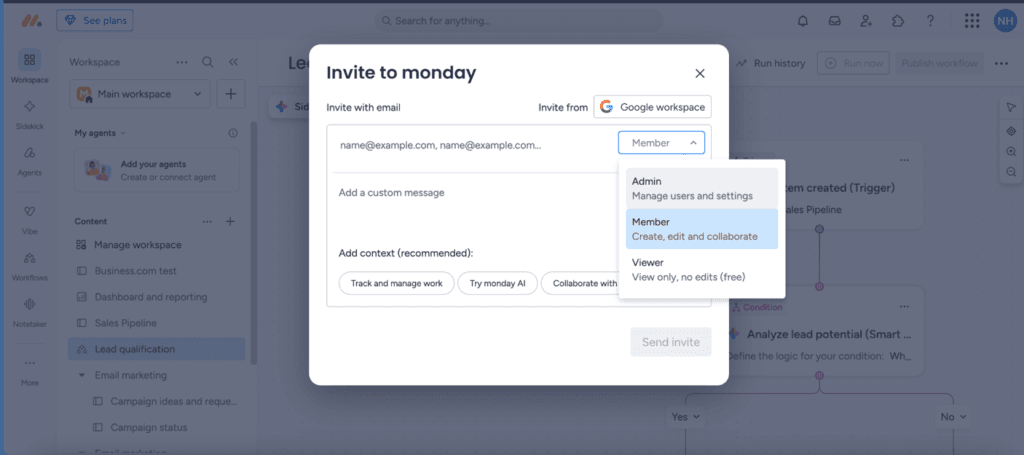
We liked how easy it was to invite collaborators to monday CRM and choose whether they could manage settings, edit content or simply view information.
Did You Know?
monday includes collaboration features in both the desktop version and the mobile app, making the CRM an excellent choice for companies with remote work plans.
Customizable Sales Workspace
monday CRM’s customization options help businesses create a CRM that reflects their sales process and fits their specific needs. Here are some of our favorite customization features:
Custom dashboards: Creating a custom dashboard for each team or sales stage was quick and easy. The number of dashboards and columns per board varies by plan: Basic includes one dashboard and five columns per board, Standard includes five dashboards and 15 columns, Pro includes 50 dashboards and 75 columns, and Ultimate offers unlimited dashboards and columns. These customizable workspaces neatly arrange relevant data, such as leads, accounts, opportunities and activities.
Color-coded labels: Many CRMs we reviewed let you create custom labels for deal stages or opportunity priority levels. However, we like that monday CRM lets you color-code these labels to make it easy to grasp key information at a glance.
Custom widgets: We like that monday CRM lets you populate dashboards with widgets that display calendars and timelines, pending tasks, your sales team’s workload, KPIs and targets, and other information that’s relevant to your business. For a sales manager who’s under pressure to perform, having live insight into upcoming activities, sales pipelines and team performance makes it much easier to spot improvement opportunities.
Lead scoring: monday CRM offers customizable lead scoring on its Ultimate plan, helping managers and reps identify the prospects who are most likely to become customers. We wish this useful feature were available on lower-tier plans.
Tip
To add some fun to your sales management, visualize your deals as wandering llamas and turn them green once the deal is closed. Who said sales management had to be all work and no play?
Integrations
We really liked monday CRM’s extensive library of integrations, which allow you to:
Connect the software to Slack, Zoom or Microsoft Teams to facilitate real-time communication and messaging.
Attach and share files from OneDrive, Box or Dropbox.
Integrate Google’s suite of business apps directly into your dashboards.
Access integrations with HubSpot, Mailchimp and Hootsuite.
Use the Emails & Activities app to track recent lead conversions and updates and set up custom activity triggers for smart workflow automations.
If you can’t find the app you need, monday CRM also integrates with Zapier and Make, which act as gateways to thousands of additional options.
FYI
monday's marketplace boasts over 850 apps and integrations. If you're looking for another CRM option with an extensive integration selection, check out our Freshworks CRM review.
monday CRM Pricing
monday CRM offers four paid plans, with pricing based on the number of users. However, there’s a three-seat minimum, even if your business needs fewer users. That means the Basic plan actually starts at $36 per month with annual billing, or $432 for the year. You can choose monthly or annual billing, with lower rates for annual subscriptions. Here’s how the plans compare.
Plan
Pricing
Key Features
Basic
$12 per seat per month (billed annually)
$18 per seat per month (billed monthly)
Customizable sales pipelines, unlimited main boards, one dashboard, up to 1,000 active contacts and deals, 20 quotes and invoices per month, 5GB of storage
Standard
$17 per seat per month (billed annually)
$25 per seat per month (billed monthly)
Everything in Basic, plus two-way email syncing, Gantt and calendar views, guest access, duplicate merging, five dashboards, 250 custom automations per month, 20GB of storage
Pro
$28 per seat per month (billed annually)
$41 per seat per month (billed monthly)
Everything in Standard, plus sales forecasting, private boards, mass emails, email tracking and sequences, time tracking, workload and chart views, 50 dashboards, 25,000 custom automations per month, 100GB of storage
Ultimate
Custom quote
Everything in Pro, plus AI-powered lead scoring, advanced security and permissions, team goals, unlimited dashboards, enterprise-scale automations, priority support, 1,000GB of storage
Here are a few things to keep in mind when considering monday CRM:
Monthly vs. annual billing: Annual subscriptions offer lower monthly rates, but you’ll need to pay for the full year upfront. Monthly billing costs more but gives businesses greater flexibility.
Free trial: monday CRM offers a 14-day free trial, so you can explore the platform before fully committing. Unlike monday work management, monday CRM doesn’t offer a permanent free plan.
Contact and deal limits: Basic supports up to 1,000 active contacts and deals, Standard allows 10,000 and Pro increases the limit to 100,000. Ultimate offers unlimited active contacts and deals, making it a better fit for businesses managing larger sales pipelines.
Advanced features: Some useful CRM tools are reserved for higher-tier plans. For example, email syncing and custom automations start with Standard, mass emailing and sales forecasting require Pro, and AI-powered lead scoring is exclusive to Ultimate.
Additional seats: If you need to add more users, keep in mind that monday CRM sells seats in bundles. You may end up paying for extra seats you don’t need, so it’s worth checking the total cost before choosing a plan.
Plan changes and refunds: You can change your subscription plan and number of users through your account’s billing settings. If you cancel an annual subscription within the first 30 days, monday says you’re entitled to a prorated refund. However, refunds aren’t available for downgrades after the refund period.
Nonprofit discounts: Qualified nonprofit organizations may be eligible for discounted pricing or free access. You’ll need to apply through monday to find out what your organization qualifies for.
Onboarding and Implementation
Getting started with monday CRM is relatively simple. Since everything runs in the cloud, there’s no software to install or servers to set up. New users can log in, create a board from scratch or choose a ready-made template, then start adding tasks and customer information.
Customers who prefer working on their computers can also download monday’s desktop app for Mac or Windows and follow the same setup process.
We also like how easy it is to import existing data. Users can upload Excel or CSV files or use the import wizard to bring in information from platforms such as Basecamp, Jira, Trello and Asana. Some imports have specific requirements, so it’s worth checking compatibility before transferring your data.
For businesses that need a little help getting started, monday offers online tutorials, videos and training resources. We also like that companies can get additional implementation assistance through monday’s partner network, including help with setup, data migration and employee training. Pricing depends on the services needed, so businesses should contact a partner for a quote.
Customer Support
We were pleased to see that monday CRM offers 24/7 customer support across all four plans, along with several ways to find answers and get help. Support options include:
Live chat: Users can start a conversation with monday’s AI support assistant and connect with a customer service representative when additional help is needed.
Self-service resources: monday’s help center includes tutorials, guides and videos covering everything from setting up your CRM to managing leads and automations.
Community forum: Users can ask questions, share ideas and learn from other monday customers.
Webinars and training: monday offers regular live webinars, along with additional courses and training resources through monday Academy.
For businesses that need more personalized assistance, the Ultimate plan includes a dedicated customer success manager. monday also offers Premium Support for companies that want priority assistance, faster responses and more ways to contact the support team. Businesses interested in these services should contact monday for details.
The customer service department was helpful and friendly when we contacted monday to learn more about onboarding and training options. A representative responded immediately with detailed information on how to get a quote and learn more about the company’s partner training program.
Limitations
There’s much to like about monday CRM’s features and functionality for SMBs. However, we identified a few potential limitations to consider:
Complex pricing: While monday CRM is easy to use, its pricing structure can be frustrating. There’s a three-seat minimum, and users must purchase seats in bundles rather than paying for the exact number they need. This means smaller businesses may end up paying for unused seats. Companies with larger teams may also want to compare enterprise-focused alternatives. Check out our Oracle NetSuite CRM review for another option.
Potential customization overload: monday CRM is extremely customizable, allowing users to shape the platform around their needs. However, the product’s greatest strength can also be a downside. Some users may spend more time tweaking settings and dashboards than actually using the software. Businesses looking for a more sales-focused CRM may prefer a simpler approach. See our Pipedrive review and Pipedrive vs. monday comparison to learn more.
Advanced features cost more: Some of monday CRM’s most useful tools aren’t available on lower-tier plans. For example, Basic doesn’t include two-way email syncing or custom automations, while mass emailing and sales forecasting require Pro. AI-powered lead scoring is reserved for Ultimate, which requires a custom quote. SMBs should look carefully at which features they need before choosing a plan.
No standard 24/7 phone support: Although we appreciate the availability of round-the-clock customer support, monday CRM doesn’t offer 24/7 phone support as a standard feature across all plans. This is worth considering if your team prefers speaking directly with a representative. For comparison, read our Salesforce CRM review and Salesforce vs. monday comparison.
Methodology
When evaluating the best CRM software solutions, we conducted extensive comparative research on dozens of products. Our review process included viewing software demos, corresponding with customer support teams, testing features firsthand through free trials and reviewing webinars, tutorials and other support materials.
To find the best CRM for SMBs specifically, we looked closely at scalability and flexibility, along with features such as contact and deal management, sales enablement, workflow automation, team collaboration, data analytics and available integrations. Our goal is to help you find the right CRM for your business.
monday FAQs
Both! monday started as a project management platform but has since expanded into a suite of business software products. monday work management helps teams organize projects, assign tasks and track progress, while monday CRM is designed specifically for managing leads, tracking deals and overseeing the sales process. The company also offers monday dev for software development teams and monday service for managing service requests and support operations.
These products share a similar interface and can work together, but they're sold as separate solutions with different features and pricing. If your main goal is to manage customer relationships and improve sales performance, monday CRM is the better fit. Businesses that primarily need help coordinating projects and everyday tasks may prefer monday work management.
No, monday CRM doesn't offer a permanent free plan. However, you can try the software free for 14 days before choosing a paid subscription. monday work management, the company's separate project management platform, does offer a free plan for up to two users.
Nonprofit organizations may also qualify for free or discounted access to monday's software. Eligible nonprofits can apply for special pricing, although the available plans and number of users covered may vary.
monday CRM has plenty of useful features for solo entrepreneurs, including customizable sales pipelines and contact and deal management tools. However, the three-seat minimum means you'll have to pay for users you don't need. Individual business owners may be better off with a CRM that offers a free plan, such as Zoho CRM. Read our Zoho CRM review to learn more.
Bottom Line
We recommend monday CRM for …
Small and midsize businesses that want a customizable, easy-to-use platform for managing their marketing and sales pipelines.
Sales teams that want to manage the entire customer journey, from lead generation to post-sale activities, in one place.
Companies that want greater visibility into the performance of their sales, marketing and customer service teams.
We don’t recommend monday CRM for …
Businesses that prefer a simpler, more structured CRM without so many customization options.
Solopreneurs and very small teams that don’t need the three paid seats required by monday CRM.
Companies on a tight budget that need advanced features, such as mass emailing or lead scoring, without upgrading to higher-priced plans.