Your free business.com+ membership unlocks exclusive tech deals and advisor support
Join Free
BDC Hamburger Icon

Menu

Close
BDC Logo with Name
Search Icon
Search Icon
Advertising Disclosure
Close
Advertising Disclosure

Business.com aims to help business owners make informed decisions to support and grow their companies. We research and recommend products and services suitable for various business types, investing thousands of hours each year in this process.

As a business, we need to generate revenue to sustain our content. We have financial relationships with some companies we cover, earning commissions when readers purchase from our partners or share information about their needs. These relationships do not dictate our advice and recommendations. Our editorial team independently evaluates and recommends products and services based on their research and expertise. Learn more about our process and partners here.

Rippling HR Software Review and Pricing

author image
Written by:
Skye Schooley, Senior Lead Analyst
author image
Editor verified:
Gretchen Grunburg,Senior Editor
Last Updated Aug 07, 2026
Business.com earns commissions from some listed providers. Editorial Guidelines.
Table Of Contents Icon

Table of Contents

Open row
Editors Score:9.4/10
Rippling is a customizable HR solution with many automation and integration capabilities. The software is simple to get up and running, making it our choice for the best HR software for those prioritizing ease of use and seamless implementation.
Thumbs Up Pros
  • Rippling makes it easy to automate HR tasks through customizable workflows and a unified platform.
  • Rippling combines HR, payroll, IT and finance in one platform, making it easier to manage employee data across departments.
  • Its intuitive interface and straightforward implementation make it easy to get up and running despite the platform's extensive capabilities.
Thumbs Down Cons
  • Rippling doesn't offer a free trial for its HR software, so businesses must schedule a demo to explore the platform.
  • The company doesn't publish pricing, so you'll need to contact Rippling for a custom quote.
  • Building a custom Rippling package can take more planning than choosing a traditional all-in-one HR platform.
Editor's Rating9.4/10

Rippling combines HR, payroll, IT and finance in a unified workforce management platform that’s surprisingly easy to implement and navigate despite its extensive capabilities. Its automation tools, customizable workflows and hundreds of integrations help simplify everyday HR tasks, making it our choice for the best HR software for ease of use. Once you’re up and running, Rippling can streamline everything from hiring and onboarding to payroll, benefits administration and employee management.

Rippling Editor's Rating:

9.4 / 10

Price/value
9/10
Features
9.7/10
Customizations, add-ons and integrations
9.7/10
Ease of use
9.9/10
Customer service
8.9/10

Why We Chose Rippling for Ease of Use

Rippling is one of the most comprehensive workforce management platforms we’ve evaluated, but it doesn’t sacrifice usability for functionality. Despite offering HR, payroll, IT and other workforce and HR management tools in one platform, Rippling is intuitive to navigate and easy to customize. Its automation tools, configurable workflows and extensive integrations help businesses simplify routine HR tasks while reducing the need to switch between multiple systems. The addition of Rippling AI further streamlines everyday work by helping users quickly find information, automate repetitive tasks and answer questions using data from across the platform.

We were also impressed by how seamlessly Rippling connects employee data across its platform. Rather than managing separate tools for HR, payroll, IT and other workforce functions, businesses can manage the entire employee lifecycle from a single system. During our evaluation, we found that this unified approach makes everything from employee onboarding and payroll to performance management, benefits administration and reporting easier to manage while reducing duplicate work.

For businesses looking for an HR solution that’s easy to implement, easy to use and powerful enough to grow with their organization, Rippling is our top choice.
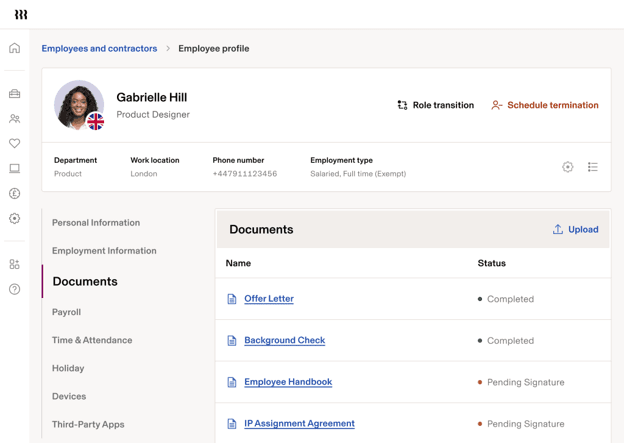
Rippling employee profile dashboard showing employee information, HR documents, payroll and workforce management tools in one interface.
Rippling’s unified employee profile keeps HR documents, payroll, time tracking and other workforce information in one place, making it easy to manage the entire employee lifecycle. Source: Rippling
TipBottom line
Rippling automatically carries employee data throughout the platform. If you hire a candidate, details from their job application automatically populate their offer letter and employee profile.

Ease of Use

One of Rippling’s biggest strengths is its ease of use. The platform’s intuitive dashboard makes it easy to navigate between HR, payroll, IT and other workforce management tools from a single interface. During our evaluation, we also liked how easy it is to create automated workflows that streamline repetitive HR tasks, helping businesses save time and reduce manual work.

Rippling AI further enhances the platform’s ease of use by helping employees and administrators quickly find information, automate routine work and answer questions using data from across the platform. Rather than replacing existing workflows, the AI helps users complete everyday tasks more efficiently.

It’s not just HR administrators who benefit from Rippling’s intuitive design. Employees can easily access the cloud-based platform to update personal information, complete onboarding tasks and manage other HR responsibilities through self-service tools, reducing administrative work for HR teams.

Rippling also offers mobile apps for iOS and Android devices, allowing employees and managers to review HR tasks, approve requests and stay connected while away from their desks. The platform integrates with more than 650 third-party applications as well, making it easy to connect Rippling with the software many businesses already use.
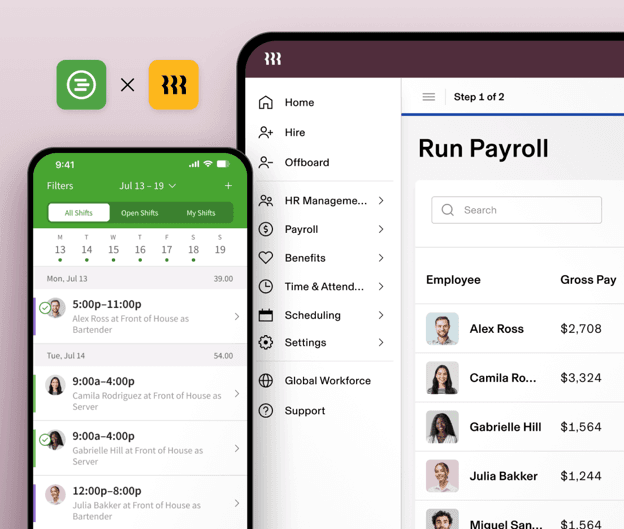
Rippling desktop and mobile dashboards showing payroll, HR management, scheduling and workforce tools in a unified interface.
Rippling’s desktop and mobile apps use a consistent interface, making it easy for administrators and employees to manage HR tasks from virtually anywhere. Source: Rippling
Did You Know?Did you know
Rippling's implementation options range from guided setup to white-glove service. Depending on how complex your setup is, you could likely start running payroll within a few weeks.

Rippling HR Software Features

Rippling’s workforce management platform includes a core set of HR tools for onboarding, offboarding and task management, with additional modules available for payroll, benefits administration, talent management, device management and more. Despite its extensive capabilities, the platform remains intuitive as you add new features, which is one of our favorite things about it. The additional functionality never comes at the expense of ease of use.

The features available to your business depend on the Rippling package you choose, but below are some of the platform’s standout capabilities and how they can simplify everyday HR tasks.

Recruiting and Onboarding

Recruiting and onboarding workers with Rippling is easy. Its applicant tracking system (ATS) includes customizable job boards, candidate surveys, calendar integrations and analytics. Candidate information can flow automatically from your ATS or background check provider into Rippling, or you can enter it manually. During our testing, we found the recruiting experience intuitive and appreciated how seamlessly it connects with the rest of the platform.

Some of the recruiting and onboarding tools that stood out most during our evaluation include the following:
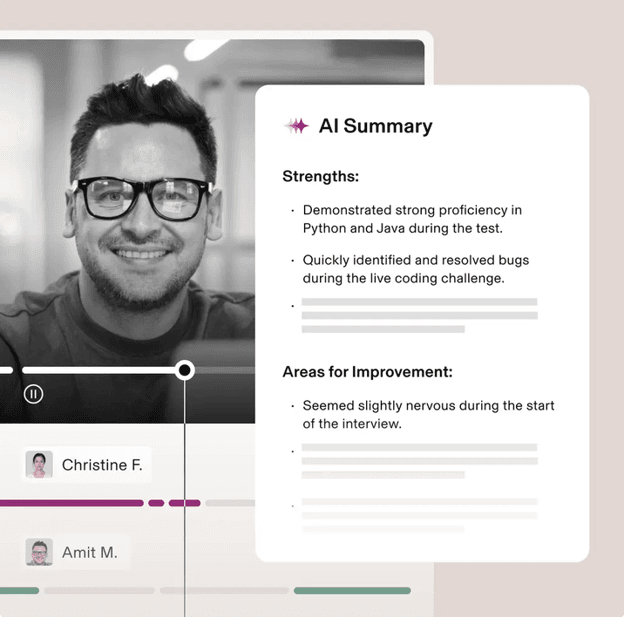
  • AI-powered interviews: We liked Rippling’s interview management tools, which let you set user permissions, create interview groups and collect structured feedback from hiring managers. A standout feature is Interview Assistant, which can record, transcribe and summarize interviews using AI to help hiring teams evaluate candidates more efficiently.
  • Automated hiring workflows: Rippling makes it easy to build custom employee recruitment and onboarding workflows. The platform can automatically move candidates through background checks and E-Verify, generate offer letters and send new-hire paperwork for e-signature without requiring HR to manage each step manually.
  • Streamlined onboarding: Once a candidate is hired, Rippling automatically creates an employee profile that includes employment information, payroll details, signed documents, benefits, performance records and integrated applications. We especially like that employee information syncs across the platform automatically, eliminating duplicate data entry as employees move from recruiting into HR and payroll.
FYIDid you know
Rippling says businesses can onboard a new hire in as little as 90 seconds. While the entire hiring process takes time, the platform can dramatically speed up onboarding.
Rippling Interview Assistant displaying an AI-generated interview summary with candidate strengths and areas for improvement after a recorded interview.
Rippling’s Interview Assistant uses AI to record, transcribe and summarize interviews, giving hiring teams a quick overview of each candidate’s strengths and areas for improvement. Source: Rippling

Payroll

Rippling’s payroll module is an optional add-on that integrates directly with the rest of the company’s workforce management platform, so employee information, benefits, expenses and time tracking stay synchronized automatically. During our review, several payroll capabilities stood out.
  • AI-powered payroll tools: Rippling’s AI can automate repetitive payroll tasks, including adding one-time employee bonuses, comparing payroll runs before approval and answering payroll questions using natural-language prompts. We like that these tools simplify payroll administration without changing your existing workflow.
  • Payroll connected to HR: One of Rippling’s biggest advantages is that payroll isn’t a standalone product. Changes to employee records, benefits, paid time off (PTO) and approved expenses automatically flow into payroll, reducing manual data entry and helping keep payroll information up to date.
  • Flexible payroll processing: Rippling lets businesses customize payroll workflows, run payroll when needed and delegate payroll responsibilities while maintaining approval controls. Employees can also access pay stubs and tax documents through the platform’s employee self-service tools.
  • Automatic tax filing: Rippling automatically calculates payroll taxes and files federal, state and local tax forms. The platform also supports direct deposit, reimbursements, deductions, garnishments and year-end tax documents.
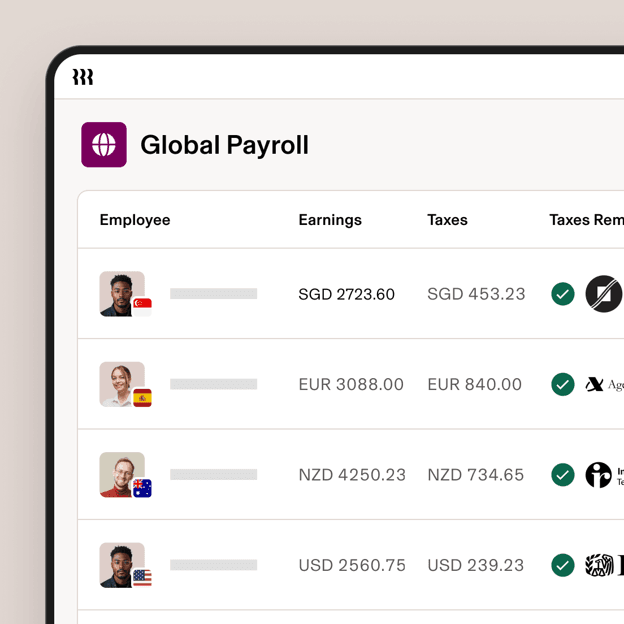
  • Global payroll: Rippling continues to stand out for international workforce management. Businesses can run native payroll in 10 countries, pay contractors in more than 185 countries and pay employees in more than 50 currencies while automating many country-specific tax and compliance requirements. The company also offers employer-of-record (EOR) services in 80 countries for businesses hiring internationally.
  • Accounting integrations: Rippling integrates with many of the best accounting software platforms, including QuickBooks, Xero and Oracle NetSuite, helping keep payroll and accounting records synchronized automatically.
Rippling Global Payroll dashboard showing employees in multiple countries with payroll amounts, taxes and compliance status in different currencies.
Rippling’s Global Payroll dashboard lets businesses manage payroll for employees in multiple countries from a single interface. Source: Rippling.
Bottom LineBottom line
With Rippling, instead of requiring separate HR and payroll systems, employee information flows automatically between modules, reducing manual work and making payroll easier to manage.

Benefits Administration

We like that Rippling lets businesses configure employee benefits packages with custom details, including contribution strategies and waiting periods. You can connect your existing benefits broker to the platform or have Rippling help you find one. During enrollment, Rippling automatically pulls information from employee profiles to prefill forms and help employees enroll more quickly, saving HR teams valuable time.

We also like that employees’ benefit elections sync with payroll automatically, so deductions update without anyone having to enter the same information twice. That makes open enrollment much less of a headache for HR teams.
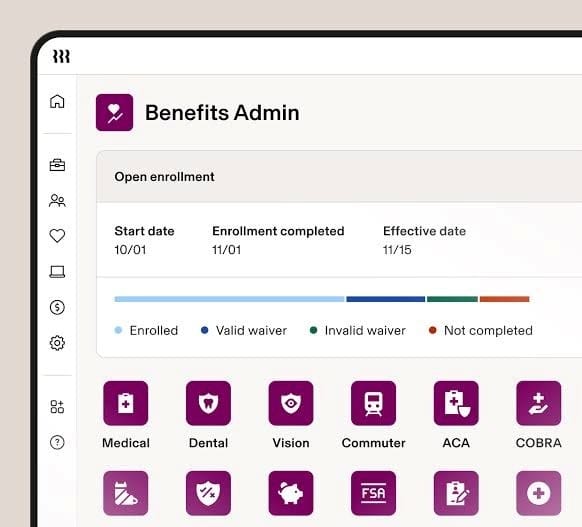
Rippling Benefits Admin dashboard showing open enrollment progress, enrollment status and available employee benefit plans.
Rippling’s Benefits Admin dashboard lets HR teams track open enrollment and manage employee benefit plans from one centralized interface. Source: Rippling

Reporting and Analytics

When testing Rippling, we liked that the platform makes it easy to build reports and dashboards for just about any workforce metric. You can create custom reports to analyze headcount, compensation, budgets and other HR data, giving managers a clear picture of what’s happening across the organization. We also like that Rippling brings together data from HR, IT, finance and connected third-party applications, so you don’t have to piece information together from multiple systems.

One feature that stood out during our review is Rippling’s business intelligence capabilities. Rippling AI can build dashboards from simple natural-language prompts, allowing users to describe the information they’re looking for instead of manually creating charts and filters. We also found that reports are interactive, making it easy to drill into the underlying data and launch workflows directly from the report when action is needed.

Rippling also lets administrators control access with role-based permissions, so managers can share reports without exposing sensitive information. Overall, we found the reporting and analytics tools to be among the most flexible of the HR software platforms we reviewed. Paycor is another strong option for workforce analytics. If reporting is a top priority for your business, check out our review of Paycor to see how the two platforms compare.
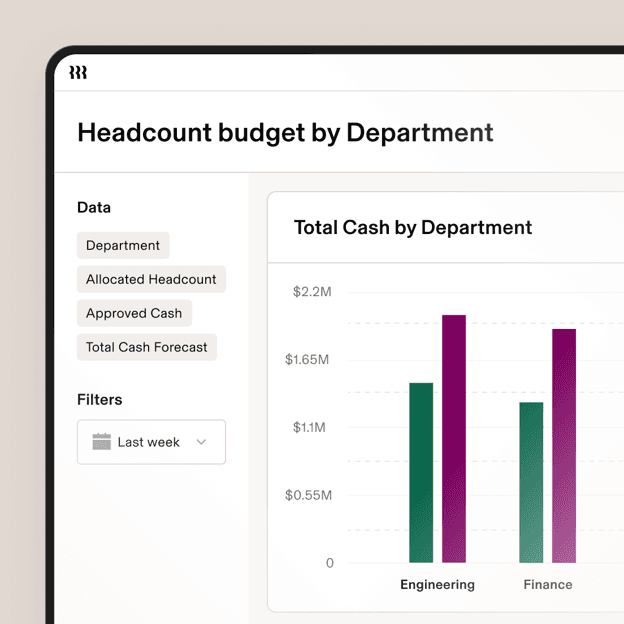
Rippling reporting dashboard showing a customizable headcount budget report with department filters and cash-by-department charts.
Rippling’s reporting and business intelligence tools let managers build customizable dashboards to analyze headcount, budgets and other workforce metrics. Source: Rippling

Rippling Time and Attendance

We like how Rippling helps businesses manage employee time from one centralized platform. Because the time and attendance tools integrate with payroll and the rest of the workforce management system, it’s easy to automate routine tasks while giving employees self-service access through the web or mobile app. Here are some of the features that stood out to us during testing:
  • Flexible time tracking: Employees can clock in and out from a web browser, the Rippling mobile app or a tablet kiosk. Employers can add safeguards such as geofencing, QR code clock-ins and selfie verification to help reduce timecard fraud. Managers can also edit or add time entries when needed.
  • Compliance and overtime management: Rippling automatically applies overtime, break and labor policies based on employees’ work locations and alerts managers before potential HR compliance issues become payroll problems.
  • Time-off requests: Employees can submit PTO requests through the platform, and requests are automatically routed to managers for approval. We found the process intuitive during testing.
  • Job tracking and costing: Businesses can require employees to assign hours to specific jobs or locations when clocking in or out, making it easier to analyze labor costs and simplify workforce planning. Hours automatically sync with payroll.
  • Custom alerts and notifications: Rippling lets businesses create alerts for meal breaks, overtime, shift endings, early clock-outs, approvals and other timekeeping events so managers can respond quickly when action is needed.
Did You Know?Did you know
Rippling can automatically apply overtime and break policies based on the locations where employees work, helping businesses stay on top of changing employment laws without manually updating policies.
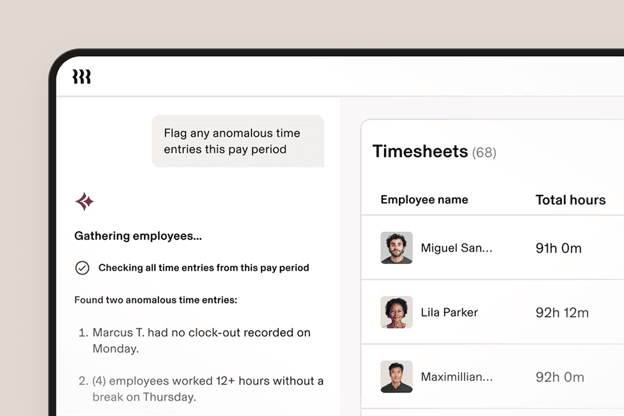
Rippling AI reviewing employee timesheets and flagging anomalous time entries before payroll is processed.
Rippling’s AI can automatically review timesheets, flag missing clock-outs and identify other timekeeping issues before they become payroll or compliance problems. Source: Rippling

Rippling Pricing

Rippling doesn’t publish pricing, so you’ll need to contact the company for a custom quote. We generally prefer vendors that provide at least some pricing information upfront because it makes comparing software much easier. That said, Rippling’s pricing is highly customizable, so your total cost will depend on the products you choose and the size of your business.

Keep these pricing considerations in mind:

  • Think à la carte: Rather than paying for one bundled package, you build your own Rippling plan. Start with the Rippling Platform, then choose only the HR, payroll, IT and finance products your business needs.
  • You can add products over time: One thing we like about Rippling’s approach is that you don’t have to buy everything at once. If you only need payroll and time tracking today, you can always add recruiting, benefits administration, device management or other products as your business grows.
  • Most pricing is per employee: Most Rippling products are priced on a per-employee, per-month basis, although some modules also include a monthly base fee.
  • Choose the platform that’s right for you: Rippling offers Core and Pro platform editions. Both include foundational platform features, while Pro adds more advanced capabilities like enhanced reporting, Formula Fields, webhooks and additional workflow automation.
  • Schedule a demo: Rippling doesn’t offer a free trial (with the exception of a 14-day trial for its IT management product), but you can schedule a personalized demo with a product specialist to see the platform before making a decision.

Implementation and Onboarding

Because Rippling is highly customizable, you’ll work with a company representative to tailor the platform to your business before implementation begins. That includes selecting the HR, payroll, IT and finance products you need, along with any workflows and automations you want to set up. While that takes more planning than some plug-and-play HR software, it also gives businesses much more flexibility.

One thing that stood out during our review is Rippling’s extensive integration library. The platform connects with more than 650 third-party applications, making it easier to bring your existing HR, accounting, productivity and business software into one system. We also like that Rippling offers flexible implementation options, from guided onboarding to fully managed, white-glove implementation services.

Even with its extensive customization options, Rippling says many businesses can be up and running in as little as three weeks, though implementation timelines vary depending on company size, the products you purchase and the complexity of your setup. We found the onboarding process well-organized, and once the system is configured, the platform is straightforward to navigate.

Customer Support

Rippling’s Help Center is the hub for customer support, giving users access to self-service articles, troubleshooting resources and support channels when they need assistance. During our review, we also found a robust library of educational resources, including webinars, downloadable guides and Rippling University, an on-demand training platform that helps customers learn new features and get more out of the software over time.

Businesses that want more personalized guidance can add Rippling HR Help Desk to their subscription. The service connects you with certified HR professionals who can answer compliance questions and help with day-to-day HR issues. It’s a nice option for smaller businesses that don’t have an HR expert on staff.

One feature that really stood out to us was Rippling’s real-time support status page. Rather than leaving customers wondering how responsive its support team is, Rippling publicly shares metrics like live chat and email response times, first-contact resolution rates and customer satisfaction scores. At the time of our review, the company reported a median live chat response time of about 30 seconds and a customer satisfaction score above 95 percent. While those numbers naturally change over time, we appreciated the transparency. It’s a level of openness we rarely see from HR software providers.

TipBottom line
Rippling's free webinars and Rippling University can help new administrators get comfortable with the platform after implementation, making it easier to learn advanced features and automation tools at their own pace.

Limitations

While Rippling is one of the most impressive HR platforms we reviewed, there are a few drawbacks worth considering before making a decision.

  • Pricing isn’t transparent: Rippling no longer publishes starting prices or plan costs on its website. Instead, you’ll need to contact the company for a custom quote based on your business size, the modules you need and any add-on services you choose. We appreciate the platform’s flexibility, but comparing costs with competitors isn’t as easy as it is with providers that publish their pricing online. If transparent pricing is important to your business, check out our review of Gusto HR software; this vendor publishes straightforward pricing on its website.
  • The modular pricing can get expensive: Rippling’s build-your-own approach lets you pay only for the features you need, which is great for customization. However, costs can add up quickly if you need payroll, benefits administration, recruiting, IT management or other optional modules on top of the required Rippling platform. It’s worth requesting a detailed quote so you understand exactly what’s included before signing up. If you’d rather purchase a comprehensive HR platform with many core features already included, check out our review of Justworks.
  • ESAC accreditation may matter to some PEO buyers: Businesses considering Rippling’s PEO services should know the company isn’t currently listed as an ESAC-accredited PEO. While ESAC accreditation isn’t required, it provides independent verification of a PEO’s financial stability, ethical business practices and regulatory compliance. If ESAC accreditation is a priority for your business, providers like TriNet or ADP may be worth comparing. Our detailed TriNet review and review of ADP TotalSource explain more about these platforms.

Methodology

We tested dozens of HR software solutions to identify the best platforms for today’s businesses. During our hands-on evaluations, we considered recruiting and onboarding, payroll, benefits administration, time and attendance, reporting and analytics, performance management, integrations, AI capabilities and compliance tools. We also evaluated pricing, customer support and overall ease of use.

To determine the best HR software for businesses prioritizing ease of use, we paid particularly close attention to each platform’s implementation process, automation capabilities, navigation, integrations and customer support. We also evaluated how well each system streamlined everyday HR tasks and whether it could scale as a business’s workforce and needs grew.

Rippling FAQs

Yes. Rippling includes benefits administration that helps businesses manage medical, dental and vision insurance, health savings accounts (HSAs), flexible spending accounts (FSAs), retirement plans, commuter benefits, COBRA and workers' compensation. We also like that the platform can automate benefits enrollment and sync employee benefit elections with payroll, reducing manual work for HR teams.
Yes. Rippling offers both standalone HR software and professional employer organization (PEO) services. Businesses that choose Rippling's PEO enter into a co-employment relationship, allowing them to outsource many HR responsibilities while gaining access to benefits administration, payroll processing, compliance support and other HR services. One thing we especially like is that businesses can move between Rippling's PEO and standalone HR software without changing platforms or replacing their underlying system. That flexibility makes it easier to adapt as your HR needs evolve.

Bottom Line

We recommend Rippling for …

  • Businesses looking for an intuitive, easy-to-use HR platform that can grow with them.
  • Companies that want to automate HR, payroll, IT and other workforce management tasks from one system.
  • Organizations that value customizable workflows, AI-powered tools and robust reporting capabilities.
  • Businesses that need a flexible platform they can tailor with only the modules they need.

We don’t recommend Rippling for …

  • Businesses that want transparent pricing before speaking with a sales representative.
  • Companies looking for a simple, all-in-one HR package without choosing individual modules.
  • Organizations that want to try out HR software through a free trial before making a purchase.
Did you find this content helpful?
Verified CheckThank you for your feedback!
author image
Written by: Skye Schooley, Senior Lead Analyst
Skye Schooley is a dedicated business professional who is especially passionate about human resources and digital marketing. For more than a decade, she has helped clients navigate the employee recruitment and customer acquisition processes, ensuring small business owners have the knowledge they need to succeed and grow their companies. At business.com, Schooley covers the ins and outs of hiring and onboarding, employee monitoring, PEOs and HROs, employee benefits and more. In recent years, Schooley has enjoyed evaluating and comparing HR software and other human resources solutions to help businesses find the tools and services that best suit their needs. With a degree in business communications, she excels at simplifying complicated subjects and interviewing business vendors and entrepreneurs to gain new insights. Her guidance spans various formats, including newsletters, long-form videos and YouTube Shorts, reflecting her commitment to providing valuable expertise in accessible ways.
Editor's Rating9.4/10