Business.com aims to help business owners make informed decisions to support and grow their companies. We research and recommend products and services suitable for various business types, investing thousands of hours each year in this process.
As a business, we need to generate revenue to sustain our content. We have financial relationships with some companies we cover, earning commissions when readers purchase from our partners or share information about their needs. These relationships do not dictate our advice and recommendations. Our editorial team independently evaluates and recommends products and services based on their research and expertise. Learn more about our process and partners here.

Workforce size shouldn’t dictate how and when employers pay staff, or limit access to pay stubs and pay histories. With Patriot Payroll, small teams don’t have to compromise between affordability and functionality. The online platform is easy to navigate, supports multiple job roles and wage types and costs less than competitors’. Explore more reasons why we chose Patriot Payroll as the best payroll software for small teams.
Patriot Payroll gives small teams the tools, flexibility and support they need to process payroll in minutes. Basic and full-service payroll plans cost less than competitors. Plus, it’s accessible to non-accountants and staff with limited or no payroll experience. After testing Patriot’s payroll processing and tax filing services, it was clear that Patriot Payroll is the best payroll software for small teams.
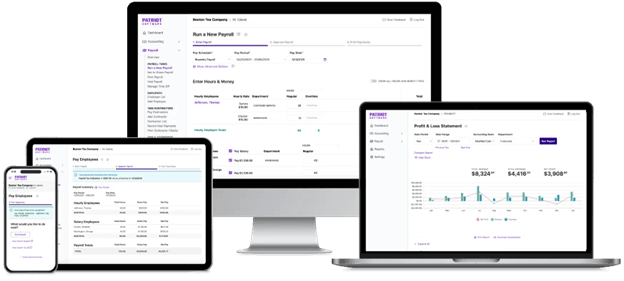
For full-service payroll management, a team of five can save $200 to $500 yearly with Patriot Payroll vs. Gusto or ADP. And filing payroll taxes yourself with Patriot’s basic payroll plan cuts your costs in half.
Although Patriot offers the cheapest payroll software for small teams, its customer service is top notch. Our interactions with customer support were positive, reflecting experiences highlighted in many Patriot Payroll reviews. Notably, free payroll setup assistance comes with both plans, whether deploying Patriot Payroll for one employee or a dozen.
Overall, Patriot Software’s basic payroll features easily met the needs of our hypothetical small workforce. It handled employee and contractor payments, multiple pay rates for team members with different roles and off-cycle payroll for bonuses, commissions and more.
For simple payroll software anyone on the team can use, Patriot Payroll gets our vote. In fact, as first-time Patriot Software users, we had no trouble navigating the online payroll platform to adjust pay schedules, configure deductions and run payroll.
Here are a few factors that make Patriot Payroll software easy to use:
Both Patriot Software payroll plans include payroll processing and management tools. But only the full-service package comes with payroll tax deposits and filings.
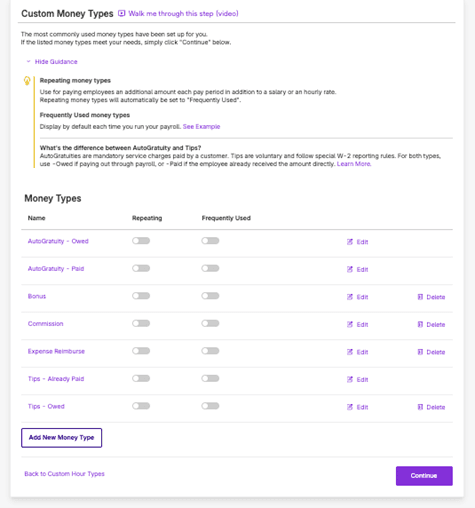
Small business employees often float between job roles, like a restaurant waiter and host. Others earn commissions or bonuses. Patriot’s setup wizard prepopulates common hour and wage types. You can edit the label, delete ones you don’t need and create custom categories, such as paid time off (PTO).
For our Patriot Payroll review, we set up pay schedules for hourly and salaried staff, then created new flat-dollar earning and role-specific types. For each option, we could click “frequently used,” and for some, we could check the “repeatable” payments box. The new hour or wage types appeared immediately in the payroll entry sheet. From there, we could assign up to 25 pay rates and roles per employee.
We appreciated how Patriot simplified multi-rate payroll management. When you assign a second role to an employee for the first time, Patriot displays a box for blended overtime calculations. With one click, Patriot applies this company-wide setting, ensuring your overtime rates comply with the Fair Labor Standards Act (FLSA).
When adding a role that earns tips, the software prompts you to select a Treasury Tipped Occupation Code (TTOC) from a drop-down list. This step helps small employers comply with the “No Tax on Tips” deduction.
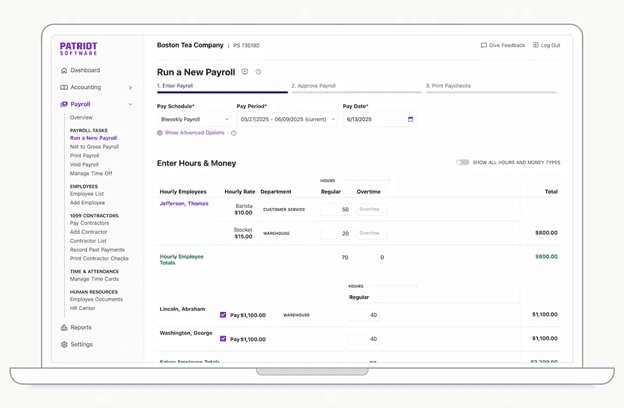
After we set up the backend, running payroll took only a few minutes. We tested a standard biweekly pay schedule and used different pay periods for salaried workers. Patriot’s automatic payroll calculations were spot on, and it withheld the right amounts for each payroll deduction.
The most tedious part was entering hours worked. Once we double-checked our figures, it was smooth sailing. Still, if your workforce is growing or employees juggle multiple roles, Patriot’s time and attendance add-on is worth checking out.
We also tried these payroll features:
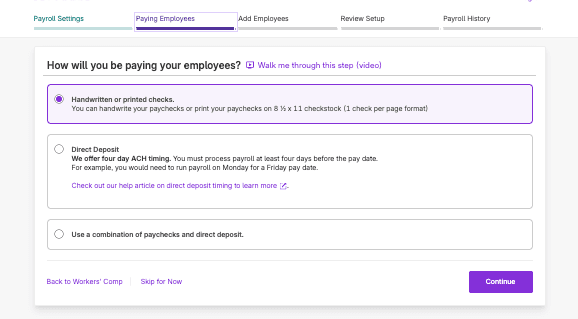
Most platforms we reviewed, including Patriot, offer payroll software with free direct deposit. Paperless payments are available upon approval in Patriot Payroll for W-2 employees and 1099 contractors, along with printed or hand-written paper checks.
Patriot’s standard direct deposit speed (four days) is on par with competing payroll systems for small businesses. Established payroll customers may qualify for expedited, two-day direct deposit. For auto-payroll, Patriot collects payroll liabilities five to six days before payday.
For comparison, OnPay deposits payments in two to four days, depending on a risk assessment. Gusto transfers funds in two or four days, with next-day pay available on some plans. QuickBooks Workforce (formerly QuickBooks Payroll) has two-day, five-day, same-day and next-day direct deposit.
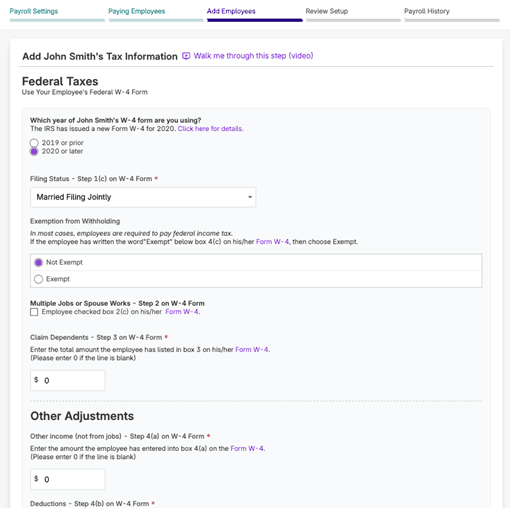
With the full-service plan, Patriot Payroll will handle federal, state and local payroll tax filing and deposits. It creates payroll tax filing forms 940 and 941 and sends them to tax agencies quarterly and annually. Patriot also provides free year-end payroll tax filings, including W-2s for employees and 1099s for contractors. Digital copies go directly to contractor or employee self-service portals, or you can print them on plain paper.
Most Patriot Payroll competitors file payroll taxes on your behalf. Some manage tax forms for special business types. For example, OnPay creates and files IRS Form 943 for agricultural businesses, but Patriot does not. Check out our OnPay review to see how it supports family farms and small agricultural companies.
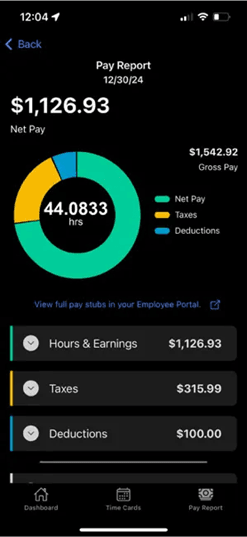
Payroll and HR platforms often provide time off and pay stub portals. Self-service tools come free with Patriot Payroll software for W-2 employees and contractors. Team members can access and update information online or from My Patriot mobile apps for Android and iPhone. However, new hire self-onboarding only works in a web browser.
For this review, we sent invites from the payroll software to employees and contractors. From there, workers entered tax and direct deposit details. Like Patriot Payroll software, the portal is easy to navigate. It shows pay stubs, tax forms and payroll reports that list all payments to date.
Teams can use the employee self-service portal to track personal and vacation days. It doubles as a time clock for accounts with Patriot’s time and attendance add-on. When employees update federal tax withholdings online, Patriot notifies employers via email.
Patriot Payroll integrates with QuickBooks and Patriot Accounting software. By comparison, competitors offered more integrations with top accounting programs, such as Xero. After connecting payroll to Patriot or QuickBooks accounting, the system records a journal entry every time you run payroll. Unfortunately, it doesn’t send contractor payroll to QuickBooks.
Here’s how benefits integrations work in Patriot:
Patriot Payroll costs $17 monthly plus $4 per paid worker for basic, and $37 monthly plus $5 per paid worker for full-service. Compared to other cloud payroll solutions, Patriot is the cheapest payroll software for small teams. In addition, the vendor frequently offers promotions, like 50% off for three months, which start after your 30-day free trial ends.
We loved Patriot’s transparent pricing. It’s upfront about its total payroll service costs, and we didn’t find any hidden fees. Patriot Payroll plans include unlimited payroll runs, free integrations and unlimited users.
Patriot’s full service payroll pricing adds tax filing in one state. It costs $12 per month per additional state. If you don’t run payroll during the month, you only pay the base monthly price, not the per-employee fee.
Compare Patriot Payroll full service vs. basic pricing and features below:
Plan | Pricing | Features |
|---|---|---|
Basic | $17 monthly plus $4 per employee or contractor |
|
Full Service | $37 monthly plus $5 per employee or contractor | Everything in the Basic plan, plus:
|
You can use Patriot accounting software with its payroll module. The vendor offers two unlimited-user plans, both of which are free to integrate with Patriot Payroll software. Basic is $20 per month, while Premium costs $30 per month.
In addition, there are two add-ons available for Patriot Payroll:
Setting up Patriot Payroll software for the first time only took us a couple of hours. To save time, we gathered information using Patriot’s printable payroll setup checklist. After that, the onboarding wizard walked us through each step. Alternatively, you can schedule a time online to meet with a dedicated onboarding coordinator who will walk you through the setup process in real time.
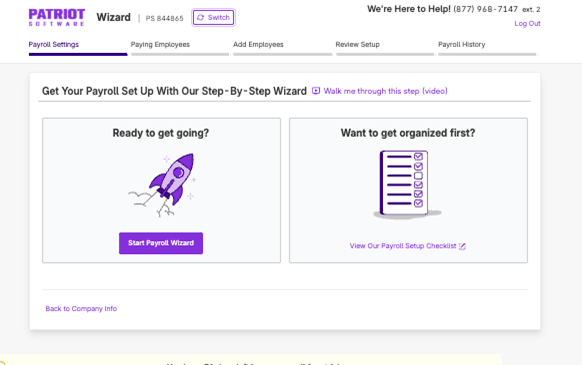
Most steps include an optional video walk-through that highlights various terms, so you can click them to see an explanation or view a longer support article. Patriot can generally verify your identity automatically, but in some cases, a business owner may need to upload a photo ID. It confirms banking information through Plaid, which connects to many financial institutions. If using a local bank or credit union, you may need to enter details manually.
For full-service payroll setup, the wizard requests a digital signature for IRS Form 8655. This step allows Patriot to file payroll taxes and make deposits on your behalf.
After finishing setup, you can apply for direct deposit. The system requires additional details, including your business NAICS code and your commercial bank account statement. It takes up to 10 days for Patriot to approve your direct deposit application. In the meantime, you can invite employees to onboard and view their progress in the dashboard.
Patriot has guides and tutorials for most topics, including how to use the employee portal. These resources, along with live payroll setup assistance, helped us quickly configure everything.
Patriot offers live chat, phone support and email assistance Monday through Friday from 9 a.m. to 7 p.m. Eastern Time. The U.S.-based customer service team was friendly and knowledgeable during interactions. Our experience was similar to that of many users, with customers rating Patriot Payroll highly across professional review channels.
We especially liked the live chat option in the payroll software, as this helped us get answers quickly without switching devices or tabs. Also, there are separate email addresses for general and tax filing assistance. For certain services, such as tax return amendments, Patriot charges premium support fees.
If you need help over the weekend or after business hours, you can send a message, and Patriot will respond during regular hours. Larger companies or those who handle admin tasks like payroll or new hire paperwork over the weekend may prefer 24/7 customer support. We discuss our experiences with ADP’s customer service in our ADP Payroll software review.
Patriot’s beginner-friendly platform makes it a top payroll solution for small employers. But the right software for your business depends on workforce size and location. We came across these limitations when reviewing Patriot Payroll:
Our team evaluated dozens of cloud payroll services before selecting the top solutions for small businesses. We spent over 30 hours researching core payroll management software, participating in product demos and interacting with customer support. During free trials, we tested payroll automation features, employee self-service tools and integrations with accounting and timeclock systems. We also considered ease of use and scalability for companies with W-2 employees and 1099 contractors.
While analyzing independent user reviews and ratings, we looked for recurring complaints and limitations. In addition, our side-by-side payroll software comparison examined multi-state payroll availability, payment methods, HR and tax compliance support, direct deposit timing and payroll software fees, including monthly and per-employee prices.
By following best practices for choosing online payroll systems, we were able to determine how each platform handled small business payroll tasks. From there, we tested individual features for specific use cases. To find the best payroll software for small teams, we prioritized a simple setup process, minimal training requirements, affordability and robust customer support.
We recommend Patriot Software for…
We don’t recommend Patriot Software for…
