Business.com aims to help business owners make informed decisions to support and grow their companies. We research and recommend products and services suitable for various business types, investing thousands of hours each year in this process.
As a business, we need to generate revenue to sustain our content. We have financial relationships with some companies we cover, earning commissions when readers purchase from our partners or share information about their needs. These relationships do not dictate our advice and recommendations. Our editorial team independently evaluates and recommends products and services based on their research and expertise. Learn more about our process and partners here.
Business.com earns commissions from some listed providers. Editorial Guidelines.
Table of Contents
Editors Score:9.2/10
RingCentral RingCX helps businesses deliver exceptional inbound customer service. Its AI-powered tools, omnichannel support and workforce management features help agents resolve issues faster and improve every customer interaction.
Pros
RingCX is easy to deploy and use, helping teams get up and running without a steep learning curve.
AI-powered quality management, analytics and workforce management tools help supervisors coach agents and improve team performance.
We love the queue callback feature, which lets callers keep their place in line instead of waiting on hold.
Cons
Many of RingCX's most advanced AI, analytics and workforce management features require higher-tier plans or add-ons.
The platform's extensive features and customization options may be more than smaller businesses need.
Enterprise organizations must contact sales for custom pricing and advanced capabilities.
Looking for more options?
Check out The Best Call Center Software In 2026 business.com recommends.
RingCentral RingCX is our choice for the best call center software for inbound customer service teams. It combines AI-powered tools, omnichannel support and workforce management features in an easy-to-use cloud platform that helps businesses deliver faster, more consistent customer service. RingCX also gives supervisors the data analytics, quality management and coaching tools they need to improve agent performance.
You can deploy RingCX quickly, and its extensive library of prebuilt integrations and APIs makes it easy to connect with the software your business already uses. As your customer service operation grows, RingCX can scale with advanced AI capabilities, automation and additional channels.
RingCentral RingCX Editor's Rating:
9.2 / 10
Pricing
8.5/10
Built-in features
9.5/10
Integrations
9.5/10
Ease of use
9.2/10
Call routing options
9.5/10
Why We Chose RingCX for Inbound Customer Service Teams
RingCentral RingCX is our choice for the best call center software for inbound customer service teams because it combines AI-powered tools, omnichannel support and workforce management features in one intuitive platform. The software gives supervisors everything they need to coach agents, monitor performance and maintain consistently high service standards while helping customer service teams resolve issues quickly and efficiently.
RingCX’s AI-powered tools are thoughtfully integrated throughout the platform. AI Agent Assist provides agents with real-time guidance during customer interactions, while AI Quality Management, AI Supervisor Assist and interaction analytics help managers identify coaching opportunities and improve team performance over time.
RingCX also excels at helping businesses deliver seamless omnichannel customer service. Voice, SMS, email, web chat and social messaging are all managed through a clean, easy-to-use interface, while intelligent routing helps connect customers with the right agent based on skills, availability and other criteria. Together, these features improve first-contact resolution and create a more consistent customer experience.
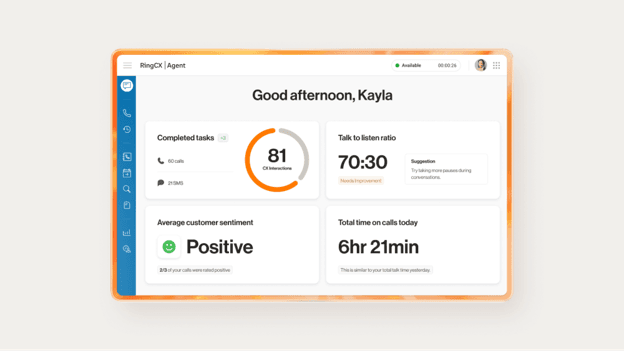
RingCentral RingCX gives agents and supervisors AI-powered insights into customer interactions, helping improve coaching, service quality and overall team performance. Source: RingCentral
Tip
The best call center software is only part of the equation. Building efficient customer service also requires well-trained agents, clear workflows and performance metrics that help supervisors identify coaching opportunities.
Ease of Use
RingCX is easy to deploy and navigate despite its robust feature set, as agents and supervisors can access the platform through a web-based interface or directly within the RingCentral app. RingCentral also offers more than 500 prebuilt integrations and APIs, including Outlook, Microsoft 365, Chrome, Salesforce and Zendesk, making it straightforward to connect RingCX with the tools your team already uses.
RingCX has separate interfaces for agents, supervisors and admins, each tailored to the user’s role. The layouts are clean and intuitive, and switching between features is quick. Rather than overwhelming every user with the same controls, RingCentral gives each role access to the tools they need most.
Agents can manage customer interactions across voice and more than 20 digital channels from a single workspace, while supervisors have easy access to coaching tools, AI-powered quality management, analytics, reporting and live monitoring features. Administrators have a more comprehensive dashboard where they can manage users, communication channels, routing, workflows, automations and AI tool access.
RingCentral does a nice job keeping each dashboard focused on the person using it. Agents aren’t distracted by settings they’ll never touch, while supervisors and admins have more advanced controls when they need them. That makes RingCX much easier to learn than you’d expect from such a feature-rich and AI-forward platform.
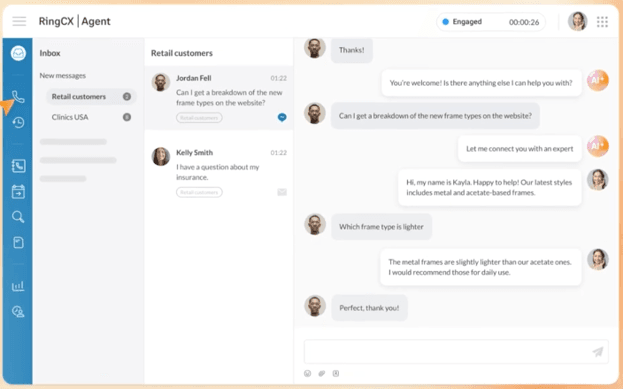
RingCentral RingCX gives agents a clean, unified workspace for managing customer conversations across channels, with AI-powered assistance available during live interactions. Source: RingCentral
RingCentral RingCX Features
RingCentral offers a comprehensive set of contact center tools that help businesses manage customer interactions, support agents and monitor performance. Below are some of the call center software features we found most valuable during our testing.
Analytics and Reporting
RingCX Analytics gives managers a comprehensive view of contact center performance through real-time dashboards, historical reporting and customizable reports. Businesses on higher-tier plans can also take advantage of AI-powered conversation intelligence and quality management tools to uncover deeper customer and agent insights.
Here’s a closer look at some of RingCentral’s most valuable analytics and reporting capabilities.
Real-time dashboards: RingCX Analytics provides customizable dashboards that display live contact center metrics, including queue activity, agent availability, service levels and interaction volumes. Supervisors can monitor performance in near real time, set alerts for important events and quickly identify issues before they affect customer service.
Historical reporting: Historical dashboards and reports help managers analyze long-term performance trends, evaluate agent productivity, monitor service level agreements (SLAs), forecast staffing needs and identify coaching opportunities. Users can drill into reports to better understand contact center performance over time.
Custom reports and dashboards: RingCentral includes more than 250 prebuilt reports and lets administrators create custom reports, dashboards and widgets tailored to their business. Reports can be organized by team or workflow, shared across teams and integrated with third-party business intelligence (BI) tools for more advanced analysis.
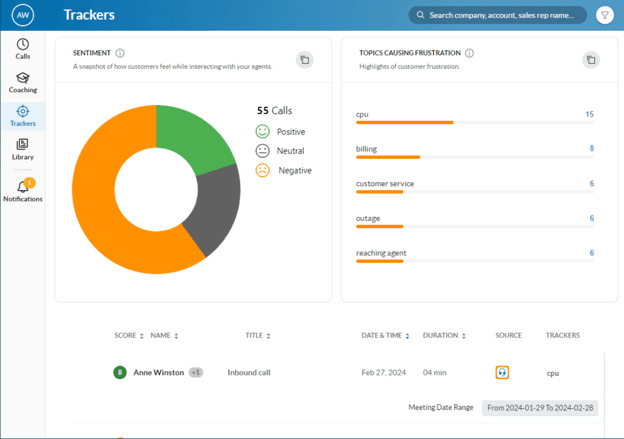
Conversation intelligence: RingCX uses AI-powered conversation intelligence to analyze customer interactions for sentiment, keywords, agent performance and coaching opportunities. Managers can review call transcripts, AI-generated summaries and scorecards to identify trends, improve customer experiences and deliver more targeted agent coaching.
RingSense Conversation Analytics uses AI to identify customer sentiment, recurring topics and coaching opportunities across customer conversations. Source: RingCentral
FYI
RingCX's analytics and reporting tools track key performance indicators (KPIs) such as average handle time, first-call resolution, service level and agent occupancy through real-time dashboards and historical reports.
Agent Training and Support
RingCX gives supervisors several ways to coach agents during live customer interactions. In addition to monitoring calls, supervisors can use the Whisper feature to privately coach agents without the customer hearing or Barge into a conversation when they need to actively assist. Supervisors can also monitor digital interactions, view live transcripts and summaries, and step in with full context when AI Supervisor Assist (more on this below) flags a conversation that may require intervention.
We also like that RingCX lets supervisors create scripts for different call types, helping agents follow consistent processes while still delivering personalized customer service. Combined with real-time coaching tools, these customizable scripts give new hires extra guidance and help experienced agents stay on message.
RingCX’s AI capabilities extend well beyond traditional AI chatbots. Highlights include:
Intelligent Virtual Agent (IVA): Handles routine customer inquiries across voice and digital channels, automating common requests and escalating more complex issues to a live representative when needed. This helps reduce call volumes and frees agents to focus on conversations that require empathy, critical thinking and personalized service.
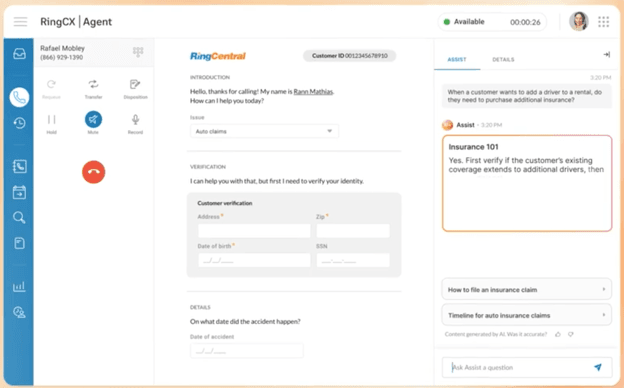
AI Agent Assist: Listens to conversations in real time and surfaces relevant answers, knowledge base articles and suggested responses directly within the RingCX interface. Agents can even ask AI questions proactively without leaving the conversation, reducing time spent searching through documentation.
AI Supervisor Assist: Provides real-time alerts, live transcripts and call summaries that help supervisors pinpoint coaching opportunities and join conversations with full context and understanding when intervention is needed.
Together, these AI-powered tools help reduce handle times, improve first-contact resolution and make both agents and supervisors more effective.
AI Agent Assist provides agents with real-time response suggestions and relevant knowledge base content without requiring them to leave the customer conversation. Source: RingCentral
Workforce Management and Engagement
Included with RingCX Elite and available as an add-on for lower-tier plans, RingCentral’s AI Workforce Management tools help managers optimize staffing while giving agents more flexibility. We were particularly impressed by the following features:
Quality management: Managers receive AI-powered automated scorecards, real-time call summaries, conversation analytics and performance insights that make it easier to identify coaching opportunities and support agent development.
Conversational insights: RingCX analyzes customer conversations to surface trends, track sentiment and uncover opportunities to improve customer service and agent performance.
Shift management: Agents can request preferred shifts, bid on open schedules, swap shifts with co-workers, and receive schedule updates through the self-service workforce management portal and mobile app. This reduces scheduling friction for managers while giving employees more control over their work schedules.
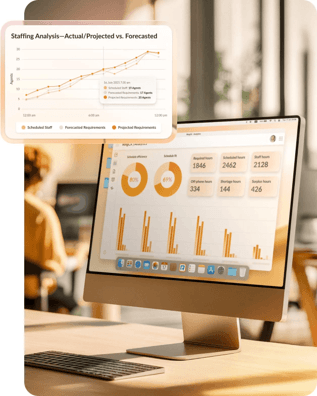
AI-powered forecasting and scheduling: RingCentral analyzes historical interaction data to forecast staffing needs, predict contact volumes and generate optimized schedules. Managers can also make intraday staffing adjustments and monitor schedule adherence in real time as demand changes.
RingCentral AI Workforce Management analyzes staffing demand, forecasted requirements and scheduling metrics to help managers optimize workforce planning. Source: RingCentral
Omnichannel Call and Message Routing
RingCX helps businesses deliver consistent customer service across voice and more than 20 digital channels, including SMS, email, web chat, social media and messaging apps. Rather than treating each communication channel separately, RingCX unifies customer conversations and intelligently routes them to the most appropriate agent based on your business rules and AI-powered insights.
Some of the omnichannel routing features we found most impressive include:
Skills-based and AI-powered routing: Route voice and digital interactions to the agent best equipped to resolve the issue based on skills, availability, priority, customer history and AI analysis. RingCX also supports multiple routing strategies, including skills-based, fixed-order, round robin, longest idle and time-based routing.
Intelligent omnichannel routing: Whether a customer reaches out by phone, email, SMS, web chat or social messaging, RingCX automatically routes the interaction to the right team or agent. AI analyzes message content and metadata to help ensure customers reach the most appropriate representative on the first contact.
Interactive Voice Response (IVR): RingCentral’s AI-powered IVR system lets businesses build customized call flows with drag-and-drop tools instead of custom coding. Customers can complete self-service tasks or be routed to the appropriate department based on their responses.
Queue callbacks: Rather than waiting on hold, callers can request a callback while keeping their place in line. When an agent becomes available, RingCX automatically routes the callback to the appropriate representative with the customer’s information already attached to the interaction.
Automatic Call Distribution (ACD): Supervisors can create routing rules for different departments, products, locations or priorities so inbound calls are distributed efficiently, even during periods of high demand.
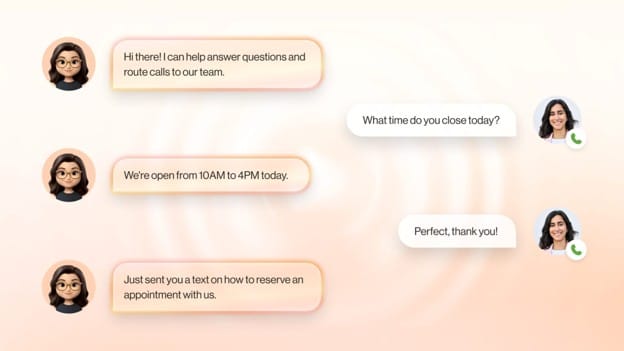
AI Receptionist (optional add-on): Available as an add-on, AI Receptionist acts as a virtual receptionist to answer inbound calls, greet callers naturally, handle common questions and route customers to the appropriate department before a live agent becomes involved.
These routing capabilities help reduce wait times, improve first-contact resolution and ensure customers receive consistent support regardless of which communication channel they choose.
The AI-powered virtual agent can answer routine customer questions, intelligently route callers to the right department and continue conversations across multiple communication channels. Source: RingCentral
Outbound Calling and Call Blending
While RingCX excels at inbound customer service, it also gives sales teams the tools they need to run organized outbound calling campaigns and win customers over the phone. Here are some highlights:
Multiple dialing modes: If your business relies on outbound calls to book appointments, qualify leads or close sales, RingCX supports multiple dialing modes to improve productivity for agents. We particularly liked the platform’s predictive dialer, which automatically places calls so agents spend less time waiting between conversations. RingCX also offers preview, progressive and manual dialing modes, giving businesses flexibility based on their sales strategy and compliance requirements.
Call blending: If your business needs reps to handle both inbound and outbound calls during the same shift, RingCX’s call blending feature can help. During busy times, agents are pulled into the inbound queue automatically. As call volumes taper off, they’re returned to outbound campaigns so they can pick up where they left off.
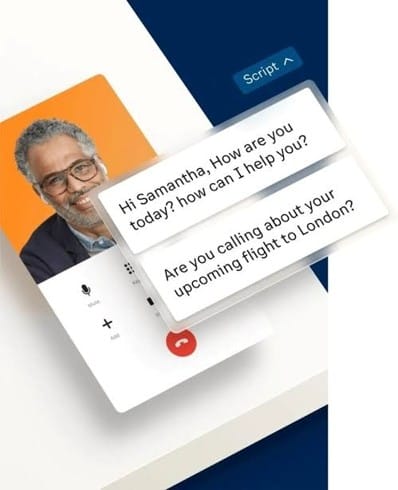
Call scripts: We also like how RingCX lets administrators create customizable call scripts and workflows through a visual interface rather than custom coding. This makes it easier to guide agents through conversations, maintain consistent messaging and support compliance requirements in highly regulated industries. (If your organization has especially stringent compliance or cybersecurity requirements, Five9 is another excellent option to consider. Read our Five9 review to learn more.)
RingCX provides customizable call scripts that help agents deliver consistent, compliant customer interactions during live conversations. Source: RingCentral
Third-Party Integrations
RingCentral’s App Gallery includes more than 500 prebuilt integrations spanning CRM, productivity, collaboration and contact center software. We like that businesses can connect RingCX with the tools they already use while also extending the platform with specialized AI and contact center applications. Here are a few integrations we think users will find valuable.
Salesforce: Sync customer information with RingCX so agents have relevant CRM data available during customer interactions.
Aigent Real-time Assistant: Delivers real-time coaching and suggested responses based on what customers are saying during live conversations.
Cognitive View: Helps organizations monitor customer interactions for compliance, quality assurance, risk and fraud detection.
Noise Firewall: Reduces background noise during calls, making conversations clearer for both agents and customers.
Apps are organized into more than 20 categories, including analytics, automation, customer support, productivity, speech and storage. Developers can also build custom integrations using RingCentral’s APIs and SDKs when they need more specialized workflows.
Bottom Line
RingCX is designed for customer-facing support and sales teams. If you're simply looking for a business phone system with voice, messaging and video conferencing, RingEX may be a better fit — and typically costs less. Our detailed RingEX review explains more.
RingCX Pricing
RingCX offers four contact center plans that scale from small support teams to enterprise organizations. Here’s a look at what’s available (prices shown reflect a discount for annual payment):
Plan
Price
Key features
Best for
Standard
$65/user/month
Voice and 20+ digital channels
Omnichannel routing
IVR
Skills-based routing
Predictive/progressive dialers
Queue callback
CRM integrations
Call recording
Reporting
AI Receptionist available as an add-on
Small contact centers
Professional
$95/user/month
Everything in Standard, plus:
AI Quality Management
AI Agent Assist
Growing teams
Elite
$145/user/month
Everything in Professional, plus:
AI Interaction Analytics
AI Supervisor Assist
AI Workforce Management
Larger support operations
Enterprise Contact Center
Custom pricing
Everything in Elite, plus:
AI routing
Workflow automation
Proactive AI agents
Copilot tools
Knowledge management
Advanced workforce engagement features
Large enterprises
Additional pricing considerations include the following:
AI add-ons are available: RingCX offers several optional AI add-ons, including AI Receptionist, AI Quality Management, AI Agent Assist, AI Interaction Analytics, AI Supervisor Assist and AI Workforce Management. Availability varies by plan, and some features are included in higher-tier subscriptions.
Enterprise unlocks the most advanced AI capabilities: Features such as AI routing, workflow automation, copilot tools, proactive AI agents and knowledge management are reserved for the Enterprise Contact Center plan.
Core contact center tools are included across all plans: Every RingCX plan includes omnichannel routing, IVR, predictive and progressive dialers, integrations with many of the best CRM software platforms, call recording, reporting and queue callbacks.
Annual billing offers the lowest pricing: The published prices are based on annual billing, while monthly billing costs up to 15 percent more.
Implementation and Onboarding
We like how approachable RingCX is despite the platform’s depth. Businesses with relatively straightforward contact center needs can get the core platform up and running quickly, while organizations with more complex routing rules, AI features or third-party integrations have the option of working with RingCentral’s Professional Services team.
Once your account is set up, administrators can add agents and supervisors, create teams, configure communication channels and build call flows through a web-based admin console. We especially liked the drag-and-drop tools for designing IVR menus and routing workflows, which eliminate much of the custom coding traditionally associated with contact center deployments.
Companies can start with the essentials — voice channels, queues, routing rules and agent permissions — then add more advanced capabilities over time, including workforce engagement management, AI-powered quality monitoring, outbound campaigns and CRM integrations.
For larger implementations, RingCentral Professional Services can help with IVR design, automatic call distribution (ACD) configuration, API development, telephony and network setup, as well as administrator and agent training. RingCentral also coordinates implementation for many advanced AI and third-party integrations through dedicated project managers and vendor implementation teams.
Tip
RingCentral doesn't publicly disclose Professional Services pricing, so businesses planning a large or highly customized deployment should request an implementation quote as part of the sales process.
Customer Support
RingCentral backs RingCX with around-the-clock support and one of the more comprehensive self-service ecosystems we evaluated. In addition to phone and chat support, customers have access to extensive documentation, free training resources and optional Professional Services for more complex deployments.
24/7 support: RingCentral offers 24/7 technical support by phone, live chat and an online case portal. During our testing, we found it easy to access support directly from both the product and the company’s support website. An AI-powered virtual assistant can answer common questions before connecting users with a live support representative when needed.
Self-service resources: Businesses that prefer finding answers on their own will appreciate RingCentral’s extensive knowledge base. The company provides searchable setup guides, troubleshooting articles, administrator documentation and product-specific RingCX help centers, along with FAQs and system status updates.
Training and education: We were impressed by the breadth of RingCentral’s training resources. RingCentral University offers free, on-demand courses for administrators, supervisors and agents, while the company also provides short video tutorials, webinars, ebooks, release notes and other learning materials to help customers get the most from the platform.
Professional Services: Organizations with more complex contact center deployments can purchase assistance from RingCentral Professional Services. The team can help with implementation planning, migrations, workflow design, custom integrations, administrator training and other services that can speed deployment and reduce the burden on internal IT teams.
Limitations
RingCX is a feature-rich contact center platform, but there are a few considerations to keep in mind before choosing it.
Advanced AI features can increase costs: RingCX includes robust contact center capabilities, but several of its most powerful AI tools — including AI Receptionist, AI Agent Assist, AI Quality Management, AI Interaction Analytics and AI Workforce Management — require higher-tier plans or additional subscriptions. Businesses should factor those costs into their budget when comparing platforms.
The platform may be more than some businesses need: RingCX’s extensive AI, routing, workforce management and customization capabilities make it an excellent choice for growing and enterprise contact centers, but they also add complexity. Businesses looking for a simpler, plug-and-play contact center solution may be better served by GoTo Connect Contact Center, which is easier to deploy and manage while still offering the core call center features many small businesses need. Check out our review of GoTo Connect Contact Center to learn more.
Budgeting takes a little more research: While RingCentral publishes pricing for its RingCX Standard, Professional and Elite plans, optional AI add-ons and Professional Services are priced separately. Businesses planning to use several advanced features should request a customized quote to understand the total cost before purchasing.
Did You Know?
Twilio Flex is another excellent call center platform option for organizations that need a highly tailored solution. Read our review of Twilio Flex for more details and pricing.
Methodology
To help small businesses choose the best call center software, we evaluated the leading platforms on the market. We assessed each solution’s ease of use, implementation process, pricing, customer support and overall value, along with core contact center capabilities such as omnichannel communications, inbound and outbound call management, AI-powered features, workforce management, reporting and analytics, integrations and self-service tools. Whenever possible, we participated in product demos and free trials to better understand how each platform performs in real-world business environments.
When selecting the best call center software for inbound customer service teams, we placed particular emphasis on omnichannel routing, agent coaching and training, AI-powered customer service tools, reporting and analytics, and integrations that help businesses deliver faster, more consistent customer support.
RingCX FAQs
Yes. RingCX is available as a standalone contact center platform and no longer requires a RingEX subscription. If you use both products, they work together seamlessly, giving your employees and contact center teams a shared communications platform.
Yes. In addition to inbound customer service, RingCX supports outbound sales and service campaigns with predictive, progressive, preview and manual dialing modes. The platform also includes call blending, allowing agents to move automatically between inbound and outbound work as call volumes change.
Who should use RingCX?
RingCX is designed for businesses that rely heavily on customer service. If your team handles a high volume of customer interactions across multiple channels and wants advanced AI, reporting and workforce management tools, RingCX is an excellent choice. Smaller teams with simpler needs may prefer a less feature-rich platform.
Bottom Line
We recommend RingCentral RingCX for …
Businesses that want an AI-powered contact center with excellent inbound customer service tools.
Teams that need to manage customer conversations across voice, email, chat, SMS and social media from one platform.
Growing organizations that want advanced reporting, workforce management and outbound calling capabilities.
We don’t recommend RingCentral RingCX for …
Small businesses that want a simple, plug-and-play contact center.
Organizations that don’t need advanced AI features or workforce management tools.
Businesses looking for the lowest-cost contact center solution.
Mark Fairlie brings decades of expertise in telecommunications and telemarketing to the forefront as the former business owner of a direct marketing company. Also well-versed in a variety of other B2B topics, such as taxation, investments and cybersecurity, he now advises fellow entrepreneurs on the best business practices.
At business.com, Fairlie covers a range of technology solutions, including CRM software, email and text message marketing services, fleet management services, call center software and more.
With a background in advertising and sales, Fairlie made his mark as the former co-owner of Meridian Delta, which saw a successful transition of ownership in 2015. Through this journey, Fairlie gained invaluable hands-on experience in everything from founding a business to expanding and selling it. Since then, Fairlie has embarked on new ventures, launching a second marketing company and establishing a thriving sole proprietorship.