Your free business.com+ membership unlocks exclusive tech deals and advisor support
Join Free
BDC Hamburger Icon

Menu

Close
BDC Logo with Name
Search Icon
Search Icon
Toast logo
Advertising Disclosure
Close
Advertising Disclosure

Business.com aims to help business owners make informed decisions to support and grow their companies. We research and recommend products and services suitable for various business types, investing thousands of hours each year in this process.

As a business, we need to generate revenue to sustain our content. We have financial relationships with some companies we cover, earning commissions when readers purchase from our partners or share information about their needs. These relationships do not dictate our advice and recommendations. Our editorial team independently evaluates and recommends products and services based on their research and expertise. Learn more about our process and partners here.

Toast POS Review and Pricing

Natalie Hamingson headshot
Written by:
Natalie Hamingson, Senior Writer
author image
Editor verified:
Gretchen Grunburg,Senior Editor
Last Updated Sep 14, 2026
Business.com earns commissions from some listed providers. Editorial Guidelines.
Table Of Contents Icon

Table of Contents

Open row
Editors Score:9.5/10
Toast is our choice for the best restaurant POS system for online ordering. Its dynamic order throttling lets restaurants control order flow during peak times. Toast's delivery services, order and pay functions and loyalty programs are also top-notch.
Thumbs Up Pros
  • Toast's commission-free online ordering integrates directly with its POS and kitchen systems.
  • Dynamic order throttling helps restaurants manage online order volume during busy periods.
  • Menu updates can be managed centrally, including across Toast and integrated third-party delivery platforms.
  • Toast offers several ways to order, including direct online ordering, delivery and QR code ordering and payment.
Thumbs Down Cons
  • Toast requires restaurants to use its payment processing services, so you can't shop around for a third-party processor.
  • Toast Delivery Services has a maximum 10-mile delivery radius, which may be limiting for restaurants with a larger service area.
  • Restaurants can't use their own delivery drivers and Toast Delivery Services at the same time.
  • Toast works only with approved hardware, and new customers must purchase new networking equipment rather than reuse an existing Toast network setup.
Toast logo
Editor's Rating9.5/10

Toast is one of the industry’s best restaurant point-of-sale (POS) systems. The company excels at online ordering and delivery, with extensive options that provide an excellent experience for restaurants and customers. These features can help restaurants capture more orders while making takeout and delivery easier to manage. Restaurants can customize online menus and set online orders to auto-fire to the kitchen, reducing the need for staff to manually enter orders. Guests will appreciate the customized experience, where they can save order information and convey special instructions.

Toast Editor's Rating:

9.5 / 10

Pricing/value
9.4/10
Features
9.7/10
Customizations, add-ons and integrations
9.1/10
Ease of use
9.7/10
Customer support
9.4/10

Why We Chose Toast for Online Restaurant Ordering

Toast is a flexible POS system that can accommodate restaurants, bakeries and cafes of all sizes, whether they’re casual eateries or fine dining establishments. Restaurants can use Toast to accept payments, manage front- and back-of-house operations and enable online ordering.

It’s also a great bar POS system, with many built-in features bar owners will appreciate. For example, its QR-code bar service prevents employees from starting an order before receiving customer payment — a significant advantage in crowded environments where it’s easy to lose track of customers.

We were impressed by Toast’s broad selection of restaurant-specific hardware and helpful software add-ons, with a significantly greater breadth of features than most POS systems we’ve reviewed. Its loyalty programs and Order & Pay feature, which allows diners to place orders directly from their phones, particularly stood out to us.

Where Toast excels the most, though, is online ordering. Guests can easily order and schedule meals online, save orders, pre-order meals and use express checkout for a seamless experience. Toast’s online ordering system is integrated directly with its POS software, with features designed to streamline things for staff when business gets busy. Restaurants can use order throttling to help manage demand and temporarily snooze online ordering when necessary. For these reasons, we chose Toast as the top restaurant POS system for online ordering.
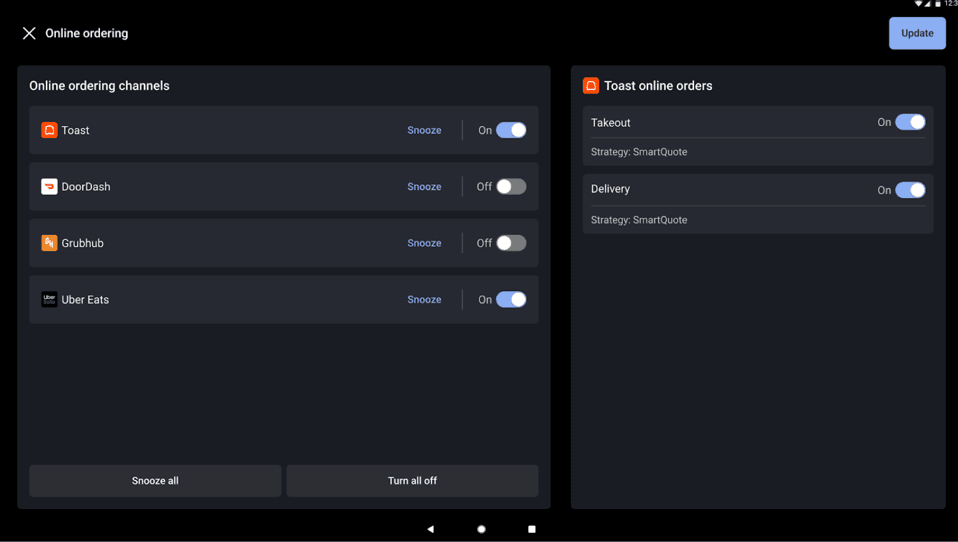
Toast online ordering controls showing Toast, DoorDash, Grubhub and Uber Eats ordering channels with snooze and on-off options.
Toast lets restaurants manage Toast and third-party ordering channels from one screen, including the ability to snooze individual channels when things get busy. Source: Toast
Did You Know?Did you know
Direct online ordering can help restaurants maintain control over the customer relationship. Toast gives restaurants access to guest data from direct orders, which they can use with the platform's loyalty and marketing tools.

Ease of Use

Toast’s POS system is intuitive and easy to use, making it clear why more than 180,000 restaurant locations use the platform. These user-friendly features especially captured our attention throughout our research of the platform:
  • Simplified hardware options: We saw hardware options from Toast to fit just about any restaurant ordering scenario, all designed to simplify the server and customer experience. For example, servers can easily take orders, collect payments and request guest feedback using Toast’s in-restaurant tablets. Toast’s mobile functionality speeds up the ordering process and improves the customer experience.
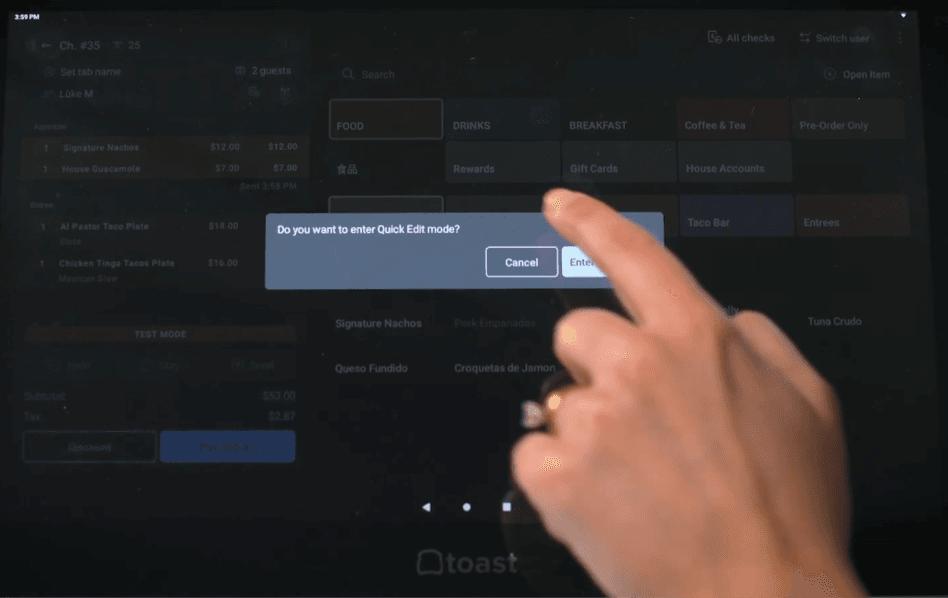
  • Easy customization options: Customization options are also straightforward. As we found while examining Toast’s features, subscribers are immediately provided with ways to use their menus more efficiently, including templates, modifiers and the ability to turn off options if you’ve run out of something. We really appreciated how easy it is to enter Quick Edit mode. All you have to do is hold down any menu button and select “Enter Quick Edit.” From there, users can take actions like changing prices or updating inventory.
Toast POS screen prompting a user to enter Quick Edit mode to make menu changes.
Toast’s Quick Edit mode makes it easy to update menu information directly from the POS. Source: Toast
  • Training resources: Toast provides ample training materials and tutorials to make life easier for everyone using the platform. If we couldn’t find answers in training materials, we could easily refer to Toast’s online knowledge base of information and troubleshooting tips.
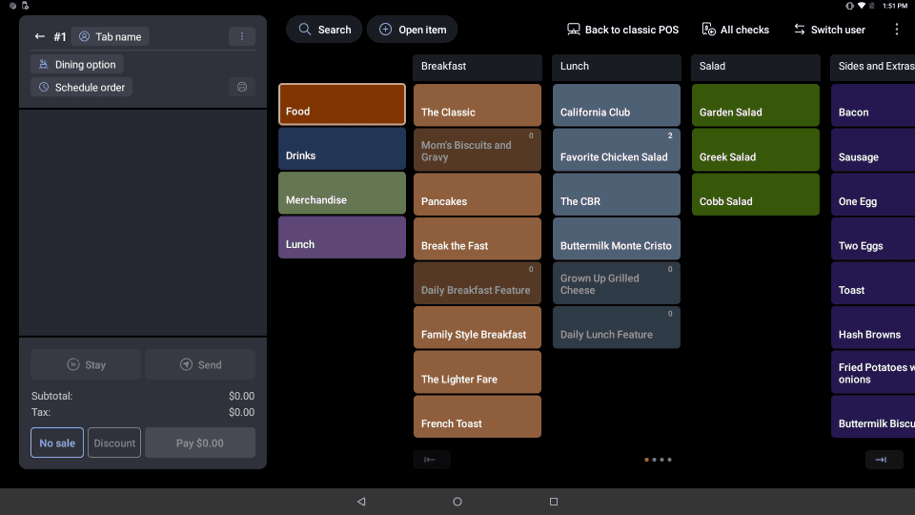
  • User-friendly interface: Toast’s intuitive layout offers different viewing options to fit your restaurant’s style and preferences. Open View lets staff see more menu items and modifiers at once, while Focus View offers the traditional ordering layout. We really appreciated the level of detail available all on one screen with Open View. The platform also offers Toast Tables, a color-coded view that allows staff to manage and quickly turn over tables in real time. The system was easy to understand, with available tables highlighted in light gray. We could even see which tables needed to be bussed before seating guests, color-coded in yellow.
Toast POS Open View showing menu categories, items and modifiers on a single ordering screen.
Toast’s Open View displays menu items and modifiers on one screen, making it easier to navigate customizable orders. Source: Toast

Toast Features        

Toast’s all-in-one POS system provides everything needed to run a restaurant, including restaurant-grade hardware like handheld devices and self-serve kiosks. Because Toast is a cloud-based POS system, it’s possible to manage important restaurant functions from any location.

Here are some notable POS system features Toast offers.

Online Ordering

We were impressed by Toast’s online ordering tools, which make things easier for both customers and restaurateurs. Here are some highlights:
  • Easy ordering for customers: Customers can easily place new orders on your website or through the Toast Local mobile app, formerly Toast TakeOut. You can opt to auto-fire those orders directly to the kitchen, reducing manual entry and the risk of errors. Customers can also pre-order meals, helping you manage orders during peak dining hours. They can also choose from multiple order fulfillment options.
  • Saved customer data: Toast’s features help support restaurants by fostering repeat business and customer loyalty. Guests can create an account with their payment information saved and view past orders via the Your Restaurants feature, making it easy to reorder their favorite dishes.
  • Easy menu management: All menu changes and updates are automatically reflected in available online ordering options, eliminating confusion. Additionally, online menus can be customized to account for product availability.
  • Online-order pausing and scheduling: Toast gives restaurants the ability to pause online orders so the kitchen doesn’t get overwhelmed. We also appreciated the ability to override normal order scheduling for special occasions like holidays and early closures in just a few easy steps. Just navigate to the Takeout and Delivery function on Toast Web, go to Online Ordering Hours, select +Add Override, choose the dates and hours you need to make changes to and save.
  • Restaurant features: Restaurants can customize the online ordering interface with their branding. Additionally, restaurants with multiple locations can enable a setting that ensures customers order from the correct location.
  • No commissions: Unlike some other vendors, Toast doesn’t charge commissions or hidden POS charges and fees for online ordering. Restaurants still pay the applicable credit card processing fees on orders placed through Toast.
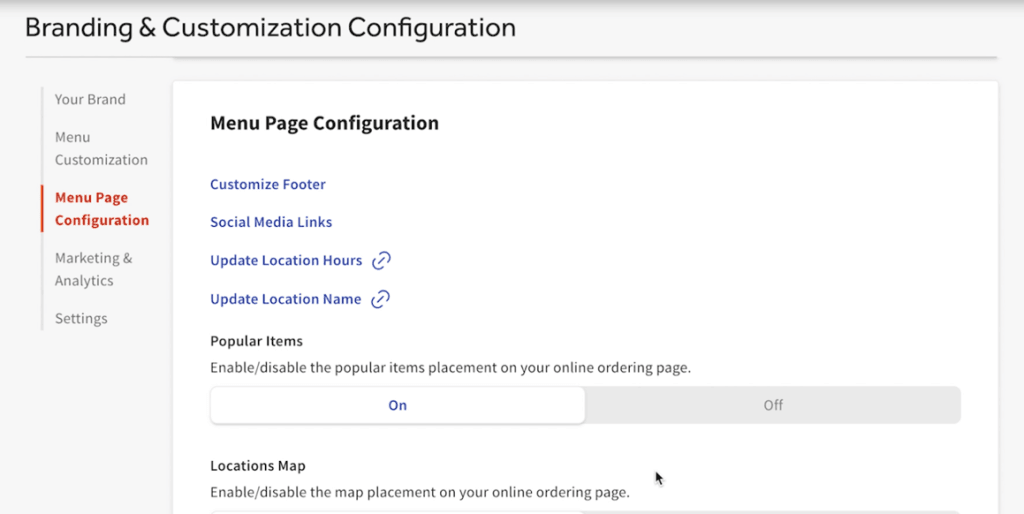
Toast online ordering settings showing branding and menu page customization options.
Toast gives restaurants options to customize their online ordering pages, including branding, location information and menu features. Source: Toast

Toast Websites

We really like the Toast Websites option, which incorporates Toast functions in one place, while making it easy for restaurants to add an SEO-friendly webpage to their domain. Reservations, online ordering, loyalty programs, marketing tools and a digital menu are all available to your customers online.

You won’t have to hire web developers or learn how to incorporate these functions. Toast Websites’ plug-and-play nature makes it quick and easy to produce a professional, clean-looking site that syncs seamlessly with your POS system. Like everything else with Toast, the interface is user-friendly and makes quick edits easy. For instance, if you need to make an update to your hours, all you have to do is navigate toward the bottom of the menu for the Quick Links feature and select Update Location Hours.
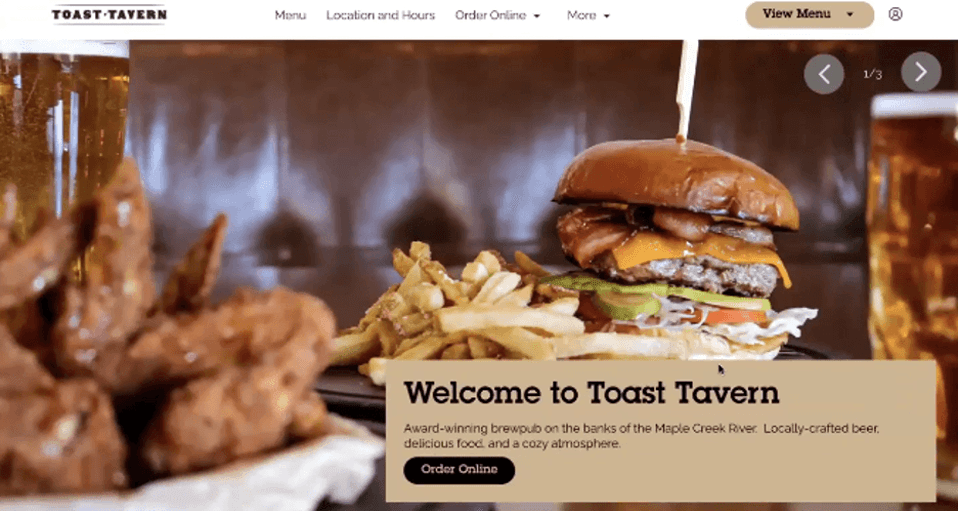
Toast Tavern website showing restaurant branding, menu navigation, location information and an online ordering option.
Toast Websites lets restaurants create a branded site with features like menus, location information and online ordering. Source: Toast

Delivery Services

We like how Toast handles its delivery service. While delivery benefits customers, many restaurants are hesitant to hire delivery drivers or work with unreliable delivery partners. Instead of employing your own delivery drivers, you can rely on Toast Delivery Services to dispatch third-party drivers through Uber Direct or DoorDash Drive to fulfill online orders.

This feature is completely integrated with your POS, so Toast Delivery Services orders follow the same workflow as any other online order. You can adjust minimum ticket requirements for delivery and set up your fee structure so guests take on a portion of delivery costs. Flat delivery fees vary by provider and delivery distance.
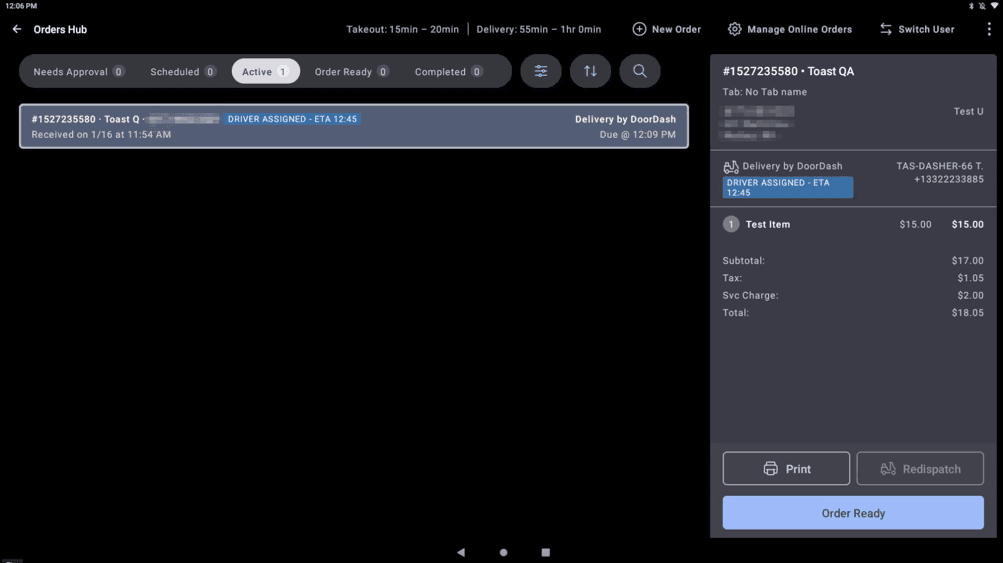
Toast Orders Hub showing an active DoorDash delivery with an assigned driver and estimated arrival time.
Toast lets restaurants track delivery orders, including driver assignments and estimated arrival times, directly from the Orders Hub. Source: Toast
FYIDid you know
One way to take your restaurant to the next level is to expand how customers can order. Toast Delivery Services lets you add delivery without hiring and managing your own team of drivers.

Order & Pay

Toast Order & Pay helps restaurants operate more efficiently by minimizing the back-and-forth between guests and staff. This add-on service allows customers who prefer in-person dining to use a QR code to place new orders and pay for their food on their mobile devices while inside the restaurant.

Restaurants can print stickers or table tents to display these codes. Customers can access the menu, modify orders and pay for their meals from their phones while seated at their table. The group ordering function especially stood out to us, allowing groups to combine their orders in one group tab. Everything appears on one check while guests can pay individually on their phones, saving time and energy for both servers and guests. Plus, guests don’t have to wait for a server to deliver their menu or the check, thereby speeding up table turnover.
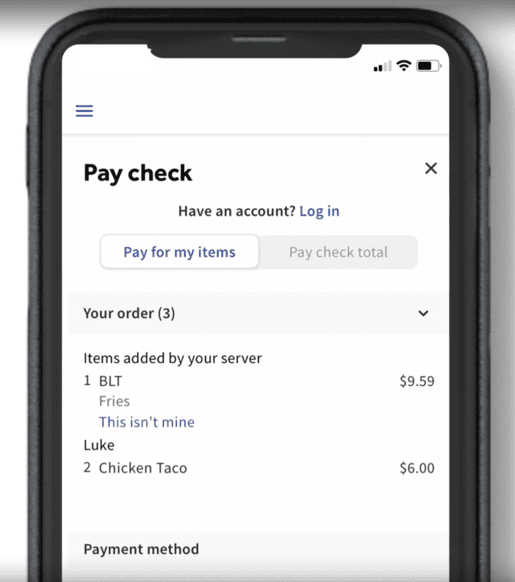
Toast Mobile Order & Pay screen showing options to pay for individual items or the full check.
When the group ordering function is enabled, guests can pay for their own individual items without the hassle of servers manually splitting checks. Source: Toast

Hardware

Toast’s available hardware is relatively standard for the industry but delivers what restaurants need. Here’s an overview: 
  • Toast Flex Countertop Terminal: The Toast Flex POS hardware is a flexible solution for host stands, kitchen displays and server stations. Adding the Toast Flex for Guest customer-facing module makes it easy for guests to pay.
  • Toast Go 3: The Toast Go 3 handheld device enables quick tableside service and is designed to mimic the ordering experience of a traditional POS system. It features a handle for easy carrying and offers all-day battery life, so servers don’t have to worry about recharging when they’ve got guests waiting during busy periods.
  • Toast Tap: This counter or attached device allows restaurants to accept contactless NFC mobile payments. Customers especially rave about Toast’s offline mode, so there’s no need to worry about lost business if there’s an outage in your area.
  • Kiosks: Toast’s self-service kiosks enable customers to place and customize their orders, which are then sent directly to the kitchen. Self-service kiosks are a great way to reduce wait times and improve staff productivity.
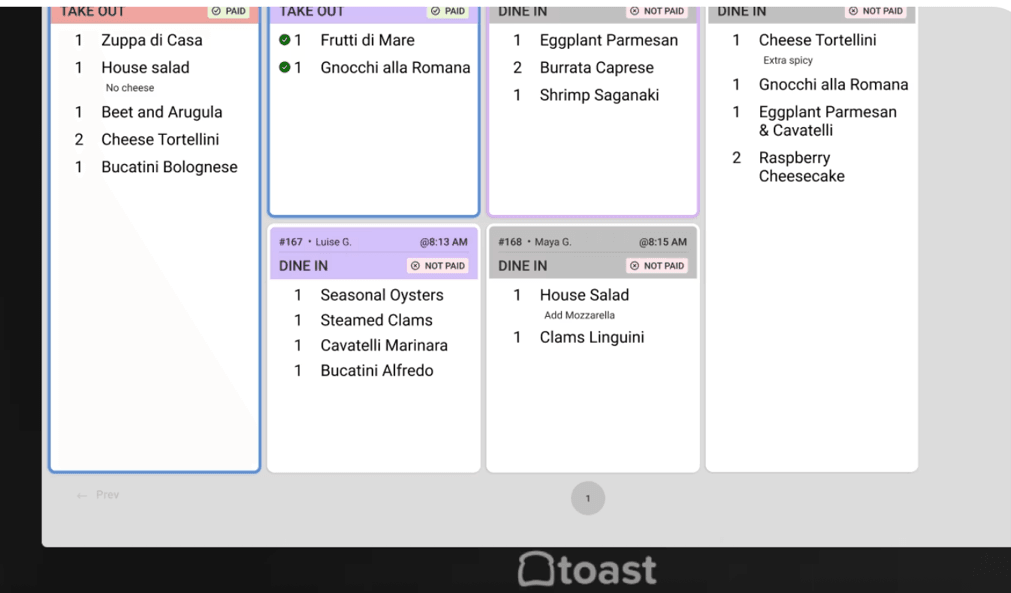
  • Kitchen Display System: This kitchen display system integrates with the POS system and allows kitchen staff to customize ticket views. They can be color-coded by time elapsed and separated by course, with visible countdowns for fired items.
Toast Kitchen Display System showing color-coded restaurant order tickets with items, modifiers and order status.
Toast’s Kitchen Display System gives kitchen staff a customizable view of incoming orders, with color-coded tickets that make it easier to track order status. Source: Toast

Customized Tipping

We like that Toast provides customized tipping options, including suggested tipping amounts. After navigating to the Customize Tip Percentages setting under the Tipping functionality, users have the option to display suggested tips as percentages, dollar amounts or a combination of both. Tips can be automatically calculated, while Toast Tips Manager provides additional options for pooling and distributing tips among restaurant staff.
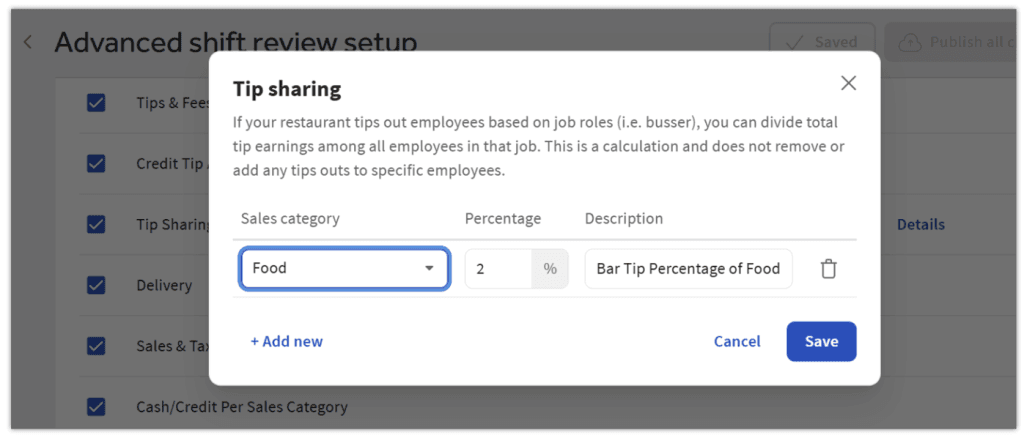
Toast tip sharing settings showing a percentage-based tip distribution rule for restaurant employees.
Toast gives restaurants options for setting up tip-sharing rules, including percentage-based distributions for different employee roles. Source: Toast
TipBottom line
Flexible tipping options can simplify restaurant management, especially when you're collecting and distributing tips across a larger staff.

Order with Google

Toast’s Google partnership allows restaurants to tap into an additional ordering channel. Customers can search for restaurants on Google Search and Maps, find your eatery and access your Toast Online Ordering page to place an order. Toast is also integrated with Google’s Ask Maps AI feature, so when Google users ask for restaurant recommendations, Toast can surface restaurant menus and allow them to place a mobile order right then. This integration gives Toast a more extensive online presence and greater control over ordering channels.
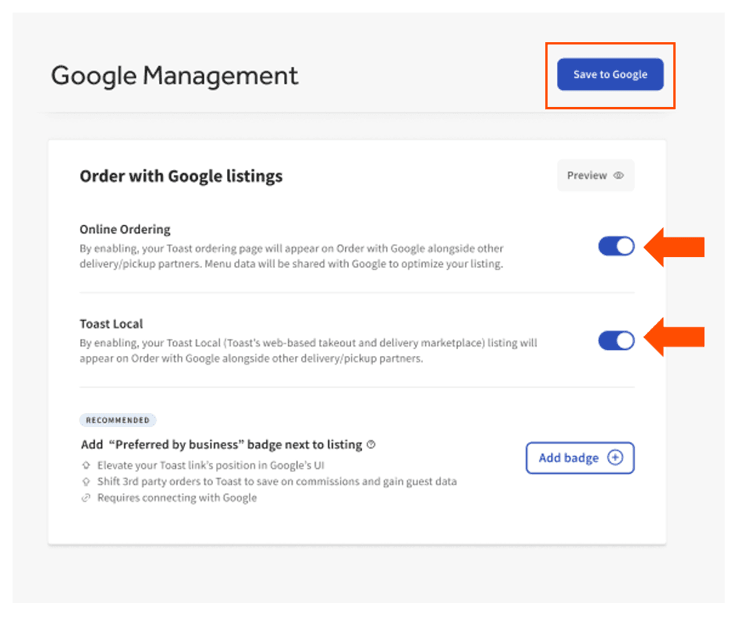
Toast Google Management settings showing options for Online Ordering and Toast Local listings.
Toast lets restaurants manage their Order with Google listings, including Toast Online Ordering and Toast Local, directly from the platform. Source: Toast

Loyalty Programs

We like that you can use Toast to boost engagement, drive long-term customer loyalty and earn repeat business. The system’s flexible customer loyalty program integrates directly with your POS system. Customers can earn points on purchases made in your restaurant or online, and you can customize how customers earn and redeem their points. For example, you can offer birthday rewards and sign-up bonuses.

Customers can use the Toast Local app (available on Android and iOS) to track their progress toward a reward. Restaurants don’t need any additional hardware to implement this loyalty program.
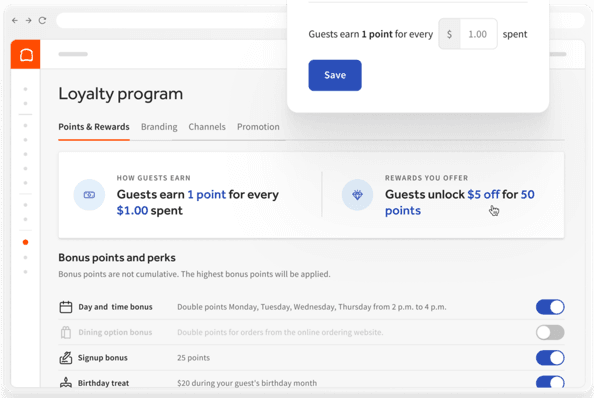
Toast Loyalty settings showing customizable points, rewards, sign-up bonuses and birthday treats.
Toast lets restaurants customize how guests earn and redeem loyalty points, with options for sign-up bonuses, birthday treats and other rewards. Source: Toast

Integrations

We like Toast’s ability to integrate with numerous third-party applications, including the most widely used restaurant software. Businesses can use integrations like 7shifts to streamline staff scheduling or manage inventory costs through WISK or MarketMan. With more than 200 technology integrations available, restaurants have plenty of options for connecting Toast with other software they use to run their business.
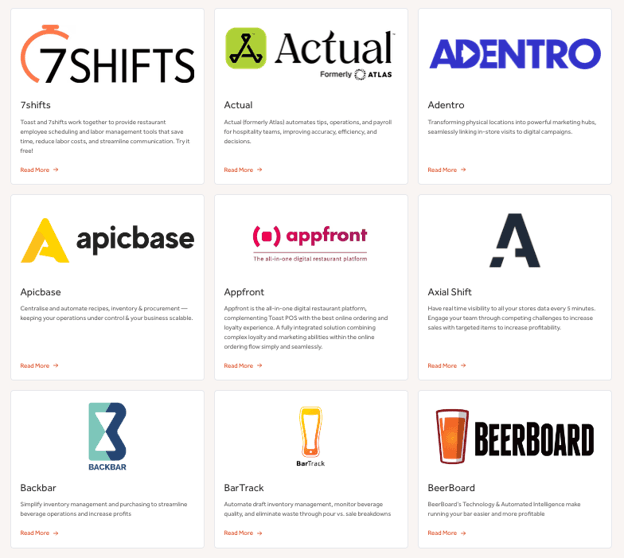
Toast integration directory showing restaurant software partners including 7shifts, Apicbase, Backbar and BeerBoard.
Toast offers more than 200 technology integrations, including tools for employee scheduling, inventory management, marketing and other restaurant operations. Source: Toast

Reports

Toast’s detailed POS reports enhance its usability, giving insight into your restaurant’s sales and costs, including how these numbers have increased or decreased over time. This can help you find ways to make adjustments and increase your restaurant’s profits.

We were really struck by the detail in Toast’s reporting capabilities. With reports like Toast’s sales summary, restaurant owners can see sales trends by day of the week or time of day. They can also customize revenue summaries by date range or course and view data across multiple locations.

Sales breakdowns go even further with insight into dining options, service areas and discounts. Operators can view a menu breakdown of quantities of items and modifications, alongside frequent discounts and refunds. This information is invaluable for staff who are making menu changes and ordering decisions. We really liked that users can see which items sell the most, so it’s easier to identify which items could be cut to reduce costs. We could also see how bar sales performed compared to overall service and even view a breakdown of sales by individual servers. Reports can also be segmented by location or dining option.

Toast’s xtraCHEF inventory management feature also stood out in our research. We were able to see breakdowns of all ingredients by individual recipe, making it easier for restaurants to keep track of what they need to have on hand. We also appreciated that this feature allowed users to mark common allergens in each dish. Recipe instructions can be entered in English or a secondary language, making this information more accessible to different members of your team.
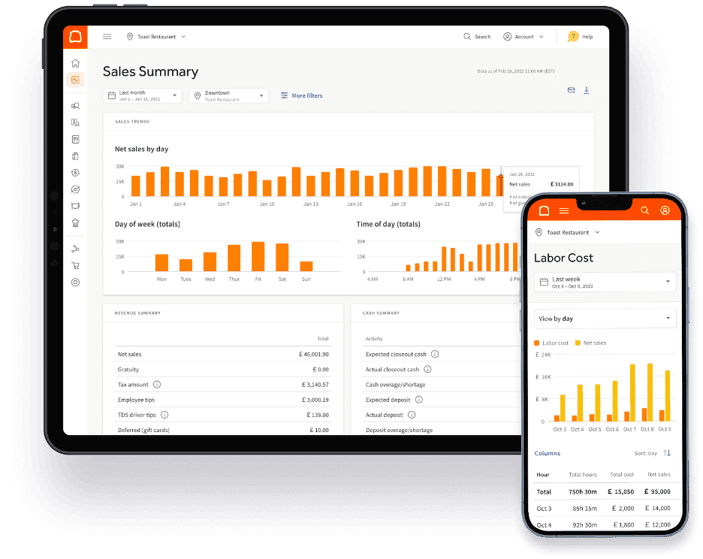
Toast Sales Summary showing net sales trends by day, day of the week and time of day alongside labor cost data.
Toast’s Sales Summary helps restaurant operators spot sales trends by day and time, while additional reports provide insight into metrics like labor costs. Source: Toast

Toast Pricing 

Toast offers flexible, customizable POS packages. There’s a monthly software subscription, optional hardware costs and add-on features to select. Here’s a breakdown:

Plan

Starting Price

Key Features

Starter Kit

$0

  • Cloud-based POS software
  • One terminal or handheld kit
  • Flat-rate payment processing
  • 24/7 customer support
  • Table and order management
  • Digital menus
  • Mobile payments

Point of Sale

$69 per month

Everything in Starter Kit, plus: 

  • Choose your own hardware
  • Custom hardware configuration

Build Your Own

Custom pricing

Everything in Point of Sale, plus options for: 

  • Online ordering and delivery
  • Payroll features
  • Employee benefits and scheduling
  • Guest marketing, loyalty and gift card features
  • Automated inventory features

Additional pricing considerations include the following:

  • POS and Payroll bundle: New restaurants can save by bundling Toast POS and Payroll, starting at $69 per month, plus $9 per employee per month — a great option if you’re just starting a restaurant.
  • Essential restaurant add-ons: Toast offers the following additional features and services, with pricing depending on your configuration:
    • Order & Pay
    • Additional hardware
    • Payroll and team management
    • Scheduling and team communication
    • Marketing, gift cards and loyalty features
    • Delivery services
    • Partner integrations
    • Digital storefront suite
    • Supplier bookkeeping and accounting
  • Payment processing costs: Toast requires customers to use its payment processing services, so you can’t use a third-party provider. Toast offers simple, flat-rate payment processing, with rates depending on your agreement.
FYIDid you know
Toast offers flexible payment options for your restaurant payment processing setup, including Pay-as-You-Go pricing that can reduce upfront hardware and installation costs.

Implementation and Onboarding

We like that Toast provides a dedicated onboarding consultant to help you get up and running. Several customer onboarding resources are also available online. A kickoff call with your consultant is one of the first steps. Toast says a typical remote or onsite implementation takes four to six weeks, with the process covering back-end and menu setup, staff training, hardware installation and go-live.

We appreciated the thoroughness offered in the onboarding kickoff call. The assigned consultant confirms your hardware needs and reviews your restaurant’s site readiness, including cabling, internet speeds and power sources, before installation. Before the call is over, they also make sure to set deadlines and deliverables for other important tasks like menu review, manager training, go-live readiness, hardware installation, activation and go-live support.

Customer Support

Each Toast plan includes 24/7 chat support, as well as phone support from 7 a.m. to 12 a.m. ET, seven days a week, ideal for restaurants operating early or late schedules. This level of support is fairly common in the POS industry, as many restaurants stay open late and may need assistance outside of standard business hours.

Users can also open and track support cases through Toast’s Support Center. We especially like that you can add comments or attachments to an existing case and chat with an agent in real time if an issue becomes urgent. You’ll also find a robust Toast Community, where users can get help online from industry peers.

Other online support resources include the Toast Central knowledge base, Toast Classroom training tools and live Office Hours.

Limitations

Toast has much to offer restaurants, but we identified a few potential limitations during our evaluation.

  • Toast isn’t compatible with third-party payment processors. Toast requires restaurants to use its payment processing services, so you can’t shop around for one of the best credit card processors for your needs. If you’re looking for a restaurant POS that allows third-party payment processing, check out our review of Epos Now.
  • Toast has hardware and networking limitations. Toast works with approved hardware, which could mean additional costs if you need to replace equipment you’re already using. Restaurants establishing a new Toast account are also required to purchase new networking equipment, and Toast generally doesn’t allow networking equipment to be reused or transferred from a previous Toast location.
  • Toast Delivery Services limits your delivery options. Restaurants that use Toast Delivery Services can’t simultaneously use their own delivery drivers, so you’ll have to choose one fulfillment method. Toast Delivery Services also has a maximum 10-mile delivery radius, which could be limiting for restaurants with a larger service area.
TipBottom line
If you'd prefer to use your current hardware with your POS system, read our Lightspeed POS review. This vendor has an extensive list of compatible hardware, so you might be able to use existing devices and save money.

Methodology

We researched and analyzed dozens of highly rated solutions to identify the best POS systems on the market, with a special focus on maintaining and growing revenue. We looked at factors like pricing, contracts, hardware, platform compatibility, features, reports, payment processing, integrations, usability and customer support. We watched product videos and got hands-on experience with demos when possible. When choosing the best POS system for online ordering, we prioritized robust online ordering functionality, restaurant-specific features, integrations, delivery options and loyalty programs.

Toast FAQs

Toast POS contracts automatically renew for successive one-year periods. You can choose not to renew by providing at least 30 days' written notice before the end of your current contract term. If you cancel early, you may be responsible for an early termination fee based on the time remaining in your contract.
Toast TakeOut is now called Toast Local. The customer-facing mobile app lets guests browse nearby restaurants, place pickup or delivery orders, save payment information and quickly reorder past meals. Guests can also make reservations at participating restaurants.
Yes. Toast allows restaurants to offer takeout and delivery services directly from their websites. It's a commission-free service that integrates with a restaurant's POS system. Restaurants can customize the online ordering experience to match their brand, add promotions, remove menu items and throttle online orders during busy periods.

Bottom Line

We recommend Toast for …

  • Restaurants that need a POS system with online ordering and delivery capabilities.
  • Restaurants that want to provide an in-store, guest-driven dining experience with QR codes.
  • Restaurants that want to increase and maintain customer loyalty.

We don’t recommend Toast for …

  • Restaurants that want to use a third-party payment processor.
  • Restaurants that want to reuse networking equipment or existing POS hardware, particularly iPads.
  • Restaurants that want to use their own delivery drivers alongside Toast Delivery Services.
Did you find this content helpful?
Verified CheckThank you for your feedback!
Natalie Hamingson headshot
Written by: Natalie Hamingson, Senior Writer
Toast logo
Editor's Rating9.5/10