Check out The Best Accounting Software for Restaurants business.com recommends.
Business.com aims to help business owners make informed decisions to support and grow their companies. We research and recommend products and services suitable for various business types, investing thousands of hours each year in this process.
As a business, we need to generate revenue to sustain our content. We have financial relationships with some companies we cover, earning commissions when readers purchase from our partners or share information about their needs. These relationships do not dictate our advice and recommendations. Our editorial team independently evaluates and recommends products and services based on their research and expertise. Learn more about our process and partners here.


Check out The Best Accounting Software for Restaurants business.com recommends.
Once a business launches, few things are more critical than accounting and financial management. Sage 50 Accounting includes all the small business accounting tools needed for financial tracking. Sage now sells the software in two editions: a desktop version that installs on your own computer and a fully cloud-hosted version you access through a browser. Since most small business owners aren’t accountants or bookkeepers, we appreciate that Sage is intuitive, easy to set up and use, and provides robust customer support.
While cloud-based accounting software offers flexibility and accessibility, desktop-based programs provide some advantages. Since the software resides on your local computer, you have greater control over where your accounting data is stored. Desktop software may also run faster and doesn’t require an internet connection, allowing uninterrupted work during outages.
Sage 50 Accounting stands out because it no longer forces you to make that choice permanently. You can run the software on a local machine today and move to Sage 50 Cloud later while staying within the Sage 50 platform. Sage provides a migration process that lets existing Desktop users move their company data to the Cloud edition. We think that flexibility is one of the most compelling reasons to pick Sage over a rival right now.
As one of the few accounting platforms that still sells and actively develops a desktop edition, Sage 50 handles bookkeeping, inventory management, reporting and other day-to-day accounting tasks without requiring businesses to move their books entirely to the cloud. That makes it a strong fit for businesses that still prefer working from locally installed software.
Sage 50 now comes in two versions. If you prefer traditional desktop software, you can install Sage 50 Desktop on your computer or server and continue working locally. Sage 50 Cloud, which debuted in October 2025, gives you the same familiar accounting software (including features and interface) through a web browser instead.
Sage 50 Desktop installs on a local computer or server and can be used without an internet connection. Sage 50 Cloud adds browser and mobile access, automatic updates and backups, built-in cybersecurity and real-time collaboration. Sage has also positioned the Cloud edition as the foundation for Sage Copilot, agentic AI and future mobile workflows.
There’s a pretty big price difference between the two versions. With annual billing, Sage 50 Desktop Pro costs $702 per year, compared with $1,413 per year for Sage 50 Cloud Pro. If you don’t need to access your books from anywhere, that makes Desktop an appealing option. You’ll save money and still get the accounting functionality Sage 50 is known for.
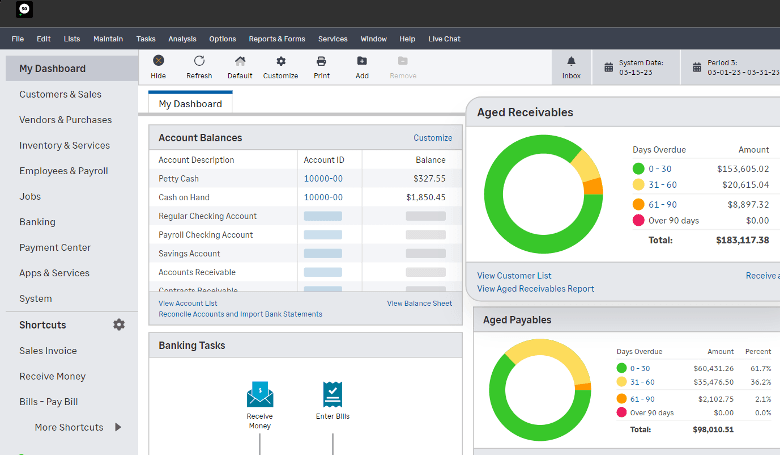
During our testing process, we found Sage 50 Accounting relatively straightforward to learn. Although the user interface (UI) is somewhat dated compared to alternatives like QuickBooks Online, Sage’s dashboard is easy to navigate and puts important information, including account balances, aged receivables and payables, in one place. A feed from your bank account allows you to see how money is flowing in and out of your business, and you can generate reports to get a closer look at your finances.
We like that you can customize Sage’s dashboard according to your preferences and configure it to display areas of the business you or your employees deal with regularly. For example, you can customize the dashboard for an accounts receivable (AR) manager to display features such as customer lists and invoices. This flexibility is great if you plan to have users in different roles work with the program.
Sage 50 also keeps tools for cash flow tracking, expense management, payroll (with a subscription), job management, job costing, inventory management and reporting within the same desktop program, so you don’t have to jump between different applications for everyday accounting tasks.
Sage 50 Accounting has a deep set of accounting tools across both its desktop and cloud editions. When testing the software, the following accounting software features stood out the most to us.
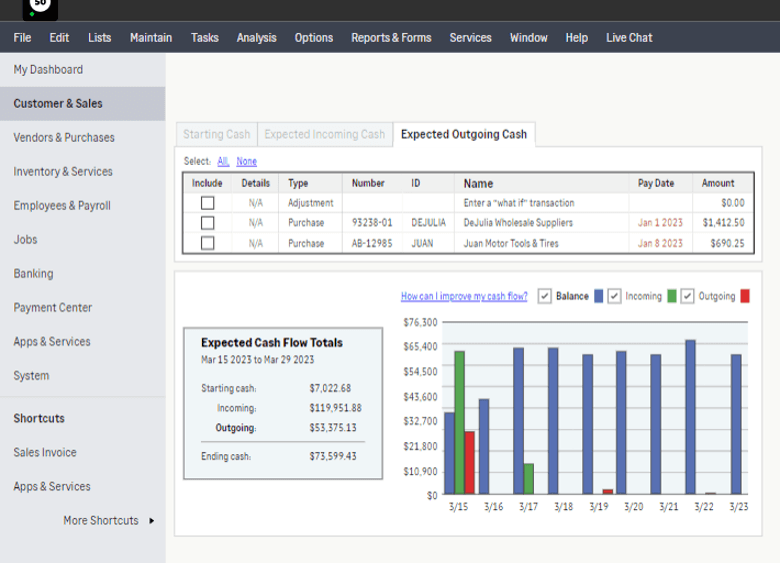
Sage shines when it comes to providing easy access to tools and reports for managing cash flow. The software includes a “what-if” analysis tool to help you project cash flow, as well as detailed breakdowns of how cash is flowing in and out of your business. We like that the program also shows what you’re owed and what bills are due, so you can keep on top of near-term cash needs.
Reconciling a business bank account can be tedious, but Sage streamlines this crucial accounting task. When you connect your business checking account, credit card accounts and business savings account to the software, Sage automatically downloads your transaction statements. Its smart bank reconciliation tool then automatically matches your bank transactions to those you’ve created in the system. This allows you to see whether your accounts are cleared or if any unreconciled differences remain.
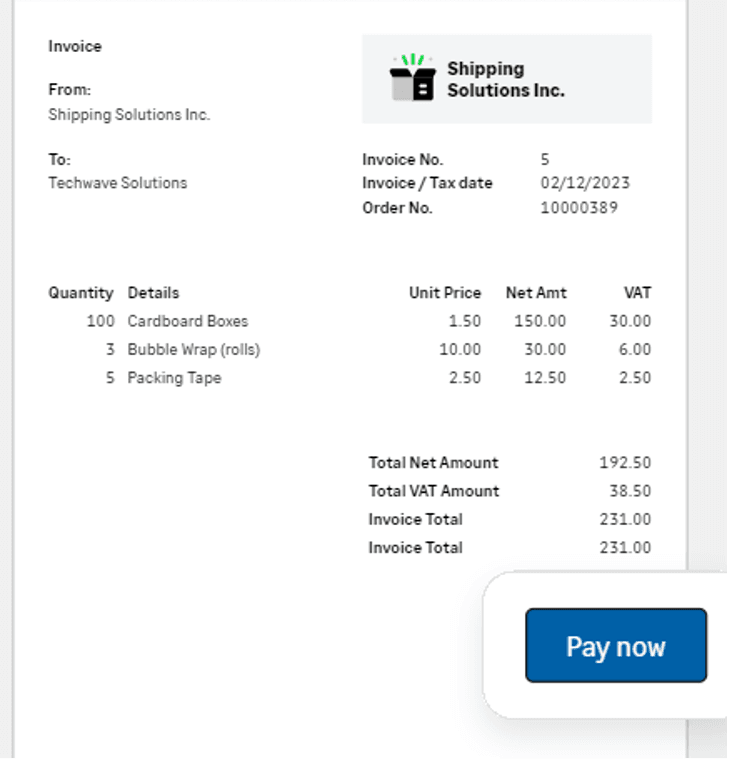
A professional invoice is critical to getting paid, so we appreciate that Sage offers an invoicing feature that makes it easy to bill customers. Businesses can create and send invoices, convert quotes to invoices and track customer payments. You can also send an invoice to several customers at once and set up recurring invoices — a real time-saver if you run a subscription business model. The invoicing tools also include automatic payment reminders and late fees, along with integrated payment options that let customers pay invoices online. Sage supports providers including Stripe, PayPal and Fortis. (See our review of Stripe for more information.)
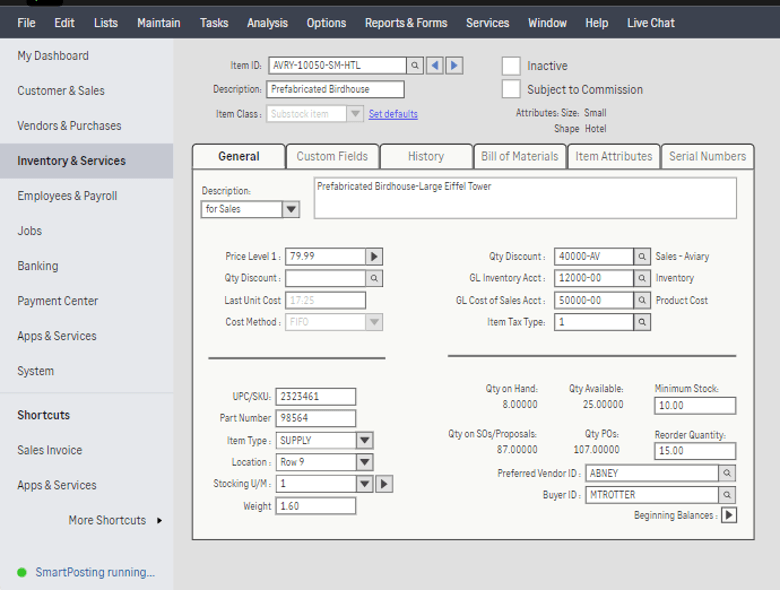
Sage’s inventory-tracking features are incredibly helpful to businesses that sell tangible products. You can set reorder quantities and adjust stock quantities manually as needed. You can enter items into the system individually or import them in bulk ― a time-saver if you carry many items or customized products. Sage also lets you set multiple prices for each item and add categories and descriptions. More advanced tools include multiple inventory costing methods and item assemblies, while Premium and higher plans can track inventory by serial number.
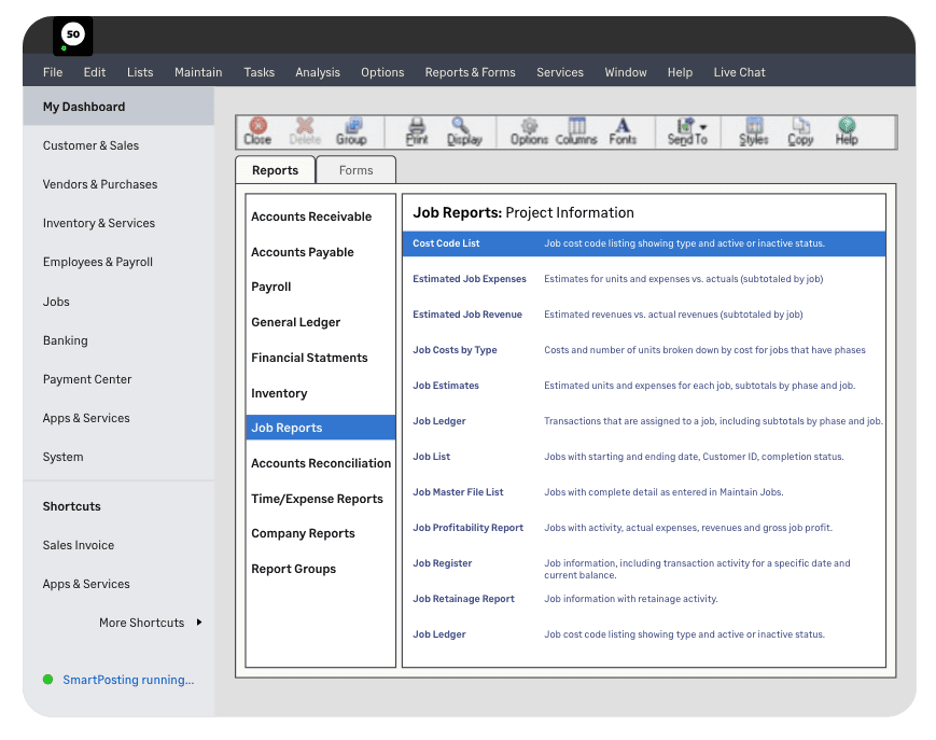
Organized financial reports make it easier to analyze your business’s data and generate insights about what’s going on under the hood, financially speaking. We were impressed that Sage 50 Accounting offers over 150 reports to analyze your business’s financial health. These reports include profit and loss statements, trial balance reports, balance sheets, accounts receivable aging reports and general ledger reports. We especially like the specialized report sets Sage builds for construction, manufacturing and distribution businesses, which spare you from reverse-engineering an industry view out of generic templates. Reports can also be customized using Sage’s prebuilt options as a starting point.
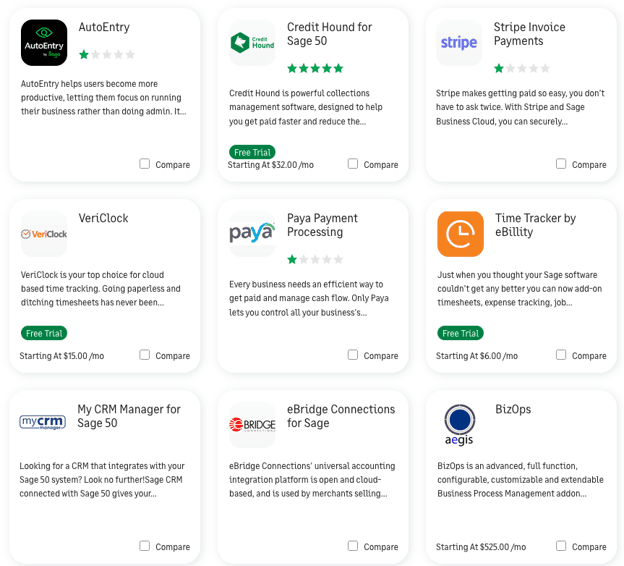
While its app library is narrower than what the cloud-native leaders offer, we like that the Sage Marketplace covers the categories most small businesses actually need, including POS systems and some of the best CRM software platforms. Sage also offers add-ons for Sage Payroll as well as Microsoft 365. With the Microsoft integration, you get access to financial reporting in Excel and cloud backups of your data. Other add-ons include e-filing, HR tasks, direct deposit, checks and forms, data entry, invoice payments, payment processing solutions and time-tracking attendance.
Sage 50 has picked up some useful AI and automation tools in recent updates. Here’s what stood out to us:
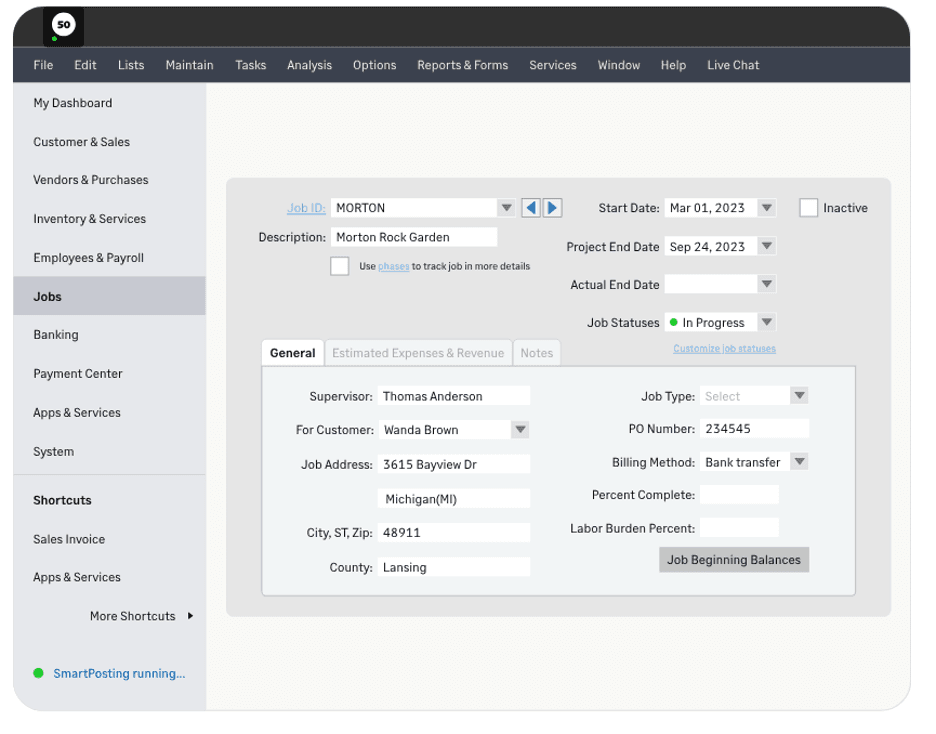
Sage 50 gives businesses a detailed look at what they’re spending on individual jobs and whether those jobs are actually making money. You can create unique job records and track labor, materials and overhead, while Premium and higher plans let you break costs down further by phases and cost codes.
We especially like that Sage lets you compare estimated and actual expenses and revenue as a job progresses. This makes it easier to spot a project that’s running over budget before it’s finished. You can also see which jobs generate the most revenue and customize job statuses and fields to fit the way your business works.
Sage sells three Sage 50 plans — Pro, Premium and Quantum — in both its Desktop and Cloud editions. The figures below reflect a single user; multi-user Premium and Quantum licenses cost more.
Plan | Sage 50 Cloud | Sage 50 Desktop | Ideal for | Key Features |
|---|---|---|---|---|
Pro Accounting | $128.67 per month or $1,413 paid annually | $69.42 per month or $702 paid annually | Solopreneurs, entrepreneurs and very small businesses |
|
Premium Accounting | $182.50 per month or $1,947 paid annually | $123.25 per month or $1,236 paid annually | Small businesses | Everything in Pro, plus:
|
Quantum Accounting | $271.17 per month or $2,841 paid annually | $211.92 per month or $2,130 paid annually | Larger businesses and enterprises | Everything in Premium, plus:
|
There are a few other costs and pricing details to keep in mind:
When you’re ready to implement the software, we like that Sage provides complimentary training and a dedicated Sage Customer Success representative. There are plenty of resources to help you get up and running, which is especially useful if you’re new to Sage 50 or switching accounting programs.
If you’re transitioning from QuickBooks, Sage support experts will import your data for free so you don’t have to. Sage says migration support for other accounting platforms varies, so you’ll want to ask before you commit. If you need further assistance while setting up the program, Sage University is a great resource during onboarding and beyond (more on this below).
Many software providers skimp on customer service, but we were impressed by Sage’s many customer support resources:
Although Sage 50 Accounting has many advantages for users who want a desktop accounting solution, we found a few potential drawbacks:
We studied dozens of the best accounting and invoicing software solutions to help small businesses find the right accounting software for their needs. As part of each analysis, we evaluated each program’s software features, including payment and invoicing capabilities, integrations, mobile apps, report generation, supported user count and customer service options. We also assessed pricing and free trial availability and considered user reviews for independent opinions on each product’s pros and cons.
When determining the best accounting software for desktop users, we focused on options for small businesses that offered a locally installed desktop option while still including everything that small business owners expect from modern accounting software. For this update, we also weighed how each vendor’s desktop and cloud deployment options compare on price, accessibility, software maintenance and data control.
We recommend Sage 50 Accounting for …
We don’t recommend Sage 50 Accounting for …
Amanda Hoffman contributed to this review.
Check out The Best Accounting Software for Restaurants business.com recommends.
